
Skip to content
DevMeme
621 of 7435
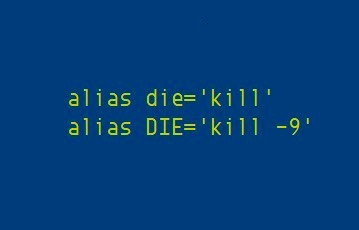
When lowercase kill isn't enough, uppercase alias summons the almighty SIGKILL
CLI Post #709, on Sep 27, 2019 in TG

When lowercase kill isn't enough, uppercase alias summons the almighty SIGKILL

Why is this CLI meme funny?

Level 1: Shouting “Stop!” to a Stubborn Program

Imagine you’re playing with a toy or a game, and it’s not behaving. First, you ask nicely for it to stop – kind of like saying, “Hey, please quit now.” Often, the toy will listen and stop when asked. But sometimes, it just keeps going, like a friend who doesn’t hear you. So what do you do? You raise your voice and shout “STOP RIGHT NOW!” with a very serious face. That usually does the trick because now you really mean it.

This meme is joking that using the computer is a bit like that. The normal kill command is you asking a program gently to stop (using your indoor voice). The big kill -9 command is like you shouting in all caps “DIE!” (using your loud voice) because the program didn’t listen the first time. The picture shows two special shortcuts: one for the calm request and one for the angry demand. It’s funny because we usually don’t think of talking to our programs – but here the developer gave themselves a command that feels like they’re yelling at the computer. It’s a playful way to say sometimes you have to ask nicely, and if that doesn’t work, you make yourself heard loud and clear!

Level 2: Polite Kill vs Force Kill

Let’s break down the basics behind this meme for those newer to the command line. The meme text is showing two shell aliases: shortcuts that you can define in a Unix/Linux command-line environment to save typing or add a personal touch. An alias lets you create a nickname for a longer command. For example, many people use alias ll='ls -l' so that typing ll lists directory contents in long format. Here, someone set up two aliases named die and DIE. In a shell (like bash on Linux), alias names are case-sensitive, so lowercase die and uppercase DIE are different.

  • alias die='kill' – This means whenever they type die in the terminal, it will actually run the kill command. By default, kill sends a termination signal (SIGTERM) to a process. SIGTERM is like asking a program to please stop. The program can catch this signal and decide how to handle it. Often, programs will perform cleanup and then exit when they receive SIGTERM. If you don’t specify a signal, kill assumes you meant this polite termination.
  • alias DIE='kill -9' – This sets DIE (all caps) to run kill -9. The -9 is an option telling kill to send signal number 9, which is SIGKILL. SIGKILL is not polite at all – it’s a forceful stop right now command. The program cannot refuse or ignore SIGKILL. When you send SIGKILL to a process, the operating system will immediately end that process. It won’t get a chance to clean up or save anything. It’s like the computer just pulls the plug on that program.

In simpler terms, the person created a friendly command die to gently stop a process, and a big angry command DIE to really kill a process that won’t quit. It’s a playful way to use the command line. The humor comes from the naming: saying “die” to a process is already a bit dramatic, but saying “DIE” (yelling it in uppercase) for the stronger kill is what makes it funny and relatable. Developers often have to manage processes on Linux or other Unix systems, and the kill command is a basic tool for that. When a program is misbehaving or frozen, you find its process ID (a number that uniquely identifies a running process) and use kill PID to ask it to terminate. If the program is well-behaved, it stops. If not, you might escalate to kill -9 PID which almost always works because the program can’t block it.

This two-step approach is common in process_management: try a graceful shutdown, then do a force stop if needed. For example, when you shut down a service, the system might first send a gentle signal (allowing the service to close connections, etc.), and if the service doesn’t stop in time, then a stronger measure (like SIGKILL) is used. Even tools like killall or task managers follow this idea. In the context of this meme, the developer has simply given those two steps fun labels: die (soft kill) and DIE (hard kill).

To make it crystal clear, here’s a comparison of the two aliases:

Alias Command Expands To Effect on the Process
die kill (default signal 15, SIGTERM) Politely asks a process to stop. The process can decide to listen or delay. (“Please exit when you can.”)
DIE kill -9 (signal 9, SIGKILL) Forcibly tells a process to stop NOW. The process has no choice; it will be terminated by the OS immediately. (“End this instantly, no ifs or buts.”)

Notice how one is polite and one is forceful. The uppercase naming of DIE is the user’s joke to themselves (and others who see their terminal): it’s like shouting the command. In everyday usage, if a program isn’t closing normally, a junior developer might ask, “Why is it still running after I tried to kill it?” That’s when a more experienced colleague might introduce them to kill -9 – the guaranteed way to shut down a stubborn process. It’s almost a rite-of-passage in IT or programming to learn about kill -9. The meme exaggerates this by actually making you type the word “DIE”. It’s both DeveloperHumor and a tiny lesson: there are different levels of killing a process.

Also, it’s a nod to how we customize our CLI (Command Line Interface). People who spend a lot of time in the terminal often add aliases or tweak their shell to make life easier or more fun. Maybe your first week learning a ShellScriptingLanguage (like bash), you discovered you can make aliases and you made one for a long ssh command or a build script. This meme is that same idea applied creatively. It takes something technical (signals and killing processes) and makes it a bit theatrical. The result is both practical (shorter commands) and humorous (naming them “die” and “DIE”). And because the command kill -9 is known among programmers as the ultimate problem-solver for hung processes, seeing it given a flashy alias is instantly relatable. It’s the kind of inside joke you start to appreciate as you become comfortable with Unix commands and maybe had to terminate your share of unresponsive programs.

In short, kill vs kill -9 is a concept every sysadmin learns, and this meme simply labels those two modes in a memorable way. Now you know: if someone jokes about “okay, time to all-caps DIE this process,” they mean things just got serious in the terminal!

Level 3: All-Caps Means Business

This meme nails a familiar scenario in SystemsAdministration and Unix culture: sometimes you try to stop a misbehaving program nicely... and it just won’t listen. The first alias, alias die='kill', is the calm approach – using the standard kill command which by default sends a polite SIGTERM. The second alias, alias DIE='kill -9', is the frustrated escalation – sending the dreaded SIGKILL. Writing it in all-caps “DIE” perfectly conveys that feeling of shouting at the computer when it’s 3 AM and that process refuses to exit. It’s the textual equivalent of hollering “DIE!” at a stubborn app after several gentle nudges have failed. In developer humor, all-caps is used for emphasis or upper_case shouting, and here it ironically matches the more aggressive action.

Every seasoned developer or sysadmin chuckles at this because we’ve all been there. Picture this: a server process has hung up or a rogue script is eating memory. You run kill <PID> (the soft kill) a couple of times and wait, hoping the process will take the hint and terminate gracefully. But the process is either stuck or programmed to ignore the signal – essentially it’s giving you the silent treatment. This is the moment shared in the meme: you sigh, grit your teeth, and escalate to kill -9 <PID>. That’s the “I’ve had enough” move. As a colleague might joke, “If at first kill doesn’t succeed, try, try again with kill -9.” 😈

The two alias definitions encapsulate that ritual of escalation. By actually naming the commands die and DIE, the meme-maker highlights the dramatic flair developers often have in their private shell customizations. It’s a bit of SysadminHumor: taking a grim task (terminating processes) and giving it a tongue-in-cheek theatrical touch. It’s funny because it’s a digital temper tantrum given structure in a config file. The lowercase alias is the reasonable voice inside your head, and the uppercase alias is the raging inner sysadmin who has lost patience. When lowercase kill isn’t enough, you “summon the almighty SIGKILL” with a capitalized command as if casting a powerful spell. The humor lands because, emotionally, that’s exactly what it feels like—going from a calm request to a magical exclamation when dealing with obstinate software.

There’s also an undercurrent of best-practices-meets-real-world in this joke. In theory, we try to avoid using kill -9 casually. It’s considered the force_kill hammer: it gets the job done but with brute force, potentially leaving a mess (temp files, database locks, or other cleanup that the program would normally handle on graceful exit). Seasoned developers will advise, “Don’t jump straight to SIGKILL unless you have to.” The person who set up these aliases seems to know this; they kept the normal kill as the default for die – so they likely attempt a gentle kill first. Only if that fails do they break out the all-caps DIE alias for the big guns. It’s a bit of unspoken wisdom in shell form: try a polite request, then issue a command from the gods if needed. By separating the two, the user avoids going nuclear by accident. Imagine if they had aliased kill itself to kill -9 – one typo could terminate the wrong thing with extreme prejudice. Instead, they created a deliberate “are you sure?” step: you literally have to type DIE to invoke the lethal option.

The meme also pokes fun at how CLI enthusiasts love customizing their environment. Aliases are a common convenience in the CommandLineInterface world – for productivity or just for laughs. Ever see someone alias ll to ls -l or gs to git status? Same idea. Here, it’s taken to a comedic level: aliasing die and DIE to different kill commands. It’s essentially a terminal_alias_joke. The developer is treating the shell like a sandbox for dark humor and efficiency combined. They’ve anthropomorphized the process control – as if saying, “I asked the program to die, and if it doesn’t, I’ll yell DIE until it’s gone.” The use of the word “die” is morbidly funny in itself (developers often jokingly use dramatic words for commands). And using uppercase for the harsher variant is a clever punchline that everyone who’s wrestled with a stubborn process can appreciate.

In a broader sense, this meme underscores a shared experience in tech: sometimes you must unleash unfriendly solutions on unruly problems. Whether it’s restarting a server that won’t respond or using kill -9 on a runaway process, every sysadmin has that “enough is enough” moment. We laugh at this meme because it’s a relief to know others get it too. It’s a tiny DeveloperHumor bonding moment: “Haha, yes, I have a DIE button for those pesky processes as well!” And indeed, some developers literally add funny aliases or functions in their shell as a form of stress relief (e.g., aliasing please to sudo so you can politely ask for admin privileges). This one is both a joke and a practical reminder: on a Unix system, when a process truly won’t die, you can always shout in uppercase and let the kernel play Grim Reaper.

Level 4: Uncatchable Signal

In Unix-like operating systems, signals are a fundamental inter-process communication mechanism. The kill command isn’t literally about violent process murder – it’s a user-level interface to the kill(2) system call, which sends a signal to a target process. By default, kill <PID> transmits SIGTERM (signal number 15), a polite termination request. Think of SIGTERM as the OS saying, “Could you please stop now?” A well-behaved program can catch this signal (via a signal handler in code) and decide how to respond – usually initiating a graceful shutdown, cleaning up resources, or sometimes flat-out ignoring the request.

But then there’s SIGKILL (signal number 9), the so-called almighty signal in the meme. SIGKILL is the operating system’s non-negotiable termination directive – the nuclear option. When you execute kill -9 <PID>, you’re asking the kernel to immediately halt that process. The target process never gets to see or handle SIGKILL; the kernel doesn’t politely knock, it just kicks the door in. All user-space cleanup code, signal handlers, and polite goodbyes are bypassed. The process is removed from the run queue, its open file descriptors are closed, memory freed – poof, gone. This is why SIGKILL is described as uncatchable and unignorable: the process can’t defend against it or procrastinate. It’s the OS equivalent of cutting the power – effective and final.

Shell aliasing (as shown by alias die='kill' and alias DIE='kill -9') doesn’t change how signals work, but it streamlines the way a user invokes these commands. Aliases in a shell like bash or zsh are essentially textual macros. When you type a command that matches an alias, the shell replaces it with the predefined expansion. For example:

$ alias die='kill'       # lowercase alias for gentle termination (SIGTERM)
$ alias DIE='kill -9'    # uppercase alias for forceful termination (SIGKILL)

Now if the user types $ DIE 1234, the shell expands it to kill -9 1234. Notably, shell commands are case-sensitive, so die and DIE can coexist as two different shortcuts. The all-caps alias here is deliberately dramatic – by convention, all-caps in shell often denotes something attention-grabbing (just like environment variables are uppercase). The author of this alias pair encoded a mini-protocol: use the lowercase die for a regular process kill (SIGTERM), and escalate to the screaming DIE for the force kill (SIGKILL). This isn’t just style – it’s a safeguard and a bit of dark humor. The uppercase DIE stands out like a warning label, reminding you that kill -9 is the force_kill that takes no prisoners. In kernel terms, it’s summoning the “grim reaper” for processes.

From an OS perspective, this dual-alias trick acknowledges the two-tier nature of Unix process management: graceful termination vs. immediate annihilation. Developers who’ve dug into process_management know that ideally we prefer to let a process shut down cleanly (flushing logs, saving state, releasing locks). However, if a process is hung, deadlocked, or has simply gone rogue consuming 100% CPU and ignoring SIGTERM, the SIGKILL signal is the last-resort hero (or villain, depending on your view) to stop it. Even the kernel’s OOM (Out-Of-Memory) killer uses SIGKILL to instantly sacrifice processes when the system is critically low on memory – it’s the only sure way. In summary, kill -9 is the ultimate CLI incantation to snuff out a stubborn process. The meme’s humor lies in treating that incantation as a literal “DIE!” command – an uppercase alias that taps into the kernel’s uncompromising enforcement mechanism.

(A seasoned sysadmin might chuckle here, recalling that if even SIGKILL won’t terminate a process – e.g., if it’s stuck in uninterruptible I/O wait – then you’re dealing with a truly undead task. But that’s a horror story for another day.)

Description

The image shows a solid deep-blue background with two lines of bright green monospace text, mimicking a Unix shell prompt. Line 1 reads: “alias die='kill'”. Line 2 reads: “alias DIE='kill -9'”. The humor comes from defining two aliases: a gentle “die” that issues the standard kill command (default SIGTERM) and a shouting all-caps “DIE” that force-terminates a process with “kill -9” (SIGKILL). It pokes fun at shell customization, process management, and the escalation developers resort to when a stubborn process refuses to exit

Comments

6
Anonymous ★ Top Pick Lowercase die is a courteous SIGTERM; uppercase DIE is the 3 a.m. Sev-0 when you’ve accepted data corruption, graceful shutdown be damned, and your only SLA is “make the pager stop.”
  1. Anonymous ★ Top Pick

    Lowercase die is a courteous SIGTERM; uppercase DIE is the 3 a.m. Sev-0 when you’ve accepted data corruption, graceful shutdown be damned, and your only SLA is “make the pager stop.”

  2. Anonymous

    The evolution of every production incident: first you ask nicely with SIGTERM, then you realize the process has been ignoring cleanup handlers since 2019 and it's time for SIGKILL to remind everyone why we have circuit breakers

  3. Anonymous

    The perfect escalation path for process management: first you politely ask with 'die' (SIGTERM), giving the process a chance to save state and exit gracefully. But when that microservice is still hanging after 30 seconds, refusing to acknowledge your Kubernetes termination grace period, you bring out the uppercase 'DIE' with -9 (SIGKILL) - the nuclear option that doesn't take no for an answer. It's the technical equivalent of going from 'please stop' to 'I SAID STOP' - because sometimes SIGTERM is just a suggestion, but SIGKILL is the law

  4. Anonymous

    My .bashrc mirrors incident escalation: die sends SIGTERM, DIE screams SIGKILL - if it’s still in D, I start drafting the postmortem

  5. Anonymous

    Incident runbook: try die (SIGTERM) for grace; if it stalls the SLO, hit DIE (SIGKILL), accept orphaned locks, and pad the postmortem with action items

  6. Anonymous

    SIGTERM is for cooperative processes; DIE is the architectural nuke when they ghost your signals

Use J and K for navigation


