Satirical Text Exchange Depicts Twitter's Security Meltdown
Why is this Security meme funny?
Level 1: One-Man Security Team
Imagine you have a big fancy castle that usually has an automatic lock on the gate – like a magic keypad that only lets you in when you enter the right code. But one day, that automatic lock breaks. Instead of fixing it properly, the castle says, “Don’t worry, we’ve got Gary.” Now, Gary is just a regular guy (maybe a tired guard) who stands at the gate with a phone. When you want to come in, Gary himself calls out: “Hey, is that really you? Prove it!” He doesn’t have a great system, so he just makes up a simple secret number like “1234569” and tells it to you as your entry code. Then, still not sure it’s you, he holds up some crumpled pictures and asks, “Which one of these pictures has a bus in it?” It’s totally goofy – one picture isn’t even of buses because Gary grabbed the wrong sheet! You’d probably giggle and also feel a bit worried: this is not how a castle is supposed to be guarded, right? One sleepy guard doing things by hand, making mistakes, and sharing easy-to-guess secrets is a pretty poor security plan. This funny scenario is basically what the meme is showing with Twitter: something that should be automatic and safe turned into “just Gary” doing everything in a messy, human way. It’s like locking your front door but then handing the only key to a random guy – silly and not very safe, which is why it makes us laugh.
Level 2: Manual 2FA 101
At its core, this meme highlights Two-Factor Authentication (2FA) gone horribly wrong (in a humorous way). 2FA means you need two proofs to log in: usually (1) your password and (2) a one-time code or confirmation from something you own (like your phone). The idea is to boost security: even if someone guesses your password, they still need that second factor (like a code texted to your phone or generated in an app) to get in. Normally, this process is automated and trustworthy. For example, when you log into Twitter, after your password you might get an SMS from an official number or a prompt on an authenticator app giving you a 6-digit code. It’s all handled by servers and secure services behind the scenes – no person at Twitter actually types “your code is 432111.”
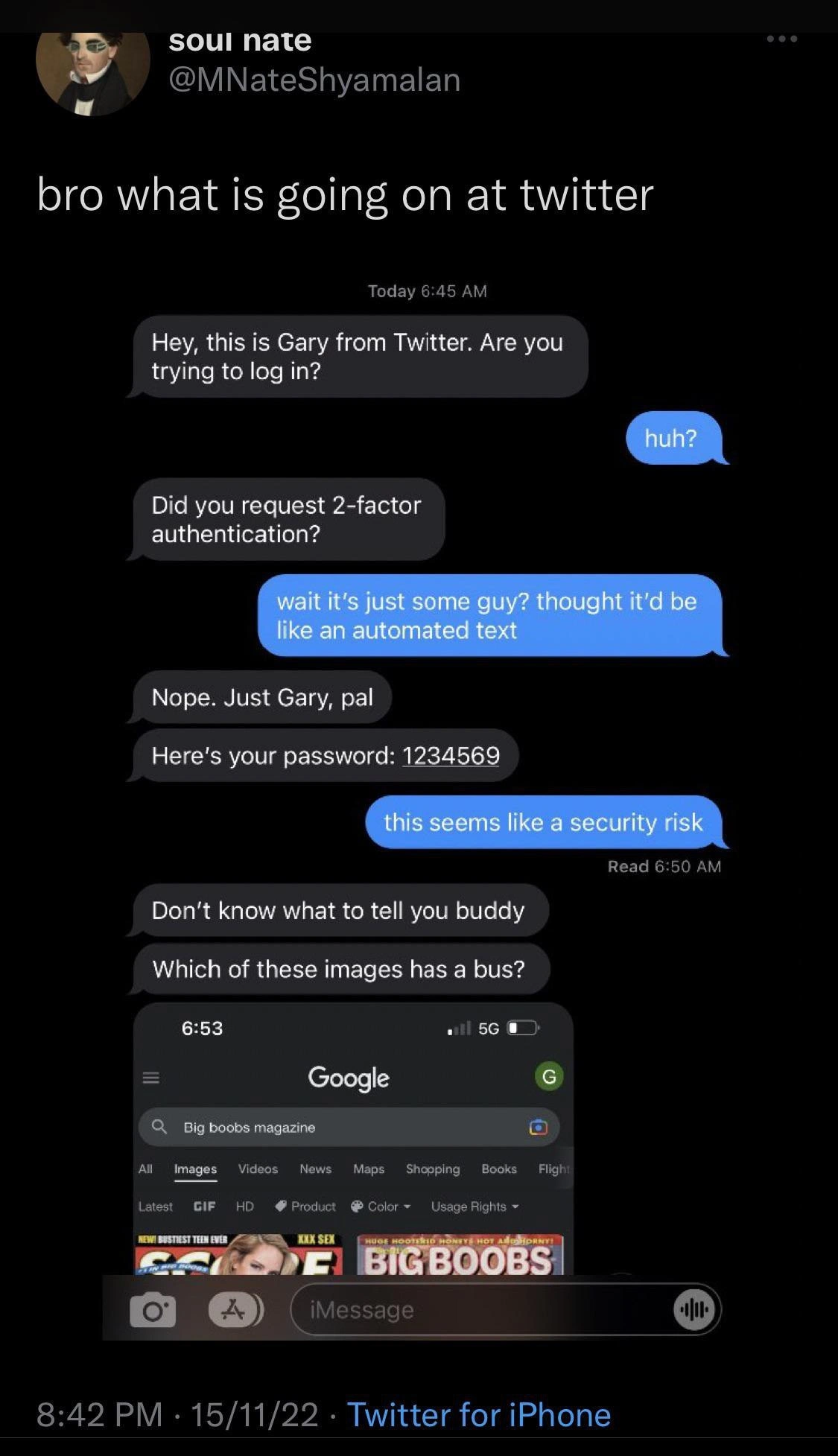
In this meme scenario, though, it looks like Twitter’s 2FA system has been reduced to “Gary from Twitter” sending you direct text messages. Instead of an automated SMS, you get an iMessage from a human named Gary asking, “Are you trying to log in?” and “Did you request 2-factor authentication?” This is immediately weird because companies never have a staff member manually verify logins one by one over chat – that defeats the purpose of a quick, consistent extra factor. The user in the meme even replies, “wait it’s just some guy? thought it’d be like an automated text,” voicing the obvious: we expect a short code text or app notice, not a personal conversation.
Let’s outline the normal process versus what’s happening in the meme:
How 2FA SHOULD work:
- Automated Text/Code: After entering your password on Twitter, their system triggers an automated service to send a code, usually from a short number or as a push notification. e.g., a text saying “Your Twitter verification code is 731054.”
- No Human Knows Your Code: The code is generated by a secure algorithm. No employee sees it; it’s between you and the machine. This keeps things secure and private.
- Enter Code: You type that code into the login form, and if it matches, you’re in. The whole thing typically takes seconds.
How 2FA works in the MEME:
- Manual Message: You get a message on iMessage from “Gary” (some Twitter employee). He personally asks if it’s really you trying to log in. This is already a Security flaw because anyone could impersonate Gary – how do you know this number is legit? It’s not coming from a verified channel.
- Human-Generated Code: Gary doesn’t send a random secure code – he literally says “Here’s your password: 1234569.” It’s unclear if this is meant to be a one-time code or if he’s sending you your actual account password. Either way, it’s wrong. If it’s a one-time authentication code, it’s frighteningly weak (a sequence like
1234569is easy to guess and looks like someone just making it up). If it’s your real password, that’s even worse because it means your password isn’t safely stored — Gary can read it, and he’s transmitting it in plain text over iMessage. This is the opposite of proper cybersecurity practices. - User Doubt: The user responds, “this seems like a security risk.” That’s an understatement: it is a huge risk. Normally, you should never give out your login info to random texts. Here the user is basically being handed info by a stranger named Gary. It’s totally fishy by usual standards – in real life, we’d warn: beware of phishing! (Phishing is when someone tricks you via message into trusting them with your login.) In a real company scenario, if you got a text like this out of the blue, it very likely would be a scam. The meme plays on that discomfort.
- CAPTCHA via Chat: Then Gary says, “Which of these images has a bus?” Normally, a CAPTCHA challenge appears on the website or app: you might see a grid of images and you click all the ones with a bus (this proves you’re a human, not a bot, because identifying objects in images is still easier for people than bots). It’s called a CAPTCHA (Completely Automated Public Turing test to tell Computers and Humans Apart). The keyword there is Automated – it’s usually handled by a service like Google’s reCAPTCHA integrated into the site. In the meme though, Gary is manually sending you a CAPTCHA through text! He attaches an image and wants you to pick out buses. This is enormously inefficient and, frankly, ridiculous from a tech standpoint. To make it funnier, the image he sent (according to the meme description) wasn’t even relevant to buses – it had results for “Big boobs magazine,” suggesting Gary blundered and sent the wrong screenshot from his phone. It’s an extra joke implying Gary is incompetently multitasking or just clueless about how to do his job.
To summarize the absurdity, here’s a comparison between normal 2FA and Gary’s manual 2FA:
| Normal 2FA (Secure & Automated) | Gary’s 2FA (Meme Scenario) |
|---|---|
| Automated SMS or app notification from “Twitter” or a secure service. | Personal iMessage from Gary’s phone. “Hey it’s Gary from Twitter…” (Who’s Gary? 🤨) |
| Code is randomly generated by servers (e.g. 6-digit number). No human ever sees your code. | Code (or password) is chosen or retrieved by Gary. He texts “1234569” – a weak, guessable sequence. Gary now knows your code (or password) too. |
| Communication is formal and on-brand: “Your verification code is X”. | Informal, buddy-chat tone: “Nope. Just Gary, pal.” Not exactly professional communication. |
| CAPTCHA (if needed) is handled in-app or in-browser by a known system (with proper images). | CAPTCHA is improvised: Gary texts you “Which image has a bus?” with a random screenshot (possibly the wrong one!). 😅 |
| Scalable and reliable – millions of users get codes simultaneously via cloud services. | Not scalable at all – one human in the loop. If Gary is sick or busy, you’re waiting. It’s prone to human error (as evidenced by that wrong image). |
Seeing it laid out, it’s clear why this scenario is so ridiculous. The meme exaggerates reality, of course; Twitter wasn’t actually doing this (we hope!). But it riffs on real concerns from late 2022: Twitter’s internal chaos after big layoffs and resignations. People joked that critical systems might fail or get replaced with sloppy quick fixes. SecurityVsUsability is at play here too: sometimes companies make authentication more user-friendly (like fewer CAPTCHAs, or using SMS codes for convenience), but that can reduce security. In this extreme case, they’ve swung the pendulum to a bizarre corner where neither security nor usability is served — it’s just chaos. The user is confused (“huh?”), the process is slow and sketchy, and the security is paper-thin.
This meme is categorized under Security for obvious reasons: it’s about authentication and SecurityFlaws in a login process. It’s also under CorporateCulture and Communication because it hints at how a company’s internal culture (possibly a meltdown where normal protocols are gone) leads to bizarre communication like a random employee texting customers. It’s a form of Corporate Humor: anyone who’s worked in tech, especially during a crisis, can relate to how absurd things get when you’re duct-taping solutions to keep the service running. Maybe you haven’t experienced manual 2FA, but perhaps you’ve seen a critical process that was supposed to be automated end up being done by one person frantically manually updating things. It’s both funny and a bit scary to imagine.
In short, relatable humor for developers often comes from “this is so wrong, it reminds me of that one time at work…” feelings. Here, the relatability is: imagine if your whole login security depended on one guy texting. It’s an exaggeration that makes us laugh, while also reminding us how important proper, automated security systems are. And if someone from Twitter Support named Gary ever does text you out of the blue… you’d be right to respond exactly like the meme: “this seems like a security risk.” 🚩😅
Level 3: Human Factor Authentication
When Two-Factor Authentication (2FA) devolves into a friendly text from “Just Gary, pal”, you know something’s on fire in the server room. This meme lampoons a Security meltdown at Twitter, where the once-automated login safeguards have allegedly been reduced to a single overworked human with an iPhone. The tweet “bro what is going on at twitter” sets the stage: it’s early morning, you’re logging in, and instead of a coded SMS or app prompt, you get an iMessage:
Gary: “Hey, this is Gary from Twitter. Are you trying to log in?”
That’s right — your multi-factor login is now a manual, human-in-the-loop security checkpoint. It’s hilariously absurd and comically bad security practice. In a normal world, 2FA means a machine automatically texts or generates a one-time code only you can see. Here, a guy named Gary personally DMs you, turning a private authentication step into an awkward corporate culture skit. The humor cuts deep for developers: we’ve all joked about the “bus factor” – if critical knowledge lives in one person’s head and they get hit by a bus, you’re doomed. Well, Twitter’s bus factor is literally one Gary. If Gary oversleeps or his phone dies, guess no one’s logging in this morning. 🚌🔑
Let’s unpack the technical insanity on display:
- Single Point of Failure: 2FA is supposed to be distributed and robust. Here it’s a single employee texting codes. Gary is now the entire authentication service. This is the antithesis of a scalable distributed system – it’s a distributed human.
- Password Exposure: Gary says, “Here’s your password: 1234569.” Wait, what?! In a secure system, no employee should ever see or send you your actual password. Passwords are stored hashed (one-way encrypted), not readable by support staff. If Gary can spit out
1234569, it implies either your password is laughably simple or the system stores passwords in plaintext (a cardinal sin in CyberSecurity). More likely, the meme is using “password” to mean a one-time code. Still, sending any code in plain text from Gary’s personal phone is a giant security flaw. And the choice1234569is comedic gold – it riffs on “123456”, one of the most common (and worst) passwords on the planet (adding a “9” doesn’t make it secure, Gary!). - Informality and Insider Info: Gary’s tone is casual: “Nope. Just Gary, pal.” and “Don’t know what to tell you buddy.” Real security communications are formal (“Your Twitter verification code is...”), not “pal”-level chummy. This hints that Gary’s not following any script – he’s winging it. It feels like an on-call horror story: a lone IT guy covering for a broken system at 6:45 AM, barely awake, giving a user access because what else can he do. It’s Security by Gary – the new worst practice.
- Manual CAPTCHA Fiasco: Then comes the cherry on top: Gary attempts a CAPTCHA. He asks, “Which of these images has a bus?” – a line straight out of every frustrating login puzzle – but delivers it via iMessage with an image attachment. The image (in the meme’s tiny screenshot) shows a browser with a very not-safe-for-work search query: “Big boobs magazine” 🤦♂️. In other words, Gary either sent the wrong screenshot or his method to get “bus” pictures was to Google something entirely unrelated (maybe an unfortunate autocomplete or just Gary being a creep on the job). This adds an extra layer of WTF. It’s a security vs. usability nightmare: CAPTCHAs are already annoying when done properly in-app; now imagine a half-asleep guy accidentally sending you his browser tabs instead of a simple puzzle. It’s outrageously unprofessional and hilariously appalling.
All these elements combine into primo Security Theater – the appearance of authentication without any real safety. It satirizes how a company in chaos might jury-rig critical features. In late 2022, Twitter was going through a very public corporate turmoil: mass layoffs, critical engineers quitting, reports of systems failing. This meme exaggerates that reality to comic effect: “things are so bad, they’ve got Gary from support manually texting login codes.” Experienced devs recognize the dark humor: we’ve encountered kludgy manual fixes for broken automation, and it always gives a DevOps veteran PTSD. This scenario is basically a worst-case security incident waiting to happen – phishing, leaks, mistakes galore – all represented by one exhausted guy on iMessage. The meme is funny, yes, but it’s the kind of laugh that comes with a wince. It’s a reminder that even big tech companies can descend into security chaos if enough things go wrong. The next time your 2FA code arrives 10 minutes late, just pray it’s not because Gary had to finish his coffee and close a few “research tabs” first.
Description
A screenshot of a tweet by user 'soul nate' (@MNateShyamalan) that reads "bro what is going on at twitter". The image within the tweet shows a fake iMessage conversation. A person identified as "Gary from Twitter" initiates contact, asking about a login attempt and 2-factor authentication. The user is surprised it's a real person, not an automated text. 'Gary' casually replies, "Nope. Just Gary, pal," and then proceeds to send the user's password: "1234569". When the user points out this is a security risk, Gary dismisses the concern and asks a CAPTCHA-style question, "Which of these images has a bus?". He then sends a screenshot of a Google Image search for the inappropriate phrase "Big boobs magazine". This meme is a sharp satire on the perceived collapse of security protocols and professionalism at Twitter, combining elements of social engineering, terrible password security, and a completely absurd and unprofessional CAPTCHA verification to paint a picture of chaos
Comments
10Comment deleted
This is the inevitable result of replacing automated security workflows and IAM policies with 'a guy named Gary.' His authentication process seems to be a single-factor, plaintext password reveal, followed by a CAPTCHA that probably has a 100% false positive rate for identifying buses
Twitter’s new “cost-optimized” 2FA: the HSM cluster got laid off, and Gary texts you the OTP from a spreadsheet called prod-secrets-final.xlsx - extra auth step is spotting the bus in his “Big Boobs Magazine” tab
When you replace your entire SRE team with a single intern who learned authentication from YouTube tutorials and thinks TOTP stands for "Text One Time, Paul"
When your 2FA implementation is so robust that 'Gary from Twitter' just texts you the password directly - truly a masterclass in zero-trust architecture where the trust is literally zero. The password '1234569' suggests they at least tried to meet the 'must contain a number' requirement, though I suspect the security audit that approved this was conducted by the same Gary. The CAPTCHA follow-up is chef's kiss: 'Prove you're human by identifying buses' immediately followed by proving you're distracted by identifying... other things. This is what happens when your incident response team consists of one guy named Gary with an iPhone and a dream
New auth flow: we replaced MFA with GFA - Gary Factor Authentication; he texts 1234569 and a screenshot CAPTCHA asking for a bus, delivering zero trust and infinite audit findings
Twitter auth at scale: Skip JWT rotation, just DM pw=123456 - Gary's got the bus-hunting CAPTCHA covered, zero-trust optional
Twitter’s Zero Trust rollout: SSO via Gary, MFA is him texting “1234569,” and CAPTCHA is “find the bus” - the only login I’ve seen where the bus factor is in the UI
We don't need Microservices, while we have Gary Comment deleted
🤣🤣🤣 Comment deleted
New concept: garrying Comment deleted