
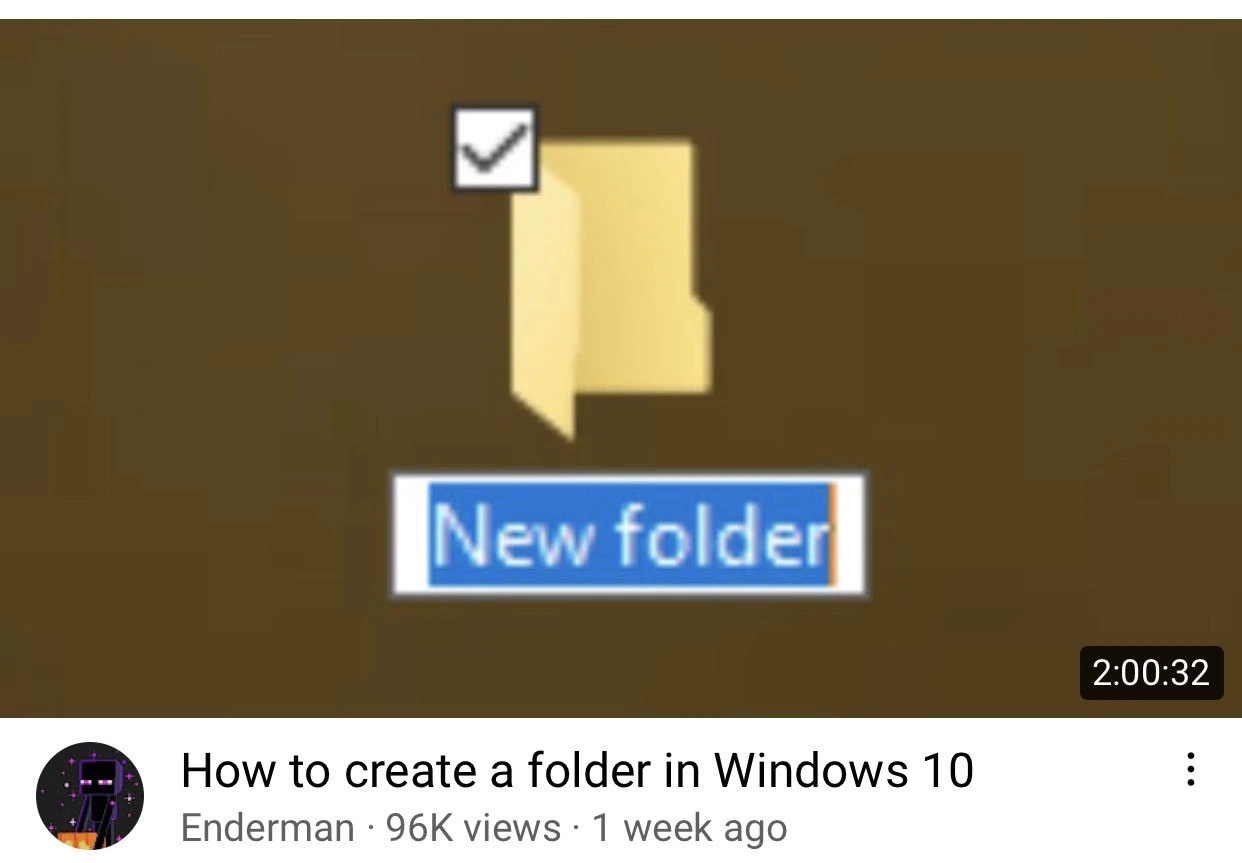
The Definitive 2-Hour Masterclass on Creating a Folder
Why is this Learning meme funny?
Level 1: Huge Talk, Tiny Task
Imagine asking someone to show you how to do something very simple, like tying your shoelaces, and instead of a quick demo, they give you a two-hour lecture about it. đŽ They start with the history of shoes, then explain every type of shoelace ever made, and go on and on before actually showing you the one little knot you needed to learn. By the time they get to the part you care about, youâre completely bored or confused! This meme is joking about that exact idea, but with computers. Making a new folder on a computer is super easy â itâs like putting a new empty box on a shelf to hold things. Normally someone could show you how to do it in a few seconds: click here, then click âNew Folder,â and youâre done. But the picture shows a pretend YouTube video that lasts 2 hours just to teach this tiny task. Itâs funny because itâs way too much talk for something so basic. We all laugh because we know how silly it would be if learning such an easy thing took that ridiculously long. Itâs like turning a little molehill into a huge mountain â an overly big effort for a very small thing, which is what makes it so absurd and amusing!
Level 2: Tutorial Overkill
On the surface, this meme is about a very simple task â creating a new folder in Windows 10 â being presented as an extremely long video tutorial. In real life, making a folder (also called creating a directory) in an operating system is one of the most basic things you can do. For example, in Windows 10 you usually just right-click in an empty area of the Desktop or a File Explorer window, choose New â Folder, and voilĂ â a new folder appears, named âNew folderâ by default. You can then type a name to rename it. Alternatively, thereâs even a handy keyboard shortcut: pressing Ctrl + Shift + N instantly creates a new folder without any mouse clicks. You could also do it through the command line by typing a quick command. Itâs a fundamental skill for organizing files, typically taught to computer beginners within minutes.
So why joke about a âHow to create a folderâ video lasting two hours? Because it humorously exaggerates the idea of an overly long, step-by-step tutorial for something incredibly straightforward. This image parodies those YouTube tech tutorials that are much longer than they really need to be. The thumbnail is styled exactly like a real YouTube video: it shows a Windows 10 desktop (with a plain brown background) and a single yellow folder icon. The folderâs label âNew folderâ is highlighted in blue, which is what happens in Windows when you create a new folder and the system is waiting for you to type a name. Thereâs even a small white checkbox showing on the folder icon â Windows 10 has a feature that shows checkboxes on icons when you select files, to help manage selections. It suggests that this new folder is selected as part of the demonstration. In the bottom-right of the thumbnail, thereâs a black box with â2:00:32â â thatâs the videoâs length (2 hours and 32 seconds). Normally, a tutorial for such a task might be 2 minutes, not 2 hours, so seeing 2:00:32 immediately signals that this is a joke about the runtime being ridiculously exaggerated.
Below the thumbnail image, the meme even includes the typical YouTube video info bar: the title âHow to create a folder in Windows 10â, a channel name Enderman, a view count of 96K views, and â1 week agoâ to indicate when it was uploaded. These details make it look just like a genuine YouTube upload. The large number of views (96,000 in one week) adds to the silliness â it implies that tens of thousands of people sat through or at least clicked on this two-hour tutorial for a basic task. Of course, in reality this isnât a real video (itâs a parody), but itâs formatted to poke fun at the kind of content you might find online.
The humor is essentially pointing out âtutorial overkill.â That means providing way more explanation or content than is necessary. In the context of learning tech, tutorial overkill could happen when an instructor or video goes painfully slow and covers every tiny detail, even the ones that most people can figure out quickly. This can be frustrating for someone who just wants the core information. Tutorial bloat is another term used here â bloat means an excess of unnecessary material. The meme suggests that the creator of this imaginary video stuffed it with so much extra talk or redundant steps that a one-click task ballooned to two hours of footage. It satirizes the idea that sometimes learning resources for beginners are overly padded or overengineered.
For a junior developer or someone new to a system, having clear tutorials is important, but thereâs a balance. Learning curve refers to how quickly a person can pick up a new skill â a steep learning curve means itâs hard at first, whereas a shallow one means itâs easy to get started. Creating a folder is intentionally an easy, shallow part of using a computer. So a video that makes this simple step feel like a long journey is highlighting a warped learning curve â itâs as if the instructor assumed the viewer knows absolutely nothing and thus stretched the explanation to an extreme. This can happen in real life: sometimes tutorials start with extremely basic concepts (like âthis is a mouse, hereâs how to clickâ) before they get to the actual point. Newcomers might appreciate some thoroughness, but too much detail becomes counterproductive (and a bit comedic, as shown here).
Letâs break down what actually goes into creating a folder and why it normally doesnât require a long guide:
What is a folder? In computing, a folder (also called a directory) is just a container for files or other folders. It helps organize data on your computer, much like a physical folder in a filing cabinet holds papers.
How do you create a folder in Windows 10? You have multiple quick options:
- Using the Graphical User Interface (GUI): Right-click in the location where you want the new folder (for example, on the Desktop or inside another folder in File Explorer). In the context menu that pops up, hover over âNewâ and then click âFolderâ. A new folder icon will appear, and you can type a name for it.
- Using a Keyboard Shortcut: Press
Ctrl + Shift + Nwhile in an Explorer window or on the Desktop. Windows 10 will immediately create a new folder, ready to be named. - Using the Command Line: Open the Command Prompt or PowerShell and type a command like
mkdir NewFolder(mkdir stands for âmake directoryâ). Hit Enter, and a new folder named âNewFolderâ will be created in the current directory.
Any of these methods takes just a few seconds at most. Itâs a very basic operation in the OS.
What would a normal tutorial cover? A reasonable beginner tutorial for this might be a short 1-3 minute video or a concise written guide with maybe 3-4 steps and some screenshots. It would show one of the above methods (probably the right-click approach, since thatâs the most visual). It might also briefly explain what a folder is and why youâd create one. Then itâs done. â
Now compare that to the memeâs imaginary 2-hour tutorial. To fill two entire hours on this, the video would have to go into extreme detail or lots of off-topic discussion. Perhaps it includes a very slow introduction, personal anecdotes, and covers not just creating a folder but also tangential topics like âhow to navigate Windows settings,â âhow to rename files,â or the instructor talking about unrelated computer tips. Itâs making fun of the fact that some tutorials feel like they take forever, either because the host speaks very slowly, repeats themselves, or explains every minor thing (like moving the mouse, clicking, confirming, etc.). This is what we call overkill â doing far more than is needed. The result is humorous because no experienced person would actually need that much explanation for something so basic, and yet we can imagine a scenario where a poor beginner might sit through it all.
In terms of DeveloperExperience_DX, this meme also touches on a cultural difference in how people like to learn. Many developers prefer efficient learning resources â they want answers quickly, since in coding or IT work you often have many problems to solve in limited time. Watching a slow-paced video for a tiny piece of info can feel frustrating. Thatâs why this exaggerated two-hour runtime is funny: itâs the exact opposite of the quick solution a developer would want. It emphasizes a kind of inside joke: âImagine if every simple task came with an overlong tutorial like this â weâd never get anything done!â Itâs a reminder that while thorough tutorials have their place (especially for absolute beginners who need extra guidance), thereâs such a thing as diminishing returns when you overload a lesson with unnecessary fluff.
All in all, at Level 2 we understand that this meme is making a clear point: a basic task (creating a folder) is being treated with an absurd level of over-explanation. The image replicates a real YouTube video setup to make the joke obvious to anyone familiar with tech tutorials. Even if youâre a beginner yourself, you likely know that two hours is far too long for this topic. The humor lies in that excess, and it gently pokes fun at the sometimes laborious nature of beginner tutorials on platforms like YouTube.
Level 3: Marathon of the Mundane
From a senior developerâs perspective, the idea of a two-hour video on âHow to create a folder in Windows 10â is equal parts hilarious and horrifying. This meme is a razor-sharp satire of tutorial bloat â the kind of overengineering in educational content that turns a five-second task into an feature-length saga. Creating a new folder is a trivial Operating System operation that most developers perform instinctively (often without even thinking). So seeing a YouTube thumbnail promising 2 hours and 32 seconds of step-by-step instructions is absurdly disproportionate. Itâs like using an industrial jackhammer to crack a peanut. The humor comes from that massive mismatch in complexity: an incredibly mundane task presented as if it requires an epic in-depth lesson. It strikes a familiar chord in the software community about painfully low signal-to-noise ratios in some tutorials and the LearningCurve overload faced when ramping up on new tech. This is DeveloperHumor with a pinch of trauma â any experienced dev whoâs ever skimmed a bloated tutorial or slogged through HRâs mandatory âhow to log inâ video is probably cringing and laughing at the same time.
On a deeper level, itâs poking fun at how modern tech learning sometimes prioritizes lengthy hand-holding over efficient instruction. In an ideal DeveloperExperience (DX), youâd get the information you need quickly. But here we have the opposite: a presumably excruciating, granular breakdown of a task so basic itâs almost reflex. This is instructional overkill taken to a comic extreme. Imagine the content: the video likely starts with the very basics (âThis is a computer... Windows 10 is an operating system by Microsoft...â). It probably covers every conceivable method of making a folder â from the GUI context menu to the mkdir command â padded with long pauses and âfriendlyâ introductions. It might even wander off into tangents (â...and thatâs how you adjust your mouse settings, but back to folder creation...â). The meme nails that feeling when youâre forced to sit through a drawn-out explanation that tests your patience. Many of us have developed coping mechanisms for this kind of TechHumor scenario â for example, watching tutorials at 2Ă speed. But even on double-speed, a 2:00:32 video would consume a full hour of your life just to reach the part where the instructor finally right-clicks and selects âNew Folderâ. Itâs an exaggeration, sure, but not without truth: certain beginner resources really do try to fill every second with commentary, to the point where the actual useful content is drowning in fluff.
For instance, a real-life equivalent might start something like:
Instructor: âHi there, Enderman here! Today Iâm going to show you how to create a folder in Windows 10.
Before we begin, letâs talk about what an operating system is and make sure youâve subscribed and hit the bell icon. đ Now, Windows 10 is the latest version of Windows⌠(ten minutes later) âŚso once your PC is on and youâve logged in, youâll want to find the desktop. See this little iconâŚ?â
This exaggerated intro lampoons the slow, methodical pace of some tutorials, where a huge chunk of time is spent on pleasantries or ultra-basic prerequisites. Itâs the kind of gentle, ultra-beginner approach that can feel agonizing to a tech-savvy viewer. Seasoned developers usually prefer information in a concise form â we thrive on quick answers, code snippets, or a one-paragraph Stack Overflow solution. If someone literally doesnât know how to make a folder, an experienced mentor might just say, âRight-click and hit New Folder, done.â In earlier days, if you asked a question that basic, you might even get a snarky RTFM (Read The Fine Manual) response rather than an elaborate lesson. The meme underscores how far things have swung in the opposite direction: now the manual has turned into a marathon video where nothing is left to chance. It highlights a real tension between the just-Google-it efficiency culture of developers and the sprawling, sometimes overdone tutorials aimed at beginners.
The backdrop to this joke is also the YouTube tutorial ecosystem and content culture. Many creators pad their videos to boost watch time (which the almighty algorithm loves) or to avoid missing any detail for absolute novices. This results in tutorials that test the viewerâs endurance. Weâve all been there: you search for a quick fix or simple âhow-toâ, and the top result is a 15-minute video where the actual answer is buried at 9:47. đŤ By the time the host gets to the point, youâve screamed âget on with it!â at your screen five times. Here that frustration is cranked up to eleven â two hours to learn how to do something that even non-developers often figure out by accident. Itâs a sly commentary on LearningCurve extremes: yes, beginners need guidance, but thereâs a point where guidance becomes overbearing. The meme exaggerates it so much that it becomes ridiculous, which is exactly why itâs funny.
Finally, the image itself is crafted to look authentically like a YouTube video thumbnail and metadata, which adds to the humor. The Windows 10 desktop background with a single yellow folder icon labeled âNew folderâ (highlighted in blue text selection) captures the exact moment a folder is created and ready to be renamed â basically the culmination of the task. That little white checkbox on the folder icon is a Windows UI detail indicating the item is selected (as if checking off a step in a long checklist). And in the bottom-right, the black time stamp reading 2:00:32 is the punchline: itâs an outrageously long duration badge for such a simple topic. The video title and info below â âHow to create a folder in Windows 10â, the channel name Enderman, 96K views, and â1 week agoâ â are all there to satirize a real YouTube tutorial that somehow went semi-viral. (Even the choice of the channel name âEndermanâ is amusing to the geeky crowd â an Enderman is a Minecraft creature that picks up blocks, which is a fitting nerdy in-joke for a channel about moving files and folders around. đ) All these details sell the parody, making us do a double-take: at first glance it looks legit, then you notice the runtime and burst out laughing. The absurd specificity and realism of the thumbnail convey, âYes, weâve all seen videos like this⌠just not usually THIS extreme.â
In essence, Level 3 analysis reveals why developers find this meme painfully on-point. Itâs calling out the overblown tutorial culture with a wink and a nudge â turning a basic task into an epic learning ordeal for comic effect. Anyone whoâs ever impatiently scrubbed through a video timeline to get to the one step that matters feels this joke in their bones. Itâs a humorous reminder that sometimes our educational content can be over-engineered, and that the gap between an expertâs reflex and a noviceâs learning process can be hilariously wide.
Description
A screenshot of a YouTube video suggestion. The video's thumbnail shows the iconic yellow folder icon from Windows 10 with the text 'New folder' highlighted in blue, indicating it's being renamed. The video is titled 'How to create a folder in Windows 10' and is presented by a user with a Minecraft 'Enderman' avatar. The key element of the joke is the video's absurd length, displayed in the bottom right corner as 2:00:32 (two hours and thirty-two seconds). This meme satirizes the existence of overly detailed and unnecessarily long tutorials for incredibly simple, fundamental computer tasks. For experienced tech professionals, the humor is amplified by the contrast between this two-hour ordeal and the instant it takes to perform the action using a keyboard shortcut (Ctrl+Shift+N) or a command line (`mkdir`), highlighting the absurdity of such content

Comments
25Comment deleted
Two hours to create a folder? In that time I could write a shell script to do it, containerize it, set up a CI/CD pipeline, and then realize I just needed to type 'mkdir'
Two-hour âNew Folderâ tutorial: 5 minutes on Ctrl+Shift+N, 115 on a whiteboard debate about whether the folder deserves its own microservice or belongs in the monolithic desktop
This is the same developer who needs a 3-hour meeting with 12 stakeholders to decide if the new microservice should return 200 or 201 on successful POST
When your sprint retrospective reveals that 96,000 engineers spent 2 hours learning to create a folder, you realize the real technical debt isn't in your codebase - it's in your organization's assumption that 'basic computer literacy' is a universal constant. This is why we can't have nice things like assuming developers know how to use their operating system, and why every internal wiki eventually becomes a 47-page guide on 'How to Open a Terminal.'
Only in enterprise Windows does âNew folderâ warrant a two-hour tutorial - five minutes of mkdir, then an hour fifty-five negotiating NTFS ACLs, AD/GPO inheritance, and a naming convention nobody will follow
The prerequisite training before your COBOL team gets folder access on that Windows Server relic
Two hours to create âNew folderâ - peak ClickOps; somewhere a PM just marked âimproved onboardingâ as done
"Hello friends" Comment deleted
https://www.youtube.com/watch?v=5QZcOugHQ6s&ab_channel=kriper2004 Comment deleted
This is the real guide Comment deleted
dat guy just stoled another guy video lmaođ¤ Comment deleted
+++++++ Comment deleted
Average comp sci college be like Comment deleted
is it even real Comment deleted
The best part: it is Comment deleted
wth lol Comment deleted
what do they tell in this much time Comment deleted
how to code windows Comment deleted
how long does video about creating folder in linux take Comment deleted
15hrs Comment deleted
on ubuntu Comment deleted
30 minutes my dude https://youtu.be/PQgyW10xD8s Comment deleted
Hey, that's the one I followed to install arch :) Didn't think derek was that famous Comment deleted
actually, that windows guide showas how to install wsl and make it from there Comment deleted
ĐŃипоŃ2004 Comment deleted

