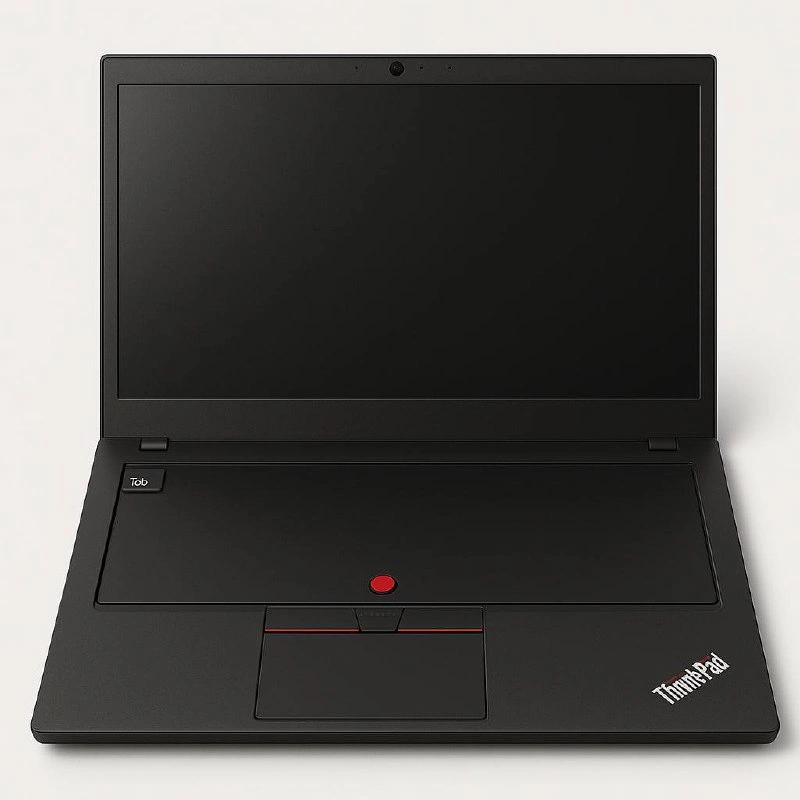
The Ultimate Minimalist ThinkPad: All Vibe, No Type
Why is this Hardware meme funny?
Level 1: Only the Essentials (A Simple Analogy)
Imagine you have a special toy that you really, really love – let’s say a remote control for a video game. This remote is old but super reliable, and you’ve used it so much that you feel you can do anything with it. Now picture that instead of having the whole video game console, you only have this remote control in front of you. The actual game is running somewhere else (maybe at a friend’s house or on a big computer in another room), but you’re so confident in your little remote that you joke you don’t even need the console with you.
That’s basically what this funny picture is saying about a programmer and their laptop. The laptop in the picture has no keyboard – the part you normally need to type words is completely missing. The only thing left is a little red pointer stick (that’s like a built-in mini-mouse some laptops have) and a button to turn it on. It’s like saying the developer only kept their very favorite part of the laptop and threw everything else away! Of course, normally you do need a keyboard to write code or even to type at all. The joke here is that this programmer feels so secure with their tiny red pointer and some secret startup tricks (kind of like special cheat codes for the computer, called BIOS hotkeys), they act like the regular keyboard isn’t even needed because all their real work is happening on powerful computers far away (that’s what “in the cloud” means – it’s like using someone else’s big computer over the internet).
In simple terms, it’s funny because it’s like seeing a car with no steering wheel – only a little joystick – and the driver saying, “Don’t worry, I drive with this tiny stick, the actual steering happens somewhere else.” It’s absurd and silly. The feeling behind it is both playful and proud: the developer is proud of their trusty old tools (that red pointer and those secret key combos) and is playfully teasing that they don’t even need the usual tools (like a keyboard) anymore. It’s a way of saying “I’m such a pro, I could code with practically nothing but my favorite little gadget!” Of course, it’s all in good fun – in reality, they’d plug in a keyboard when they actually need to type. The humor makes tech-savvy people chuckle, and even if you’re not a computer expert, the image of a laptop with no keys looks so odd that it’s clearly a joke. It’s about loving a gadget so much that you jokingly act like that one gadget is all you need to get the job done.
Level 2: Keyboards, Nub, and Cloud Stuff
So, what’s actually going on here? Let’s break down the scene and the joke in more straightforward terms. We have a Lenovo ThinkPad laptop pictured. ThinkPads (originally made by IBM, now by Lenovo) are famous among programmers and IT folks for being durable, no-nonsense laptops. They’re those all-black, somewhat boxy laptops you might have seen at companies or with older developers. ThinkPads are adored for their excellent keyboards and a little red dot in the middle of the keyboard called the TrackPoint. That red dot is essentially a tiny joystick that controls the mouse pointer on the screen. It’s an old-school alternative to using a touchpad or an external mouse. Some people absolutely love it because it means you can move the mouse without lifting your hands away from typing position. It’s a bit of an acquired taste – if you’ve never used one, at first it feels strange pushing on a tiny nub to move the cursor. But many developers who have used ThinkPads for years become very fast and comfortable with it. It’s iconic; when you see that red nub, you immediately think “ThinkPad”. It’s so associated with serious coding and DeveloperTools that it’s almost a symbol of a certain kind of hacker ethos.
Now, normally, a ThinkPad has a fantastic keyboard surrounding that TrackPoint. In fact, a running joke is that ThinkPads have “the best laptop keyboards” – the keys feel great to type on, with long key travel and satisfying feedback. That’s why it’s so startling (and funny) that in this image the keyboard is just... gone. The whole area where the keyboard should be is a flat black surface, as if someone literally removed all the keys. The only things left are the TrackPoint (red nub) and its buttons (the three buttons with red stripes just above the touchpad). There’s also a small square button on the top left labeled "Tob". On many ThinkPads, the top left above the keyboard might host the power button or a special button (older ThinkPads had a blue ThinkVantage button for accessing recovery or BIOS settings). Here "Tob" is probably a made-up label – it might be part of the joke (perhaps short for something like “To BIOS” or just a play on the look of those buttons). Essentially, the laptop in the picture is missing its primary input device (the keyboard), but still has the pointer.
So why would a developer joke about not having a keyboard? That seems like the last thing you’d remove, right? The text caption gives a clue: “When your dev life depends on a trusty TrackPoint and BIOS hotkeys.” This is highlighting two things a lot of power-user developers care about: the TrackPoint (for moving around and clicking) and BIOS hotkeys. Let’s explain BIOS real quick. BIOS stands for Basic Input/Output System – it’s firmware that lives on the motherboard of your computer. When you first turn on a PC, before Windows or Linux or any operating system starts, the BIOS is what runs and checks your hardware, and it lets you configure low-level settings. Nowadays, BIOS is being replaced by something called UEFI, but people often say “BIOS” to mean the system setup. To access the BIOS settings, you usually have to hit a special hotkey (a key or combination like F2, F10, Del, or on ThinkPads often F1 or Enter) during the very early moments of booting up. Developers and IT folks often need to go into BIOS/UEFI to do things like enable virtualization support (so they can run VMs or Docker properly), change the boot order (like boot from a USB when installing a new OS), or tweak performance settings. Hotkeys are just keyboard shortcuts – in this context, BIOS hotkeys are those keys you press to get into those firmware menus or do special actions, like maybe a key to restore the system.
So the caption is joking that this developer’s life depends on two things: the TrackPoint and those BIOS hotkeys. In other words, they’re such a hardcore developer that they’re constantly using the TrackPoint to navigate, and constantly jumping into the BIOS or using special key combos to fix issues or configure things. Where’s the keyboard then? The tongue-in-cheek idea is: maybe they’ve spent so much time in BIOS and have everything set up in the cloud that they barely even need to type normally! It’s like saying the regular keyboard-based work (like writing code, typing documents) isn’t happening on this laptop anymore. Perhaps all that coding is done on a remote server or cloud environment (“the code is in the cloud”), meaning this ThinkPad is just a window or portal to that. This could be referencing modern RemoteWork setups: for example, some developers use services like VS Code Remote or SSH into a powerful machine elsewhere. They might be using the local laptop only to connect to a development environment in the cloud. In such a case, theoretically, you could use an on-screen keyboard or a minimal setup and still get your coding done, since the heavy lifting and even the files are on the remote system.
Of course, in reality you do still need a way to type. So removing the keyboard is an exaggeration for humor. It highlights the absurdity in a funny way: imagine being so confident in your secondary tools that you neglect the primary one. It’s as if the meme says, “I rely so much on my TrackPoint for navigation and on low-level system tweaks, who cares about actual keys for coding? They’re somewhere else, maybe virtually.” It’s poking fun at the idea of being a super-pro system tinkerer or a cloud-centric developer. DeveloperExperience (DX) these days often involves cloud services and remote servers; here the DX is so cloud-centric that even the keyboard has become optional (or exists virtually). It also mocks (lovingly) the developer hardware loyalty some people have: ThinkPad users notoriously stick to their machines and brag about them. So a die-hard ThinkPad fan might joke, “Even if my keyboard falls off, I’ll keep coding on this thing with just the TrackPoint!”
And about that little text in the post: “Or VibePad?” – that’s likely a quip by the poster. They’re suggesting a funny alternate name for this keyboardless wonder: instead of ThinkPad, call it “VibePad.” Why “Vibe”? Possibly because with no keyboard, you’re left to run on vibes – meaning intuition or feeling. It’s like saying the laptop now operates telepathically or something: you vibe with it to get things done. It’s a play on words, since “Think” vs “Vibe” (thinking is logical, vibing is feeling) and Pad remains. It’s a lighthearted crack at how impractical a keyboardless laptop is – you’d need to channel some serious vibe or magic to actually use it.
In summary, the image and caption together form a DeveloperHumor meme that takes a common trope (developers loving ThinkPads and doing crazy low-level stuff) and pushes it to a silly extreme. It’s referencing:
- ThinkPad TrackPoint (the red nub many devs love),
- Missing keyboard (humorously implying the keyboard’s function is somehow offloaded or not needed),
- BIOS hotkeys (the idea the dev is always fixing/tweaking via firmware shortcuts),
- and the concept of coding “in the cloud” (remote development), since the description mentions “the actual code (and maybe the keyboard) is in the cloud.”
All these are wrapped in a joke that long-time techies find amusing. If you’re newer to this, just know it’s like an inside joke: the most important things to this stereotypical hardcore developer are a pointing stick from the 1990s and some boot-time key combos, while the normal stuff, like actually typing on a keyboard or seeing something on the screen, is oddly absent. It’s sarcasm and affection rolled into one meme — a love letter to the ThinkPad’s quirkiness and a gentle ribbing of our own sometimes over-the-top tech habits.
Level 3: The TrackPoint Cult
At first glance, this keyboardless ThinkPad looks like some bizarre tech sacrilege. An iconic Lenovo ThinkPad — a brand legendary in Hardware and developer circles for its rugged build and best-in-class keyboards — is shown without any keyboard at all. In its place: a smooth matte-black expanse interrupted only by the little red TrackPoint nub and its companion mouse buttons, plus a mysterious square button labeled "Tob" in the top left. The screen is blank, the bezel thick, and the classic ThinkPad logo sits proudly on the palm rest. This image screams minimalism to an absurd degree, as if the laptop has been sacrificed to the cloud gods. For seasoned engineers, the humor comes from an infamous devotion to ThinkPad hardware: it’s exaggerating how some developers swear by their trusty TrackPoint and deep technical shortcuts (like BIOS hotkeys) to the point they joke they don’t even need a keyboard anymore. It’s like a visual punchline: “Who needs keys when all my code (and apparently the keyboard itself) is in the cloud?”
For veteran developers, this strikes a chord because many have an almost cult-like loyalty to the ThinkPad’s old-school features. The TrackPoint (that little red joystick in the middle of the keyboard) is more than a pointing device – it’s a symbol of DeveloperProductivity for those who mastered it. It lets you move the mouse pointer without taking your hands off the home row keys. In a fast-paced coding session or while bouncing between terminals, that can feel like a superpower. Many senior engineers have mused that the TrackPoint is the only acceptable alternative to a mouse – an acquired taste that once acquired, becomes an obsession. By showcasing a laptop where the TrackPoint stands alone, the meme playfully implies the developer is so reliant on this DeveloperTool for navigation that they’ve dispensed with everything else. It’s hardware minimalism as an inside joke: the machine’s soul (the TrackPoint and maybe a power button) is intact, but the body (the keyboard for actual typing) has ascended to the cloud.
Then there are the BIOS hotkeys – those magical key combinations you press during boot (like F1 or Delete or on ThinkPads often Enter or a special blue ThinkVantage button) to enter the BIOS setup or diagnostics. The meme’s caption “dev life depends on ... BIOS hotkeys” pokes fun at how deeply some developers get into low-level tinkering. Seasoned engineers often have war stories of late-night debugging sessions where nothing works except dropping into the BIOS to tweak a boot order, enable virtualization, or disable some rogue security setting. It’s practically a rites-of-passage in system administration and hardcore dev-ops: when production is on fire or your OS won’t boot, knowing the right BIOS incantation (hotkey) is a lifesaver. The phrase “BIOS hotkey cult” (as hinted by the tags) is a humorous way to describe those nerds who know, for instance, that on an old ThinkPad you press F1 at the logo screen to get into BIOS, or F12 for the boot menu – and they proudly consider this secret knowledge part of their DeveloperExperience. This meme exaggerates that pride: as if the developer spends so much time in BIOS and hardware settings that the regular OS and keyboard are secondary. Only the sacred hotkeys matter – everything else, including the OS login screen or even the keyboard itself, is an afterthought.
In real-world scenarios, this absurd image isn’t entirely without basis. Modern development workflows, especially with the rise of RemoteWork and cloud computing, sometimes make our local machines mere thin clients. Many devs run heavy workloads on remote servers or use cloud IDEs (like developing in a web browser connected to a cloud container, or using ssh to code on a beefy remote server). When your actual code, development environment, and even compilation are happening “in the cloud,” your laptop becomes basically a fancy screen, a network interface, and an input device. This meme takes that to an extreme literal interpretation: if everything is in the cloud, why not put the keyboard in the cloud too? The blank keyboard deck implies that the user might be typing on a completely remote interface or perhaps using an external keyboard off-frame, and the ThinkPad is just a durable shell to access the cloud. It’s a tongue-in-cheek commentary on cloud-first development. Some old-timers might even note the parallel to the age of mainframes and dumb terminals – we’ve kind of come full circle. Back in the day, you had a terminal with a keyboard and screen but all the computation was on a central mainframe. Now in 2025, you might have a powerful laptop, but you choose to offload everything to a server and jokingly remove your own keyboard because even that input could be elsewhere (maybe an onscreen keyboard or just faith?). The meme asks, “Is this the ultimate thin client or just a joke about how far we’ll go?”
The presence of the red TrackPoint and its buttons while everything else is gone is also a nod to how essential this little device is to ThinkPad aficionados. It’s as if saying: as long as I have my TrackPoint (and a way into BIOS), I can survive anything. It resonates with those who have had a laptop survive falls, spills, and years of coding marathons. ThinkPads are often called the tank of laptops – they’re sturdy and functional. The image’s HardwareHumor is that the machine has been stripped down to the bare survival gear. In a disaster recovery scenario (or, say, after spilling coffee on the keyboard for the 100th time at 3 AM), an engineer might indeed be stuck using only a partial machine. A cynical veteran might joke that the keyboard probably died heroically during an all-night on-call incident, but the TrackPoint endured (“ThinkPad keyboards are great, but that little red nub is indestructible, it’ll outlive us all”). Pressing BIOS hotkeys to revive a crashed system is a familiar drama. So, seeing only a TrackPoint and a “Tob” (which we can interpret as a power or special BIOS button in this context) suggests a last-resort, Spartan coding setup. It’s funny because it’s true – in crunch times, devs often end up using whatever still works. (No keyboard? Fine, maybe use on-screen keyboard or SSH from another machine – just get me my TrackPoint and network!). The caption even quips “Or VibePad?”, implying that perhaps this isn’t a ThinkPad at all anymore but a “VibePad” – you operate it by pure vibe and intuition. With no keyboard to physically type, you might as well feel your way through coding! This wry joke underlines the almost mystical trust some developers place in their setups: when you’re running on fumes and stack overflow incantations, sometimes vibes (and a couple of BIOS beeps) are all you have.
All these elements together make experienced devs smirk in recognition. The meme riffs on developer hardware loyalty and the eccentric extremes of the DeveloperHumor world: venerating an old laptop’s quirks, joking about “my code’s not even on this plane of existence (it’s on AWS/Azure), I only keep this husk around because it has a TrackPoint and I know how to enter BIOS blindfolded.” It highlights the gap between ideal modern workflows (cloud-based, high-level, abstracted) and the reality that many hardcore devs still relish the low-level control and reliability of good old hardware. In other words, it’s parodying the idea of a cloud developer monk, someone who has transcended physical keyboards and lives on the essence of computing: a boot firmware and a pointing device, communing with distant servers. It’s absurd, it’s nerdy, and it perfectly captures that mix of frustration and affection we have for our DeveloperTools. The next time your colleague brags about coding from their iPad or a slick new MacBook, show them the VibePad: the ultimate dev machine that dares to ask, “Do you really even need a keyboard, bro?” 😜
Description
The image displays a conceptual, hyper-minimalist version of a black Lenovo ThinkPad laptop, shot from a frontal angle against a clean, off-white background. The laptop's iconic matte-black chassis, red TrackPoint pointing stick in the center of the palm rest, and the 'ThinkPad' logo in the bottom-right corner are all present. However, the entire keyboard has been replaced with a massive, seamless touchpad that covers the entire surface area where the keys would normally be. The only visible key is a single 'Tab' key on the upper-left side. The screen is black and powered off. This image satirizes the tech industry's trend towards minimalism and larger touchpads, taken to an absurd and impractical extreme. For experienced developers, especially those who revere the ThinkPad for its legendary keyboard, the humor lies in this complete betrayal of the brand's function-over-form ethos. The original post's caption 'Or VibePad?' perfectly captures the joke, mocking the marketing-driven focus on aesthetics and 'vibe' over the practical needs of a power user who actually types code for a living

Comments
18Comment deleted
Finally, the perfect laptop for project managers to silently judge your pull requests from. All trackpad, no actual input
Still the only laptop that lets you ssh into production with one hand while the other searches the room for where you left the actual keyboard
After 20 years in tech, I've learned there are only two types of senior engineers: those who swear by their ThinkPad's TrackPoint, and those who accidentally ordered the wrong laptop from procurement and are too stubborn to admit it
The ThinkPad: where the only RGB you'll find is in your terminal color scheme, and the TrackPoint remains the most polarizing input device since vim keybindings. It's the laptop equivalent of choosing Arch Linux - you don't pick it for the aesthetics, you pick it because you've transcended caring what your hardware looks like and only care that it won't fail during a production incident at 3 AM. Real developers know that red nub isn't a design flaw, it's a feature that separates those who touch their trackpad from those who never leave the home row
ThinkPad's TrackPoint: navigating microservices sprawl without ever losing your pointer - unlike that flaky touchpad on your manager's Surface
Finally, a corporate laptop that enforces least privilege at the hardware layer - no keyboard means no Friday SSH into prod; the red TrackPoint is just the rollback button
The new enterprise keyboard: one Tab for Copilot, a TrackPoint to steer the diff, and six CAB meetings to justify pressing it
Tab Comment deleted
Tob Comment deleted
To b or not to b? 🤔 Comment deleted
Maybe you need to look at the image again to get it Comment deleted
Did anyone try to vibecode a program that will take over the world? Prompt it to "Write me a self-improving Common Lisp program that will take over the world." Comment deleted
ah yes the ThwrlePad Comment deleted
This is the evolution of ctrl c v keyboaed Comment deleted
AI slop Comment deleted
Tob Comment deleted
Bro I noticed that centuries ago Comment deleted
I love how the plate the "Tob" button is on is another button Comment deleted