The Unspoken Superiority of a Vim User
Why is this IDEs Editors meme funny?
Level 1: No Words Needed
Imagine you have a friend who really loves a particular toy or game. Let’s say they’re super into LEGO. Every day they wear a LEGO t-shirt, their backpack has LEGO characters on it, and even their water bottle has a LEGO sticker. They never actually come up to you and say “Hey, I love LEGO,” but you can just tell from all those clues, right? This meme is the same idea, but for a computer thing called Vim that programmers use. Instead of saying “I use Vim,” the joke is that people who use Vim give it away by how they act. It’s like a secret club: they have special ways of using the computer (like special key presses) that everyone in the club recognizes. So the meme is playfully saying, “Show me you’re in that club without saying it out loud.” It’s funny because sometimes actions speak louder than words – you can know what someone loves or uses just by the little hints in how they behave. You don’t need any words at all to figure it out, and that little realization makes people smile.
Level 2: The Vim Starter Pack
So what’s going on here? Let’s break it down in simpler terms. Vim is a popular text editor that programmers use to write code. Unlike Microsoft Word or modern code editors that you click with a mouse, Vim runs in a terminal window (the text-only CLI, or Command Line Interface) and relies entirely on the keyboard. Vim is special because it’s modal – it has modes like Normal mode for commands and Insert mode for typing text. For example, in Normal mode the letter keys don’t type letters but instead move the cursor or edit text (pressing dd deletes a line, u undoes, etc.). You have to press i to switch to Insert mode to actually type text, and then hit Escape to go back to Normal mode. This design is super efficient once you learn it, but it’s confusing to newcomers. Ever hear jokes about people stuck in Vim? That’s because if you don’t know the right command to quit (it’s :q to quit, :wq to save-and-quit, or :q! to quit without saving), you can panic and feel trapped. Exit Vim jokes have become an entire subgenre of programming humor because of this learning curve.
Now, the meme text “Tell me you use Vim without telling me you use Vim” is referencing a popular online challenge format. Usually, the idea is: show or hint at something about you without stating it outright. In this case, it’s asking Vim users to reveal themselves indirectly. Why? Because Vim users have some pretty distinct habits and pride points. It’s almost a running joke that you can identify a Vim user by observing their behavior at a computer. For instance, a person who uses Vim a lot might avoid using the mouse even when it would be easier, because they’re so used to doing everything with keyboard shortcuts. They might navigate through text by hammering those H, J, K, L keys (since in Vim those keys move the cursor left, down, up, right) instead of arrow keys. If you see someone furiously tapping Escape and weird letter combos while editing text, you can guess they’re a Vim pro. Another telltale sign is the :wq thing – that’s the command Vim users type to save and quit. It becomes muscle memory. Some Vim fans joke that they accidentally type :wq in other programs or chat messages because they’re so used to it. So the meme is basically saying: “Prove you’re a Vim user by demonstrating one of these quirky habits, rather than just saying you use it.”
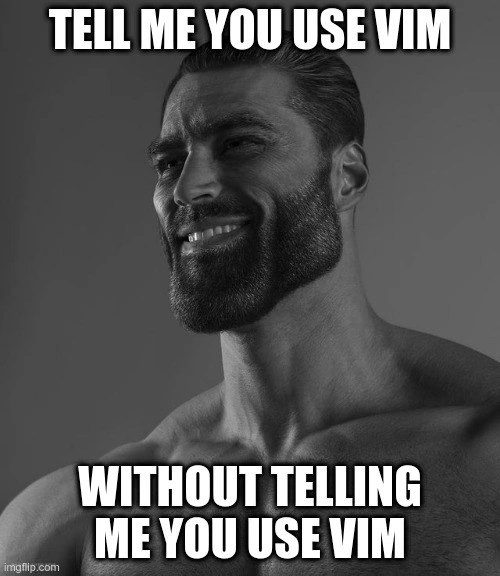
The image used is that grayscale photo of a super muscular bearded man with a confident smirk. If you’ve seen meme compilations, this is often called the “sigma male” or “Gigachad” meme template. It’s often used sarcastically to portray someone (usually male) as ultra-cool, independent, or superior in a tongue-in-cheek way. Here, the meme-maker chose that image to represent the Vim user as this almost ridiculously confident dude. It’s like saying “using Vim is the macho power move of programming.” This adds an extra layer of humor because, let’s face it, using a text editor doesn’t actually make you a bodybuilder – but within programmer culture, being a Vim guru is seen as a flex (something to show off). The bold white all-caps text at the top and bottom is a classic meme style for emphasis, making the statement feel loud and proud.
Why is this funny to developers? Well, it taps into the ongoing friendly feud known as the Editor Wars – debates over which code editor or IDE (Integrated Development Environment) is the best. Vim is one of the oldest and most respected editors, but it’s also infamous for its steep learning curve. So people who master Vim often take pride in it. There’s a whole vim_culture around customizing your ~/.vimrc (the Vim configuration file) and sharing tips. On the other side, users of modern editors like VS Code or old rivals like Emacs might poke fun at Vim users for being stuck in the past or for the whole “can’t exit Vim” problem. It’s all usually in good humor. This meme falls into DeveloperHumor/TechHumor because only people in the programming community really get these references. It’s specifically targeting CLI geeks – those who love living in the terminal. The categories listed (IDEs_Editors, CLI, DeveloperExperience_DX) indicate the meme is about the developer experience of choosing editors and using the command line. If you’re early in your coding journey, picture this: one coder uses a modern point-and-click editor and another lives in the old-school text-only Vim. They both get the job done, but the Vim user likes to think they’ve unlocked some higher skill level. This meme playfully acknowledges that attitude.
In short, the meme is saying: “Vim users, we know you’re proud. Show us your secret handshake!” Those in the know will chuckle because they’ve either been through the Vim learning process or have colleagues who swear by Vim. If you’re not familiar with Vim, now you know: it’s an editor that inspires almost fanatical devotion, and its users can’t help but show it in how they work. The joke lands because the audience understands the hints (like weird key presses or inside jokes about :wq) and enjoys the nod to this aspect of programmer culture.
Level 3: Keybinding Kung Fu
In the world of editor wars, using Vim is a badge of honor – and veteran developers have a hundred subtle ways to flaunt it without saying a word. This meme riffs on that inside joke by using the popular "tell me without telling me" format plastered in bold white Impact font. The top text, “TELL ME YOU USE VIM”, and bottom text, “WITHOUT TELLING ME YOU USE VIM”, challenge a Vim user to prove their loyalty through actions, not claims. And what image do they choose to drive it home? The infamous sigma male (a.k.a. Gigachad) meme template – a grayscale photo of a chiseled, confident guy smirking. It’s a tongue-in-cheek way to cast the Vim user as the ultra-confident “alpha” of text editing. The implication is clear: real Vim aficionados don’t need to brag; their keyboard kung fu speaks for itself.
Seasoned devs immediately grin at this combination, because they know exactly what those unspoken signals are. A true Vim user’s habits in the CLI (Command Line Interface) shout their identity loud and clear. Vim keybindings become second nature – so much so that these folks often end up using them everywhere. For instance, they might install Vim emulation plugins in IDEs or browsers, or even catch themselves typing :wq at the end of an email out of sheer muscle memory. The humor here is that Vim users are almost like a secret club with a special handshake. They exhibit quirks and workflows that tell on them. Some classic giveaways:
- Escape key obsession: Vim’s modality means hitting
Escconstantly to switch modes. Hardcore users often remap their Caps Lock key to Escape (because who actually uses Caps Lock for shouting, right?). If you notice someone’s keyboard has that tweak – or see them reflexively tapping Escape twice when finishing a sentence – it’s a dead giveaway they live in Vim. - H,J,K,L navigation: In normal mode, Vim users steer the cursor with
h(left),j(down),k(up),l(right) instead of arrow keys. So if you spot a dev furiously j-ing and k-ing through lines of text, not a mouse in sight, you know what’s up. Some Vim enthusiasts even find themselves trying those keys on websites or in chat windows, accidentally typing “kkkk” when they meant to move the cursor. It’s hilarious evidence of a Vim-trained brain. - Command colon reflex: Saving or quitting files in Vim isn’t a click – it’s a command. Vim vets will instinctively type
:wto save (write) and:qto quit. The meme’s challenge could prompt responses like a screenshot of a terminal where the user has:wqat the ready. It’s the universal “exit Vim” sequence. Showing you can elegantly exit Vim (a task that baffles newbies and spawned countless jokes about people being stuck in Vim forever) is the ultimate flex. A true Vim user might even joke, “I’ve taught my parrot to say colon-w-q”. - No mouse, no mercy: Vim devotees are proud TerminalLife creatures. They’ll do anything to avoid leaving the keyboard. You might catch them scrolling through code with deft key combos, using
/to search within a file faster than others can reach for the mouse. If someone scoffs at using a mouse or GUI and claims everything is faster in the terminal, chances are they’re a Vim fan. It’s part of that Terminal humor where doing it the hard way (but faster once you’re skilled) is cool.
All these behaviors are like a secret language among developers. The meme expects viewers (especially those who have been around the block) to immediately think, “Oh, I know those people – the ones who close Stack Overflow posts with :q! and have Vim cheat sheets as wall art.” The DeveloperHumor here comes from recognition: it’s funny because it’s true. Experienced devs have either been that person or pair-programmed with one. The meme’s format invites Vim users to boast indirectly – a playful DeveloperJokes challenge. It’s poking fun at Vim’s steep learning curve and the pride that comes with mastering it. After all, Vim has been around for decades (it descends from the 1970s vi editor), and anyone who tames this beast has earned some respect. There’s a whole vim_culture of power users who swap configuration tweaks and war stories of their first :q escape, much like soldiers comparing scars. By referencing this culture, the meme appeals to editor war veterans who remember the old Vim vs Emacs battles, and also to modern devs who might engage in friendly banter of Vim vs VS Code today.
Ultimately, the meme is an inside joke celebrating the esoteric skills of Vim users. It says, “Prove you’re elite, but in the Vim way – silently, efficiently, and with a bit of smug flair.” Those in the know can’t help but smirk along. The next time you see a developer breezing through code with cryptic key combos and never touching a mouse, you’ll think of this meme and know – they didn’t have to tell you they use Vim, you just felt it. 👨💻😎
Description
This meme features the 'GigaChad' character, a black-and-white photograph of an extremely muscular and chiseled man, typically used to represent an ideal or superior viewpoint. The image has large, white impact-font text overlaid on the top and bottom. The top text reads: 'TELL ME YOU USE VIM'. The bottom text reads: 'WITHOUT TELLING ME YOU USE VIM'. This meme leverages the popular 'tell me without telling me' social media trend to poke fun at the distinct culture and habits of developers who use the Vim text editor. Vim is a powerful, terminal-based editor known for its steep learning curve and reliance on keyboard commands for navigation and editing (e.g., 'hjkl' keys for movement, ':wq' to save and quit). Users often develop such strong muscle memory that they instinctively try to use these commands in other programs, which is one of the classic 'tells' the meme alludes to. The use of the GigaChad format ironically reinforces the stereotype that Vim users view their choice of editor as superior to others

Comments
85Comment deleted
I tried to edit a Google Doc and instinctively hit 'esc', 'dd', 'p' to cut and paste a line. Now I have to explain to my PM why the project plan just says 'pp'
Yesterday’s post-mortem found the root cause of the prod outage: a stray “:wq” accidentally committed to a Kubernetes manifest - turns out Vim muscle memory can schedule its own containers
After 15 years in the industry, I've learned that the only thing harder than exiting Vim is getting a Vim user to stop explaining why their .vimrc is a work of art that makes them 10x more productive than us mere mortals using IDEs with their 'training wheels'
The first rule of Vim Club is you absolutely must tell everyone about Vim Club - preferably within the first 30 seconds of any technical conversation, right after mentioning you use Arch Linux but before explaining why your dotfiles are superior
Proof you use Vim: EDITOR=vim turns every company rebase into a helpdesk ticket, and the postmortem title ends with ':wq'
You know they use Vim when they navigate Jira with hjkl, try to quit Zoom with :q!, and justify it as “consistent modal UX” in the architecture review
:wq is your mic drop; everyone else fumbles with Ctrl+S
How do I quit this?.. Comment deleted
this is the question I google every time when I accidentally run emacs. One colleague of mine always sets EDITOR=emacs, and once in a while (maybe once a month) I press ^x^e and land in there. Comment deleted
I have crippling depression Comment deleted
ZZ Comment deleted
:q! Comment deleted
👍👍 Comment deleted
:wq Comment deleted
I use Reset button to quit editor Comment deleted
:%s/Linux/GNU\/Linux/g Comment deleted
I don't Comment deleted
start now Comment deleted
I'd prefer nano. It suits for all of my minor tasks at work Comment deleted
hotkeys are really bad (compared to vim and notepad.exe) Comment deleted
Maybe, but I don't complain. For small edits just fine Comment deleted
I used nano for a while, until i found micro, i think you should try it out Comment deleted
Maybe at some day I'll try it. Thanks for the advice! Comment deleted
wanted to try it for ages, but I haven't found time so far Comment deleted
"I don't need GUI to freely edit and navigate complex code files" Comment deleted
gnu ed users: Comment deleted
ok, countered Comment deleted
emacs. huh? ;) Comment deleted
<C-v>jjjjjjjjjlg<C-a> Comment deleted
also, x on my keyboard has been broken for a year now, so i know by heart that X is <C-v>88 and x is <C-v>120 😅😅😅😅 Comment deleted
Русский детектед Comment deleted
russian detected please use english in this chat Comment deleted
this rule does apply for sent stickers, but does not for other sitckers in packs (which are not sent) Comment deleted
I used to edit code on production server using my smartphone with physical qwerty keyboard.... Comment deleted
"used to edit" means that in past you edited but now you don't more correct will be "I edited code ... with smartphone ..." or "I used smartphone ... to edit code ..." Comment deleted
Yes, in past it was pretty normal for me to do that and now it is not. Comment deleted
you should have told that you use vim, not used in past Comment deleted
Cursed Comment deleted
It's not that bad if you're using ssh and text editors Comment deleted
The problem is not really in setup, but in all cursed chaos that led to editing code directly on production server through this setup, this process seems so wrong and broken to me Comment deleted
Huh... I... oh Comment deleted
ee > vim Comment deleted
:/ Comment deleted
Today I work in outlook mostly :D Comment deleted
Nice COC bro Comment deleted
guys i wanna install ubutu alongside windows 10 but rsd problem doesn't allow me do you have any suggestions? Comment deleted
there's windows version of Vim mate, welcome Comment deleted
you can also use wsl/wsl2 or cygwin Comment deleted
yes i know but i wanted to dual boot 😅 Comment deleted
use VMs Comment deleted
installl windows first, slap ubuntu with EFI GRUB after, it should figure out the boot partitions itself Comment deleted
"I've never felt the touch of a woman" Comment deleted
!wqa Comment deleted
Yanked this meme, thx Comment deleted
impossible. vim users tell everyone they use vim constantly Comment deleted
how to generate random string in vim?? open vim for a frontend developer and tell him to exit. Comment deleted
lmao Comment deleted
cat /dev/urandom | tr -d "[:cntrl:]" | strings -s "" Comment deleted
Oh yeah FUCK Comment deleted
:w :q Comment deleted
ZZ does the same apparently, pity :w:q is inprinted in the brain already Comment deleted
now try to exit "easy mode" of vim (vim -y) Comment deleted
Oh dear lord Comment deleted
I am not afraid to admit I prefer mcedit (Midnight Commander) in *nix and FAR Editor in Windows. See no reason to suffer with vi and alike, except on embedded devices with limited hardware resources. Comment deleted
no reason to suffer with vi and alike you should enjoy vim, and you'll have a different opinion Comment deleted
We have too few time in this life to spend it on learning vim. Comment deleted
you can actually make your next life easier with learning how to use vim now and if you're lucky enough, your current one too Comment deleted
d% Comment deleted
hjkl yy p Comment deleted
We have a plugin for this. Comment deleted
I use vi Does not conflict with the condition. Comment deleted
Извините, но Вы - меркантильное :q! Comment deleted
Sounds about right Comment deleted
Glory to Lannisters! :) Comment deleted
It should be mercantile, something to do with trading, greed Comment deleted
ggdG:wq f*** this sh** I'm out Comment deleted
А как какать выйти? Comment deleted
tell me you are russian without telling me you are russian скажи мне, что ты русский, не говоря, что ты русский Please use English as a main language in this chat. This means that you either translate or explain your message, or you don't use any language except English. Comment deleted
what if link in qr code dies? Comment deleted
and then your qr code is considered fake Comment deleted
they won't if they don't want to Comment deleted
people won't automated systems will mostly break Comment deleted
well in most cases the check is performed by a elderly person working as security or something like that Comment deleted
<Esc> :wqa Comment deleted
iVim<Esc>:wq Comment deleted