Skip to content
DevMeme
4859 of 7435
Anatomy of a Real-World Production System
TechDebt Post #5320, on Aug 4, 2023 in TG

Anatomy of a Real-World Production System

Why is this TechDebt meme funny?

Level 1: Held Together with Tape

Imagine you built a machine out of all sorts of random stuff from your garage. There are tubes connecting a bunch of mismatched gadgets, and everywhere you look you see tape and glue holding things together. One part of the machine is fixed with a pillow so it doesn’t make a loud noise, and in the corner there’s a tiny little toy car that was supposed to test if the machine works. Surprisingly, after you push some buttons and turn some knobs… the contraption actually does what it’s supposed to do! You can almost hear the inventor saying, “Hey, it works!” with a nervous smile. It’s funny because the machine is way more complicated than it needs to be – like using a huge crazy setup to do a simple job. And all those tapes and quick fixes make you wonder, “Is this whole thing going to fall apart any second?” The joke is basically showing a home-brewed solution that’s so over-the-top and patched-up that you can’t help but laugh. It’s like using ten band-aids to fix a leaky pipe: it might stop the leak for now, but it looks ridiculous and you know it’s not a stable fix. The humor comes from that mix of surprise and concern – you’re amazed it works at all, and it’s just so silly to see a machine held together by tape, pillows, and hope.

Level 2: Spaghetti Code Pipeline

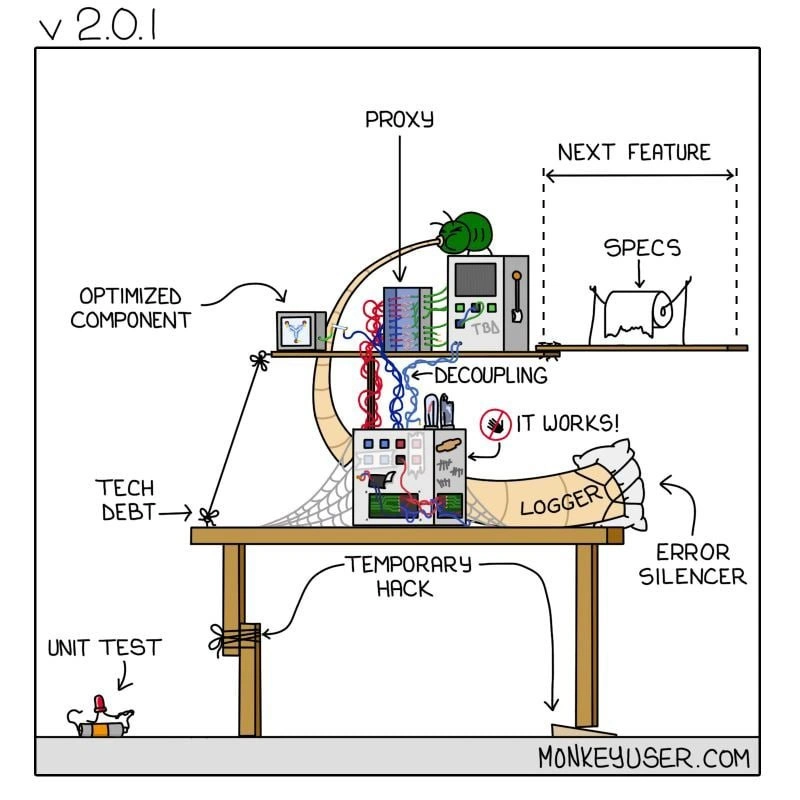
This comic panel shows a cartoonish machine labeled v2.0.1, and it’s using humor to illustrate a software system that has become a messy patchwork. If you’re a junior developer or just starting out, let’s break down what all those labels and components mean in real software terms. Each label is a clue to common concepts (and problems) in programming:

  • Rube Goldberg machine: First, the whole setup is a visual metaphor. A Rube Goldberg machine is a ridiculously complicated contraption designed to accomplish a simple task through a chain reaction (think of those fun sequences with dominoes, pulleys, and levers in cartoons). Here it represents a system that performs a task in an overly complex way. Instead of a clean, straightforward design, the code has many unnecessary steps and odd solutions linked together.

  • Technical Debt (Tech Debt): You see a section marked “TECH DEBT” with cobwebs. Technical debt is a term for the consequences of quick-and-dirty coding shortcuts. Imagine you have to rush a feature or fix, so you write something clunky or leave a known bug in the code with a plan to fix it later. That’s like borrowing time – you get the feature now but “owe” the codebase a cleanup. Over time, if you don’t pay off this debt (by refactoring or improving the code), it accumulates interest: the system becomes harder to change or debug. The cobwebs in the picture humorously show that these debts have been neglected for a long time, just sitting there in the codebase.

  • Optimized Component: There’s a box labeled “OPTIMIZED COMPONENT.” In programming, optimization means making something run faster or use less memory. A component is just a part of the system (like a module or service). The joke here could be that one part of this system was painstakingly optimized – maybe it runs super efficiently – but doing that is a bit pointless when the overall system is disorganized and slow due to all the other issues. It’s like fussing over tuning one wheel of a beat-up car that has an engine held together by tape. Yes, that one wheel might be perfect now, but the car as a whole is still in trouble. This teaches that optimizing without addressing bigger design problems often doesn’t yield great benefits.

  • Proxy: Atop the curved tube, there’s a label “PROXY” under a green bug. In software, a proxy is like a middleman – it stands between two components to pass messages along, often adding or modifying something in the process. For example, a proxy server sits between your computer and the internet, maybe to cache data or filter traffic. In code, the Proxy pattern is a design pattern where a class controls access to another class. Proxies can be used for good reasons (security, logging, compatibility), but too many layers of proxies can overcomplicate things. The comic shows a bug on the proxy, implying that introducing this proxy also introduced a bug (an error). This is common: every new layer or quick-fix can create new problems. If you’ve ever had an issue where a request goes through multiple services or handlers, a proxy might be one of those layers. And if any layer has a flaw, the whole chain can break.

  • Decoupling: Inside the tube, a bunch of red and blue wires is labeled “DECOUPLING.” Decoupling means designing system parts to be independent or loosely connected so that you can change one part without breaking others. It’s a good design principle (low coupling, high cohesion is a mantra you might hear). However, in practice, achieving decoupling can be tricky. The cartoon shows it as tangled wires, joking that their attempt to decouple modules just resulted in a confusing wiring job. Perhaps they split one system into two for clarity, but ended up with a lot of complex communication (wires) between them, which is just as bad as if they were one tightly coupled piece. For a newcomer: it’s like trying to separate two intertwined tasks but then spending a ton of effort passing messages back and forth between them. Bad decoupling can lead to what we call SpaghettiCode – code that’s twisted and tangled, making it hard to follow. Those red and blue wires look like spaghetti strands, emphasizing that this “decoupling” actually made a mess.

  • “It Works!”: This label is stuck near one of the boxes and the tube, proclaiming “IT WORKS!”. You’ll hear this in development as a half-joke: it suggests that despite all the ugliness in the system, at least it functions. Often developers say “It works on my machine!” to imply that something is technically working in one environment even if it’s not well-built or might not work elsewhere. Here, “It Works!” is highlighting a bit of denial or relief. The system is ugly and probably fragile, but hey, it produces the correct output (for now). It’s funny because sometimes teams will tolerate a horrifying codebase as long as the end-user doesn’t see any issues – “if it ain’t visibly broke, don’t fix it.” But under the hood, it’s a ticking time bomb. New developers are usually taught that just because code “works” doesn’t mean it’s good – you have to consider maintainability and quality too. This sign is the cartoon’s way of saying the builders are patting themselves on the back that the contraption hasn’t exploded… yet.

  • Logger: Along the bottom of the tube, you see “LOGGER.” A logger is a tool or part of a program that records events, errors, or information (usually to a file or console) so developers can see what the application is doing. For instance, you might log “User X signed in” or log an error when something goes wrong, to help with debugging. In a complex, error-prone system, developers often lean heavily on logs to figure out what’s happening. The presence of a big logger here suggests the system probably generates a ton of log messages to make sense of its convoluted process. It’s both a reassurance (“we have logs if something breaks”) and a crutch (“we need logs because nothing makes sense without them”). For a junior dev, it’s good to know logging is important, but if you find yourself adding logs everywhere just to track basic flow, it might mean the design is hard to understand.

  • Error Silencer: Notice the pillow wrapped around the tube labeled “ERROR SILENCER.” This is a humorous representation of code that catches errors and effectively hides them. In programming, an error silencer might be a try/except or try/catch block that catches an exception and does nothing or very little with it. For example, wrapping a function call in a try-catch and then not handling the error (other than maybe logging “error happened, moving on”) – the program doesn’t crash, but it also ignores a problem. This is generally an anti-pattern because it can lead to undetected issues. The pillow shows that they’re muffling the noise: the errors are happening, but they’re being suppressed so the system can keep chugging along. It’s funny in the comic because literally silencing errors with a pillow is absurd, but in real life, you might see code like:

    try:
        do_critical_task()
    except Exception as e:
        logging.warning("Oops, something failed, but continuing...") 
        # error is basically ignored, system continues 
        pass
    

    The result? The program doesn’t crash (that’s why “it works!”), but now you have hidden bugs. It’s like sweeping dirt under the rug – the room looks clean until someone lifts the rug. For a junior dev, the lesson is: handle errors thoughtfully. Silencing them might avoid immediate failure, but it can cause bigger problems later (like corrupted data or a confusing state that’s harder to debug).

  • Temporary Hack: Under the table, a table leg is fixed with duct tape, labeled “TEMPORARY HACK.” In software, a temporary hack is a quick fix applied to solve a problem right now, often because you don’t have time for a proper solution. It’s meant to be temporary, with the intention to replace it with a well-engineered fix later. However, as many devs discover, “temporary” tends to last a long time (sometimes forever) if the pressure to add features keeps outweighing the time given to refactor. The cartoon is literally showing duct tape on furniture – a universal symbol for a cheap fix. For example, say a function is misbehaving and you don’t understand why; a temporary hack might be to hard-code a correct value or add a quick check like if weirdCondition: doSomethingSpecial() just to avoid the bug. It works for now, but it’s not robust. Junior devs often encounter code with comments like // TODO: remove hack when issue #123 is fixed or // FIXME: temporary workaround for now. Seeing that duct tape reminds us of every TODO comment that never got done. It’s funny because everyone claims their hacks are temporary, yet many codebases are essentially museums of “temporary” hacks that became permanent features.

  • Unit Test: On the floor, very small, there’s a tiny cart with a red button labeled “UNIT TEST.” Unit tests are small programs or scripts that test individual parts (units) of your code to ensure they work correctly in isolation. Ideally, for each function or module, you’d have a set of unit tests covering various scenarios. Here, the joke is that only a minuscule effort was made in testing – that little cart is probably a single unit test or just a few of them, dwarfed by the gigantic system it’s meant to validate. It indicates poor UnitTesting practices: maybe the developers wrote one test and called it a day, or they only test trivial parts because the overall system is too complex to test easily. For someone new to engineering, this highlights the importance of tests: if you neglect them, you end up afraid to change code because you have no safety net. The comic exaggerates it: an enormous contraption with a tiny test cart that would clearly be insufficient to catch failures. The red button could be a nod that the test is simplistic, like it just checks a very obvious thing (or it’s an “easy button”).

  • Next Feature: On the right side, there’s an empty space bracketed by arrows and labeled “NEXT FEATURE.” This indicates that the team is already looking to add more to this already shaky system. In software companies, there’s constant pressure to add the next feature – new functionality that marketing or users want. The joke here is that instead of stopping to fix or redesign the messy setup, they’ve reserved a spot to bolt on yet another gadget when the next feature request comes in. It’s like continuing to stack blocks on a teetering tower. If you’re new, this is a common tug-of-war: planning new features versus improving the existing system. Often, unfortunately, new features win, and the debt accumulates. The cartoon is essentially saying, “Look, we know it’s bad, but there’s more coming anyway!”

  • Specs on a Toilet Paper Roll (SPECS): Perhaps the most comic touch is the toilet-paper roll labeled “SPECS” hanging above the workspace. “Specs” means specifications – the requirements or design documents that describe what the system should do. High-quality specs are important for building a system with a clear plan. But here, the specs are literally on toilet paper, implying a few things: maybe the specs are crappy (low quality) or they were disposable (written hastily and meant to be thrown away). It also suggests that the documentation is treated flippantly – perhaps scribbled in a hurry and not taken seriously. For a junior dev, imagine starting a project with only a rough sketch on a napkin or a half-baked idea from a meeting – that’s what building from toilet-paper specs would be like. The result is usually a system that doesn’t have a strong guiding blueprint, which can lead to the piecemeal, inconsistent architecture we see in this cartoon. It’s funny and a bit scathing: it suggests the system turned out messy because it was built on poor planning (literally crappy specs).

Now, why is all this funny (especially to developers)? Because it’s relatable exaggeration. Each part of this drawing is something devs have seen or done:

  • Rushing a fix and promising to clean up later (temporary hack).
  • Wrapping code in extra layers because we can’t touch the core (proxy upon proxy).
  • Decoupling things in name, but creating complex integration code (wires everywhere).
  • Covering up errors instead of solving them (error silencer).
  • Boasting that “it works” to gloss over the mess.
  • Having little to no tests but forging ahead with new features regardless.
  • Working with poor specs or constantly changing requirements.

For a newer developer, the takeaway is that these are common pitfalls in software projects. At first, you might not spot these problems in a codebase, but with experience you’ll learn to recognize them. The meme is using humor to teach a lesson: if you keep adding patches without refactoring, you’ll end up with a system that’s ridiculously convoluted. It warns about ArchitectureDecay – a decline in the structure of the software over time as quick fixes accumulate.

It’s also highlighting the idea of CodeQuality and why disciplines like refactoring, testing, and proper design are championed in engineering. The comic resonates because a lot of us have joined a project that looked just like this cartoon in spirit. We laugh because it’s absurd, but also because we remember the headache of dealing with such a system.

So, in simpler terms: the cartoon is a funhouse mirror for bad software practices. Each label corresponds to something real:

  • SpaghettiCode (messy, entangled code structure),
  • Workarounds and hacks instead of solutions,
  • CodeSmells (indicators of deeper problems),
  • and a piling up of TechnicalDebt that makes every new change riskier than the last.

By pointing these out in a silly visual way, MonkeyUser (the comic’s creator) manages to communicate: “Don’t let your project become this!” or if it already is, “Hey, at least you’re not alone – we’ve all been there.” It’s educational beneath the humor. As a junior dev, you can learn to spot these warning signs. And if you ever catch yourself saying “It works, ship it,” just remember this cartoon and consider if you’re adding one more wacky piece to your own Rube Goldberg machine of code.

Level 3: Duct Tape Driven Development

v2.0.1 – even the version number screams last-minute patch. This MonkeyUser comic nails the nightmare of a system held together by band-aid fixes and wobbly architecture. It’s a classic Rube Goldberg architecture: an overly convoluted machine of code where every new piece is a quick fix bolted on to solve yesterday’s crisis. Experienced engineers look at this and nod (or cringe) knowingly. We’ve all been here, watching a once-elegant design turn into a Big Ball of Mud with proxies on top of proxies, pipes, pillows, and prayer.

Let’s stroll through this spaghetti-coded contraption:

  • The thick beige tube snaking around is the main data pipeline, bent into absurd loops. Each loop has a label that reads like a rogue’s gallery of code smells and TechnicalDebt. The tube connects mismatched components that were probably never meant to work together, yet here they are, exchanging data through a hose that looks one patch away from bursting.

  • “OPTIMIZED COMPONENT” sits at one end – a lone shiny box presumably housing some super-efficient code. Perhaps a dev spent weeks tuning this part for speed. The irony? Optimizing one piece in isolation often yields diminishing returns when the overall system is this chaotic. It’s like a polished gear jammed in a rusty machine: sure, that gear spins beautifully, but the whole apparatus still creaks and groans. Senior devs recognize this as misplaced priority – optimizing the easy part while ignoring systemic issues. In real projects, teams sometimes hyper-focus on micro-optimizations or the “hot new tech” for one module, even as duct tape holds the rest together.

  • “TECH DEBT” lurking with cobwebs under the table is the old code nobody dared touch. This is legacy logic from perhaps version 1.x, hastily repurposed in v2.0.1 because “if it ain’t broke (yet), don’t fix it.” It’s collecting dust and fear: everyone knows it’s brittle, but it still somehow works and no one has time to rewrite it properly. Experienced engineers have eerie war stories of such dusty corners: change one thing and the whole system might collapse. That cobweb is basically a Do Not Disturb sign.

  • “PROXY” sits atop the tube with a big green bug on it – literally a bug crawling on the proxy box. This hints that the system has at least one extra layer of indirection thrown in to solve a problem, and that layer itself introduced a new bug. The Proxy pattern in software is meant to control access or add features like caching or compatibility by interposing a surrogate object. But here it’s likely a band-aid solution: maybe the team couldn’t directly modify a core service, so they wrote a quick proxy to intercept calls and tweak behavior. Over time, you get proxies wrapping proxies (each added during different emergencies) until no one remembers why the data flow is so indirect. Each proxy adds latency, complexity, and yep – more bugs. As a grizzled engineer might joke, “Welcome to enterprise software, where adding another layer of abstraction always fixes the problem… until it doesn’t.”

  • “DECOUPLING” is labeled on a tangle of red and blue wires inside the tube. Decoupling normally means designing modules that are independent, with clean interfaces, so changes in one won’t break others. It’s a hallmark of good Architecture when done right (think well-defined APIs or microservices boundaries). But in this cartoon, decoupling appears as a snarled mess of wires – likely an jab at cargo-cult architecture: someone attempted to refactor or split components (“Let’s decouple the payment service!”), but ended up creating a forest of fragile adapters and integration code. Instead of one coherent system, they now have many small pieces connected by convoluted “spaghetti” glue code. Senior devs know this scenario too well: when decoupling goes wrong, you trade a straightforward but messy monolith for a distributed tangle – ArchitectureDecay at its finest. The colored wires are basically the real-world result of design patterns misapplied: a mishmash of connectors that make maintenance even harder.

  • Slapped on the side is a cheerful sign “IT WORKS!” – the classic last refuge of a harried developer. It’s both a relief and a cringe. Sure, it runs in production, but at what cost? This sign is practically the system’s motto: It ain’t pretty, but it hasn’t crashed (yet). Seasoned engineers often joke that “it works” are the two most dangerous words in programming – often used to justify truly dubious code. In a system like this, “it works!” usually precedes a silent “…and we’re terrified to touch it.”

  • Along the bottom of the tube we see “LOGGER”. When you can’t understand the flow anymore, you add logging everywhere. This logger is probably spitting out megabytes of logs per minute as data passes through the Rube Goldberg pipeline. Logging is absolutely useful – it’s how we trace what’s happening in complex systems – but excessive logging can also be a code smell if it’s compensating for bad design. In production at 3 AM, you’ll be tailing a dozen log files trying to figure out which part of this contraption misfired. Logging becomes the lifeline for brave souls debugging the beast, since clear structure and self-documenting code left the building ages ago.

  • Note the pillow labeled “ERROR SILENCER” wrapped around the tube. This is hilariously on-point: they’ve literally smothered the errors. Instead of fixing root causes, the code probably just catches exceptions and keeps going as if nothing happened. It’s like putting a pillow over a squeaky machine part – you don’t hear the squeak anymore, but the underlying problem remains. In code, an error silencer might look like:

    try {
        runCriticalProcess();
    } catch (Exception e) {
        // Shhh... error is silenced
        logger.warn("Something went wrong, but carry on.");  
        // (Pretend everything is fine)
    }
    

    This is a notorious CodeSmell: swallowing exceptions or using broad catch(Exception e) blocks that prevent failures from surfacing. It makes the system deceptively stable – until that suppressed error causes data corruption or a cascade of failures later. A senior developer sees that pillow and immediately thinks, “What nightmares are being hidden under there, and when will they wake us up?”

  • Holding up the table’s shaky leg is a strip of tape marked “TEMPORARY HACK”. The detail is painfully accurate – a temporary fix that became permanent. That duct-tape on the table leg represents all those hotfixes and kludges we swear we’ll replace in the next sprint, but never do. Maybe an API returned bad data, so they wrote a quick parser tweak or a hard-coded check to handle it “for now.” Fast-forward a year, and that hack is still in production, now critical to the workflow. Every veteran developer knows that “temporary” in code is often until the heat death of the universe. These hacks accumulate like scar tissue, making each new change harder. The table (the system foundation) would collapse if you removed this tape, because the original design is long gone – it’s all patches propping up patches. This is TechnicalDebt in physical form: quick fixes that save the day short-term, but become a liability long-term.

  • On the floor, almost an afterthought, sits a tiny cart labeled “UNIT TEST” with a little rubber chicken. It’s comically small compared to the monstrous pipeline. This implies the codebase has maybe one token unit test (perhaps written under duress to appease QA) that covers a trivial case. In a healthy project, unit tests are the safety net that catch problems early. Here, the lone UnitTesting artifact is basically pointless – it might as well be that rubber chicken squeaking in the void. The humor (tinged with tragedy) is that when you build such a convoluted system, writing comprehensive tests becomes nearly impossible. Either there’s no time (because you’re too busy firefighting and duct-taping), or the system is so coupled that setting up test scenarios is a nightmare. So you end up with just one feeble test or a bunch of half-baked tests that developers ignore because “this thing is too hard to test, but hey it works in production.” Seasoned devs recognize this downward spiral: fewer tests -> more fear of refactoring -> more hacks -> even harder to add tests later.

  • To the right, an empty space marked “NEXT FEATURE” awaits the next addition to this contraption. Arrows indicate where the next gizmo will bolt on. This is the future we’re sprinting toward – instead of pausing to refactor or pay down debt, the team is already planning to slap another module onto the existing mess. This reflects a common reality: business pressure often prioritizes new features over code cleanup. Each new feature is like adding another gear to the machine, usually with its own quirks and workarounds, further entrenching the messy architecture. The empty placeholder suggests that this cycle is going to continue indefinitely (at least until something breaks catastrophically).

  • Over that space hangs a roll of “SPECS” that looks exactly like a toilet paper roll. 🧻 This is a cheeky dig at the quality of specifications or documentation guiding this system. Perhaps the requirements were literally sketched on whatever was at hand (toilet paper, a napkin) – in other words, they’re flimsy, incomplete, or constantly being torn off and thrown away. It implies that formal design docs were absent or useless. This resonates with engineers who’ve worked on teams where specs change daily or were so poor, the developers might as well flush them. The toilet paper spec also hints that the design process was crappy (to be blunt) and that maybe the system grew without a solid plan – just a series of ad-hoc moves. If you’ve ever scrambled to implement a feature from vague or shifting requirements, you know this feeling. In short: garbage in, garbage out – shaky specs yield a shaky system, and you end up using a lot of “toilet paper” to clean up the ... mess.

All these pieces together form an architecture only a mother could love (and even mom’s worried). The humor bites because it’s so true: real-world software tends toward this state if you’re not careful. Every label in the comic is an archetype of a development sin:

  • Optimized in isolation rather than holistically,
  • “Decoupled” with complexity instead of simplicity,
  • Proxies and layers piling up beyond reason,
  • Errors hidden under the rug,
  • Temporary fixes ossified into permanent structure,
  • Testing neglected,
  • Specs ignored.

For a senior developer, it’s funny in a gallows-humor way. We laugh, then sigh, because we’ve wrestled with exactly this type of monstrosity at 2 AM. The ArchitectureDecay depicted is practically a rite of passage in our field. It highlights the gap between design ideals and product deadlines. Sure, everyone starts with grand plans of clean architecture and thorough testing, but then reality hits: that critical client demo, the zero-day bug in production, the “just add this one feature ASAP” request. Next thing you know, you’ve bolted on a hasty proxy or taped over an error, promising to refactor later. But “later” never comes, and the interest on the technical debt keeps growing.

This meme brilliantly captures the incremental unraveling of software design. Each individual fix made sense at the time – you can almost hear the justifications:

  • “We don’t have time to rewrite that module, just put a proxy in front of it for now.”
  • “The service keeps timing out, wrap it in a retry and silence the error if it fails – we’ll investigate the root cause eventually.”
  • “I know it’s hacky, but we need this done by Friday. It works, ship it.”

And it works – until one day it doesn’t, and then everyone panics because no one truly understands the Frankenstein their codebase has become. The comic’s version 2.0.1 suggests this is early in a product’s life (just one minor patch after a major version), which is another tongue-in-cheek detail: even second versions of software can become unwieldy if the team went wild with features (the infamous “second-system effect”) or had to patch bugs in a rush. It doesn’t take decades for a codebase to rot; one intense release cycle can do the trick if you churn out features and hacks under pressure.

In summary, the meme hits home for seasoned devs because it exaggerates a truth: software projects often devolve into a series of kludges and Workarounds linked together, especially when maintaining CodeQuality and doing proper RefactoringNeeded tasks get deferred. It’s a cautionary tale and a shared joke. We’re laughing at this ridiculous apparatus, but nervously – because we know our project might be only a few “temporary fixes” away from looking the same.

Description

This is a single-panel cartoon by Monkeyuser.com, titled 'v 2.0.1', which humorously illustrates the fragile and chaotic state of a typical software system. The drawing depicts a complex, Rube Goldberg-like machine built on a rickety wooden table. Every component is a metaphor for a software engineering anti-pattern. The specifications ('SPECS') for the 'NEXT FEATURE' are represented by a roll of toilet paper. A single, tiny 'OPTIMIZED COMPONENT' sits isolated, while a large green bug infests the main machine, which is fed by a 'PROXY'. The system's layers are connected by a tangled mess of wires labeled 'DECOUPLING'. The lower part of the machine, held together by cobwebs of 'TECH DEBT', has a sign that proudly declares 'IT WORKS!'. This machine rests on a pillow labeled 'LOGGER', which is also identified as an 'ERROR SILENCENCER'. The table itself is propped up by a 'TEMPORARY HACK', and at the very bottom, a tiny wind-up mouse with dynamite on its back, labeled 'UNIT TEST', walks away from the contraption. The comic is a deeply relatable satire for experienced engineers, perfectly capturing how many production systems are a precarious assembly of quick fixes, ignored debt, insufficient testing, and suppressed errors, all while superficially appearing functional
Comments

16
Anonymous ★ Top Pick This system just passed its SOC 2 audit because the 'Error Silencer' doubles as a log redaction layer and the 'Unit Test' was de-scoped as a physical penetration threat
  1. Anonymous ★ Top Pick

    This system just passed its SOC 2 audit because the 'Error Silencer' doubles as a log redaction layer and the 'Unit Test' was de-scoped as a physical penetration threat

  2. Anonymous

    v2.0.1 is live: we rebranded the duct-tape proxy as a service mesh, shoved all the try/catch into an “error silencer” pillow, parked our lone unit test on a dolly for portability, and declared the whole Rube Goldberg pipeline officially cloud-native

  3. Anonymous

    After 15 years in the industry, I've learned that every 'temporary hack' becomes a load-bearing pillar in production, and the only difference between v2.0.0 and v2.0.1 is we've added more duct tape and renamed it 'decoupling' in the architecture diagram

  4. Anonymous

    Ah yes, v2.0.1 - where 'decoupling' means adding more colorful spaghetti wires, the unit test lives in exile on the floor, and the entire production architecture is literally one 'temporary hack' away from collapse. But hey, at least we have a logger to document the inevitable catastrophe, and that error silencer ensures management never hears about it. Ship it - the proxy will handle everything, right?

  5. Anonymous

    v2.0.1: the temporary hack is load‑bearing, the logger became the data bus, errors are handled by a silencer, and the unit test lives under the table - executive summary: “decoupling.”

  6. Anonymous

    Decoupling via proxy: because nothing screams 'loosely coupled' like a Rube Goldberg machine silencing its own screams

  7. Anonymous

    Architecture meeting recap: we ‘decoupled’ the monolith by tunneling around it with a proxy, muted exceptions with a pillow, taped on a “temporary” fix, and promoted the duck-on-wheels to unit test - product calls it v2.0.1

  8. @ZgGPuo8dZef58K6hxxGVj3Z2 2y

    Unit test is the best

  9. @s2504s 2y

    Everything is the best! 👍😂

  10. @SoutHora 2y

    NOOOOOO YOU CAN'T CONNECT DIODES DIRECTLY TO THE POWER SOURCE!! They're gonna burn out in a matter of seconds! You need to put a resistor first.

    1. @Strangerx 2y

      unless you'll never run unit test connect them

    2. @ZgGPuo8dZef58K6hxxGVj3Z2 2y

      Try catch is optional

      1. @RiedleroD 2y

        you're joking, but java genuinely ignores assert statements outside dev environments

        1. @ZgGPuo8dZef58K6hxxGVj3Z2 2y

          Lmao

    3. @SamsonovAnton 2y

      Don't you see an optimized flux capacitor over there? It makes the whole system look perfectly designed and smoothly functioning!

      1. @SoutHora 2y

        Oh wait.. You're right man. It's just so tiny compared to thw battery

Use J and K for navigation