When you try reading pull-request code on a phone screen and regret it
Why is this DeveloperExperience DX meme funny?
Level 1: Tiny Screen, Big Struggle
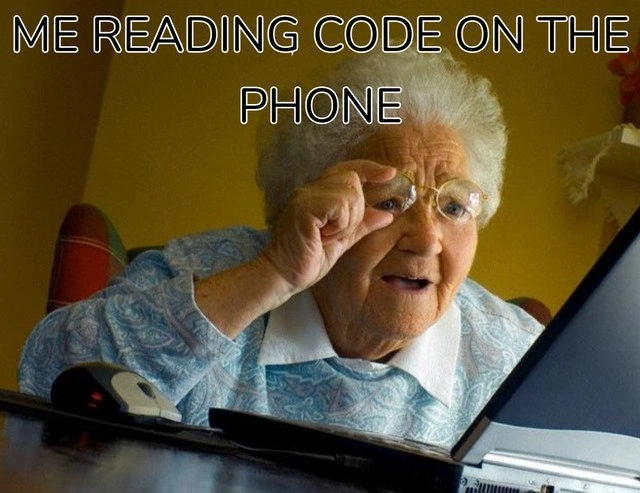
Imagine trying to read your favorite storybook, but it’s printed really, really small on a tiny piece of paper. You’d hold it super close to your face, maybe squint or use a magnifying glass, and probably still get a headache, right? That’s what’s happening in this picture, except the “story” is computer code and the “tiny piece of paper” is a phone screen. The grandma in the meme is showing how any of us (even young folks with good eyes) feel when we look at a phone and see a ton of tiny letters and symbols. It’s funny because you know you’re not supposed to read something so important on such a small screen – it’s a silly situation. The person thought they could do it easily, but now they regret it because it’s so hard to see. In simple terms: reading code on a phone is like trying to do homework with a crayon on a grain of rice – frustrating and not a good idea! It makes us laugh and say, “Oops, never doing that again.”
Level 2: Scroll and Squint
Let’s break this down in simpler terms. The meme shows a grandma squinting at a laptop, but the caption says “me reading code on the phone.” It’s comparing developers to that grandma in the moment we try to read code on a phone’s small screen. Why would we do that? Suppose a teammate sends you a pull request – that’s a bundle of code changes they want you to review and merge into the project. Maybe you get a notification while you’re away from your computer. You think, “Oh, I’ll just quickly check it on my phone.” That’s when the fun (or frustration) begins.
Code readability refers to how easy it is to read and understand code. On a big monitor, code is usually pretty readable: you can see long lines of code and the spacing (indentation) that shows which code is inside loops or if-statements. Most code editors and sites use a special font where every character is the same width (a monospaced font) so things line up nicely. On your phone, however, the screen is so small that a line of code might not fit across it. For example, consider a single line of code that’s 100 characters long (not unusual in programming). On your phone’s narrow display, that either means:
- The text becomes very, very small to fit the whole line on the screen, or
- The line gets cut off and you have to drag/scroll sideways to read the rest.
Neither option is great. If the text is tiny, you end up doing the classic pinch-and-zoom gesture, then swiping around to see different parts of the code. If lines wrap or require scrolling, you lose the visual cues like neat indentation or alignment that tell you what’s going on. It’s super easy to miss a comma or a } bracket when you’re essentially peeking through a keyhole. No wonder the grandma in the picture is holding her glasses and leaning in – that’s any developer squinting at a dense block of code on a smartphone. Tiny screen struggle is a very real thing!
From a developer experience perspective (often shortened as DX), this is far from ideal. Developer experience is all about making the developer’s life easier and more productive. Reading code on a phone scores low on the DX scale because it’s uncomfortable and slow. In terms of developer productivity, something that might take you 2 minutes on your dual-monitor desktop (like spotting an error or understanding a code change) might take 10 minutes on your phone – if you don’t give up first. You might accidentally tap the wrong thing, or struggle with the interface (ever try selecting and copying a code snippet on a mobile screen? it’s fiddly). All these little hassles add up to a feeling of “I shouldn’t have tried this.”
Now, the humor here is that just about every developer has done this at least once, thinking “I’ll be productive on-the-go.” And almost everyone has regretted it. It’s a relatable developer experience: we value good equipment (like nice big screens and comfy keyboards) for a reason! The meme exaggerates this by using the grandma image (she’s even using a wired mouse with a laptop, which screams old-school). In meme language, an older person squinting at technology is a way to say “I can barely see what I’m doing, this is awkward.” So when developers see this, they immediately connect to the feeling of developer frustration – it’s like, “Yep, that’s me trying to decipher 12px text of Java code on my iPhone.” We laugh because it’s true and a little absurd. Next time we might remember this meme and just wait until we’re back at a proper computer to do a thorough code review.
Level 3: Monospaced Microscope
At first glance, this meme gets a knowing laugh from seasoned developers. It uses the classic grandma meme format – an elderly woman squinting at a screen – as a visual punchline. The caption "ME READING CODE ON THE PHONE" highlights a real DeveloperExperience (DX) pain point: trying to review code on a tiny phone display. In a normal dev workflow, a pull request review happens on a nice big monitor with plenty of screen real estate. But catch yourself away from your desk (or feeling lazy on the couch), and you might attempt the dreaded mobile PR review. The result? You’re essentially imitating grandma’s squint, holding the phone at odd angles like a makeshift microscope. 📱🔍
Why is this so brutal from a technical perspective? It comes down to code readability and how our tools are designed. Code is usually displayed in a monospaced font (every character takes up equal width). On a desktop, that font might be 12-14px size, and an 80-120 character line of code fits horizontally without issue. You can see the full context, indentation, and structure. On a phone screen, however, those same 100 characters become microscopic if you try to fit them all at once. If you zoom in to make the text legible, now a single code line spills off the screen, forcing you to scroll horizontally back and forth to read one line. This is the equivalent of reading a sentence through a mail slot – you only see a fragment at a time. It’s easy to lose the flow of logic because you can’t take in the whole picture. Key developer productivity tools like side-by-side diffs or syntax highlighting might also be cramped or absent on mobile, further slowing you down.
Consider an example: imagine reviewing a diff on GitHub’s mobile interface. Instead of a comfy IDE or even a large browser window, you have maybe 6 inches of screen. Long function names, nested callbacks, or deeply indented code blocks will either appear ridiculously tiny or break into janky wrapped lines. Indentation – which is crucial for understanding scope in languages like Python or JavaScript – might not even be visible without scrolling. Subtle bugs (like a mis-placed parentheses or an off-by-one error) could hide in plain sight because you’re too busy pinching and zooming. The humor in the meme is that every dev recognizes this absurd situation: you can perform a code review on your phone, but doing so makes you feel about 90 years old, squinting and baffled.
To put it in code terms, if we had a function to handle code review, it might warn us about this scenario:
// Pseudocode illustrating the "tiny screen" review scenario
function reviewCode(device) {
if (device.type === 'phone') {
console.warn("Code might appear teeny-tiny on this screen!");
// Suggest to find a larger display for optimal experience
}
openPullRequestDiff();
}
In reality, most experienced devs will postpone a detailed review until they’re back on a proper setup. But of course, curiosity or urgency sometimes wins – hence the regret part of the meme title. The shared laughter is in that relatable developer experience: everyone remembers the one time they tried to approve some changes from their phone and nearly went cross-eyed. It’s a gentle poke at the expectation that we be able to work anywhere, anytime – technically possible, practically painful. The meme nails this truth with a single image and line of text, turning a frustrating workflow into communal developer humor.
Description
The meme shows an elderly woman sitting at a desk, leaning far forward and squinting at an open laptop while holding a wired mouse. She wears a light blue patterned sweater and is framed by a warmly-lit living-room background. Large white uppercase caption text overlaid at the top reads: "ME READING CODE ON THE PHONE." The humor comes from equating the tiny, hard-to-see smartphone code view with the stereotypical image of someone straining to read small text, highlighting real developer pain around code readability, developer experience, and productivity when away from a full workstation
Comments
7Comment deleted
Reviewing a 2,000-line PR on my phone taught me two things: my pinch-zoom scales better than our monolith, and “LGTM” is basically an accessibility feature
Nothing makes you appreciate your 32-inch monitor setup like trying to debug a race condition in production while squinting at a GitHub diff that requires horizontal scrolling for every single line
Approving a PR from your phone is the modern trust fall: you reviewed 8 visible characters per line and the vibes of the diff stat
When the P0 production incident hits at 2 AM and you're reviewing the emergency hotfix PR on your phone, suddenly that 27-inch 4K monitor and mechanical keyboard back at the office feel like distant memories of a more civilized age. Nothing quite captures the architectural irony of building responsive web applications all day, only to discover that GitHub's mobile diff view makes reading a 500-line code change feel like deciphering cuneiform tablets through a keyhole
Reading code over the phone: where O, 0, and Ø are indistinguishable and the SEV‑1 ends up being a zero‑width space
Mobile PR diffs: where 'responsive design' meets 'retina strain' - because who needs legible diffs when you have pinch-to-pry-apart nested ternaries?
Reviewing a 900-line PR on my phone turns architecture into a binary: pinch-to-zoom or LGTM - the only time cyclomatic complexity and my patience both drop to 1