The Enthusiastic Ubuntu Install and The Inevitable Windows Retreat
Why is this OperatingSystems meme funny?
Level 1: Sticky Situation
Imagine you have a group of friends who all got a new, super cool sticker for their favorite toy. They’re all excited, showing off how awesome their toys look with this sticker. You don’t want to feel left out, so you get the same sticker and slap it on your favorite toy, just like all your homies did. At first, it’s fun and you’re happy because you’re part of the cool crowd. But after a while – say, a year later – you decide you don’t really like that sticker anymore. Maybe it’s making it hard to use the toy, or you just miss how things were before. So you try to take the sticker off… and uh oh, it’s really sticky. It won’t come off cleanly! There’s glue residue everywhere, maybe bits of torn sticker, and you’re worried you might even break your toy trying to peel this thing off. You sit there feeling frustrated, looking at your once-pristine toy, and think, “Why did I ever put this on? I wish I could just go back to how it was before.” That’s exactly the feeling this meme is joking about. The person did something because all their friends were doing it, and later found out that undoing it is a lot harder than they thought. It’s funny in a friendly way, because we’ve all been in a sticky situation like that – easy to join in, tough to back out!
Level 2: Dual Boot Dilemma
Let’s break down what’s happening in this meme in simpler terms. First, we have Ubuntu and Windows – two different operating systems. An operating system (OS) is the main software that manages your computer, like Windows 10/11, macOS, or Linux. Ubuntu is a popular version of Linux known for being relatively user-friendly and free. Many developers like Linux/Ubuntu because it gives them a lot of control, customization, and it’s great for programming environments. Windows, on the other hand, is very common on PCs and is what our meme’s protagonist originally had. Now, the meme scenario is that this person decided to install Ubuntu on their computer because all their friends (“homies”) were doing it. This often happens in tech – you hear your buddies or online peers say “Linux is awesome, you should use it!” and you feel peer-pressured to try it out.
When he went to install Ubuntu, he likely set up what’s called a dual boot. Dual booting means you keep your original OS (Windows) and install a second OS (Ubuntu) alongside it. The computer can then boot into either Windows or Ubuntu, one at a time, but both are stored on the same hard drive. How is that possible? Well, the hard drive gets divided into sections called partitions. Think of a hard disk partition like splitting a bookshelf into two sections: one section for Windows files, one section for Ubuntu files. When you install Ubuntu, the installer probably shrank the Windows partition to make room and then created a new partition for Ubuntu (and maybe a small swap partition for Ubuntu’s use). So physically the data is separated, but they share the hardware.
Now, when you turn on a computer, something needs to decide which OS to start – that something is the bootloader. A bootloader is a small but crucial program that runs immediately when you power on your PC, before any operating system is fully loaded. Its job is to load up an OS. In a dual-boot setup, the bootloader will present you with a menu asking “Which OS do you want to start today?” In our case, Ubuntu installs its default bootloader, GRUB, to handle this. GRUB stands for GRand Unified Bootloader and is designed to recognize multiple operating systems. When Ubuntu got installed, GRUB likely took over the boot process from Windows’ own bootloader. So instead of your PC booting straight into Windows as it used to, now it might pause at a text menu (usually with an orange highlight if Ubuntu themed) where you can choose Ubuntu or Windows. GRUB knows how to start Ubuntu (since Ubuntu set it up) and it also usually detects Windows and can start it too. At this point, everything is actually working fine – you have the choice of OS at each startup. It’s pretty cool, actually, and at the time of install our guy was probably excited to see that menu pop up, confirming he’s now a dual-boot power user.
The real trouble comes later, when the novelty wears off or if Ubuntu didn’t turn out to be as comfortable as expected. The meme says “one year later and still not knowing how to uninstall it and get back to Windows.” So let’s unpack that: he wants to remove Ubuntu from his system, presumably because he’s not using it and it might even be causing inconvenience. Perhaps he misses some Windows-only programs or just got tired of switching back and forth. “Getting back to Windows” implies he wants his computer to go back to running Windows only, like it did originally. To do this, two main things would need to happen: 1) remove the Ubuntu partitions (to free up space and delete Ubuntu’s files), and 2) restore the Windows bootloader so that the PC starts Windows automatically again, without showing GRUB or looking for Ubuntu.
Why is that hard? For someone who’s never done it, it’s pretty confusing! Unlike uninstalling a normal program (where you might go to Add/Remove Programs in Windows and just click uninstall), removing an entire OS is manual. There’s no “uninstall Ubuntu” shortcut. The user might not even see Ubuntu listed anywhere inside Windows. In fact, Windows doesn’t recognize Ubuntu’s ext4 partition in its file explorer – it might just show up as an unknown or hidden partition in the Disk Management tool. It’s kind of like having a secret room in your house that only Ubuntu has the key to. Windows largely pretends that Ubuntu’s section of the drive doesn’t exist (unless you go looking in specialized disk utilities). So a novice user might not even be sure how to start removing it. They could delete the partition via Windows’ Disk Management utility (which would effectively erase Ubuntu’s storage space), but doing just that leads to the boot problem we discussed: GRUB would still be set as the bootloader in the system, and without the Ubuntu files it expects, the boot process breaks. Imagine GRUB as a librarian that suddenly can’t find one of the books (the Ubuntu OS) in its catalog – it panics because it doesn’t know how to boot anything now. The computer might then fail to boot entirely, even into Windows, until the Windows bootloader is restored. That’s scary! It’s easy to see why our protagonist would be hesitant. One wrong move and you think, “Did I just brick my PC?” (Meaning it won’t start at all).
So the proper way to uninstall Ubuntu and go back to Windows involves a couple of steps that sound kind of advanced:
- Backup important data (always wise before messing with partitions!).
- Use Windows’ tools to fix the bootloader. In Windows 10/11, typically you’d boot from a Windows installation or recovery media and use the Startup Repair or run commands like
bootrec /fixmbrandbootrec /fixboot. These basically tell Windows, “Hey, put your own boot code back in charge and clean up the startup process.” - Only after fixing the boot process, go ahead and delete the Ubuntu partitions (and then maybe expand the Windows partition to reclaim the space). This could be done in Disk Management (graphically) or using a command-line tool like
diskpart.
For someone who’s never heard of these terms, that’s a tall order. Our meme friend likely didn’t know where to begin. He “still not knowing how” suggests he didn’t feel confident enough to attempt it, or perhaps he tried something and hit a snag. He might have Googled “How to remove Ubuntu dual boot” and been frightened by tutorials that mention things like “Repairing the MBR” or “Using a Linux live USB to fix GRUB.” It’s understandable – words like MBR, GRUB, partition can sound like techno-babble if you’re new. It’s a steep learning curve for sure.
Let’s also address why he installed Ubuntu in the first place, as that’s part of the story. All his friends were doing it – meaning there was a belief that using Linux would make life better or mark him as a serious coder. There is a long-running discussion in developer communities: Linux vs Windows for development. Many programming tools originated on Unix/Linux, and developers often tout that “it works better on my Linux machine” or they enjoy scripting and automation on Linux. Ubuntu, specifically, is often recommended to beginners who want to try Linux because it has a reputation for being easier to install and use compared to other distributions. So our guy likely got caught up in that excitement: Linux hype can be contagious. It’s free, it’s customizable, and all your dev heroes might be using it. It’s very relatable for a newcomer to think they should be on Linux to “level up” their skills.
During that install day, he probably had help or at least a tutorial. Modern Ubuntu installers actually make dual-boot fairly straightforward: you click “Install alongside Windows,” slide a divider to allocate space for Ubuntu, and it does the rest. The installer even says something like “setting up bootloader” in the progress, but a newbie may not understand it – just that it rebooted and presented a nice menu. So at first, everything is great. Ubuntu boots up, he can log in, maybe he even shows off the fancy terminal or the Ubuntu GUI to his friends, who all cheer (like in the top panel image). The developer experience at that moment feels exciting – new OS, new tools, a feeling of being more “advanced.”
But as time went on, perhaps he ran into issues. A year is a long time; maybe he found he wasn’t actually using Ubuntu much after the initial enthusiasm. Common friction points could be: some favorite Windows applications or games didn’t work on Linux, he had trouble with certain hardware (maybe his printer or a specific device didn’t have good Linux drivers), or he just didn’t find the supposed “productivity boost” that he expected. Using Linux can indeed require adopting new workflows (like using the terminal for tasks that were point-and-click in Windows). That adjustment can be hard. It’s also possible that he did use Ubuntu for a while but then a Windows update or a work requirement forced him back to Windows more frequently. Over the year, Ubuntu might have become an annoyance – e.g., having to choose OS at boot every time, or Ubuntu taking up a chunk of disk space while rarely being used. Eventually, he says “Alright, I just want my old single-OS setup back.”
Now, because he doesn’t know how to achieve that, he’s essentially stuck in this dual-boot state. The meme emphasizes how long it’s been — a whole year — which is exaggeration for comedic effect, but also plausible if he was busy or afraid to tackle it. Being peer-pressured into something often means you didn’t fully learn or want all the details, so undoing it becomes extra challenging. He might have even asked the same friends, and they joked “Haha, I have no idea how to remove it, just keep it!” (Not very helpful!). In reality, plenty of guides exist to fix this, but the point is he’s feeling the regret and frustration. The relatable humor is strong: many of us have had a tech setup we wanted to undo (be it an OS, a framework, or a tool) and found that “getting back to the way things were” was harder than expected. It’s like untangling a bunch of wires that you yourself tangled up.
To someone early in their tech journey (a junior developer or a student), the takeaway is that operating systems aren’t like apps you can just swap in and out. The Operating Systems themselves control fundamental things like booting and hardware access, so changing them means doing some heavy lifting. And if you do it because of hype rather than a real need, you might end up with dual_boot_regrets as the meme jokes about. On the bright side, going through this teaches a lot. Our protagonist probably knows a ton more about how his computer works now. It’s a tough lesson in the software installation process for OS: easy to install, not so straightforward to uninstall. And next time, maybe he’ll try a Linux live USB or the Windows Subsystem for Linux for a low-commitment trial instead of jumping in headfirst. But hey, no judgement – many of us only learn by doing (and messing up) exactly like this! That’s why this meme is so relatable and funny to developers: it’s portraying a learning experience we’re almost proud of after we survive it.
Level 3: Bootloader Blues
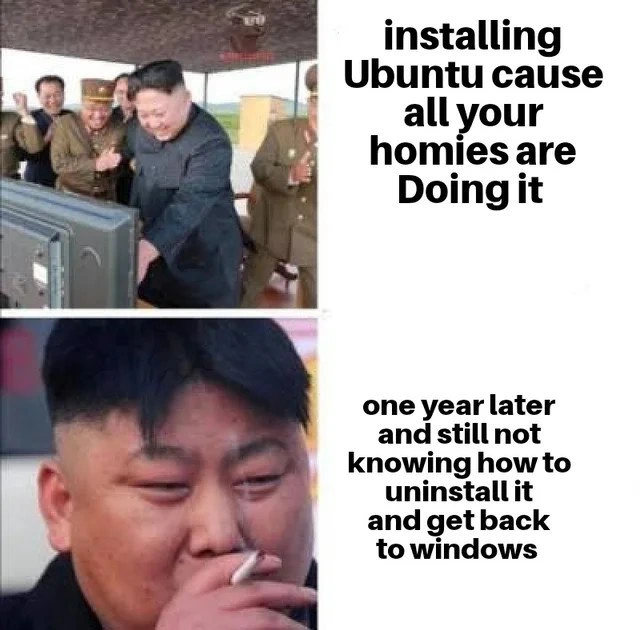
This meme nails a classic developer experience: getting swept up in the hype of a new technology (in this case, switching operating systems) and then facing the harsh reality of maintaining or reverting it. The top panel’s caption “installing Ubuntu cause all your homies are Doing it” perfectly captures peer pressure in tech culture. All the friends or co-workers are raving about Linux (“Come on, all the cool devs use Ubuntu! It’s so much better for coding!”), and our protagonist doesn’t want to feel left out. It’s the tech equivalent of everyone jumping off a bridge – or rather, everyone dual-booting their system just because others are doing it. In the image, a group of uniformed individuals excitedly pointing at a screen symbolizes that communal hype: “Look, you’re one of us now, welcome to the Linux club!” The promise of better Developer Experience (DX) and the allure of open-source freedom make Ubuntu sound like the gateway to programming enlightenment. This moment is full of optimism and maybe a bit of smug pride – our guy likely bragged about running the superior Linux OS, customizing his terminal, and saying goodbye to Windows bloat. It’s all high-fives and victory laps during the installation party.
Fast-forward one year, and we hit the bottom panel: “one year later and still not knowing how to uninstall it and get back to windows.” The once-excited developer is now alone, facepalming (almost literally, since in the image he’s looking downward in disappointment, possibly smoking in stressed contemplation). This dramatic shift is where the humor really bites: it’s painfully relatable to anyone who’s dabbled in dual-booting or any big tech switch-over. We’re laughing with this poor soul because many of us have been there – stuck in a self-inflicted tech predicament. The phrase “still not knowing how to uninstall” is both funny and tragic. It implies he might have spent months tolerating an OS he didn’t actually want to use, simply because he couldn’t figure out how to remove it. Maybe every time he powered on his computer, he’d see that GRUB menu (the black and white text screen asking him to choose between Ubuntu and Windows) and get a little reminder of his dual_boot_regrets. Perhaps he even set Windows as the default in GRUB eventually, but the unused Ubuntu entry just sat there, a thorn in his boot sequence saying “remember me?”.
Why didn’t he just remove Ubuntu right away when he grew disillusioned? That’s where the hidden complexity and bootloader blues kick in. For one, uninstalling an OS isn’t common knowledge – especially if nobody taught you. His “homies” enthusiastically guided him through the install (“It’s easy bro, just click next a few times, Ubuntu even does partitioning for you!”), but a year later those same friends might not be around to help undo it. It’s like a one-way initiation rite. There’s a famous quip among sysadmins: “One does not simply uninstall an OS.” Unlike applications, operating systems don’t come with a convenient uninstaller. Windows and Linux are basically two rival managers that don’t normally help each other. So our guy is in a predicament: he wants Windows to be in charge again, but currently GRUB is the one greeting him every time he boots. Removing Linux is not just Drag-and-Drop to Trash; it requires arcane steps that sound intimidating: editing partitions, fixing boot records… things he likely avoided out of fear of wrecking his whole system. The risk of messing up your bootloader is real – do it wrong and you might end up with an unbootable machine. That fear can paralyze a person into “I’ll deal with it later” procrastination. Well, later has become one year later, and he’s still stuck.
This scenario is a rite of passage in the developer humor world because it combines overconfidence, lack of planning, and the sobering slap of reality. It’s poking fun at the learning curve of switching to Linux. In year one, you’re learning shell commands and customizing your desktop environment. By year two, you’re desperately learning about the Windows Recovery Environment and how to run bootrec commands to fix what you did. The meme resonates strongly with developers who have experienced Linux_noob_problems: things like struggling with Wi-Fi drivers, being baffled by sudo apt-get, or partitioning their disk incorrectly. A lot of us remember our first time installing Linux and how something as simple as graphics drivers or dual-monitor setup could lead to frustration. Often, after wrestling with those issues (and not wanting to admit defeat to our friends), we’ve thought “maybe I should just go back to Windows.” But as our meme hero discovered, extricating yourself isn’t so straightforward.
There’s also a facet of social commentary here: tech peer pressure. Developers love to hype up what they’re into. In this case, it’s os_choice_hype – the almost zealous belief that Linux (Ubuntu specifically, known for being user-friendly) is the one true path to developer nirvana. The newbie likely heard things like: “Why are you still on Windows? All the tools are better on Linux, the terminal is awesome, you’ll be closer to the servers, etc.” So he jumped in, maybe dual-booting so he could keep Windows “just in case.” But those conversations rarely cover, say, how to restore your system if you change your mind. It’s similar to how everyone might encourage you to use a new framework or database, but nobody talks about how to migrate off of it. Here the peer_pressure_decisions led to an OS switch without an exit plan.
One year later, he’s frustrated enough to want out, but ironically this experience likely taught him more about system internals than he ever wanted to know. Maybe at the start he barely knew what a partition was. Now, after countless forum searches like “How to remove Ubuntu and restore Windows bootloader”, he’s learned terms like GRUB, MBR, and dual-boot the hard way. The situation could be seen as a failure in Developer Experience design – perhaps OS installers should make it easier to revert changes – but it’s also a kind of darkly funny educational journey. He basically got an impromptu lesson in system administration. In a sense, the Ubuntu install itself was easy (thanks to Ubuntu’s polished installer), but the Ubuntu uninstall turned into a year-long personal IT project.
The “year-long struggle” bit could also hint that in that year, he might have kept using Ubuntu hoping it would grow on him. Maybe he thought, “I’ll figure out how to remove it eventually, but let’s give it one more try.” Perhaps he even grew to appreciate some aspects of Linux (coding on it can be pretty great once you configure everything). But the comfort of Windows – and the friction of Linux for certain tasks – kept nagging him. It’s telling that after one year, he still wants to return to Windows fully. Not everyone ends up a convert in the infamous “Windows_to_Linux_switch” saga. Some try it and happily stick with Linux; others, like our meme star, decide it’s not worth the hassle. And there’s no shame in that – but the meme milks the comedic aspect of being unable to leave. It’s like those horror movies where someone joins a cult and then discovers leaving is much harder than joining!
On a brighter note, experienced devs reading this meme might chuckle and think: “Heh, I bet he never heard of WSL.” Indeed, nowadays Windows Subsystem for Linux (WSL) lets you run Linux tools on Windows without dual-boot madness. A senior engineer might wryly note that if our friend had used a VM or WSL to experiment, he could have avoided the grub_bootloader fiasco entirely. This is where a bit of TechHistorian perspective comes in: back in the day (before WSL was around), dual-booting or using Live CDs was the way to try Linux. So lots of people got burned exactly like this meme. It was almost a rite of passage to bork your bootloader at 2 AM and learn how to fix the MBR from a console. Today, there are safer ways to satisfy that Linux curiosity. But clearly in the context of the meme (2021 or so), the classic dual-boot trap is still catching newcomers.
In summary, the humor of this meme comes from a place of developer frustration and hindsight. It’s the “LOL, been there, done that” empathy laugh. We see the excited newbie -> burned out regretful user transformation and recognize it instantly. The meme exaggerates it in a fun way: a whole year of not figuring out the uninstall. (Hopefully it didn’t really take that long, but it drives the joke home.) It highlights how something can be relatable humor in tech: you hype what’s new and shiny, only to discover later that undoing your choices can be an epic quest of its own. It’s both a cautionary tale (“know what you’re getting into with that Linux vs Windows decision!”) and a light-hearted poke at our tendency to dive in first and read the manual later. And above all, it’s funny because every developer who’s ever tried to support a friend through an Ubuntu install, or had to fix someone’s messed up dual-boot, is nodding and laughing (perhaps with a slight cringe) at how true it rings.
Level 4: Master Boot Regrets
Under the hood, this meme exposes the nitty-gritty of PC bootloaders, partitioning, and the perils of trying to undo a dual-OS setup. When our enthusiastic dev installed Ubuntu alongside Windows, the installer wasn’t just copying files – it was also modifying the system’s boot process at a fundamental level. In a traditional BIOS system, there’s a special 512-byte section on the disk called the Master Boot Record (MBR). Ubuntu’s installer cheerfully replaced the Windows boot code in the MBR with GRUB (the Grand Unified Bootloader), effectively making GRUB the new boss of the boot process. In modern UEFI systems, a similar takeover happens in the EFI partition: Ubuntu adds its boot files and often makes the GRUB bootloader the default. The idea is that GRUB is a smart intermediary – it can show a menu at startup to let you choose between Windows or Ubuntu. This mechanism is known as chainloading: GRUB can either launch Linux directly or hand off control to Windows’ boot manager when you select Windows. It’s a clever technical solution to the dual boot problem of having two operating systems coexisting.
However, this also means uninstalling an OS is not as simple as removing an app – there’s bootloader sorcery involved. The partition table on the disk now contains multiple partitions: one for Windows (likely NTFS file system), one (or more) for Ubuntu (ext4 for the main filesystem, maybe a swap partition), and possibly a small boot or EFI partition. Ubuntu’s presence in the partition table and boot sequence is deeply entrenched. If you just delete the Ubuntu partition without restoring the original bootloader, GRUB will freak out on next boot because its configuration (pointing to Ubuntu) is now broken. You might be greeted with a dreaded grub rescue> prompt or a cryptic error like “no such partition.” The computer essentially says, “I can’t find that Ubuntu you wanted me to boot, now I don’t know what to do.” This is the technical heart of the meme’s joke: the hidden complexity of reversing a dual-boot setup.
To truly uninstall Ubuntu and get back to a pure Windows boot, one must delicately undo what the installer did:
- Remove or reformat the Ubuntu disk partition(s) to reclaim space.
- Restore the Windows bootloader to the MBR or UEFI so the system boots directly into Windows again, bypassing GRUB.
In practice, this often means using Windows recovery tools to run commands like bootrec.exe to repair the boot sectors. For example, within a Windows Recovery Environment one might run:
REM Restore Windows bootloader in MBR and fix boot sector:
bootrec /fixmbr
bootrec /fixboot
These commands wipe out GRUB’s control (fixing the Master Boot Record with Windows’ standard code, and ensuring the Windows boot sector is intact). Technically inclined users might also use tools like bcdedit (on Windows) to ensure Windows Boot Manager is set up correctly, or efibootmgr (on Linux) to tweak UEFI boot entries. There’s also the matter of cleaning up the partition table (e.g., using Disk Management in Windows or gdisk/fdisk in Linux) to merge or reuse the freed space from the removed Ubuntu partition. It’s intense OperatingSystems wizardry for someone who thought they’d just click an uninstall button.
What makes this hilarious from a hardcore tech perspective is that the newbie essentially performed a feat of low-level system configuration (installing a second OS and altering the boot sequence) without fully realizing it. The software installation process for an OS involves a lot of moving parts: bootloaders, filesystems, partitioning, and sometimes even BIOS/UEFI settings. Reversing those changes is equally complex. There’s no guided “uninstall Ubuntu” wizard because operating systems aren’t meant to be disposable in the way apps are. Fundamentally, this is about how computers boot: only one program can hold the keys to start the system, and once you hand those keys to GRUB, you need to ask Windows to politely take them back later. It’s a classic case of “so easy to do, so hard to undo” because of how tightly integrated an OS becomes with the machine’s boot process and disk layout. In short, the meme humorously hints at deep systems concepts: bootloader orchestration, disk partition anatomy, and the absence of a rollback plan when jumping on the Linux bandwagon. It’s a crash course in why learning these low-level details is important – and why that poor developer ended up with master boot regrets.
Description
A two-panel meme format featuring images of North Korean leader Kim Jong Un to contrast enthusiasm with struggle. The top panel shows a happy, celebratory Kim Jong Un looking at a monitor, with the text 'installing Ubuntu cause all your homies are Doing it'. The bottom panel is a close-up of Kim Jong Un looking stressed and smoking a cigarette, accompanied by the text 'one year later and still not knowing how to uninstall it and get back to windows'. This meme captures the common developer journey of enthusiastically trying out a Linux distribution like Ubuntu, often due to peer influence, only to face the non-trivial technical challenge of removing it and restoring the Windows bootloader, a frustrating experience for those unfamiliar with disk partitioning and GRUB

Comments
21Comment deleted
Switching to Ubuntu for the dev cred is a rite of passage. Spending the next weekend figuring out how to exorcise GRUB from your MBR just to get back to Windows is the final exam
I can roll out blue-green deploys across 200 microservices without flinching, but stripping GRUB from the EFI partition so Windows boots again feels like live-editing hex with a blindfold
The real tragedy isn't not knowing how to uninstall Ubuntu - it's realizing you've spent a year configuring dotfiles, compiling from source, and arguing about systemd vs init, only to discover your productivity peaked when your biggest decision was whether to use WSL or PowerShell
The classic Ubuntu trap: your friends convince you it's just 'sudo apt install freedom', but nobody mentions that getting back to Windows requires understanding UEFI boot order, partition tables, and why GRUB now owns your soul. A year later, you're still Googling 'how to remove Linux without losing data' while your Windows license key mocks you from a sticky note you can no longer find
Classic migration POC: install Ubuntu for a sprint, let GRUB squat in NVRAM, then discover the rollback is bcdboot + ESP surgery conducted via a GParted USB at 2 a.m
Installed Ubuntu for VM-free street cred; a year later, your homies are back on WSL while you're dd-ing the EFI partition
Ubuntu installs in 10 minutes; uninstall takes a fiscal quarter - rename the laptop to 'ci-runner-03', let GRUB keep the EFI, and expense a new Windows box
Multi-boot?No? Comment deleted
win10 updates erase dualboot Comment deleted
Didn't they fix it a while ago? Comment deleted
Knowing Microsoft i doubt it Comment deleted
I have dual boot and updated to win11 without problems Comment deleted
no they don't. I have win10 dual-booted with arch, and it works surprisingly well. Comment deleted
May I know why not just use wsl2? Comment deleted
because that negates all the performance improvements you get from using linux natively Comment deleted
Ah make sense. thanks Comment deleted
I usually don't update Win10 Comment deleted
Lol Comment deleted
grub broken won’t boot 🔥 Comment deleted
when I first got into linux and didn't really know what I was doing I made my pc go into bootloop while installing openSUSE, and not knowing how to fix that I had to format the entire drive. Twice. Comment deleted
Not sure if English Pls all speak english it is very important Comment deleted