A 'Scary Idea': The Cursed MacBook and ThinkPad Keyboard Hybrid
Why is this Hardware meme funny?
Level 1: Steering Wheel on a Bike
Imagine you have a bicycle that you usually steer with handlebars, and one day someone sticks a car’s steering wheel right in the middle of those handlebars. It would look super weird, right? You’d probably laugh but also feel confused about how to ride that bike now. Do you use the handlebars like you always have, or do you grab the steering wheel instead? It’s kind of funny and kind of unsettling at the same time.
This meme is doing the same thing but with laptops. It took one thing we only see on certain laptops – a little red “joystick” in the keyboard (that’s the bike’s handlebars, in our analogy) – and stuck it onto a laptop that usually never has that (the car steering wheel, in this case). The result is both silly and surprising. It’s like mixing two very different toys together: the end result might be cool because you get the best of both, but also confusing because you’ve never seen them combined before. The reason people who write computer programs (developers) find it funny is that they’re imagining how strange it would feel to use. It makes them think, “Whoa, what if my familiar gadget suddenly had this extra weird control? I wouldn’t know what to do at first!”
So just like a bike with a car steering wheel would make you stop and giggle, this picture of a MacBook with a big red dot in the keyboard makes techie folks laugh. It’s a playful kind of scary idea – not actually frightening, but so unusual that it gives you a little shock and then a smile, because it’s combining two things that normally don’t go together.
Level 2: Hardware Frankenstein
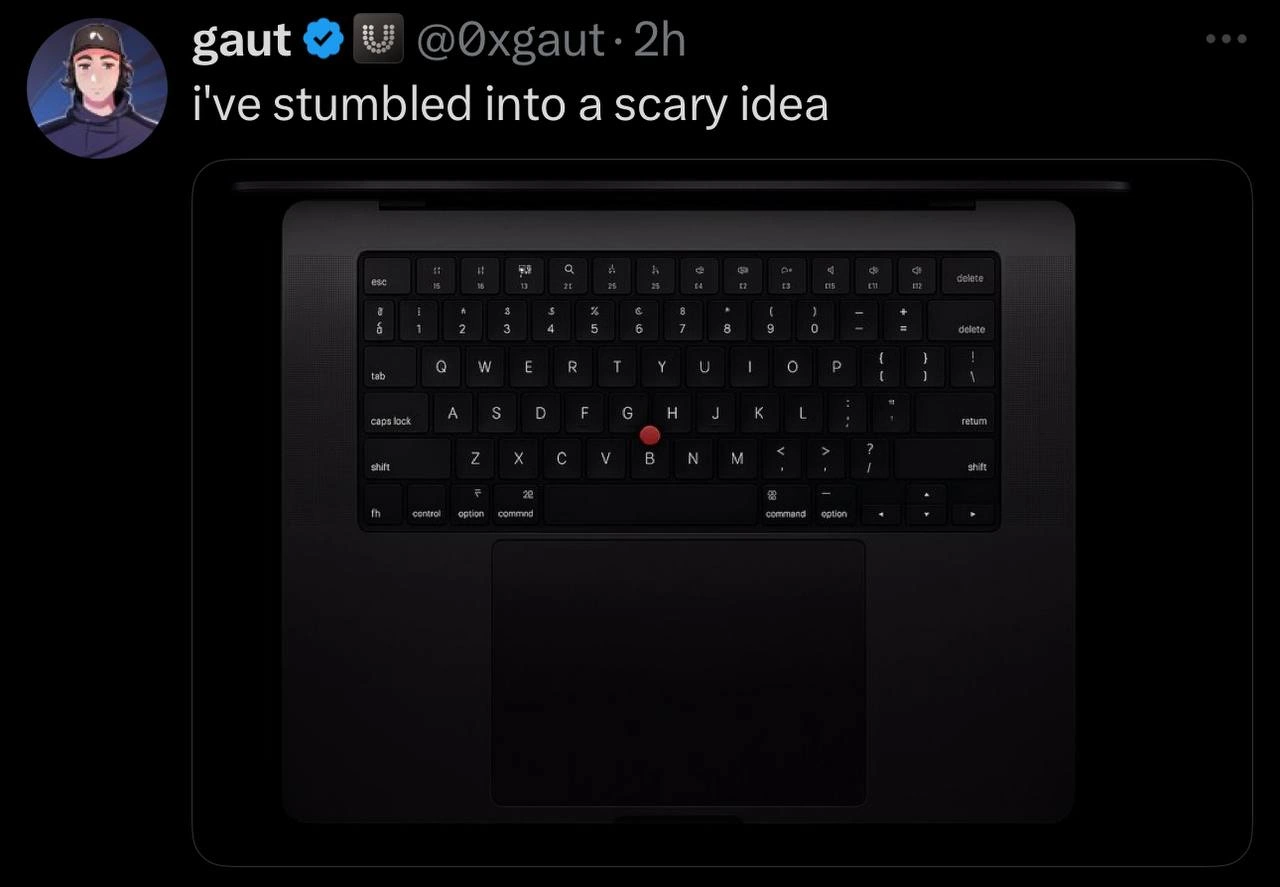
So what exactly are we looking at here? It’s a photo-realistic concept of a MacBook laptop keyboard that’s been merged with a signature feature of ThinkPad laptops: the TrackPoint (that little red pointing stick). This is essentially a hardware_frankenstein mashup – like someone took two different laptop DNA strands and spliced them together. Apple’s MacBooks are known for their large trackpad (the flat touch-sensitive area below the keyboard used to move the mouse pointer) and their super-clean design. Lenovo ThinkPads, on the other hand, are famous among developers and IT folks for their comfortable keyboards and that quirky red trackpoint_on_macbook nub in the middle of the keys, which acts like a tiny joystick for your cursor. The meme image shows an Apple laptop keyboard (you can tell by the key labels: the presence of the command ⌘ and option keys instead of Windows-specific keys) but unexpectedly, right between the G, H, and B keys, there’s that thinkpad_red_nub sticking out. On a real ThinkPad, that spot is exactly where the TrackPoint lives; on a real MacBook, there’s nothing but smooth key caps and aluminum finish. Seeing them combined is both fascinating and a bit unsettling – kind of like seeing a familiar car model but with a steering gadget from a completely different vehicle bolted on.
Let’s break down why developers find this funny and what all those tags and terms mean:
TrackPoint: This is the official name for the small red joystick found in the middle of many Lenovo (formerly IBM) ThinkPad laptop keyboards. It’s essentially an alternate way to move the mouse pointer. Instead of using a touchpad or an external mouse, you nudge this stick with your finger. It’s loved by some power-users because you don’t have to take your hands off the keyboard home row to move the cursor. In the meme, the TrackPoint is that bright red dot – it immediately catches your eye because Apple’s design normally wouldn’t have any bright colored key like that.
MacBook Keyboard & Apple Aesthetics: Apple’s MacBook laptops (running macOS) typically have a very minimal, flat keyboard with backlighting and a huge trackpad just below it. They emphasize a clean look: all keys are black or grey, and nothing sticks out. There’s certainly no red nub in the middle! The keys labeled “command”, “option”, “control”, etc., and the lack of a Windows logo key, tell us this is an Apple layout. Apple also has a very different philosophy on pointers — they design some of the best trackpads in the industry (large glass surface, multi-touch gestures). No MacBook has ever had a built-in pointing stick. So adding a TrackPoint is totally foreign in Apple’s world. That’s why it looks so “scary” or shocking at first: we just don’t expect these two designs together.
ThinkPad & the Red Nub Legend: ThinkPads are a line of laptops originally by IBM, now by Lenovo, known for being robust and utilitarian. The TrackPoint nub is basically the Lenovo/IBM signature – usually bright red (sometimes it has a textured cap). Many longtime developers and sysadmins love it because it’s precise and keeps your hands in place while coding or navigating documents. ThinkPads usually include both the trackpoint and a smaller touchpad, giving users a choice. Over the years, a bit of a cult following has grown around that little red pointer. People who get used to it often claim it’s faster and avoids the need to move your hand to the touchpad. People who come from the Apple world, however, might find it weird at first, because you have to apply pressure and sort of push it in the direction you want the mouse to go (it’s not visually moving like a joystick, it’s sensitive to force).
Muscle Memory and Ergonomics: The meme caption mentions “muscle-memory battles” and “cross-platform ergonomics.” Muscle memory in this context means your fingers have learned to do things a certain way automatically. For example, if you’re a Mac user, you might instinctively move your thumb to the big trackpad to move the mouse, or hit the ⌘ Command key for shortcuts like
⌘+Cto copy text. If you’re a ThinkPad user, you might instinctively press the red TrackPoint with your index finger to move the cursor, or hitCtrl+C(Control + C) to copy, since Windows/Linux uses Ctrl for that. Now imagine you sit at a keyboard that has both a giant trackpad and a TrackPoint: your poor fingers might confuse themselves! That’s the muscle_memory_conflict the tag refers to. It’s like your hands have learned two different dialects of the same language. Ergonomics is about how comfortable and efficient something is for human use. “Cross-platform ergonomics” hints at the adjustments you make when switching between different systems (Mac vs Windows/Linux laptops). A small example: on ThinkPads the Ctrl and Fn keys were famously swapped compared to other keyboards, causing new users to hit the wrong key until they retrained their muscle memory. On Mac, using Command instead of Ctrl for many shortcuts is another adjustment. So developers who use multiple types of computers often have these funny moments where they press the wrong key by habit or try to do a Mac touchpad gesture on a Windows laptop that doesn’t support it. This meme exaggerates that by mashing the hardware together.“Perfect” Laptop Input Device Quest: Developers can be keyboard nerds and pointing device aficionados. We spend so much time typing and navigating code that the feel of the keyboard and the responsiveness of the mouse or trackpad really matters. Some love the AppleEcosystem for its smooth gestures and hardware-software integration (for instance, a MacBook trackpad can detect a light tap versus a press, and supports two-finger scrolling, pinch zoom, three-finger swipes for switching desktops, etc.). Others love the ThinkPad for its tactile keys and that TrackPoint which lets them quickly pinpoint the cursor without reaching for a mouse. There’s an endless light-hearted debate in the dev community: which laptop has the best keyboard? Which pointing device makes you most productive? It’s almost a running joke. So this image of adding a TrackPoint to a Mac is like someone trying to combine chocolate and peanut butter – two good things from two different worlds – to create the ultimate combo. It’s simultaneously intriguing and funny because it feels a bit unnatural.
In summary, this meme is showing a hardware cross-over that nobody asked for (hence the title). It’s like a visual punchline: imagine a super modern Mac laptop, elegant and refined, suddenly sprouting a bright red relic of 90s-era business laptops. For those who know both worlds, it immediately brings to mind all the little habits and preferences we develop. The idea is “scary” perhaps because it’s so unusual and might confuse the user, but it’s also amusing because it’s a nerdy dream/curse come to life. It’s TechHumor that plays on our daily tools and how mixing them could create both improvement and chaos. And just to be clear, this isn’t a real product – it’s a joke render. Apple isn’t actually putting ThinkPad nubs on their machines (at least not as of April 2025!). But the concept is enough to make any developer who’s ever switched laptops crack a smile and maybe shudder a tiny bit.
Level 3: Point of Contention
At first glance, this mashup of Apple and ThinkPad design is both hilarious and faintly horrifying to seasoned developers. It’s as if someone crossed the streams of two parallel tech universes. The sleek space-gray MacBook—the poster child of minimalist AppleEcosystem aesthetics—suddenly sports IBM’s iconic bright red TrackPoint nub right between the G, H, and B keys. That little red dot (a pressure-sensitive pointing stick) is normally the pride of Lenovo’s ThinkPad lineage, a symbol of old-school laptop engineering. Dropping it into Apple’s carefully curated keyboard is like dropping a neon spray-paint can into a monochrome art exhibit.
For senior devs, the humor cuts deep: we’ve spent years adapting our workflows to each platform’s quirks, and here we see them literally colliding. The muscle_memory_conflict is real—veterans remember how muscle memory binds us to input devices. ThinkPad die-hards navigate their code with the trackpoint_on_macbook concept of never moving hands off the home row, deftly nudging that red pointer stick while tapping the dedicated mouse buttons. Meanwhile, Mac enthusiasts have trained their fingers to dance across a massive glass trackpad, executing multi-touch MacOS gestures and keyboard shortcuts with surgical precision. By combining both, this image riffs on the cognitive dissonance: which device do you instinctively reach for to move the cursor now? It’s a hardware_frankenstein scenario where your fingers hesitate, unsure whether to caress the spacious trackpad or poke the red nub that’s never supposed to be there.
This contrast also highlights a long-running Apple_vs_Lenovo design philosophy clash. Apple’s creed is simplicity and uniformity—Think Different, but within our perfectly sculpted unibody shell. Lenovo’s (originally IBM’s) philosophy with ThinkPads has been performative utility—give the user multiple tools (trackpoint + touchpad + plenty of keys) and let them decide. Seasoned engineers nod knowingly at how this “scary idea” plays out: the MacBook’s enormous Force Touch trackpad (famous for being the gold standard of touch input) is now accompanied by a tiny red joystick that’s been essentially unchanged since the early ‘90s. It’s like a DeveloperExperience_DX time-travel mashup: two generations of laptop UX in one device. Seeing the thinkpad_red_nub amidst Apple’s glossy keys evokes the absurdity of mixing oil and water – or in dev terms, mixing tabs and spaces in one file.
The meme lands because it satirizes that perpetual quest for the perfect laptop input device. Developers are notoriously picky about their keyboards and mice/trackpads. We optimize our rigs for speed and comfort, whether that means customizing vim keybindings or swapping Caps Lock with Escape. Among us, there’s an oft-heard fantasy: “If only I could get a ThinkPad keyboard and trackpoint on a MacBook Pro running macOS, I’d have the ultimate setup.” This image grants that wish in the most visually jarring way possible. It’s funny because it’s true — and also truly cursed. The red TrackPoint is the input_device_abomination here, a bold intrusion into Apple’s zen garden. It’s a point of contention (pun intended) between two tribes of laptop users. And it makes us laugh because we can imagine both the immense productivity and the utter confusion such a hybrid would bring. After all, solving tech’s greatest debates by literally merging the solutions is equal parts ingenious and insane.
Subtle joke #1: The only thing scarier for an Apple purist than this red intruder might be a ThinkPad that suddenly sports a glowing Touch Bar and a giant glass trackpad – talk about cross-platform nightmares! Just picturing Jony Ive’s face at the sight of a bright red nub breaking the perfect lines of a MacBook could make any engineer smirk. We’ve essentially got the apple_vs_lenovo version of a chimera: useful in theory, unsettling in execution.
Subtle joke #2: Many of us who’ve worked on ThinkPads have a muscle memory for that nub – some even reach for it on laptops that don’t have one, only to poke empty space. If a MacBook actually had a TrackPoint, you might see long-time Mac users poking it in bewilderment (“Is this the self-destruct button?”) while veteran ThinkPad users rejoice (“Finally, a Mac that understands me!”). It’s humor born from the absurd empathy of devs who have lived in both worlds. We can’t help but chuckle at this input_device_abomination because deep down, we know exactly the kind of coffee-fueled late-night thought (“hey, what if my Mac had a TrackPoint…”) that led to this scary idea.
Description
This image is a screenshot of a tweet from user 'gaut' (@0xgaut) with the caption, 'i've stumbled into a scary idea'. The image below the tweet displays a top-down view of a modern, dark-grey laptop that strongly resembles an Apple MacBook. The 'scary idea' is a digital modification: a red TrackPoint, the iconic pointing stick nub from a Lenovo ThinkPad keyboard, has been photoshopped directly onto the 'G' key of the MacBook's keyboard. This creates a cursed hardware mashup, blending the signature features of two fiercely loved, yet philosophically distinct, developer laptops. The humor is aimed squarely at software engineers who often have strong allegiances to their chosen hardware. For them, the ThinkPad's TrackPoint is a symbol of functional, keyboard-centric productivity, while the MacBook represents a different aesthetic and user experience. Placing the nub on a letter key makes it completely non-functional and absurd, amplifying the unsettling 'cursed' nature of the image and satirizing the idea of combining two incompatible design icons
Comments
26Comment deleted
The ultimate developer laptop: it runs Docker Desktop as poorly as a Mac, but now you can rage-quit Vim without moving your hands from the home row
At last - a laptop that lets you pay Apple prices to keep the ThinkPad dent in your fingertip
After 20 years in tech, the scariest realization isn't that keyboards can be keyloggers - it's that we've trained ML models on decades of Stack Overflow copy-paste patterns, and they're now suggesting the same security vulnerabilities we've been shipping since 2003
When you've been debugging ThinkPad firmware for so long that you start seeing TrackPoints on MacBooks - a clear case of pointer dereferencing gone wrong. The real scary idea isn't the phantom nipple, it's realizing you've been using the wrong abstraction layer between your brain and your hardware for years
A TrackPoint on a MacBook - finally, a way to get merge conflicts in my muscle memory
Vim muscle memory meets MacBook: now hjkl navigates your cursor without leaving home row - until the F-key divorce papers arrive
MacBook + TrackPoint: Fitts’s Law approved, Apple’s HIG denied - basically a portable editor war
Explain pls Comment deleted
MacBook + ThinkPad trackpoint Comment deleted
when? Comment deleted
something's off about the keyboard Comment deleted
For one it's a Mac keyboard with a track point Comment deleted
Why does it have 2 delete keys? AI slop? Comment deleted
because it's AI generated Comment deleted
One is to delete and other one to delete de deletion Comment deleted
For my mistakes 😩 Comment deleted
yeah. add nipple to Mac. make Mac gread akain Comment deleted
black mac? and trackpoint? that's it? u think that's enough to be FUNNY?!?!?! Comment deleted
but how do you click on this trackpoint ? Comment deleted
Also mixed up f buttons Comment deleted
AI is poor man’s photoshop now Comment deleted
If it isn't edited afterwards then it's actually good Comment deleted
AI slop! Comment deleted
Unlimited power Comment deleted
Hey, I know this brand! Even my school uses one of these Comment deleted
Until I opened the comments I thought it was the joke about G-point and trackpoint 😅 Comment deleted