Skip to content
DevMeme
2514 of 7435
The Silent Demo: A Tale of an Unshared Screen
RemoteWork Post #2788, on Feb 23, 2021 in TG

The Silent Demo: A Tale of an Unshared Screen

Why is this RemoteWork meme funny?

Level 1: All Talk, No Show

Imagine you’re super excited to show your friends a cool picture in a book. You start describing the picture with lots of excitement — but the book is closed and you never actually show them the page. Your friends are listening, confused, and one of them finally says, “Um, we can’t see what you’re talking about.” Oops! You’d feel a bit embarrassed, right? That’s exactly what’s happening in this meme. The character thought everyone could see what he was pointing at, but he forgot to let them see it. It’s a funny, relatable mistake that makes us laugh because we all know how silly it feels to explain something and then find out no one was watching the thing we were explaining. In simple terms, he was doing the talking part, but forgot the showing part of show-and-tell, which is why it’s so awkward and amusing!

Level 2: Screen-Sharing Blunder

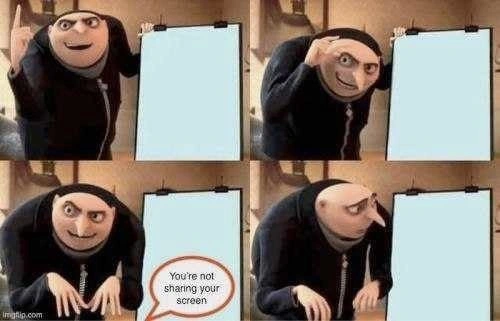
Let’s break down the meme in simpler terms. We have Gru, the comic villain from Despicable Me, who’s often used in memes where he presents plans on a whiteboard. In this four-panel format:

  • Frames 1-3: Gru is proudly presenting something on a big display board. But here’s the catch: the board is completely blank. He’s smiling and pointing as if there’s an important diagram or code snippet there, but visually we see nothing. This represents a person in a video meeting enthusiastically talking about their work, thinking everyone else can see their slides or code, when in reality no one can.
  • Frame 4: In the last panel, Gru’s posture changes — he slumps in embarrassment. We see a speech bubble that says, “You’re not sharing your screen.” This is the moment someone in the meeting finally tells the presenter that they never actually started the screen share. Cue the awkward realization: all that gesturing and explaining was over a blank screen on the viewers’ end.

What’s going on here? In a remote meeting (like on Zoom, Microsoft Teams, or Google Meet), screen sharing is when you broadcast your computer screen or a specific application window to everyone else. It’s how developers show each other code, diagrams, or slides during a stand-up meeting or a presentation. But screen sharing isn’t automatic; you have to click a button (often labeled something like “Share Screen” or an icon of a screen with an arrow) to start it. In the meme, Gru’s blank whiteboard is a metaphor for forgetting to press that button.

So the humor comes from a very relatable RemoteWorkCulture moment: a person begins an online presentation full of confidence, but they skipped the basic step of sharing their screen. Everyone else is too polite or confused at first, until someone finally speaks up with, “Excuse me… we can’t see your screen.” It’s the kind of benign mistake that happens to junior developers and senior engineers alike when working from home. If you've just started doing remote meetings, don’t worry — this happens to almost everyone at least once!

Think of typical remote meeting hiccups:

  • Talking while on mute: You’re explaining something, wondering why everyone is so quiet… then realize no one heard you.
  • Not sharing the screen: (This meme’s scenario) You assume everyone sees your brilliant demo, but you never actually clicked “share.”
  • Sharing the wrong screen or window: You intended to show your code editor but ended up sharing your email or an empty desktop. Oops!
  • Background surprises: Like when a pet or family member walks in, which isn’t directly in this meme, but it’s another common remote-work funny incident.

In this particular meme, the key phrases and tags point to Zoom meetings and communication breakdowns. “You’re not sharing your screen” is practically a catchphrase of the past couple of years of virtual teamwork — just like “You’re muted.” It highlights a small failure in communication: the presenter thought their information was being conveyed visually, but it wasn’t at all. Meetings rely on everyone seeing the same thing, and here technology (or rather, user oversight) created a gap.

For someone new to this context: imagine you’re in a classroom and the teacher is enthusiastically referencing a diagram on the board — but forgot to actually draw it. In a real room, you’d see nothing on the board and immediately say, “There’s nothing there!” In a video call, you only see the presenter’s face or name, not their screen, until they click that share button. It might take a moment to realize what’s wrong. When someone finally points it out, the presenter usually reacts just like Gru: a bit embarrassed, maybe face-palming, and then quickly hitting the share button and saying something like, “Oh! Sorry about that, let me share my screen…”

The Categories “Meetings, Communication, RemoteWork” tell us this meme is about the work culture of having meetings remotely and the communication mishaps that can occur. It’s not poking fun at coding or algorithms, but at the experience of working with others through computers. The tags like ZoomScreenSharing, MeetingHumor, and remote_standup_mishap confirm it: this is a joke about the tools we use (Zoom’s screen sharing) and common mistakes during remote stand-ups or presentations. Even if you’ve never used Zoom, almost all video call apps have this feature and this potential blunder. The meme is basically a friendly reminder (with humor) to always check “Am I sharing my screen?” when you’re presenting online.

Level 3: Works on My Screen

In the era of RemoteWork, daily stand-ups and sprint demos happen over video calls. This meme perfectly captures a classic remote-meeting fiasco: the screen share fail. An enthusiastic engineer (like Gru pointing at his blank easel) launches into an architecture walkthrough or bugfix demo on Zoom, completely oblivious that nobody else can see the diagram or code he's referring to. Everyone else on the call just sees his eager face and a big blank space—zero context, zero content. It’s a hilarious and cringe-worthy CommunicationBreakdown rolled into one.

"You're not sharing your screen."

Those five words land like a deploy-night bug alert. The presenter’s confident grin instantly melts into that Gru-style slouch of embarrassment. The humor is painfully real: how many times have seasoned devs meticulously explained a complex design pattern or walked through a new feature, only to discover they’d been essentially talking to themselves? This scenario hits close to home for any distributed team. It’s the remote equivalent of gesturing at a PowerPoint slide deck that isn’t on the projector, or writing on a whiteboard no one else can see. The mismatch between what the presenter thinks they’re showing and what the team is actually seeing is pure comic irony — a modern “works on my machine” moment, but for screen-sharing. He sees the content on his screen (so it “works on his screen”), while everyone else sees nothing.

From a senior developer’s perspective, this meme nails the MeetingCulture of 2020-2021: we perfected CI/CD pipelines and container orchestration, yet still fumble a simple ZoomScreenSharing button. 😅 It’s funny because it’s true. We’ve all been either Gru, confidently presenting thin air, or the team member gently interrupting so we can actually see the goods. The situation combines human error with UX design quirks — screen-sharing in apps like Zoom or Teams isn’t always foolproof. Maybe the UI didn’t make it obvious the share wasn’t live (no green border or glowing icon), or the presenter was juggling multiple monitors and shared the wrong one (showing a blank desktop while the code editor stayed hidden on another screen). Sometimes nerves and focus on the content make us skip that final “Share Screen” click. The result? A perfectly blank presentation slide beamed to all, and a presenter unknowingly lecturing to an empty canvas.

This meme also nods to how remote teams have developed a whole new set of reflexes and inside jokes. “You’re on mute.” “We can’t see your screen.” “Next slide, please… oh, it’s not advancing for us.” – these phrases are the soundtrack of modern remote work. The moment someone says “we can’t see anything”, everyone else on the call chuckles empathetically, and the presenter experiences a brief moment of dread. It’s a digital-age faux pas that spares no one; even the battle-scarred senior engineer who can live-debug a memory leak might forget to share their window in a hurry. The meme’s final panel (Gru burying his face in frustration) is basically the universally understood response to such goofs: a mix of facepalm and “let’s try that again…”.

Why does this keep happening, even to experienced folks? Partly because remote meetings lack the immediate feedback loops of in-person meetings. In a physical conference room, if you point at a blank screen, you’d catch on quickly – the confused stares or someone pointing at the projector will clue you in. In a virtual call, everyone is politely quiet at first, not wanting to interrupt. Precious seconds pass while the presenter excitedly outlays their brilliant idea to nobody. Eventually, a colleague chimes in (perhaps in a small voice or a chat message): “Uh, we’re not seeing your screen.” That delayed feedback is what makes the realization so awkward and comical. It’s a perfect storm of RemoteWorkCulture: technology enabling us to meet from anywhere, and human fallibility turning it into a sitcom moment.

Historically, this is just the latest incarnation of a classic presentation blunder. The TechHistorian in us can recall similar fails from earlier eras of tech:

  • In the 2000s, someone would excitedly start a demo in a meeting room only to realize the VGA cable wasn’t plugged in, or they forgot to hit the “Projector Output” key combo. The screen stayed black while they talked — oops.
  • Go back further, and it’s like forgetting to put transparencies on the overhead projector; you’d be gesturing at blank light.
  • Even outside tech, it’s like a teacher passionately writing on a chalkboard that’s behind the curtain.

The tools have evolved from overhead slides to Zoom shares, but the core issue — forgetting to actually show what you’re talking about — is timeless presenter trouble. The meme resonates because it bridges that old and new: Gru’s retro-style flipchart is blank, much like a Zoom screen when you haven’t hit “share.” It’s a gentle reminder that no matter how advanced our tools become, the human factor (and a dash of MeetingHumor) keeps us humble. After all, we can design resilient microservices and distributed systems, but we still ask, “Can you see my screen now?”

In short, the meme humorously distills a key remote-meeting lesson: enthusiasm is great, but double-check that tech. It’s a senior-level inside joke that even entry-level devs quickly learn: always verify you’re sharing before diving into your epic explanation of the new feature flag rollout. Because nothing punctures a good tech story like realizing your audience has been staring at nothing for the past five minutes. That mix of shared embarrassment and relief (once the screen finally appears) is what makes this so funny and cathartic for teams. We’ve been there, we survived it, and now it’s meme-worthy. Embrace the awkwardness — and maybe add a big “📢 SHARE SCREEN” sticky note to your monitor next time.

Description

This meme uses the four-panel 'Gru's Plan' format from the movie 'Despicable Me' to illustrate a common remote work mishap. In the first panel, Gru enthusiastically presents a point on a blank whiteboard. In the second, he confidently explains another part of his plan. The third panel shows him continuing his presentation, but a speech bubble appears from an off-screen participant stating, 'You're not sharing your screen'. The final panel shows Gru looking back at his presentation board with a deflated, horrified expression of realization. This meme perfectly captures the universally relatable and embarrassing moment during a virtual meeting when someone delivers a passionate, detailed explanation or demo, only to find out that nobody else could see what they were referring to. For developers, this is a familiar pain point from sprint demos, remote pair programming, or technical presentations
Comments

13
Anonymous ★ Top Pick I spent an hour whiteboarding the entire distributed system architecture with perfect detail, only to find out the team just saw a video of my face. They said it was my most expressive presentation yet
  1. Anonymous ★ Top Pick

    I spent an hour whiteboarding the entire distributed system architecture with perfect detail, only to find out the team just saw a video of my face. They said it was my most expressive presentation yet

  2. Anonymous

    Spent ten minutes whiteboarding our CAP-theorem trade-offs - turns out the only partition was between my screen and Zoom

  3. Anonymous

    After 20 years in tech, I've mastered distributed systems, scaled to billions of requests, and debugged kernel panics... yet I still present my quarterly architecture review to a blank screen for 5 minutes while everyone's too polite to interrupt

  4. Anonymous

    After 15 years of architecture reviews and technical presentations, I've learned that 'Can everyone see my screen?' is not a rhetorical question - it's a critical pre-flight check. The real senior move is having a second monitor to verify your screen share is actually working, because nothing says 'principal engineer' quite like passionately explaining your distributed systems design to a blank screen while your team politely waits for you to notice the Zoom notification you've been ignoring

  5. Anonymous

    Fifteen minutes into a CAP‑theorem diatribe and blue/green rollout plan, the only observability signal with 100% precision finally fired: ‘You’re not sharing your screen.’

  6. Anonymous

    Every remote demo starts with a NotSharingScreenException; our most reliable linter is a teammate saying, "You're not sharing your screen."

  7. Anonymous

    Architect diagramming event sourcing trade-offs via collective imagination - no Draw.io required

  8. @repixel 5y

    اسکی جناپ؟

    1. @feskow 5y

      چي؟ مترجمان موفق به ترجمه پیام خود را بیش از حد انگلیسی.

  9. @l33tissw00t 5y

    Awesome.

    1. Deleted Account 5y

      What awesome in this? I think you are only one who is able see the screen.

  10. @pyproman 5y

    1st comment: Translation: Is it his? [Probably "Is this meme his?" or "Did he stole this meme?" (you can see imgflip.com watermark in bottom left corner)] 2nd comment: Translation: What? Translators fail to translate their message fully in English

    1. @feskow 5y

      I used translator to get the second comment to communicate with him

Use J and K for navigation