
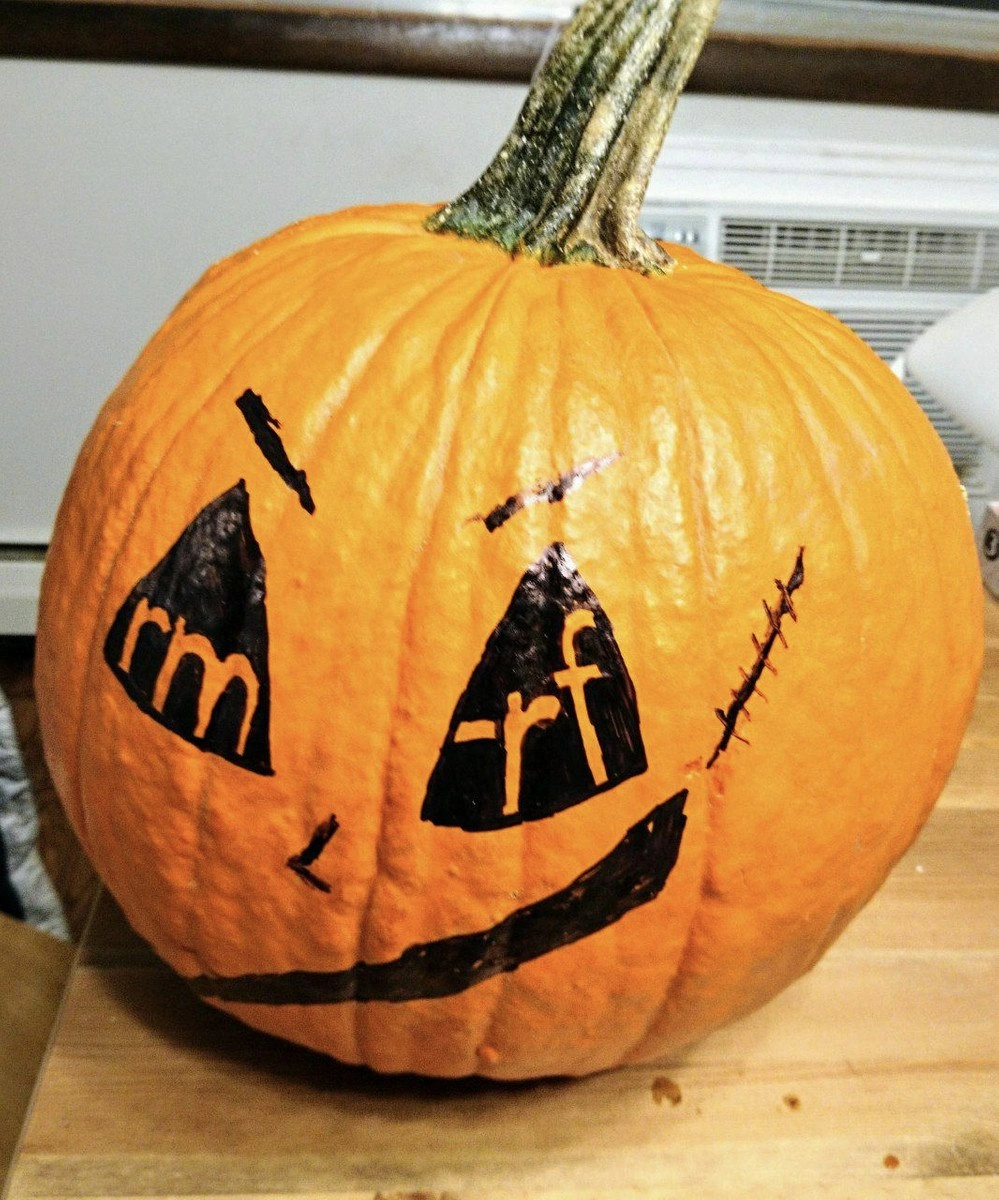
The rm -rf Jack-o'-Lantern
Why is this CLI meme funny?
Level 1: The Magic Eraser
Imagine a pumpkin with a magic eraser for a face. If you point it at one toy, it erases one toy. If you accidentally point it at the whole toy box and say "do it without asking," it erases everything inside. The joke is that programmers see rm -rf and feel the same fear other people feel when they see a haunted face.
Level 2: Delete Means Delete
In Unix-like systems such as Linux and macOS, the command line shell lets users type commands directly. rm is short for "remove." It deletes files. The option -r means recursive, so it can delete folders and everything inside them. The option -f means force, so the command tries to continue without stopping for confirmation.
That combination is useful when cleaning generated files, build folders, temporary directories, or old deployment artifacts. It is also dangerous because computers follow commands literally. If you point rm -rf at the wrong folder, it will not understand that you were tired, distracted, or only meant to delete dist/.
For newer developers, this meme captures a common rite of passage: learning that terminal commands are powerful because they skip the friendly layer. There may be no trash can, no undo button, and no "are you sure?" dialog. The pumpkin face is cute, but the command in its eyes belongs to the same family as production deploys, shell scripts, and backup recovery drills.
Level 3: Recursive Pumpkin Panic
The pumpkin is funny because it turns the classic jack-o'-lantern threat into something a sysadmin can actually fear. The eyes visibly contain:
rm
and
-rf
Together they form rm -rf, the Unix command pattern that means "remove files recursively and forcefully." That is not movie-monster scary. That is "why is the production volume suddenly quiet?" scary.
The senior-developer reflex here is not abstract superstition. rm deletes directory entries. -r tells it to descend through directories, and -f tells it to keep going without asking many questions. The danger is not that the command is evil by itself; it is that shells make it very easy for a small mistake to become a large blast radius. A missing variable, an unexpected empty string, a bad glob, or running from the wrong working directory can turn a cleanup task into a resume-generating incident.
# The kind of line that looks harmless until $TARGET is empty.
rm -rf "$TARGET"/*
Modern systems have guardrails for some famous disasters, especially around deleting /, but guardrails do not protect every mounted disk, cache directory, build artifact, user upload, or backup path. The real punchline is that file-system damage is often fast, quiet, and irreversible unless backups are current and actually restorable. Everyone says they have backups. The command line waits patiently to find out whether that was documentation or folklore.
The Halloween styling matters because it reframes developer folklore as seasonal horror. The black marker face, stitched scar, slanted eyes, and curved grin are ordinary spooky decorations, but the text in the eyes makes the pumpkin less like a monster and more like a terminal prompt with bad intentions. It is a visual pun for people whose worst jump scare is pressing Enter before rereading the path.
Description
The photo shows a large orange Halloween pumpkin on a tabletop with a black marker-drawn jack-o'-lantern face. The left triangular eye contains the text "rm," and the right triangular eye contains "-rf," with additional black slashes, stitch marks, and a curved mouth completing the spooky face. The technical joke is that `rm -rf` is the famously destructive Unix command pattern for recursively and forcibly deleting files, making it genuinely scary to anyone who has ever managed a shell prompt.
Comments
16Comment deleted
The scariest part is not the pumpkin; it's realizing your backups are mounted under the same path.
that's pretty damn scary I have Linixophobia after that incident when my friend typed "rm /" instead of "rm /." Nothing serious tho, the only thing we lost was Minecraft server Comment deleted
Hmmm, I mean you can’t remove / not recursively and not as root Comment deleted
Yeah, it was with -r Comment deleted
And with ./ Comment deleted
F ( Comment deleted
Please leave me alone 😭 Comment deleted
alias yeet="rm -rf" Comment deleted
sudo YEET="/" yeet $YEET Comment deleted
doesn't work since 2012 Comment deleted
Why 2012? Comment deleted
Addition of "--no-preserve-root" parameter Comment deleted
We don't mention this Comment deleted
for safety of whoever will execute it? Comment deleted
Yes, yes) Comment deleted
kill 1 and shutdown -H are also fun and safe commands then (edit: -h as halt is fixed) Comment deleted


