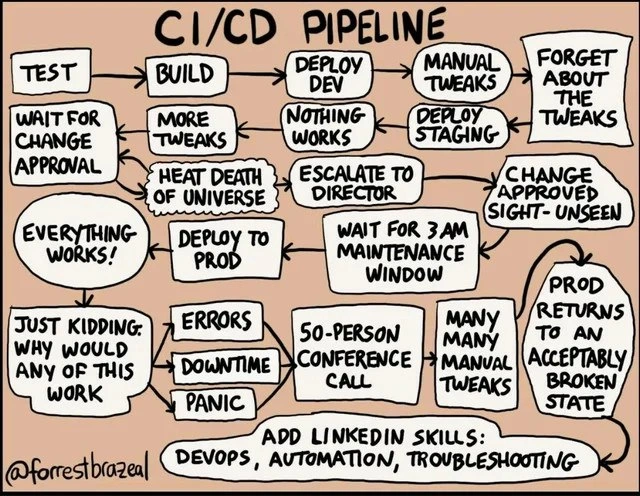
CI/CD Pipeline Chaos: build succeeds, panic conference call, update LinkedIn skills
Why is this BuildSystems CICD meme funny?
Level 1: The Cake Catastrophe
Imagine you’re helping to bake a big cake for a school event using an automatic cake machine. You just have to add ingredients, and the machine is supposed to do everything: mix, bake, and decorate the cake. Sounds easy, right? But here’s what happens:
First, you press the Start button (that’s like running tests). The machine stops and says, “Wait for teacher’s approval.” So you stand there until the teacher comes and nods okay. The machine starts mixing, but then it suddenly stops and says “Oops, something’s wrong.” So you add a bit more sugar and try again. It stops again, you add a bit more flour, and you keep doing this over and over. It feels like you’ll be tweaking this recipe forever — the event might even be over by the time the cake is ready! It’s like waiting until the end of the universe for this cake.
Finally, the machine moves on to baking. You send a small test cake to a practice oven (that’s like the Dev environment). But the cake comes out flat and burned. Nothing worked! Now it’s a crisis. You call the principal and all your friends to help. The principal says, “We’ll try again at 3 AM when no one is in the cafeteria.” So in the middle of the night, about 50 people are in a group phone call (half-asleep) trying to salvage this cake. Everyone is suggesting fixes: add more eggs, increase the oven temperature, cover the top with foil, etc. People are manually tweaking the cake, opening the oven, stirring icing by hand – whatever it takes. After many, many little fixes, you do get a cake out in the end. It’s not pretty; in fact, it’s a bit lopsided and missing frosting on one side. But hey, it’s acceptably cake-ish and at least you won’t completely disappoint the school event.
In another case, you skip some safety steps and just throw the batter into the real oven meant for the event (that’s like deploying straight to production). For a moment you think, “Wow, maybe it’s working this time!” – the cake smells good. But then, of course, the cake collapses and the oven catches fire. Total disaster: smoke everywhere, fire alarms, panic! In the end, your cake plan failed and everyone’s rushing to clean up and fix the kitchen.
After this whole chaotic night, you go to your online profile (imagine a place where you list what you’re good at, like LinkedIn for grown-ups or maybe your school achievement board) and you proudly add: “Skilled in Cake Baking, Automation, and Problem-Solving.” Why? Because you did manage to get some kind of cake out and you solved a ton of unexpected problems along the way (with a lot of help). It’s a bit cheeky — the cake certainly wasn’t a smooth automated success — but you learned a lot, even if the process was a mess.
The humor here is that you set out to let the machine do all the work (that was the whole point!), but you ended up in a crazy adventure of doing things by hand and fixing emergencies. It’s like trying to automate a task and then having to do even more work to fix all the issues. In the end you’re exhausted, the result is just okay, and you still pat yourself on the back saying, “Well, I guess I’m an automation expert now!” Everyone who’s ever had a plan go horribly wrong can relate: sometimes all you can do is laugh about it and claim the experience as a “skill.”
Level 2: When Automation Fails
Let’s step back and explain what’s going on in this meme in simpler terms. The title is "CI/CD Pipeline", which stands for Continuous Integration/Continuous Delivery (or Continuous Deployment). A CI/CD pipeline is supposed to be an automated process that developers use to test and deploy code quickly and reliably. In an ideal world, here's how it works: a developer writes code and merges it into a main code base; an automated system runs tests (Continuous Integration – making sure new code plays nicely with existing code), then if all tests pass, the system automatically deploys the new code to production (Continuous Delivery/Deployment – delivering updates to users rapidly). The goal is to eliminate manual steps, so that software can go from code to customer smoothly, maybe multiple times a day, with very little human intervention.
Now, the meme shows a flowchart with many boxes that represent steps in a pipeline. But instead of a clean sequence of automated steps, it’s full of goofy, wrong steps. It’s basically highlighting how real-life deployment processes can break down despite fancy “automation.” Let’s decode some of the terms and jokes:
Test: This is where the pipeline starts. After code is written, you run tests to verify it. In CI, this is usually automated. If tests pass, you proceed. In the cartoon, after "TEST" it immediately goes to "WAIT FOR CHANGE APPROVAL."
Wait for Change Approval: Normally, a CI/CD pipeline doesn’t stop for human approval until maybe production deployment, but many companies have a rule that any change must be approved by a Change Advisory Board or a manager, especially for production. That means even if all tests pass, the code can’t be deployed until someone officially signs off. This could be a meeting or a ticketing system where a human says "okay, go ahead". It's often done to ensure quality or compliance (for example, in a bank or healthcare company, you might need approval for changes). However, this slows things down a lot. The meme is poking fun by implying this wait can be so long that it feels like waiting until the end of the universe! (Hence the "HEAT DEATH OF UNIVERSE" path – a hyperbole meaning waiting forever).
Build: The build step is where the code is compiled or packaged. For instance, turning source code into an application or a service, maybe creating a Docker image or an executable. "Build" here likely also includes running further tests, integrating components, etc. It's an automated step. The meme shows multiple "BUILD" boxes, meaning you might build at several points (for Dev, for Staging, for Prod), or re-build after tweaks.
More Tweaks: This indicates that things didn’t go smoothly. A "tweak" means a small change or adjustment. If after a build the tests or deployment failed, engineers might quickly adjust something (like fix a config file, adjust some code) and then try building again. The cartoon has "MORE TWEAKS" leading to "HEAT DEATH OF UNIVERSE", implying the engineers got stuck in a loop of making changes and rebuilding, over and over, with no end in sight. This kind of infinite loop is a nightmare scenario: you’re trying to get the code working, but each fix leads to another issue, and you just keep going until you run out of time (or patience). It's an exaggeration, but it highlights how a build process can go on indefinitely when you're chasing a bug.
Deploy Dev: This means deploying the code to a development environment (often just called "Dev"). A Dev environment is a server or cluster where new builds are tested internally. It's not production (real users aren't on it), but it's a place to test the integrated application in a realistic setting. Think of it as a sandbox that mimics the real system, where developers can make sure things actually run, not just pass tests. Deploying to Dev is usually one of the steps after a successful build.
Nothing Works: After deploying to Dev, ideally, the app should run and testers can verify it. "Nothing works" is a comically blunt way to say the deployment failed or the application is seriously broken in that environment. This could happen due to differences between the developer’s machine and the Dev environment (maybe missing environment variables, or a service isn't configured right). It’s a very frustrating outcome – it means despite passing tests and building, when you actually run the code, it crashes or behaves badly.
Escalate to Director: This means the problem was bad enough that higher-ups (a Director or another manager) had to be notified. To "escalate" an issue means you raise attention to a more senior person because maybe more resources or a big decision is needed. In a deployment scenario, if "nothing works" in the testing environment and you're on a tight deadline, you might have to tell your Director or CTO that "our deployment is failing, and we might miss a deadline or have to do something drastic." It’s generally not good news and not something you do for minor glitches. The fact that the cartoon includes this step shows the issue has become a big deal internally.
Wait for 3AM Maintenance Window: Many organizations won’t do risky deployments or big fixes in the middle of the day, because if something goes wrong it could impact users during peak hours. Instead, they schedule a maintenance window, which is a planned downtime, often late at night (like 3 AM) when user traffic is very low. During that window, they might take the system offline to deploy fixes or updates, hoping that if anything goes wrong, fewer users are affected and they have time to fix it before business hours. The meme specifically says 3AM, which is both a typical off-hours time and a comedic nod (nobody likes working at 3 in the morning, but it happens in IT!). On-call engineers are usually the ones who have to wake up at that hour to do the deployment or repair. So this part of the chart conveys: "We gave up trying to fix this during the day; let's try again at 3AM when we can afford to break things for a bit."
50-Person Conference Call: This is an exaggeration of a crisis meeting. In major incident emergencies (like when a production system is down or a very important deployment is failing), companies will have a conference call or virtual meeting room where everyone involved hops on to coordinate. This can include developers, testers, ops, support, managers, etc. The cartoon says 50-person, joking that an absurd number of people are on the call – which can happen if everyone and their boss wants to know what's going on. It highlights how large and stressful the situation has become. Instead of a small DevOps team quietly deploying, you now have a huge call of people trying to solve the problem or just listening anxiously. It’s basically a war room scenario for the deployment.
Many Many Manual Tweaks: When automated processes fail, people often resort to manual fixes. A manual tweak means a human goes in and changes something by hand. For example, manually editing a configuration file on a server, manually restarting a service, or running a one-off script, etc. "Many many manual tweaks" implies that during that 3AM call, engineers are logging into servers or using admin consoles to change all sorts of things in a trial-and-error fashion. This is the opposite of how an ideal CI/CD pipeline should operate (which would be fully automated and repeatable). It's basically hands-on debugging in the live environments. While this can solve the immediate issues, it’s risky because those changes might not be documented or reproducible later. The cartoon making this a big loop emphasizes just how much manual effort and fiddling was needed to finally get things working.
Prod returns to an acceptably broken state: Prod means the production environment – the live system where real users are affected. "Acceptably broken state" is a very sarcastic way to describe the outcome. It suggests that after all those manual tweaks, the production system is still broken, but in a way that the business can tolerate for now. In other words, not everything is fixed 100%, but maybe the main functionality is up. For example, imagine a website went down; an acceptably broken state might mean the website is back up but perhaps one feature (say, image uploads or the search bar) is still not working – something minor that can be fixed later, while the critical parts (like the homepage and login) are functioning again. It’s "broken" but acceptable as a temporary outcome. This phrase is a bit of bitter humor: in tech, sometimes "good enough" is the win you take at 4 AM after fighting fires for hours.
Build → Manual Tweaks → Deploy Staging: This is another path on the chart. Staging is an environment that is almost a clone of production, used as the last step before going live. Normally, you deploy to staging, do final tests or get approvals, then push the same build to production. However, here it shows they did "manual tweaks" during or after the build, then deployed to staging. That implies that the build artifact (what was built) was modified or adjusted by hand in between. This is a bit of a no-no if you want consistency, but maybe they had to apply a quick patch to get it to work in staging.
Change approved sight-unseen: This means whoever is responsible for approving the release (could be a manager or QA lead or product owner) gave the thumbs-up without actually looking at or testing what was on staging. "Sight-unseen" is a phrase meaning you approve or buy something without inspecting it. It's a sarcastic detail showing that the approval process is basically a rubber stamp – possibly because they were in a hurry or just trusted that it’s fine. In practice, this can happen if, say, a deadline is looming and nobody has time (or energy, after that 3AM saga) to double-check the staging deployment, so they just say "yeah, looks good, go to prod" even if they haven’t verified it properly. It’s obviously risky – it defeats the point of staging, which is to catch any last issues before going to users.
Deploy to Prod: This is the final step, pushing the changes to the production environment so all users are now running the new code. In a proper CI/CD, this is done when you are confident everything is tested. In our cartoon scenario... well, they deployed with fingers crossed.
“Everything works! → Just kidding: Why would any of this work”: This part is the comic zinger. It sets up a fake optimistic scenario: "Everything works!" which is quickly revealed to be a joke. Essentially, it’s saying: after all those shaky steps, did you really think the production deployment would be flawless? "Why would any of this work?" is pointing out that given all the last-minute changes and sloppy process, it's actually expected that something will go wrong. This is that moment when the team deploys to prod and maybe for one second something looks okay, but almost immediately errors start pouring in. The optimism is immediately dashed. The phrasing is very informal and humorous – exactly how a jaded engineer might narrate it.
Errors → Downtime → Panic: Now we see the consequences in prod. Errors means the application is throwing exceptions or not functioning correctly. Downtime means parts of the system are down or unresponsive (for users, this could mean the website/service is effectively unavailable or very broken). Panic is the human reaction – everyone starts scrambling because a live system is failing. Users might be impacted, business might be losing money, and engineers are urgently trying to fix it. This often triggers another all-hands-on-deck situation (another conference call, alerts paging people awake, etc.). It's a cascade: errors lead to partial or full downtime, which leads to panic among the tech team and management. This is exactly what DevOps and SRE practices try to prevent or at least handle gracefully, but here it's pure chaos.
Forget about the tweaks: This is written on a side branch in the drawing. It's referring to those "manual tweaks" made earlier (like in Dev or Staging). "Forget about the tweaks" is what often happens later: people applied quick fixes under pressure but then failed to record them or integrate them into the actual codebase. So when things calm down, those tweaks might be forgotten. This means the next time you run the pipeline or deploy fresh, the same issue might reoccur because the permanent fix was never properly done — it was only patched live and then lost. It's a cheeky reminder of a common oversight: failing to document your hotfixes. In other words, at 3AM someone edited a config directly on the server to get things working; two weeks later, another deploy overwrote that config because nobody put that change in version control or told the team. Oops!
Add LinkedIn Skills: DevOps, Automation, Troubleshooting: LinkedIn is the professional social network where people list their job experience and skills. This line implies that after going through this whole ordeal, the person is updating their LinkedIn profile to include new skills like "DevOps, Automation, Troubleshooting". This is very tongue-in-cheek. DevOps and Automation are buzzwords that would imply the person is good at setting up automated pipelines and following DevOps best practices – which is ironic here, because what we saw was mostly not automated or smooth. The pipeline fell apart and required a lot of manual intervention. By adding those as skills, the person is either sarcastically celebrating that they survived this nightmare (so hey, that must make me a DevOps pro, right?), or they’re humorously résumé-padding (making one’s experience sound fancier than it was). Troubleshooting, to be fair, was definitely demonstrated: they troubleshot a complex problem under pressure, which is a real skill. But listing "Automation" after a process that clearly wasn’t automated – that’s the joke. It’s poking fun at how everyone loves to claim DevOps expertise, even if their "DevOps" pipeline is held together by duct tape and toil. For a junior developer or someone new to this world, it’s useful to understand that DevOps is a cultural/engineering practice aiming to automate and smooth out the path from code to production, and CI/CD tools (like Jenkins, CircleCI, GitLab CI, etc.) are what we use to do that. When done right, you don’t usually end up firefighting like this. When done wrong, well... this cartoon is what can happen!
Overall, this cartoon is a satire – it uses exaggeration to highlight real problems. For someone new to DevOps and deployment pipelines, the key takeaways are:
- Automation is great, but only if done thoroughly. If parts of the process require special approval or manual fixes, those are potential failure points.
- Consistent environments are important. Development, staging, and production should be as similar as possible. If not, you’ll hit the "works in dev, breaks in prod" issue.
- Don’t rely on last-minute heroics. A solid deployment process should not require a huge late-night effort with dozens of people on the phone. If that’s happening, it means the process needs improvement (more testing, better automation, etc.).
- Learn from failures. If you do have an incident, remember to officially fix the problems (and the process) later. Update the code or scripts with those "manual tweaks" so you don’t forget them.
The humor might rely on knowing a bit about how software deployments work, but even without deep knowledge, you can sense the chaos. Think of it this way: The cartoon starts with a normal plan (test, build, deploy...) and then shows everything going wrong one step at a time, until lots of people are trying to fix it and it ends in semi-disaster. Then the person still boldly claims expertise from it. It’s like a comically bad day at work for a DevOps engineer. If you’ve just started in tech, know that this is a scenario people actively try to avoid! It’s funny to those who have lived through it because we sincerely hope these experiences make us wiser (and we’d rather laugh than cry about it). And if you do end up in a situation like this as a junior, well, you'll definitely earn some troubleshooting skills – and maybe a good story for your LinkedIn profile too. 😉
Level 3: Integration, Incidents & Insomnia
For those of us who've been through the wars of software delivery, this CI/CD Pipeline cartoon triggers immediate recognition (and maybe a nervous chuckle). It’s a senior engineer’s nightmare played for laughs: the wide gulf between how Continuous Integration/Continuous Deployment is supposed to work versus how it often works in reality. The flowchart boxes read like a greatest hits of DevOps pain points and deployment anti-patterns. It's funny because it's painfully true. Let’s break down the paths of this chaotic pipeline and why they hit home for experienced DevOps and SRE folks:
“TEST → WAIT FOR CHANGE APPROVAL”: This highlights the frustrating bureaucracy that sneaks into pipelines. In an ideal CI/CD setup, after code passes automated tests, it should flow onwards to deployment. But in many enterprises, there's a manual gate: a Change Approval Board or a manager who must rubber-stamp changes. This wait for change approval means your continuous integration just got a coffee break. It's anathema to agility – nothing continuous about waiting on someone’s email response for three days. Seasoned engineers know this well: you're ready to deploy on Tuesday, but you’re stuck waiting until the CAB meets on Friday. By then your code is stale, other merges have created conflicts, and the deployment risk actually increases. The meme’s grim joke of this leading to “HEAT DEATH OF UNIVERSE” is an exaggeration of the interminable delays. It’s sarcastically suggesting that with enough red tape, a simple update might take literally forever. Deployment anxiety builds up as time stretches; by the time approval comes, everyone’s half-forgotten what the change was supposed to do.
“BUILD → MORE TWEAKS → (… → HEAT DEATH)”: Here we see the flaky build loop from hell. You run the build, something fails or isn't quite right, so you make a tweak, rebuild, then another tweak, and so on. If you've ever dealt with a fragile build process or integration tests that fail randomly, this hits home. Perhaps an environment variable wasn't set, or a library version mis-match, or a test that only fails on CI but not locally (it works on my machine!). Each "tweak" is a desperate attempt to patch things up (maybe editing a config file, adding a sleep in a test, increasing a timeout, etc.). This trial-and-error cycle can feel endless – hence the dark humor of ending in the heat death of the universe. It’s poking fun at how something meant to be automated and repeatable (the build) can devolve into manual troubleshooting purgatory when your CI infrastructure or test suite is brittle. Senior developers have spent long afternoons and late nights repeatedly kicking off builds, praying for that one green run. The entropy in the system just grows with each manual tweak, making the build less reliable and more time-consuming.
“BUILD → DEPLOY DEV → NOTHING WORKS”: Ah, the optimism of “it built successfully, let’s deploy to our Dev environment” immediately smashed by the reality that Nothing works. This is an all-too-familiar scenario: the code compiled and all unit tests passed, but the moment it runs in a realistic environment (Dev integration environment), it blows up. Maybe the service can't connect to a database because of a wrong connection string, maybe a microservice isn’t talking to its upstream, maybe a container didn't build with the right config. There's that sinking feeling for the on-call engineer when an integration deploy fails hard. The next steps in the chart – “ESCALATE TO DIRECTOR → WAIT FOR 3AM MAINTENANCE WINDOW” – are a direct satire of corporate firefighting protocol. When a deployment in a lower environment reveals a showstopper bug that late in the game, suddenly it’s all hands on deck. Escalating to a director or higher-up means the issue is now visible to management (never a good sign for a quiet night). They decide to schedule a special maintenance window at 3:00 AM, meaning the team will apply fixes or deploy to Prod in the middle of the night when user impact is minimized. Why 3 AM? Because that's the classic on-call duty nightmare slot when the business deems it safest to do risky fixes — and when engineers would rather be sleeping. Only battle-scarred SREs and DevOps folks truly appreciate how many bad things happen after midnight during those supposed “controlled” maintenance windows. It's practically a Murphy’s Law of on-call: anything that requires a 3 AM deploy will invite chaos.
“50-PERSON CONFERENCE CALL → MANY MANY MANUAL TWEAKS → PROD RETURNS TO AN ACCEPTABLY BROKEN STATE”: This is the meme unmasking the reality of a production incident — humorously exaggerated by saying 50 people on the call (though in large orgs, that's hardly an exaggeration!). When a critical system is down, it's not uncommon to have a huge bridge call or Slack channel with developers, SREs, QA, Product Managers, directors, maybe a VP, all frantically trying to figure out WTF is going on. It's conference call hell. The cartoon nails it by showing the resolution as lots of manual tweaks. In a perfect DevOps world, you'd have automated rollback or well-tested scripts to fix issues. In reality, folks are manually editing config files on servers, running ad-hoc database scripts, restarting services one by one, or rolling back to an old version manually. Each of these is a manual tweak – essentially hot-fixing the system on the fly. It's brittle and undocumented, but in the heat of the moment you do whatever gets the site back up. Eventually, through brute force and loss of a few years off everyone’s lifespan, the team gets production working... “to an acceptably broken state.” That phrase is pure gold to an experienced engineer: it means it's not perfect, some features might be disabled or some data might be inconsistent, but hey, at least users can log in and the thing isn't crashing anymore. In other words, production is still a bit broken, but it's acceptably broken – users and management can tolerate the remaining glitches until a more permanent fix later. This is gallows humor about technical debt: we patch things just enough to stop the bleeding, knowing full well there's a mess to clean up later. Seasoned devs have definitely released a patch or toggled off a feature and said, "We’ll fix the rest on Monday, this is fine for now." It's the software equivalent of taping a broken bumper on a car and calling it roadworthy.
“BUILD → MANUAL TWEAKS → DEPLOY STAGING → CHANGE APPROVED SIGHT-UNSEEN”: This branch shines a spotlight on a terrible (but common) practice: making out-of-band changes in staging and then getting approval without anyone really validating those changes. Staging is supposed to be a nearly identical pre-production environment to test the release. But often staging differs from prod in subtle ways, or testers are in a rush. Here, after the build, someone performs manual tweaks before or on the staging deploy. Maybe a config file was edited directly on the staging server, or a one-off patch was applied that isn't in version control. The phrase “change approved sight-unseen” implies that whatever was deployed to staging was not actually reviewed or tested properly; the approval process became a rubber stamp. Perhaps the manager saw a green checkmark in the pipeline tool and said "Looks good to me" without realizing the staging environment was held together with duct tape and prayers. For a senior engineer, this scenario triggers alarm bells: it means what you're about to deploy to prod is not exactly what's in your code repo, it's some mystery mix of code + manual hotfix. This defeats the purpose of having a staging environment and violates the principle of immutable infrastructure/artefacts (where you promote the exact same build from environment to environment). When a change approval is given "sight unseen," it's basically a formalistic step with no real quality control – a faux sense of security. You can bet such blind approvals often lead directly to…
“DEPLOY TO PROD → EVERYTHING WORKS! → JUST KIDDING: WHY WOULD ANY OF THIS WORK → ERRORS → DOWNTIME → PANIC”: This final branch is the punchline cascade. It mocks that brief moment of hope (Everything works! 🚀) that every engineer has right after deploying to production, immediately followed by the crushing reality of errors and downtime. The rhetorical "Why would any of this work?" is the veteran voice of experience, essentially saying "We did everything wrong in this process, of course it's going to break in production." 😬 It's both hilarious and tragic how true that is. When you've skipped tests, made last-minute changes, and bypassed proper approvals, a smooth production rollout would practically be a miracle. And miracles are in short supply in on-call life. So naturally, things blow up: errors cascade, monitoring alarms go off, users start complaining on Twitter, and the system goes into downtime. Panic ensues. This is the classic production firefighting scenario that every DevOps or SRE professional knows too well. The way the meme presents it – a sudden reversal from "victory" to "defeat" – is a nod to our shared PTSD from countless times we deployed something thinking "maybe this time it'll just work", only to get smacked with a critical outage. It’s Murphy's Law of deployments: anything that can go wrong, will go wrong (especially if you cut corners). Experienced teams know to have a rollback plan or feature flags as a safety net, but in the depicted scenario, it looks like they went straight to panic mode. No rollback mentioned – perhaps it wasn’t even possible because the manual tweaks made everything unique. So all they can do is triage frantically.
After all this drama, the cherry on top is “ADD LINKEDIN SKILLS: DEVOPS, AUTOMATION, TROUBLESHOOTING.” 🔖 This is a sardonic little twist from the cartoonist (Forrest Brazeal). It implies that after surviving this gauntlet of incompetence and chaos, the engineer is updating their résumé (CV) to highlight skills like DevOps (which here was barely practiced in its true sense), Automation (ironic, given how many manual steps occurred), and Troubleshooting (well, that one at least they earned!). It’s a cynical jab at how folks spin war stories into résumé highlights. In many tech careers, you unfortunately earn your stripes by dealing with outages and messy releases. So yes, after this soul-crushing release, our hero probably deserves to list "Troubleshooting" as a skill – they troubleshot half the night. "DevOps" and "Automation", however, are more tongue-in-cheek: the whole pipeline was supposed to be automated DevOps, but it devolved into manual ops. Still, you just know some manager will say "Great job being a DevOps ninja under pressure!" and the engineer will think, "Sure, let's call it DevOps," and promptly add it on LinkedIn to attract that next recruiter. It's also a hint that maybe the person is considering polishing their LinkedIn because after this kind of fiasco, they might be lightly thinking about moving on to a better job 😅. Or at least, they want to appear as seasoned as they feel (battle-hardened engineers often jokingly add every buzzword to cope with the absurdity they just endured).
In essence, this meme resonates with every developer or SRE who's lived through a deployment horror show. It's pointing out the massive gap between the promise of CI/CD and the reality in many organizations. The categories at play include Build Systems & CI/CD (all those builds and supposed automation), DevOps/SRE culture (or lack thereof, given the heroics needed), and Release Management gone awry (approvals, maintenance windows, etc.). Each element in the cartoon is an exaggeration with a kernel of truth: the bureaucratic change process, the flaky build needing infinite tweaks, the untested staging deployment, the middle-of-the-night emergency deploy, the gigantic war-room conference call, and the half-broken production state declared "good enough". These are classic DevOps humor reference points because they've happened to so many of us. The tags practically write themselves: #DeploymentAnxiety (who isn't anxious after seeing this pipeline?), #DevOpsPainPoints, #BuildPipeline nightmares, #ProductionIncidents, and of course #OnCallDuty from hell.
What makes it funny (in a dark way) is that the CI/CD pipeline is supposed to be about automation, reliability, and speed – pushing small changes frequently with confidence. Instead, here we have the pipeline introducing new failures, delays, and massive human intervention. It's a comedic inversion of DevOps ideals: Continuous Integration turns into Continuous Interruption, Continuous Delivery turns into Continuous Drama. Yet, anyone who's worked in a large enterprise or a startup at crunch time knows that these things happen. We laugh because we've been there: deploying a hotfix at 3 AM while on a Zoom call with bleary-eyed colleagues, hacking away until things are "acceptable". And afterwards, management still pats themselves on the back for being "agile" and "devops-y". The meme holds up a mirror to those lies we sometimes tell ourselves in IT.
One could almost take this flowchart as a checklist of what not to do in release engineering. The lessons hiding behind the laughter include:
- Don’t let manual approvals and red tape stall your pipeline endlessly. If you require approvals, make them quick and informed, not a black hole where builds go to die. Over-governance can be as dangerous as under-testing.
- Avoid unseen manual changes. If you fix something, get that fix into source control and into the pipeline. A manual tweak that isn’t reproduced for the next run is a ticking time bomb (the "Forget about the tweaks" side-note in the meme is exactly how teams end up with "But it worked last time!" confusion – someone tweaked a server and forgot).
- Keep environments as similar as possible. The bigger the delta between Dev, Staging, and Prod, the more "Nothing works" surprises you'll get. This is why concepts like Infrastructure as Code and config management are vital: so that Dev and Prod aren’t like different planets.
- Test realistically and don’t skip staging validation. Approving a change sight-unseen is begging for trouble. If you don't genuinely test in staging (or you bypass it under pressure), you might as well deploy blindfolded. It's better to delay a release than to have 50 people scrambling during a crisis.
- Have automated rollback or feature flags ready. If "Everything works!... Just kidding" is a scenario you dread (and you should), ensure you can undo or disable new changes quickly without a full panic. Smart release strategies (blue-green deployments, canary releases, etc.) are the antidote to this rollercoaster.
- Value boring, uneventful deployments. The true sign of DevOps maturity is deployments that are so smooth and dull that nobody outside the team even notices them. If your deployment requires a hero's journey and a heroic LinkedIn post, something went wrong.
And yet, despite knowing all this, even the best teams can find themselves in situations that look a lot like this meme (hopefully minus the 50-person call – that one is particularly traumatic). That shared trauma is exactly why this comic is DevOps humor gold. It's cathartic. We laugh, perhaps a bit bitterly, because we survived similar tales. Then we copy the link and say “lol this is so us last weekend” in Slack to our team – who respond with the laughing-crying emoji because they know it's true. After all, “Prod returns to an acceptably broken state” is basically the unofficial motto of too many on-call rotations. And yes, we've probably all updated our LinkedIn the morning after to add "crisis management" or some fancy wording for "kept the dumpster fire from burning down the whole neighborhood."
To drive the point home, here's a pseudo-code representation of this nightmare pipeline in action, for those who appreciate a bit of code humor:
def ci_cd_pipeline():
test()
wait_for_change_approval() # Pipeline paused for bureaucracy
build_success = build()
tweaks = 0
# Loop of endless tweaks if build fails
while not build_success and tweaks < 999:
apply_manual_tweak() # Quick fix to make tests pass?
tweaks += 1
build_success = build()
if not build_success:
raise UniverseHeatDeathError("Build never stabilizes after too many tweaks")
deploy("Dev")
if not app_works("Dev"):
escalate_to_director("Deploy to Dev failed horribly")
schedule_maintenance_window(time="3:00 AM")
conference_call = start_conference_call(participants=50)
while site_status() != "acceptably broken":
perform_manual_fix("Prod") # tweaking live until it's quasi-stable
end_conference_call(conference_call)
else:
deploy("Prod")
if app_works("Prod"):
print("Everything works! 🎉 (This is fine...?)")
else:
print("Just kidding: nothing works in Prod 🤦")
trigger_panic_mode()
add_linkedin_skill(["DevOps", "Automation", "Troubleshooting"])
// The code above is a satirical take. In real life, please don't structure your pipeline logic like this! 😂
Reading through that, any senior engineer can relate to how absurd it is that something meant to be automated still ends up looking like a choose-your-own-adventure book where every choice leads to disaster. The meme is funny because it’s true, and it hurts because it’s true. After living through such incidents (and losing sleep to insomnia on those 3 AM calls), we earn the wisdom to appreciate why solid DevOps practices matter – and we earn a grim sense of humor about the whole ordeal. This cartoon distills complex, hard-earned lessons into a simple sketch that says: "We've all been here, and it’s a mess, but at least we can laugh about it now."
Level 4: Second Law of DevOps
At the lofty theoretical level, this cartoon hints at an entropic fate for overly complex software pipelines. In thermodynamics, the heat death of the universe is the ultimate state of maximum entropy where no useful work can be extracted. Here, "Heat Death of Universe" appears as a tongue-in-cheek node in the CI/CD flow, implying an infinite loop or an interminable wait where the pipeline never converges to a successful deployment. In a way, the meme is acknowledging a Second Law of DevOps: as the number of manual steps and bureaucratic gates in a pipeline increases, the overall disorder (chance of chaos) in the system inevitably grows. Every extra approval step, every manual tweak, injects a little more entropy into the release process. Over enough iterations, that chaos accumulates to the point that forward progress grinds to a halt – essentially the DevOps equivalent of a closed system winding down. It's a darkly humorous take on how excessive process and ad-hoc fixes can make a theoretically continuous pipeline approach an almost halted state.
From a computer science perspective, a well-designed CI/CD pipeline should form a deterministic, directed acyclic graph of build and deployment stages: a sequence that reliably produces the same outcome given the same input. But the depicted pipeline breaks from that ideal into a cyclic, non-deterministic process. Consider that "MORE TWEAKS" loop after build: this suggests repeated adjustments (perhaps changing config or code) in response to failures, a feedback cycle that isn't guaranteed to terminate. The presence of a potential infinite loop (tweaks → build → more tweaks → ...) is reminiscent of the Halting Problem in a humorous light – you can't be sure if the pipeline will ever finish or if it will keep tweaking until the end of time (or universe!). In theoretical terms, the pipeline's state machine has an absorbing state called "Heat Death of Universe," meaning a state of permanent stasis where no further progress is possible. This is a sly exaggeration of real projects that get stuck in endless refinement and approval cycles, never actually making it to production.
We can also view each environment (Dev, Staging, Prod) as nodes in a distributed system that the code passes through. Achieving consistent behavior across these nodes is akin to reaching consensus in a distributed database cluster – and we know from the CAP theorem you can't have it all. If we treat "fast deployment, full automation, zero errors" as the trifecta, reality forces us to sacrifice something. The pipeline illustrated is essentially violating ideal consistency: a change applied manually in Staging might not be reflected in Prod, analogous to a distributed transaction that isn't atomic. The result? Propagation delays and mismatched system states that lead to incidents. In formal terms, the pipeline lacks idempotence and hermeticity. Ideally, deploying the same artifact to each environment should yield identical results (idempotent, hermetic builds ensure no external influences). But here, manual tweaks break idempotence – a tweak might fix Dev but not be reapplied in Prod, introducing divergence. The system’s evolution becomes path-dependent and chaotic. This calls to mind aspects of chaos theory: a small change in one stage (the proverbial butterfly flapping its wings, or an engineer tweaking a config) can have disproportionately large effects down the line (a full production downtime). In such a complex, non-linear system, predicting a stable outcome is exceedingly hard – hence the dark humor of "Why would any of this work?" as a rhetorical question.
Underneath the jokes lies a grim insight: automation in theory follows engineering principles (like control theory aiming for steady state, or formal verification to prove correctness), but in practice, large systems drift towards disorder without constant vigilance. Just as physical systems have friction and energy loss, our software pipelines have communication breakdowns and configuration drifts that prevent a perpetual motion of smooth deployments. In fact, expecting a perfectly smooth CI/CD pipeline in a big enterprise can be as fanciful as a perpetual motion machine – it defies some fundamental law of organizational physics. The Second Law of DevOps might thus be stated informally as: The spontaneity of human error and process friction in a deployment pipeline will always increase over time, unless deliberate work is done to counteract it. The meme encapsulates this idea with absurd humor: no matter how advanced our tools, without the right culture and design, entropy always wins, and our “continuous delivery” can decay into continuous disaster.
Description
Hand-drawn flowchart on a tan background titled “CI/CD PIPELINE”. Boxes connected by black arrows read, in order and branching paths: “TEST → WAIT FOR CHANGE APPROVAL → BUILD → MORE TWEAKS → HEAT DEATH OF UNIVERSE”, “BUILD → DEPLOY DEV → NOTHING WORKS → ESCALATE TO DIRECTOR → WAIT FOR 3AM MAINTENANCE WINDOW → 50-PERSON CONFERENCE CALL → MANY MANY MANUAL TWEAKS → PROD RETURNS TO AN ACCEPTABLY BROKEN STATE”, “BUILD → MANUAL TWEAKS → DEPLOY STAGING → CHANGE APPROVED SIGHT-UNSEEN”, and “BUILD → DEPLOY TO PROD → EVERYTHING WORKS! → JUST KIDDING: WHY WOULD ANY OF THIS WORK → ERRORS → DOWNTIME → PANIC”. A side branch shows “FORGET ABOUT THE TWEAKS”. At the bottom it says “ADD LINKEDIN SKILLS: DEVOPS, AUTOMATION, TROUBLESHOOTING” with the artist’s handle “@forrestbrazeal”. The cartoon satirizes real-world continuous integration and delivery pipelines where automated steps degrade into manual fixes, late-night maintenance windows, emergency conference calls, and résumé-polishing rather than true automation, resonating with DevOps engineers who battle flaky builds, untested staging, and production firefights

Comments
6Comment deleted
Merge PR → Terraform apply → PagerDuty symphony → 50-person Zoom → retro-fit the chaos into a LinkedIn post about “resilience engineering” - code still broken, personal brand shipped to prod
After 20 years in tech, I've learned that 'fully automated CI/CD pipeline' is just enterprise-speak for 'we've automated the part where we blame Jenkins when the manual hotfix deployed at 3am by the on-call engineer who doesn't have prod access but somehow knows the shared root password breaks everything.'
This flowchart perfectly captures the senior engineer's nightmare: a CI/CD pipeline so laden with manual interventions and forgotten configuration drift that 'Continuous' becomes a euphemism for 'Continuously Broken.' The real automation here isn't the pipeline - it's how reliably production returns to an inexplicably broken state, triggering the same 50-person war room call where everyone pretends the 3AM maintenance window and rubber-stamped change approvals constitute a 'process.' The punchline? After all this chaos, you still get to add 'DevOps' and 'Automation' to your LinkedIn - because if you survived this, you've earned those buzzwords through sheer psychological endurance
Our pipeline is fully automated - it deterministically converges to the same fixed point after every release: an acceptably broken prod, reached via a 3am, 50-person, idempotent manual‑tweak loop
CI/CD: Continuous Integration via endless approvals, Continuous Deployment via 3AM heroics and 50-person war rooms
CI/CD: GitOps in theory, 3am human consensus in practice - reapplying the staging-only hacks until prod converges to “acceptably broken.”