Skip to content
DevMeme
3602 of 7435
Developer Productivity: The Plan vs. The Reality
DeveloperProductivity Post #3939, on Nov 17, 2021 in TG

Developer Productivity: The Plan vs. The Reality

Why is this DeveloperProductivity meme funny?

Level 1: I’ll Do It Tomorrow

Imagine your mom gives you one simple chore: say, cleaning your room. You really mean to do it right away – that’s the plan. You picture yourself picking up your toys, putting clothes away, and tada, room clean, done! But then reality happens: you walk into your room to start cleaning and you see your favorite toy on the floor. Ooh, it’s that cool puzzle you were working on yesterday. You decide, “I’ll play with it for just five minutes.” That’s the first detour. After playing a bit, you remember you haven’t replied to your friend’s message about the game you’ll play later. So you pause the cleaning and send a text back – that’s another thing done, but not the cleaning. While texting, you sit on your messy bed and notice a comic book you left there. “Hmm, I should put this on the shelf… but let me just read one page.” Now you’re reading the comic, laughing at the jokes. Time is slipping by. Then your tummy rumbles – you got hungry. Snack time! You head to the kitchen for a cookie. You munch your cookie, and oh, the TV is on, showing your favorite cartoon. You stand there nibbling and watching for a bit. One episode won’t hurt, right? Eventually, you remember you were supposed to be cleaning, so you go back towards your room. On the way, you pass the bathroom and think, “Actually, I gotta go!” So you take a bathroom break. By the time you return to your room, guess what? It’s almost bedtime. The room is still a mess except for maybe one or two toys you put away. You sigh and say, “Well, it’s too late now. I’ll clean it tomorrow.”

This is exactly what the meme is joking about, but for a software developer with their work. The funny part is that the story started so simply – just clean your room – yet became a big adventure of doing lots of other things. We laugh because we’ve all been there: you intend to do one important thing, but end up doing a bunch of unrelated (often more fun or easier) things instead. It’s like your day went on a silly detour. The phrase “I’ll do it tomorrow” is the punchline – it’s what we tell ourselves when we’ve run out of time after procrastinating. We find it humorous because deep down we know tomorrow the same pattern might happen if we’re not careful. The meme’s picture with all the colorful circles and arrows is basically showing that exact kind of day: one straightforward chore turns into a wild goose chase of distractions. It’s comforting and funny because it tells us, “See, everyone gets distracted by snacks and phones and random ideas sometimes, you’re not the only one!” It’s a playful reminder that staying focused is hard for many people, and sometimes all you can do is laugh at how ridiculous it is that you ended up doing everything except the one thing you meant to do.

Level 2: Too Many Tabs Open

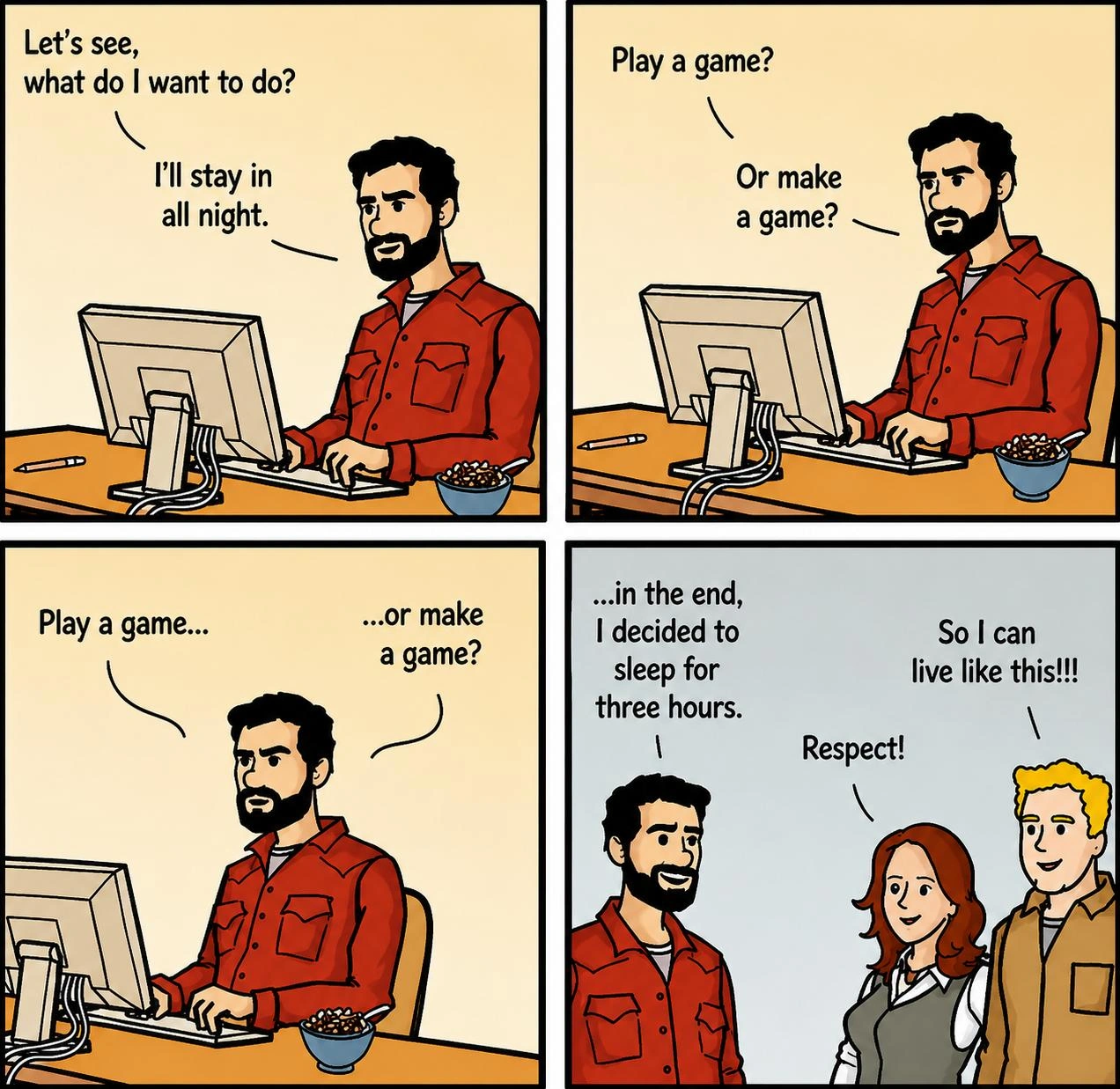
Let’s break down what’s going on here in simpler terms, especially for those newer to the developer world or who aren’t familiar with ADHD. The meme uses a flowchart (a diagram with circles and arrows) to compare what we intend to do with what often actually happens. The top part labeled “THE PLAN” shows a very simple plan: there’s a blue circle that says “Thing I need to do” and it goes in a straight line (via a blue arrow) to a red circle that says “DONE.” Think of this like your to-do list when you’re feeling optimistic: “I need to finish this coding task. I’ll start it, I’ll work on it, and then it will be done.” In an ideal world, that’s how tasks would go — a straight path from start to finish. In tech terms, you might imagine opening your code editor, writing the feature, and pushing the code all in one go. No fuss, no interruptions. The confetti-like dots drawn between the start and done circles even give it a celebratory feel, as if saying “Yay, mission accomplished easily!”.

Now, the bottom part labeled “THE REALITY” is where things get relatable (and a bit funny). Instead of one straight line, we see a whole bunch of different colored circles with arrows going every which way, almost like a tangled web or a bunch of tabs open in your browser at once. The first circle is still “Thing I need to do” (so you do start with the intention to do that important task), but then an arrow takes a sharp turn to a teal circle “Fun thing I want to finish.” This is the first detour: maybe you remembered a personal project or a smaller work task that you find more enjoyable, and you decide to spend time on that instead of the main thing. It’s like when you sit down to do homework, but then recall a cool side game you were making and start doodling with that.

From the “Fun thing” circle, an arrow then points to another red circle: “Texts I need to answer.” Here the meme shows that while you’re distracted by the fun side-task, you also remember or notice that there are text messages or emails you haven’t replied to. For a developer, “texts” could also mean unread Slack messages or pending code review comments — basically communications you owe someone. So now you jump to replying to those. It’s as if you’re juggling: you had one ball (the main task), you picked up a second ball (the fun task), and now a third ball (replying to messages) has been added to the mix. None of these are inherently bad things, right? Finishing a fun task or replying to texts are good to do… just maybe not right now, when they’re stealing time from the main task. But in the moment, it’s easy to justify: “Let me just quickly reply to this, it’ll only take a minute.”

Following that, there’s an arrow to a maroon circle: “Messy thing I need to organize.” Here’s another super common scenario, especially in tech: you suddenly feel the urge to clean or organize something that’s been messy. Maybe your computer desktop is cluttered with files, or your code project’s folder structure is a bit messy, or even physically your desk has papers and coffee cups. You think, “I can focus better once I tidy this up,” so you start organizing. Before you know it, you’ve spent half an hour color-coding your bookshelf or refactoring a part of code that’s unrelated to the task at hand. For someone new in development, this might manifest as reorganizing your project files or updating your to-do list, instead of tackling the actual coding task. It’s procrastination in disguise – you feel productive because organizing feels like work, but it’s not the work that was top priority.

Next up, a purple circle: “Gotta go to the bathroom.” This one is straightforward – literally nature calls. Even if you’re perfectly focused, at some point you might need a bathroom break. The meme includes this to be humorous (because who can argue with bathroom breaks!) and to show how even necessary breaks can break your flow. Perhaps you really did need to go, or maybe sometimes when you’re bored with your task, you suddenly feel the urge to take yet another bathroom break as an excuse to step away. It’s illustrating context switching on a small scale: you switched from “work mode” to “bathroom mode.”

From the bathroom, an arrow goes to a big green circle: “Wasting time on my phone.” This is a big one for almost everyone nowadays. After the bathroom (or during it, let’s be honest, many of us scroll our phones in there), you might start checking your phone. “I’ll just see if I have notifications… oh look, a friend posted a funny video… let’s watch it… now an ad or another video pops up… or I’ll quickly check Twitter…” – and down the rabbit hole you go. In no time, a “quick check” can turn into 20 minutes of scrolling through social media or news feeds. If you’re a developer early in your career, you probably know the feeling of having your phone nearby while coding; one buzz and you’re out of coding mode and into chat or social media mode. It’s a distraction that’s hard to resist because phones offer quick bursts of entertainment or connection (which feel rewarding compared to the hard brain-work of coding or studying). The meme highlights this by making the phone distraction bubble quite large, implying it’s a major time sink.

The green phone bubble then points to a yellow circle: “Quick thing I need to Google.” Ever been working on something and a random question pops into your head? “Actually, how do JavaScript closures exactly work under the hood?” or “What’s the weather this weekend for that picnic?” or maybe you encounter a bug and think “I’ll just quickly search Stack Overflow for this error.” Googling is often necessary in development (we Google stuff all the time for documentation, error messages, etc.), so it can start innocently enough. But the meme calls it out because sometimes that “quick Google” isn’t directly about our task – it could be a stray curiosity or something only tangentially related – and it can branch off into opening multiple browser tabs, reading unrelated articles, or otherwise losing track of time. For instance, a junior dev might search one thing about their project, then click a related link about a new tech, then end up on a tutorial video… and suddenly what was meant to be a 2-minute reference check turned into an hour in a completely different knowledge space. It’s another form of context switching: you left the coding mindset to go into research/web-browsing mode. It feels like you’re doing something useful (learning is good!), but it paused the main task momentum.

Finally, all those many detours converge to the purple circle that says “Well, it’s too late now.” This is the realization point. Perhaps you glance at the clock and it’s 6 PM, or your brain is just drained from all the starting and stopping. You think, “Where did the time go? I haven’t actually finished the thing I needed to do.” This moment often comes with a mix of frustration and resignation. In the flowchart, this bubble leads to an arrow off the edge of the image, where we see the words “DO IT TOMORROW.” In other words, the end result of all these distractions is that the original task gets postponed to the next day. This is the procrastination loop completed: you had a task for today, you did a bunch of other stuff (some of it even task-like), and now you push the main task to tomorrow because the day’s effectively over. For a young developer or student, this might be like when you had all day to do an assignment, but you ended up doing laundry, sorting your music playlist, watching YouTube, etc., and now it’s bedtime and the assignment is still not done – so you tell yourself you’ll wake up early and finish it (sound familiar?).

Key terms to clarify here:

  • ADHD: This stands for Attention Deficit Hyperactivity Disorder, a condition that many people have which makes it challenging to focus, organize, and not get distracted by impulses. Not everyone who procrastinates has ADHD, but those with ADHD often experience exactly this kind of day described in the meme. In tech, you’ll hear ADHDInTech discussions, as folks talk about how ADHD affects them at work (needing strategies like timers or special organization tools). The meme uses ADHD in the title because it’s a prime example of an ADHD-style attention spiral, but even those without ADHD can relate on a bad day.
  • Context Switching: In computing, context switching is when a CPU switches from running one process to another – it has to save the state of the first process and load the state of the second. This comes with some overhead (a little extra work and time lost during the switch). In human terms, context switching is when you change what you’re focusing on. If you’re writing code and then you alt-tab to answer a chat message, you’ve switched context. When you come back to coding, you might need a few moments to remember where you left off – that’s overhead. Too much context switching (back and forth, back and forth) means you spend a lot of time just readjusting and not actually moving forward on any one task. New developers often learn that constantly interrupting your coding to check emails or meetings can make you way less productive, because you never stay in the “zone” long enough. That’s exactly what this meme visualizes: multiple context switches leading to very little actual progress on the main task.
  • Developer Productivity: This refers to how much useful work (like writing code, fixing bugs, completing features) a developer can get done in a given time. It’s a hot topic in the industry – everyone is looking for ways to maximize productivity, whether through better tools, methodologies, or personal habits. Things like procrastination and distractions are enemies of productivity. The categories here (DeveloperProductivity, MentalHealth) highlight that this meme is about how mental habits (and health conditions like ADHD) can affect a developer’s output. If you’re new to the field, you’ll soon realize productivity isn’t just about coding skills – it’s also about managing your time and focus. Memes like this resonate because even great programmers struggle with staying on task.
  • Mental Health in Tech: It might seem odd to connect mental health and tech, but in recent years there’s been more open discussion about issues like burnout, anxiety, imposter syndrome, and conditions like ADHD among software developers. Tech jobs can be high-stress and require intense concentration, which can exacerbate mental health challenges. The tag MentalHealthInTech signals that the meme touches on one of these challenges – in this case, how ADHD or even just plain old stress-related procrastination can derail a day. The tone is humorous, but the underlying message is, “you’re not the only one who struggles with this.” It’s kind of comforting for developers to know this pattern is common enough to joke about.
  • Procrastination: Simply put, procrastination means delaying or postponing something that needs to be done, often by doing more pleasurable or easier things in the meantime. Everyone procrastinates sometimes, but this meme is showing an epic level of procrastination where a single task gets delayed by a whole chain of other activities. For a junior dev, a classic case of procrastination might be delaying writing unit tests for your code by first “organizing the test folder” or tweaking something minor, because writing the actual tests feels daunting or tedious. The meme literally maps out procrastination in graphical form.
  • Relatable Humor: The reason many people find this meme funny is because it’s relatable – meaning they see themselves in it. When we say something is relatable in humor, it means a lot of people have experienced it, so they nod and laugh and think “oh my gosh, that’s me!” Developers often share these kinds of memes to bond over common experiences (like deploying on Fridays gone wrong, or imposter syndrome feelings). Here, the whole whirlwind of doing everything except the thing you meant to do is a painfully relatable scenario.
  • ContextSwitching (in daily life): We defined the computing meaning, but it’s worth noting how it feels in daily life: imagine you’re writing code and someone walks over to ask a quick question – your brain had to switch contexts. You answer them, then try to go back to coding. Now your phone buzzes – switch context to check that. Then back to coding. Each time, you might forget a bit of what you were doing. For someone with ADHD, their brain might context switch internally even without external interruptions (one second you’re coding, the next second an idea pops in your head, and boom you’ve switched focus). It’s like having “too many tabs open” in your mind and constantly clicking between them.
  • Task inertia: This term “task inertia” in the context tags isn’t a standard textbook term, but it’s descriptive. Inertia is the tendency to stay in the same state (like an object at rest stays at rest, an object in motion stays in motion). Task inertia here means once you stop working on the main task, it’s hard to start again (staying at rest), and once you start focusing on something else (like browsing the phone), you tend to keep doing that (staying in motion on the distraction). It takes effort to overcome inertia and get back on track. New devs often experience this when they take a “short break” that turns into a long break – the longer you stop, the harder it is to restart the original work. That’s why lots of productivity advice says to minimize how many times you stop and start.

Visually, the bottom “REALITY” graph looks like a bunch of different colored bubbles connected by arrows. This is basically a picture of a distracted day. Each bubble’s color is different, maybe to symbolize how each activity is a whole different context or mood (also it makes the graphic pretty and chaotic-looking, emphasizing the wild mix of activities). The tangled arrows show that there’s not one clear direction; you kind of bounce from one thing to the next unpredictably. When the meme shows the arrow leading to “DO IT TOMORROW” off-screen, it’s implying this whole messy process is going to repeat. Tomorrow, presumably, you’ll start again with “Thing I need to do,” possibly to get caught in a similar loop if nothing changes. It’s like showing a never-ending cycle of intending to work, getting sidetracked, and rescheduling.

For someone just getting into development (or students), seeing this meme might also be a gentle introduction to why focus is so talked about in tech circles. It’s not that devs are uniquely bad at focusing, but the work often requires deep concentration, and our tools (computers, internet, smartphones) are ironically the same tools that give us endless opportunities for distraction. Imagine trying to write code (which is like solving a puzzle) while every few minutes someone taps you on the shoulder or your own brain says “hey, let’s do something else.” It makes the work much harder and slower. That’s why many developers use techniques like:

  • Pomodoro Technique: working in short focused bursts (like 25 minutes on, 5 minutes off) to train some disciplined focus.
  • Do Not Disturb modes: turning off phone notifications or using apps that block distracting websites while working.
  • Task lists or Agile sprints: breaking the main task into sub-tasks so you feel a sense of progress and don’t drift as easily.
  • Pair programming or accountability: sometimes working with someone else or at least telling a colleague “I’m going to finish X today” helps to keep one on track. These aren’t explicitly in the meme, but they’re good to know as counter-measures. The meme itself is more about pointing out the problem in a funny way than solving it.

In sum, at Level 2 understanding, this meme is showing the difference between what we plan to do and what we actually do, especially highlighting how easily we get distracted by other tasks or fun activities. It’s using an exaggerated flowchart to make the point. For a newcomer in the field or a junior developer, the takeaway is: hey, even experienced folks struggle with staying on task; it’s a known issue and we even joke about it. It’s also saying: if you’ve ever ended a day feeling like “I did a lot of stuff but not the one thing I meant to do,” you’re definitely not alone. That scenario isn’t because you’re a bad dev or anything – it’s almost a running joke in the community because it happens so often, especially when our brains are tired or when dealing with something like ADHD. Recognizing it is the first step to managing it (and enjoying the meme is a way to recognize it with a smile).

Level 3: Interrupt-Driven Day

This meme strikes a chord with experienced developers because it humorously illustrates a common productivity killer: excessive context switching and the fragmentation of focus during the workday. The top half labeled “THE PLAN” is every developer’s ideal morning mindset: I have one thing I need to do, I’ll start it and before you know it, boom, it’s done. That clean blue circle (“Thing I need to do”) connected by a straight arrow to the red “Done” circle is blissfully simple – it’s the linear workflow you’d expect if everything went perfectly. In an engineering context, that’s like saying “I’ll implement this feature from spec to commit with no interruptions.” It’s a plan_vs_reality_diagram setup: the plan is straightforward, sequential, and controlled.

Then reality hits – literally under the header “THE REALITY” – and we see an explosion of multicolored nodes and twisty arrows. This is where every seasoned developer chuckles (albeit sardonically): we recognize the procrastination_loop and scatterbrained task switching all too well. The single blue node “Thing I need to do” still appears at the start, but instead of a direct line to “Done,” it branches into a labyrinth of detours. It’s a flowchart of every other shiny object, obligation, or distraction that manages to grab our attention. The humor here is how painfully relatable this tangled flow is – it’s essentially a day in the life of a developer (or any knowledge worker) prone to distractions or living with ADHD. The meme’s subtitle nails it: “When a simple task derails into an ADHD whirlwind of procrastination.” We’ve all had that one simple coding task that somehow spirals into reorganizing your desk, responding to backlog emails, reading random tech articles, and basically doing everything except the one thing you set out to do. It’s funny in the “laugh to keep from crying” way, because this RelatableHumor hits a genuine DeveloperPainPoints: the struggle to maintain DeveloperProductivity in the face of constant context switching and distraction.

Each bubble in “THE REALITY” flow is a tongue-in-cheek label for a common distraction vector. For instance, “Fun thing I want to finish” (teal circle) might be a side project or minor feature that is way more enjoyable than the boring task you’re supposed to do. Developers often have a refactoring idea or a nifty script they’ve been tinkering with – it’s not priority, but it calls to them when they’re trying to focus on something else. This is classic procrastination by way of pseudo-productivity: you neglect the important task by working on something else that feels productive or fun (hey, at least you’re coding… just not the thing you should be coding!). Then there’s “Texts I need to answer” (red circle) – that’s all the unread messages on Slack, or that email from 3 days ago you suddenly feel guilty about and decide to reply to right now instead of doing your task. It includes both personal and work messages: maybe your family texted you, or a colleague pinged you with a question. In the moment, answering those feels responsible, but in truth it’s another context switch pulling you away from the main objective. The meme acknowledges even obligations we’ve been putting off (like replying to texts) suddenly become tantalizing when there’s a more pressing task to avoid. This is often called structured procrastination: doing lower-priority “useful” tasks as a way to justify avoiding the top-priority one.

Then we hit the maroon bubble “Messy thing I need to organize.” This one is particularly funny to developers because it’s so real: when that code task or report writing feels daunting, suddenly organizing your desk, sorting your email inbox, or cleaning up that untidy ~/Downloads folder becomes incredibly appealing. It’s the tech equivalent of deciding to rearrange your sock drawer when you should be writing an essay. Developers might even start refactoring unrelated code or tidying up their Git branches purely to dodge the actual work at hand. This bubble represents the task_inertia problem: you have inertia against starting the hard thing, so you apply that energy toward trivial organizing tasks that have been low on your list. It’s productive procrastination again – you are doing something, maybe even something you “need to do” eventually, but it’s absolutely not the thing you’re supposed to be doing now. The humor (and pain) comes from recognizing this rationalization: “Well, cleaning up this mess is important too!” – sure, but it could have waited. It’s procrastination wearing the disguise of “getting other stuff done.”

The purple node “Gotta go to the bathroom” introduces a bit of biological reality into the mix. It’s funny because it’s true: the moment you actually settle down to focus, suddenly your body pipes up with “actually, we need a restroom break.” 😂 Of course, using the bathroom is a legitimate need, but the meme exaggerates how even basic needs become part of the procrastination flowchart. Many developers know this phenomenon: as soon as you’re in the zone, something pulls you out – sometimes it’s an internal distraction like hunger or nature’s call. In an office environment, it could be analogous to a coworker stopping by (an external interrupt). The bathroom break bubble highlights that some context switches are unavoidable but still break momentum. In an ADHD context, even a quick bathroom break can sidetrack into something else on the way (e.g., you notice the fridge en route and then “Looking for snacks” happens next). And indeed, the next orange bubble is “Looking for snacks.” This probably resonates with every remote developer who suddenly finds themselves staring into the pantry fifteen minutes after opening the IDE. Grabbing a snack is a minor task that somehow expands – maybe you start actually preparing a little meal or you realize the kitchen is messy and start tidying it. It’s comedic because wasting time in the kitchen when a deadline looms is a well-known procrastination classic. It’s also a dopamine thing: tasty snacks provide a quick reward, whereas that long coding task might not provide satisfaction for hours. The ADHD brain especially is drawn to quick rewards, so of course a snack detour is in the flow.

Now the big green bubble “Wasting time on my phone” – possibly the largest bubble in the flowchart – is extremely relatable and a huge part of modern procrastination. Whether it’s doomscrolling Twitter, mindlessly swiping through Instagram, or getting lost in a TikTok hole, checking our phone is the go-to distraction for so many people, techies included. It often starts innocently: “I’ll just check one notification” or “I’ll respond to that one WhatsApp message,” and then suddenly 30 minutes are gone. For developers, it could also be checking Reddit or Hacker News “for a quick break” and then emerging much later having lost the thread of the original work. The meme places this bubble prominently because it’s a common ADHDInTech experience and generally a huge productivity sink. It’s also a bit meta: you might even be scrolling through tech memes and stumble on this exact meme instead of finishing your work. The arrow flows show “Gotta go to the bathroom” leading to “Wasting time on my phone” – perhaps implying the classic move of taking your phone with you to the bathroom, then getting stuck on it. In any case, every senior dev has likely struggled with smartphone distraction at some point, so this hits home. It’s a perfect illustration of ContextSwitching in practice: you literally switch from your development environment or planning documents to a completely different context (social media or messages) and it can be really hard to switch back. The cost isn’t just the time on the phone; it’s also the time to recover your mental state after.

The yellow bubble “Quick thing I need to Google” is another sneaky one. Developers often do need to Google things as part of work – a documentation lookup or Stack Overflow search – but this bubble represents when a random thought or curiosity hijacks your focus. For example, you’re coding and think, “Did the new version of that library release? Let me quickly Google it.” Or “What’s the weather tomorrow?” or literally anything not strictly your current task. That “quick Google” often leads to not-so-quick outcomes: you open one tab, then another, and before you know it you’ve fallen down a rabbit hole of browser tabs unrelated to your core task (hence the common joke about having too many tabs open – a hallmark of a distracted developer). The phrase “I’ll just quickly Google X” is basically the famous last words of focus. It’s funny because it’s a universal self-deception – we tell ourselves it will only take a moment, but it rarely does. Senior developers might recall times they ended up reading about some new framework or an unrelated bug report for an hour all because one thing led to another on Google. This bubble is a nod to how our own curiosity or sudden questions can derail us. It’s a very developer-specific flavor of procrastination: you justify it as work-related (I’m researching something), but it’s often just a tangent.

The violet bubble “Well, it’s too late now” encapsulates the grim punchline of this whole procrastination tour. It’s that moment late in the day when you look at the clock (or build monitor, or task list) and realize you’ve run out of time to meaningfully complete the “thing you needed to do.” Every detour – however small – added up and snowballed until the day’s essentially over. For a developer, this could mean you wanted to implement a feature or fix a bug by EOD, but after all the Slack conversations, coffee breaks, configuration clean-ups, etc., you have barely any commit-worthy progress. That “Well, it’s too late now” is both humorous and painfully real: humorous in the comic because it’s phrased in a deadpan way inside a bubble (we can almost hear the sigh), and real because many of us have internally said these exact words as we give up for the day. The arrow from this bubble points to “Do it tomorrow,” which is drawn off the canvas – implying that the ultimate result of the day’s procrastination is punting the task to the next day. In developer terms, this is like creating a JIRA ticket for tomorrow for the task you failed to finish today, or moving the Trello card back to the “To Do” column. It’s a visualization of task_inertia winning: the task didn’t get done, it simply got postponed. Seasoned devs know the danger here: tomorrow the cycle can repeat unless something changes. That impending loop of “tomorrow never comes” is a shared dread and a bit of dark humor in tech circles (we joke that “I’ll refactor that code later” sometimes never happens, similar energy to “I’ll do it tomorrow” in this meme).

So why is this particularly relevant to developers and not just anyone with ADHD? In the tech industry, ContextSwitching is already a big issue even for those without ADHD. We often have multiple projects, meetings, notifications popping up, on-call alerts, and shifting priorities. Developers cherish the concept of the “flow state” – that deep focus where you lose track of time while solving a complex problem – because it’s productive and mentally rewarding. The plan (top diagram) essentially depicts an uninterrupted flow state: one task, start to finish. But the reality diagram is the antithesis of flow: it’s start-stop-start-stop, never sustained long enough on one thread. For developers with ADHD (and many do identify with ADHD or at least DeveloperFrustration around focus), achieving flow is even harder because their brains are more susceptible to exactly these kind of derailments. The meme falls under ADHDInTech and MentalHealthInTech because it shines a light on how mental health conditions can impact work habits in tech. It’s presented humorously, but it opens the door to talk about serious topics like executive dysfunction (difficulty in initiating and completing tasks, common in ADHD) and the guilt or anxiety that can result from these productivity struggles.

From a senior developer perspective, there’s also an element of self-awareness and coping mechanisms embedded in the humor. The fact that we can list out these distractions (and even color-code them!) means we know this happens. Teams often try to mitigate this: e.g., no-meeting days to protect focus time, or pomodoro technique (timed focus sprints with breaks) to impose some structure. Some developers turn off notifications or use apps to block social media during work hours. These are attempts to straighten out that tangled arrow mess into something closer to a straight line. A veteran dev might chuckle at the “ADHD whirlwind” and think, yep, been there – nowadays I literally put my phone in another room when I need to concentrate. Others might relate on a process level: maybe you planned to code a feature, but real-world interrupts at work turned your day into something completely different (e.g., sudden bug reports, urgent code reviews, DevOps fires to fight). In that sense, this meme isn’t only about internal distractions; it can also symbolize how a developer’s day derails due to external factors (the many hats we wear in tech). One minute you plan to implement feature X, the next you’re noodling with build scripts because CI broke (the “quick thing I need to Google” could be a quick fix search for the build error), then a coworker asks for help (like answering “Texts I need to answer”), then you realize you skipped lunch (snack time). Before you know it, it’s evening. Senior engineers see this pattern in chaotic work environments or when one isn’t strict about prioritization.

The plan_vs_reality_diagram format of this meme is itself a popular way to express tech frustrations. It sets up an expectation vs outcome contrast. Here the expectation is almost childishly optimistic – just do the task and finish. The outcome is comically convoluted. This contrast is funny because it’s true: in complex systems (be it software projects or human behavior), the happy path is rare. Seasoned developers know projects rarely go as linearly as the Gantt charts or sprint plans imply. There are always unforeseen issues and detours – though usually more justifiable than “I got snacks instead of coding,” but the core idea of diverging from the plan resonates. We often joke that estimating a task doesn’t account for all the “stuff” that happens in between. This meme takes that to an extreme personal scale, crediting ADHD for an almost slapstick series of diversions. It’s cathartic humor for those of us who live it. By laughing at the absurdity of the distraction swirl graphic (all those colorful nodes), developers can bond over shared experiences: “Haha, I’ve basically drawn that exact flowchart on days when my brain just wouldn’t cooperate.” In communities discussing DeveloperProductivity, seeing this meme might prompt folks to share tips or at least feel less alone in their struggle to stay on task. It validates that this context-switching chaos is a real phenomenon, not just personal failure.

In summary, the senior-perspective take on this meme is that it perfectly encapsulates a DeveloperFrustration we rarely put into diagrams: the multi-threaded, interrupt-driven nature of a workday, especially for those with ADHD or a lot of concurrent responsibilities. It emphasizes the cost of ContextSwitching in human terms – not just lost CPU cycles, but lost hours of a day. It’s funny because every labeled circle is something we’ve told ourselves or done at least once (if not every day during a tough week 😅). The humor has a slight edge of “this is my life and I hate that it’s true”, but by being presented in a playful flowchart, it helps us step back and chuckle. After all, sometimes the only thing you can do is laugh at the absurd complexity of a supposedly “simple” day. And who knows, maybe seeing it laid out like this even helps one or two people catch themselves mid-procrastination and think, “Ah, I’m in the orange bubble ‘looking for snacks’ right now – time to get back on track!” In any case, the meme stands as a witty visual reminder that plan vs. reality often differ, and that the struggle to stay focused is real – but hey, at least we can meme about it together.

Level 4: Cognitive Context Thrash

At the most granular level, this meme highlights a brain under interrupt overload much like a computer CPU thrashing between too many tasks. In the ideal “THE PLAN” scenario, the mind would execute a single thread from “Thing I need to do” straight to “Done” – analogous to a simple synchronous program with one clear execution path. No context switching, no multi-threading, just a straightforward function call that returns success. The confetti sprinkled between the start and end in the diagram even evokes a celebratory commit progression: start the task, run it to completion, and 🎉 ship it (Done). This is akin to a CPU pipeline running a single process uninterrupted, or a clean directed acyclic graph of dependent tasks that leads to a final output without detours. It’s the brain’s equivalent of a well-optimized algorithm with minimal overhead.

But “THE REALITY” section below is a chaotic tangle of colored nodes and arrows – essentially a state machine of procrastination with numerous intermediate states. Each colored bubble (“Fun thing I want to finish,” “Texts I need to answer,” “Looking for snacks,” etc.) represents an unscheduled context switch, comparable to interrupts preempting the main process. In computing terms, an interrupt-driven system keeps halting the main thread to handle peripheral events; here, each random urge or distraction acts like a hardware interrupt. The result? The mental CPU repeatedly performs a costly context switch: saving the state of the “real work” context, loading the new “snack time” or “check phone” context, then later attempting (often awkwardly) to resume the main thread. This constant juggling incurs massive overhead – just as a computer thrashing between too many threads wastes cycles on switching rather than actual computation. In fact, it mirrors a known performance killer in operating systems: if a scheduler swaps tasks too frequently relative to work done (due to a flurry of I/O or interrupts), throughput plummets because the system spends more time switching and restoring state than executing useful instructions. Here, the brain’s scheduler is essentially context-switching so often that productivity approaches zero, an ADHD-induced form of cognitive thrashing.

We can push the analogy deeper: modern CPUs rely on caches (L1, L2, etc.) to keep recently needed data close. Frequent task-switching causes constant cache invalidation – one of the famously hard problems in computer science – so the CPU ends up reloading data from slower memory again and again. Similarly, when you jump from writing code to checking a text, you flush your “mental cache” of what you were doing. By the time you return, the problem state that was in your working memory is gone (mental cache miss!), and you have to painstakingly page it back in from long-term memory or redo the mental loading process. Each colorful detour in “THE REALITY” graph effectively invalidates the cache of the main task’s context. No wonder progress feels slow: the cost of continually reloading context after each distraction is like a pipeline flush – all the prior progress and flow gets discarded. In formal terms, you’re experiencing a worst-case scenario for context switching overhead, where the overhead dominates the actual work. This is analogous to a computing scenario known as thrashing, where the system spends all its time swapping pages in and out (or switching tasks) and does very little real work. Here the developer’s day is “thrashing” between tasks: lots of motion, very little progress.

From a theoretical perspective, this meme’s tangled flowchart is almost a petri dish for discussing scheduling algorithms and priority inversion. An optimal scheduler (like an OS trying to maximize throughput) would ideally prioritize the important job (the “Thing I need to do” task) and minimize interruptions. But an ADHD brain’s “scheduler” tends to elevate whatever is immediately stimulating – analogous to a poorly tuned priority scheduler that gives short-term, I/O-bound processes excessive priority. The “Fun thing I want to finish” or “Wasting time on my phone” tasks are like high-frequency interrupts or high-priority background threads that steal CPU time from the main task. There’s even a hint of a priority inversion problem: the trivial tasks (snack searching, impulsive googling) end up overtaking the critical task in priority, so the primary task starves. It’s as if the brain’s kernel constantly issues a yield() to any shiny object that comes along. Classic scheduling theory tells us that if the time slice for each task is too small (or tasks keep self-preempting), none of the tasks get enough continuous CPU time to complete – exactly the situation depicted. The “Do it tomorrow” node off to the side is essentially a goto Tomorrow; in the human operating system – an unscheduled context switch that defers completion indefinitely (programmers might chuckle here, recalling that goto is considered harmful 😉). In other words, instead of reaching the proper end of the program (Done state), the flow jumps out to a next-day label, forming a procrastination loop. We’ve basically entered an infinite loop of postponement, where the output of the day’s “program” is not a completed task, but a reschedule to run the task again tomorrow – much like a cron job that keeps getting pushed to the next run because the previous execution never finished.

Notably, the diagram itself resembles a directed graph of mental states. The top section’s simplicity can be described as a trivial graph (two nodes, one edge) or even a straight-line timeline of execution. The bottom section is a complex graph with many nodes and edges crossing – reminiscent of a tangled flowchart or even spaghetti code flow. Each arrow between colored bubbles is like a transition in a finite state machine (FSM) of distraction: from the “Thing I need to do” state, one can transition to “Gotta go to the bathroom” (perhaps triggered by the event of sitting down to focus 😜), and from there to “Wasting time on my phone,” and so on. The path winds through numerous states before reaching that terminal “Well, it’s too late now” state. In formal language, this is the execution path your brain took, and it’s far from optimal. A compiler or static analyzer looking at this would flag a nightmare of unstructured jumps. Indeed, the flow is essentially unstructured – much like spaghetti code with GOTO statements jumping all over, making it hard to follow or maintain a clear call stack of what led where. Just as senior developers cringe at spaghetti code that wanders through multiple unrelated modules before finishing a routine, here we have spaghetti focus: the day’s attention bounces through unrelated tasks (modules) in a convoluted way. The difference is that in code, spaghetti structure might still eventually reach an output by accident, but with ADHD procrastination, the “program” often times out (day ends) before producing the intended result. The meme humorously captures this fundamental issue: our mental “execution environment” has limited cognitive resources and when it’s forced into handling too many context switches (due to either external interrupts or internal impulses), it can’t complete the job it set out to do. This cognitive context thrash is the deep technical root of the relatable chaos shown – a developer’s attention algorithm failing to achieve a stable, optimal path from intent to done because it’s busy servicing every little sub-routine along the way.

Description

A two-part infographic by Dani Donovan contrasting 'THE PLAN' with 'THE REALITY' of completing a task. The top section, 'THE PLAN', shows a simple, direct arrow from a starting point labeled 'THING I NEED TO DO' to a destination labeled 'DONE'. In stark contrast, the bottom section, 'THE REALITY', depicts a chaotic, non-linear flowchart. It begins at 'THING I NEED TO DO' but then veers off into a complex web of interconnected bubbles representing common distractions: 'FUN THING I WANT TO FINISH', 'TEXTS I NEED TO ANSWER', 'MESSY THING I NEED TO ORGANIZE', 'LOOKING FOR SNACKS', 'GOTTA GO TO THE BATHROOM', 'WASTING TIME ON MY PHONE', and 'QUICK THING I NEED TO GOOGLE'. This winding path ultimately leads to a bubble stating 'WELL, IT'S TOO LATE NOW', which then points to the final outcome: 'DO IT TOMORROW'. While originally created to illustrate the executive dysfunction associated with ADHD, this diagram is deeply resonant with software developers, perfectly capturing the constant battle with procrastination, context-switching, and yak-shaving that derails a seemingly straightforward coding task
Comments

8
Anonymous ★ Top Pick The 'Quick thing I need to Google' is how a simple bug fix ticket turns into a three-day refactor of a utility function you discovered hasn't been touched since the company used Subversion
  1. Anonymous ★ Top Pick

    The 'Quick thing I need to Google' is how a simple bug fix ticket turns into a three-day refactor of a utility function you discovered hasn't been touched since the company used Subversion

  2. Anonymous

    PM’s arrow: spec → done. My call stack: spec → Slack interrupt → prod alert → drive-by code review → snack I/O → bathroom syscall → RFC rabbit hole → ‘roll to next sprint’ - the human equivalent of a cache-missed pointer chase

  3. Anonymous

    Every senior engineer knows the real architecture diagram isn't the clean microservices mesh in Confluence - it's the undocumented state machine of context switches, Stack Overflow rabbit holes, and that one critical service that only works because someone's browser tab has been open since 2019

  4. Anonymous

    This flowchart perfectly captures why every 'quick fix' ticket becomes a three-day odyssey through dependency hell, Stack Overflow archaeology, and that one config file you swear you updated last sprint. The real kicker? Senior engineers have simply learned to pad their estimates by 10x and call the bathroom-snack-phone loop 'architectural contemplation time' - because sometimes the best solution to a race condition is realizing it's 6 PM and you can just mark it as 'works on my machine' tomorrow

  5. Anonymous

    On the roadmap it’s O(1)→done; at runtime it’s a strongly connected component with interrupts from phone(), snack(), and quickGoogle() - the scheduler eventually calls deferToTomorrow()

  6. Anonymous

    Plan: TODO → DONE. Runtime: a saga that invokes “quick Google,” “toolchain upgrade,” and “snack breaks” as compensating actions - result: eventually consistent tomorrow

  7. Anonymous

    The plan: sequential task queue. Reality: async distraction storm with no await, spawning zombie processes till tomorrow

  8. Deleted Account 4y

    Yeah, im currently wasting my time in this channel, instead of fixing the bug.

Use J and K for navigation