Skip to content
DevMeme
6488 of 7435
Goku Demonstrates the Cautious Approach to Copy-Paste Operations
DeveloperProductivity Post #7113, on Sep 10, 2025 in TG

Goku Demonstrates the Cautious Approach to Copy-Paste Operations

Why is this DeveloperProductivity meme funny?

Level 1: Better Safe Than Sorry

Imagine you’re about to leave your house. You lock the front door, but then you pause and check the knob a couple of times to make sure it’s really locked. Maybe you even go back once more to double-check. We do little things like this in everyday life to be extra sure we didn’t forget something. “It doesn’t hurt to be cautious,” right? That’s exactly what’s happening in this meme, but with a computer action. The person in the meme is copying some text on the computer. Normally you’d press the “copy” keys once and then paste it. But here, the person presses the copy keys over and over again, like checking the door multiple times, before finally pasting. It’s a funny exaggeration of being extra careful: they know one copy would do the job, but doing it repeatedly makes them feel absolutely certain the text is safely copied. In short, the developer is just double-checking (well, six-checking!) their work, the same way you might double-check a locked door or verify you packed your lunch twice. It’s a playful reminder that sometimes a little extra caution gives us peace of mind – better safe than sorry, even if it makes everyone else chuckle.

Level 2: One More For Luck

Let’s break down what’s happening here in simpler terms. Developers frequently use keyboard shortcuts like CTRL+C and CTRL+V in their day-to-day work. In most applications (code editors, Word documents, browsers – you name it), pressing CTRL+C will copy whatever is selected to the clipboard (a special place in your computer’s memory that holds copied text or images). Pressing CTRL+V will paste that content wherever your cursor is. This is the classic copy-paste action that almost everyone knows.

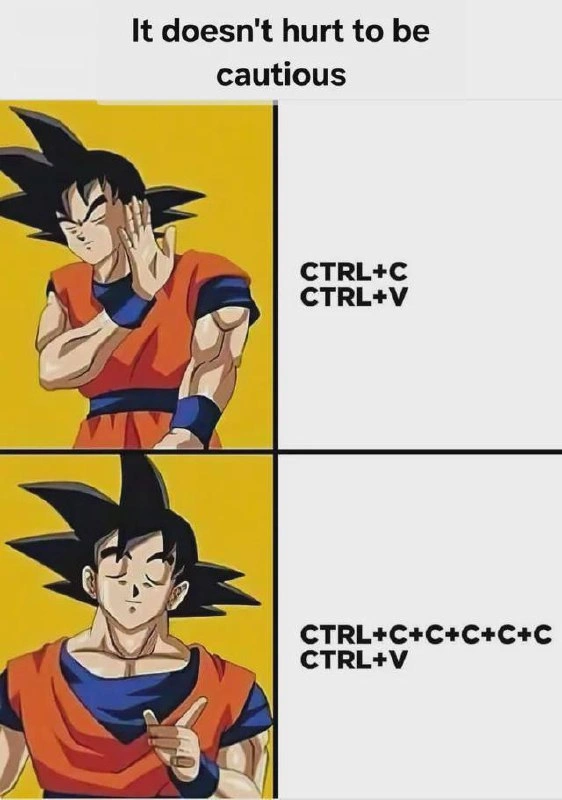
Now, normally you just do CTRL+C once to copy something, then CTRL+V once to paste it. The meme’s joke is about some developers who have a habit of pressing CTRL+C not just once, but multiple times in a row before they hit CTRL+V. The bottom-right panel literally shows “CTRL+C+C+C+C+C+C” – meaning the person pressed copy six times – and then “CTRL+V” to paste. The text above the meme says “It doesn't hurt to be cautious,” and that’s exactly the message: why press copy once when you can press it six times to be extra sure?

Why would anyone do this? It’s not because the computer requires it – one copy is enough to put the text into the clipboard. Rather, it’s about the developer’s own peace of mind. We’ve all had moments where we thought we copied something but it didn’t actually copy. Maybe we didn’t highlight the text properly, or we accidentally copied a blank space afterward, or some program lagged. For a newcomer, the first time this happens is a surprise: you go to paste and… nothing (or the wrong thing) appears. Frustrating, right? So after a few incidents like that, people develop a tiny bit of paranoia about the clipboard. Pressing CTRL+C a second time (or third… or sixth!) is like telling yourself, “Okay, I definitely got it this time.” It’s a quick double-check.

Think of it as a habit or a quirk in the developer workflow. Just like some people might save their file repeatedly (CTRL+S, CTRL+S, CTRL+S) to be absolutely sure their work is not lost, many devs also tap copy a couple of times. It doesn’t actually copy the text twice – the clipboard just keeps the latest content, so copying the same thing over and over has the same effect as copying it once. But doing it can be satisfying because you feel like you’ve verified the action. In programming, we often talk about verifying things (like writing tests to verify code works). Here, the dev is almost “verifying” that the copy worked by doing it repeatedly. It’s a bit funny because it’s overkill for such a simple operation, but hey, it doesn't hurt.

The imagery in the meme helps illustrate this. It uses a character from Dragon Ball (that’s Goku in the orange outfit) as the reaction guy. In the top half, next to “CTRL+C / CTRL+V” (copy once, paste once), Goku has his hand up like “nah, not good” – implying that just doing one copy-paste is not cautious enough for him. In the bottom half, next to the many CTRL+C sequence and then CTRL+V, Goku is smiling and giving a thumbs up, as if saying “yes, that’s the right way.” So the meme visually shows approval for the extra-cautious approach. It’s exaggeration humor: of course copying six times is unnecessary, but that’s what makes it comical. It’s taking a tiny habit and blowing it up for effect.

For a junior developer or someone new: don’t worry, you don’t actually need to press copy multiple times for it to work! One time is enough. The computer isn’t more likely to copy just because you pressed the keys repeatedly. However, don’t be surprised if you catch yourself doing a quick double-tap of CTRL+C someday. A lot of us do it when we’re handling something important and just want that extra confidence. It’s a little inside joke among developers that shows we can be a bit over-cautious with our tools. After all, if pressing a couple more times makes you feel 100% sure, then, as the meme says, it doesn’t hurt to be cautious. It’s basically a “just in case” measure — a tiny insurance policy for your clipboard content! Also, it’s a form of muscle memory: once your fingers learn the pattern, you might do it without thinking. You’ll see jokes about this on developer forums tagged as #DeveloperHumor or #DeveloperPainPoints, because it’s both funny and born from minor pain (losing copied text). So the meme is a lighthearted nod to all the times we’ve nervously hit CTRL+C one extra time, just to be sure.

Level 3: Trust But Verify

Experienced developers will grin at this because we’ve all done it. You copy some code or config, and then quickly hit CTRL+C again... maybe a third time for good measure, before finally pasting. This reflex comes from a mix of muscle memory and mild paranoia – a phenomenon we might jokingly call clipboard anxiety. After you've been burned once by something not being in your clipboard when you needed it, you develop a "trust but verify" mindset. You trust that the first CTRL+C should work, but you verify it by pressing that copy combo a few extra times. It’s a harmless little ritual that gives peace of mind. The top text of the meme, “It doesn't hurt to be cautious,” perfectly captures this mentality. Why settle for one copy when a half-second burst of extra CTRL+C taps can guarantee your data is in place? No harm, no foul – copying again doesn’t duplicate anything or error out; it’s essentially an idempotent ritual at the altar of the clipboard.

This habit is extremely relatable in daily development workflow. Think about working in an IDE or code editor: you might highlight a block of code to move it elsewhere. You hit CTRL+C, switch files, and... a tiny voice in your head goes "Did it copy? Are you sure?". So just before pasting, you reflexively hit CTRL+C again, maybe multiple times in rapid succession, just to be absolutely sure. This is the exact scenario the meme illustrates. In the first panel, Goku (the anime character in orange gi) is shown with a hand raised dismissively next to the text "CTRL+C / CTRL+V" – implying “copy once and paste, pfft, that’s not cautious enough.” In the second, Goku is smiling and giving an approving gesture in front of "CTRL+C+C+C+C+C+C / CTRL+V", which represents hitting copy six times before the paste – and that gets the thumbs-up from our hero. It humorously validates the paranoia: more copies = better.

Why do seasoned devs find this so funny (and painfully true)? It taps into real developer pain points. Losing your clipboard content at a critical moment can be surprisingly disruptive. Perhaps you cut a chunk of code (removing it) and then the copy didn’t take — now that code is gone into the ether. Or you spent 20 minutes crafting a complex command or query, copied it, then copied something else too soon, overwriting your clipboard. Oops. Every dev has a war story like this, even if minor, where a failed copy/paste caused frustration. So we overcorrect by double- and triple-checking. It’s the same energy as hitting CTRL+S (save) repeatedly when you’re anxious about losing work, even if auto-save is on. It costs nothing but a pinky tap, so why not be extra sure, right?

There’s also an aspect of developer workflow optimization (or superstition!). We use keyboard shortcuts like CTRL+C/CTRL+V so often that they become reflexes. Many of us don’t even consciously realize we’re hitting copy multiple times – it’s ingrained muscle memory. The meme exaggerates it (six copies is a bit extreme unless you’re truly paranoid), but the core joke lands because it’s a familiar quirk. It’s a form of “trust but verify”: we trust our tools (we know they should work), but our own past experience leads us to verify anyway (just hammer that combo again). Some might call it overkill or laugh at themselves for doing it, but it’s oddly satisfying to see that text confidently paste exactly what you expected.

The caption likening this to a “distributed commit” is tongue-in-cheek hyperbole that senior devs appreciate. In big enterprise systems, a distributed commit means coordinating a save across multiple machines or databases – a process that’s delicate and requires multiple acknowledgments to ensure success. Here, of course, nothing so grand is happening; it’s just one computer’s clipboard. But the paranoid dev’s approach is as if copying to clipboard were as failure-prone as replicating data to several servers around the world! We’re effectively seeing a solo developer mimic a multi-replica commit: pressing copy over and over, akin to writing data to several redundant places, before one final paste (the commit) uses that data. It’s an absurdly grandiose comparison, and that’s why it’s funny. It pokes fun at how seriously we sometimes treat small things, just because we’ve been trained by not-so-small failures.

And let’s not forget the specific context: IDEs/Editors and Developer Experience (DX). This meme is about a small UI/UX quirk in a programmer’s day. It doesn’t involve coding skills or algorithms, but rather how we interact with our tools. Good DX is about trust in your tools — yet even in pretty stable systems like modern editors and operating systems, developers develop these quirky trust-but-verify workflows. We laugh because it’s true; we see a bit of ourselves doing extra steps "just in case". The humor lives in that gap between what we know (one copy is enough) and what we feel (better hit it a few more times). As experienced devs, we recognize this irrational habit, maybe roll our eyes at ourselves, and share a chuckle. After all, it doesn’t hurt to be cautious.

# Paranoid copying ritual (pseudo-code)
for _ in range(6):
    press("Ctrl+C")   # spam copy (idempotent, so no side effects)
press("Ctrl+V")       # finally paste once, after feeling 'sure'

Level 4: Quorum of Copies

At the highest nerd level, this meme hilariously parallels a mundane action with distributed systems theory. The joke title even says "hammer CTRL+C like it’s a distributed commit," hinting at how a paranoid dev treats a simple copy as seriously as a multi-node database commit. In distributed databases, achieving a reliable commit often involves protocols like two-phase commit (2PC) or even consensus algorithms (think Paxos or Raft). These ensure every node in a cluster agrees on a transaction by sending confirmations back and forth. The cautious developer in the meme is essentially performing a one-person consensus algorithm with the clipboard: pressing CTRL+C repeatedly to reach a personal quorum of confidence before executing the CTRL+V. It’s as if each extra CTRL+C is another server node voting "yes, I got the data".

This relates to the idea of idempotent operations in computing. An operation is idempotent if doing it multiple times has the same effect as doing it once. Copying text to the clipboard is idempotent: whether you hit CTRL+C once or six times, the clipboard ends up with the same content (assuming nothing changed in between). The dev exploits this property – spamming an idempotent copy command has no side effects, except perhaps easing their mind. In distributed systems, idempotency is gold: it allows safe retries. Here our dev is essentially retrying the copy operation to guard against any transient failure (even though, on a single machine, a failed copy is extremely rare).

Another concept echoed here is improving reliability by redundancy and retries. In engineering, if you want near-perfect reliability, you add backups or repeat the action. We often quantify reliability in “number of nines”: for example, five nines uptime means 99.999% availability. Copying once might already be 99.999% reliable, but this dev wants six nines or more! By hammering CTRL+C say 6 times, if we fancifully assumed each copy attempt had a tiny independent failure chance, the probability that all six attempts failed is astronomically low. In effect, the success probability of having the text in the clipboard approaches 99.9999999999% — achieving a clipboard high-availability guarantee that any SRE would envy. It’s a playful exaggeration: the developer is treating the local clipboard like a distributed data store that needs multiple acknowledgments before we consider the data safely “committed.”

From a theoretical perspective, there’s irony in treating a simple UI action with the rigor of distributed consensus. A real distributed commit involves handling network latency, partial failures, and the CAP theorem’s intricacies (consistency vs availability). Here, none of those factors are in play – the clipboard is just a chunk of memory on one machine. Yet the muscle memory of an experienced (or battle-scarred) dev responds as if this were a critical transaction in a cluster: ensure the data is replicated (copied) to all nodes (…or at least to my satisfaction) before proceeding. It’s like using a sledgehammer to crack a nut, technically overkill, and that absurdity is what senior folks find amusing. We see a reflection of our own over-engineering tendencies in this trivial scenario. The meme tickles that part of a developer’s brain that’s dealt with real distributed nightmares — we laugh because the stakes here are comically low in comparison, yet the ritual of caution is the same.

Description

A two-panel Dragon Ball Z meme with the header 'It doesn't hurt to be cautious'. Top panel shows Goku in a focused prayer-like pose with text 'CTRL+C CTRL+V' representing a normal copy-paste. Bottom panel shows Goku looking more intense with a knowing finger raised, alongside text 'CTRL+C+C+C+C+C CTRL+V' representing the paranoid habit of pressing Ctrl+C multiple times to make absolutely sure something is copied before pasting. This captures the universal developer anxiety of not trusting the clipboard

Comments

75
Anonymous ★ Top Pick The clipboard has a 100% success rate on Ctrl+C, but my trust issues from that one time it didn't paste correctly have a TTL of infinity
  1. Anonymous ★ Top Pick

    The clipboard has a 100% success rate on Ctrl+C, but my trust issues from that one time it didn't paste correctly have a TTL of infinity

  2. Anonymous

    I don't just hit CTRL+C multiple times; I'm sending a packet burst to the clipboard manager to establish a quorum and ensure data replication before the paste commit

  3. Anonymous

    If only our eventual-consistency databases synchronized as faithfully as we hammer CTRL+C before every remote ‘ssh’ paste

  4. Anonymous

    After 20 years in the industry, I still don't trust the clipboard API more than I trust a junior's 'minor refactor' on a Friday afternoon - at least with the refactor, git blame tells me who to haunt

  5. Anonymous

    After 20 years in the industry, I've learned that pressing CTRL+C five times doesn't actually make the clipboard more reliable - but I still do it anyway, because the one time I didn't, I lost a perfectly crafted regex that took me 45 minutes to write. It's not paranoia if the clipboard has actually betrayed you before

  6. Anonymous

    Years of prod shells teach you to treat paste like a two-phase commit - spam SIGINT until the prompt is consistent, then apply

  7. Anonymous

    My clipboard uses at-least-once delivery - mash CTRL+C until quorum, then paste; just don’t run leader election in a prod shell where SIGINT is exactly-once

  8. Anonymous

    Triple CTRL+C: because clipboards suffer eventual consistency too

  9. @Valithor 10mo

    Am I the only one who has noticed that control C just sometimes straight up doesn't fucking work

    1. @ZgGPuo8dZef58K6hxxGVj3Z2 10mo

      Yes since fucking Clipboard history in build 18XXX was added

      1. @Valithor 10mo

        That can be disabled though, and I still run into this issue on an embedded version of Windows where the clipboard history is disabled

        1. @ZgGPuo8dZef58K6hxxGVj3Z2 10mo

          Yea but it probably had some internal change in the clipboard pipeline and its got ruined for all

      2. @Broken_Cloud_1 10mo

        No one mentions the chaotic Linux clipboard

        1. @ZgGPuo8dZef58K6hxxGVj3Z2 10mo

          Oh no, tell us now I am curious

          1. @Broken_Cloud_1 10mo

            It just sucks

            1. @RiedleroD 10mo

              works for me

              1. @RiedleroD 10mo

                I should get a clipboard manager at some point tho 🤔

              2. @ZgGPuo8dZef58K6hxxGVj3Z2 10mo

                You are evil

                1. @RiedleroD 10mo

                  meow?

                  1. @ZgGPuo8dZef58K6hxxGVj3Z2 10mo

                    "Works on my machine" from a random spectator is literally the worst thing you could have done 😂

                    1. @RiedleroD 10mo

                      what can I say. perhaps their unreliable clipboard is a skill issue

    2. dev_meme 10mo

      Same was happening with me since at least El Capitan on MacOS

      1. @Algoinde 10mo

        That's because you're supposed to press Command + C, you silly.

  10. @Valithor 10mo

    Like I don't know if it's specifically a thing that has started since Windows 10, but there is definitely some weird shit going on with trying to copy stuff sometimes

    1. @dukefox11 10mo

      it's the windows clipboard, appeared in win 10. Google will know more

    2. @SamsonovAnton 10mo

      I faced similar issue while using Firefox in Windows 7 several years ago: in some circumstances at least the keyboard shortcut for copying didn't work (don't remember whether the menu item worked either). Perhaps that was just a big that was fixed several major releases later, as I don't remember facing it recentrly (and I still use Windows 7 btw 🤓).

  11. @Algoinde 10mo

    This is genuinely a learned behaviour if you think about it I think the main reason is the fact that a) we know the action is repeatable without consequences b) there is no visual indication that something was succesfully copied c) sometimes copying actually doesn't copy for reasons unknown (focus? dropping inputs?)

    1. @Algoinde 10mo

      Like, some developer's shit code actually made us distrust the shortcut until the end of time, and it may only have been a single case of it not working in a specific program

  12. @dukefox11 10mo

    As we say in Russia: "copy seven times, paste once"

  13. @Algoinde 10mo

    I've just never thought about why I actually mashed ctrl+c before now

  14. @Valithor 10mo

    Because Windows 10 has gaslit us into thinking we must have fucked up pressing the hotkey for pasting to fail

  15. @cold_is_the_void 10mo

    "+yy "+p

  16. @Valithor 10mo

    I can only assume it's poorly or improperly implemented

  17. @Valithor 10mo

    Exactly

    1. @ZgGPuo8dZef58K6hxxGVj3Z2 10mo

      There is 2 clipboards since Windows 8. Literally there is one for WinRT and for Win32

  18. @Valithor 10mo

    Hmm... I don't remember what version I have to use for work. Guess I'm checking that in 5 hours.

    1. @ZgGPuo8dZef58K6hxxGVj3Z2 10mo

      And I think when they implemented the online syncing and history it got fucked because now the plain win32 clipboard also has async pipeline

  19. @Valithor 10mo

    Oh it's definitely the async pipeline

  20. @Valithor 10mo

    From what I figured is you go to copy, it takes an unknown number of ticks before it will actually hit the clipboard, and if you try to paste before it finishes then it just never hits the clipboard because the async will fail

    1. @ZgGPuo8dZef58K6hxxGVj3Z2 10mo

      Yeah 100%

  21. @Valithor 10mo

    Makes no sense to me why there's a race condition there

    1. @ZgGPuo8dZef58K6hxxGVj3Z2 10mo

      Because there is 2 clipboards that have to get syncronized and there is the online clipboard thing too

  22. @Valithor 10mo

    Windows internal API bullshit at work again

    1. @ZgGPuo8dZef58K6hxxGVj3Z2 10mo

      Win32 Clipboard api is not async btw

    2. @ZgGPuo8dZef58K6hxxGVj3Z2 10mo

      Fr

    3. @ZgGPuo8dZef58K6hxxGVj3Z2 10mo

      And then there is the old mail app that is winrt and clears the clipboard if it wrote to it and you close it. "Security"

  23. @Valithor 10mo

    I don't think most things were back then

  24. @Valithor 10mo

    This issue all started when they started trying to implement react into the operating system FOR SOME GOD FORSAKEN REASON

    1. @ZgGPuo8dZef58K6hxxGVj3Z2 10mo

      This is actually unrelated

  25. @Valithor 10mo

    Probably, it's just the timing of it all is roughly the same

    1. @ZgGPuo8dZef58K6hxxGVj3Z2 10mo

      Yeah true, I know WinRT with sync on its own works well because I used WinRT only Windows before and it worked reliably as fuck but on desktop windows where 90% of apps you use is win32 doesn’t work is ridiculous

      1. @Valithor 10mo

        By the way, totally unrelated, but fuck yeah NGNL

  26. @Valithor 10mo

    Probably just a compatibility layer thing then. Windows 12/13 will maybe save us?

    1. @Valithor 10mo

      I said this before I gave it enough thought and remembered that they're trying to push windows as a service, so... They need to get their API versioning shit together, and I have no evidence to believe they have even started attempting to do that

      1. @ZgGPuo8dZef58K6hxxGVj3Z2 10mo

        They did this with uwp/winrt but nobody liked to develop for that api

    2. @ZgGPuo8dZef58K6hxxGVj3Z2 10mo

      The thing is Microsoft tries to replace win32 by winrt so win32 is the compatibility layer now 💀

  27. @Valithor 10mo

    Kind of figured the whole reason they would deprecate an API like that is because they would remove it in a future release. I don't know why we still have this ancient architecture floating around programs that are clearly breaking on the new versions.

    1. @ZgGPuo8dZef58K6hxxGVj3Z2 10mo

      Because people dont like change and developers are lazy to learn how AppContainers work

  28. @Valithor 10mo

    They're so afraid of making breaking changes that it's detrimental to the end user. If anything they should adopt versioned APIs instead of a single unified one with multiple layers of compatibility gumming it all up.

    1. @ZgGPuo8dZef58K6hxxGVj3Z2 10mo

      Yes winrt has that

    2. @ZgGPuo8dZef58K6hxxGVj3Z2 10mo

      Look up onecore api set

  29. @Valithor 10mo

    This happens with literally every single thing Microsoft touches though. I lost track how many instances of "new" and "old" outlook and teams programs they pushed, or O365 shenanigans

  30. @KratzKatz 10mo

    I noticed ctrl+c not working too. Just like the print screen key, unless i click the task bar first

  31. @Valithor 10mo

    Since we're talking about it, I think this whole issue came from efforts to get rid of the white (hung) application windows that happened since at least XP when an application is thought to not be responding by the operating system. It used to be that applications would act like they're not responding while they're still loading If you try to interact with them too quickly during that process, it would cause it to hitch and interrupt (and push that interrupt to the end of the priority stack) until the CPU would eventually try and go back to it later.

    1. @Diotost 10mo

      They were not white untill Windows Vista or 7

      1. @Valithor 10mo

        Vista, that was it

  32. @Valithor 10mo

    I swear to God if I could just have a few months at Microsoft...

    1. @ZgGPuo8dZef58K6hxxGVj3Z2 10mo

      We literally need windows 10 X

      1. @ZgGPuo8dZef58K6hxxGVj3Z2 10mo

        Win32 apps run in a VM like on Xbox

  33. @Valithor 10mo

    Because nobody uses Linux

    1. @Broken_Cloud_1 10mo

      😆

  34. @Valithor 10mo

    The vocal minority can boo me all they want but I'm still right

  35. @IPDan4ik 10mo

    just using y to yank with text highlighting (neovim btw)

  36. @zzzFagon 10mo

    So many comments on this issue yet no one has found a solution. Very repeatable in Excel for me

  37. @PermanentDaylight 10mo

    I do ctrl + x, ctrl + z, ctrl + v

Use J and K for navigation