Skip to content
DevMeme
3313 of 7435
The Most Unbelievable Fairy Tale in IT History
Hardware Post #3637, on Sep 3, 2021 in TG

The Most Unbelievable Fairy Tale in IT History

Why is this Hardware meme funny?

Level 1: Unicorn Printer

Imagine a story about a magic printer that always does exactly what you want. Every time you press the print button, poof! your paper comes out perfectly, with no problems at all. Doesn’t that sound nice? In real life, though, printers are more like tricky little goblins than helpful magic friends. They often break down or get stuck right when you need them most. Maybe you’ve seen a grown-up get frustrated because the printer won’t print your homework or their important papers. It happens a lot! So people joke that a printer that always works is as pretend as a unicorn. 🦄

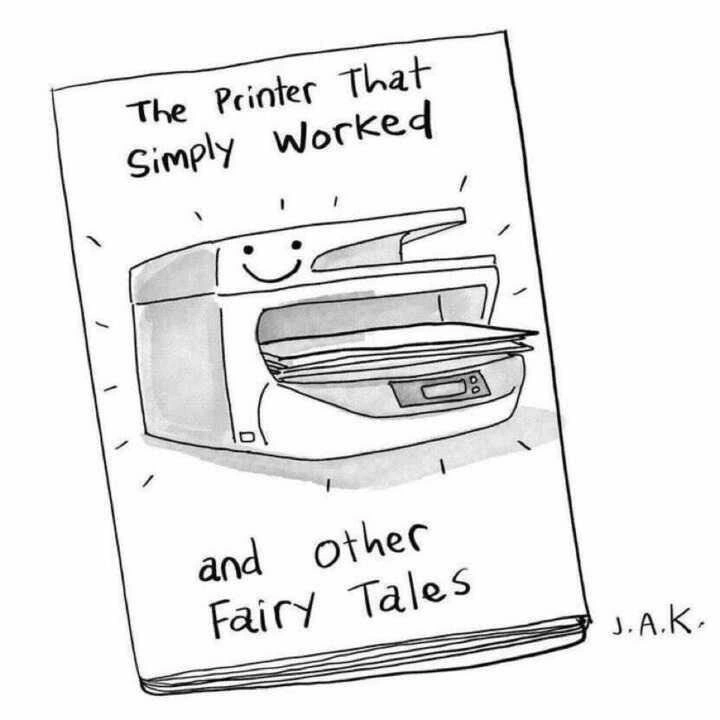
This meme is funny in a very simple way: it’s showing a happy printer on a pretend book cover, like a fairy tale story. Grown-ups find it silly because, in their experience, printers almost never act that friendly. It’s like saying “once upon a time, there was a perfect printer” – everyone knows that’s just a make-believe tale. Think about a toy car that always zooms without ever getting stuck, or a crayon that never runs out no matter how much you draw. That would be awesome, right? But also unbelievable. This picture makes us laugh because it takes something that usually causes headaches (a bad printer) and imagines it in a world where it behaves perfectly. Just like fairy tales about magical creatures or happily ever after, we know it’s not real – and that’s exactly why it’s so funny and charming.

Level 2: Printer Problems 101

Let’s break down why a “printer that simply worked” is such a fantastical idea in tech circles. A printer is a hardware device that takes the documents on your computer and puts them onto paper. Sounds simple, right? In theory, you hit “Print,” and a page comes out. But in practice, a lot can (and does) go wrong between that click and the paper in the tray. This meme highlights those everyday struggles in a playful way. It’s drawn like a children’s book cover with a cute smiling printer because it’s joking that a trouble-free printer belongs in a story book, not real life.

Several technical pieces have to cooperate for printing to succeed. First, your computer talks to the printer using a special piece of software called a printer driver. The driver acts like a translator, converting what you see on screen (text, images) into a language the printer understands (often PCL or PostScript). If the driver isn’t correct for that printer model or is outdated, the printer might receive gibberish—resulting in pages of random symbols or nothing at all. Many of us have faced the dreaded “driver not found” error when trying to set up a new printer. That’s a common it_support issue: making sure every PC has the right driver installed. This meme’s title suggests those pains vanish in a fairy tale scenario (which we know isn’t how it works in real offices).

Next, consider the print spooler, which is a small program on your computer or server that queues up print jobs (like a line at a busy coffee shop) and feeds them to the printer one by one. Ever notice how you can click “Print” and then go pick up your pages later? That’s the spooler at work, freeing you up while it handles the job in the background. But spoolers can crash or get stuck. If one bad print job goes in (say a huge file or a corrupted document), it can clog the queue — like a stalled car blocking a single-lane road. That’s when nothing else prints until an IT person clears the jammed queue. The meme hinted at “flaky network queues”: in offices, printers are often networked, meaning your job might travel through the office network to a shared printer. Network hiccups can cause the job to disappear into the digital ether (ever had a document that you sent to print and it just never came out?). A printer that never drops jobs or never crashes the spooler is as magical as a flying dragon in these folksy “fairy tale” terms.

Then there’s the classic paper jam. This happens when a sheet of paper gets stuck inside the rollers or anywhere along the paper path. You’ll know it from the blinking red light on the printer and an error message on the tiny screen (if the printer has one) or on your computer. Clearing a paper jam often means opening panels, pulling out a warm, toner-dusted sheet carefully, and sometimes getting ink on your hands. It’s a rite of passage in any office job to learn how to clear the common jam. Why do printers jam so often? Sometimes because of dust, sometimes the paper stack wasn’t aligned, or the printer’s rollers are worn out from years of use. High-end printers have sensors and better rollers to reduce this, but in many companies, they keep using an aging machine until it practically wheezes. Hardware reliability tends to decline with heavy use, and printers have lots of moving parts – more chances for mechanical failure compared to, say, your solid-state phone or laptop. So a printer that never jams is almost comedic to imagine.

Another issue is toner and ink. Printers either use liquid ink (inkjet printers) or toner powder (laser printers) to put text and images on paper. Both run out periodically. We’ve all seen the printouts that start fading or streaking because the cartridge is low. In a perfect world, the printer would magically always have enough ink/toner (as the smiling printer on the cover implicitly does). In reality, either someone forgets to stock a spare cartridge, or the printer’s sensor claims the cartridge is empty even when it’s not (some printers are notorious for early low-toner warnings). Many an office has a supply closet just for paper and toner because running out is so common. The meme title “The Printer That Simply Worked” includes the assumption “...and never ran out of toner at the worst time” without saying it. It’s part of the fantasy.

We also encounter connectivity problems. Especially with Wi-Fi or network printers, sometimes your computer just can’t find the printer. Maybe your PC is on the wrong network, or the printer’s IP address changed. In a Windows environment, the printer might show as offline if the print server (another computer managing the printer) has an issue. In a smaller setup, a USB cable might be loose. Newcomers in IT quickly learn to check the obvious things first: “Is the printer powered on? Is it connected to the network? Does it have paper and ink?” This mirrors the classic tech support phrase, “Have you tried turning it off and on again?” Often rebooting the printer or the computer can fix a temporary glitch (for example, restarting the spooler service clears out stuck jobs). It’s practically a running joke in corporate tech support that 90% of printer issues can be fixed by power cycling or reinstalling the driver, yet those steps have to be done over and over.

The phrase “and Other Fairy Tales” at the bottom of the image is there because within corporate culture, whenever someone says “Oh, the printer worked without any setup or hassle,” the sarcastic response is, “Yeah, and pigs can fly — tell me another fairy tale.” This meme is a book cover parody of that idea. It’s riffing on the notion that such statements belong in storybooks. The smiling, radiant printer on the cover is drawn to look almost like a character from a kids’ bedtime story — completely opposite to how people in real life view the office printer (some see it as a necessary evil, if not a outright foe). By presenting it this way, the artist exaggerates the truth: nobody expects a printer to behave, so we joke about it as if even talking printers and friendly dragons are more likely.

For a junior developer or anyone new to office tech, encountering these printer problems can be eye-opening. You might think, “We can send rockets to Mars, why can’t we print this 10-page report without errors?” The reality is a mix of hardware mechanics, legacy software, and yes, a pinch of neglect. Printers often don’t get the same love and upgrades that our computers do. A company might still be using a printer from 10+ years ago because “if it ain’t broke, don’t fix it” — but as we see, it is often broke(n). This meme is extremely RelatableHumor for anyone who’s scrambled to get a printer working under a tight deadline. It’s both a laugh and a commiseration. Now you understand why the very notion of a printer that gives zero trouble sounds as fanciful as a genie granting wishes. It’s a comedic way to teach a newcomer that “in IT, not everything works as smoothly as you’d hope, and printers are the prime example.”

Level 3: Paper Jam PTSD

In the fairy-tale kingdom of IT, a printer that actually behaves is as legendary as a unicorn. Seasoned developers and sysadmins chuckle (or groan) at the children’s-book style cover proclaiming “The Printer That Simply WORKED.” Why? Because in real offices, printers are the stuff of nightmares. This meme mixes HardwareHumor with OfficeHumor, tapping into a RelatablePain so universal that just seeing a smiling printer makes every tech veteran smirk. We’ve all been there: that crucial moment before a meeting and the printer decides to throw a tantrum. It’s practically CorporateCulture lore that printers fail at the worst times. The joke here is that a printer functioning flawlessly isn’t just rare – it’s a mythical saga fit for “and Other Fairy Tales.” 🧚‍♂️

Let’s unpack the technical cringe: Printers are supposed to be plug-and-play, but often they’re plug-and-pray. A senior engineer knows that behind every innocently blinking printer lies a gauntlet of driver quirks, network glitches, and mechanical pitfalls. The humor stems from just how absurdly unreliable these machines can be. The meme’s faux-storybook format implies that believing “it just works” is as naive as a child believing in dragons. Experienced IT folks have a bit of Paper Jam PTSD – flashbacks of late-night support calls because the CEO’s print job hung the entire queue. The text “WORKED” in bold echoes our emphasis when we say “Yeah right, it actually worked for once!” – dripping with sarcasm born of countless frustrations.

Why is this funny to a senior dev? Because it’s painfully true. The combination of a cheerfully smiling printer and the phrase “simply worked” screams irony. We remember battling driver mismatches (that one update that breaks printing for everyone), inscrutable errors like PC LOAD LETTER (what does that even mean?!), and networked printers that mysteriously go offline. Entire sprint tasks can be derailed by a $50 printer refusing to do its one job. It’s TechHumor 101: take a universally hated problem, and imagine it solved in a perfect fantasy. The gap between that utopia and reality is comedy gold (tinged with trauma).

Real-world war stories highlight why this resonates. Picture a hectic office morning: dozens of employees hit “Print” at 9:00 AM for a meeting. In a perfect world, a multifunction printer handles it in stride. In reality, it might jam on page 2, spew blank pages, or enter a paper-out tantrum. Someone from IT support gets summoned like an exorcist to appease the demon in the print room. Maybe you’ve seen a dev hugging the printer in relief when a deploy diagram finally prints after the third reinstall of the driver. Or the opposite: the infamous scene from Office Space where frustrated coworkers enact vengeance on a misbehaving printer in a field – that’s basically catharsis for anyone who’s dealt with corporate printers. The meme nails that shared exasperation: it’s RelatableHumor because every tech team has uttered, “Why can’t the printer just work?!” at least once this week.

Even the format of the meme – a children’s book cover parody – adds depth. It suggests that believing in a perfectly working printer is something only an innocent child (or an optimist new hire) would do. The subtitle “and Other Fairy Tales” hints there’s a whole anthology of impossible IT stories (like The Wi-Fi That Never Dropped or The Update That Didn’t Break Anything). It’s the cynical veteran viewpoint wrapped in a sweet storybook joke: we laugh so we don’t cry. Below that humor, there’s an implicit industry critique: decades into high tech, and we still can’t get this basic office hardware reliability sorted. The relatability across companies and generations of techies is what makes this meme hit home.

To illustrate the chasm between fantasy and reality, consider the daily printer experience in fairy tales vs. real life:

Fantasy Printer Scenario Actual Office Reality
Press “Print,” pages appear instantly 📑 Press “Print,” nothing happens for 2 minutes…
Printer warms up silently and never jams Clunking noises, then “Paper Jam” alert on screen 😖
Always finds the printer on the network 🔍 Device not found. Please install drivers.” 🔧
Toner magically never runs out Toner runs out mid-project, splattering ink 😭
Everyone prints happily ever after 😇 Queue stuck; user hits “Print” 10x, gets 10 copies later 🤦

In short, the meme lands a punch because it satirizes a universal truth in tech: some of the most mundane tools (like printers) cause outsized headaches. The IT team often treats rumors of a perfectly working printer as folklore — “I heard Legends of the 4th floor printer that never jammed… but that was long ago”. We laugh, but it’s the laugh of seasoned warriors who have been defeated by a paper tray. This shared battle scars vibe is exactly why the image is instantly Relatable in any CorporateCulture setting. The next time you see a printer cheerily churning out pages with no errors… pinch yourself. You might just be in a fairy tale.

Description

This image is a black-and-white cartoon drawing of a book cover. The book's title, written in a friendly, handwritten font, is 'The Printer That Simply Worked'. Below the title is an illustration of a standard office multi-function printer, which has a cheerful smiley face drawn on it. The book's subtitle, located at the bottom, is 'and Other Fairy Tales'. The artist's initials, 'J.A.K.', are signed on the side. The humor is rooted in the widely shared, frustrating experience that printers are notoriously unreliable, frequently malfunctioning due to driver issues, network problems, or mechanical failures. The meme equates the concept of a flawlessly working printer with mythical stories, making it a deeply relatable piece of humor for anyone who has ever worked in an office, especially in IT or software development


Comments

11
Anonymous ★ Top Pick That book is in the same fantasy section as 'The API With No Breaking Changes' and 'The Feature That Shipped With Zero Technical Debt.'
  1. Anonymous ★ Top Pick

    That book is in the same fantasy section as 'The API With No Breaking Changes' and 'The Feature That Shipped With Zero Technical Debt.'

  2. Anonymous

    Team bedtime story: there’s a printer whose driver, firmware, and CUPS queue all agree on the same reality - clear evidence of the long-rumored fourth property in the CAP theorem: Print

  3. Anonymous

    After 20 years in tech, I've successfully deployed distributed systems across continents, but I still can't explain why the printer needs a driver update to work with the same computer it worked with yesterday

  4. Anonymous

    A printer that 'simply works' is indeed pure fantasy - right up there with 'it works on my machine' being an acceptable production deployment strategy. Any engineer with 15+ years knows that printers are the only hardware that somehow got *less* reliable as technology advanced, defying Moore's Law and every principle of engineering progress. They're the ultimate reminder that sometimes the most 'simple' peripherals harbor the deepest circles of driver hell, where CUPS configurations go to die and PostScript errors multiply like microservices in a poorly-architected system

  5. Anonymous

    Distributed consensus, printer edition: SNMP says “offline,” CUPS says “processing,” the Windows spooler insists “paused” - leadership is elected by power‑cycling

  6. Anonymous

    Printers: turning 20+ YoE architects into sysadmins cursing paper trays every Friday at 5 PM

  7. Anonymous

    I can keep a Kubernetes cluster stable, but getting CUPS, GPO, and a chip‑locked HP to agree on duplex A4 remains an unsolved distributed‑systems problem

  8. @tercio133 4y

    After working as a helpdesk monkey I know a few models that just werks

  9. @neopulsar 4y

    Cannon MF3310 works just fine and it's not even designed for offices but works fine for years.

  10. @plusdanshi69 4y

    have you got your bogos binted?

    1. @RiedleroD 4y

      photos printed?

Use J and K for navigation