Skip to content
DevMeme
4598 of 7435
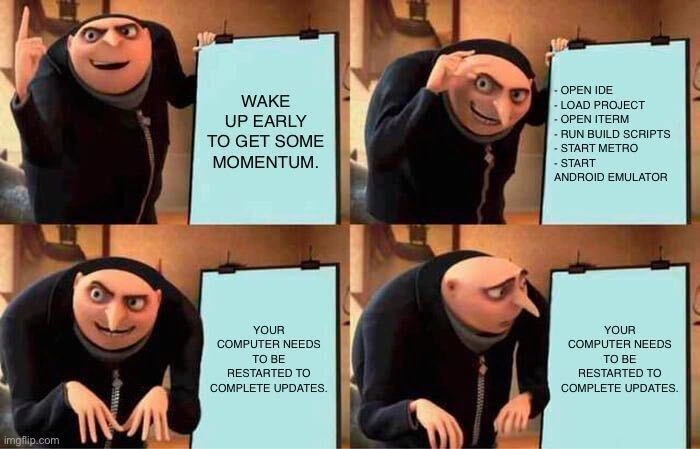
Gru's Perfect Plan for Developer Productivity Meets an Inevitable System Update
DeveloperProductivity Post #5045, on Nov 28, 2022 in TG

Gru's Perfect Plan for Developer Productivity Meets an Inevitable System Update

Why is this DeveloperProductivity meme funny?

Level 1: Early Start, Sudden Stop

Imagine you woke up super early one morning, excited to play your favorite game or toy without anyone bothering you. You spend time setting everything up – maybe you build a big LEGO castle or set up a cool race track around your room. You’re just about ready to start enjoying it. But then, right at that moment, a parent comes in and says, “We need to clean the house now, pack up all your toys.” You have to stop immediately, put everything away, and reboot (start over) later. All your early-morning work setting things up feels like it was for nothing. It’s frustrating and a little funny in a “of course this would happen now!” kind of way. In the meme, the developer is the kid who set everything up, and the computer’s forced restart is the parent making them undo it all. The feeling is: “I tried to get ahead, but now I’m back to square one.” It’s a silly reminder that sometimes, even if you plan perfectly, things can still pop up and ruin the moment – and all you can do is shrug like Gru and start over once the interruption is gone.

Level 2: Morning Boot-Up Blues

This meme plays on a common DeveloperFrustration: you try to start your day right, but your computer throws a wrench in your plans. In the first panel, Gru has written “Wake up early to get some momentum.” That idea of momentum in coding means getting into a groove or “flow” where you’re focused and making steady progress. Many developers cherish early mornings for this reason – fewer emails, no meetings yet, and a fresh mind. It’s all about boosting DeveloperProductivity by starting strong.

The second panel lists a bunch of setup steps that any mobile app developer will recognize as their morning warm-up routine. Let’s break down those steps in normal terms:

  • Open IDE – An IDE is an Integrated Development Environment, which is a special application for coding. Think of Visual Studio, IntelliJ, Android Studio, or VS Code. It’s where you write your code, and it often includes tools to build and run your app. “Open IDE and load project” means the developer is launching their coding software and loading all the project files into it. This can take some time for large projects because the IDE might need to index (scan) all your files and set up the project’s settings.

  • Open terminal – The terminal is a text-based window (command line) where developers run commands. Here, after the IDE is up, the developer opens a terminal window, likely either inside the IDE or separately. This is where they’ll run commands to build or run the app.

  • Run build scripts – A build script is an automated set of instructions to compile or prepare the software. For example, in an Android project, it might run a Gradle build (./gradlew assembleDebug), or in a React Native project, it could be starting the bundler with npm start. Essentially, “run build scripts” means “let’s compile the code or start the development server.” The developer is making sure that all the necessary background processes (like compilers or bundlers) are running.

  • Start MetroMetro is the name of the bundler for React Native projects (React Native is a framework for building mobile apps using JavaScript). Metro runs in the background to package the JavaScript code and quickly send updates to your app while you’re developing (hot reloading). When you “start Metro,” you’re basically starting a local server that will serve your latest code to the mobile app as you work. If you’re not a React Native developer, think of it as pressing the “go” button on a machine that continuously builds your app’s code as you edit it.

  • Start Android emulator – An Android emulator is a program that simulates an Android phone on your computer. Mobile developers use it to test their apps without needing a physical phone for every test. Starting the emulator can be slow because it’s like booting up a whole phone’s operating system in a window. It often takes a minute or two for the virtual phone to start up and be usable. So, this is usually one of the final steps in the setup: once the emulator (virtual phone) is running and connected to the build system (Gradle/Metro), the developer can actually run the app and start testing their code changes.

All these steps combined make up a developer’s boot-up routine for working on a mobile app. It’s a bit like prepping your workspace: you launch programs, start services, and get everything ready so you can code and see the results on a simulator. It does take a while – sometimes several minutes – especially on a slower computer or with a big project. But once it’s done, you’re all set to code away in a smooth workflow. That’s the “momentum” Gru talked about: the feeling that everything is ready and you’re in the zone to start creating.

Now, the punchline in panel 3 and 4: “Your computer needs to be restarted to complete updates.” If you use Windows (and even Macs at times), you’re probably familiar with those update notifications. What’s happened here is the operating system downloaded some updates (security patches or system fixes) and it requires a restart of the computer to finish installing them. On Windows, you might have seen a full-screen message or a pop-up reminding you to reboot. If you ignore those reminders long enough, Windows may decide to enforce the restart. In the meme, it seems the system chose this exact early morning moment – right after everything finished loading – to insist on a reboot.

Why is this so frustrating for developers? Because a restart will wipe out all those running processes we just talked about. After a reboot, the IDE will be closed (you’d have to reopen it and reload the project), the terminal sessions will be gone, the build processes or Metro bundler will have stopped (you’d have to run those again), and the Android emulator will shut down (you’ll have to boot it up from scratch after the restart). Essentially, the developer’s whole setup work is undone in an instant. It’s as if you spent 10 minutes setting up a game, and then someone hit the reset button. Not to mention, the interruption itself breaks the flow_state_disrupted – the developer’s concentration and early-morning enthusiasm take a hit. It’s hard to feel that “momentum” when you’re stuck staring at a reboot screen and then waiting for all those tools to load up again. By the time everything is back, that initial magic of the early morning could be gone, replaced by annoyance.

This is a prime example of a DeveloperPainPoints and ToolingFrustration scenario. The tools and the system are supposed to help the developer be productive, but sometimes they clash. Operating system updates are important (they keep your machine secure and stable), but they sure can be inconvenient. Many developers learn to schedule these updates for times they aren’t working, or they turn off auto-update during their work hours. But in a corporate environment or with default settings, you might find the machine deciding an update is non-negotiable. It’s practically a rite of passage to have your DeveloperExperience moment like this: you’re all set to code, and suddenly you’re forced to sit and watch a progress bar instead. The meme is funny because it’s so relatable – most programmers have had a day where their productivity plans were thrown off by something as mundane as an update and restart. Gru’s defeated look in the last panel perfectly captures that mix of exasperation and “I can’t believe this is happening now of all times.” The early bird tried to catch the worm, but the computer said, “Restart required, try again later.”

Level 3: Rise and Shine... and Reboot

At the crack of dawn, a determined developer tries to jump-start their day for peak DeveloperProductivity. The meme’s first panel has Gru proudly proclaiming his master plan: “WAKE UP EARLY TO GET SOME MOMENTUM.” This is the classic optimism of a coder seizing quiet morning hours to dive into code without meetings or distractions. In theory, coming in early means you can launch all your heavy dev tools, get your build going, and enter that coveted flow state before the rest of the world logs on. It’s a well-intentioned plan every seasoned developer has attempted – and often, it’s exactly when Murphy’s Law likes to strike.

In the second panel, Gru excitedly lists out the meticulous boot-up checklist. This isn’t just grabbing coffee and reading emails; it’s a full IDE and environment warm-up routine that any mobile developer will recognize: opening the IDE (say, Android Studio or VS Code), loading the entire project (libraries, indexers, and all), firing up a terminal to run those build scripts (maybe a gradlew assembleDebug or a npm start for a React Native app), launching the Metro bundler (the React Native development server that serves your JavaScript code), and finally booting the Android emulator (a virtual phone that’s notoriously slow to start). Each step is a prerequisite to actually running the app and writing code. By the time all these services and tools are up, the developer has invested several minutes and a good chunk of RAM just getting the stage set. It’s a mini orchestra of dev tools humming along – the kind of setup that a veteran dev might automate with scripts or just ritualistically perform every morning. The goal? Achieve momentum: a state where code, app, and tools are all running smoothly so you can iterate quickly. This rigorous setup is the BuildAutomation and environment prep that underpins modern app development. A senior engineer knows that once you have everything spun up, you guard that state carefully – restarting any part of it (let alone the whole machine) is a costly context switch.

Then comes the gut-punch third panel. Gru’s triumphant stance collapses as the flip chart now reads the dreaded message: “YOUR COMPUTER NEEDS TO BE RESTARTED TO COMPLETE UPDATES.” Oof. Every experienced developer immediately cringes at those words. It’s the hallmark of a forced windows_update_reboot at the worst possible moment. The operating system (often Windows with its infamously aggressive update policies) has decided that the machine must restart right now to finish installing patches. Maybe the OS queued this overnight, or the corporate IT policy scheduled it for 6 AM when they assumed no one would be working. But our early-bird developer is very much online and in the middle of loading their world. The humor here is darkly relatable: the one time you’re trying to be extra productive, the system slams on the brakes. It’s like the computer is saying, “That’s a nice momentum you’ve got there… it’d be a shame if someone rebooted it.”

From a senior perspective, this scenario hits on multiple DeveloperPainPoints. First, there’s the frustration with ToolingFrustration: heavy-weight tools like IDEs, emulators, and build systems have long startup times. Losing all that progress is not trivial – after a reboot, you’re looking at another 5-10 minutes of waiting for Gradle, Node, Metro, and the emulator to spin back up, not to mention re-loading your project in the IDE (which might chew on indexing files again). All those efficiencies you gained by coming in early evaporate instantly. Second, it underscores the eternal battle between DeveloperExperience_DX and system administration: OS updates are crucial (security patches, stability improvements – we get it), but they sure have a talent for picking the most inconvenient times. A grizzled veteran dev has likely learned to delay updates or switch off auto-restarts during work hours, precisely to avoid this kind of ambush. (There’s an entire folklore of developers yelling “Not now, Windows!” upon seeing that full-screen update notice). The meme nails this shared experience – it’s funny because it’s true. Everyone in the office might later chuckle sympathetically when the early riser groans, “I had everything open and then… restart. Lost my whole flow.” It’s a comedic and painful reminder that no matter how well we plan, DeveloperHumor kicks in when an inanimate system has other plans. Gru’s defeated posture in the fourth panel – arms limp, face blank – is basically every developer who’s been at the mercy of an update reboot. It’s a mix of “are you kidding me?!” rage and the bleak humor of knowing complaining won’t change anything. We’ve all been there, and we’ll be there again, coffee in hand, watching that percent-progress on a reboot screen instead of our code. In true cynical veteran fashion, the lesson is clear: the best-laid development plans often fall victim to a mandatory restart.

Description

This is a four-panel meme using the 'Gru's Plan' format from the movie Despicable Me. In the first panel, Gru excitedly presents a board that reads, 'WAKE UP EARLY TO GET SOME MOMENTUM.' In the second panel, he details the plan with a list of a mobile developer's morning setup tasks: '- OPEN IDE', '- LOAD PROJECT', '- OPEN ITERM', '- RUN BUILD SCRIPTS', '- START METRO', and '- START ANDROID EMULATOR.' The third panel shows Gru looking back at the board, confused, as it now reads, 'YOUR COMPUTER NEEDS TO BE RESTARTED TO COMPLETE UPDATES.' In the final panel, his excitement has turned to disappointment as he stares at the same update message. The meme humorously captures a universally painful experience for software developers: having a surge of motivation to be productive completely derailed by a mandatory system update. It highlights the friction in complex development environments, particularly in mobile development where starting a session can involve a lengthy sequence of launching tools like IDEs, bundlers (Metro suggests React Native), and emulators. The joke lies in the anticlimax - the grand plan for a productive morning is foiled by a mundane, unavoidable, and time-consuming IT problem, killing all momentum before any actual coding can begin
Comments

26
Anonymous ★ Top Pick You plan your sprint down to the story point, but you forget to budget for the unplanned, mandatory 'sprint zero' orchestrated by the OS update manager
  1. Anonymous ★ Top Pick

    You plan your sprint down to the story point, but you forget to budget for the unplanned, mandatory 'sprint zero' orchestrated by the OS update manager

  2. Anonymous

    We containerized the whole stack, pre-warmed Gradle caches, snapshot the emulator - yet the real monolith still ships quarterly: Windows Update with a blocking call to reboot()

  3. Anonymous

    The only thing more reliable than a race condition in production is your OS deciding that NOW is the perfect time for mandatory updates - right after you've spun up your entire local microservices constellation and the Android emulator has finally finished its 5-minute boot sequence

  4. Anonymous

    The cruel irony of mobile development: you've finally optimized your build scripts to shave 30 seconds off the cold start, configured Metro to use the new architecture, and pre-warmed the Android emulator - only to discover your OS has been silently downloading a 6GB update overnight that now demands a restart. By the time you're back up, you've lost not just momentum but also the entire mental model of the bug you were about to fix. At least the update probably broke your USB debugging drivers too, so you'll have some fresh problems to solve

  5. Anonymous

    Developer momentum: fragile state achieved early, collapsed by Windows Update's impeccable timing on CAP theorem violations

  6. Anonymous

    Nothing kills deep work faster than the real boot sequence: OS update reboot → Gradle daemon thaw → Metro cold start → Android emulator deciding whether to exist

  7. Anonymous

    Planned a clean morning DAG - IDE → scripts → Metro → emulator; the OS injected a hidden edge to Reboot(), and now it’s a while(true) loop

  8. @RichStallman 3y

    GNU/Linux Chads don't understand this meme

    1. @pavloalpha 3y

      No if installing a new arch core or dkms Linux headers

      1. @chupasaurus 3y

        The point is Linux doesn't have mandatory time to update. Arch core? The only related is this one. Wtf is DKMS headers?

        1. @pavloalpha 3y

          Sorry I meant Linux kernel

      2. @SamsonovAnton 3y

        Use kpatch | Ksplice | kGraft | Livepatch, Luke!

        1. @pavloalpha 3y

          I can't imagine what could be if the corps will come to Linux. Omg so efficient system can we get

          1. @SamsonovAnton 3y

            Yeah, Linux distros surely might be more efficient — take DRPM ("delta RPM" packages containing only the files changed between versions) for example.

  9. @CcxCZ 3y

    Multiple governments are spying on you though. As are most of the top IT corporations.

    1. @ilovethicktights 3y

      but atl you think that you're gigachad :clueless:

  10. @Saeid025 3y

    Well windows nowadays gently ask you if you want to restart... You can just say no

    1. @RiedleroD 3y

      fake news lol

      1. @Saeid025 3y

        Well mine do it

        1. @RiedleroD 3y

          well mine doesn't

    2. @prirai 3y

      Haha, I use the LTSC, so only security updates. And Arch

  11. @Saeid025 3y

    What version?

    1. @RiedleroD 3y

      idk

  12. @Saeid025 3y

    I'm in windows 10 2H something It never force restart And also I can even still restart/shutdown my PC normally without updating it There is multiple options - Update and restart - Update and shutdown - and the rest normal ones

  13. @SamsonovAnton 3y

    What's wrong with KDE?

  14. @RiedleroD 3y

    acktually,

Use J and K for navigation