Dora the Abstraction Explorer
Why is this Virtualization meme funny?
Level 1: The Ridiculous Rube Goldberg of Hello
Imagine you want to give your friend a simple hello message, but instead of just saying “Hello!” you decide to do it in the most overcomplicated way possible. You write the word “Hello” on a tiny piece of paper. Then you put that paper in a small box. You put that box inside a slightly bigger box. Then that into an even bigger box, and so on – five or six boxes deep. Finally, you deliver this huge nested box contraption to your friend. Your friend opens box after box, only to find the tiniest note inside that just says, “Hello!” 😄 It’s silly, right? All that work for a one-word greeting.
That’s exactly what’s happening in this meme, but with computers. A very simple program that says “Hello World” is wrapped up in many layers of computer “boxes” (virtual machines, containers, etc.). It’s funny because it’s like using a huge, complex machine to do a very simple task – like using a giant rocket ship to deliver a birthday card next door. The emotion at the core is a mix of amusement and a kind of head-shaking “why would anyone do that?!” feeling. We laugh because the poor developer in the joke went through an absurd number of steps just to accomplish something a beginner could do with one line of code on a normal computer. It’s a lighthearted poke at how we sometimes make things more complicated than they need to be, turning a simple “Hello” into an epic adventure through layer upon layer of technology.
Level 2: Unpacking the Backpack (Layers Explained)
Let’s break down all the layers and terms in this meme in a straightforward way, as if we’re explaining the stack to someone new to DevOps. Think of each layer as one inside the other, like a series of nested boxes (or nested backpacks, if we keep the explorer theme):
Windows host – This is the starting point, the main computer and operating system (OS) the developer is using. In our case, it’s Windows. So the developer’s laptop or PC is running Windows as the base OS. This is the outermost “box” in the picture.
Linux VM – VM stands for Virtual Machine. A VM is like a computer inside a computer. Here, the developer creates a Linux VM on the Windows host. Why? Because the tools we want to use next (like Docker containers and Kubernetes) typically run on Linux. Windows can’t directly run Linux programs, so we use virtualization software (like VirtualBox, Hyper-V, or WSL2) to create a fake Linux computer inside the real Windows computer. That’s the “linux VM” layer – it’s a fully functional Linux environment running as an application on Windows.
Minikube VM – Minikube is a tool that sets up a local Kubernetes cluster. Kubernetes is a system for running and managing containers (we’ll get to containers next). Normally, Kubernetes runs on a bunch of servers (often Linux servers). Minikube allows you to run a mini, single-server version of Kubernetes on your own machine, so you can test and develop against a cluster without needing multiple computers. In many cases (especially back in 2021), Minikube itself would create its own VM. If you’re already inside a Linux VM, this might mean it’s trying to create another virtual machine inside the first VM (which is a bit unusual – that’s the nested virtualization we talked about). Some setups might skip making a second VM by using the existing Linux environment, but either way, the diagram shows a “minikube VM” as another layer. This represents the Kubernetes node where your containers will run. Think of it as launching a small Linux server whose job is to act like a Kubernetes cluster for you.
Docker image – Docker is the most popular containerization platform. A Docker image is like a recipe or template for creating a container. It’s a file that includes everything needed to run a piece of software: the code, runtime, libraries, and even an OS filesystem (but not the kernel). In our scenario, the developer wrote a little Go program (
hello.go) and likely created a Docker image for it (for example, using a simple Dockerfile that compiles the Go program and sets it up to run). So the “docker image” in the meme’s layers refers to the packaged app. When you run a Docker image, it becomes a Docker container, which is an instance of that image running as a process isolated from other processes on the system.Kubernetes Pod – In Kubernetes (often abbreviated as K8s), a Pod is the smallest unit of deployment. It’s like a wrapper around one or more containers that are meant to work together. Usually for a simple app, one Pod contains one container (one running instance of your Docker image). The Pod adds a layer of management – it has an identity in the cluster, an IP address, and it can have multiple containers if needed (for example, a helper sidecar container). In our meme, “kubernetes pod” is one of the nested boxes, meaning our hello world container is running inside a Pod. So Kubernetes is controlling that container via the Pod. If the container (say the app) crashes, Kubernetes (via the Pod) can restart it, etc. The pod is running inside the Minikube Kubernetes cluster (inside that VM), which is inside the Linux VM, and so on.
(Another) Docker image – The image labels show “docker image” again inside the pod. This part is slightly cheeky/redundant in the meme depiction. It might be emphasizing that even inside the Kubernetes pod, what you really have is the Docker image running as a container. Possibly it denotes there could be another image involved (maybe an init container or a base image). But you can think of it simply as “inside the Kubernetes Pod, our Docker image is running as a container.” The meme maker wrote it twice perhaps to highlight “it’s containers all the way down” or just to be funny with extra repetition. In practice, one Docker image would correspond to one container in the pod (unless you had multiple containers in that pod).
hello.sh – This is a shell script file (
.shtypically indicates a Bash shell script). Why is there ahello.shinside the container? Many Docker images use an entrypoint script or a startup script. Perhaps our developer wrote a simple script to execute the Go program, or to print “Hello World” by calling the Go program. For example, the Docker container might run/hello.shas its entrypoint, and inside that script it might have a line to run the compiled Go program (maybe namedhello). It could also be that the Go program prints "Hello World", but they added a script for environment setup or just as an additional layer of humor. In any case,hello.shrepresents a trivial script whose job is to invoke the actual app (hello.goprogram) or echo "Hello". It’s another layer of indirection (a very small one) inside the container.hello.go – This is the actual Go source code file containing the classic “Hello World” program. In Go, that might look like:
package main import "fmt" func main() { fmt.Println("Hello, World!") }It’s as simple as it gets – just printing a greeting. This is the innermost box in the diagram, meaning after you peel away Windows, the VMs, the container, the pod, and the script, at the heart of everything is this tiny program that just says hello. The contrast is the joke: to run this 5-line program, we have so many layers around it.
Now, why would anyone do this? In real development, if you’re working on a cloud-native application, you might containerize even the small services so they fit into a larger system. Local development setup can mirror production, so if production runs in Kubernetes, you run a local Kubernetes (with Minikube) to test your app in a similar environment. Each layer serves a purpose:
- The VM isolates the Linux environment on a Windows host.
- Kubernetes (via Minikube) simulates the cloud environment where apps run in pods.
- Docker container ensures the app and its dependencies are packaged consistently.
- The script might ensure the container starts the app correctly.
- The code is the actual logic (trivial in this case).
However, doing all of this for “Hello World” is overkill — and that’s exactly the humor. It’s DevOps humor 101: the tools are great, but here they’re being used in a playfully exaggerated scenario. A term often used for this is "abstraction layers". Each of these is a layer of abstraction: you don’t run the code directly on the physical machine; each layer abstracts away the details of the layer below. But every layer you add (like an onion’s layers) makes the overall system more complex.
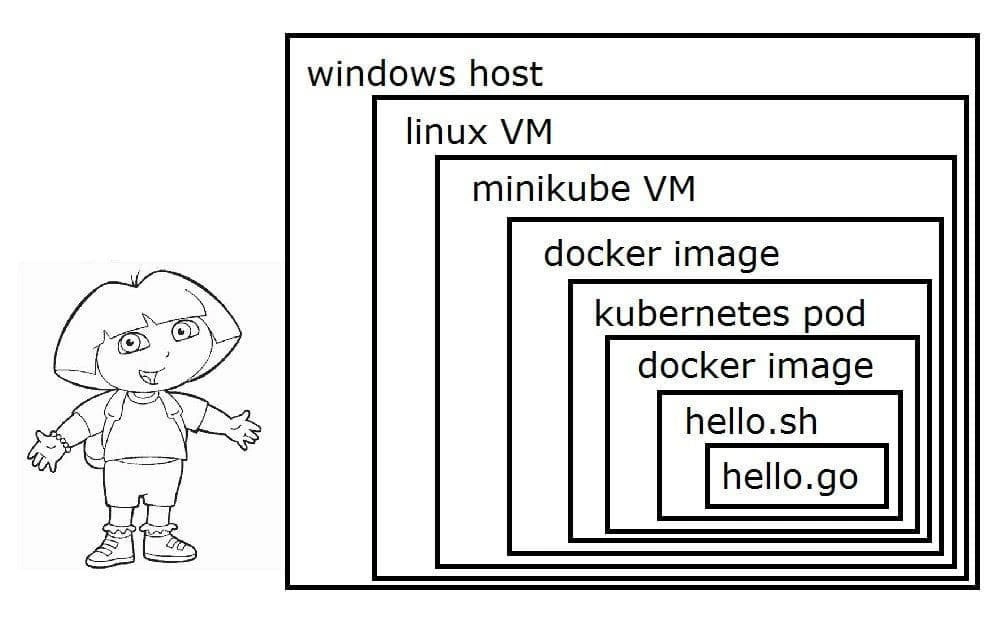
Finally, notice the explorer cartoon on the left side. That character looks like Dora the Explorer, a children’s cartoon character known for her adventurous spirit and, importantly, her Backpack that contains everything she might need. This is likely a visual pun. Dora cheerfully explores complex places with her trusty backpack. Here, the developer (or explorer) is happily saying “Hello” (like a greeting to the world or new technology), unaware of or undeterred by the massive backpack of tech behind them needed to make that hello happen. It’s an innocence-meets-complexity contrast. The meme maker chose Dora possibly to symbolize the exploration of all these new tools (Kubernetes, Docker, etc.) — it’s an adventure, albeit a comically complicated one for such a simple goal.
In summary, this meme’s stack:
Windows -> Linux VM -> Minikube/Kubernetes -> Docker container -> Hello World app
is a real-ish scenario exaggerated for effect. Each term here (container, VM, pod, etc.) is a building block of modern cloud software deployment. If you’re new to these, think of it like building a series of boxes within boxes to create a controlled environment for your code. It’s super useful for complex, scalable applications... but for a one-liner program, it’s hilariously unnecessary – and that’s why developers are cracking up at this image.
Level 3: Hello World, Enterprise Edition
From a seasoned developer’s perspective, this meme is painfully on point and hilarious. It’s highlighting the modern DevOps tendency to throw an entire data-center’s worth of tooling at even the simplest problem. The caption “When ‘Hello World’ requires VMs inside containers inside pods inside VMs” screams over-engineering. Why spin up a whole miniature cloud just to print “Hello, World!”? Because, in today’s enterprise setups, that’s sometimes exactly what happens.
Let’s unpack the scenario: a developer on Windows wants to run a simple Go program in a cloud-native way. Instead of running it directly on their machine, they decide (or their company mandates) to use Kubernetes with Docker containers — the full microservices treatment. But Kubernetes is a Linux-based container orchestration system, and Docker’s typical containers also expect a Linux kernel to run Go binaries compiled for Linux. So our poor developer ends up using Minikube to get Kubernetes running locally. On Windows, Minikube itself often uses a Linux VM under the hood (via something like Hyper-V, VirtualBox, or nowadays WSL2). So right off the bat, printing “Hello” has turned into a tour of duty through Windows-to-Linux virtualization.
This double-VM stack (Windows host -> Linux VM -> Minikube’s VM) is a well-known yak shave in the DevOps world. It’s the “it works on my machine” problem taken to its logical extreme: “It works on my mini-cluster that simulates the production cluster that will run it, so it should work on the real cluster too.” One can almost hear an exasperated SRE saying, “You needed Kubernetes for that?”. But at the same time, there’s an understanding nod: in many companies, even the tiniest service is containerized and managed through Kubernetes for consistency and deployment pipeline reasons. DevOps/SRE culture emphasizes automation and parity between environments – the joke here is how that noble goal can lead to absurd setups like this one.
The visual on the right with nested boxes labels each layer:
- “windows host” (base OS),
- inside it “linux VM” (to provide a Linux environment),
- then “minikube VM” (the Kubernetes single-node cluster),
- then a “docker image” (the container image for the app),
- then a “kubernetes pod” (which in Kubernetes is the unit that holds your container),
- then another “docker image” (perhaps alluding to either the container runtime inside the pod or a sidecar – it’s a bit tongue-in-cheek repetition),
- then “hello.sh” (a shell script),
- and finally “hello.go” (the Go source code).
The stack is so deep it’s practically a parody of modern software architecture diagrams. It’s reminiscent of the classic “Yo dawg, I heard you like…” meme: “Yo dawg, I heard you like VMs, so I put a VM in your VM so you can containerize while you containerize.” Each technology is valuable on its own – VMs for isolation, Docker for consistent deployment, Kubernetes for scaling – but together, for something this trivial, it’s comically excessive. The meme exaggerates to make the point: sometimes we adopt a toolchain that’s heavier than the problem we’re solving.
Why is this funny to experienced devs? Because it’s a shared absurdity. Many of us have been there: setting up a whole Kubernetes cluster locally just to test a “Hello World” microservice, or using a full CI/CD pipeline for a one-line change. It’s funny in the “laugh or cry” sense. We recognize the situation: a quick task ballooning into a multi-hour environment setup. The explorer cartoon on the left (which looks like Dora the Explorer with her arms wide) adds to the humor – she’s cheerful and eager, saying hello, while behind her that innocent greeting is entangled in layers of tech spaghetti. Dora’s famous for having a Backpack that contains everything she needs; here the “backpack” is full of VMs and containers. It’s a playful nod to that image of an explorer venturing through a jungle of abstractions, happy-go-lucky, oblivious to the ridiculousness of it all.
This meme also pokes fun at the state of local development setups. On modern projects, a newcomer might need to install Docker, enable Hyper-V, run Minikube or Docker Desktop, allocate gigabytes of RAM, just to get a development environment running. Seasoned engineers have a term for this: “onboarding hell.” The environment setup for a simple app can be so complex that saying “Hello World” becomes an adventure. There’s dark humor in that: the “world” you’re saying hello to is buried under so many layers that by the time your message surfaces, you’re not even sure which world you’re in (is it the container’s world? the VM’s world? the host’s world?).
From a DevOps/SRE angle, every additional layer is another potential point of failure or weird bug. Maybe the VM’s network NAT isn’t forwarding ports, or the container can’t mount a file from the host because of a virtualization quirk, or the Kubernetes pod keeps CrashLoopBackOff because the shell script has the wrong line endings between Windows and Linux. This stuff happens! The meme tickles us because we can imagine the real-life hassle behind it – a developer excitedly trying out Kubernetes, only to spend the afternoon debugging why their Go binary won’t execute in the container due to a line-ending issue in hello.sh. It’s a comedy of errors born from lots of abstraction layers.
In essence, Containerization and Virtualization are amazing technologies – they’re the backbone of cloud computing and modern dev workflows – but, as this meme jokes, we sometimes employ them in situations so trivial that it highlights an absurd contrast. It’s like using a rocket ship to deliver a postcard. Sure, it works, but you step back and ask, “Was that really necessary?” The experienced folks laugh because they’ve seen this pattern: the cool new tools get applied everywhere, even when you just need a simple script. And the fact that it still technically works (you do get “Hello World” printed at the end) doesn’t stop it from being overkill.
TL;DR: The meme humorously captures the zeitgeist of DevOps culture: even “Hello World” has become a stack of pods, containers, and VMs. It’s a gentle roast of our industry’s tendency to add layers of abstraction for the sake of process, portability, or just because we can. Seasoned devs find it funny because it’s true – we’ve all at some point built a sandcastle of tech just to output one line of text. And as absurd as it is, we also appreciate the irony that this is the price of consistency and modern best practices. Welcome to Enterprise Hello World: please make sure your Kubernetes cluster is up before greeting the world!
Level 4: Hypervisors All The Way Down
At the deepest technical level, this meme illustrates a cascade of virtualization and containerization that would make any systems architect either cringe or geek out (or both). We’re essentially looking at nested virtualization: a Windows host running a Linux VM, which in turn runs another VM for Minikube (a local Kubernetes node), and inside that we run Docker containers. This is like a computing Matryoshka doll, but each doll is a full operating environment.
To appreciate the absurdity, consider what’s happening in terms of system layers:
Hardware Virtualization: The Windows host uses a hypervisor (e.g., Hyper-V or VirtualBox) to run a Linux virtual machine. Modern CPUs (with Intel VT-x or AMD-V) make this possible by letting a guest OS run as if it has its own hardware. Every privileged operation the guest tries (like changing page tables or accessing hardware) is intercepted by the hypervisor. Running a VM inside another VM (Minikube’s VM inside the Linux VM) means nested hypervisors: the outer hypervisor must "trap" and forward virtual hardware calls to an inner hypervisor. Each layer believes it’s the only operating system in control, thanks to a neatly choreographed illusion managed by the layers below. It’s a bit like Inception for operating systems – “we need to go deeper” in terms of privilege levels. Performance takes a hit with each layer due to this trap-and-emulate dance, but remarkably, it works (assuming all the proper CPU virtualization extensions are enabled).
Container Abstraction: Now, inside that second VM, we use Docker to run a container. Containers aren’t full VMs – they rely on the host kernel’s features like namespaces and cgroups to isolate processes. In a Linux container, the processes think they have their own isolated system, but they really share the host’s kernel. This usually makes containers lightweight. However, here our container is running in a Kubernetes cluster that itself is running inside a VM, which is inside another VM. The irony is that to get the benefit of lightweight containers on a Windows machine, we first had to create a heavy VM to host a Linux kernel for those containers. The Windows kernel can’t run Linux binaries directly (aside from something like WSL2, which itself is a VM under the hood), so we pile on an extra layer. Essentially, we’re using a full Linux OS as a compatibility layer to support “lightweight” containers – a bit contradictory in spirit.
Abstraction Overhead: Each layer (hypervisor, Kubernetes, Docker) adds overhead and complexity. In theoretical terms, you could think about the increasing latency and resource footprint with each abstraction. There’s a principle akin to the law of leaky abstractions here: every abstraction (be it a VM or a container) eventually shows its cost or quirks. For instance, debugging a performance issue might require peeling back these layers to see if the bottleneck is CPU virtualization overhead, the Docker container limits, or Kubernetes scheduling. We’ve added so many indirection layers that answering “Where is my code actually running?” becomes non-trivial – it’s running on a virtual CPU provided by a hypervisor running on a virtual CPU provided by another hypervisor on a physical CPU. 😅 This is a far cry from simply running
hello.goon bare metal. Yet, thanks to brilliant engineering in hypervisors and the kernel, this kind of stack (though ridiculous for “Hello World”) can actually function. It’s a showcase of how flexible and powerful our virtualization technology has become – we can nest worlds within worlds, Turing completeness tucked inside itself. The meme humorously pushes this to the extreme, revealing an almost recursive truth: to achieve isolation and consistency, we sometimes stack systems so deep that a trivial task involves the coordination of countless subsystems.
Description
The meme is composed of two parts. On the left, there is a black-and-white outline drawing of the children's cartoon character, Dora the Explorer, looking cheerful. On the right, there is a diagram of eight nested black boxes, representing layers of technological abstraction, similar to Russian nesting dolls. The outermost box is labeled 'windows host', followed by 'linux VM', 'minikube VM', 'docker image', 'kubernetes pod', another 'docker image', 'hello.sh', and finally, the innermost box is labeled 'hello.go'. The humor stems from the juxtaposition of Dora the Explorer with the comically excessive number of layers required to run a simple 'hello.go' program. It satirizes the often-overwhelming complexity of modern local development environments, particularly in the cloud-native and containerization space. For experienced engineers, this is a relatable depiction of 'yak shaving' or over-engineering, where setting up the environment to run a simple application becomes a monumental task in itself. The joke is that one has to 'explore' through countless layers just to find where their code is actually executing
Comments
26Comment deleted
We call this 'résumé-driven development': the art of touching every possible technology just to run a single binary
Senior dev rule #42: if your 12-byte “Hello, world” needs a Windows host, a Linux VM, Minikube, two Docker layers, and a pod spec, congratulations - you’ve successfully rebuilt printf as a distributed system
Remember when deploying 'Hello World' just meant compiling and running? Now it requires a PhD in distributed systems and enough RAM to simulate the Matrix. At this rate, we'll need a Kubernetes cluster just to open Notepad by 2030
When your local development environment has more layers than your production infrastructure, and you need 32GB of RAM just to run 'hello world' because you're virtualizing a VM inside a VM running containers inside containers. The real question isn't 'does it scale?' but 'can my laptop even boot this?' - a perfect illustration of how we've achieved the remarkable feat of making a simple shell script require more compute resources than the Apollo moon landing
Local dev nirvana: five layers to echo 'hello' - because one more VM ensures it *definitely* won't work anywhere else
We gave hello.go a control plane - its runtime complexity is now O(CNCF)
Nothing like printing 'hello' after paying the hypervisor tax twice and scheduling a single-pod cluster to run a bash wrapper for a Go file
And using rust you get zero-cost abstractions Comment deleted
What is this ? Comment deleted
> hello.go exec.Command(«hello.sh») Comment deleted
"Rust is a thing everyone likes to talk about, but almost nobody is using it in production" Change my mind. Comment deleted
I use Rust in production :/ Comment deleted
does it count? https://github.com/linkerd/linkerd2-proxy Comment deleted
Linkerd is quite popular is some workloads so it definitely counts Comment deleted
My company uses Rust for most of our projects Comment deleted
>discord At least quote a good software Comment deleted
Are you working in discord? Comment deleted
I think you understand that if I worked in Discord, then I would not be able to tell anything because of the NDA Comment deleted
But agree, it still doesn't mean rust is widely used in big products Comment deleted
I mean it can be a single internal service written in Rust Comment deleted
Нет нихуя, они бэкенд с гошки на раст переписывали, на Хабре почитать можешь Comment deleted
>russian Comment deleted
Похуй абсолютно Comment deleted
Nobody knows their internal infrastructure except themselves Comment deleted
Current working setup: Ubuntu host, vmware, windows guest with hyper-V, Visual Studio + Docker. Comment deleted
I hope at some point there will be a superset in rust which is easier for beginners and fits well in enterprise-level projects Comment deleted