Skip to content
DevMeme
683 of 7435
Windows UAC Challenges Your Authority, Dares You to 'Change My Mind'
OperatingSystems Post #775, on Nov 2, 2019 in TG

Windows UAC Challenges Your Authority, Dares You to 'Change My Mind'

Why is this OperatingSystems meme funny?

Level 1: Rules Are Rules

Imagine you’re a kid at a theme park, and you run up to a giant roller coaster you’re super excited to ride. But uh-oh, there’s a sign at the entrance that says: “You must be THIS tall to ride.” You stand under it and you’re just a tiny bit too short. A staff member with a measuring stick shakes their head and says, “Sorry, you can’t go on.” You protest, “I really, really want to! I’ll be careful, I promise!” But it doesn’t matter – the rule is the rule. You’re not tall enough, and no argument is going to magically stretch you a few inches in that moment. You just have to wait until you grow or find a different ride.

That’s exactly what’s happening in this meme. Think of the computer as that strict ride operator. When it says “You’re not the administrator,” it’s like saying “You’re not tall enough for this ride.” In other words, “you don’t meet the requirements, so you can’t do this.” You can’t really convince a roller coaster attendant to let you on if you don’t meet the height requirement, right? Similarly, you can’t convince the computer to let you install something or change a big setting if you don’t have the right permissions. It’s not personal; it’s just following the rules set for safety.

The meme is funny because it shows a super-serious sign and a stubborn character (Windows UAC, represented by that shield face) basically saying, “Nope, not gonna happen – change my mind.” But both you and the computer know its mind won’t be changed. It’s a playful way to capture that feeling when you desperately want to do something on the computer, and the computer just crosses its arms like a strict teacher and says “No.” We laugh because we’ve all felt like that little kid denied a ride, or a cookie before dinner, or some privilege that an adult (or machine) wouldn’t grant. In simple terms: the computer has rules, you didn’t meet the rule this time, and that’s that. No hard feelings – just come back when you have what you need (whether it’s a few more inches taller, or the admin password!).

Level 2: Permission Denied 101

Let’s break down what this meme is talking about in simpler terms. Windows (the operating system on many PCs) has something called user accounts. Not all user accounts are equal. There are normal user accounts (with limited abilities) and Administrator accounts (with a lot more power). If you have admin rights, you can do big things on the system: install or remove software, change settings for everyone on the computer, access important system files – basically, you’re the boss of the machine. If you’re a normal user, the system keeps you on a short leash: you can do everyday things like run programs and change your own settings, but you can’t touch the sensitive stuff without permission.

Now, Windows really likes to be sure when something important is about to happen. This is where that blue-and-yellow shield comes in – that's the symbol for User Account Control (UAC). UAC is a feature in Windows that acts like a guard. Whenever you (or a program) try to do something that could affect the whole computer or other users, UAC springs into action. It might prompt you with a question, often wording it like: “Do you want to allow this app to make changes to your device?” If you’re logged in as an administrator, you typically just have to click “Yes” (and maybe enter your password, depending on settings) to give the green light. If you’re not an admin, this is the point where you hit a wall. The system will ask for an admin password, and if you don’t have one, it’s game over – Windows will refuse to proceed with the action. That’s the “You’re not the administrator” moment the meme is mocking. It’s basically the computer saying, “Sorry, you’re not on the list of people who can do this.”

Think of the computer like a house: An Administrator has the master key to every room, while a normal user might only have keys to some rooms. Access control mechanisms are the rules about which keys open which doors. When you try to open a door you don’t have a key for, you get a big “Access Denied” – the door stays locked. In a company setting, it’s common that your work computer account is not an admin. This is on purpose! Companies use what's called the principle of least privilege, meaning you get the bare minimum access needed to do your job, but no more. It’s a safety thing: if every employee ran around with admin rights, sooner or later someone might break something big (by accident or by opening the door to a virus). So, they set up your account to be more like a guest and less like a house owner.

Now, let’s say you try to install a new program on your work PC – maybe a code editor or a browser plugin. You double-click the installer and suddenly a wild UAC prompt appears with that shield icon. If you don’t have the admin password (which, in many cases, only IT knows), you’re stuck. It’s like hitting a locked door. You might see a message like “To continue, type an administrator password and click Yes” but you have no such password. At this point, you have to call the helpdesk or a system administrator to come over and log in with their super-key. It’s a bit inconvenient (imagine having to ask someone every time you want to rearrange furniture in your own room), but it’s done for security. They want to make sure whatever you’re installing or changing is kosher and won’t harm the system.

This meme’s joke is rooted in that scenario. The text "YOU'RE NOT THE ADMINISTRATOR" is basically what the computer is telling you, bluntly. Sysadmin humor comes into play because system administrators (the IT folks) deal with these situations every day. They’re usually the ones enforcing these rules, and they’ve heard every complaint in the book: “But I promise I won’t break anything!” or “It’s just one little config change!” From the sysadmin’s side, these restrictions save them from a lot of cleanup. (Ever hear the phrase “user error”? It’s an affectionate way IT describes when the problem was, well, the user doing something they shouldn’t have.) By not making everyone an admin by default, the system prevents a lot of those user errors from happening in the first place.

There’s also a concept called privilege escalation. That’s a fancy term from security which means an attempt to gain higher access rights than you should have. For example, a piece of malware might start running as a normal user but then try to sneak its way into admin-level access to take over the system. UAC is one of the hurdles that helps stop that. When you see that UAC prompt, it’s not just annoying you – it’s also potentially stopping a malicious program from silently doing admin things in the background. Unless the bad program can somehow click “Yes” itself (which it can’t, because UAC pops up on a secure screen that other programs can’t interact with), it’s stuck just like you are. So UAC is an access control mechanism doubling as a security checkpoint.

Finally, you might hear about Role-Based Access Control (RBAC) in companies. That’s basically what it sounds like: your user account is assigned a “role” (like Developer, or Accountant, or Intern) and the IT team gives each role a set of permissions. Developers might get some extra leeway (maybe you’re allowed to run Docker or install certain approved dev tools), but you still might not have full admin. The “woes” or problems with RBAC come when the role doesn’t cover something you legitimately need. You need one little thing outside the sandbox, and suddenly you’re back to begging the admins for help. The meme is a lighthearted take on those RBAC woes – it’s that stern Windows voice saying “rules are rules” when your role says No but you really meant Yes.

In summary, if you’re new to this: the meme is funny because Windows is bluntly reminding a person that they lack admin rights, which is a situation we tech folks run into a lot. It's like a big bold sign from the computer saying, "I'm in charge here, not you." Once you’ve experienced that a few times, you start to appreciate the dark humor in it!

Level 3: The UAC Showdown

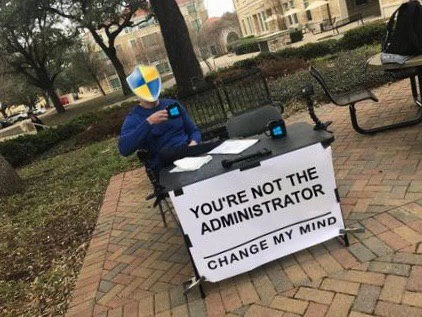
In this meme, Windows’ UAC is literally personified as the smug guy behind a “Change My Mind” booth. The sign on the table reads, “YOU’RE NOT THE ADMINISTRATOR – CHANGE MY MIND,” and that hits home for anyone in IT. It’s funny because it’s true: arguing with the Windows permission system is as pointless as it sounds. UAC (User Account Control) is essentially Windows telling you, “I don’t believe you have the rights to do that. Prove me otherwise.” And we all know how that debate ends — if you don’t have admin credentials, you’re not going anywhere, end of story. The meme captures that sensation of sitting there pleading with a computer that just sips its coffee and says, “Nope.”

For seasoned developers and sysadmins, this scenario is painfully relatable. We've all had that moment: you're in a rush, maybe trying to edit the hosts file to test a new server routing, or install a crucial debugging tool. You double-click or run a command, and instead of progress you get slapped with a prompt or error. The infamous Windows dialog (with that blue-and-yellow shield icon) pops up, or worse, you just get a terse message: “You do not have permission.” It's the digital equivalent of hitting a brick wall. Picture yourself staring at the screen at 2 AM, whispering “C’mon, just this once?” as if the machine might show mercy. Spoiler: it won’t. The UAC shield might as well be sitting there behind that table in the meme, calmly repeating “You're not allowed to do that, pal,” while you fume.

The combination of elements here makes the humor click: the Windows UAC shield icon has replaced the person’s face, implying it’s Windows itself taking a seat to lecture you. The two coffee mugs on the table (each with the UAC emblem) add to the absurdity – as if Windows invited you to a friendly chat over coffee, only to tell you “Access Denied” with a smile. The phrase “Change My Mind” is the icing on the cake: it references a popular meme format where someone states a controversial opinion and challenges others to prove them wrong. But in this context, you literally cannot prove Windows wrong unless you somehow magically become the administrator. It’s a one-sided debate. UAC knows it, and you know it. That’s the joke – the futility is the point.

Why do developers find this so familiar? In many workplaces, you're given a standard user account on your computer, not an admin account. This is part of a broader IT policy emphasizing security (often called a least privilege policy). It means day-to-day you can’t install software, edit certain system files, or change system-wide settings without jumping through hoops. Ever tried to install an updated version of Node.js or pip a new Python package and the installer wizard halts asking for admin approval? Cue the collective groan. Many of us have developed “workflows” (read: coping mechanisms) for this: submitting helpdesk tickets to get software installed, pleading with IT to temporarily elevate our rights, or scheduling that “Hey, I need admin for an hour” meeting with the sysadmin. It’s practically a rite of passage. The meme resonates because we’ve all been that frustrated person at one time or another, halted by a permission denied roadblock in the middle of what should’ve been a five-minute task.

Let’s talk real scenarios. Say you need to update your project’s database engine on your work laptop. You run the installer, and boom – UAC prompt. If you’re lucky, you are an admin (or you at least know the admin password) and can click “Yes”. If you’re not so lucky, you’re staring at a grayed-out “No” button or a password field you can’t fill. The computer effectively says, “Go get someone who has the keys, because it ain’t you.” I’ve been there, you’ve been there. Ever spent half an hour debugging a tool that mysteriously fails, only to realize it simply couldn’t write to a protected directory? The fix: run it again as Administrator, and suddenly everything works. Facepalm. This is the classic "did you turn it off and on again" of permission issues: "Did you try running it with admin rights?"

In a corporate environment, this dynamic becomes an everyday comedy (or tragedy). You might hear conversations like:
Developer - "I can’t deploy the local test server because I can’t open port 8080 on my machine."
IT Security - "Well, by policy you don’t have rights to change network settings. Submit a request and we’ll consider it."
Developer - "But I literally need this to do my job..."
IT Security - "Sorry, that’s the policy."

It’s a stalemate. The sysadmins and security team are essentially backing up what that UAC sign in the meme says. From their perspective, giving every developer full admin rights on their PCs is like giving all the kids the keys to the candy store – someone’s eventually going to make a mess. And to be fair, they have a point: all it takes is one developer accidentally running a malicious attachment or misconfiguring something critical, and the whole system could be compromised. So, the policy stays, and devs grumble. The meme nails this tension by removing all the polite corporate phrasing and distilling it to: "You're not the admin. Change my mind." It’s the unvarnished truth behind all those helpdesk tickets and policy documents.

There’s also a bit of shared trauma here from the Windows Vista days. Back in 2007 when UAC was first unleashed widely, the joke was that Vista would ask for permission if you so much as sneezed near the keyboard. Many power users found ways to turn it off (at their own peril) because it was that annoying. Over the years, software got smarter about not needing admin rights for trivial things, and UAC got more refined. Yet, the core scenario didn’t go away – especially in locked-down work setups. That “Cancel or Allow” dialog is burned into our brains. We’ve learned to identify that dimmed screen and the jarring dong! sound that accompanies the UAC prompt. It’s the computer’s way of stepping in with a parental voice: "I need an adult here." The meme just anthropomorphizes that into a humorously confident Windows Shield character, essentially saying what we all hear in our heads at that moment.

From the senior dev/sysadmin lens, there’s an extra layer of humor in seeing Windows portrayed as an obstinate debate opponent. In reality, trying to “convince” Windows to let you do something without rights is absurd – you either have the rights or you don’t. But how many times have we half-jokingly talked back to an error message? “Oh c’mon, you stupid machine, just let me through this once!” We personify our tools in moments of frustration. This meme leans into that by literally seating Windows down at a table to explain its unyielding stance. It’s like the OS is saying, “Go ahead, argue all you want. I’m not changing this policy.” Seasoned folks find that funny because it’s a truth we’ve come to accept. We might not like it, but we’ve made peace with it (or at least learned to laugh about it later).

Finally, there’s a grain of “I told you so” from the security side. The UAC shield at the table is almost smug. And honestly, a sysadmin who’s had to clean up a mess after someone ran wild with admin rights might wear that same expression. The sign might as well read, “You’ll thank me later for not letting you mess things up – change my mind.” From failed installs to botched configurations, restricting admin access has prevented countless self-inflicted wounds. Deep down, we know this. But in the heat of the moment when you just want to get things done, being stopped by a machine can drive you up the wall. That mix of logical reasoning and irrational frustration is exactly why this meme elicits a chuckle. It’s the IT world’s version of gallows humor: “It’s for the best, but darn if it isn’t inconvenient!” We laugh because if we didn’t, we’d cry – and then maybe throw our locked-down laptop out the window.

Level 4: The Principle of Least Privilege

At the heart of this meme is a hardcore security principle disguised as a punchline: the Principle of Least Privilege. For all the developer eye-rolls it induces, this idea is a cornerstone of modern OS design: every user and process should run with as few permissions as possible until more are absolutely needed. Windows isn't just being bossy for fun—there are decades of operating system theory (and painful security lessons) behind that UAC prompt. In a multi-user OS like Windows NT (the architecture underlying modern Windows versions), there's a clear separation of roles: regular users and administrators (the all-powerful accounts akin to root on Unix). Historically, many Windows folks (developers included) used to always log in as Administrator because it was convenient—no barriers, no questions asked. That’s like walking around with the keys to the kingdom 24/7; convenient until something (like malware or a stray script) abuses that power.

Microsoft learned the hard way during the Windows XP era that running everything as admin was a recipe for disaster (viruses had a field day back then). So with Windows Vista (circa 2007), they slammed on the brakes and introduced User Account Control (UAC) as a gatekeeper. UAC basically forces you to explicitly approve when something tries to use admin-level powers. It was a shock to users at the time (cue the endless “Allow / Cancel” pop-up jokes), but it established a new normal for security. Suddenly, even if you were an admin, Windows would ask “Are you sure?” when a sensitive action was attempted. Vista’s early UAC was notoriously chatty (it felt like a paranoid hall monitor, asking for confirmation on the most trivial things), but over subsequent Windows releases, it got tuned to be less annoying. Still, the fundamental idea remained: admin privileges are under lockdown unless explicitly unleashed.

Under the hood, Windows uses something called an access token to represent your user identity and what you're allowed to do. If you're not an administrator, your token simply lacks the high-level privileges – it’s like an ID card that doesn’t have the “all-access” sticker. Even if you are in the Administrators group, UAC in modern Windows gives you two personas: a standard user token for everyday operations and a full admin token that stays dormant until you approve an elevation. Think of it like having a dual identity: you operate as Clark Kent most of the time, but the Superman powers only come out after you agree to that dramatic UAC prompt. This design is why you can’t accidentally (or quietly) run a program with full privileges; the system makes sure you explicitly consent.

For instance, when a program tries to modify a protected system file or a registry key, the Windows kernel checks your token against the file’s security descriptor (ACL) using its internal security functions (e.g. SeAccessCheck). If your token doesn’t have the right privileges, the operation is blocked outright with an error. If your account could have admin rights (say you are in the admin group but running with a limited token), that’s when UAC kicks in to say, “I need higher clearance – do you want to proceed as admin?” Only after you confirm (and possibly enter the admin password on a secure desktop) will it flip the token to your full-power mode and retry the operation. Otherwise, it’s Access Denied. There’s no negotiating in that moment: either you have the clearance or you don’t. We can simulate what happens with a simple example in a Windows shell:

C:\> echo 127.0.0.1 test.local >> C:\Windows\System32\drivers\etc\hosts
Access is denied.

In this snippet, a non-admin user attempts to edit the system hosts file and the OS responds with a flat "Access is denied." – a straight-up veto from the kernel.

From a security engineering perspective, if a normal user could somehow convince the system to give them admin rights without proper authorization, that would be a catastrophic breach. Any attempt to do so is what we call privilege escalation – essentially trying to climb over the security walls to gain higher access than you’ve been granted. Malware and hackers are constantly looking for exploits to achieve this (a stray bug that lets code slip past UAC or run with SYSTEM-level rights). Microsoft designs UAC and the Windows kernel specifically to prevent unauthorized privilege escalation. In fact, Windows doesn’t even treat UAC prompts as a full security boundary (it’s more of a speed bump) – the real security is in the access control enforcement deep in the OS. If you’re not an admin, you simply cannot perform admin-only actions unless you provide valid admin credentials. Period. The system is deliberately built to be stubborn here. It’s like a vault door that doesn’t care who you are unless you present the right key.

So when the meme shows UAC declaring “You’re not the Administrator, change my mind,” it’s highlighting this rock-solid design stance. There’s fundamental computer science and OS architecture ensuring that UAC indeed won’t change its mind. Windows’ security model, rooted in the NT kernel, is designed to say “No” by default to anyone lacking the proper privileges. The humor is that we’ve all felt the absurdity of trying to argue with a machine that just won’t budge. But under that absurdity lies a very real safeguard: an operating system that has been taught (through decades of hard knocks and viruses) not to trust by default. UAC’s unflinching sign is the OS reminding us of that zero-trust stance. The rules are baked in, and no amount of debating can flip a single bit in that access token without proper authorization. In short, Windows UAC is petty for a reason – and that reason is keeping your system (and by extension, the whole network) safe from harm, including harm that might come from our own overconfident selves.

Description

This meme uses the 'Steven Crowder's Change My Mind' campus debate format. The image features a person sitting at a black desk on an outdoor brick patio. The person's face is completely obscured by the iconic blue and yellow shield of the Windows User Account Control (UAC) security feature. The large white sign on the desk reads, in bold black letters, 'YOU'RE NOT THE ADMINISTRATOR. CHANGE MY MIND'. The humor is rooted in the personification of the notoriously persistent UAC prompt. For any developer or system administrator who has used Windows, the experience of being blocked from performing a task by a dialog box questioning your privileges is universal. The meme hilariously captures the OS's unyielding, almost smug authority, framing it as an unbeatable debate opponent. It's a perfect visual gag for the common frustration of fighting for administrative rights on your own machine


Comments

7
Anonymous ★ Top Pick UAC is the only thing in computing more stubborn than a legacy codebase held together by a single, undocumented shell script
  1. Anonymous ★ Top Pick

    UAC is the only thing in computing more stubborn than a legacy codebase held together by a single, undocumented shell script

  2. Anonymous

    Nothing shatters an architect’s ego like a UAC popup - proof that even on your own machine, governance has root

  3. Anonymous

    After 20 years of explaining why developers can't have prod access, I've realized the real administrator was the sudo we denied along the way

  4. Anonymous

    The irony here is that in production, you're absolutely right - I'm not the administrator. I'm just the person who gets paged at 3 AM when the actual administrator's automation scripts fail, expected to fix critical issues with read-only access while navigating a JIRA ticket approval process that requires sign-off from three managers across two time zones. But sure, let's debate philosophy while I wait for my temporary sudo privileges to expire in the next 15 minutes

  5. Anonymous

    In enterprise Windows, even changing your mind requires elevation and a ticket

  6. Anonymous

    Enterprise RBAC in a picture: you’re admin of the mug; everything else is behind UAC with deny-by-default and a six-week ServiceNow SLA to change its mind

  7. Anonymous

    20+ YoE architect: masters CAP theorem across clusters, but still pwned by a UAC prompt on the local box

Use J and K for navigation