
Coding Faster Than Your IDE Can Judge You
Why is this IDEs Editors meme funny?
Level 1: Covering Your Eyes
Imagine you’re playing a game of peek-a-boo or hide-and-seek. You know how little kids sometimes cover their eyes and believe that since they can’t see you, you can’t see them? This meme is joking about a similar idea, but with coding. The programmer is basically covering their eyes to any mistakes by writing super fast. It’s like if you had a friend who points out every time you mess up, but you start talking so quickly that your friend can’t get a word in. For a moment, you get to pretend you didn’t mess up at all because your friend didn’t say anything. In reality, of course, the mistakes are still there – your friend noticed them eventually, and so will the computer. But for that brief moment, the coder feels safe and proud, just like a kid who thinks closing their eyes made the monsters go away. The humor comes from that childlike “If I can’t see it, it’s not there!” feeling. We laugh because we know covering our eyes doesn’t actually make problems disappear, whether it’s a messy room or buggy code. The meme is a fun way of saying that sometimes, programmers like to pretend their code has no errors… at least until the “all-clear” illusion is over and reality catches up!
Level 2: Race Against Squiggles
For a more junior developer or someone new to coding, let’s break down what’s happening. Modern programming is often done in applications like Visual Studio Code, IntelliJ, or Eclipse – these are examples of IDEs (Integrated Development Environments). An IDE is basically a super-powered text editor for code: it not only lets you write text, but also helps you by checking your code for mistakes in real time. If you’ve written code in one of these, you’ve probably seen those wavy red underlines (squiggles) or maybe red highlight in your code. Those are the IDE’s way of saying “Uh oh, there might be something wrong here” – kind of like the red spell-check underline in a word processor but for code errors. These could indicate a syntax error (like a missing parenthesis or a misspelled keyword), an undefined variable, or other common mistakes. In simple terms, the IDE is constantly acting like a quick proofreader or teacher, pointing out errors as you type, instead of you having to wait until you run the code or manually compile it to find out about the mistakes.
Now, normally you’d write a line, pause a bit, maybe think, and in that pause the IDE’s error-checker (often called a linter or a background compiler) will scan what you wrote. If it spots a mistake, bam – you see a red squiggly line or an error message almost immediately. That’s great for code quality because it lets you fix problems early. However, in this meme the developer is doing something funny: typing so fast and continuously that the IDE doesn’t get a chance to update those error markers. Imagine the IDE needs, say, half a second of you not typing to say, “Alright, let me double-check everything now.” If you never give it that half-second break, the IDE is essentially left hanging, thinking “the code is still in progress, I’ll wait to check.” So, on your screen, you don’t see any red squiggles yet, because the poor IDE is still catching up with your furious typing. The meme jokes that this feels like you have no errors at all – the code looks all clean because the IDE hasn’t had time to mark the errors. It’s like outrunning the red pen of a teacher who’s trying to mark your mistakes.
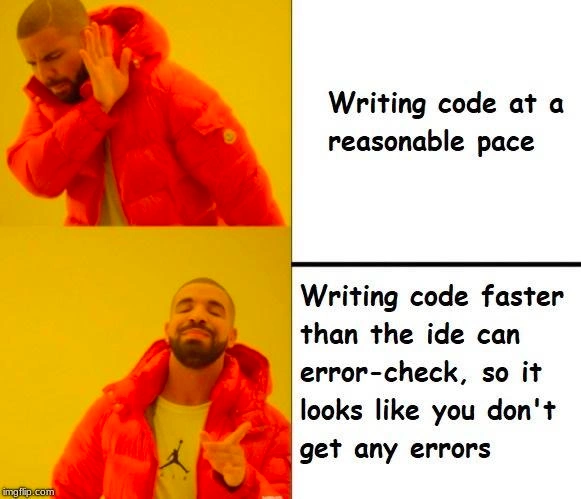
The top panel (Drake turning away) says “Writing code at a reasonable pace” – which is normally a good thing. A “reasonable pace” implies writing carefully, maybe pausing to think or to let the IDE show any errors. Drake rejecting that in the meme is the joke setup: it’s saying meh, who wants to go slow and steady?. The bottom panel (Drake smiling and pointing approvingly) has the line “Writing code faster than the IDE can error-check, so it looks like you don’t get any errors.” This is the punchline. Drake is basically representing the coder’s cheeky preference here. It’s presenting a humorous “preference” for this absurd strategy of typing super fast to avoid seeing any error marks. Of course, in reality, that’s not a serious recommendation – it’s a silly thing that gives you a short-term psychological boost. The meme is using Drake’s famous Hotline Bling reaction template (where he discards one thing and likes another) to compare a normal coding habit with a goofy “hack”.
Let’s clarify a few terms from that bottom text:
- “Error-check” refers to the IDE’s automatic checking of your code. Think of it like your code’s grammar and spelling check. The IDE is continuously compiling or interpreting your code in the background (using something like a language server or an internal compiler) to catch mistakes.
- The phrase “looks like you don’t get any errors” is key. The code “looks” error-free on the screen only because the IDE hasn’t flagged the errors yet. It’s not that the code truly has no errors, it’s just that the IDE’s visual feedback (the red lines) are lagging behind. It’s a cosmetic victory, not a real one.
This resonates with many developers as a shared joke about our habits and feelings. Maybe you’ve experienced writing a quick chunk of code and for a moment, your IDE shows no red marks – you feel a tiny surge of pride: “Wow, it compiled on the first try!” – only to realize a second later, as the IDE finishes thinking, that you actually had a typo on line 3 and forgot a semicolon on line 5. The meme exaggerates this by suggesting doing it on purpose: just keep typing non-stop so you can pretend everything is fine. It’s humorously highlighting a common developer pain point: seeing a bunch of errors while you’re in the middle of writing can be frustrating or break your flow. So wouldn’t it be nice if you could just not see them for a while? By typing at ludicrous speed, you kind of get that wish – the IDE stays silent temporarily. It’s a lighthearted way to say “I know my code is probably on fire, but if I don’t let the IDE catch it right now, I can live in blissful ignorance a bit longer!”.
In summary, for a newcomer: this meme is joking that a coder might outrun the IDE’s error warnings by typing so fast that the tool can’t keep up. It’s funny because it’s obviously not a real solution to errors – it’s like sweeping dirt under a rug. The red squiggly lines in editors are there to help, but here the coder is avoiding them in a playful, counterproductive way. Seasoned devs and even beginners with a bit of experience find it relatable: we’ve all wished our code was instantly perfect, and it’s amusing to think the answer could simply be typing faster than the computer’s ability to point out our mistakes!
Level 3: Race Condition – Developer vs IDE
At the highest technical level, this meme highlights a tongue-in-cheek race condition between a programmer and their development tools. Modern IDEs (Integrated Development Environments) constantly run background processes – compilers, static analyzers, or linters – that underline mistakes in your code with those infamous red squiggly lines. However, these tools usually operate on a slight delay or on idle moments to avoid lagging your typing. This creates a scenario where a fast-typing developer can literally outrun the IDE’s error checker, at least for a few seconds. It’s as if the coder and the IDE are two concurrent threads: the developer’s thread is furiously writing code, while the IDE’s thread is parsing and analyzing it. When the developer doesn’t pause, the error-highlighting thread falls just behind – a playful software latency issue turned into a joke.
From a seasoned developer’s perspective, the humor comes from exploiting a tool’s timing to feel a false sense of victory. We all know that no red squiggles ≠ no bugs, yet it’s amusing to witness a moment where the IDE appears “speechless” because it hasn’t caught up. It’s a temporary illusion of code quality. The meme’s bottom panel choice – “writing code faster than the IDE can error-check, so it looks like you don’t get any errors” – satirically glorifies this illusion. It’s developer humor at its finest: taking a common pain point (seeing a sea of error markers while writing) and flipping it into a faux life hack. The experienced audience recognizes the shared absurdity: typing speed is being cheekily conflated with bug-free code. In reality, blasting out code at breakneck pace doesn’t solve errors; it only delays their appearance. The code isn’t magically correct – the IDE just hasn’t had the time to mark it up yet.
Technically, this highlights how IDE error checking latency works. Many editors debounce their analysis – waiting until you pause typing or finishing a line before re-checking – to avoid constantly flagging transient states (like a half-typed variable name or an open parenthesis). If you keep pounding out code without a break, the IDE’s parser might never see a stable moment to update the error markers. For a brief, blissful interval, your IDE looks clean and bug-free. Seasoned devs find this funny because it’s a bit like tricking a surveillance camera by moving too fast – a harmless rebel move against the machine. But beneath the humor is a shared understanding: eventually reality catches up. The moment you stop or the analysis finally ticks, all those syntax errors, undefined variables, and missing semicolons will pop up in angry red. It’s not a practice you’ll find in any serious code quality guide – in fact it’s the opposite – but it pokes fun at our occasional desire to feel productive (and maybe avoid bad news) even if just for a second. The meme uses the popular two-panel Drake format (with the rapper Drake rejecting one thing and approving another) to compare the sensible approach (coding at a reasonable pace, addressing issues as they come) with the sneaky thrill of rushing through code so quickly that the IDE’s real-time checks can’t keep up. Every veteran programmer chuckles because they’ve been there: you sprint through a function, notice no immediate complaints from the editor and think half-jokingly, “hey, my code is perfect on first try!” – knowing full well it’s just outrunning the messenger of bad news.
Beyond the joke, this touches on the balance between developer productivity and assistance from tools. Live error feedback in editors is a fantastic productivity feature – it’s meant to help us catch mistakes early. But it can also be a double-edged sword: constant red underlines can disrupt your flow or confidence. The meme exaggerates the counter-strategy of essentially disabling that feedback via sheer speed. It resonates with anyone who’s experienced the relief of an IDE with no red marks, and the subsequent disappointment when errors flood in after a fresh compile or a lull. In short, the humor works on a technical level because the audience understands how IDEs work under the hood and why “no errors (yet)” is a mischievously misleading metric. We laugh because we all know that feeling of temporary victory against the machine – and the inevitable surrender when the machine catches up.
Description
This image uses the popular two-panel 'Drake Hotline Bling' meme format. In the top panel, the rapper Drake is shown in a bright orange puffer jacket, looking displeased and holding up a hand as if rejecting something. The text next to him reads, 'Writing code at a reasonable pace'. In the bottom panel, Drake is smiling and pointing in approval. The text beside him says, 'Writing code faster than the ide can error-check, so it looks like you don't get any errors'. The watermark 'imgflip.com' is visible in the bottom left. The humor lies in its relatable absurdity. Developers often rely on their Integrated Development Environment (IDE) to provide real-time feedback, highlighting syntax errors and other issues. This meme jokes about typing so quickly that the IDE's linter or static analysis tools can't keep up, creating a brief, blissful illusion of writing perfect, error-free code. For senior engineers, it's a funny nod to ignoring best practices for a fleeting moment of high-speed 'flow state', fully knowing a tidal wave of red squiggly lines is coming the moment they pause

Comments
8Comment deleted
I call it 'optimistic compilation.' I write the code, and assume the IDE will eventually agree with my genius. The red squiggles are just suggestions, right?
Outrunning the IDE’s red squiggles is just local eventual consistency - sooner or later the CI pipeline guarantees delivery of shame
The same technique I use in production: if the monitoring dashboard takes 30 seconds to update, that's 30 seconds of plausible deniability after deployment
It's eventual consistency for your codebase: zero errors observed, as long as no one ever reads the latest state
Ah yes, the classic 'Schrödinger's Code' technique - your code exists in a superposition of both working and broken states until the IDE's error checker finally catches up and collapses the wave function. Bonus points if you've already committed and pushed before the red squiggles appear, achieving the coveted 'clean local build' status that will haunt your team's CI/CD pipeline for the next 20 minutes
Senior dev flex: typing faster than LSP can parse, turning async linting into your personal imposter-syndrome shield
Outrun the LSP and you get Schrödinger’s codebase: simultaneously clean and broken until CI observes it
Set the LSP diagnostic debounce to 2000ms and type at 150 WPM; congrats, you just implemented eventual consistency for compiler errors and made your DORA metrics look elite

