The Developer's Ascent to Editor Nirvana
Why is this IDEs Editors meme funny?
Level 1: Why Not Both?
Imagine two kids arguing about whether chocolate or vanilla ice cream is better. They each insist their flavor is the best and can’t imagine why anyone would like the other. One kid even has a plain cone (that’s like using Vim: very simple and original), and the other has a big fancy ice cream sundae with sprinkles (that’s like using Visual Studio: lots of extras). Now, along comes a new ice cream that’s a mix – say, chocolate swirl with a bit of vanilla – which both kids start to like (that’s like Visual Studio Code: a mix of qualities from both). Finally, in a funny twist, the first kid puts rainbow sprinkles from the fancy sundae onto his plain chocolate cone. It’s as if he’s combining the two to get the best of both worlds. Suddenly, both kids are excited and amazed: you can have both together!
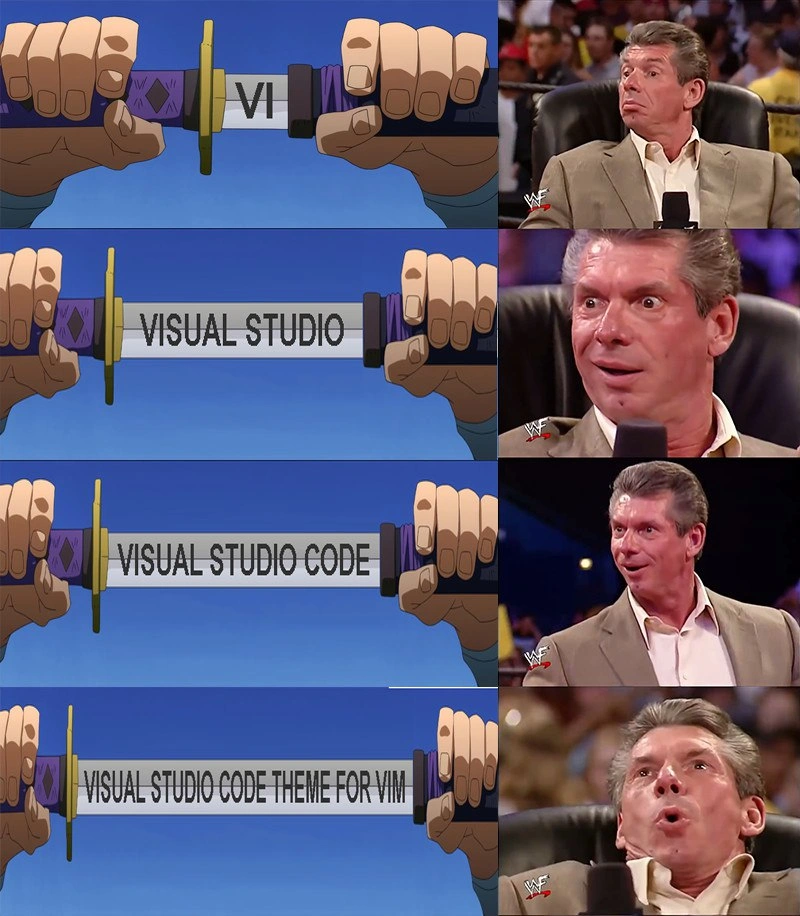
This meme is doing the same thing but with coding tools instead of ice cream. One side is a super simple editor (Vim, like plain chocolate), and the other side is a big fancy editor (VS Code, like a sundae with sprinkles). In the end, the meme shows the simple editor decorated to look like the fancy one – and everyone is surprised and happy. It’s funny because it’s like saying, “Why choose one when you can mix them and have everything you want?”
Level 2: Editor Wars 101
Developers love to argue about their tools. “Editor wars” refer to the long-standing debates over which code editor or IDE is the best. Imagine forums and chat rooms divided into camps: one side champions Vim (a lightweight text editor you run in a terminal, famous for its efficiency and steep learning curve), and another side swears by full-featured IDEs like Visual Studio (a program with graphical menus, buttons, and built-in tools for coding). It’s like chefs arguing over a simple knife versus an elaborate food processor – both cut vegetables, but in very different ways.
Let’s break down the meme’s four stages in simple terms, as if leveling up through editor history:
VI – This is the original form of Vim (Vi is a classic text editor from Unix). It runs in a console window, with no mouse usage at all. You have to press keys (like
ito insert text or:wqto save and quit) because it has modes. It’s powerful but not user-friendly to newcomers. In the meme’s first panel, seeing “VI” on the sword is like saying “here’s the old-school tool.” The reaction is pretty calm – many developers know Vi/Vim is respected, but it’s nothing shocking.Visual Studio – Next, the sword reveals the words “Visual Studio.” This is a big shift: Visual Studio is a Microsoft Integrated Development Environment, mainly used for languages like C# or C++ on Windows. It has a GUI, toolbars, and you can click around – a totally different approach from Vim. It’s heavy and does a lot for you (autocomplete, designers, debuggers). For someone who only knows minimal editors, Visual Studio is like a spaceship cockpit in comparison. In the meme, Vince (the man on the right) looks more interested now – it’s unexpected to go from Vi to a giant IDE like Visual Studio.
Visual Studio Code – Then, an even more modern name appears: Visual Studio Code (often just called VS Code). Despite the name, VS Code is separate from Visual Studio; it’s lighter and geared toward a wide range of programming tasks. Think of VS Code as a sleek sports car compared to Visual Studio’s freight truck – faster to start, highly customizable with extensions, and cross-platform (works on Windows, Mac, Linux). It became hugely popular among developers for its balance of simplicity and powerful features (like an integrated terminal, extensions for everything, and a friendly interface). When the sword shows “Visual Studio Code,” Vince’s eyes go wide – it’s like pulling out the current fan-favorite tool. Many developers today love VS Code, even some old Vim users gave it a try. So this panel says “now we’re talking!”
VS Code theme for Vim – Finally, the kicker: the entire blade reads “Visual Studio Code theme for Vim.” A “theme” here means the color scheme and style of the editor (how the code coloring looks, the background color, etc.). VS Code’s default theme (for example, the Dark+ theme) is something people really like visually. “For Vim” means someone made that theme available in Vim. This implies a Vim user is actually running Vim, but they tweaked it to look like VS Code. This is a bit mind-bending if you think in terms of rival camps. It’s like a sports fan wearing the jersey of a rival team’s star player – a mixing of allegiances. In the meme’s final panel, Vince is losing his mind with excitement: the idea that a hardcore Vim user would go so far as to install a Visual Studio Code theme in Vim is both hilarious and oddly impressive. It says, “I want the best of both worlds!”
So why is this so funny to developers? It’s because it highlights how silly the EditorWars can be. People argue Vim versus VS Code (or IDEs vs editors) as if you must pick a side. But in practice, developers often customize things endlessly. Vim users can add plugins to Vim to incorporate features or looks from other editors. There are actually Vim plugins to emulate VSCode’s look, and conversely, VS Code has plugins to emulate Vim’s behavior (like VS Code’s Vim plugin that lets you use Vim keybindings). In other words, the “war” often ends in a compromise: use whatever works for you, even if it means blending two approaches.
This meme is a slice of DeveloperHumor showcasing that obsession. The editor_customization_obsession is real – some programmers spend more time fine-tuning their editor’s settings than writing code at first! And the theme_consistency_ironies shown here (wanting the same theme everywhere) is also common: once your eyes get used to a certain color scheme, you want it in every tool you use. It’s comfort and aesthetics. So a Vim user installing a VSCode theme plugin is totally something that happens in real life. The meme just makes it dramatic and funny by treating each step like an epic power-up.
In summary, the meme is saying: “Developers kept upping the ante in the editor game – from old VI to big Visual Studio to hip VS Code – and in the end, the Vim die-hard couldn’t resist even the theme of VS Code. And that moment is pure blissful CodingHumor.” Anyone who has seen passionate debates about editors or fussed with their coding setup will chuckle at this.
Level 3: Editor Arms Race
The meme comically escalates the long-running Editor Wars by revealing bigger and more ironic “weapons” in each panel. On the left, a samurai unsheathes a sword with increasingly elaborate inscriptions: first VI (the classic Unix text editor), then Visual Studio (Microsoft’s heavyweight IDE), followed by Visual Studio Code (the trendy open-source editor), and finally the entire blade reads “Visual Studio Code theme for Vim.” On the right, WWE’s Vince McMahon reacts with growing excitement – a famous vince_mcmahon_reaction_template – culminating in jaw-dropped euphoria at the absurd final reveal. This side-by-side format is a textbook increasing_excitement_format, perfectly synced with each stage of the sword text.
At its core, the humor riffs on EditorWars: the almost tribal dev debates over text editors and IDEs. Seasoned developers immediately recognize the satire of TextEditorChoice fanaticism. Historically, vi/vim users and Visual Studio users sit at opposite ends of the tooling spectrum. Vim (an improved vi) is a minimalist, keyboard-driven text editor dating back to the 1970s Unix era, favored by those who value speed, modal editing, and living in a terminal. Visual Studio, born in the 1990s, is a graphical all-in-one IDE (Integrated Development Environment) known for rich features, GUI tools, and being heavy on system resources – the polar opposite philosophy. By the mid-2010s, Visual Studio Code (VS Code) emerged, combining a modern GUI with speed and extensibility, quickly dominating DeveloperExperience_DX discussions. It’s ironically also from Microsoft, but beloved even by many open-source enthusiasts.
The meme’s escalation plays on this timeline of tools in a single hyperbole. The first inscription “VI” gets a mild nod (been there, classic choice). Then “Visual Studio” appears – an unexpected twist like drawing a pistol in a swordfight – prompting raised eyebrows. Next, “Visual Studio Code” ramps up the hype: VS Code is currently superstar status in IDEsAndTextEditors fandom, so Vince’s eyes widen. Finally, the ultimate combo breaker: “Visual Studio Code theme for Vim.” This final form is hilariously specific and deeply ironic. It implies a Vim user has customized their editor with a VSCode color scheme, essentially adorning their hardcore terminal sword with a flashy rival’s jewel-encrusted hilt. Vince’s over-the-top reaction signifies mind-blown approval. It’s the meme’s punchline: the once unimaginable fusion of two rival camps, achieved through obsessive customization.
This speaks to a broader truth in developer culture: devs are notorious for editor_customization_obsession. They’ll spend hours tweaking dotfiles, installing Vim plugins, or skinning their IDE, chasing that perfect theme or UX. Here, a Vim aficionado presumably loves the VS Code aesthetic so much they installed a plugin to get the Visual Studio Code Dark+ theme inside Vim. The humor lies in the absurdity and familiarity: even the staunchest Vim user might secretly covet a slick VSCode feature (like a pretty theme or an intuitive interface), and vice versa (e.g. VS Code users installing Vim keybinding extensions for efficiency). The theme_consistency_ironies are strong – someone who prides themselves on using classic Vim ends up with an editor that looks exactly like VS Code. It’s like painting racing stripes on a horse so it resembles a sports car: functionally unnecessary yet oddly satisfying.
In practical terms, this mashup is very real. Thanks to open-source contributions, you can find a VSCode theme ported to Vim. A Vim user might add lines to their config like:
" Vim configuration snippet for a VS Code color theme
call plug#begin('~/.vim/plugged')
Plug 'username/vscode-theme.vim' " Install VS Code theme plugin for Vim
call plug#end()
colorscheme vscode-dark-plus " Apply the Visual Studio Code Dark+ theme
Here we see the Editor Arms Race turn into a peace treaty via plugin. The once rigid lines between editors blur: Vim can imitate an IDE’s look, and IDEs can emulate Vim’s modal editing. The meme captures this convergence with tongue-in-cheek flair. It satirizes the futility of holy wars over tools – in the end, developers just mix and match what they like. The “war” escalated so far that it wrapped around into unintentional harmony. The final panel is essentially the community’s collective laugh at ourselves: after years of arguing Visual Studio vs Vim, we end up running a Visual Studio Code theme inside Vim. Ultimate irony, ultimate DeveloperHumor.
Description
A four-panel, two-column meme comparing developer editors. The left column uses an anime template of a katana being slowly unsheathed, revealing more text on the blade in each panel. The right column features the Vince McMahon reaction meme, showing his escalating approval. In the first panel, the sword reveals 'VI', and McMahon looks unimpressed. In the second, it says 'VISUAL STUDIO', and he shows mild interest. In the third, 'VISUAL STUDIO CODE' is revealed, and McMahon is visibly excited. In the final panel, the fully unsheathed blade reads 'VISUAL STUDIO CODE THEME FOR VIM', and McMahon is ecstatic, leaning back in pure bliss. This meme charts a humorous progression of developer tool preference, starting with the classic but barebones Vi, moving to the powerful but heavy Visual Studio IDE, then to the popular and modern VS Code, and culminating in the perceived ultimate setup for a power user: the efficiency of the Vim editor combined with the popular aesthetics of VS Code

Comments
7Comment deleted
The final form of a senior developer's IDE is just a highly-themed, plugin-heavy terminal editor that consumes almost as much memory as the IDE they originally abandoned
Calling it now: next sprint someone will open a ticket to run Vim (with the VS Code theme) inside a VS Code terminal inside tmux on a headless Neovim container - because apparently editor choice scales better when you Helm-chart it
After 20 years in the industry, you realize the ultimate developer flex isn't choosing between Vim and VS Code - it's maintaining your .vimrc file that makes Vim look like VS Code, which itself has a Vim mode extension, creating an infinite recursion that would make Douglas Hofstadter proud
The ultimate developer flex: spending three days configuring VS Code to perfectly emulate Vim, then another week tweaking the theme, all to avoid the 30 minutes it would take to just learn actual Vim. It's not about efficiency anymore - it's about achieving the Platonic ideal of 'hjkl' navigation while still having IntelliSense and a file tree. We've come full circle from 'bloated IDEs' to 'lightweight editors' back to 'lightweight editors cosplaying as terminal editors inside Electron apps.' The real productivity gain was the yak we shaved along the way
After enough LSPs and theme plugins, the editor wars converge to a fixed point: Vim impersonating VS Code to preserve 15 years of muscle memory
Steering committee verdict: “VS Code theme for Vim” - backwards-compatible DX with zero refactor to the legacy muscle-memory API
Vim config hits escape velocity: now with VS Code themes, accruing more tech debt than your legacy monolith