
Skip to content
DevMeme
6319 of 7435
The Escalating Chaos of Coding Assistance Tools
DeveloperExperience DX Post #6930, on Jun 30, 2025 in TG

The Escalating Chaos of Coding Assistance Tools

Why is this DeveloperExperience DX meme funny?

Level 1: Asking Louder and Louder

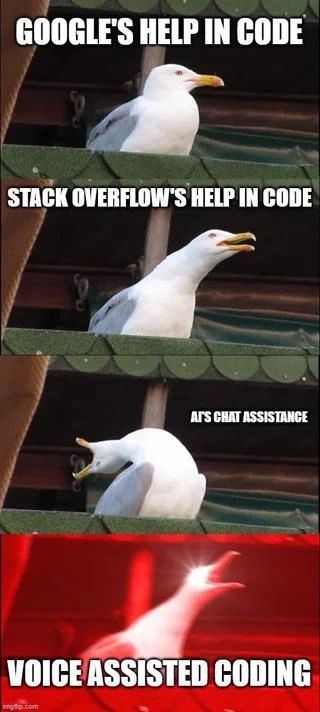
Imagine you’re trying to solve a puzzle or homework question. At first, you search quietly in a book or on the internet for a hint – kind of like whispering to yourself while you look for the answer. That’s the calm seagull with “Google’s help”; it’s you being quiet and looking stuff up. If you still can’t solve it, next you ask a friend who might know. Now you’re speaking up a bit: “Hey, how do I do this problem?” That’s like the seagull in the second picture – a bit more active. If your friend doesn’t help, you ask an expert or teacher. They might give you a very detailed answer, maybe even too much info, talking a lot. This is like the third seagull image, which looks like it’s yelling – the helper (an AI in this case) is giving a whole lot of explanation, almost like a big lecture. Finally, imagine you’re totally frustrated and just shout out loud for help: “PLEASE, ANYONE, JUST TELL ME THE ANSWER!” That’s the last seagull screaming in red. It’s as if the way we get help went from a quiet little search to a big noisy yell. The meme is funny because it exaggerates this idea – each new way of getting help (from Google, to a Q&A site, to an AI chatbot, to a voice assistant) is like you’re asking for help louder and louder. By the end, the developer is practically screaming (or the computer is screaming back)! It’s a silly way to show that sometimes using fancy high-tech help can feel as chaotic as just yelling, “I need help with my code!” The pictures of the seagull make it extra clear and comical: calm at first, then completely freaking out at the end, which is why we laugh. It’s showing the stress and desperation growing, in a cartoonish way that anyone who’s struggled with a tough question can understand.

Level 2: From Search to Scream

At this level, let’s clearly identify each element of the meme and explain it in simpler terms. This meme is using a well-known seagull-scream format (a series of images where a seagull bird goes from quiet to literally screaming) to compare four different sources of coding help. It shows how getting help with code has evolved – and how each step can feel more intense or “noisier” than the last. Here’s what each panel means:

  • Google’s help in code: This refers to using Google Search to find programming answers. Developers often type their error message or question into Google. For example, if your code throws NullPointerException, you might Google “NullPointerException how to fix in Java”. Google then shows links to relevant pages: official documentation, tutorials, or Q&A threads. It’s usually the first step when you’re stuck. It’s quiet in the sense that you’re just reading search results and articles on your own. Think of Google as an index of knowledge: it points you to answers, but you have to dig in and read. In the meme, the seagull is calm with just Google’s name, implying this method is helpful but low-key – like a helpful whisper giving you hints (the meme’s title even says “Google whisper”). Key point: Google is indispensable for programmers to quickly lookup issues, but it requires the programmer to do some reading and analysis of the results.

  • Stack Overflow’s help in code: Stack Overflow is a famous question-and-answer website specifically for programming problems. It’s so popular that often the top Google result for a coding question is a Stack Overflow page. On that site, someone likely asked the exact same question you have, and other users have posted answers. The best answer (as voted by the community or accepted by the question asker) will usually be clearly marked and often contains a code snippet or clear instructions. “Stack Overflow’s help” means you’re basically copying a solution from that site into your own code. In the meme’s second panel, the seagull leans forward, indicating it’s getting a bit more intense. Why? Because now instead of you quietly researching, you have a direct answer being given to you. It’s a step up: rather than figuring out the answer from documentation, you have a ready-made solution from another developer. Newer developers quickly learn that Stack Overflow is like the ultimate programmer help desk; you can find fixes for countless errors by just copying what others have done. However, it’s slightly comedic too – developers joke that a lot of code in real projects originates from quick copy-pastes off Stack Overflow. (There’s even light humor about the ethics of this, since content there has a license, but practically everyone does it.) So, in simpler terms: Stack Overflow is where you find a straightforward answer or snippet for your problem, often saving you time. It’s more direct than Google, since someone has likely asked your exact question before.

  • AI’s chat assistance: This refers to using Artificial Intelligence chatbots or assistants to get coding help. Examples include ChatGPT, Bing Chat, or coding-specific bots like GitHub Copilot or Amazon CodeWhisperer. Instead of searching or reading threads, you actually ask the AI your question in natural language, and it replies with an answer, often including sample code or an explanation. It’s like texting a very knowledgeable friend who never sleeps. The meme’s third panel shows the seagull with mouth wide open, which humorously suggests that the AI’s help is very talkative or loud. Indeed, AI chat assistance tends to give a lot of detail. For instance, you might ask: “How do I sort a list in Python?” and the AI could reply with a step-by-step explanation and a code example. This is super helpful, especially for beginners, because it’s like a personalized tutor. But it can also be overwhelming: sometimes the AI gives much more info than you asked for, or it might say something with great confidence that’s slightly off-target (since the AI doesn’t truly “know” – it predicts likely answers based on training data). The term AI pair programmer is often used for these assistants: it’s as if the AI is your programming partner who suggests code and solutions as you work. In summary, “AI’s chat assistance” means using an intelligent chatbot to solve coding issues – a more interactive and verbose helper than static web pages or forums.

  • Voice assisted coding: This is the most hands-on (or rather, voice-on) approach: actually using your voice to write or modify code with the help of an assistant. Imagine using a voice assistant like Siri, Alexa, or Google Assistant, but for programming. For example, you could say, “Computer, create a new React component” or dictate actual code, and the system would attempt to write it. You might also ask a voice assistant to explain an error or fix some code, and it would speak back to you. In the meme’s final panel, the seagull is in a full-out scream with the caption, implying this method is chaotic or extreme. Why would voice coding be depicted as a scream? Because in practice, coding by voice can get noisy and frustrating. Speaking out code isn’t easy – you have to spell out symbols (imagine saying “open curly brace, close curly brace, semicolon” for { } ;). It’s also easy for the assistant to mishear you (your “foo” might become “food”). Voice assisted coding is a relatively new and niche idea, often developed to help programmers who can’t use a keyboard (for accessibility, like if someone has an injury or disability). For most developers, it’s not the daily way to code, so using it can feel strange or comical. The meme jokes that by the time you get to this method, you’re practically shouting. It exaggerates the experience: picture a programmer alone in a room talking to their code out loud, possibly getting louder when the assistant doesn’t understand. It’s a big contrast to the first panel’s quiet Googling. So, voice assisted coding means interacting with a coding assistant through speech – it’s futuristic and cool, but also the meme implies it might drive you up the wall (hence the screaming seagull).

Overall, these four panels show a progression of tools in a developer’s toolkit for help, each more advanced than the last:

  1. Search engines (Google) – find info quietly.
  2. Community Q&A (Stack Overflow) – get a direct answer from others’ experience.
  3. AI chatbots – get a generated answer from an artificial expert, in a conversational way.
  4. Voice interfaces – literally talk and listen to get code help.

The humor comes from the idea that each step is “louder” and more intense. It’s tagged as AIHumor and DeveloperHumor because it playfully mocks how AI and new tools are changing the developer experience. Modern tooling has indeed expanded from simple searches to complex AI-driven interactions. And as it expands, sometimes the process feels more convoluted or noisy – which the meme captures by going from a whisper to a scream. If you’ve ever used Siri or Alexa and ended up practically yelling to correct it, you can relate. Now imagine that scenario, but while trying to code – it’s both funny and a bit stressful! This meme sums up that feeling in a way fellow developers find relatable and laughable.

Level 3: Rubber Duck to Red Alert

For seasoned developers, this meme hits close to home by exaggerating a familiar progression of getting coding help. It’s a tongue-in-cheek take on how our methods for debugging and problem-solving have evolved – and gotten progressively “louder” and more overbearing in the process. Let’s break down why this strikes a chord:

1. The Gentle Google Whisper: Not long ago (and still today), the first thing any dev does when stuck is quietly open Google and type a query. It’s almost an unspoken ritual – no need to call for help out loud, just a quick, silent search. The meme’s first panel with a calm seagull labeled “GOOGLE'S HELP IN CODE” represents that discreet, almost whisper-like assistance. You formulate a specific query ("TypeError: cannot read property 'foo' of undefined"), maybe add some magic keywords (like including the framework name, or using site:stackoverflow.com in the query for laser focus). As a senior dev, you’ve honed this search-fu to an art: you know how to skim error codes and go straight to the relevant link on the results page. Google is like the quiet librarian of coding help – it points you to the shelf where the answer might be, but it doesn’t read it out for you. This stage is calm and controlled. It’s just you and a search bar, no noise except maybe your keyboard clacking. The humor here is subtle: we all know the slightly furtive feeling of Googling something that we think we should know, doing it under our breath. (There’s even that joke that being a developer is 90% Googling). Developer experience (DX) at this stage is very self-directed: you sift through documentation or blog posts in peace. Nothing is “shouting” answers at you; if anything, you might have multiple tabs open, quietly comparing notes. It’s almost meditative – except for the minor panic of having an unresolved bug, of course. The whisper metaphor also hints that Google’s help is as good as the question posed; if you only vaguely describe the problem, you might get irrelevant noise, but a well-crafted query returns pure gold without drama. Seasoned devs appreciate this control – you can choose which link to follow, essentially controlling the volume and quality of input.

2. The Stack Overflow Chorus: Enter the second panel: “STACK OVERFLOW’S HELP IN CODE”. Now the seagull leans forward with its beak open a bit – we’re turning up the volume. Stack Overflow is a legendary Q&A site every programmer knows, often the very link Google just showed you. It feels like walking into a room of fellow devs and saying, “Hey, has anyone seen this error before?” except the room is global and answers are already archived. The humor here lies in how Stack Overflow solutions are often treated as gospel. A senior dev has probably both given and received answers there, and they know the drill: scroll past the question directly to that accepted answer (the one with the green check mark and lots of upvotes) and copy-paste the code snippet or the one-liner fix. The meme highlights this as a louder form of help compared to Google. Why louder? Because the answer is effectively being dictated to you by someone else – the community voice. It’s no longer just a hint or a reference; it’s usually a direct “Do X or use Y; here’s how.” It’s like the seagull starting to squawk a bit 😆. For experienced devs, there’s shared amusement in this: how many times have we solved a problem by essentially dropping someone else’s snippet straight into our code? The phrase “Stack Overflow-driven development” is an inside joke meaning a codebase that’s basically a patchwork of such snippets. Every senior knows the pros and cons: on one hand, it’s a huge time-saver – why reinvent the wheel when an expert stranger already did it? On the other hand, it’s a bit dangerous; blindly using code you found means technical debt or even bugs if you don’t fully grok it. (Cue war stories of production outages caused by a copied snippet that worked in one context but not in another!) Also, there’s an irony seniors appreciate: Stack Overflow’s content is user-generated and can become dated. A top answer from 2012 might recommend an approach that’s now deprecated in 2025. We’ve seen those “Edit: Don’t do this in 2020+” comments under old answers. So the volume of help from Stack Overflow might come with some noise – sometimes multiple conflicting answers, debates in comments, or the classic snarky remark “Why don’t you just read the docs?” from purists. Still, overall, Stack Overflow is like having a knowledgeable colleague who speaks up with a solution – more direct than a quiet search, but usually very helpful. The camaraderie and sometimes blunt tone of Stack Overflow answers (some are curt: “Use x = x || {}. Done.”) can feel like that seagull squawk: straight in your face with the fix. It’s funny because we’ve all been that seagull at some point, both giving a loud answer (“Just upgrade your library, duh!”) or receiving it. The developer community vibe is encapsulated here – helpful, yes, but not always gentle.

3. AI’s Confident Shout: The third panel text “AI’S CHAT ASSISTANCE” shows the seagull with head thrown back, mid-scream. This perfectly captures how an AI pair programmer can feel. As experienced devs, many of us have started using AI tools like ChatGPT, Bing Chat, or GitHub Copilot to speed up our workflow. The funny thing is how these tools, while incredibly advanced, often come across as over-confident and verbose – essentially, they “yell” out an answer in detail. It’s the difference between asking a human colleague and asking an AI: the colleague might give you a concise tip, but the AI will likely produce five paragraphs, a code sample, and an apology if it wasn’t sure. 😅 It’s like having an intern who’s read the entire library of congress trying to impress you with a full dissertation for a simple question. The meme nails this dynamic: the seagull’s mouth wide-open scream is that exuberant avalanche of information you get from AI. For example, imagine asking the AI, “How do I center a div in CSS?” A senior dev knows the war story behind this (centering used to be tricky pre-Flexbox, with countless Stack Overflow threads on it). Ask Google, you get a list of blog posts; ask Stack Overflow, you get one or two popular solutions with some code. Ask an AI, and you might get a whole styled <div> example, multiple methods (old and new), an explanation of each method’s history, and a chipper note saying “I hope this helps!” It’s like the AI really wants to make sure you got it – no whispering, just full-on lecturing. Seniors find this amusing because it’s both helpful and a bit much. There’s an underlying industry commentary: we’ve moved from pulling knowledge as needed (quietly searching or reading answers) to having it pushed at us by an eager algorithm. The volume is up figuratively – sometimes the AI will even volunteer extra tips you didn’t ask for. And yes, it can be noisy or even misleading at times. We’ve learned to be skeptical: a confident answer isn’t always a correct one. A seasoned developer might chuckle recalling when they tried an AI-generated code snippet that looked perfect but then didn’t actually run because the AI had slyly invented a function name that doesn’t exist in the real API. It’s the “sound and fury” effect – lots of output, not always substance. Despite that, it’s undeniably impressive. This is why the meme escalates to supernatural scream: AI assistance can feel like having a genie or a daemon whispering (or rather shouting) in your ear as you code. It’s thrilling but can be distracting, especially when the AI suggests code changes unprompted or pops up with “Did you mean...?” messages in your IDE. Many senior devs have a love-hate relationship with these tools: they love the productivity boost (like generating boilerplate or tests in seconds), but hate the occasional nonsense and the need to double-check everything. It’s a far cry from the quiet days of reading official docs page by page. Now the answers come to you proactively, sometimes with overwhelming confidence. The meme humor is that the AI’s “voice” is effectively a shout – a stark contrast to Google’s whisper. It resonates with our experiences of testing these AI helpers late at night: sometimes you exclaim, “Okay, okay, that’s enough!” at your screen because the AI keeps pouring on details even after it solved the problem. The volume (metaphorically) is just way up.

4. The Voice Assistant Scream: Finally, the meme culminates in “VOICE ASSISTED CODING” with a red, blurry seagull shrieking its heart out. This is a hyperbolic portrayal of the newest (and perhaps most experimental) way to code: literally talking to your computer and having it talk back. If AI chat felt like a shout, voice integration is a scream because it adds actual sound to the mix. Picture a senior dev trying this out: you go from quietly thinking or typing to suddenly verbalizing everything. “Create a new file. No, not that folder! Cancel!” – it can very quickly turn into a shouting match with your supposedly helpful voice assistant. The humor lands because we’ve all had frustrating experiences with voice-controlled tech (“No, Alexa, I said play rock music, not Bach music!”). Now apply that to the precise world of coding, and it’s chaos. A programmer’s day is usually full of silent concentration, maybe some muttered curses at most. Switching to voice commands is jarring: everyone in earshot can now hear your coding session. A senior in a shared office would never do this – imagine the looks if you started declaring if statements out loud! So it’s both absurd and relatable on a human level. The red glow and motion blur in that panel imply a kind of frenzied emergency mode – exactly how it feels when voice assistance goes wrong. Perhaps the voice recognition misheard a command for the tenth time, and now the dev is literally raising their voice (just like the seagull) in frustration, hoping clarity (or sheer volume) will make the computer finally understand. It’s a comedic exaggeration of something very real: voice interfaces have a high error cost in programming. If an AI mishears “delete line 10” as “delete file 10”, you’re in trouble! So you find yourself enunciating like you’re talking to a stubborn pet: “No, not that one! Undo! Stop!” The experienced dev in us cringes (we prefer our mistakes to be fixable with a simple backspace, not an argument with HAL 9000), but also laughs because you can imagine it like a sitcom scene. This is also highlighting how Developer Experience might suffer if the tools aren’t perfectly in sync: what was meant to make coding easier (hands-free coding, how futuristic!) ends up introducing new friction (constant need to confirm what the AI heard). The meme’s screaming seagull encapsulates that frustration and absurdity. From a senior perspective, it’s also a commentary on how far we’re pushing the envelope. We went from the quiet, controlled process of reading and typing, to effectively a chaotic conversation with our machines. It’s both amazing (we’re literally in an era where you can talk to a computer to build software) and amusing (the reality often devolves into a farce of “Computer, stop. COMPUTER, STOP!”). Many of us recall pop-culture like Star Trek, where engineers would just tell the computer what they wanted. We’re almost there, but the meme winks at us: the road to that sci-fi ideal is currently paved with a lot of yelling and miscommunication. In practice, only a brave or desperate soul “codes by voice” unless necessary (though it’s a wonderful accessibility option for those who can’t use a keyboard – that serious benefit aside, for the rest of us it’s often more novelty than efficiency). So the final stage is a perfect punchline: it exaggerates the noise and drama to reflect how out-of-hand our help methods can feel. A senior developer laughs at this progression because they’ve lived through it – from the quiet days of manual debugging and RTFM (Read The Friendly Manual)… to copy-paste programming… to being practically inundated with AI-generated suggestions… to possibly shouting “End curly brace! END CURLY BRACE!!” at a device. It’s a comedic reflection of our industry’s sometimes absurd leaps in tooling. We keep adding more layers (and more volume) to what should be a simple conversation between a coder and their code. In short, we’ve gone from rubber-duck debugging to red-alert yelling, and the meme captures that escalation brilliantly.

Level 4: From PageRank to Whisper

At the deepest technical level, this meme spotlights an evolution of algorithms and interfaces in programming help. Each stage — Google, Stack Overflow, AI chat, and voice — is powered by increasingly complex tech under the hood, effectively amplifying how help is delivered (and how loud it feels):

  • Google’s search relies on heavy-duty information retrieval algorithms. The famous PageRank algorithm (created by Google’s founders) crawls and ranks webpages by importance (measured largely by backlinks). When you quietly type a code error or question into Google, it’s using optimized data structures (like inverted indices for quick keyword lookup) and ranking formulas to fetch relevant documentation, blog posts, or Q&A pages. This process is fast and silent – the “whisper” of help: you get links that you, the developer, still have to click and read. The search engine’s job is to serve results efficiently (in O(log n) time or better on massive indexes), not to explain them out loud. The signal-to-noise ratio is handled by you filtering the results. Technically, Google’s help stays in the background, returning curated information without much fanfare.

  • Stack Overflow’s answers introduce a human-curation layer. The site itself is built on a fairly straightforward web platform with a SQL database behind it, but the content is community-driven. When you search a question, often Google’s algorithm elevates Stack Overflow pages to the top because of their popularity and relevance (and Stack Overflow’s SEO optimization). There’s no advanced AI here, but rather a crowd-sourced knowledge base. The “algorithm” is social: question upvotes, accepted answers, and reputation scores surface the best solutions. In a sense, it’s structured crowdsourced data — a query on Stack Overflow (via Google or the site’s own search) runs through a Lucene search index to find matching keywords/tag, then sorts by votes. The result: one authoritative answer (usually in plain text or code snippets) that developers copy-paste. It’s more direct than raw Google results, almost like turning up the volume a little: the answer is handed to you, but you still integrate it into your code. The knowledge has been distilled by humans, and any “screaming” is just enthusiastic commenters in text form 😉.

  • AI chat assistance ramps up the complexity significantly. Modern code assistants (like ChatGPT or GitHub Copilot, presumably what “AI’s chat assistance” refers to) are powered by Large Language Models (LLMs) – deep neural networks with billions of parameters. These models (often based on the Transformer architecture) have been trained on vast swaths of the internet: documentation, open-source code, forums (very likely including tons of Stack Overflow Q&A). Through training, the AI has effectively absorbed patterns of how coding questions are answered. When you ask a coding question, the AI doesn’t just fetch an existing answer; it generates a brand new answer word by word, predicting likely helpful content based on its training. For example, ask it to “implement a binary search in Python,” and it will craft a complete function on the fly, possibly with explanatory comments. It’s like a super-advanced autocomplete that understands natural language queries. Underneath, it’s doing high-dimensional matrix multiplications and attention-weight calculations to decide what token (word or symbol) comes next. The result often feels like an over-eager expert: it might provide a detailed answer with code, explanation, caveats, and edge-case considerations — a firehose of information. This is the seagull in the third panel with head thrown back: the AI is effectively shouting code at you (metaphorically). The “volume” of help is amplified by the model’s ability to spout out large, perfectly formatted code blocks and verbose analysis in seconds. Technically, this stage adds some noise too: language models can hallucinate — producing plausible-sounding but incorrect code or references (like a function name that doesn’t exist). It’s the classic stochastic parrot problem: the AI predictively “squawks” content it saw during training, but doesn’t truly know truth from error. Hence, you sometimes get confident-sounding nonsense (a bit like a bird screaming random phrases it learned). Still, when calibrated, this AI assistance is tremendously powerful, leveraging massive computationally-trained knowledge to provide help far beyond a static search result. It’s basically Google + Stack Overflow distilled and given a voice (textual voice, so far).

  • Voice-assisted coding is where things get really interdisciplinary: combining the language model’s capabilities with speech recognition and synthesis. Now the assistance isn’t just text-based; it’s auditory. A voice-assisted coding setup likely uses an Automatic Speech Recognition (ASR) engine (like Google’s speech API or OpenAI’s Whisper model) to convert your spoken words into text, then possibly an AI to interpret that and generate code, and finally maybe a Text-To-Speech system to read back results or confirmations. Each of those components is complex: the ASR has to handle programming jargon accurately (imagine it mapping “open bracket curly brace” to “{”). Voice recognition models are usually trained on lots of conversational data and might not be tuned for code syntax out-of-the-box, making them prone to hilarious errors. For instance, saying “for i in range ten” could be misrecognized as “for eye in rain 10” without domain-specific customization. Companies working on voice coding create special grammars or language models just for code to improve accuracy. There’s research on having context-aware voice inputs so that speaking if (x < 5) is parsed correctly, not as a weird English sentence. On the output side, having the assistant speak code or responses introduces another layer of possible chaos: reading code aloud is inherently awkward (for i equals 0 semicolon i less than n semicolon i plus plus is a mouthful for anyone, human or AI!). Keeping the developer’s mental model synced while listening to code is hard – our brains are used to visually parsing code structure, not auditory. So the entire pipeline from your microphone to synthesized voice answer is a symphony of advanced tech: deep learning models, signal processing, and careful prompt engineering to keep the AI’s responses concise when spoken. The meme’s final panel – the red-tinted seagull screaming – humorously captures the discord that can happen here. The “whisper” tech (speech recognition model) ironically ends in a screamed output. In theory, voice-assisted coding is like Star Trek’s computer come to life (you talk to the computer, it writes code), but in practice today it often feels clunky and noisy. The algorithms are straining to translate between human speech and precise code, and any mismatch is immediately obvious and comical (e.g. the assistant might cheerfully say aloud, “Sure, I’ll delete all files now!”, when you really just asked it to delete an array element). It’s an amazing technical feat that we can even attempt this integration of AI and voice for programming, but as the meme suggests, the user experience can escalate into chaotic hilarity when the tech misfires. In essence, high-tech helpers have turned the volume way up – from silent search results to a talking, shouting assistant – revealing both how far computing has advanced and how human factors (like our tolerance for noise and error) remain crucial.

Description

A four-panel meme using the 'Inhaling Seagull' format to satirize the evolution of getting help with programming. The first panel, labeled 'GOOGLE'S HELP IN CODE', shows a calm, composed seagull. The second panel, 'STACK OVERFLOW'S HELP IN CODE', depicts the seagull with its beak slightly open, as if starting to make noise. The third panel, 'AI'S CHAT ASSISTANCE', features the seagull leaning back and screaming loudly. The final, climactic panel, labeled 'VOICE ASSISTED CODING', shows a glowing, distorted image of the seagull with laser eyes against a dramatic red background. This meme humorously critiques the developer's experience with different support tools. It portrays Google as a standard baseline, Stack Overflow as more intense and sometimes argumentative, AI assistants as loud and occasionally overwhelming, and voice-assisted coding as the peak of chaotic, impractical absurdity. It's a relatable commentary on the signal-to-noise ratio of modern developer tools


Comments

12
Anonymous ★ Top Pick Voice coding is the final frontier of debugging, where you're not sure if you're fixing a syntax error or accidentally ordering a lifetime supply of rubber ducks from Amazon Alexa
  1. Anonymous ★ Top Pick

    Voice coding is the final frontier of debugging, where you're not sure if you're fixing a syntax error or accidentally ordering a lifetime supply of rubber ducks from Amazon Alexa

  2. Anonymous

    Give it another sprint and we’ll be shouting ‘kubectl just fix it’ at production - because apparently verbosity scales better than our microservices

  3. Anonymous

    After 20 years in tech, I've gone from carefully crafting Google queries to get past SEO spam, to mining Stack Overflow's duplicate-marked goldmines, to prompt engineering ChatGPT like it's a junior who read all the docs but none of the code, and now apparently I'm supposed to verbally explain my architectural decisions to Siri while my open-plan office wonders if I've finally lost it

  4. Anonymous

    The progression from Google to Stack Overflow to AI chat to voice coding perfectly mirrors the journey from 'let me quietly research this' to 'I need community validation' to 'just tell me the answer' to 'I'M LITERALLY SCREAMING CODE AT MY COMPUTER AND IT'S HALLUCINATING IMPLEMENTATIONS.' We've gone from copy-pasting Stack Overflow answers to having existential debates with LLMs about whether our architectural decisions align with SOLID principles, and now we're one step away from pair programming with Alexa who keeps suggesting we import lodash for everything. The real question is: when voice coding suggests 'Did you mean to refactor your entire codebase?' do we laugh, cry, or just accept that we've entered the timeline where rubber duck debugging has been replaced by screaming at a seagull-shaped AI?

  5. Anonymous

    Google hints at docs, SO berates you to RTFM, AI voice-codes a hallucinated refactor symphony straight to prod

  6. Anonymous

    Search and SO are cold‑cache hits; the LLM is branch prediction; when it mispredicts the dependency graph, “voice‑assisted coding” is just raising the human event loop’s log level to ERROR

  7. Anonymous

    We spent years shaving keystrokes; now the critical path is pronunciation - mispronounce 'double colon' and the voice assistant scaffolds a migration in prod before I finish saying 'undo'

  8. @Vincent_Hawks 1y

    the voices in my head assist me in coding

  9. @q_rsqrt 1y

    post approved by cia web slop developers

  10. @qtsmolcat 1y

    i use DAC: Demon Assisted Coding

  11. @leejoys 1y

    *Awaiting a code written by Damballa's horse*

  12. @Broken_Cloud_1 1y

    *iron ingot +3

Use J and K for navigation
