Skip to content
DevMeme
2430 of 7435
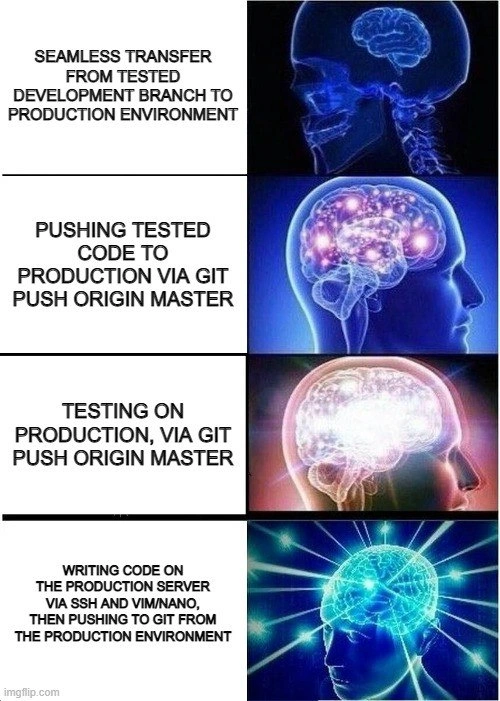
The galaxy brain guide to software deployment
Deployment Post #2701, on Jan 29, 2021 in TG

The galaxy brain guide to software deployment

Why is this Deployment meme funny?

Level 1: Building the Plane in Mid-Air

Imagine you’re going to show off a new toy or project to your friends – say, a model airplane that everyone will get to see fly. The smart way would be to build and test the airplane at home first, making sure it actually flies before the big show. Now, picture someone doing the opposite: they start assembling the airplane while it’s already in the air with people watching. 😮 They’re tightening screws and adding wings as the plane is trying to fly. That sounds crazy, right? It’s super risky and could crash at any moment. This meme is funny for the same reason. It’s joking that a programmer might try to fix or write their software while it’s already running for real users. Each step in the meme is like a worse and worse idea of doing things last-minute on the live product. The last panel – “writing code on the production server” – is as wild as fixing an airplane mid-flight. It makes us laugh because it’s so obviously a bad idea, yet every experienced coder sort of knows someone who’s tried something that silly when they were desperate. The joke is basically saying: the more ridiculously brave (or foolish) you are with making changes at the last second, the bigger your brain must be! It’s a goofy, ironic way to highlight why planning, testing, and doing things the right way is important – because the “galaxy brain” alternative (just winging it live) is clearly absurd.

Level 2: Testing in Production

Let’s break down the meme in simpler terms. It’s showing four ways developers might put new code onto a live website or app (the production server). The joke is that each method is crazier than the last. In software, production (or “prod”) is the environment that real users use – the live site. In contrast, a development environment (and often a staging or test environment) is where you’re supposed to try out and test your changes safely, without affecting customers. Now, the smart way (Panel 1 of the meme) is to move code from a tested development branch to production in a seamless way. This implies you have a special process or pipeline for deployment: often automated scripts or a service (like Jenkins, GitLab CI, or GitHub Actions) that take the code that passed tests and deploy it to production. This is what people mean by CI/CD: Continuous Integration (merging code constantly and testing it) and Continuous Deployment (releasing updates frequently through automation). It’s like having a checklist that the code must pass (all tests green, approvals given) before it can go live. It reduces human error.

Now, Panel 2 is a bit less fancy: “pushing tested code to production via git push origin master.” Here’s some context: Git is a version control system that developers use to store code. “Origin” is the default name for the main centralized repository (usually on services like GitHub or GitLab), and "master" is what we traditionally called the main line of code (these days many use “main” as the name). So git push origin master is a command that sends your latest code changes up to that main repository branch. In many setups, the master (or main) branch is what’s deployed to production. So this method means the developer is manually pushing their code to the live branch. It suggests they already tested the code (maybe on their machine or a dev environment), but the deployment itself isn’t automated – it’s a manual step. This is a pretty common practice, especially in smaller projects: you finish a feature, perhaps run your tests locally, then merge to master and push. If everything is configured simply, production might just pull from master or you trigger a deploy after pushing. It’s VersionControlHumor because usually we’d like more safeguards (like code review or CI tests running on that push), but hey, at least everything is in Git and you’re not doing anything too wild… yet.

Panel 3 takes a sideways step into risky territory: “testing on production, via git push origin master.” “Testing in production” is often mentioned jokingly when a team skips having a proper testing phase. It means they deploy the new code straight to the live site and watch for problems there. It’s like saying, “If users don’t complain, then I guess it works!” In practice, this can be somewhat intentional in advanced scenarios – for example, some companies do a soft launch of a feature to a small percentage of users and closely monitor it (that’s called a canary release). But more often this phrase is poking fun at doing things backwards. Normally, you’d test in QA or staging (an environment identical to production but not user-facing). If you only test in prod, you might catch issues too late – real users could be hitting bugs. This part of the meme implies the developer isn’t bothering with a full test cycle; they just run git push origin master, deploy the code live, and then treat production as the testing ground. It’s funny (and scary) to developers because we’re taught “Don’t deploy untested code to production,” yet we know in reality sometimes deadlines or laziness lead to exactly that. It’s a major DeploymentPainPoint – when a team doesn’t have good test environments or processes, everything gets tested on the live server by default.

Finally, Panel 4 shows the most extreme method: writing code on the production server itself via SSH and a text editor (vim or nano), then pushing to git from prod. Let’s unpack that. SSH stands for Secure Shell – it’s a way to remotely log into a server’s command line. When you SSH into a production server, you are literally on that live machine where the app is running for users. Editors like vim or nano are programs you run in a terminal to edit text files (source code, config files, etc.). So this method means the developer isn’t even coding on their own computer or a staging area – they are directly editing the live code files on the prod machine. It’s akin to popping open the hood of a running car on the highway to tweak the engine while it’s running. After making changes with vim/nano, the caption says they then push to git from production. That part is also backwards from normal: they’re using the production server itself to run git commit and git push, effectively updating the repository with whatever changes they just made live. Usually, it’s the other way around (you push from your laptop to the server). Doing it from the server means the source of truth was briefly just that one machine until they updated the repo. This practice is generally considered a big no-no. Why? Because it bypasses all the safety nets – no code review, no automated tests, nothing. If you make a mistake editing directly in prod, users could see errors immediately, and it might even bring the system down. Plus, those changes might get lost if someone else deploys from the repo, since the repo didn’t have them until you manually pushed. It’s very easy to create inconsistencies (“It works on Server A but not on Server B, because I only edited one of them!”). This scenario is often referred to as “cowboy coding” or doing a “hotfix in prod.” A hotfix means a quick fix to a live bug, and the proper way is still to apply a fix through version control and a deploy pipeline. But here the person is doing it live, likely because of an emergency (‘the site is down, fix it right now!’ scenario) or extremely bad habits.

All four panels together are a tongue-in-cheek ranking of deployment practices from best (top) to worst (bottom). It’s presented as a galaxy_brain_meme, which is an Internet meme format where the more “enlightened” or “galaxy brain” something is, the more absurd or outlandish the idea. The humor comes from the fact that in reality, the truly enlightened approach is the opposite of the bottom panel – you don’t want to do that! But the meme jokes that the craziest method (editing live in prod) is the biggest brain move. It’s ironic. Developers find it funny because we all recognize that progression: we start with good intentions and processes, but under pressure, things can devolve. DevOps engineers and SREs (Site Reliability Engineers) especially chuckle (or groan) at this, because they advocate for everything in Panel 1 (automation, testing, immutability) and try to prevent everything shown by Panel 4. In summary, each step down the meme is an increasingly chaotic way to deploy code:

  • Proper CI/CD pipeline – code goes through testing and integration steps before hitting prod (Yay! 🎉)
  • Manual Git push to master – code goes straight to live branch after some manual testing (Okay, but be careful…)
  • Test in prod – code goes live then you find out if it works (Eeep 😬, hope you have good monitoring!)
  • Edit in prod via SSH – code is changed live on the server, bypassing all process (🔥🚒 This is fine… everything is on fire…)

Each of these corresponds to the meme’s panels from top to bottom. By the bottom panel, any junior developer can tell it’s a bad idea — it’s practically a rite-of-passage horror story you hear about on your first job. And that’s exactly why the meme is relatable and humorous: it exaggerates “big brain” genius by showing something that is actually an epically bad practice. It’s poking fun at a certain overconfidence some devs might have (“I don’t need all those fancy pipelines, I’ll just hack it now”). We laugh at it, but we also learn from it: don’t be that person in Panel 4!

Level 3: From DevOps to DevOops

At the top tier of this “galaxy brain” meme, we see a satirical ladder of deployment practices descending straight into madness. It starts with the ideal DevOps pipeline – a seamless transfer from a tested development branch to production. This is the stuff of industry dreams: automated CI/CD (Continuous Integration/Continuous Deployment) pipelines, rigorous testing suites, and one-click deploys where code flows to Production only after passing all checks. In a perfect world, every release would go through this clean path: merge your feature branch into a staging branch, all tests green, then automatically deploy to production with proper version tracking. It’s Deployment done right, the opposite of cowboy chaos.

But the meme’s joke is how each subsequent panel “upgrades” the brain while downgrading the deployment practice. Panel 2 shows a brighter brain with the caption “PUSHING TESTED CODE TO PRODUCTION VIA git push origin master.” Ah yes, the classic manual deploy: no fancy pipeline, just a developer running the Git command to push changes directly to the main branch (often named master in Git; think of it as the live code). This is still somewhat sane – at least the code was tested locally or in a branch. It’s basically saying: “We skipped the automated part, but trust me bro, I tested it. Now I’ll just push to master and production will update.” Many small teams deploy exactly this way. It’s a step down from full CI/CD, but at least version control is involved and you’re not editing things live on the server… not yet, anyway. It’s the VersionControl equivalent of doing your own stunts: risky, but you might get away with it if you know what you’re doing. Seasoned engineers smirk here because they know how often a git push origin master on Friday 5 PM has led to late-night rollbacks.

Panel 3 cranks up the brain glow (and the chaos): “TESTING ON PRODUCTION, VIA git push origin master.” This is where DevOpsHumor turns to horror. The code isn’t really verified until it’s running in prod. In other words, “let’s deploy first and test in production to see if it works.” 😱 This trope is so common it’s practically a running gag in DeploymentPainPoints: you skip a real QA environment, and instead watch the real users (and your monitoring dashboards) to find bugs. Maybe you’ve heard the cheeky mantra It’s not a bug, it’s a feature in progress – that’s the vibe here. Some companies like to spin “testing in prod” as a modern strategy (using techniques like canary releases or feature flags to mitigate risk), but in the context of this meme it’s clearly the reckless version: just YOLO deploying and hoping nothing catches fire. The ProductionIssues that can result are legendary. A senior engineer reading this panel likely recalls war stories: the midnight scramble when something that “worked on staging” blows up on real user data, or the time a hotfix was made directly on production because “we’ll test it live!”. It highlights the gap between best practice and reality – often, deadlines or pressure lead teams to cut corners and essentially use prod as the test environment. It’s funny in that dark way because we’ve all been there, nervously refreshing the site after a deploy, praying no error pages appear.

Now Panel 4 is the final cosmic-brain stage, captioned in all its absurd glory: “WRITING CODE ON THE PRODUCTION SERVER VIA SSH AND VIM/NANO, THEN PUSHING TO GIT FROM THE PRODUCTION ENVIRONMENT.” This is the ultimate taboo, the stuff of an SRE’s nightmares. It’s basically saying: “Screw process, I’ll just live-edit the code on the server itself!” The Galaxy brain meme format portrays this as the enlightened step, which is pure irony because every experienced dev knows this is a huge facepalm moment. We’ve reached “cowboy coding” in its rawest form – no code review, no local testing, directly logging into the production box (via ssh) and editing files with a terminal editor (hello vim or nano). It’s hard to overstate how risky this is. By bypassing version control and CI, you risk introducing changes that aren’t documented or reproducible. This is how configuration drift and “But it worked yesterday!” mysteries are born. In proper DevOps culture, servers are immutable (you deploy new versions, never alter on the fly) and treated like cattle (disposable), not pets. But here, the engineer is treating the prod server like their personal dev machine – hand-tweaking code live, as if cuddling a pet. A cynical veteran might quip: “Directly editing in prod? Bold move, let’s see if it pays off…” Often it doesn’t: one stray character in that vim session can take down the site.

To a senior developer, this final stage evokes both laughter and PTSD. It lampoons that one teammate (or maybe a younger version of ourselves) who thought they were a 10x developer by hot-patching production at 3 AM via SSH. Sure, they’ll brag “I fixed the bug directly on the server, crisis averted!” – but meanwhile the operations team is pulling their hair out because the next deployment will overwrite that change, or the servers are now snowflakes with unique differences. It’s Deployment chaos. In fact, some companies lock down production so tightly (rightly so) that SSH access is only for emergencies, precisely to prevent this scenario. When it does happen, there’s usually an incident post-mortem about “why did we allow a change outside the pipeline?” and action items to never let it repeat. The meme resonates because it’s a ranking of bad practices that are hilariously familiar. Each step up the “galaxy brain” is essentially a step down in sanity:

  • Level 1 (small brain): Proper CI/CD pipeline from a tested branch – sane, professional, boring (in a good way).
  • Level 2 (bigger brain): Manual git push to main branch – a bit old-school and risky, but still within reason.
  • Level 3 (glowing brain): Testing in productionedgy and dangerous; you’re literally learning about bugs from real users.
  • Level 4 (galaxy brain): Editing on prod via SSH + vimthe “I AM THE PIPELINE” god complex; simultaneously heroic and horrifying.

The humor lies in presenting that last, worst method as the most “enlightened”. It’s dripping with irony. Seasoned devs are laughing (or cringing) because they know the only time you’d ever do that is when all hell breaks loose – and even then, you feel dirty afterward. The meme is a tongue-in-cheek way to say: “Look how ‘big-brained’ I am, I don’t even need deployment processes!” – mocking those bad habits. In reality, of course, writing code on prod is a DevOps sin that can lead to catastrophe (and many an on-call pager alert). The VersionControlHumor here is strong too: pushing to git from production after the fact is totally backward. It underscores misuse of Git – normally code flows to production, not the other way around. The fact that the final step is git push from prod implies the developer hurriedly commits their live edits back to the repo: “Oh right, I should probably save this in Git so we have a record…”. That’s a VersionControl antipattern if there ever was one.

In summary, this meme strikes a chord by escalating a scenario from textbook-perfect deployment to the ultimate “DevOops” moment. It shines light (in increasing wattage, brain-lit fashion) on our industry’s dirty little secret: sometimes, when under pressure or lacking discipline, even smart people resort to terribly chaotic practices. And it’s equal parts funny and frightening that we recognize each stage. The galaxy-brain format is a perfect parody: the more outrageous the behavior, the more “cosmically enlightened” the meme pretends it is. It’s a form of catharsis for engineers – we laugh so we don’t cry about how often things like “test in prod” or “quick fix on the live server” have actually happened in real life.

Description

An 'expanding brain' meme format with four panels, each depicting a progressively more chaotic and reckless method of deploying code. The first panel, with a small brain, describes the ideal 'seamless transfer from tested development branch to production environment.' The second shows a slightly more illuminated brain for 'pushing tested code to production via git push origin master.' The third, with a brightly glowing brain, is 'testing on production, via git push origin master.' The final panel, representing the 'galaxy brain' state of enlightenment, is 'writing code on the production server via ssh and vim/nano, then pushing to git from the production environment.' This meme satirizes the spectrum of deployment anti-patterns, from common shortcuts to the most terrifying 'cowboy coding' practices. For senior developers, it's a painfully relatable progression of how development standards can decay under pressure, leading to the ultimate sin of editing live production code

Comments

20
Anonymous ★ Top Pick The final panel isn't a deployment strategy; it's a live-action role-play of the CAP theorem where you sacrifice both consistency and availability for the partition tolerance of your own sanity
  1. Anonymous ★ Top Pick

    The final panel isn't a deployment strategy; it's a live-action role-play of the CAP theorem where you sacrifice both consistency and availability for the partition tolerance of your own sanity

  2. Anonymous

    DevOps nirvana: ssh into prod, hot-patch in vim, :wq, git commit -m "tested in revenue", and let the post-commit hook page yourself - true closed-loop observability

  3. Anonymous

    The only thing more enlightened than editing directly on production is realizing you've been doing it on the wrong server cluster for the past hour while the actual production server has been serving cached 404s

  4. Anonymous

    The final panel perfectly captures that 3 AM moment when you SSH into production, fire up vi because vim isn't installed, make a 'quick fix,' then realize you need to commit it to git to maintain the illusion of version control - essentially using production as your development environment and git as a backup tool rather than the other way around. It's the deployment equivalent of putting the cart before the horse, then realizing the horse is actually a database server and the cart is on fire

  5. Anonymous

    Reverse GitOps: the source of truth is whichever prod box you SSH’d into at 3 a.m

  6. Anonymous

    Our GitOps strategy is eventual consistency: prod is the source of truth, Git is the read replica we backfill after Vim over SSH

  7. Anonymous

    Vim in prod isn't cowboy coding - it's the architect's final form: zero context switches, infinite regret

  8. @APT3M 5y

    You can use ssh extensions for vs code or idea, really comfortable for coding on production😏

    1. Deleted Account 5y

      why would you want to use vscode?

      1. @UQuark 5y

        Because it's pretty handy for such languages as Go, Python or C Of course, for Java/C#/other languages with powerful SDK you have to use a specific IDE

        1. Deleted Account 5y

          why would you not just use vim tho?

          1. @UQuark 5y

            Because I don't know how to exit vim

            1. Deleted Account 5y

              good

              1. Deleted Account 5y

                never exit vim

                1. @x_Arthur_x 5y

                  You don't have to if you never enter it

                2. @gizlu 5y

                  Just install emacs

                  1. Deleted Account 5y

                    god motherfucking damn

                    1. Deleted Account 5y

                      another instance of editor war

    2. Deleted Account 5y

      Ssh extension for vscode. God help us

  9. @UQuark 5y

    And also, IntelliSence

Use J and K for navigation