
The German Accent Mnemonic for Remembering Tar Commands
Why is this CLI meme funny?
Level 1: Silly Memory Trick
Imagine you have a big box that can hold lots of toys, and you have a special “code word” to open or close that box. But the code word is just a bunch of letters that don’t form a real word – it’s hard to remember. So, you make it easier by turning those letters into a funny phrase in a pretend voice. For example, instead of remembering “C-Z-F” and “X-Z-F” (which are like secret codes to pack up or unpack stuff on a computer), you say to yourself, “create ze file” and “extrakt ze file” in a silly German accent. It sounds like a goofy cartoon character is giving you instructions: “create the file” (when you want to pack everything up) and “extract the file” (when you want to unpack it). It’s funny because you’ve turned a hard-to-remember command into a little joke. The guy in the picture wearing old-fashioned German clothes and holding a huge beer is there to make that pretend voice feel real and extra silly. The whole joke shows that even grown-up programmers use playful tricks – like making up a goofy phrase – to remember how to do things. It’s like learning the rhyme “Never Eat Soggy Waffles” to remember North, East, South, West, but for computer stuff. We laugh because it’s relatable: sometimes the best way to remember something boring is to make it fun!
Level 2: Unpacking Tar Flags
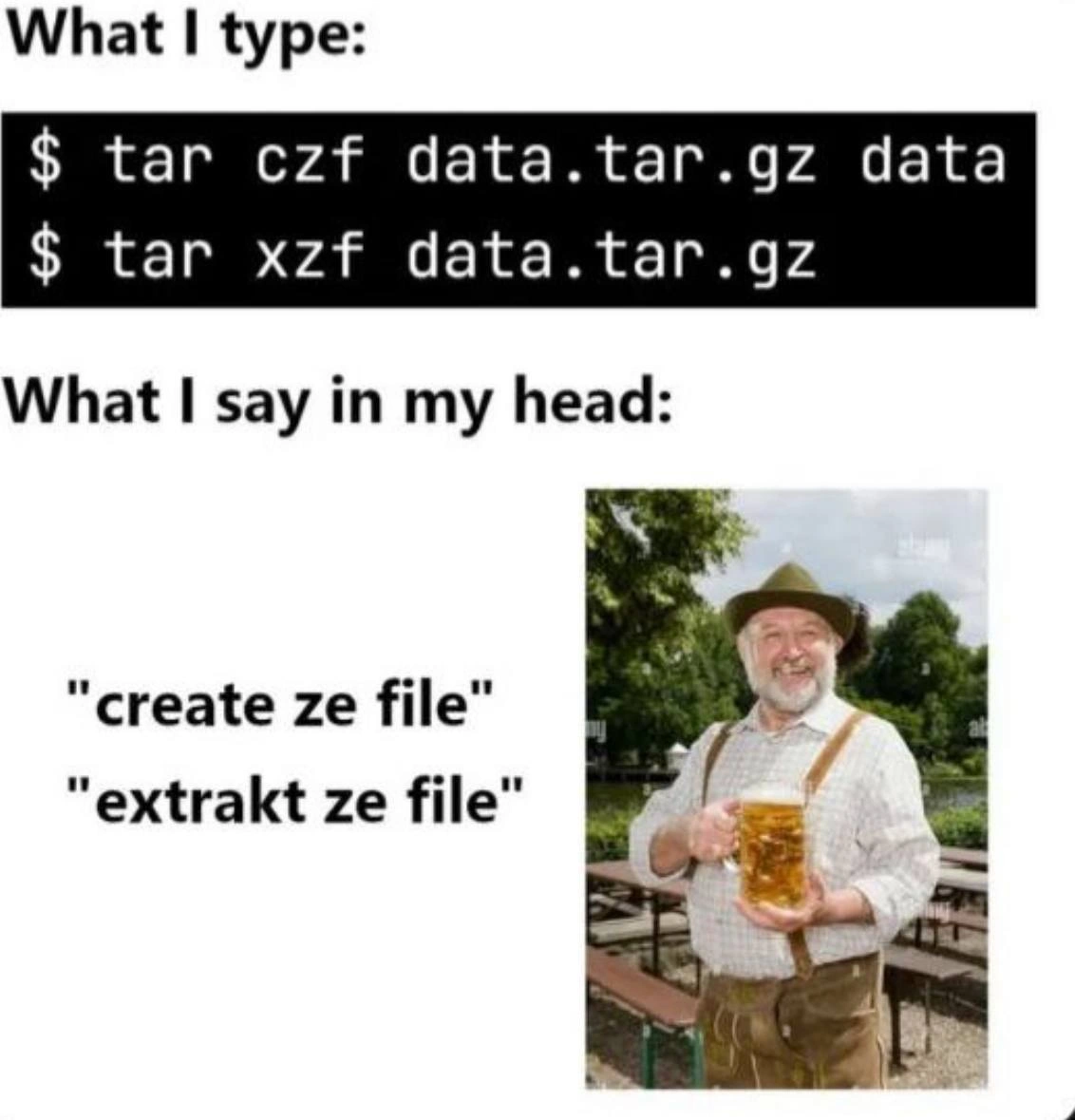
Let’s break down what’s happening for those newer to the command line. The joke centers on the tar command, a classic Linux/Unix tool for bundling files together (archiving) and optionally compressing them. In the top half of the meme (“What I type:”), we see two actual terminal commands in a terminal screenshot:
tar czf data.tar.gz data– This tellstarto create (c) a new archive file, compress it with gzip (z), name the output filedata.tar.gz(fflag means “file name follows”), and archive the contents of the folder nameddata. After running this, you get a single filedata.tar.gzthat contains all the files from thedatadirectory, compressed to save space.tar xzf data.tar.gz– This command tellstarto extract (x) the contents of the archive, while auto-detecting gzip compression (zagain), from the archive file (f)data.tar.gz. Run this, and it will unpack the archived files back into the current directory (recreating the originaldatafolder and files).
Okay, so what’s with the funny phrases? The bottom half (“What I say in my head:”) reveals the user’s mnemonic device – basically a memory trick. The meme shows the quotes "create ze file" and "extrakt ze file" next to a smiling man in lederhosen (traditional German clothing) holding a huge beer stein. This visual emphasizes a German accent joke: the person imagines the tar commands as if spoken by a cheerful German character. Why? Because pronouncing the tar flags in a goofy German-accented phrase makes them easier to remember and less dry. Here’s how the mnemonic aligns with the flags:
- "create ze file" — Say this out loud, and you hear the letters c, z, f in order: create ze (a play on “the”) file. It reminds you that
tar czfmeans “create a compressed file.” (The realtarflags are c=create and z=gzip compression, and f=file name, but the phrase covers all of them.) - "extrakt ze file" — Here you hear x, z, f in order: xtrakt ze file. That corresponds to
tar xzf, meaning “extract from a compressed file.” The word “extrakt” isn’t English (we’d spell it extract with a c), but spelling it with a k gives it a German flair and makes the x sound stand out.
These phrases are an example of using a command_flags_mnemonic – a simple story or saying to recall something complicated. The tar flags are short single letters, which can be hard to remember in the correct combination, especially when you’re tired or new to this. It’s like creating a mini translation from computer-speak to human-speak. The developer in the meme doesn’t literally say “create ze file” out loud (especially not in front of coworkers!), but it’s their inner voice guiding their fingers on the keyboard. By imagining the command in a humorous way, they ensure they use the right flags. This is part of real-life Developer Experience (DX): even though we use powerful tools like the terminal (CLI stands for Command Line Interface, basically the text-based console where you type commands), we often personalize how we work with them. We make up little Bash rhymes, silly analogies, or funny mental images to remember sequences that aren’t obvious.
The context mentions “at 3 am deployments” – it’s common in tech that big updates or fixes happen late at night or early morning when user activity is low. At that hour, a developer might be alone at their keyboard, groggy, and double-checking everything. In such a moment, recalling the exact tar syntax can feel strangely hard (Was it czf or zcf? Do I need a dash? etc.). Having a mnemonic like “create ze file” ready in your head is like having a friend whispering the answer. It’s both a memory aid and a little stress-reliever (it might even make you chuckle at 3 AM, which is a relief during a tense deploy!). The TerminalHumor here is that even serious tasks on the command line sometimes involve almost childlike tricks. And the image of a jolly Bavarian man with beer just caps it off – it’s an exaggerated, lighthearted representation of that inner voice. After all, nothing says “relax, we got this” during deployment like imagining a friendly beer garden buddy helping you run your Linux commands! This human touch in CodingHumor shows that no matter how advanced our skills, our brains love a good silly shortcut.
In summary, the meme is showing a real-life example of a developer translating cryptic Unix command flags into a memorable phrase. It’s a reassuring message to newcomers: it’s normal if you have to come up with weird little stories to remember commands – even experienced devs do it. Those seemingly ninja-like folks who type tar -czf without hesitation? Chances are, they’ve just said “create ze file” in their head, with a grin, as their fingers hit the keys. 😉
Level 3: Teutonic Tar Trickery
Even the most battle-hardened Unix veterans have their quirky rituals. At 3 AM deployments, running the venerable tar command becomes a mix of muscle memory and madness. The meme shows what looks like a routine CLI incantation:
$ tar czf data.tar.gz data/ # compress "data/" into data.tar.gz
$ tar xzf data.tar.gz # extract files from data.tar.gz
By daylight, these tar flags are straightforward: c means create an archive, x means extract, z means compress with gzip, and f means use filename (the next argument is the archive’s name). But at 3 AM, after countless on-call marathons, your brain is running on fumes. You’re deploying code or packing logs, and those cryptic tar flags (czf, xzf) start to blur together. This is where the seasoned shell user’s survival instincts kick in. Instead of trusting shaky memory, you lean on an absurd mnemonic: "create ze file" and "extrakt ze file". Yes, in your head, you’re suddenly a jovial Bavarian gently reminding you what each flag does. It’s like your tired brain conjures a traditional Bavarian friend in lederhosen holding a beer stein (just like the image) who pats you on the back: “Ja, don’t forget to create ze (zipped) file, then extrakt ze file!”. This silly phonetic command_flags_mnemonic ensures you don’t mix up tar flags when it counts.
Why is this funny to experienced devs? Because we’ve all been there — squinting at a terminal in the dead of night, trying to recall arcane one-letter options of ancient Unix commands. The tar utility itself is old-school; its name stands for Tape ARchive, a tool originally designed for streaming files onto backup tapes. Over decades, it accreted single-letter switches like a cryptographic codebook: powerful but impenetrable to the uninitiated. There’s an inside joke that using tar is akin to casting a spell or shell sorcery — you either know the magic incantation by heart or you fumble through man tar pages. Even senior engineers admit that typing tar czf... from cold memory is a minor rite of passage (and a common DeveloperHumor trope). We’ve memorized it, but ask us why z means gzip or which order the flags go, and you’ll get a moment of pause followed by a goofy grin. Hence this meme: it playfully exposes the senior_shell_muscle_memory secret. The humor comes from juxtaposing a serious deployment command with a ridiculously bad German accent mnemonic. It’s the kind of internal monologue you’d never document, but it might save your bacon during a foggy deploy. In short, the meme hits home because it’s absurdly relatable: even ultra-technical folks use dad-joke-level tricks to remember their Bash scripting voodoo. When you’re one bad flag away from a failed deploy, you’ll gladly whisper “create ze file… extrakt ze file” if it keeps production running. Prost to that! 🍻
Description
A two-panel meme explaining a popular mnemonic for the 'tar' command-line utility. The top panel, titled 'What I type:', shows two common tar commands: `$ tar czf data.tar.gz data` and `$ tar xzf data.tar.gz`. The bottom panel, 'What I say in my head:', displays a cheerful, older man in traditional Bavarian attire (lederhosen and a hat) holding a large beer. Next to him are the phrases '"create ze file"' and '"extrakt ze file"', which correspond to the 'czf' and 'xzf' flags in the commands. The joke lies in how this stereotypical German accent perfectly matches the letters of the command flags, making the otherwise cryptic options easy to remember. It's a classic piece of developer humor that turns a dry technical detail into a funny and effective memory aid, instantly relatable to anyone who has ever struggled to remember Unix command-line flags

Comments
19Comment deleted
I still use the 'czf' and 'xzf' mnemonics. For flags like '--strip-components=1', I just have to hope the man page has a section in plain English, not Bavarian
We can debate CAP theorem all day, but if I don’t whisper “extrakt ze file” first, tar still wins the outage lottery
After 20 years, I still Google tar syntax every time, but at least my mental German accent has gotten more authentic with each failed attempt at remembering whether the 'f' goes before or after the compression flag
After decades of using tar, I still mentally pronounce 'czf' with a German accent to remember it means 'create ze file' - because apparently my brain decided that Bavarian mnemonics are more reliable than actually learning what the flags stand for. At this point, I'm convinced the only reason I remember 'xzf' is because I imagine a very enthusiastic German engineer shouting 'EXTRAKT!' while aggressively decompressing production backups at 3 AM
Tar: the only tool where f must be last and z isn’t for ‘ze’, yet my brain still ships an Oktoberfest mnemonic - czf create ze file, xzf extrakt ze file
After two decades, 'tar czf' and 'xzf' aren’t commands - they’re the ritual that keeps GNU tar from streaming my archive to an imaginary tape when I forget the 'f'
Two decades in, tar czf still summons my inner Lederhosen-clad sysadmin: 'Extraktkt ze file, mit precision!'
shit, now I'm doing ze same. This is your fault Comment deleted
all mnemonics are good Comment deleted
created zipped file then Comment deleted
bruh Comment deleted
Thats how zis wörks. Comment deleted
wait really? That changes everything Comment deleted
does it understand only tar.gz or does it understand tgz aswell? Comment deleted
you can use a instead — which deduces compression based on the file type Comment deleted
that is insane, so much wasted time typing those letters or even looking up which is which :D Comment deleted
I'm not sure. when I read this part of man — I just stopped to use -z and started to use -a and it just works. maybe I need to try to use it without such flag at all Comment deleted
i don't have enough time for this shit, just use https://github.com/dtrx-py/dtrx Comment deleted
Oh, that’s helpful Comment deleted

