Why search tabs when Google will relink you to Stack Overflow again
Why is this DevCommunities meme funny?
Level 1: Why Clean Your Room?
Imagine your room is super messy with toys and books scattered everywhere. You suddenly need your favorite toy car to play with. You know it’s somewhere in that messy room (maybe under a pile of clothes or hiding behind other toys). Looking for it would mean digging through the mess, which is annoying and time-consuming. So what do you do instead? You go ask your mom or dad for that same toy again, or maybe you have an extra one in a drawer. You basically avoid searching the messy room by getting the toy through a different route. It sounds silly, right? You had the toy all along, but you didn’t feel like sorting through the clutter to find it. This meme is laughing at a similar kind of silly shortcut. The developer’s “messy room” is their web browser filled with lots of open pages (tabs). Their “toy” is the answer they need for a coding problem. Instead of searching through their open tabs to find the answer (cleaning their room), they just ask Google to give them the answer again (asking mom for help). It’s funny because it’s a lazy shortcut we kind of recognize in ourselves. We’ve all been a bit lazy like that – avoiding the hard way and doing the easy thing, even if it means repeating work. The meme makes us laugh because it’s a goofy reminder that sometimes grown-up programmers act just like a kid who won’t clean their room, choosing the quick fix over the “right” way.
Level 2: Stack Overflow Revisited
Let’s break down what’s happening in this meme for a less experienced developer. Stack Overflow is a hugely popular Q&A website where programmers ask questions and get answers from the community. It’s basically the go-to place for coding solutions. If you run into an error or need help with a programming problem, chances are someone on Stack Overflow has already asked the same thing — and someone else has answered it. Now, how do developers usually find those Stack Overflow answers? They Google the error or problem. For example, if you see an error message like “NullReferenceException,” you might open Google and type “NullReferenceException Stack Overflow fix”. Google is great at this: it often shows a Stack Overflow link as the top result. This is what we mean by “Googling the same keywords to find the same Stack Overflow post.” It refers to typing the same search terms into Google that you used before, expecting to get the exact same answer page as last time. And most of the time, it works! Google will relink you right to that familiar Stack Overflow thread you visited earlier.
Now, what about “finding the tab you already have open”? This part refers to when you’ve kept the Stack Overflow answer open in your web browser from an earlier search. Developers often open a lot of browser tabs while working: one for documentation, one for an error explained on Stack Overflow, maybe another for a tutorial, etc. Over a day of coding, it’s easy to accumulate a dozen or more open pages related to whatever problem you’re solving – this is that tab_overload situation. The meme’s top panel is saying the developer already has the answer page open in one of those tabs. In theory, they could just click through their open tabs to find it. Modern browsers show little tabs at the top, sometimes with the page title or icon (for Stack Overflow you’d see the Stack Overflow logo and part of the question title). But when you have too many open, it’s hard to quickly pick out the right one. It’s like having a bunch of open books on a desk — finding the exact page you want means scanning each book. That’s a hassle, especially if you’re in a hurry. This is what the meme jokes about: the developer doesn’t want to waste time searching through their lost browser tabs for the answer that’s somewhere in there.
Instead, the bottom panel shows they prefer the quick solution: just search the internet again. It sounds redundant, but it can actually be faster and easier. By googling the problem again with the same keywords, the developer knows Google will show the familiar Stack Overflow link in the results (likely as the first hit, because Google’s ranking algorithm surfaces popular Stack Overflow answers readily). With one click they’re back on the solution page — possibly even faster than they could manually find the old tab. This habit is so common that it’s a trope in programming humor. Newer developers might be surprised that experienced coders don’t always memorize solutions or keep everything neatly bookmarked. But in practice, many programmers treat Google as an on-demand manual. We often joke about “Stack Overflow–driven development,” which means writing code by constantly copying solutions or snippets from Stack Overflow posts. This meme is a lighthearted take on that: it suggests that even if you have the information handy (open in your browser), you might still re-query Stack Overflow because that’s what you’re used to doing. It highlights a bit of ToolingFrustration too – web browsers aren’t the best at helping you manage tons of open tabs. Sure, you could use bookmarks, or the browser’s history, or a tab search feature (some browsers now have one), but in the moment, many people just default to Google because it’s straightforward.
For someone starting out, the key things to understand are: Stack Overflow is a beloved resource for debugging and troubleshooting, and Google is how we usually get to those resources. “Relink you to Stack Overflow” means Google will give you that Stack Overflow page link again. Developers joke about this because it happens so often. We might have 15 tabs open with different potential solutions when fixing a bug. Later in the day or week, when the bug (or a similar one) pops up again, it feels easier to just do the same Google search rather than remember which of those tabs had the answer. It’s a funny reality of modern programming workflows and a bit of a relatable pain: we know it’s a bit inefficient, but it’s just so tempting to do what’s quick and familiar. The meme captures this in a simple two-panel comparison: “No” to hunting through open tabs manually; “Yes” to using Google and Stack Overflow as a quick shortcut to the knowledge we need. It’s poking fun at us developers for being creatures of habit. Even with all our fancy tools and techniques, we sometimes solve problems in a very roundabout way – but hey, if it gets the job done and the bug fixed, it works! This is common enough that anyone who codes will likely smile and think, “Haha, I do that too.” In a nutshell, the meme is about DeveloperProductivity quirks: sometimes the fastest way to get an answer is to re-google something you already had, and that irony is what makes it funny.
Level 3: Tab Overflow
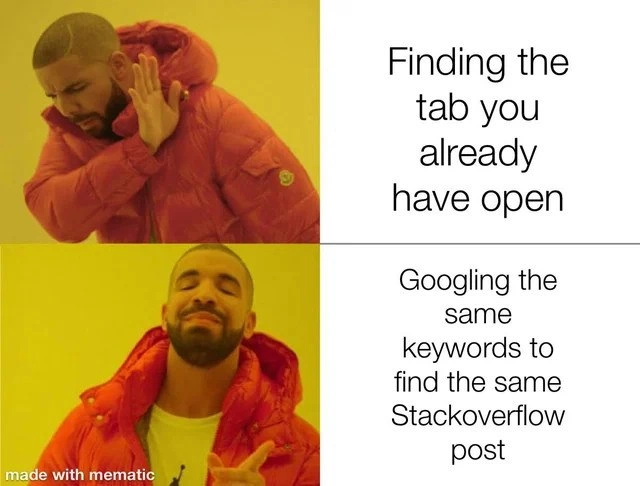
In the top panel of this meme, a developer (portrayed by the ever-memeable Drake in his orange puffer) is recoiling from the idea of finding the tab you already have open. Why such disgust? Because by the end of a long debugging session, your browser has so many tabs open it looks like a tab overload nightmare. Each tab’s title is shrunk to an icon or a few letters, and finding that one Stack Overflow page hidden among dozens feels like a needle-in-haystack search. It’s a comically common scenario in software development: you’ve collected a small army of Stack Overflow posts, documentation pages, and error logs in your browser while troubleshooting. Yet when you need that solution again, manually sifting through your cluttered tab bar is friction. It’s far easier to just open a fresh tab and Google the same keywords. The bottom panel shows Drake happily pointing to this preferred approach: Googling the same query to pull up the same Stack Overflow post. This captures a universal developer habit: instead of digging through an existing resource, we ping the internet again for the answer. It’s essentially a Google search loop that many of us fall into.
This meme hits home in developer circles because it humorously exposes a workflow inefficiency we’re all guilty of. We rely on Google and Stack Overflow as extensions of our memory. After all, why worry about remembering or bookmarking the fix for that obscure error when the StackOverflow community has answered it and Google will serve it up on demand every time? The combination of DevCommunities and powerful search engines has made this our default mode of problem-solving. It’s the ultimate lifehack turned running joke: your browser might already be sitting on the solution (literally open in a tab), but muscle memory says “just Google it.” In a senior developer’s world, this pattern is so common that it’s both funny and painfully relatable. We chuckle because we’ve been there — staring at a sea of chaos open tabs and still opting to re-query the almighty Google. It’s a tiny snapshot of the modern programmer’s mindset: DeveloperProductivity sometimes means leaning on quick search results rather than meticulously organizing information. The meme also hints at a subtle tooling frustration: browsers aren’t great at helping you find a specific tab once you have dozens open. Until recently, there was no global “search my tabs” feature, so the path of least resistance truly was searching the web anew. In essence, the developer’s brain is doing a cognitive cache miss: instead of retrieving the answer from our own working memory (or an open tab cache), we fetch it from the internet all over again. This shared experience is a relatable pain that binds the programming community — enough so that seeing it in meme form elicits knowing nods and a mix of laughter and self-reflection.
On a deeper level, this meme is poking fun at how knowledge retrieval has changed in the era of constant connectivity. We’ve externalized so much of our problem-solving to community-driven platforms like Stack Overflow that performing the same search repeatedly feels natural. There’s a wry irony here that senior devs appreciate: despite having vast information literally at our fingertips (open in Chrome or VS Code’s side panel), we treat Google like our personal function call for answers, with Stack Overflow as the returned result. Over years of debugging and coding, we develop a kind of “search reflex.” Got an error? Copy-paste it into Google. Need the syntax for some API call? Google again. Even if we just looked it up an hour ago, we’ll do it again later rather than scroll through our history or cluttered tabs. Yes, it’s hilariously inefficient from a computer science perspective (imagine a program re-computing something expensive instead of caching it!), but in human terms it often feels easier. The meme exaggerates this habit to comedic effect: Drake literally preferring to perform duplicate work (searching anew) over using what he already has (the open tab). Every seasoned programmer recognizes this mildly absurd trade-off and perhaps cringes affectionately at how accurate it is. It’s a gentle roast of our DeveloperProductivity habits — calling out that lazy-but-convenient tendency. In the end, “Why search tabs when Google will relink you to Stack Overflow again?” perfectly sums up the modern developer ethos: when in doubt, re-query the collective knowledge of the internet, even if the answer is staring at you from an existing tab. After all, what’s one more Stack Overflow tab in our lost_browser_tabs collection? 😅
Description
The image uses the well-known two-panel orange-puffer-jacket meme template. Top panel: a person in a bright orange jacket turns away in rejection; the adjacent text says, "Finding the tab you already have open." Bottom panel: the same person smiles and points approvingly; the adjacent text says, "Googling the same keywords to find the same Stackoverflow post." Faces are blurred, background is solid yellow, and the meme was generated with the "mematic" app (small watermark in the lower left). Technically, it pokes fun at developers who keep countless browser tabs open yet still rerun the same search query to reach the identical Stack Overflow solution, highlighting habitual workflow friction and knowledge-retrieval inefficiency
Comments
28Comment deleted
Chrome tabs are my immutable event log - appending a fresh Google search for the same Stack Overflow answer is way cheaper than running the ‘find existing read model’ query
The 247 tabs in my browser are a distributed cache with eventual consistency - I just prefer the lower latency of a fresh Google search over implementing proper indexing
Senior engineers know the real productivity metric isn't lines of code per day - it's the ratio of Stack Overflow tabs opened to tabs actually closed. We've all achieved that zen state where Googling the same error message feels more natural than Ctrl+F through our 47 open tabs, because let's face it: Google's search algorithm is better than our memory, and Stack Overflow's purple links are the only documentation we trust
Browser tabs are like microservices: they proliferate uncontrollably, defy orchestration, and nuke your RAM when the monolith crashes
My brain's tab index is O(n), but Ctrl+L -> retype is O(1) to the same Stack Overflow canonical, eventually consistent after every context switch
Finding the existing tab is a linear-time search across a distributed monolith called Chrome; re-Googling the same StackOverflow post is an idempotent request with better p99 latency
That's why everyone keeps 9999+ tabs opened Comment deleted
Why do I relate so much Comment deleted
XDDD Comment deleted
Modern browsers search in opened tabs too. And yes. Sometimes I find out that I already have my question opened somewhere. Comment deleted
Usually if you have all that much tabs browsers would just offload most of them or put to sleep mode, so depending on the level of snappiness of your computer it may actually be faster to open the page again than to reactivate that tab Comment deleted
I think no workflow ever makes it actually faster to keep more than 15 tabs open Comment deleted
Oh? I have an extension to destroy them completely after 10 minutes of inactivity. So I load it again every time. The speed is not a problem for me. Comment deleted
reading this and seeing the history search function in modern browsers being a default makes me sad Comment deleted
That's a feature I use quite a lot and would relly miss. I can open most sites I use regularly by typing just two letters. And that's an easy way to find back something I read a while ago, usually easier and more reliable than to try to remember specific keywords to search or the path I took to find that page Comment deleted
Of course you can disable it if you don't like that Comment deleted
I have >600 tabs. And I can't remember jtc1 sc22 wg21 p2996r13 in https://www.open-std.org/jtc1/sc22/wg21/docs/papers/2025/p2996r13.html Comment deleted
the browser indexes the page title too Comment deleted
Good. But I don't want to rely on it. I want to have it be 100% reachable. Bookmarks will do better. But I just don't have a habbit to use them. Comment deleted
In my experience firefox's history search has been very reliable, better than searching again with Google. Thanks to that I can close tabs I don't need right now and be confident I'll reopen them when needed. I don't need to ask myself whether to bookmark a page, as it's already in the history index anyway. The only case where I use bookmarks is for lists of pages I'll want to all open at the same time Comment deleted
oh yeah, I do that pretty often. I'm pretty sure that it forgets visited URLs sometimes tho, I guess it occasionally cleans old history? Comment deleted
But I've just had a bad experience with Chrome, which is more or less imposed at work. Because it deletes history older than a few months (not sure if that's by default or a company policy). Comment deleted
maybe have less tabs and instead use bookmarks? idk Comment deleted
to each their own I suppose Comment deleted
oh wait I misread, my b. I guess searching page contents in bookmarks wouldn't work. Comment deleted
You can use raindrop or some other bookmark utility. Comment deleted
oh, that sounds neat. maybe I'll take a look at raindrop, thanks for the recommendation Comment deleted
Scrape it and search with fzf? Comment deleted