Skip to content
DevMeme
439 of 7435
The Absurd Evolution of Running a Simple Script
Containerization Post #507, on Aug 2, 2019 in TG

The Absurd Evolution of Running a Simple Script

Why is this Containerization meme funny?

Level 1: When Layers Attack

Imagine you want to do something simple, like hand-deliver a note to your friend who lives down the street. At first, you just run out the door and sprint over with the note — you get there super fast! That’s the straightforward way. But then, someone suggests a different idea: “How about you ride a horse to deliver the note?” Okay, riding a horse is fun, but you have to go find a horse, climb on it, and then go to your friend’s house. It’s a bit slower to start, but you eventually get there. Now another person says, “Wait, let’s use a train instead!” So you decide to put the horse on a train and use the train to go one block down the street. Sounds ridiculous, right? You’d have to lay down tracks, start up the big steam engine, and it’s much slower and way too much effort for that short trip. In the most absurd twist, imagine trying to have the horse pull the train along the tracks to deliver that little note. By now, delivering this simple note has turned into a huge, clunky adventure.

It’s funny because nobody would actually do that in real life — you’d just walk or run over to keep it simple. The meme is joking that sometimes in technology we accidentally do the equivalent of using a horse to pull a train for a quick errand. We take something easy and make it overly complicated by adding too many vehicles (or in the case of code, too many layers of software). The result is slow and silly, and everyone watching can see it’s overkill. Just like you’d laugh seeing a horse and a steam locomotive tied together to go a few meters, developers laugh when they realize they’ve added so many extra steps for a task that could be done in one go. It’s a reminder: sometimes the simple way is the best way! So the meme makes us giggle and say, “Whoops, that’s way too complicated for such a simple job!”

Level 2: Mounting Layers, Mounting Cost

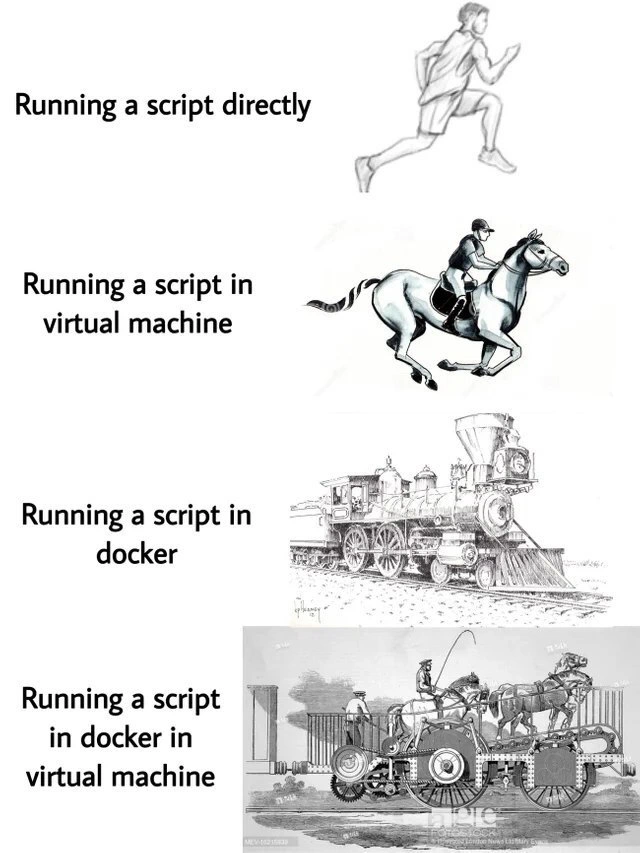
Let’s break down what’s happening in this meme step by step, and explain the terminology in plain terms. The meme uses four images – sprinter, horse, steam locomotive, and an outrageous horse-plus-locomotive machine – to represent four scenarios of running a program (like a simple script). Each scenario adds another layer of abstraction, which means another “wrapper” or environment around the code. Every added layer introduces some overhead (extra work the computer has to do). Here’s what each panel signifies:

  • Running a script directly (Sprinter): This is the simplest case. You have a script (maybe a Python script or a Bash script) on your computer, and you just run it on your normal operating system. For example, you open your terminal and type ./run_my_script.sh or python my_script.py, and it runs. The sprinter image shows speed and agility – there’s nothing holding our program back. In tech terms, this is running on the host OS (your actual machine’s OS) with no intermediate layers. It’s often called running on bare metal (even if there’s an OS, it’s direct on the hardware). The performance is optimal because the code can use the full power of your computer with only the standard OS services involved. It’s like running on an open track with no obstacles.

  • Running a script in a virtual machine (Horse and rider): A virtual machine (VM) is like a computer inside your computer. Software like VirtualBox, VMware, or Hyper-V can create a simulated computer that runs its own operating system. For instance, you might simulate a Linux machine while you’re actually on Windows or Mac. In this scenario, instead of running the script on your real OS, you first start up a VM and run the script inside that VM. The meme uses a rider on a horse to depict this: the rider (the guest OS) adds weight and an extra layer between the runner and the ground. The horse represents the actual hardware being driven indirectly. So, why use a VM? Perhaps you want to test something in an isolated environment or mimic a production server. But it comes at a cost. When you run a script in a VM, your real computer now has to do all the work of emulating or managing a full secondary OS. That means allocating memory for it, giving it CPU time, etc. It’s like if you wanted to run in a race, but first you sit on a horse; maybe eventually you go faster, but initially it’s slower to get going, and the horse could have a mind of its own. In computing, that translates to slower startup (the VM might take time to boot up) and extra resource usage (two operating systems are running – your host and the VM’s guest). The virtualization layer provides great benefits (sandboxing, consistency across environments), but it certainly can slow things down and use more RAM/CPU. The horse-and-rider image captures that idea of added heft and complexity for the same task.

  • Running a script in Docker (Steam locomotive): Docker is a popular platform for containerization. A container is a bit like a lightweight VM, but instead of emulating an entire machine with its own kernel, it uses the host’s kernel and isolates just the application processes. Think of a container as a special package that has your application plus all its libraries and dependencies bundled, running in its own sandbox on a shared OS. Docker containers are often described as “lightweight,” and compared to VMs they are – there’s less overhead because you’re not duplicating the whole OS. So why does the meme draw a big steam locomotive (an old-fashioned train engine) for Docker? Because even though containers are lighter than VMs, they still introduce some overhead and machinery. Running a script in Docker means you have to involve the Docker engine (which is like the train’s boiler – some heavy setup) and possibly a container image (the cars the locomotive pulls, carrying your app’s files). There’s an initial delay to start a container (not as long as a VM boot, but not zero either). You might have had the experience of running docker run ... and noticing it’s a bit slower than just running the command on your normal system, especially the first time when the image is not yet downloaded. Docker uses features of the OS like namespaces (to isolate the process so it thinks it has its own environment) and cgroups (to limit resources). These features are efficient, but managing them still incurs a small cost. The performance might be a tad slower than native, and you’ve added another thing to manage (the Docker daemon, images, etc.). The steam locomotive in the meme signifies that although Docker is powerful (trains were hugely powerful in their time, able to pull many cars), it’s also quite heavy. A locomotive needs time to build up steam. Similarly, a container might need to be built or fetched, and it sits on top of the OS like an additional layer. It’s a controlled environment “on rails”. For example, if your script needs to read from disk or send network data, in Docker it might go through an extra translation (like the train following tracks instead of a sprinter cutting across a field). Docker is great because it makes software run the same everywhere, but it’s one more layer between your code and the real hardware.

  • Running a script in Docker in a virtual machine (Horse pulling a locomotive): This is the grand finale that the meme finds absurd. Here we’re literally combining the previous two layers: we run a VM and inside that VM we run a Docker container which has our script. It’s a bit meta, but it happens frequently in real setups. For example, you might be on a Windows laptop, run a Linux VM, and inside that use Docker to run a Linux container. Or your company deploys code to a VM in the cloud, and within that VM, Docker is used to manage the apps. The image of a horse hitched to a steam locomotive says it all: it’s combining two different heavy approaches in a way that feels comically excessive. Technically, what’s happening here is you pay the cost of the VM (an entire OS boot and resource usage) + the cost of Docker inside it (setting up the container environment). The script is now two steps removed from the actual hardware: first by the VM’s virtualization, second by the container’s isolation. If running directly is like running on an open road, and running in a VM is like running inside a fenced track, and running in Docker is like running on a train track, then doing Docker-in-VM is like running on a train track inside a fenced track – with a fence (VM) around the train (Docker) around you. All those fences and tracks constrain the poor program. In everyday terms, it’s double packaging: imagine you want to send a gift, so you put it in a box (Docker container), and then you put that box inside a bigger box (the VM). It’ll definitely be secure and nicely wrapped, but the receiver will have to open two boxes and it takes twice the effort to get it out. The computer likewise expends extra effort to unwrap layers to execute instructions. This layers_of_abstraction approach can make a simple task much slower.

So why do developers use these layers if they add cost? Each layer has its advantages:

  • VMs guarantee a consistent whole machine environment (useful if, say, your code needs a specific OS or you want strong isolation from other apps).
  • Containers guarantee the app with all its dependencies runs uniformly across different machines (“it runs the same everywhere” mantra) and they start/stop faster than full VMs, plus use fewer resources than an entire OS.

Often, in professional environments, you end up using both. For example, cloud servers (which are VMs) host Docker containers because the cloud provider isolates customers by VMs, and the customer isolates apps by containers. It’s a performance tradeoff we accept for better development and deployment workflow. However, for a small personal script, doing all that is like using a sledgehammer to crack a nut. It’s an instance of over-engineering: more complicated setup than necessary for the task at hand. The meme exaggerates it to make the point clear.

In summary, each “layer” — direct, VM, Docker, Docker-in-VM — adds more overhead (slowness and complexity) much like each successive image adds more bulk to the runner:

  • The sprinter is nimble (script on host OS).
  • The horse and rider introduce weight and indirection (script in VM).
  • The steam locomotive adds raw power but heavy setup (script in Docker).
  • The horse pulling a locomotive is jokingly ridiculous (script in Docker in VM) to highlight the inefficiency of stacking every possible layer.

For a newcomer, this meme is saying: every extra tool or layer we use can slow things down, so we should be mindful. It’s not literally against VMs or Docker (they’re very useful!), but it laughs at putting them all together for something trivial. The key terms to know are:

  • Virtualization (creating a virtual machine with its own OS),
  • Containerization (packaging an app into a container like Docker),
  • Overhead (the extra work the computer does aside from the work of the script itself, due to these layers),
  • Overengineering (designing a system more complex than what is needed).

Now, seeing those concepts, the meme’s humor becomes clearer. It’s basically a tech inside-joke illustrated with a racing analogy: the further you go down the road of adding layers “for the sake of it,” the more you slow down your poor program. A script that could have been done in a blink now chugs along like a weighted, steam-belching, horse-dragged contraption. Engineers find this funny because we’ve all seen simple things made unnecessarily complex by too many layers of tech — and it’s both amusing and a little painful when we recognize it.

# Comparison of running a simple script in different ways:

# 1. Running directly on the host (sprinter)
./my_script.sh   # executed immediately on your machine

# 2. Running in a Virtual Machine (horse & rider)
start_virtual_machine  # Boot up a VM (e.g., via VirtualBox or cloud VM)
# ...Wait for guest OS to start...
run_in_vm "./my_script.sh"  # Now run the script inside that VM

# 3. Running in Docker (steam locomotive)
docker build -t my_script_image .   # Package script and env into a Docker image
docker run my_script_image         # Run the containerized script

# 4. Running Docker inside a VM (horse pulling locomotive)
start_virtual_machine               # First, launch the VM environment
run_in_vm "docker run my_script_image"  # Then run the Docker container inside it

(The above pseudocode shows the extra steps involved at each level. Notice how by #4, you’re doing everything in #2 and #3 together — it’s like double-wrapping the execution.)

Each added step is like an extra stagecoach stop on the route. The point is that each layer adds setup and teardown time. Direct execution (#1) is just one command. The VM approach (#2) introduced a VM startup before the actual work. The Docker approach (#3) introduced an image build/pull and container launch. The combined approach (#4) stringed both together, so you wait for a VM to boot and then a container to start. You can imagine how each layer slows the journey down. That’s exactly what the meme is humorously depicting with the progression from a speedy runner to a cumbersome steampunk machine.

Level 3: Overengineering Express

Every seasoned developer can recall a time when something that should have been blazingly fast turned sluggish due to piling on “just one more layer.” This meme nails that feeling. It starts with a lone sprinter — that’s our code running directly on the host, lean and mean. By the end, we’ve got a bizarre horse-tractor-locomotive contraption, representing a Docker container running inside a virtual machine, all to execute the same script. The joke is a sardonic nod to OverEngineering in our industry: taking a simple task and wrapping it in so much infrastructure that the original elegance is almost unrecognizable. We’ve effectively boarded the overengineering express, a one-way train to Needless Complexity Town.

Why is this funny to a senior dev? Because it’s painfully relatable. We’ve seen scenarios where a tiny Python or Bash script that could run in 0.1 seconds on a laptop is instead deployed via a full CI/CD pipeline, packaged into a Docker image, and hosted on a VM in a data center — resulting in a 5-second startup time and multiple points of failure. That lone sprinter got saddled with a horse, then upgraded to a steam engine, metaphorically speaking. Each step made sense at the time: “We need a stable environment, let’s use a VM.” “We want consistency and easy deployment, containerize it!” These are well-intentioned decisions. VMs provide isolation and repeatable infrastructure. Containers solve the “works on my machine” problem by packaging dependencies. But combine them without restraint and you’ve built an inefficient_stack. It’s like using a freight train to deliver a single letter because, hey, the letter will definitely arrive in a controlled sealed box... eventually.

The panels perfectly illustrate the performance tradeoffs involved:

  • Direct on host (sprinter) – minimal overhead, the script bolts off the starting line. This is the ideal for speed.
  • On a VM (horse and rider) – heavier and slower to start. There’s an entire guest OS (the rider) that needs to coordinate with the hardware (the horse). It’s reliable and isolated, but you’ve introduced that familiar “wait, the VM is booting up” delay.
  • In Docker (steam locomotive) – powerful and consistent, but with its own startup and runtime costs. You need to fire up the Docker engine (build the steam pressure) before it can move. A container usually runs on an existing OS, which is efficient, but the image layers and container runtime add bulk. It’s a controlled environment on rails, trading a bit of raw speed for predictability.
  • Docker in a VM (horse pulling a locomotive) – the punchline combo. You’ve got the overhead of the VM and the container. It’s the “worst of both worlds” performance-wise: two layers of isolation, two sets of management daemons, double the complexity. Sure, it’s also the best of both worlds in flexibility (portable container, strong isolation), but for a simple script it’s complete overkill. The poor horse is straining to drag the locomotive – our metaphor for how the VM’s resources now must power both the guest OS and the container engine. The image screams inefficiency and absurdity, just as any senior dev would scream internally seeing a hello-world script deployed with such excess.

In real life, running Docker inside a VM is actually very common (cloud providers do this all the time – your Dockerized app likely runs on a VM in the cloud). We accept the overhead in exchange for security and multi-tenant isolation. But the meme exaggerates this idea to spotlight a truth: layering tech unnecessarily can be comical. It’s poking fun at our tendency to add “just one more thing” to be safe or modern, even when it’s not strictly necessary. The result is a contraption of a tech stack that is as fragile and slow as that horse_drawn_train_meme looks. Seasoned engineers have been in meetings where someone suggests, “Let’s containerize the VM or virtualize the container,” and you half-expect the next proposal will be to put that VM inside yet another container — Docker-in-VM-in-Docker, ad infinitum. It’s a fractal of over-engineering.

The relatable developer experience here is also about the time warp that happens with each added layer. A senior knows that feel: you start a simple deployment, but now you’re waiting for a VM to boot (maybe it’s pulling a 2 GB image for the guest OS), then waiting for Docker to download an image (another few hundred MBs), and you reminisce how you used to just run the darn script directly in half a second. It’s the absurdity of modern development workflows: convenience and consistency have a price, and that price is often measured in CPU cycles, memory usage, and wall-clock time. The meme’s Victorian steampunk train contraption captures that absurdity visually. We laugh, perhaps a bit ruefully, because we’ve all ridden that over-engineered train before, watching a simple job get delayed by a parade of setup steps and waiting for layers to initialize.

There’s also a cultural joke here: developers love new tools and abstractions. Containers, VMs, orchestration – each promised to simplify our lives. And they do, in specific ways. But stack them all together without discretion and you get a tech humor cocktail of irony. It’s like installing every single browser plugin to open one web page – sooner or later the whole system grinds under the weight. This meme exaggerates to make the point: just because you can stack technologies, doesn’t mean you should. A senior dev chuckles because they’ve witnessed teams proudly adopt the “latest and greatest”— Docker, Kubernetes, service meshes — for a project that might have been a 50-line script. The end result is often an overengineered system that requires more maintenance and has more failure modes, all while doing the original task more slowly.

In summary, the humor lands so well with experienced folks because it’s truth wrapped in exaggeration. The layers of abstraction meant to improve development (like virtualization for isolation, containerization for portability) can ironically become the very source of inefficiency when combined to excess. It’s an inside joke among developers: We made it incredibly complex, but hey, at least it’s containerized! The meme is basically the “overengineering express” in visual form — a reminder that sometimes the straight path (a sprint) beats all the fancy vehicles we cobble together.

Level 4: Indirection Indigestion

At the lowest levels of computing, every extra abstraction layer has a tangible cost. Running a script bare-metal (directly on the host OS) means the code executes with minimal overhead — just system calls interfacing with the kernel and hardware. Introduce a virtual machine layer, and now you have a hypervisor mediating access between a guest OS and the real hardware. This indirection isn’t free: every time the guest OS wants to do something privileged (like allocate memory or perform I/O), the hypervisor must step in (via traps or VT-x assisted virtualization). That context-switch act – from guest to hypervisor to host and back – is like our sprinter suddenly having to ask permission to take each stride. It adds latency. The CPU’s pipeline might stall waiting for these transitions, caches may need to flush on VM exits, and instructions might need to be emulated if the hardware can’t directly virtualize them. The result? CPU and memory overhead that slows down execution, much as a rider adds weight and complexity to a running horse.

Now consider a Docker container. Containers are a form of operating-system-level virtualization: instead of simulating an entire hardware stack, Docker isolates processes using kernel features like cgroups and namespaces. In theory, this is much lighter – there’s no redundant guest OS for each container. However, containers introduce their own flavor of overhead. File access might go through a layered filesystem (e.g. UnionFS or OverlayFS), meaning more lookups and copy-on-write costs compared to a direct disk read. Network calls from inside a container pass through virtual network bridges and NAT, adding extra hops (similar to a train having to go through switches and stations). These are small costs individually, but they accumulate. The steam locomotive in the third panel is powerful, yet heavy; likewise Docker’s packaging is convenient, yet it adds an underlying weight in the form of container runtime management and I/O indirection.

Finally, stack a Docker container inside a VM, and you start combining overheads like a bad recursion. The container’s syscalls must traverse the container’s isolation boundaries, then the guest OS in the VM, then the hypervisor, and finally hit the real hardware. It’s a triply roundabout path for each operation. If the container opens a file, it goes through Docker’s filesystem driver, then the guest OS’s virtual disk driver, then the hypervisor’s emulated storage, then the host disk. If it makes a network request, you might see double NAT: container to VM’s virtual NIC, then VM to host’s physical NIC. Each translation and context switch is like another car coupling on a train, slowing the acceleration. In computer architecture terms, we’ve added more layers of scheduling (the host scheduler dealing with a VM that itself runs a scheduler for processes inside it, one of which is our script). More schedulers, more queuing delays. Memory gets overcommitted: the VM might be reserving gigabytes for an OS that mostly sits idle, while the container demands its own slice inside that allocation. We’ve created a matryoshka doll of compute environments – a virtualized world within a virtualized world – and each shell takes its performance toll.

Why would anyone accept this indirection overhead? Often it’s about isolation, reproducibility, or simply inertia of infrastructure. A cloud platform might only give you VMs, so you deploy your Dockerized app inside those VMs. Security policies might mandate a VM sandbox, container or not. Each layer serves a purpose (isolate the hardware with VMs, isolate the app with containers), but combined, they illustrate the abstraction penalty: the convenience of modular layers at the price of raw speed. It’s a classic case of the trade-off between performance and portability. In fact, there’s an old computer science adage that captures this perfectly:

“All problems in computer science can be solved by another level of indirection, except for the problem of too many layers of indirection.” – (attributed to David Wheeler)

In our case, the problem of too many layers is exactly what the meme lampoons. The simple script’s execution path has become an overly elaborate journey through multiple encapsulations. The humor has a kernel of truth: if you pile on enough virtualization and emulation layers, eventually the script_execution_overhead becomes absurdly, palpably high. The system is essentially groaning under the weight of its own abstraction – the digital equivalent of digestive overload, or as we’ve titled it, indirection indigestion. It’s a reminder that beyond a certain point, additional layers stop solving problems and start creating new ones (like slowing a sprint to a crawl). The bottom line for senior engineers: those extra layers may be elegant on paper, but the physics of the underlying machine always gets the last laugh.

Description

A four-panel meme illustrating escalating levels of complexity for running a script, using historical modes of transportation as analogies. The first panel, labeled "Running a script directly", shows a simple sketch of a person running. The second, "Running a script in virtual machine", depicts a person riding a horse. The third, "Running a script in docker", shows a powerful 19th-century steam locomotive. The final panel, "Running a script in docker in virtual machine", displays a comically absurd and over-engineered contraption: a horse-drawn carriage on a wheeled platform, seemingly designed to power itself in a convoluted way. The meme satirizes the trend of adding potentially unnecessary layers of abstraction in software deployment. While running Docker inside a VM is a valid and sometimes necessary pattern (especially in cloud environments or for local development on certain OSes), the meme humorously portrays it as a ridiculously complex solution, mocking the tendency towards over-engineering in the DevOps space

Comments

7
Anonymous ★ Top Pick Some developers run Docker in a VM and call it 'best practice.' I'm waiting for the next logical step: running it in a WebAssembly runtime, inside a Docker container, in a VM, on a bare-metal server that I provisioned myself from spare parts. Only then can I be sure my 'Hello World' script is truly isolated
  1. Anonymous ★ Top Pick

    Some developers run Docker in a VM and call it 'best practice.' I'm waiting for the next logical step: running it in a WebAssembly runtime, inside a Docker container, in a VM, on a bare-metal server that I provisioned myself from spare parts. Only then can I be sure my 'Hello World' script is truly isolated

  2. Anonymous

    My 5-line Bash script finishes in 4 ms - right after the VM boots, Docker pulls, sidecar proxies handshake, and $400 of AWS credits evaporate

  3. Anonymous

    We've successfully abstracted away the hardware so many times that now we need a dedicated SRE just to explain why a hello world script takes 4GB of RAM and still somehow has networking issues

  4. Anonymous

    Ah yes, the classic 'Docker-in-VM' stack - because why settle for one layer of abstraction when you can have your containers running in a hypervisor, burning CPU cycles like a Victorian steam engine pulling a horse-drawn carriage. It's the infrastructure equivalent of putting a turbocharger on a bicycle: technically impressive, practically questionable, and guaranteed to make your ops team question every architectural decision that led to this moment. At least when the inevitable performance issues arise, you'll have plenty of layers to blame

  5. Anonymous

    Bare metal to Docker-in-VM: boosting velocity one ironic layer of abstraction at a time

  6. Anonymous

    Nothing says platform engineering like paying hypervisor tax, overlayfs tax, and double NAT so a 12‑line Bash script can echo “done” with enterprise‑grade portability

  7. Anonymous

    Docker inside a VM: Matryoshka isolation - cgroups on cgroups, overlayfs on a virtual disk; now the only thing truly portable is the latency

Use J and K for navigation