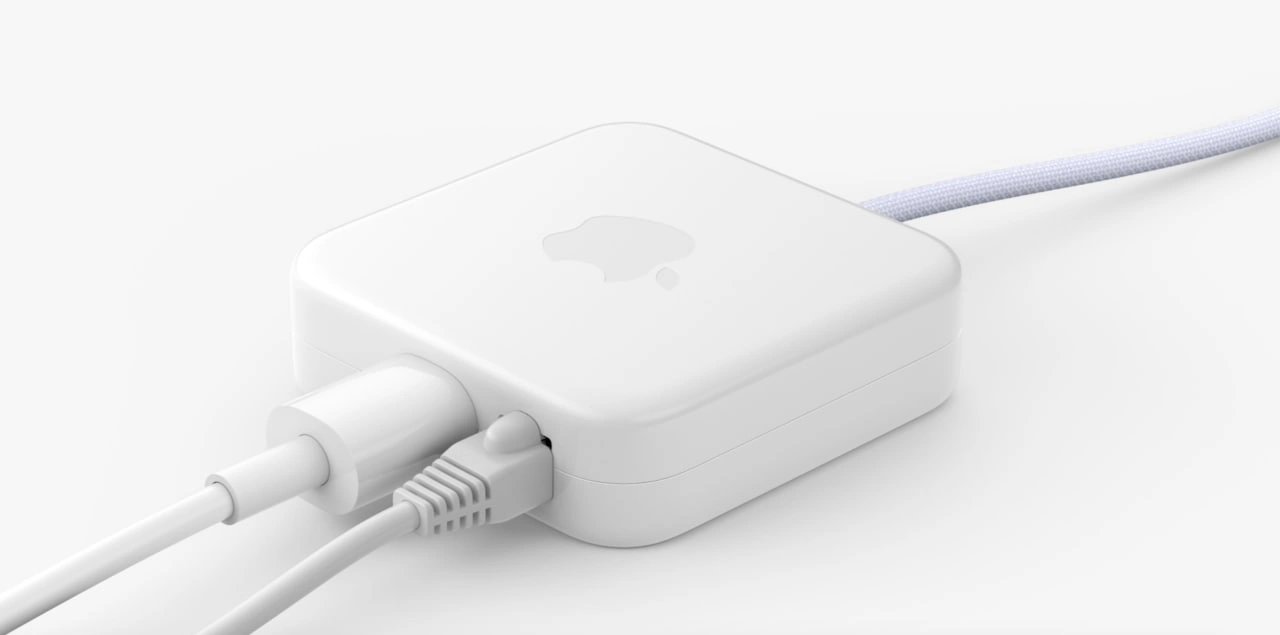
Apple's Innovative Ethernet Port Location: The Power Brick
Why is this Apple meme funny?
Level 1: One Outlet, Many Cords
Imagine you have a new fancy tablet that only has one single socket to plug things in. But you want to do a bunch of things at once: charge it, connect it to a big TV to watch cartoons, and use your friend’s game controller. How can you possibly connect all those things to that one little hole? You’d use a special splitter box that turns one plug into many. Now picture your tablet on a table with that box attached – the box has a cable to the tablet, and from the box you have a bunch of different cords: one to the electric outlet for power, one to the TV, one to the game controller. It starts to look like a snarl of wires around your tablet, doesn’t it? It works, but it’s kind of funny because your super-sleek, cool gadget is now surrounded by a bunch of clunky cords and adapters. This is the same thing the meme is showing with the Apple laptop: the computer itself is super slim and simple (just one kind of plug on it), but to use all the regular stuff (internet cable, monitors, USB drives), you have to attach a hub – a little box – with lots of cords. It’s like having a power strip when your room has only one wall outlet: you plug the strip in to get more outlets, and suddenly there are wires everywhere. The picture is amusing because the shiny white Apple box was supposed to keep things neat and modern, but with all the plugs crammed in, it ends up looking a bit messy and silly – just like using an extension cord to plug in all your toys at once. The joke is basically: “So much for keeping it simple!” – we tried to have one nice connector for everything, and we ended up with even more things plugged in.
Level 2: Dongle Life 101
Let’s break down what’s going on for those newer to Apple’s world or early in their dev career. Modern MacBook laptops often come with very few types of ports built-in. For example, many recent MacBooks have only USB-C ports – those small oval-shaped plugs. USB-C is versatile: the same port can charge your laptop, transfer data, connect to monitors, pretty much everything. Sounds great, right? In theory, yes – one kind of port to connect all devices is simple and futuristic. But here’s the catch: most of the gear developers use (monitors, projectors, USB drives, network cables, etc.) aren’t USB-C. They use other connectors like HDMI (for displays), old-school rectangular USB-A (for mice, keyboards, drives), or RJ-45 Ethernet (the chunky plug for wired internet). You can’t stick an Ethernet cable or an HDMI cable directly into a tiny USB-C hole. So how do you connect them? Adapters. Lots and lots of adapters. This situation is jokingly called living the dongle_life – where a “dongle” is a small adapter or hub that you attach to your laptop to get a port you need.
In the image described, that glossy white box with an Apple logo is a hub (or multi-port adapter). It plugs into one USB-C port on the MacBook (notice the braided cable coming out of it that would go to the laptop). In return, it provides several different ports on its sides. Here, we see two of those ports in use: one has an RJ-45 Ethernet cable for internet, and another has a cylindrical plug that looks like either a power supply connector or perhaps an audio/visual cable. Essentially, this hub is acting as a bridge between the laptop’s single type of port and all the “old” connectors. This is what we call an adapter_chain or hub setup: one connection to the laptop fans out into multiple connections for other devices.
Why do developers need these? Imagine you’re a developer who wants reliable internet during coding or deploying – Wi-Fi can be unstable or slower in some offices, so you prefer wired Ethernet. Since the MacBook has no Ethernet jack (that port is physically large and Apple made the laptop super slim), you use a USB-C to Ethernet adapter. Now say you also want to plug in an external monitor to get more screen space – the MacBook has no built-in HDMI port (used by most monitors and projectors), so you have another adapter for USB-C to HDMI. If you also need to plug in a standard USB flash drive or a hardware dongle (like a license key or an Arduino), you’ll need a USB-C to USB-A adapter or a hub with USB-A ports. It quickly becomes a lot of little adapters dangling off your machine. Port_scarcity is the term we use to describe having too few ports of the types you need. Apple’s design gives you, say, two USB-C holes total – and one might be occupied by your power cable if you’re charging the MacBook. That leaves maybe just one free port, so you end up daisy-chaining a hub to get back the functionality of all the ports that were removed.
This is a trade-off Apple intentionally made. They prioritize a slim, clean laptop design and encourage using the newest tech (USB-C for everything, wireless peripherals, cloud storage instead of USB sticks, Wi-Fi instead of Ethernet). That’s the apple_design_tradeoff mentioned: by removing bulky old ports, they achieve a sleeker device and push industry trends forward. However, in practice many developers still rely on “legacy” connections – thus the DeveloperExperience_DX can suffer because you have to carry expensive_accessories just to do normal tasks. Each of those adapters (especially if you buy Apple’s official ones or high-quality hubs) can cost quite a bit. It’s often jokingly called the Apple tax or adapter tax – you pay extra for dongles to use devices you already own. And there’s also a bit of VendorLockIn here: Apple knows if they create a special need (like removing a standard port), many customers will buy Apple-branded accessories to fill the gap, keeping you in the Apple ecosystem for peripherals too.
From a junior dev perspective, the meme is pointing out a daily annoyance. The cable_management becomes tricky – instead of a neat single plug, you might have an octopus of cables sprouting from a hub. You plug in your power, network cable, external monitor, maybe an external keyboard or phone – suddenly the side of your elegant MacBook is crowded with a clunky plastic hub and cords going every which way. The phrase “Living the dongle life” encapsulates that resigned humor: as a Mac-using dev, you accept you’ll always have a handful of adapters in your bag or on your desk. It’s practically a running joke in offices: “Don’t forget your dongle!” or “Anyone have an extra adapter?” before a meeting. Apple’s Hardware choices simplified the laptop itself but offloaded complexity onto us as users. It’s a bit of a hassle, yes, but we make it work – and we even laugh about how something as high-tech as programming on a cutting-edge laptop can be interrupted by something as low-tech as trying to find the right cable. This meme gets a chuckle from developers who have all faced that moment of juggling connectors, feeling both amused and annoyed that their $2000 computer currently resembles a makeshift wired network hub.
Level 3: One Port to Rule Them All
Apple’s relentless pursuit of minimalist design often means sacrificing trusty old ports in favor of a single versatile connector. The result? Developers end up living the “dongle life”. This meme highlights the ironic reality that after paying a premium for a sleek MacBook, you’re greeted with a mess of adapters just to reconnect the essentials. In the image, a glossy-white Apple adapter (bearing the iconic logo like a badge of honor) has multiple cables jutting out – an RJ-45 Ethernet plug and a cylindrical power/AV connector – crammed side by side. It’s a snapshot of modern Apple developer_workstation_setup: a supposedly elegant laptop entangled in ungainly cables. The humor hits home for senior engineers because we’ve seen this pattern repeat with each MacBook iteration: Apple removes something (HDMI port, SD card slot, headphone jack, MagSafe charger) in the name of “courage” and thinness, and developers scramble to purchase the expensive_accessories needed to get those functions back.
From a seasoned developer’s perspective, the scenario is simultaneously frustrating and darkly comedic. We remember older MacBook Pros that came standard with a buffet of ports – no extras required. Now, due to port_scarcity, the modern MacBook Pro might have only two or four identical USB-C/Thunderbolt ports. Need to plug in wired network for faster deployment or low-latency debugging? Whoops, no Ethernet jack – grab that ethernet_over_usb_c dongle. Want to present slides on a projector or connect to an extra monitor? Better have the USB-C to HDMI or VGA adapter handy. Even something as simple as a USB flash drive or your favorite wired keyboard requires a USB-C adapter_chain (often a hub with multiple old-fashioned USB-A sockets). In essence, Apple’s “one port to rule them all” philosophy (i.e. using USB-C for everything: power, data, video, networking) ends up spawning a hydra of dongles for anyone who lives outside the perfectly wireless AppleEcosystem.
DeveloperErgonomics and productivity suffer in subtle ways here. Attaching and detaching a nest of dongles each time you move your laptop can feel like performing a quirky ritual. There’s the constant worry of cable_management – one tug and the whole contraption might disconnect. The image even shows the physical pain point: the two cables plugged into that petite Apple hub are so close together there’s barely any clearance. Many of us have struggled with such hardware hubs where ports are tightly packed, resulting in fat cables blocking adjacent slots. It’s a comedic hardware usability fail: the very adapter meant to solve your port problem introduces its own design trade-off (sound familiar, Apple?). We chuckle because we’ve been there – jiggling cables, trying to get that last plug to fit, or deciding which device to unplug when space (or ports) runs out.
The deeper joke is on Apple’s design_tradeoff philosophy. By ruthlessly eliminating built-in ports, Apple pushes the complexity onto the user externally. It’s a classic case of shifting burden: the device looks clean, but your desk ends up looking like a retro hacker den with all the attached peripherals. Seasoned devs might recall that Apple has done this for decades. The original iMac dropped legacy ports (ADB, SCSI) in favor of USB, provoking an earlier generation of adapter woes. New MacBooks ditched the DVD drive and Ethernet early, spawning a cottage industry of external SuperDrives and USB network adapters. Each time, Apple claims innovation and courage, while users experience a transitional period of dongles and docks until the rest of the world catches up (or Apple backpedals in a future model). In 2016, dropping everything for USB-C felt like déjà vu – only this time the VendorLockIn sting was sharper, because buying first-party Apple adapters (often pricey but “guaranteed” to work) felt like paying an adapter tax on top of your laptop’s cost.
Dev A: “Do you have an HDMI dongle on you?”
Dev B: “I’ve got a USB-C hub with HDMI, Ethernet, two USB ports… basically a desktop’s worth of I/O in my bag.”
Dev A: “Great, the meeting starts in 2 minutes. Dongle to the rescue!”
This tongue-in-cheek exchange could be any pair of engineers before a big presentation. It’s funny because it’s true – our sleek computers are useless in many real-world scenarios without a handful of adapters. The meme’s image – a cute Apple hub overloaded with cables – perfectly captures this accessory_overload. It resonates with senior developers who have felt the slight embarrassment (and irritation) of rummaging through a bag for the right adapter while colleagues with other laptops just plug in directly. We laugh, perhaps a bit bitterly, at how a cutting-edge machine can be hamstrung by something as mundane as a missing port. In the end, the “dongle life” is a shared joke and a shared pain: it’s the modern tax we pay to ride the cutting edge of Apple’s design evolution, where simplicity on the surface often hides complexity (and a tangle of cords) underneath.
Description
A high-quality product photograph displaying a white, square Apple power adapter against a clean white background. The iconic Apple logo is subtly visible on the top surface. The adapter has a braided power cable extending from one side. On another side, a power cable and a standard RJ45 Ethernet network cable are plugged in, side-by-side. This image showcases the power brick for the 2021 Apple iMac, which integrates the Ethernet port directly into the adapter. This design decision, made to keep the iMac computer itself as thin as possible, is a source of humor and debate among tech professionals. For experienced engineers, it represents a peak example of Apple's 'form over function' design philosophy, where aesthetic minimalism leads to unconventional and potentially inconvenient hardware configurations. It's a physical manifestation of the 'dongle life' culture, where essential ports are moved off the main device, a move often seen as prioritizing looks over practicality

Comments
20Comment deleted
Apple's new power brick is the ultimate full-stack solution: it handles Layer 1 (Physical), Layer 2 (Data Link), and Layer 0 (the power outlet)
Apple’s “one-Port-to-rule-them-all” design is basically microservices for hardware - every missing interface spawns a $29 sidecar, and my desk now scales more dongles than our K8s cluster does pods
Remember when 'adapter pattern' was just a software design concept? Now it's a $79 hardware requirement for connecting your $3000 laptop to literally anything that existed before 2016
This MagSafe adapter represents Apple's brilliant strategy: create such elegant hardware that developers willingly maintain a museum-quality collection of incompatible chargers spanning three architectural generations, each deprecated precisely when you've finally memorized which MacBook it belongs to. It's the physical manifestation of technical debt - except instead of refactoring legacy code, you're untangling cables in airport lounges while your battery hits 2% during a production incident
Apple charger: Gets hotter than a prod outage during git rebase, but never pages you at 3AM
Apple dongles: nothing says modern architecture like replacing RJ45 and 3.5mm with an API gateway - and a shiny new single point of failure
Wi‑Fi prefers partition tolerance; incident bridges demand consistency - so we buy it back with a glossy RJ45 ‘SLO compliance kit.’
What the point. There was a discussion, they removed it. Comment deleted
What? Where? Comment deleted
confusion 100 Comment deleted
In this thread Comment deleted
I haven't deleted any discussion. I doubt that admin did that. Comment deleted
I've asked why there is so much hype about those shitty laptops, and now this message is gone Comment deleted
under this post? Comment deleted
Yep. Maybe there was another post, I don't remember. Either way message is gone. Weird Comment deleted
Sorry. Comment deleted
np man Comment deleted
you dont need any ports, just suck capitalizm dick Comment deleted
who needs ports if you can have bluetooth. Comment deleted
I fuck with the power adapter with ethernet port. All USB-C is kinda annoying though for sure. Least there's a headphone jack 😁 Comment deleted