Skip to content
DevMeme
541 of 7435
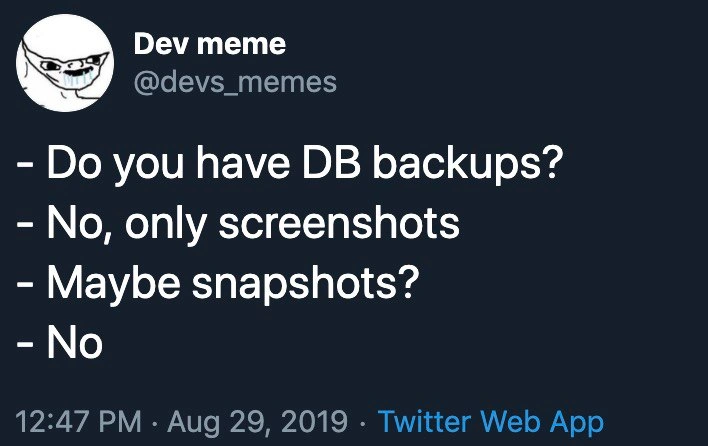
The Screenshot-Based Backup Strategy
Databases Post #621, on Aug 29, 2019 in TG

The Screenshot-Based Backup Strategy

Why is this Databases meme funny?

Level 1: A Photo Isn’t a Backup

Imagine you spent all day writing an important story for school on your computer. Instead of pressing “Save” or keeping a copy of the file, you just take a picture of your computer screen showing the story. Later, your computer crashes and the file is gone. All you have left is that photo of the screen. Can you get your story back from the photo? Not really — you’d have to retype it word for word while looking at the picture, which would take a long time and you might make mistakes or miss parts. You’d probably be really upset and in big trouble because effectively, your work is lost.

This meme is funny because it’s showing a situation just like that, but for a company’s important data. Someone asked, “Do we have a backup of our database?” (think of this like asking, “Did you save your work somewhere safe?”). And the answer that came back was, “No, we only have screenshots.” That’s like saying, “No, I only have a photo of it.” It’s an obviously silly and hopeless answer. Relying on a picture when you need the real thing is such a big mistake that it makes people laugh in disbelief. It’s the kind of joke where you laugh a little, but you’re also a bit scared for them because it’s a serious problem. Essentially, the meme is pointing out in a simple way: just having a picture of something is not a real backup. You can’t fix or restore the actual thing (in this case, the database) with just a picture. And that’s why it’s funny — it’s highlighting a ridiculous error that everyone knows should be avoided. It’s like if someone lost their house key but said “Don’t worry, I have a photo of the key!” You’d probably laugh because a photo won’t unlock anything. In the same way, the folks in the meme thinking screenshots would save them is a comical and relatable tech blunder.

Level 2: Backup Basics Gone Wrong

Let’s break this down in simpler terms. The meme shows a short dialogue about database backups. The question, “Do you have DB backups?”, is asking if the team made safe copies of their database data. A database backup is essentially a saved copy of all your important information from the database, usually stored in a file or another safe place. For example, if you have a MySQL database, you might use a tool like mysqldump to export all the tables and data into a file (often a .sql script or a .dump file). That file can later be used to restore the database if something goes wrong. Backups are a core part of any BackupAndRecovery plan – they ensure that even if your system crashes or data gets deleted, you have something to fall back on. Companies often schedule these backups to run regularly (nightly, hourly, etc.) and store them securely (on another server or in cloud storage).

Now in the meme, when asked about these backups, the team’s answer is, “No, only screenshots.” A screenshot is literally a picture of whatever is on your screen. It’s an image file (like a PNG) that shows, for example, the database interface or a list of data at a moment in time. But crucially, a screenshot is not a usable backup of the data – it’s just a snapshot image of the screen (not to be confused with the technical meaning of “snapshot” which we’ll get to in a second). You can’t take a screenshot image and directly restore a database from it. It’s like having a photograph of a book versus the actual text; you can look at the photo, but you can’t search it or load it into a system easily. If you wanted to recover data from a screenshot, you’d have to manually re-type everything you see in the picture. That’s obviously not a practical or reliable way to recover a whole database. So saying “we only have screenshots” is basically admitting, “we don’t have real backups at all.” It’s an alarming answer – hence the humor with an undertone of panic.

The next line asks, “Maybe snapshots?” Here, the person troubleshooting is hoping that the team at least took snapshots of the system. In IT, a snapshot usually means a point-in-time copy of data, often made automatically by the storage system or database. For example, cloud services (like AWS, Azure, etc.) let you take storage snapshots of a database or a disk volume. These snapshots capture the entire state of the data at a certain moment. Unlike a screenshot, a storage snapshot is actually usable for recovery: you can roll back or restore from it because it contains the actual data bits, not just a picture. Some databases also have their own snapshot or backup features (for instance, Microsoft SQL Server has backup files, and some databases support the idea of snapshotting data at a transaction boundary). The words sound similar – screenshot vs snapshot – but in a technical context they are completely different. A screenshot is just an image (for humans to look at), while a snapshot is a data backup mechanism (for computers to restore from).

So, when the person asks “Maybe snapshots?”, they’re essentially saying, “Okay, if you didn’t do proper backups, did you perhaps use an alternative like taking a snapshot of the server or database?” And the answer was “No.” That confirms that this team has no backups whatsoever that can be restored. No SQL dump, no backup files, no storage snapshots – nothing. The only record of their data exists in those screenshots (images). This is why the situation is so dire (and darkly comic): it’s a total failure of backup planning.

We should explain two important terms that were hinted at: RPO and RTO, which stand for Recovery Point Objective and Recovery Time Objective. These are metrics companies use in disaster recovery planning:

  • RPO (Recovery Point Objective) is about data loss. It’s the maximum age of files or data that your organization considers acceptable to lose in case of a failure. For example, if you have an RPO of 1 hour, you should be backing up at least every hour, so that if a crash happens, you’d lose at most 1 hour of work. In other words, RPO answers “up to how much data (time-wise) could we lose and still be okay?”
  • RTO (Recovery Time Objective) is about downtime. It’s the target time for how quickly you need to restore everything after a failure. For example, an RTO of 2 hours means your goal is to have the system back up and running within 2 hours of an outage.

In a healthy system, a team might say, “Our RPO is 24 hours and RTO is 4 hours,” meaning they do daily backups and expect that if things go wrong, they can get everything back with at most one day of data lost and within four hours of time. In the meme’s scenario, since they only have screenshots, the real RPO is effectively terrible (maybe infinite or undefined) because those screenshots might be days or weeks old and aren’t complete backups of the actual data. And RTO could be essentially never — because how do you restore a database from images? It could take days or weeks of manual effort to type things back in (and that’s if those screenshots cover all the needed data, which is unlikely). So this team basically has no meaningful RPO/RTO plan at all. That’s why the meme caption jokes that their policy is measured in PPI (a term from images) instead of RPO (a term from data recovery). PPI stands for Pixels Per Inch, a measure of image resolution (how detailed an image is). It has nothing to do with data recovery; it’s what you’d use to talk about screen or print clarity. By saying their backup policy is measured in PPI, the meme emphasizes that they only cared about the screenshots (images), not real backup metrics. It’s a clever way to highlight the mix-up.

Now consider the human side: this conversation likely takes place during an urgent ProductionIncident. Something has gone very wrong — maybe the database server crashed, data got corrupted, or someone accidentally deleted a bunch of data. When such incidents happen, the first question often is, “Don’t worry, we have backups, right?” That’s why the on-call person immediately asks about DB backups. OnCallDuty means a person (oftentimes an SRE, which stands for Site Reliability Engineer, or another engineer on rotation) is responsible for handling emergencies. They are the ones asking these questions in panic mode. Finding out that there are no backups is the worst-case scenario for them. It means there’s no quick way to fix the problem. An SRE or DBA in this situation would probably put their hand over their face in frustration – a classic facepalm. This meme is tagged with sre_facepalm because any SRE reading it knows how bad this is.

Let’s clarify why not having backups is so catastrophic. Without a real backup or snapshot, any data that was in the database and is now lost or inaccessible is simply gone. DataLoss here could be total. The only pieces of the data left are in those screenshots, which is a very incomplete and impractical form. DataRecovery typically means loading a backup file into a new database or switching over to a replica server. But in this case, data recovery would mean manually looking at each screenshot and trying to re-enter the data piece by piece into a new database. That’s not only extremely slow, it’s also prone to errors (and you might not have screenshots of everything, only bits and pieces). Imagine having thousands of customer records, and your “backup” is a handful of images of a few screens of data. There’s no way to recover all that properly. The business might lose a ton of information permanently. In planning terms, this is indeed a rpo_rto_failure – the plan to handle failure just didn’t exist.

To put it simply, the team in the meme skipped the Backup Basics. Best practices would have been to:

  • Regularly back up the database (e.g., dump all data to a secure file every day or use an automated backup service).
  • Possibly maintain snapshots or replicate the data to a secondary system for high availability.
  • Monitor those backups and occasionally test restoring them (to make sure they actually work).
  • Define RPO/RTO so everyone knows the targets (like “we can’t lose more than 4 hours of data, and we must be back up within 2 hours of an outage”).
  • Have a disaster recovery plan, which might include things like off-site backups or cloud backups, and drill it (practice it) so that the team is prepared.

None of that seems to have been done here. It’s a bit like discovering there’s no spare tire in the car after you’ve already got a flat. The meme’s humor is that the situation is portrayed so bluntly: “No, only screenshots.” It’s such an absurdly inadequate answer that you can’t help but laugh, even though in real life this would be a panic moment.

This falls squarely in the realm of Databases, OnCall_ProductionIssues, and Storage failures. The database is where the data lived, the on-call incident is when they found out the truth, and storage/backup is the underlying technology that was mishandled. A junior developer or someone new to IT can learn an important lesson here: screenshots are not backups. If you have important data, you need to ensure it’s backed up in a form that can be restored. That means actual data files or dumps, not pictures. It also helps to understand terms like snapshot vs screenshot, and why metrics like RPO/RTO are discussed – they exist to make sure everyone understands the backup and recovery expectations. In this meme, those expectations were clearly not met. The result is a kind of serious joke – the kind that makes experienced folks chuckle and wince at the same time.

So, in summary: the meme highlights a scenario where a team has completely failed at protecting their database data. It uses the punchline of “only screenshots” to emphasize just how badly they missed the mark. It’s funny to developers because it’s a hyperbole of incompetence (we hope no one is actually that reckless… though somewhere, someone probably was). For someone just learning about this stuff, the takeaway is: always do proper backups for your databases and systems. And remember that a pretty picture of your data is no substitute for the real thing when disaster strikes.

Level 3: Snapshots vs Screenshots

This meme reads like a disaster recovery nightmare transcript that any battle-worn SRE can immediately recognize. The scene: production database just went down in flames, and an on-call engineer in a late-night war room asks the dreaded question, "Do you have DB backups?" The reply comes back, "No, only screenshots." (Cue the collective groan and internal screaming). You can practically hear the facepalms. Even the tweet is shown in Twitter dark mode, fitting the midnight crisis vibe. It’s a classic SRE horror story: discovering the backup policy is basically a folder of PNG images. Measuring a backup plan in PPI (Pixels Per Inch) instead of RPO (Recovery Point Objective) is tongue-in-cheek humor that lands because it's so absurd. PPI is how sharp an image is; RPO is how much data you can afford to lose in an outage. Confusing the two means someone prioritized screenshot resolution over actual data preservation.

Let’s unpack why this is both funny and horrifying. The conversation implies that when asked about real database backups (the kind that let you restore data), the team responded that they only have screenshots. In other words, their “backup strategy” is taking screen captures of the DB admin interface or query results. That’s beyond misguided — it’s like thinking a photo of your bank statement is the same as money in the bank. The person troubleshooting then asks, "Maybe snapshots?" hoping that perhaps they at least took storage-level snapshots or VM snapshots of the database. A snapshot in IT usually means a consistent point-in-time copy of data (for example, a snapshot of a database’s disk volume or a cloud DB snapshot). Snapshots can be used for recovery; screenshots cannot. But the answer was still “No.” They didn't even have those. So there were zero backups, no snapshots, nothing — just some .PNG files. This is the moment every seasoned engineer dreads: realizing nothing was actually saving the data. The meme’s humor comes from the sheer absurdity of a screenshot_backup_strategy. It’s a facepalm moment and the tweet even tags it: #sre_facepalm.

Why do experienced devs find this painfully funny? Because many have seen a ProductionIncident or OnCallDuty scenario where backup and recovery plans were... optimistic at best. The joke hits on the gap between what management thinks is happening and reality. Perhaps someone in that team misunderstood what “snapshot” means, or they assumed taking visual evidence of data was enough. (Maybe they literally confused the terms snapshot and screenshot — one is a real backup method, the other is just pixels). It satirizes a serious DevOps anti-pattern: neglecting BackupAndRecovery until it’s too late. Everyone knows you should have reliable, tested backups with a clear RPO/RTO, but in the real world of tight deadlines and sloppy practices, basics get skipped. The result is an rpo_rto_failure of epic proportions. RPO (Recovery Point Objective) defines how fresh your last good backup is supposed to be. Here the RPO might as well be “whenever the last screenshot was taken (if ever),” which is essentially infinite data loss. RTO (Recovery Time Objective) is how quickly you can bounce back. With only images, the RTO becomes “maybe never” (unless you plan to manually re-enter data from those screenshots, which could take ages, if it’s even possible). In short, all the serious DisasterRecovery metrics are thrown out the window. This scenario lampoons the failure to plan for DataRecovery: no real backups means potentially permanent DataLoss. Seasoned DBAs and SREs have nightmares about this exact situation — it’s the kind of thing that keeps you up at 3 AM in a cold sweat.

The humor is also in the metric mix-up: Pixels Per Inch vs Recovery Point Objective. By saying the backup policy is measured in PPI, the meme implies the only thing this team optimizes is the image quality of their so-called “backups.” It’s a brilliant way to mock the situation. Imagine a post-mortem meeting where someone says, “Well, on the bright side, those screenshots were high-resolution, at 300 DPI, so at least we lost our data in Full HD!” 🤦‍♂️ It’s dark humor. We laugh, but only because the alternative is crying. DatabaseBackup practice 101 is broken here. The team clearly didn’t perform routine backups, didn’t set up automated dumps or replication, and likely never tested a restore. If they had, they would’ve discovered you can’t mysql < screenshot.png to recover anything. As a senior dev, you immediately recognize this as a catastrophic oversight. It pokes fun at how some organizations treat backups as an afterthought — or misunderstand them entirely.

Real-world analogues to this do exist (unfortunately). There have been companies that lost data because they thought they had backups but didn’t, or the backups were never tested. A famous example: MySpace years ago lost millions of user-uploaded songs because of a server migration with no proper backup – poof, gone forever. Less famously, there are countless small startups where someone says “Don’t worry, our data is safe” only to find out their “backups” were misconfigured, outdated, or in this case, non-existent except for some screenshots. This tweet perfectly captures that “oh no” moment. Storage guys, DBAs, everyone in infra can relate: if you’re asking for backups during an incident and hearing crickets (or nonsense like images), you know you’re in for a very long night. The sre_facepalm is real.

From an insider perspective, this is also about organizational dysfunction. How do you end up with only screenshots as backups? Likely no one was explicitly responsible for backups, or a manager assumed someone else handled it. Maybe the team relied on wishful thinking (“our cloud provider magically has everything, right?”) or simply never allocated time to implement a real backup plan. It highlights a classic industry pitfall: everyone is busy adding features and meeting launch dates, and DataProtection tasks get postponed indefinitely. Until Murphy’s Law strikes. Then it’s too late and someone’s scrambling to see if those occasional screenshots of the data can somehow be turned back into a database (spoiler: they can’t, at least not without heroic manual efforts). As a result, instead of a controlled recovery with minutes or hours of data loss (as a reasonable RPO would dictate), you have total uncertainty and potentially total loss. The meme exaggerates to make a point: backup is one of those unglamorous things you must do, because finding out you don’t have one in a crisis is the ultimate I told you so.

To a veteran, this scenario triggers equal parts laughter and PTSD. It’s funny because it’s an absurdly extreme case of a real issue. It pokes fun at the kind of bone-headed mistakes that junior teams or non-technical managers might make. And it resonates because many of us have walked into a new job or a late-night outage and discovered, to our horror, that the backups we assumed existed were nowhere to be found. 😱 As the meme’s title quips, “When your backup policy is measured in PPI instead of RPO”, you’ve officially entered “We are so screwed” territory. It’s a cautionary joke. The lesson underneath the laughter: always ensure you have proper backups (and test them). Otherwise, you might end up with nothing but some pretty screenshots and a very bad day.

# What a proper backup might look like (saving actual data):
pg_dump -U dbadmin production_db > prod_backup_2019-08-29.sql

# What this team's "backup" looks like (just an image of the data):
gnome-screenshot -f prod_backup_2019-08-29.png

In summary, the meme humorously encapsulates a senior engineer’s worst fear: a critical database goes down, and all the team has is a bunch of .PNG files. It’s the ultimate sre_facepalm moment. We chuckle at the PPI/RPO pun, but only because we know the profound truth behind it. This could be any of us if we’re not careful. The tweet is a reminder (delivered with gallows humor) that DataRecovery planning isn’t optional. And if you ever hear someone say “don’t worry, we have screenshots of the data,” you know exactly how deep in the muck things are. This dark joke lands because it’s built on a foundation of shared industry trauma and a very important principle: pixels are not a backup.

Description

A screenshot of a tweet from the account 'Dev meme' (@devs_memes), which has a drooling rage comic face as its profile picture. The tweet, posted on August 29, 2019, displays a short, horrifying dialogue formatted with dashes. The conversation goes: '- Do you have DB backups?', followed by the reply '- No, only screenshots'. The next question is '- Maybe snapshots?', which is met with a simple '- No'. This meme highlights a comically absurd and dangerously inadequate approach to data management. The humor is aimed at developers, SREs, and database administrators who understand the critical difference between a binary backup or a file system snapshot and a simple, non-recoverable screenshot. It evokes the terror of discovering a critical system has no viable disaster recovery plan, a scenario that is both a running joke and a real-world nightmare in the tech industry
Comments

7
Anonymous ★ Top Pick Our data recovery plan is based on the Schrödinger's backup principle: we simultaneously have and don't have backups until a restore is attempted
  1. Anonymous ★ Top Pick

    Our data recovery plan is based on the Schrödinger's backup principle: we simultaneously have and don't have backups until a restore is attempted

  2. Anonymous

    At this point their recovery plan is basically, ‘zoom in and enhance the schema.’

  3. Anonymous

    This is the same client who insisted their Excel spreadsheet with 50,000 rows was "enterprise-ready" and wondered why we needed a real database in the first place

  4. Anonymous

    When asked about their disaster recovery plan, the junior DBA confidently explained they had 'full coverage' - turns out they meant their phone's photo gallery was full of production table screenshots. The senior architect's eye twitch became permanent that day, especially after learning they rejected VM snapshots because 'those aren't real photos.'

  5. Anonymous

    If your DR plan is “check the screenshots,” your RPO is a JPEG and your RTO is an artist’s impression

  6. Anonymous

    Screenshots: achieving infinite RPO by ensuring no data survives beyond the clipboard

  7. Anonymous

    Our DR plan uses Cmd+Shift+4 for PITR - RPO measured in pixels, RTO in interns

Use J and K for navigation