The Volatile Nature of Download Time Estimates
Why is this Networking meme funny?
Level 1: Are We There Yet?
Imagine you’re on a long car ride, and you ask the driver, “How much longer until we get there?” The driver first says, “About 2 minutes.” Yay, that’s nothing! But a moment later, the driver changes their mind: “Oops, actually 30 seconds left!” That sounds even better, almost there. Then, suddenly, the driver frowns and says, “Oh no, it’s going to be 6 hours more!” What?! You start thinking this ride will never end. But then, just as quickly, the driver cheerfully shouts, “Just 5 seconds to go!” Before you can even count to five, they finally announce, “We’re done, we’ve arrived!”
You’d probably feel very confused in that car ride, right? One second you’re almost there, the next it’s like you’ll never get there (“200 years” is basically like saying forever), and then suddenly you’re at your destination with no warning. It’s silly and kind of funny because the driver clearly had no clue and was just guessing wildly every time. This is exactly what the meme is joking about, but with a computer download. The computer is like that confused driver giving random time estimates for when a download will finish. One moment it says “2 minutes left,” then “6 hours left,” then “done” out of the blue. It’s poking fun at how computers can sometimes seem like they’re making up answers. The reason it makes us laugh is the sheer absurdity — it’s like asking “Are we there yet?” and getting totally goofy, unreliable answers each time. Even if you’re not a programmer, you likely remember waiting for something to load and seeing the “time remaining” jump around. It’s frustrating when you’re eager, but when exaggerated to 200 years, it becomes a joke: clearly, neither the driver nor the computer really knows, and that’s the punchline.
Level 2: ETA Rollercoaster
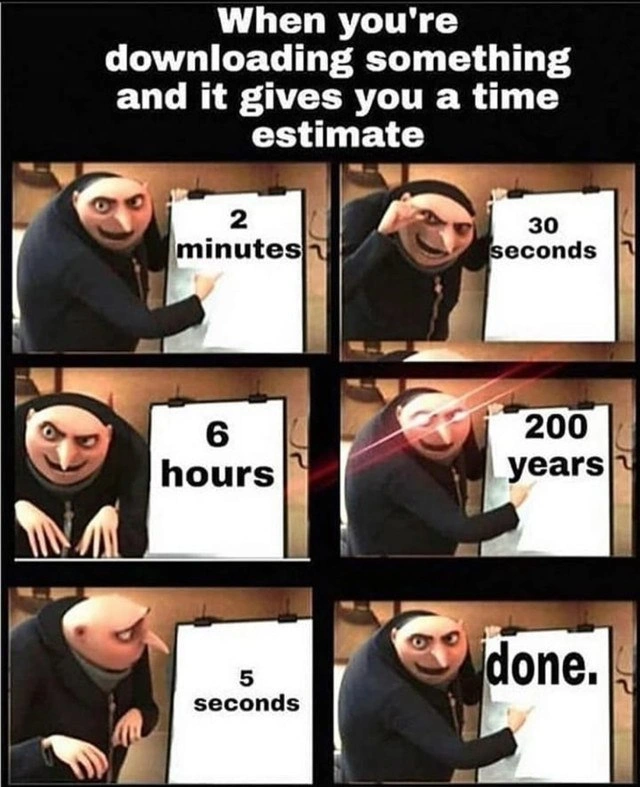
At this level, let’s break down what’s happening in the meme in simpler terms and define the key ideas. The meme uses the familiar Gru flipchart format (Gru is a character from a movie, shown presenting something on a white board). The text at the top says: “When you’re downloading something and it gives you a time estimate.” In each panel, Gru points to a board that shows a different time estimate for the download. The times jump around wildly: 2 minutes, then 30 seconds, then 6 hours, then an unbelievable 200 years, then 5 seconds, and finally “done.” This huge variation is the joke – it exaggerates what we often see when copying files or downloading: the progress bar’s “time remaining” goes up and down unpredictably.
What is a progress bar? It’s that little bar or indicator that fills up to show how much of a task is completed (like when you’re installing a game or downloading a video). Often, next to it, the computer tries to give an estimated time left (an ETA, which stands for Estimated Time of Arrival or completion). For example, it might say “About 2 minutes remaining.” That’s meant to tell you roughly how much longer you must wait. In a perfect world, that number would start high and count down smoothly to 0 as the download finishes. But in reality, especially with network downloads, the number can misbehave – it’s like a rollercoaster of estimates.
Why do the estimates jump from 2 minutes to 6 hours to 5 seconds? Because the computer is recalculating the time based on your download speed, and that speed isn’t constant. Imagine you’re downloading a big file. One second, your internet is fast (so it thinks “only 30 seconds left!”), but the next second, your connection slows down or pauses (now it panics: “uh oh, 6 hours left”). Then suddenly the file comes in quickly (“wait, maybe just 5 seconds!”), and before you know it, it’s finished (“done.”). These swings happen due to network latency and throughput changes – in simpler terms, sometimes data comes quickly, sometimes it’s delayed. Network latency is like a short pause or delay in data transfer, and bandwidth is how much data can flow per second. If the network gets busy or encounters a hiccup, your download might momentarily slow to a crawl. The downloading program often naively assumes that the current speed will continue. So if it just had a slow moment, it will guess a very long remaining time (even ridiculously long, like “200 years,” which is just a sarcastic way of saying really, really long). When the speed picks back up, the program revises the estimate to be short again. It’s basically guessing every few seconds, and those guesses are all over the place when the speed isn’t steady.
For a new developer or someone early in tech, this is a relatable and funny introduction to how hard estimations can be in computing. It’s tagged with things like RelatableHumor and DeveloperHumor because anyone who’s waited for a download or an installation has likely seen these inconsistent time predictions and felt both amused and annoyed. In terms of UX/UI design (User Experience/User Interface design), this meme is pointing out a design problem: a progress indicator that’s meant to inform you is instead confusing you. That’s why it’s labeled a UXFailure or UXIrony – the interface is ironically doing the opposite of what it should. Good UX would mean the app might say “Calculating time…” or give a stable range rather than crazy jumping numbers.
For developers (DX), it’s also a mini lesson. When building software, even something as simple as a download progress bar has tricky parts. You have to account for real-world conditions like varying network speed. Many apps try to smooth out the estimates (for example, not updating the ETA every single second, or averaging the speed over a longer period). But get it wrong, and you produce exactly what the meme shows – a progress bar that looks like it’s having a mood swing. This is a developer pain point because it can make users lose trust in your app (“It said 2 minutes, I came back 5 minutes later and it said 10 minutes left!”). So the meme’s scenario is a bit of a shared joke: “Yep, we’ve been there. Time remaining: who even knows?” Everyone from junior devs to experienced engineers chuckles because they remember the first time they saw an installer promising to be done in a jiffy, then suddenly needing an eternity, then finishing unexpectedly. It’s practically a rite-of-passage in computing to realize that these estimates are often inaccurate and to learn why.
Level 3: The ETA Conundrum
At the highest level, this meme highlights a classic UX failure in software: wildly fluctuating progress bar time estimates. In the panels, Gru (the villain from Despicable Me) points to an easel showing download ETA (Estimated Time of Arrival) values that jump from “2 minutes” to “30 seconds”, then “6 hours”, then a ridiculous “200 years”, then “5 seconds”, and finally “done.” This comically exaggerated sequence is painfully familiar to developers and users alike. It satirizes how progress indicators recalculate remaining time on the fly, often producing misleading feedback due to unpredictable conditions. The humor lands because we’ve all watched a download or file copy where the time remaining seems to oscillate without rhyme or reason. It’s an inside joke about Developer Experience (DX) and User Experience (UX): the interface is supposed to reassure you “almost there!” but instead it behaves like a broken clock spinning wildly.
Why do these ETA swings happen? Under the hood, most download progress bars compute remaining time as:
$$ \text{ETA} = \frac{\text{Bytes Remaining}}{\text{Current Speed}} $$
This looks simple, but network throughput isn’t steady; it’s more like an unruly rollercoaster. One moment your connection is fast (low latency, high bandwidth), the next moment it slows to a crawl due to network latency spikes, server hiccups, or packet loss. A naive algorithm might measure “current speed” from the last one-second or few-second window. If in one instant you only downloaded a tiny chunk of data (maybe the network paused for a second), the app divides the large remaining data by that tiny speed and gets a massive ETA — hence absurd readings like “200 years.” The next second, if a big chunk arrives, the speed calculation shoots up and the ETA plummets to something like “5 seconds.” In other words, the feedback loop for the progress bar is too sensitive, causing it to over-correct and swing to extreme values. This is analogous to an unstable control system in engineering: if you react too strongly to fluctuations, you get wild oscillations instead of a steady reading.
Let’s illustrate with a simple example: suppose you have 50 MB left to download, and the program recalculates every second based on recent speed. If your download speed varies, the ETA will too:
| Recent Download Speed | Calculated Time Remaining (for 50 MB) |
|---|---|
| 5 MB/s (very fast) | ~10 seconds (practically done) |
| 1 MB/s (steady) | ~50 seconds (under a minute) |
| 0.1 MB/s (slow) | ~500 seconds (~8 minutes) |
| 0.01 MB/s (very slow) | ~5000 seconds (~1.4 hours) |
| 0.001 MB/s (snail pace) | ~50000 seconds (~13.9 hours) |
| 0 MB/s (stalled) | infinite / enormous (years!) |
As you see, a brief moment of near-zero throughput makes the math explode. Real progress dialogs sometimes cap the number (perhaps showing “99+ hours” or a placeholder like “200 years” as a tongue-in-cheek overflow). Regardless, the system is essentially guessing based on volatile conditions. Senior developers recognize this as a relatable humor tagged DeveloperPainPoints: it’s funny because it’s true. A wildly incorrect ETA is worse than no ETA at all—it erodes the user’s trust in the progress bar. This is a prime example of UXIrony: an interface designed to comfort the user ends up confusing or annoying them.
From a seasoned developer’s perspective, there’s also an engineering lesson here. The meme hints at the difficulty of predictive modeling in software. Estimating time remaining is deceptively hard because you’re forecasting the future based on an unstable present. There are known strategies to improve it (for instance, using an exponential moving average of speed over several seconds or smoothing the updates so they don’t jump so abruptly), but each is a trade-off. A slow-moving average gives a steadier ETA that won’t swing as much, but it can lag behind reality when a connection genuinely slows down or speeds up. A fast update reacts quickly but, as we see, can go haywire with even momentary fluctuations. This is analogous to the larger issue of time estimates in software projects (the old joke: “the two hardest things in Computer Science are naming things, cache invalidation, and off-by-one errors” — we might add “estimating time” to that list!). In effect, the meme captures a Developer Humor truth: even simple-sounding features like a progress bar hide tricky algorithms and edge cases. And when those go wrong, the result is both comic and frustrating – a perfect summary of everyday Tech Humor in the industry.
Description
This image uses the six-panel 'Gru's Plan' meme format to satirize the notorious unreliability of time estimates for downloads or other long-running processes. The text at the top reads, 'When you're downloading something and it gives you a time estimate'. The subsequent panels show the character Gru pointing to a whiteboard with a wildly fluctuating sequence of time estimates: '2 minutes', '30 seconds', '6 hours', '200 years' (this panel shows Gru with glowing red eyes for emphasis), '5 seconds', and finally, 'done.'. The humor is rooted in the shared, frustrating experience of watching a progress bar give nonsensical and unpredictable completion times. This is a common issue in software, caused by factors like network speed variations, disk I/O, and poor estimation algorithms, making it highly relatable to anyone who has ever downloaded a large file, installed software, or run a lengthy build process

Comments
12Comment deleted
Our progress bar is based on the idea of eventual consistency. The time estimate and the actual completion time will eventually be consistent, right at the moment it finishes
Our progress bar ETA must share a codebase with our release planner: optimistic TCP slow-start, a few congestion collapses, a projection that lasts longer than IPv4, and then - miraculously - “done” the second the VP opens Zoom
After 20 years in tech, I've learned that download time estimates follow the same mathematical model as project estimates: take the initial value, multiply by π, add the number of dependencies, then realize it's all quantum superposition anyway - simultaneously done and infinitely far away until you actually observe it
Ah yes, the download time estimate algorithm: take the current transfer rate, multiply by remaining bytes, add a random number generator seeded with user anxiety levels, and update every 100ms with complete disregard for previous predictions. It's like watching a junior dev's first attempt at implementing exponential moving averages - except the junior dev would eventually converge to accuracy, while download ETAs seem to have discovered a novel form of computational chaos theory where the only constant is user suffering
Download ETAs are Bayesian fibs: one packet loss updates the posterior to “200 years,” then a CDN cache hit collapses it to “done.”
Download ETAs are just EWMA fanfic for a non‑stationary channel - slow start, Wi‑Fi jitter, CDN hop… 2 minutes → 200 years → done, the story points of networking
Download ETAs: the only progress bars proving time dilation is real outside relativity - npm install on spotty WiFi
Sometimes it looks like a certain function just returns a random value of time until the download is done Comment deleted
it's because it just does current download speed * size of file - elapsed time rather than average download speed so far * file size left Comment deleted
why the hell would you do (current speed * filesize) - elapsed time? you can very easily end up in negative numbers. you probably meant remaining size / current speed Comment deleted
Usually you average it for like 2-3 seconds so that it doesn’t jump faster than you can read it Comment deleted
among us download task be like Comment deleted