Skip to content
DevMeme
2213 of 7435
Da Vinci's Struggle with Version Control
VersionControl Post #2467, on Dec 18, 2020 in TG

Da Vinci's Struggle with Version Control

Why is this VersionControl meme funny?

Level 1: One More Change

Imagine you’re writing a story for school. You get to the end and proudly write “The End.” But then you think of a better ending! Instead of starting a new paper, you just add it right after and write “The REAL End.” You show it to your friend, and they suggest one more tiny change. So you add that and now write “Final End, I mean it this time.” 😄 It’s pretty silly, right? Each time you said the story was done, you kept writing more. This meme is funny for the same reason. The artist keeps saying his painting file is “final” (which means done), but he keeps making one more change, and then another. It’s like if you kept saying “I’m finished with my chores… okay now I’m really finished… wait, one more thing, NOW I’m finished!” Using “final” over and over becomes meaningless and goofy. The joke makes us laugh because calling something final should mean it’s finished, yet clearly it wasn’t – and we’ve all felt that moment when we think we’re done but we aren’t. It’s a fun way to say: sometimes we call something done just a bit too soon!

Level 2: Manual Versioning Mayhem

At its core, this meme is about version control – a way to keep track of changes to files (like code, documents, images) over time. In software development, we usually rely on specialized tools for this, with Git being the most popular modern example of a VersionControl system. Using Git, you can save snapshots of your work (called commits), go back to previous versions, and collaborate with others without overriding each other’s changes. It’s organized and reliable.

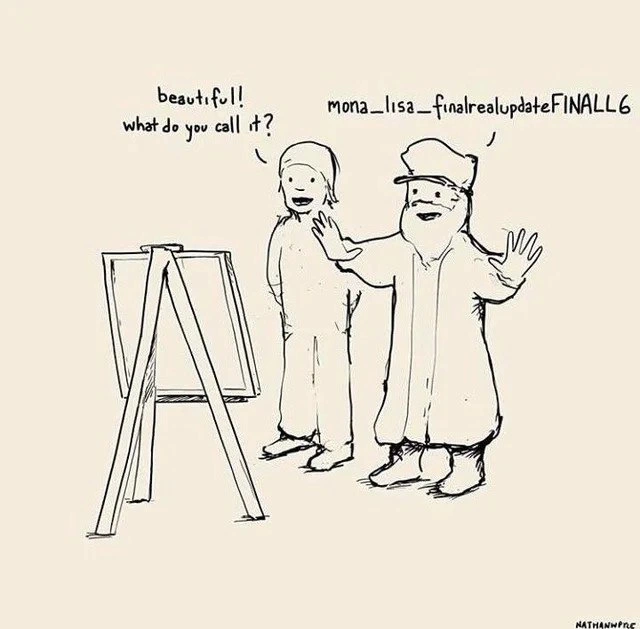
Now, what’s happening in the meme is the opposite of that organized approach. The artist is not using any real version control tool. Instead, he’s following a manual versioning method: every time he makes changes to his artwork, he saves a new copy of the file with a new name. The running joke is how he keeps adding the word “final” (and other descriptors) to the filename each time, implying each version was supposed to be the “last one,” until it wasn’t. This is a common NamingConvention people use when they don’t have a proper system: e.g., you might have seen files like resume_final.doc, resume_final2.doc, resume_final_revised.doc etc. Here it went out of control – the final file ended up named mona_lisa_finalrealupdateFINALL6. That name is a jumble of FileVersioning labels:

  • “mona_lisa” – the base name (it’s the Mona Lisa painting, presumably in a digital file).
  • “final” – indicating this was the final version… at one point.
  • “realupdate” – suggesting there was an update even after the final; perhaps the editor thought, “this is the real update, serious now.”
  • “FINAL” (in all caps) – probably another attempt to mark a version as definitively final. Often people resort to all-caps FINAL when “final” wasn’t final enough.
  • “L6” – likely meaning “version 6” (maybe the sixth time he’s saving what was supposed to be the last version). It could be an inside joke like “Level 6” of finality. Either way, it’s a version number tacked awkwardly onto the end of the name.

So why do people do this? Imagine you’re a new developer or a student who hasn’t learned Git yet. You write some code or create a graphic, and you want to make changes without losing the original. The simplest thought is “I’ll just save a new copy.” It feels safe – if the new edit goes wrong, you still have the old file. So you end up with multiple files: maybe Drawing1.png, Drawing1_edited.png, Drawing1_final.png, etc. It’s a makeshift way to have backups or older versions. In teams that don’t enforce proper version control, you might see shared folders full of these incrementally named files. It’s version control by file name.

The mayhem starts as the number of versions grows. People use all sorts of suffixes:

  • Numbers: e.g., Project_v1.doc, Project_v2.docProject_v12_final.doc.
  • Words like “final”, “draft”, “update”, “revised”: stacking them when the situation gets desperate (Final_Draft_2_revised_final.docx is a real thing you might encounter).
  • Dates: some try to put the date like Report_2021-12-01.doc to keep track, which helps a bit but can still get confusing if multiple edits happen in one day.

In the cartoon’s case, the artist just kept throwing more words into the name instead of a systematic approach. It highlights poor_versioning_practice in a funny way. It’s relatable because many of us did this early on. For example, a beginner programmer might have a folder of Python scripts: game.py, game_backup.py, game_backup2.py… Or a group of students working on a presentation might email around “slides_final.ppt” then “slides_final_john_edit.ppt” then “slides_final_really.ppt” – and it’s never clear which one to use! This leads to confusion like someone accidentally working on an outdated file.

Proper version control (with Git or other tools) solves this by keeping one main file (or set of files) and recording changes inside a repository. You don’t create new file copies for each version; instead, you make a commit in Git which internally records the diff (the changes). If you need to revert to an earlier state, you can. If two people need to work at the same time, they can create branches instead of conflicting copies. Branching is like saying: “I’ll work on my own copy internally and later merge it,” but Git handles the merge, whereas with manual files you’d have to compare and merge changes by hand. Tagging in Git can mark a certain commit as an official version (like v1.0, or “final release”), which is far more clear and dependable than a chaotic filename. And semantic versioning is a fancy term for using a number system (like 2.0.1, meaning Major version 2, Minor version 0, Patch 1) to label releases in a meaningful way. In a sane workflow, you might call the Mona Lisa version “1.0” when it’s done, then “1.1” if you lightly tweak it, and so on – rather than “FINAL” six times.

To put it simply, the meme jokes about the RelatableDevExperience of not using proper tools. It’s poking fun at the kind of mistake many beginners or non-tech folks make. The picture uses the famous Mona Lisa to exaggerate the silliness: we imagine an old master painter handling his art files like a confused student who hasn’t heard of Git. For a junior developer reading this, the lesson under the joke is: naming files “final_final_final” is not real version control. It’s always better to learn and use tools like Git for your projects. Not only does it avoid embarrassment (“Which FINAL was the final?”) but it prevents losing work or mixing up versions. The meme is funny because it’s true – so many of us have been guilty of this before we knew better!

Level 3: "Final" Isn't Final

This meme hits home for anyone who’s managed version control the wrong way. The cartoon shows an artist proudly naming his masterpiece mona_lisa_finalrealupdateFINALL6 – a hilariously convoluted filename. Seasoned developers immediately recognize this as classic VersionControlHumor: the artist is using file naming as a makeshift version control system. Instead of proper branches and commits, he’s appending FINAL (over and over) to the filename. It’s a tongue-in-cheek portrayal of poor versioning practice. In real projects, we’ve all seen files like project_final.pdf, project_final2.pdf, project_final_reallyFINAL.pdf. Seeing the Mona Lisa–the pinnacle of art–treated with the same sloppy naming shenanigans is both absurd and painfully relatable. It’s DeveloperHumor drawn from experience: you know you’re in trouble when “final” appears twice in a filename (and here it appears, what, three times? Plus a mysterious “L6” for good measure).

For veteran engineers, the humor cuts deep. It satirizes the chaos that erupts when teams forego real version control tools (like Git or SVN) and rely on ad-hoc NamingConventions. The file name mona_lisa_finalrealupdateFINALL6 tells a whole story of desperation:

  • "final" – The first attempt at declaring completion (we all know how that goes).
  • "realupdate" – Oops, a change came in after the “final” version; better sneak in an update and pretend this is the real final.
  • "FINAL" – Now we’re really, really sure it’s final (so sure we shout it in all caps).
  • "L6" – Perhaps this is version 6 of the “final” piece… by now it’s just comical. (Maybe Leonardo tried five times before?)

Each segment of that name echoes a developer’s inner monologue during last-minute edits. It’s the file_naming_shenanigans we do at 3 AM when we’re too scared to overwrite the "final" file but too tired to implement proper FileVersioning. The truth is, every added suffix (_final, _REAL, _FINAL2) is basically admitting “Alright, it wasn’t final after all.” By version “FINAL_L6,” even the most cynical engineer is cringing and laughing — we’ve been there, and it’s never pretty.

From an experienced perspective, this scenario is a mini horror story of poor_versioning_practice. Instead of using a real VersionControl system with branches and tags, each change is immortalized in a longer filename. It’s funny until you realize how easily it could have been avoided. Proper version control tools (Git, Mercurial, SVN, etc.) let us create branches for experimental changes, merge them, tag releases as actual final versions, and maintain a history of edits. In Git, you’d commit the changes with a message (perhaps "Mona Lisa touch-ups: adjusted smile curve"), and tag a release like v1.0 for the truly final version. With branching, Leonardo could have a mona-lisa-experiment branch for tweaks instead of saving “FINAL_L6” files. With tagging, he’d mark the finished artwork as mona_lisa-1.0. And with Git’s history, if someone said “The earlier smile was better,” he could retrieve that from the commit history instead of digging through mona_lisa_final_old_backup3.png. In short, real version control makes this whole final-final-v6 fiasco obsolete.

The meme brilliantly exaggerates a RelatableDevExperience. Everyone in software (and students, and office workers…) remembers the dark days before they embraced version control. You might find a folder of files like:

# Progression of "final" versions (instead of using Git history):
mona_lisa.png  
mona_lisa_final.png  
mona_lisa_final_real_update.png  
mona_lisa_final_real_update_FINAL.png  
mona_lisa_final_real_update_FINAL_L6.png  

Each new “final” is a desperate attempt to freeze a moment in time, only to be invalidated by the next change. Experienced developers chuckle because it’s a naming convention nightmare that we’ve all accidentally created. It usually ends with someone opening *_FINAL_FINAL.latest.psd and praying it’s the right one. The humor has an edge of trauma: how many times did we dive into a project folder and see ten files marked final? 😅 It’s funny now, but back then it led to confusion, lost work, and a fair share of “I told you so” when the wrong version got sent to a client or deployed to production.

In the end, this meme’s joke lands so well because it captures an universal truth in development: if you don’t have proper version control, you will reinvent it (poorly) by crawling in the mud of file names. And nothing screams “I need Git” louder than a file called “FINAL_final_USE_THIS_ONE_really.png.” The Mona Lisa deserves better – and so do your projects. Use a real VCS, folks, so you’re not stuck with a final_final_v6 monstrosity that even Da Vinci would facepalm at.

Description

A single-panel cartoon by artist Nathan W. Pyle, drawn in a simple, sketchy line-art style on a beige background. The scene depicts a caricature of Leonardo da Vinci, with a long beard and artist's cap, presenting a painting on an easel to a patron. The patron looks at the unseen masterpiece and exclaims, 'beautiful! what do you call it?'. Da Vinci, with a dismissive wave of his hands, replies, 'mona_lisa_finalrealupdateFINALL6'. The humor lies in the anachronistic application of a notoriously poor digital file-naming convention to one of history's greatest works of art. This resonates deeply with anyone in a technical or creative field who has struggled with versioning before adopting a formal version control system like Git. The filename humorously captures the chaotic and desperate process of manually tracking revisions, a relatable pain point for developers who've seen or used similar conventions on shared drives

Comments

7
Anonymous ★ Top Pick Before Git, our commit messages were in the filename, and every save was a force push to the shared network drive
  1. Anonymous ★ Top Pick

    Before Git, our commit messages were in the filename, and every save was a force push to the shared network drive

  2. Anonymous

    Leonardo kept slapping “_final_FINAL_L6” on the file; five centuries later we invented Git - and half the team is still force-pushing to main like it’s wet paint

  3. Anonymous

    The same developer who names their masterpiece 'mona_lisa_finalrealupdateFINALL6' will spend three hours in a code review arguing about whether a variable should be called 'userManager' or 'userService'

  4. Anonymous

    This is what happens when you treat your filesystem like a version control system - you end up with a Louvre full of 'mona_lisa_final_FINAL_v2_actually_final_USE_THIS_ONE.jpg'. The real masterpiece here isn't the code, it's the archaeological expedition required to figure out which of the 47 'final' versions is actually in production. Pro tip: if your filename needs a scroll bar, it's time to learn git

  5. Anonymous

    Renaissance SCM: instead of Git tags, they increment the number of Ls in FINAL until stakeholder sign-off

  6. Anonymous

    mona_lisa_finalrealupdateFINALL6 - semver by filename; when your VCS is a shared folder and conflict resolution is “append another FINAL.”

  7. Anonymous

    Semantic versioning? Nah, 'mona-lisa-finalreal-FINAL' is self-documenting legacy gold

Use J and K for navigation