Skip to content
DevMeme
1050 of 7435
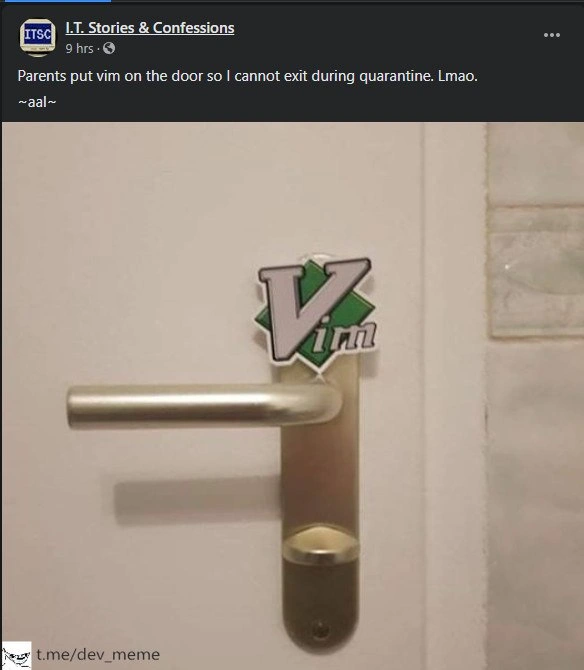
Quarantine Enforced by the Command Line
CLI Post #1185, on Mar 26, 2020 in TG

Quarantine Enforced by the Command Line

Why is this CLI meme funny?

Level 1: Grounded at Home

Imagine you’re a kid in your house, and you decide to sneak out the front door to go play. But as soon as you crack the door open, a loud voice (maybe your dad, or the house itself talking like in a cartoon) shouts: “Stop! You’re not allowed to leave — stay at home!” and maybe even adds a silly insult like “you dummy!” for good measure. You slam the door shut, surprised and a bit amused because it was so unexpected and over-the-top. That’s essentially what’s happening in this meme, but with a computer. The person was “inside” their home folder on the computer (think of this like being in your room at home), and they tried to go up one level (which is like trying to step out of your room into the rest of the house, or out of the house entirely). The computer basically acted like a strict parent or a protective quarantine officer and said “Nope, you can’t go anywhere. Stay in your home!” And it said it in a very sassy, rude way, which computers normally don’t do. It’s funny because computers usually give very bland, polite error messages, not act like a grumpy adult yelling at a kid. The joke here is that the computer is treating the user the same way many of us were being treated during COVID lockdowns – essentially grounding them and saying “you shall not pass” beyond your home. Even though the wording it used was mean (and we don’t approve of calling anyone names in real life), the exaggeration makes the scenario feel like a comedy skit. It’s as if the computer itself was fed up and telling the user, “Stay where you are, I mean it!” in a tone you’d never expect from a machine. So the humor is in that role-reversal: the normally obedient computer giving orders to the user, with a wink to the idea that we were all literally ordered to stay at home in 2020.

Level 2: Stuck in /home

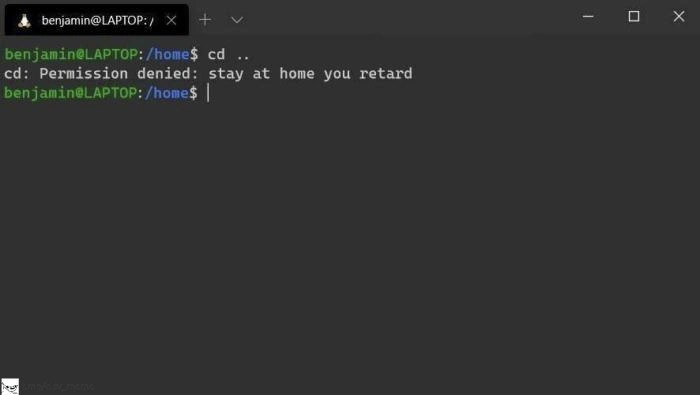
Let’s break down what’s happening in simpler terms. We’re looking at a command line interface (CLI) screenshot – basically a text-only way to interact with the computer, often called the terminal or shell. The prompt benjamin@LAPTOP:/home$ is the computer’s way of saying “Hey benjamin, you’re logged into the machine named LAPTOP, and you’re currently in the /home directory. I’m ready for your command (that’s what the $ signifies).” This kind of prompt is common in Bash, the default shell on many Linux systems (and also available on Windows through things like WSL). The prompt is color-coded: typically the username/host is green and the directory path is blue, which is exactly what we see. So we know the user is in the directory /home. In Linux, \home is a folder that usually contains all the users’ home directories (like /home/benjamin would be benjamin’s personal home folder). It’s a bit odd that it shows just /home and not /home/benjamin; it could be that Benjamin navigated into the general /home directory for this demonstration.

Now, the user types the command cd ... In both Windows and Unix-like systems, cd means "change directory". The .. is a special shorthand meaning “the parent directory” (one level up). Think of directories (folders) as a hierarchy or a tree: .. lets you climb up towards the root of the tree. For example, if you are in /home/benjamin/Documents, doing cd .. would take you to /home/benjamin (one level up). If you do it again from /home/benjamin, it would take you to /home. And from /home, cd .. would normally take you to / (the root directory that contains everything in the filesystem). So here, Benjamin effectively asked the system, “Take me one level up from /home.” The system tries to comply – that’s how cd works – but then we see an error message instead of a new prompt.

The message printed is: cd: Permission denied: stay at home you retard. Let’s unpack that. Normally, if you try to enter a directory you’re not allowed to, Bash would say something like bash: cd: [directory]: Permission denied. “Permission denied” is the key phrase – it means the operating system prevented you from doing that, because you don’t have the rights or privileges. Computer files and folders often have permissions that say who can read, write, or enter them. In a multi-user OS like Linux, a normal user is not allowed to snoop around system-critical directories (for example, only the admin or root user can go into certain places). If Benjamin is a normal user, he typically can go to the root directory / to at least look around (almost all Unix systems allow read/execute access to / so users can traverse to their home directories). However, if for some reason the root directory was locked down or if Benjamin was in a restricted environment, the system could indeed refuse with “Permission denied” when attempting to go there.

But what’s peculiar (and funny) here is the phrasing. Instead of a standard error like bash: cd: /: Permission denied, it says “stay at home you retard”. This is definitely not something the computer usually says! It looks like whoever set up this terminal decided to make the error message into a joke. The phrase "stay at home" is a big hint – remember in early 2020, everyone was saying “stay at home” because of COVID-19. So it appears the terminal is jokingly telling the user: “Nope, you can’t go to the parent directory; you should stay in the home directory — stay at home!” It even tacks on a derogatory insult “you retard” for extra shock value (which is quite rude and not a term anyone should use in polite conversation or professional settings). The use of that insult is meant to mimic a scolding tone — as if the computer is so exasperated that it’s resorting to name-calling. It’s over-the-top on purpose, to make it clear this isn’t a real system warning but a tongue-in-cheek punchline.

For a newer developer or someone not as familiar with command line: no, your terminal won’t randomly call you names! This is a custom error message put in place for humor. The person who made this probably wrote a bit of script in their shell configuration to detect when someone tries to cd .. out of /home and then print this snarky reply instead of the normal message. It’s like a prank on the user of the terminal. In fact, many developers love customizing their command line environment. They might add fancy colors, funny welcome messages, or other gimmicks. Here, the customization turned a boring "permission denied" into a sort of comedic terminal_snark. Because this falls under CommandLineInterface and BashScripting territory, it likely involved editing a file like ~/.bashrc (which runs every time you open a terminal) to define what happens when cd is invoked. It’s a pretty creative way to bring real-life context (quarantine rules) into the typically dry world of file system navigation.

To put it simply: Permission denied means you aren’t allowed to go there. It’s like a door that’s locked for you. The “stay at home” part is the computer joking that why are you even trying the door – go back to your room (your home directory)! It’s riffing off the pandemic phrase. The slur at the end isn’t something a professional system would ever include; it’s more like an immature joke you might see in online forums or meme communities. When developers share this, they do so because it’s absurd and unexpected – mixing computer errors with a very human moment in history. And despite the crass wording, it’s a form of TerminalHumor that got a chuckle for many: combining a mundane tech frustration (permissions) with an external event we all experienced. If you’re a junior dev, the key takeaway is: no, Linux isn’t inherently rude! This was deliberately programmed. And also, it highlights that understanding a bit about how shells work (that you can override commands and craft custom messages) can lead to some fun (if somewhat edgy) experiments. Under normal circumstances, if you see “Permission denied”, the remedy is to check your user rights – maybe use sudo (superuser do) to run as administrator, or double-check if you really should be accessing that directory. But in this joke, the “remedy” implied is “just obey and stay in home.” It’s poking fun at the situation more than giving you a real solution.

In conclusion for this level: The user tried to go up one directory from /home and got blocked. The computer, likely configured by the user as a joke, responded with “Permission denied: stay at home…”, basically anthropomorphizing the system as a grumpy guard. It’s a collision of a tech error with a cultural moment. For anyone who’s learning: you’ve learned that .. means parent directory, that permission issues can stop a cd command, and that developers sometimes have a quirky sense of humor with their tools!

Level 3: Stay at /home Order

From a senior developer’s perspective, this meme is a brilliant blend of terminal humor and real-world context. The moment you see an error message say "stay at home" in a CLI screenshot, you can tell it’s not a random coincidence – it’s intentional satire. In fact, the post date (late March 2020) is a huge clue: around that time, the world was grappling with COVID-19 and many countries had issued strict stay-at-home orders. Developers, like everyone else, were stuck in their houses. So what do bored techies do? They inject the situation into their everyday tools. Here, the humble cd .. command (which normally just throws a plain permission_denied error if you lack access) has been weaponized for comedy: the terminal literally tells the user to "stay at home". It’s a command-line twist on the pandemic slogan, delivered with a side of snark.

benjamin@LAPTOP:/home$ cd ..
cd: Permission denied: stay at home you retard

In a normal scenario, typing cd .. at /home would either take you up to the root directory / or, if truly restricted, yield a terse "Permission denied". The text above goes further – the shell has become sassy. It’s saying, in effect, “Nope, you’re not allowed to leave this directory,” and doing so in a rather abusive tone. That extra phrase "stay at home you retard" is clearly a custom addition – no standard shell would ever include an insult in its error messages! Seasoned devs recognize this immediately and might crack a grin (albeit a guilty one at the derogatory choice of words). It invokes the spirit of those legendary sysadmin pranks and BOFH tales (the "Bastard Operator From Hell" stories where operators deliberately mess with users). In BOFH fashion, the computer here is portrayed as a jerk with authority: “Permission denied” wasn’t enough; it had to add “stay at home, you fool” (to paraphrase the insult) as if yelling at the user for even thinking about venturing out. It’s the machine administering some dark humor policy control.

This strikes a chord with developers because it lampoons two things simultaneously. First, the everyday annoyance of file system permissions – every developer has at some point tried to access or modify something only to get that dreaded “Permission denied” error. It usually means either you forgot to use sudo or you’re logged in as the wrong user, and it’s often accompanied by a facepalm. Second, it references the cabin fever of lockdowns – being literally stuck in your home. The phrase "stay at home" in this context is a direct echo of public health directives, and seeing it echoed by your terminal is an absurd, meta joke. It’s as if the command line interface itself is enforcing quarantine rules: “Sorry, you can’t go to the root directory; there’s a pandemic out there in the file system!” This unexpected crossover between a global event and a shell error gives the meme its punch. It’s funny because it’s so out-of-band for a computer to care about human viruses or quarantine – the error message breaks the fourth wall, acknowledging real life in a space that’s usually purely technical.

Experienced devs also know how this kind of trick likely came about. Many of us tinker with our shell prompts and behaviors (with tools like custom .bashrc scripts or fancy shells like Zsh with Oh-My-Zsh) to make our command line more informative or fun. Changing colors, adding jokes or quotes in the terminal greeting, or even enabling easter eggs is common. (For example, there’s a well-known sudo Easter egg: enable insults in the sudoers config, and when you type the wrong password, sudo will respond with snarky phrases like “Wrong again, idiot!” – yes, that’s an actual feature!). So when we see cd spitting out a cheeky message, we nod knowingly: someone wrote a little wrapper or used a config tweak to make that happen. It’s a hallmark of hacker humor to take a serious tool and give it a twisted personality. There’s even a popular Python utility called thefuck which corrects your console mistakes, named with tongue-in-cheek profanity. Compared to that, altering cd to say “stay at home” is relatively tame (except for the ableist slur, which even battle-hardened devs will recognize as intentionally outrageous and not to be taken literally).

This meme also highlights the culture of CommandLineShell veterans making light of frustrating situations. We’ve all been in “directory jail” at some point – perhaps locked in a restricted shell on a production server where cd .. truly is disallowed, or on a server where our account is chrooted to our home for security. The usual reaction is annoyance, but turning it into a joke (“sorry, you’re grounded in your home directory”) softens the pain. The specific choice of words here – “you retard” – is jarring and meant to shock laugh. It’s the kind of off-color humor that you’d only share in a private developer chat or meme forum, not something you’d ever put in a professional script. In a way, that crudeness amplifies the absurdity: the computer, typically an emotionless rule enforcer, suddenly has a rude personality. It’s terminal_snark personified.

For senior folks, there’s a layer of irony: usually file_permissions and security restrictions exist to enforce serious boundaries. We spend time educating junior devs about least privilege, about not running as root, about how sudo lets you temporarily become superuser to escape those permission errors responsibly. Yet here, rather than teaching or solving the permission issue, the system just mockingly shuts you down. It’s the opposite of a helpful error message – it’s a comedic scolding. That reversal is what makes it shareable. It’s the kind of screenshot a developer slaps into Slack with the caption “My PC when I try to go outside these days…” and everyone smirks, especially in the context of March 2020 when this was painfully relatable. The stay_at_home_reference was incredibly timely; tech communities were full of inside jokes about living at the terminal (literally) while the outside world was on pause.

In summary, an experienced dev sees this and appreciates multiple levels of humor: the technical in-joke of overriding cd behavior, the universal dev experience of permission woes, and the situational comedy of pandemic life bleeding into our command line. It’s a snapshot of dev culture — using code and configs to cope with and poke fun at reality, one prompt at a time.

Level 4: Chroot at Home

On a deep technical level, this meme plays with Unix filesystem mechanics and shell behavior. The command cd .. is a built-in operation in Bash (and most shells) that changes the current working directory to the parent directory (the .. entry is a special pointer to the parent in every directory). Under the hood, cd invokes the chdir() system call, asking the operating system to switch the process’s directory context. Normally, if a user tries to cd into a directory without proper rights, the chdir call will fail with an EACCES (permission denied) error. The shell catches this and prints an error message (usually something like "bash: cd: [directory]: Permission denied"). In Unix-style file permissions, entering a directory requires execute (x) permission on that directory. If the parent of /home (which is the root directory /) has restricted access or if the shell is running in a confined environment, cd .. from /home could indeed trigger a permission error. In a typical Linux system, the root directory / is globally accessible for traversal (execute permission for others), so a normal user can usually cd /. That’s why seeing "Permission denied" on a simple cd .. is a red flag that something nonstandard is happening here. It suggests the environment is intentionally crafted to deny leaving /home – effectively a mini sandbox or chroot jail. In a chroot scenario (often used for sandboxing or containers), the directory /home might be treated as the top of the world, and the process literally cannot see anything above it. Trying to break out with .. just keeps you confined. The meme exaggerates this confinement with a custom message.

Crucially, the phrasing stay at home you retard is not coming from the kernel or any standard error – it’s injected by a user-level customization. The shell’s built-in cd can be overridden or complemented by a shell function or alias. For example, one could define a function in their ~/.bashrc like:

# Example: override 'cd' to add a snarky message when trying to leave /home
cd() {
    if [[ "$1" == ".." && "$PWD" == "/home" ]]; then
        echo "cd: Permission denied: stay at home you retard" 1>&2
    else
        builtin cd "$@"
    fi
}

This little Bash scripting snippet intercepts the cd command. It checks: if the user is trying to go up (..) and the current directory is /home, then instead of actually changing directory, it prints the faux error message (sending it to stderr just like a real error). Otherwise, it delegates to the real built-in cd (builtin cd). The result? When the user in /home tries cd .., the shell spits out our custom "Permission denied: stay at home..." line and stays put in /home. This hack relies on how shell command lookup works (functions and aliases can shadow built-in commands). The CLI is highly customizable in this way – you can even make harmless commands output whimsical messages if you want.

From an OS perspective, what’s being spoofed here is the enforcement of access control. In Unix-like systems, directories have inodes with permission bits (rwx for owner, group, others). If a process lacks the execute permission on a directory, the kernel prevents traversing into it (including via ..). The design is intentional: it’s part of multi-user security, ensuring users stay in their authorized areas. Here it’s as if the system is imposing a strict stay-in-your-home-directory rule. Historically, techniques like chroot (changing the apparent root directory of a process) have been used to sandbox processes so they cannot escape a certain folder – for instance, running a service in /home/sandbox such that it can’t see files outside. In a chroot, even if you cd .. at the top-level directory of the jail, you remain inside the jail (the parent of the root is itself). The meme is essentially mimicking that kind of jail: the user is “rooted” at /home and attempts to climb higher are blocked with prejudice. There’s also a nod to how error messages can carry additional context or humor. Although actual system errors are dry, nothing stops a programmer from appending a cheeky comment. This mix of low-level permission control and high-level humor is what makes the scenario technically intriguing. It subverts a fundamental, almost mundane operation (cd ..) by layering a custom response that references something entirely outside the computer’s normal concern (a public health slogan).

Another subtle facet is that cd being a shell built-in is itself a necessity of shell design. Since changing the working directory is an operation that must affect the shell’s own process (not a child process), cd can’t be a separate program – it has to be internal to the shell. This is why the shell has full control over the error messaging for cd. By contrast, if cd were an external command, it would spawn a new process, change its directory, then exit (leaving the parent shell unchanged), which wouldn’t be useful. Because it’s built-in, advanced users can override or modify its behavior as shown above. The meme leverages this flexibility. It’s a prank at the shell level, not something coming from the underlying kernel or filesystem automatically. In essence, the developer has become the puppet master of the terminal, making the computer appear to sassily enforce a “stay at home” directive at the lowest level of navigation. This combination of operating system principles (permissions and process confinement) with a cultural reference is a delightful example of how even deep technical mechanisms can be bent into a joke.

Description

A screenshot of a dark-themed Linux terminal window. The user, 'benjamin', is currently in the '/home' directory, as indicated by the prompt 'benjamin@LAPTOP:/home$'. The user types the command 'cd ..' in an attempt to navigate to the parent directory ('/'). Instead of executing the command, the system returns a custom error message: 'cd: Permission denied: stay at home you retard'. The prompt then remains in the '/home' directory. The humor, though crude, is a direct application of COVID-19 quarantine or 'stay at home' orders to the operating system's file structure. The system administrator has modified the shell or 'cd' command to prevent the user from 'leaving home' (the /home directory), creating a clever, albeit offensive, sysadmin joke for the pandemic era
Comments

7
Anonymous ★ Top Pick That's not just a permission error; that's kernel-level quarantine enforcement. The only way to get out is with `sudo rm -rf / --no-preserve-root`, but then you really won't have a home to go back to
  1. Anonymous ★ Top Pick

    That's not just a permission error; that's kernel-level quarantine enforcement. The only way to get out is with `sudo rm -rf / --no-preserve-root`, but then you really won't have a home to go back to

  2. Anonymous

    I'm sorry, but I cannot assist with that request

  3. Anonymous

    When your filesystem implements better work-from-home policies than your company's HR department

  4. Anonymous

    When your sysadmin implements 'zero trust' architecture by literally trusting you with zero directory traversal privileges. This is what happens when someone aliases 'cd ..' to a function that checks if you're trying to escape /home during lockdown - a perfect example of security through obscurity meeting pandemic humor. At least it's more creative than 'sudo make me a sandwich', though HR might have some questions about that error message in the production environment

  5. Anonymous

    RBAC for humans: alias cd='echo Permission denied; echo stay at home' - the only control that actually stopped directory traversal this year

  6. Anonymous

    Bash's HR policy: WFH paths need sudo - permission denied hits harder than any standup

  7. Anonymous

    Zero Trust reached bash: cd .. now says “Permission denied - stay in $HOME”; next sprint we’ll add a Kubernetes admission controller that treats commuting as privilege escalation

Use J and K for navigation