Skip to content
DevMeme
4332 of 7435
When your clever git alias actually doubles your push time
CLI Post #4735, on Aug 6, 2022 in TG

When your clever git alias actually doubles your push time

Why is this CLI meme funny?

Level 1: Shortcut to More Work

Imagine you learned a new shortcut to do a chore much faster, but you keep forgetting to use it. Let’s say you have a calculator to do a tough math homework problem really quickly. You start doing the math the long way on paper out of habit, writing out all the steps. Halfway through, you suddenly remember, “Oh, I could just use my calculator!” So you stop, pick up the calculator, and then punch in the numbers to get the answer. You do get the answer, but by the time you’re done you’ve actually spent more time than if you’d just stuck to one method. Kinda silly, right?

That’s exactly what’s happening in this joke. The developer made a shortcut command on his computer to save time, but because he’s so used to the old way, he keeps starting with the old method, then switches to the shortcut. He basically does the work twice. It’s a funny little facepalm moment where he calls himself a “genius” sarcastically — because his “smart” idea didn’t work out as planned. We find it funny because we’ve all been there: sometimes when we try to be clever and save time, we end up making things more complicated for ourselves. It’s a laugh at how strong our habits can be, and how even a good shortcut is useless if we forget to use it at first. In the end, the poor guy just doubled his effort for something that was supposed to make life easier, and that goofy outcome is what makes everyone smile.

Level 2: Alias vs Habit

Let’s break down what’s happening in this joke. The developer is working in the command line interface (CLI), which is that text-only window (the terminal) where you type commands. They use Git, a popular version control tool, to manage code. When you want to share your code changes, you run git push to send (upload) your commits to a remote server (often called origin, like the repository on GitHub). Normally, you’d specify which branch you’re pushing, for example: git push origin my-feature-branch.

Now, typing long commands over and over can get tedious, so developers often create aliases to save keystrokes. An alias in a shell (like Bash or Zsh) is basically a shortcut command that expands into a longer command. For instance, you might set alias gs="git status" so that typing gs shows the Git status. In our meme, the dev made an alias called gpono intended to stand for “git push origin no-verify”. This alias was defined such that when he types gpono <branch>, it runs the full command git push origin <branch> --no-verify. The --no-verify flag in Git tells it not to run any verification hooks (like automated tests or linter checks) before pushing. Developers sometimes use --no-verify when they’re confident their changes are fine or when they’re in a hurry, because those checks can slow down the push. It’s a bit of a shortcut to speed up pushing code – essentially saying, “I trust myself, skip the extra checks this time.”

So far so good: in theory, gpono should make pushing code faster and easier. But here’s the catch: our poor developer has been using the normal git push origin ... command for so long that it’s become muscle memory. Muscle memory means performing actions automatically, without thinking, because you’ve practiced them a lot (like touch-typing or riding a bike). So whenever he goes to push code, his fingers instinctively start typing git push origi… out of long habit. Halfway through typing the old way, he remembers that he made a shiny new alias to do this faster. Realizing this, he stops, deletes what he typed, and then retypes the command using gpono <branch> as he originally intended.

The irony is that this double typing negates the whole point of the alias! The push that was supposed to be done in one quick command (gpono) ended up taking two attempts – first the false start with the old command, then the actual alias. Instead of saving time, he added a few extra seconds and keystrokes to each push. It turned into a little personal “gotcha!” moment. The tweet calls this out with a humorous tone: “Genius as usual.” That’s the developer jokingly calling himself a genius for coming up with an idea that backfired (we can sense the playful self-mockery).

For a junior developer or anyone new to the command line, here’s why this is funny: it highlights how human habits can override our tools. You might spend time customizing your developer environment to be super-efficient — creating aliases, shortcuts, fancy terminal setups — which is a part of improving your developer experience (DX). But until your brain adapts to the new way, you might catch yourself doing things the old way out of sheer habit. It’s like setting up a shortcut that you keep forgetting to use. The humor is in that facepalm realization: “I tried to make this easier, yet I’m still doing it the hard way and actually making it take longer!” Every developer has a story like this, whether it’s forgetting a Git alias, using an outdated workflow by accident, or automating something trivial only to spend more time on the automation. It’s a gentle reminder that even in tech, old habits can be stubborn, and our fancy optimizations sometimes have an adoption curve. In short, the meme is a lighthearted poke at ourselves as developers — we can write clever code and create aliases, but we also laugh at ourselves when we trip over our own tricks.

Level 3: Shortcut Gone Long

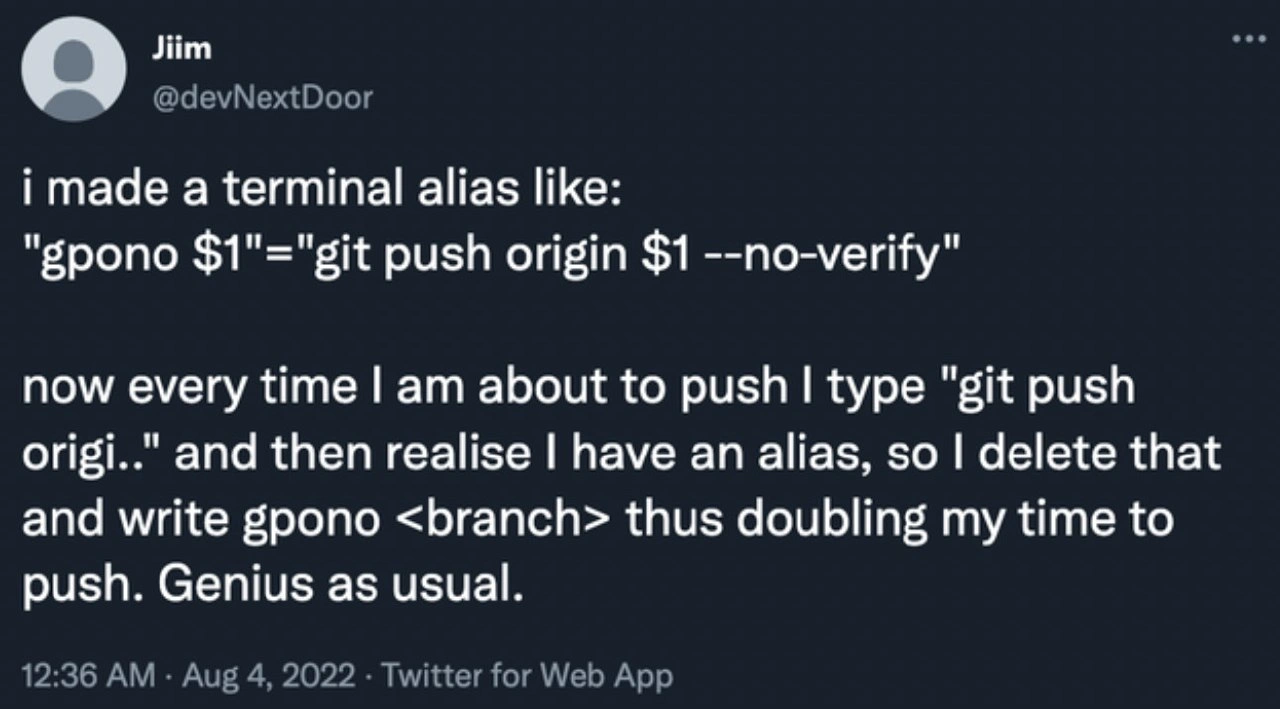
This meme hits experienced developers right in the muscle memory. It’s poking fun at a classic CLI workflow irony: a clever shell alias meant to speed up a routine Git command actually slows you down because old habits die hard. In the tweet screenshot, the developer created an alias gpono intended to quickly run git push origin <branch> --no-verify. The goal was simple – shorten a long Git push command and skip the pre-push checks (the --no-verify flag bypasses any tests or linters that normally run on push) to boost developer productivity. On paper, it’s a neat little DeveloperExperience hack. But in practice, the dev’s fingers still autopilot the longer command out of habit. Halfway through typing git push origi…, he remembers “Oh right, I have an alias for this!” and then backtracks to use gpono. The result? He ends up typing two commands for every push – effectively doubling the time it takes to push his code. Genius as usual, he remarks with self-deprecating sarcasm.

Seasoned developers chuckle at this because it rings true: we’ve all been caught by our own optimizations. It’s a mini cautionary tale about muscle memory vs. automation. The command line is all about efficiency and speed, but our ingrained typing habits can sabotage even the best shortcuts. In terms of version control humor, the scenario highlights how even a power-user trick can backfire. The --no-verify part shows the dev was trying to dodge slow git hooks (like lengthy tests) to save time, yet the savings are erased by the alias confusion tax. It’s a bash alias blunder many of us recognize – you eagerly add a new alias or script to streamline your workflow, only to find your fingers still insist on the old way. There’s an organizational memory in your hands: after years of typing git push origin, your brain treats it as muscle reflex. Changing that takes time (during which your “time-saving” alias might cost time).

This meme is funny to us because it showcases a harmless form of developer frustration. It’s the kind of everyday programmer problem that is both trivial and deeply relatable. We strive to be efficient with fancy shell setups, but end up laughing when human habit beats machine optimization. The tweet’s author basically live-commented a facepalm moment, and as fellow devs we nod knowingly. It’s a reminder that clever tricks aren’t always effective if you can’t retrain yourself to use them. In the end, the terminal humor here lies in the paradox: the shortcut turned into the long way around. We find it amusing (and a bit comforting) that even a command-line ninja can get tripped up by their own brain’s autopilot. As any battle-scarred coder would tell you, the fastest tool is only fast if you remember to use it. Until then, welcome to the club of self-defeating shortcuts!

# A familiar sight in the terminal:
$ git push origin feature-branch --no-verify  
# ...Oops, forgot I set up a shortcut for this...
# (User hits backspace repeatedly to undo the typed command)
$ gpono feature-branch  

Description

Screenshot of a tweet on a dark-themed Twitter UI. The tweet, from user “Jiim @devNextDoor”, reads: “i made a terminal alias like: "gpono $1"="git push origin $1 --no-verify" now every time I am about to push I type "git push origi.." and then realise I have an alias, so I delete that and write gpono <branch> thus doubling my time to push. Genius as usual.” The timestamp shows “12:36 AM · Aug 4, 2022 · Twitter for Web App”. Visually it’s white monospaced text on charcoal background, typical of tweet screenshots, with the user’s circular avatar at top left. Technically, the meme jokes about defining a shell alias to shorten the command “git push origin <branch> --no-verify”, but muscle memory makes the developer start typing the long command, delete it, and retype the alias, negating any productivity gain. It highlights CLI workflow habits, Git version-control ergonomics, and the irony of over-optimizing with tooling aliases


Comments

33
Anonymous ★ Top Pick Turns out my 200-line .zshrc is just a distributed cache where every alias is a cold miss - by the time I remember ‘gpono’, git already ran the pre-push hook I was trying to skip
  1. Anonymous ★ Top Pick

    Turns out my 200-line .zshrc is just a distributed cache where every alias is a cold miss - by the time I remember ‘gpono’, git already ran the pre-push hook I was trying to skip

  2. Anonymous

    The classic senior engineer optimization: spending 2 hours automating a 5-second task, then fighting muscle memory for the next 6 months while your alias silently judges you from .bashrc

  3. Anonymous

    The classic developer paradox: spending 10 minutes creating an alias to save 2 seconds, then spending 4 extra seconds every time remembering whether to use the alias or the full command. At scale, this is basically a distributed denial-of-productivity attack on yourself. The real optimization would be a git hook that detects 'git push origi' and autocompletes to the alias, but then you'd spend an hour implementing that to save those 4 seconds. It's technical debt all the way down, except the debt is owed to your own muscle memory

  4. Anonymous

    Git aliases: micro-optimizing the 1% of pushes while macro-sabotaging your daily muscle memory hot path

  5. Anonymous

    Added a git alias for 'git push --no-verify'; accidentally implemented "exactly twice" semantics: type 'git push', backspace, then 'gpono <branch>'

  6. Anonymous

    My gpono alias turned pushing into a two‑phase commit: muscle memory types 'git push origi…', rollback with Backspace, then reissue the alias - latency 2x, hooks still skipped

  7. @zakharov_iphonya 3y

    It's better to use "Oh my zsh" instead of own aliases, imho

    1. @sylfn 3y

      tr: "oh my zsh" helps a lot in situations like this Please use English as main language in this chat

      1. @briskovic 3y

        это че, не бот?

        1. @sylfn 3y

          tr: Isn't this a bot? Please use English as main language in this chat

        2. @sylfn 3y

          yeah i am not a bot

          1. @briskovic 3y

            please make a bot right now

            1. Deleted Account 3y

              i have made a ru to en translator bot some time ago

              1. @sylfn 3y

                what about other languages

              2. Deleted Account 3y

                https://t.me/TransRuEnBot

                1. @feskow 3y

                  oh lol i used it

                  1. @Zhenyokmsk 3y

                    Not bad

    2. dev_meme 3y

      OMZ slows down zsh.

  8. Deleted Account 3y

    let's rewrite it in rust :)

  9. @nicko_dema 3y

    happy to use this: gts - git status gaa - git add --all

    1. @SamsonovAnton 3y

      Do you use git add --all that often to create a shortcut for it? 😳

      1. @RiedleroD 3y

        also why wouldn't you git add -A?

      2. @nicko_dema 3y

        Yea)

        1. @SamsonovAnton 3y

          You got to lay off the coffee, dude!

          1. @nicko_dema 3y

            So if I rapidly corrected three files, why should I list them by name?

  10. @ahmubashshir 3y

    meanwhile I aliased git to g and have a few functions defined(eg. push/pull/clone), now I mistype everywhere else while invoking git...

  11. @theu_u 3y

    The only way I've used aliases is kubernetes namespaces aliasing. And then I've read about k8s context management...

  12. @realVitShadyTV 3y

    Linux moment

  13. @MagikarPoweruh 3y

    I don’t use aliases at all, if you need to type a long command like that you probably already typed it before so just use ctrl+r to search history instead of memorizing weird acronyms that you’ll never use again, fzf does a great job of making history search even faster by allowing you to fuzzy search the command list

    1. @gizlu 3y

      well

      1. @RiedleroD 3y

        ok technically I have custom scripts in PATH for things like this, so ig in some sense I have aliases too.

      2. @MagikarPoweruh 3y

        Just use make if you are going to build your project with so many parameters and options 😅

        1. @gizlu 3y

          The thing is that I don't use it for any particural project. This is incantation enabling shitton of warnings and runtime checkers, I use for debugging one file crap

Use J and K for navigation