Microsoft's Alternative Facts About System And Boot Partitions, Again Explained
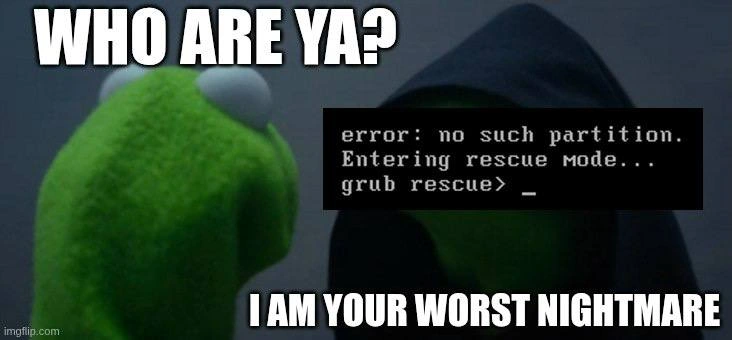
Why is this OperatingSystems meme funny?
Level 1: Swapped Name Tags
Imagine you have two important boxes in your house. One box has all the stuff to start up your day – let’s say it’s like a little kit with your alarm clock and coffee maker remote, the things that get you going in the morning. The other box has your actual daily supplies – like your clothes, your shoes, the things you actually wear and use throughout the day. Now, normally you might label the first box “Start Box” and the second one “Daily Stuff Box” so you know which is which.
But suppose someone accidentally swapped the labels on these boxes. Now the box that actually contains your clothes is labeled “Start Box,” and the box with the alarm clock and coffee is labeled “Daily Stuff Box.” You wake up and read the labels and get all mixed up — you open the “Daily Stuff” box expecting clothes, but you find an alarm clock instead! That’s pretty confusing, right?
This meme is joking about a similar kind of mix-up but in computers. Think of the computer like a house that needs to start up in the morning. One “partition” (which is like a box on a hard drive) has the tools to start the computer up (kind of like the alarm clock box – it’s needed to boot up). Another partition has the actual operating system – all the main programs and files the computer uses once it’s on (like the clothes and things you use for the day). Normally, you’d expect the label on these to make sense: “boot partition” for the one that boots up, and “system partition” for the one that has the system’s files. But Microsoft (the company behind Windows) switched the labels around from what many people expect. So it’s as if they called the boot-up box the “system box” and the everyday files box the “boot box.”
The result? People often get confused and go to the wrong “box” when trying to fix or set up things, just like you might open the wrong box in the morning because of the swapped name tags. The meme finds this funny because it’s such a silly mix-up to have in a very important place (if you grab the wrong box, your computer might not start, just like grabbing the wrong kit means no socks for you!). It’s highlighting that even big companies like Microsoft sometimes label things in odd ways, and all the engineers are joking, “Here we go again, having to explain these swapped names!”
In simple terms: the joke is that Microsoft’s names for those two parts of the computer’s disk are the opposite of what you’d think, and that’s caused a lot of “Wait, which box do I need?!” moments. It’s funny in the way a little misunderstanding is funny – as long as you’re not the one who needed the shirt but got an alarm clock instead!
Level 2: The Great Name Swap
Let’s break down what’s going on in simpler terms. Computers use disk partitions to divide a hard drive or SSD into separate sections, almost like splitting a bookshelf into different shelves. Each partition can hold a different set of files or even a completely different operating system. For a computer to start (boot up) properly, certain things need to be in the right partitions:
- One partition needs to have the bootloader (this is a small program that the computer’s hardware runs first to get the whole system up and running – basically the starter program that launches the main OS).
- Another partition usually holds the operating system itself (for example, all your Windows or Linux system files – the bulk of the OS lives here).
Now, most people would logically call the partition with the OS on it the system partition (since it has the operating system, the “system”) and the partition with the bootloader on it the boot partition (since it has the stuff to boot the computer). This is the common definition you’ll find in many places. For instance, in a typical Linux setup, you might have a small /boot partition that contains the bootloader and kernel, and the main partition (often just called the root partition) that contains the OS — you’d naturally think of that main one as the system disk.
However, in the world of Microsoft Windows, they use these terms differently – essentially swapping them around. In Windows documentation and tools:
- The “System partition” is the one with the bootloader and essential files needed to start Windows. It doesn’t contain the full Windows OS, just the files to kickstart the boot process. Often, this is a small, hidden partition that Windows creates during installation (on modern UEFI-based computers, this could be the EFI System Partition which is usually a few hundred megabytes, formatted in FAT32, that stores things like the Windows Boot Manager; on older BIOS systems, it might be a small
System ReservedNTFS partition). This partition might not even have a drive letter like C: or D: because end-users don’t usually need to mess with it directly. - The “Boot partition”, in Microsoft-speak, is actually the partition where the Windows operating system is installed – typically your C: drive (the one that has the
Windowsfolder,Program Files, etc.). So confusingly, the “boot” partition is where the OS lives and boots into, not where the bootloader is.
Think of it this way: Windows refers to the partition that the computer boots from initially as the “system” partition (because it’s critical to the whole system starting up), and the partition that contains the OS that eventually runs is called the “boot” partition (because that’s the partition that the system boots into to run the OS).
This naming is the opposite of what you’d expect at first glance. If someone says “check the system partition for errors,” a non-Windows tech might assume “okay, let’s check the OS drive.” But a Windows person actually means “check that small bootloader partition.” It’s easy to see how this could cause head-scratching.
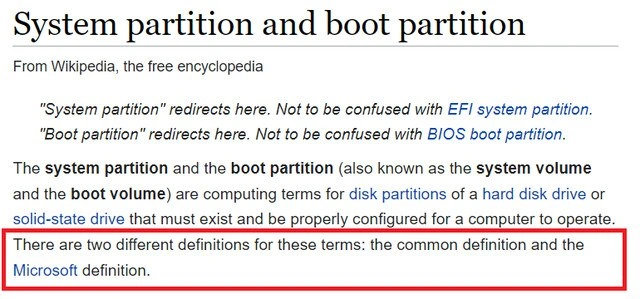
The Wikipedia screenshot in the meme underscores this confusion. It literally had to put a note saying “Not to be confused with EFI system partition” and “Not to be confused with BIOS boot partition” right under the title. Why? Because terms like system partition and boot partition are used in other contexts too:
- EFI System Partition (ESP): This is a specific term for UEFI-based machines – it’s a special partition formatted with a simple file system (FAT32) where UEFI looks for bootloader programs. Many operating systems use the term “EFI system partition” to mean that specific partition required by the UEFI standard. So if someone says “system partition” loosely, you might mix it up with this, but the Wikipedia page warns you not to.
- BIOS boot partition: In the context of GPT disks on BIOS systems (like when using GRUB on a GPT disk for Linux), there’s something called a BIOS boot partition, which is another tiny partition where parts of the bootloader might live (since BIOS can’t read GPT without help). Again, the note is saying: don’t mix up the general idea of a boot partition with this specific BIOS boot partition concept.
So the Wikipedia article is basically trying to cleanly explain that Windows uses its own definitions for “system partition” and “boot partition,” as opposed to everybody else. They even highlight that there are two definitions in total: the common one and the Microsoft one. That is almost meme-worthy on its own, because how often do you see an encyclopedia explicitly saying “X means two things, depending on if you’re using Microsoft’s dictionary or not”? It’s a hint at how much this has confused people historically.
For a newer developer or someone just learning about OS internals, this can be genuinely confusing. Imagine you’re following a guide to set up a dual-boot (say Windows and Ubuntu on the same machine). The guide from a Linux perspective might say “make sure the boot partition is large enough to hold the kernels.” You look at Windows and see something called “System Reserved” and something called the C: drive. You might reasonably guess “System Reserved = system partition (maybe the OS stuff?) and C: = boot partition (since Windows boots from C:?).” In reality, Windows would call “System Reserved” the system partition (contains boot stuff) and C: the boot partition (contains system stuff). If you followed the naming from the Linux guide without realizing the swap, you might allocate space incorrectly or mount the wrong thing, leading to a failed boot. Yikes!
Let’s give a concrete example to cement this: On a Windows 10 machine with a standard install, you’ll usually have a small partition, about 100 MB to a few hundred MB, that doesn’t even show a drive letter. This partition might be labeled “System Reserved.” This is where the bootloader lives (things like the Boot Configuration Data and boot manager). Then you have your C: drive which is hundreds of gigabytes and has Windows itself. Now, if you open Windows’ built-in Disk Management utility or use a command-line tool like diskpart, it will actually tag that small partition as “System” and the C: drive as “Boot”. It feels backwards, but it’s consistent with Microsoft’s definitions. They do also sometimes call the C: drive the “system volume” in plain English in some user-facing contexts, which adds to the mix-up, but in technical docs they stick to their unique terminology.
Why does this matter? Well, if you’re troubleshooting or scripting, you need to be very clear what’s what. For example, if a tutorial says “copy the boot files to the system partition,” a Windows-oriented tutorial is telling you to copy into the small bootloader partition. But a generic tutorial might mean copying into the OS partition. Misinterpreting that could mean your computer doesn’t start.
So, in summary, this meme is all about partition_definition_confusion. Microsoft basically swapped the name tags on two very important boxes in the computer. The result: a lot of conversations and documentation have to clarify “which definition are we talking about?” The Wikipedia screenshot provided is a perfect illustration of this universal confusion – it’s the encyclopedia effectively waving and saying “hey, just so you know, Microsoft speaks a different language for this.” As a new developer or admin, once you learn this, it’s like a little lightbulb moment: Oh! They just had the names opposite of what I thought. After that, you won’t fall into the trap so easily. But until you know, it’s an easy mistake to make. And that’s why those in the know find it a bit funny (and exasperating) – it’s a classic example of how something seemingly simple in tech (like what we call parts of a disk) can have these gotchas that require extra explanation. Consider it one of those rites of passage in understanding MicrosoftProducts versus the rest of the world: eventually someone taps you on the shoulder and explains, “Yeah… about those partition names… Microsoft does it differently,” and suddenly all those weird conversations on forums start to make sense.
Level 3: Alternate Partition Facts
At this level, we peel back the laughter to see the well-worn frustration shared by developers and IT pros when dealing with Windows disk management quirks. The meme is essentially poking fun at how Microsoft has its own special way of naming the most basic parts of a system’s storage – a way so nonstandard that even Wikipedia has to include a big red clarification box.
Wikipedia: “There are two different definitions for these terms: the common definition and the Microsoft definition.”
Reading that line on an ostensibly neutral info source is an eye-roll and a chuckle combined for anyone who’s wrestled with multi-boot setups or scripting Windows installers. It’s the encyclopedia’s polite way of saying “Brace yourself: Microsoft does it differently.” The humor lands because it confirms a suspicion every OperatingSystems nerd has had at some point: that we live in a world where facts aren’t always universal – at least not when Microsoft is involved. It’s like the tech equivalent of “alternative facts”, and it validates all those times you doubted your own understanding reading Microsoft’s documentation.
So why is this funny (in a slightly painful way) to developers and admins? Because it satirizes an industry pattern: Microsoft’s habit of taking common tech terms and giving them a proprietary twist. We’ve seen this movie before – whether it’s Internet Explorer’s take on web “standards” or Microsoft Word’s idea of a “DOC” file – Microsoft often marches to the beat of its own drum. Here, the terms system partition and boot partition sound generic and universal, but they carry a special Microsoft meaning that’s almost the opposite of what you’d think. It’s the classic naming bait-and-switch.
To a seasoned engineer, this line highlighted in the meme triggers memories and scar tissue:
- The dual-boot drama: Perhaps you recall setting up a Windows/Linux dual-boot. You carefully installed Linux on a second partition, set up what you thought was the correct Bootloader location, only to have Windows overwrite the Linux boot when it “repaired” the system partition. In hindsight, you realize you had misunderstood which partition Windows considered the sacred “system” one. Oops, there goes your GRUB.
- The recovery riddle at 3 AM: The server isn’t booting, throwing some cryptic bootloader error. Sleep-deprived, you run
bootrec.exeor fiddle withbcdbooton what looks like the main Windows drive (after all, that’s the OS partition). But the fix doesn’t work because the actual startup files live on a sneaky 100 MB partition elsewhere. You cursed the fact that Disk Management labels one small partition as System (the one your script ignored) and the big C: drive as Boot. Cue the facepalm when the realization hits that you were fixing the wrong partition the whole time. - The scripting surprise: You wrote a deployment script that should create a backup of the boot partition before a risky update. In testing on Linux, it grabbed
/bootjust fine. On Windows, it dutifully grabs drive C: (since “boot partition” = C: drive in common thinking)… and completely misses backing up the actual bootloader data on the separate system volume. The update goes sideways and the server can’t boot. Post-mortem: your script had followed common definition in a Microsoft world, and reality ensued.
These war stories all boil down to the same punchline: We thought we knew what “system” and “boot” meant, but Microsoft had a different plan. The meme’s highlighted text is essentially Wikipedia giving us a heads-up about this trap for the unwary. And it resonates because anyone who’s been that unwary soul will laugh (maybe a bit bitterly) at how a simple language discrepancy can cause very real technical headaches. It’s a shared secret among OS engineers and storage admins that Windows documentation can feel like reading through Alice’s looking glass at times – up is down, boot is system, black is white.
To clarify just how inverted these definitions are, here’s a quick comparison:
| Term | “Common” Definition (most OSes, general usage) | Microsoft’s Definition (Windows OS context) |
|---|---|---|
| System Partition | The partition containing the core OS system files (i.e. where the operating system lives and runs). Sometimes just called the OS partition or system volume in casual terms. | The partition containing the bootloader and critical startup files needed to boot the system (but not the OS itself). In Windows, this is often a small, hidden partition with things like bootmgr or BCD data. |
| Boot Partition | The partition containing the bootloader or initial boot files (for example, a small /boot partition on Linux with kernels and GRUB, or an EFI partition on UEFI systems). Basically, the place the computer boots from initially. |
The partition containing the Operating System itself (the Windows installation files, typically the C: drive with Windows\System32 etc.). It’s where the OS boots into after the bootloader handoff. |
Yes, you’re reading that right: under the common schema, “system” holds the system and “boot” holds the boot files; under the Microsoft schema, the system partition holds the boot files and the boot partition holds the system. It’s a terminology flip that has bewildered many a tech professional. In the wisecracking tone of the meme, it’s as if Microsoft said, “I reject your reality and substitute my own.”
And the Wikipedia screenshot itself adds a cherry on top. Notice how it had to include “Not to be confused with EFI system partition” and “Not to be confused with BIOS boot partition.” It’s as if the page is wearing a high-visibility safety vest, waving flags at readers: “Caution: Partition naming is a minefield!” The need for those extra disambiguation notes is part of the joke — it underscores how convoluted this has become. Think about it: we have System partition (Microsoft) vs system partition (EFI type) vs Boot partition (Microsoft) vs boot partition (BIOS/GPT context). That’s four meanings for two terms, depending on context. It’s a terminology soup only a storage admin (or a lexicographer with a sense of humor) could love. Little wonder that this became a developer meme: it’s a perfect example of the kind of esoteric gotcha that people in our field rant about over coffee or on forums, often with a mix of exasperation and laughter.
In practice, experienced folks have developed almost a muscle memory about this. Ask a seasoned Windows admin about the system partition, and they might smirk and reply, “Do you mean the one Windows calls ‘System’ or the actual system?” – fully aware that a partition_definition_confusion is at play. It’s an insider-check: are we speaking Microsoft-ese or normal English? This shared understanding (and the absurdity of having to clarify such a basic term) is exactly what the meme humor thrives on. Technical documentation ambiguity of this sort turns into a running gag: the documentation says one thing, but you’ve learned to double-check which dictionary it’s using.
Ultimately, the meme is funny because it’s true – painfully true – and it validates a common experience. It’s the community’s way of commiserating: “Remember that time you spent hours chasing a bug, only to realize you misunderstood what the docs meant by ‘boot partition’? Yeah, me too. Classic Microsoft.” By highlighting Microsoft’s alternative facts about something as fundamental as boot vs system partitions, the meme cuts right to a mix of frustration and humor. We laugh because we’ve all been tripped up by it, and sometimes the only sane reaction to such an insane little naming flip is exactly that: laughter (tinged with a bit of are-you-kidding-me sarcasm). As a cynical veteran might put it, Naming things is one of the two hard problems in computer science (the other being cache invalidation, as the joke goes). Here, Microsoft solved the naming problem by, well, renaming the problem – and inadvertently created a decade-spanning confusion. And so, this screenshot with its red highlight isn’t just Wikipedia housekeeping; it’s a monument to the collective eye twitch of countless devs and admins. The meme nails that feeling, and that’s why it draws knowing grins from anyone who’s been down the rabbit hole of microsoft_naming oddities.
Volume ### Ltr Label FS Type Size Status Info
---------- --- --------------- ----- ---------- ------ --------- ----
Volume 2 System Rese... NTFS Partition 500 MB Healthy System
Volume 3 C Windows NTFS Partition 100 GB Healthy Boot
// Example from Windows Disk Management: the small "System Reserved" volume is marked as "System",
// while the C: drive (with Windows installed) is marked as "Boot". Yes, they swapped the name-tags.
(Above: Even Windows’ own tools label the partitions in this confusing way. The Bootloader lives on the “System” volume, and the OS lives on the “Boot” volume. It’s as if Windows is doubling down on the terminology twist.)
In the end, those of us in the trenches of Operating Systems and storage can’t help but laugh at memes like this. It’s a laughter of solidarity and relief – thank goodness, I’m not the only one who thinks this is nuts! The meme’s punchline shines a spotlight on a tiny absurd corner of our tech world, one that outsiders might never even know exists. And having survived a few late-night partition fiascos, we’ve earned the right to find it funny. After all, if we didn’t laugh, we might cry – probably into our coffee, while re-imaging a server because we clicked the wrong “system” partition.
Level 4: Schrödinger's Partition
At the deepest technical level, the humor in this meme arises from a clash of definitions rooted in operating system boot architecture. When a computer powers on, the firmware (legacy BIOS or modern UEFI) initializes hardware and then looks for a special location on disk to hand off control. Traditionally, with an old-style Master Boot Record (MBR) disk, the BIOS loads a small bootloader from the first sector, which then locates an “active” partition to continue the boot process. In a UEFI world (with GPT partitioning), the firmware finds an EFI System Partition (ESP), a dedicated FAT formatted partition that stores bootloaders. Either way, there are two distinct roles at play: one partition holds the initial boot code (the bootstrap loader), and another partition holds the operating system itself.
The crux is that different ecosystems name these roles differently. In the common definition used by many systems and documentation, the term “boot partition” usually refers to the partition containing the bootloader or kernel needed to start up, while “system partition” would intuitively mean the partition containing the operating system (the system’s main files). However, in Microsoft’s Windows-centric documentation, the meanings are essentially inverted. According to official Windows terminology (originating from the design of Windows NT and carried through today), the “System partition” is the disk volume with the bootloader and boot manager files – the critical code that the firmware boots first – whereas the “Boot partition” is the volume where the operating system is installed (i.e. where the \Windows directory lives). In other words, the Microsoft definition labels partitions from the perspective of the machine’s boot sequence (“system startup here”) versus the OS that eventually boots (“OS lives here”). It’s a subtle yet profound naming reversal.
Why would Microsoft do this? The historical rationale lies in multi-OS scenarios and the evolution of boot processes. In a multi-boot setup, a single small partition might contain the bootloader that can launch one of many installed operating systems. Microsoft chose to call that shared, boot-critical partition the system volume – as it’s essential for the system to start at all. The partition that actually contains a particular OS (like Windows) they called the boot volume – since that’s where the OS boots up from after the initial handoff. This distinction was codified back in the Windows NT days and documented in the Microsoft TechNet and Knowledge Base articles. For example, Microsoft explicitly defined that the system partition contains hardware-specific startup files (like bootmgr, BCD or formerly NTLDR, BOOT.INI) and must be active/bootable, whereas the boot partition contains the Windows system files (the operating system’s own files, despite the confusing name). It’s a classic case of context-dependent terminology: from the viewpoint of the bootloader stage, the system partition is where the system’s boot begins; from the OS viewpoint, the boot partition is where the OS boots out of. Think of it as the partition having a dual identity, which can only be pinned down once you clarify which definition context you’re in – almost like a digital version of Schrödinger’s cat, the partition exists in two conceptual states until observation (or documentation) collapses it into either the common or Microsoft definition!
This dual definition would just be a pedantic footnote if it weren’t for the very real technical implications. Bootloaders and OS installers are extremely sensitive to which partition is which. For instance, Windows will insist on placing its boot manager in the System Reserved partition (often a small ~100 MB NTFS partition or the ESP in UEFI setups) separate from the main OS partition. If an engineer writing a cross-platform installer script assumes “boot partition” means the same on Windows as it does on Linux (where /boot contains the kernel and boot files), they might put files in the wrong place or reference the wrong volume, resulting in an unbootable system. The disk partition labeling matters: the firmware won’t magically find Windows’s boot files if they’re not on the expected system partition. Likewise, an OS won’t load if its files aren’t on what Windows considers the boot partition. There’s a rigorous logic (and some legacy necessity) under the hood here, tied to how the PC bootstraps itself. But that logic is entangled with nomenclature that defies the casual expectation.
From a theoretical perspective, this is also a lesson in how definitions in computing often diverge due to historical path dependence. Early PC operating systems (like DOS) did not need such dual terms – there was just one drive that both booted and ran the OS. But as systems evolved (think about the move from the simplicity of one-partition DOS to the complexity of multi-partition, multi-OS environments), new terms were coined in different circles. Microsoft arrived at their terminology through the lens of supporting multi-boot and advanced boot scenarios on Windows NT. Other communities (Unix/Linux, etc.) used more straightforward language for similar concepts, since they typically referred to a singular boot partition (for boot files, often mounted at /boot) and perhaps just the “root” or OS partition for everything else. Without a single standard across the industry, these definitions bifurcated like parallel universes. Hence we end up with Wikipedia – the arbiter of tech disputes – explicitly delineating the two universes of meaning. The meme screenshot showing “There are two different definitions for these terms: the common definition and the Microsoft definition.” is essentially highlighting a tiny documentation war: a recognition that one vendor’s vocabulary diverged so much from the norm that even an encyclopedia entry needs a diplomatic clarification.
In summary, the meme’s foundation sits on a deep well of OS internal design and the legacy of PC boot processes. It tickles the brain of seasoned engineers because it surfaces a kind of “insider” knowledge: the arcane fact that system vs boot can mean opposites depending on who you ask. It’s a truth that’s simultaneously absurd and logical – absurd in that two definitions exist for something so fundamental, yet logical when you unravel the historical and technical context. This paradox is what makes the meme intellectually satisfying at Level 4: it’s both a nod to the technical documentation ambiguity we often grapple with and a toast to the quirky, almost academic intricacies of operating systems. After all, in a domain governed by absolute truths (bits and bytes), seeing “alternative facts” coexist in documentation is a rare, head-spinning phenomenon. It’s the kind of thing that prompts OS veterans to smirk and say, “Yup, been there – only Microsoft could make a partition exist in a superposition of definitions.”
Description
The image is a screenshot of a Wikipedia page titled “System partition and boot partition.” Directly below the title is the line “From Wikipedia, the free encyclopedia,” followed by italic text: “"System partition" redirects here. Not to be confused with EFI system partition.” and “"Boot partition" redirects here. Not to be confused with BIOS boot partition.” The first paragraph states that the system partition and boot partition are disk partitions of a hard disk or solid-state drive that must exist and be properly configured for a computer to operate. A red rectangle highlights the sentence: “There are two different definitions for these terms: the common definition and the Microsoft definition.” The meme’s punchline resonates with OS engineers and storage admins who have battled Windows’ non-standard terminology when scripting installers, dual-boot setups, or recovery tooling

Comments
6Comment deleted
Microsoft’s “System vs. Boot” naming is storage’s UTF-16: double the labels, backwards compatibility baggage, and you still need a BOM to guess which partition actually starts the OS
Microsoft naming things backwards since 1985 - where the system partition boots your system and the boot partition contains your system files, because consistency is for developers who don't bill by the hour
When your documentation needs documentation to explain why there are two definitions for the same term, you've achieved peak enterprise architecture. Microsoft looked at the universally accepted definition of 'boot partition' and said 'hold my beer, let's swap these around' - because nothing says 'developer experience' quite like making the boot partition not actually be where you boot from. It's the technical equivalent of deciding that 'up' should sometimes mean 'down' depending on which vendor's documentation you're reading. At least Wikipedia is honest about the chaos: 'There are two different definitions' is just a polite way of saying 'good luck debugging your bootloader issues at 3 AM when half the Stack Overflow answers use the wrong terminology.'
Only Microsoft could make “boot partition” be the one without the bootloader - ask anyone who bricked a fleet with a DiskPart script
Microsoft's partition terms: the only thing more fluid than a distributed system's CAP choices
Only Microsoft makes the “boot partition” the one that doesn’t boot and the “system partition” the one that does - DDD by marketing; your dual‑boot pays the tax