Refusing senior dev salaries, happily footing the outrageous monthly cloud vendor bills
Why is this Cloud meme funny?
Level 1: Cheap Now, Pay Later
Imagine you have a sink that’s dripping water non-stop. You notice the leak, and you have two choices: Option A: pay a plumber once to fix the leak properly, which might be a bit expensive upfront, or Option B: refuse to pay for the fix and just let the faucet keep leaking. You choose not to call the plumber because you think you’re “saving money.” But what happens? That faucet drips day and night, and over the next weeks your water bill goes through the roof because so much water was wasted. In the end, you pay the water company a lot more money for all that wasted water than the plumber would have charged to fix it! Pretty silly, right? You tried to save a little money at first, but it ended up costing you much more later.
That’s exactly what this meme is joking about, but with computers and cloud services. The company didn’t want to spend money to hire a skilled programmer (like paying the plumber to fix the leak). They thought that was too costly. Instead, they let the “leak” continue – in this case, the app was inefficient and used a ton of extra computing power. Every month, they paid a huge cloud bill (like a huge water bill) because of all that inefficiency. SpongeBob in the first picture is the company saying “No thanks” to the upfront fix, and SpongeBob in the second picture is the company happily pulling out their wallet to pay the big bill later. The funny (and simple) lesson: being cheap in the beginning can become very expensive in the end. It’s like refusing to buy a good lock for your door and then spending a fortune cleaning up after a burglary – it just doesn’t make sense, and that’s why we find it amusing and ironic.
Level 2: Cloud Bill Shock
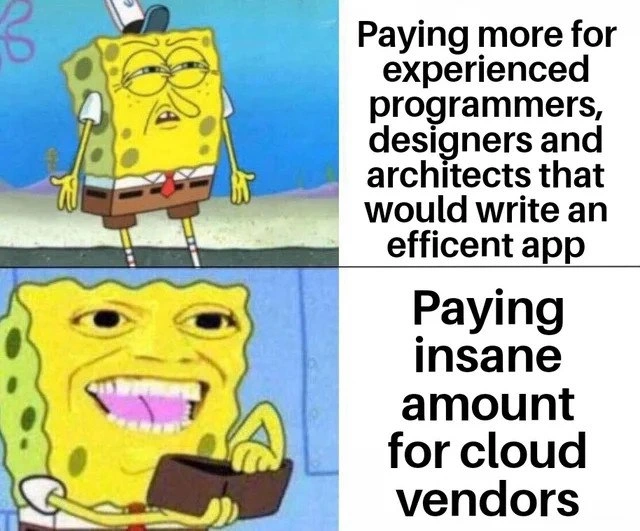
Let’s break down what’s happening in this SpongeBob meme in simpler terms. On the left side (top panel), we see SpongeBob looking bored and unenthusiastic next to the caption about “paying more for experienced programmers, designers, and architects to write an efficient app.” This represents a company (or managers) who don’t want to spend money on hiring or fairly paying senior technical people. Experienced developers, designers, and architects usually command higher salaries because they know how to build software that runs really well – by using better algorithms, cleaner code, and smart design so the app doesn’t waste computer resources. An efficient app means it can handle lots of users or data without needing tons of extra computing power. Writing efficient code might take a bit more effort or skill upfront, and that’s what the company is refusing to invest in. They’re basically saying, “Meh, why pay extra for these experts? That’s too expensive,” much like SpongeBob’s unimpressed face suggests “not worth it.”
Now, look at the right side (bottom panel) with SpongeBob suddenly excited, grinning widely and holding out his wallet. The caption there says, “Paying insane amount for cloud vendors.” Cloud vendors are companies like Amazon Web Services (AWS), Microsoft Azure, or Google Cloud – they rent out computing power, storage, databases, etc., over the internet (the “cloud”). Instead of running your app on your own server in a closet, you run it on servers owned by these big vendors and you get a monthly cloud bill for whatever you used. So, if your app is inefficient and needs a lot of servers or extra processing time, you end up paying these cloud providers a lot of money. In the meme, SpongeBob eagerly paying signifies the company has no problem spending big on cloud infrastructure. It’s like they’re saying, “Take our money, AWS!” with a smile. The phrase “insane amount” emphasizes that these bills are outrageously high. We’re talking perhaps tens or hundreds of thousands of dollars a month in cloud charges for a busy, inefficient application.
The humor (and the point) here is the contrast: the company won’t pay, say, a few thousand more per month for a skilled engineer (who could reduce how much computing the app needs), but they will pay perhaps ten times that to a cloud vendor every month to run the inefficient app. It’s a short-sighted approach. In simple terms, they skip buying a better engine for the car, then happily pay for extra gasoline every time they drive. The tags BudgetConstraints and Budget hint at this issue: companies have budgets and sometimes the way they allocate money is weird. They act like they can’t increase the engineering budget (payroll), but they somehow find money in the operations or cloud budget to cover these huge server bills. Often different departments handle these budgets, which can lead to this kind of disconnect.
Let’s clarify a few terms you might not know:
- CloudCostOptimization: This is a fancy way of saying “finding ways to reduce your cloud bill.” There are even teams or tools dedicated to this. They’ll do things like find unused servers to shut down, or re-write parts of the code to use less memory or CPU so that the cloud charges go down. The very existence of “cloud cost optimization” as a field is kind of because of scenarios like the meme: it became necessary when companies saw crazy high bills.
- FinOps: Short for “Financial Operations,” FinOps is basically the practice of managing and optimizing cloud spending – making sure you’re getting your money’s worth from the cloud and not overspending. Think of it as the marriage between the finance team and the tech team. It’s another relevant term because if a company is “paying insane amounts” for cloud, the FinOps folks would step in to figure out why and how to fix it.
- VendorLockIn: This means being dependent on a particular cloud vendor’s services to the point where it’s hard to switch. For example, if you use a database service that’s unique to AWS, moving to another provider (or back on-premises) would require a lot of change. The tag suggests part of the joke: a company that’s locked into their cloud might just keep paying whatever it costs because moving out or optimizing would be too much work without those experienced engineers (the ones they didn’t want to pay).
The SpongeBob meme format here is a specific one well-known on the internet. It’s a two-panel comic derived from SpongeBob SquarePants (a popular cartoon). The top image with SpongeBob standing unimpressed usually represents someone acting dismissive or bored about something. The bottom image with SpongeBob looking crazily eager (often edited to have him hold a wallet, as in “take my money!”) represents being very keen or excited to do something. Meme creators use this format to joke about hypocrisy or ironic priorities: not caring about A, but enthusiastically embracing B, where A and B together make the person look foolish. Here A = paying for better developers/effort upfront, B = paying huge cloud bills later. It’s showing an hypocrisy in a lot of companies’ priorities.
For a newer developer or someone outside this field, think of it this way: running software costs money. You can spend that money in two main ways – pay people to make the software efficient, or pay cloud companies for brute-force computing power to run inefficiencies. The meme is funny to developers because we often see companies choose the second option without realizing it. They say “no” to investing in code quality or skilled labor (perhaps that seems optional or hard to measure), but they say “yes” to whatever Amazon or Microsoft charges to keep the app running as-is. The end result is often a shock when the cloud bill arrives. There’s even a phrase “cloud bill shock” – that moment when a team or exec logs in to the billing dashboard and goes, “Whoa, we spent how much this month?!” The tags like cost_tradeoffs and efficiency_vs_scaling_costs encapsulate this: it’s all about the trade-off between doing things efficiently (less cost long-term) versus just scaling up with more machines (more cost long-term). This SpongeBob meme puts that trade-off in very stark, silly terms.
So, summarizing the scene in plain language: The company won’t spend extra on good developers who could make the app need maybe 5 servers, but they’re totally fine paying for 50 servers on the cloud. SpongeBob’s two expressions exaggerate just how backward that is – bored by the smart move, excited by the foolish one. It’s a form of developer humor and corporate humor rolled into one, poking fun at how businesses sometimes handle budgets and tech decisions. And for many of us in tech, it’s funny because it’s true – we’ve actually seen managers act exactly like SpongeBob in this meme.
Level 3: Penny Wise, Cloud Foolish
For the senior engineers in the room, this meme hits close to home. It’s pointing out the painfully ironic trade-off some companies make: they refuse to invest in experienced developers or architects who could build a more efficient system, yet they enthusiastically burn money on cloud infrastructure to prop up an inefficient one. It’s a classic case of being penny-wise and pound-foolish — saving a little in one budget (engineering salaries) only to waste far more in another (operational costs). The top half with SpongeBob’s bored, half-lidded expression perfectly captures management’s apathy towards the idea of “paying more for experienced programmers… to write an efficient app.” It’s that familiar scenario where a CTO or hiring manager scoffs at a senior engineer’s salary expectations or the time they request to refactor code for performance. The bottom half, SpongeBob eagerly holding out his wallet, shows the same company happily throwing down an insane amount of cash for cloud vendors. They won’t spend $1 to save $2, but they’ll spend $3 later and call it normal.
Why is this so relatable? In real projects, we’ve seen this pattern: instead of optimizing a slow database query, a company might just crank up the database server to a higher tier on AWS or add 10 more app servers behind a load balancer. Each extra EC2 instance, extra GB of RAM, or higher-tier managed service has a monthly price tag. Suddenly the AWS/Azure bill grows by tens of thousands of dollars, quietly recurring every month. Meanwhile, the cost of one experienced dev to fix the root cause might have been much less (and a one-time cost at that). Many of us have witnessed a horrifying cloud bill shock where the finance department goes, “Why are we spending so much on cloud this quarter?!” – only to learn that the application is doing a zillion inefficient operations per user. There’s a whole genre of war stories about e-commerce startups discovering a $100k/month cloud habit because their code scaled out inefficiently. This is exactly the cloud_spend_vs_developer_salaries tension: maybe they saved $100k by not hiring a senior systems engineer last year, but they’re paying $120k extra to Amazon or Google this year in server time. Oops.
The humor here also stems from corporate budgeting silliness. Often, payroll (salaries) and cloud infrastructure are separate budgets, handled by different VPs. Management might have strict budget constraints on headcount (“We can’t afford another senior developer”), yet treat the AWS bill as the cost of doing business (“We need the servers, so pay it.”). This fragmentation leads to absurd situations: approving huge cloud expenses without much scrutiny, while nickel-and-diming the engineering team. It’s not that cloud vendors are malicious – they simply charge for what you use – but they certainly aren’t complaining when a poorly optimized app cha-chings into their revenue stream. Vendor lock-in can amplify this: if your app heavily uses one cloud’s proprietary services, you’re handcuffed to them. Refactoring or migrating away (to another vendor or on-prem hardware) would require the same kind of seasoned experts or project time that the company originally avoided. So, they remain locked in, and the vendor can keep charging that premium. It’s like being stuck with an expensive habit because quitting would require professional help – help you didn’t want to pay for initially.
From a seasoned developer or architect’s perspective, this is equal parts frustrating and vindicating. We often argue that investing in good architecture and optimization pays off, but those are invisible wins (nothing flashy to show in a sprint demo). Management sometimes prefers funding visible things like new features or marketing campaigns, while assuming the cloud will just “scale” to handle whatever – essentially treating the cloud as an infinite resource that magically adjusts. And it does adjust, but the magic comes with a very real bill. Only later do they realize the code wasn’t efficient when the FinOps folks come knocking or the CFO’s eyes bulge at the cloud invoice. In recent years, entire FinOps teams and cloud cost optimization tools have sprung up as a reactive measure – a tacit admission that “maybe we should have written this more efficiently or planned capacity better.” The meme’s bottom caption “Paying insane amount for cloud vendors” is basically what a panicked company does when they skip the upfront investment: they pay through the nose continuously, feeding fat profit margins of cloud providers. (Someone’s funding Jeff Bezos’s next yacht, and it’s not coming out of the CEO’s paycheck, apparently.)
The SpongeBob format underscores the absurdity with humor: SpongeBob’s unimpressed face = management not valuing skilled dev work; SpongeBob’s excited wallet-out face = management eagerly paying the cloud bills. That wide-eyed eagerness in the second panel feels like a personal callout—every senior dev can practically hear some VP excitedly saying, “We’re all-in on cloud!” as the meters run. Meanwhile, the dev team is facepalming, knowing that a bit of refactoring or better design could slash those costs. It’s a form of technical debt irony: you either pay engineers to do it right, or you pay Amazon/Google later for all the extra cycles and servers. And guess which option many companies strangely choose? Exactly what the meme shows.
One could also call this a lesson in false economy. It reminds us of Parkinson’s Law of Triviality (a.k.a. the bike-shedding effect): people in organizations often spend excessive time and energy on things that are simple (like debating salaries, which they understand) and blindly approve enormously complex expenses (like cloud architecture) because they don’t feel qualified to question them. The result? The trivial expense gets cut (no senior hire), the massive expense sails through (sky-high cloud usage), and everyone later wonders why nothing is in the budget for bonuses – it all went to AWS! The senior engineers laugh (perhaps a bit bitterly) because we’ve been in those meetings where our suggestions for a more efficient approach are ignored, only to end up spending far more to brute-force things with hardware. In summary, the meme’s humor comes from highlighting a very real-world tech management folly: being stingy with developer investment but lavish with cloud spending, a dynamic that is as backward as it sounds, yet surprisingly common.
Level 4: Big O($) Complexity
At a deep technical level, this meme highlights how algorithmic efficiency (or the lack thereof) directly translates into cloud resource costs. In theoretical computer science, we classify how fast algorithms grow with input size using Big O notation. Here, paying for an experienced developer is essentially paying to reduce the Big O (or at least the constant factors) of your application’s workload. Why does that matter? Because if an app’s code is inefficient – say it runs in $O(n^2)$ time – then doubling your users or data might quadruple the work the servers must do. And in the cloud, more work means a higher bill. Cloud vendors charge for usage (CPU hours, GB of memory, disk I/O, network throughput, etc.), so inefficient code that performs unnecessary computations is literally like an interest rate on your monthly bill, growing faster and faster as you scale.
For example, imagine a naive algorithm that compares every user to every data item (O(n * m) complexity):
# Naive quadratic approach: cost grows with n*m
for user in users:
for item in items:
process_pair(user, item) # This runs len(users)*len(items) times
A seasoned engineer might replace that with a more efficient method (using better data structures or caching) that might only loop once or sort data first to cut down work – perhaps bringing it to O(n log n) or O(n). Fewer operations per request mean the app can handle more users on the same hardware (or the same users on smaller/less servers). In pure math, if the original cost grows like $n^2$ and the optimized version grows like $n$, then for large $n$ the difference in required compute (and thus money) is enormous. Put simply: optimizing code trims the fat that cloud providers would happily charge you for.
This is tied to the concept of technical debt in software engineering theory. Not investing in efficient design upfront is like taking a “loan” – you save time/money now but owe payments later. Here those payments accrue as cloud fees: every inefficient database query or wasteful loop is paid for in dollars to your vendor. As the system scales, that debt interest compounds. There’s even a financial-devops hybrid field called FinOps (Financial Operations) focused on wrangling this exact problem – essentially applying scientific rigor to identify where sloppy code or over-provisioned infrastructure is draining money. In a way, FinOps is about optimizing the asymptotic $$ cost = f(\text{inefficiency}) $$ embedded in your architecture.
Historically, Moore’s Law (computers doubling in power every couple of years) allowed developers to get away with some bloat – tomorrow’s hardware would often cover yesterday’s inefficient code. But in the cloud era, Moore’s Law doesn’t save your budget because you’re renting computing by the hour. Modern cloud platforms are elastically scalable: if your software needs more CPU or memory due to inefficiency, the cloud just provides it – and quietly meters the extra usage to your bill. There’s no immediate technical failure when code is wasteful (the app still “works” by just using more machines), but the theoretical inefficiencies still obey the laws of math and show up as an exponential-looking invoice. In essence, computational complexity becomes financial complexity. An $O(n^2)$ algorithm doesn’t just run slower, it costs more at scale – fundamentally. No clever cloud architecture can completely cheat those growth curves. The bottom line (pun intended) is that there are hard theoretical limits and cost trade-offs at play: you either pay in engineering effort or you pay in cloud resources. This meme exposes that absurdity when the choice is made to pay the latter in spades. In big-O terms, being cheap with code quality is an O(∞) expense in the long run.
Description
Two-panel SpongeBob meme with a vertical divider: on the left of each panel is SpongeBob SquarePants. In the top panel he stands half-lidded and unimpressed; on the right the caption reads, "Paying more for experienced programmers, designers and architects that would write an efficient app." In the bottom panel SpongeBob leans forward wide-eyed and eager (partially blurred in this version), while the right-hand caption says, "Paying insane amount for cloud vendors." The joke highlights how some companies balk at higher payroll for senior engineers who could optimize code, yet freely overspend on cloud infrastructure. For seasoned devs, it skewers real‐world trade-offs between up-front engineering quality and runaway cloud bills
Comments
17Comment deleted
Corporate cost strategy: deny a 30% raise to the engineer who can delete the N+1 query, green-light a 300% spike in egress fees, then wonder why ‘kubectl get runway -n finance’ returns 0 days
The same company that won't approve a $20k raise for a senior architect who could cut cloud costs by 40% just auto-renewed their $2M/year Kubernetes cluster that's running at 15% utilization because 'we might need the capacity someday.'
The real cloud cost optimization strategy nobody talks about: hiring senior engineers who actually understand what 'pay for what you use' means before spinning up that auto-scaling group with no upper limit. But sure, let's negotiate another $5k off that Staff Engineer's offer while our Lambda cold starts rack up more egress charges than their entire annual salary
Why hire a principal to kill the N+1 and fix cache locality when you can autoscale 200 c7g.16xlarge and call it OpEx - FinOps will optimize it next quarter
Cloud economics 101: Pay senior architects once; pay vendors forever for the 'scalable' bloat they enable
Skip the principal who’d kill the N+1; buy more nodes and pay the egress - don’t worry, Finance calls it elastic OPEX
I mean, 1k per month sounds like a lot until you remember that humans are expensive as Fuck and that's the salary of one mid-range programmer. Comment deleted
isn't 1k/month in Austria is barely enough to survive? Comment deleted
no? I think 500/month is the bare minimum, depends on where you live and if you inherited a house or not though Comment deleted
thing is we don't really have a minimum wage system because our unions are so strong that we don't need it. How much money you need depends mostly on your preferred standard of living. With 500/mo. you're certainly not going to be homeless, but it's not going to be the ritz either Comment deleted
But in the long term though... It seems to me that scaling the team up in both quality and quantity to write an efficient, maintainable app and then scale it back down would be more beneficial than constantly paying for the managed clouds 🤔 Comment deleted
I guess it depends on the type of software Comment deleted
Depends on what you do. Currently a lot of companies move from cloud only to hybrid and with edge computing we also start to slowly move some of calculations to the client side Comment deleted
Well I guess that qualifies for "efficient app", because there's definitely no need to compute everything in the managed clouds Comment deleted
1k to run a To-do app Comment deleted
Insane amount is not 1k. Usually you start to reconsider if you pay more for cloud month then you would pay for 1 programmer per year. Comment deleted
Compare 1k/month for years vs 10k/month for 6 months. If you don't expect any success: you will pick first option. Comment deleted