
Skip to content
DevMeme
427 of 7435
The Escalation of Power: Run, Administrator, and sudo
CLI Post #495, on Jul 28, 2019 in TG

The Escalation of Power: Run, Administrator, and sudo

Why is this CLI meme funny?

Level 1: Permission Power-Up

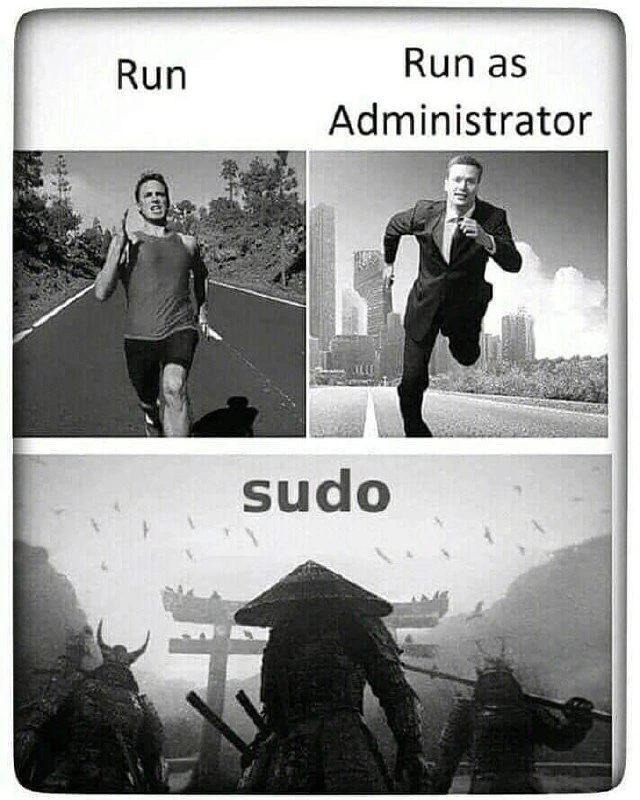
Imagine you have three different permission levels, like roles in a game or keys to a house. First, you’re just a normal person going for a jog in your neighborhood – that’s like running a program normally, nothing special needed. Next, suppose you suddenly need to do something important that only a school principal or a boss can do. You put on a suit and start running with urgency through a busy city street – that’s like saying “I’m the administrator now!” on a Windows computer. You’ve got more authority than the average person, so you can access more places, kind of like having a master key to many rooms.

Finally, imagine you’re in an old samurai movie. You’re not just running – you and two fellow warriors are walking through the mist with swords drawn, approaching a huge gate for an epic showdown. This is the level where you have all the power – no door is locked to you, no rules hold you back. That’s what using sudo on a Linux computer feels like. It’s as if you’ve become a legendary hero who can do anything. It’s funny because we’re talking about just running computer commands, but it feels adventurous. Normally, using a computer is casual like a jog. But if you run things with higher privileges, suddenly it’s like you’re on a high-stakes mission or an epic quest. The meme makes us laugh by showing just how dramatically that feeling changes – from a simple jog, to a serious sprint, to an almost mythic samurai march – all because of how much permission the computer gives you. It’s a big power-up in each step, and seeing it pictured this way is both relatable and hilariously over-the-top!

Level 2: Elevating Privileges

Let’s break down what’s happening here. In computing, to “run” a program just means to execute it normally, using your current user account’s privileges. For example, if you double-click an application or type its name in the CLI (Command Line Interface), it runs with whatever access your user has. Most of the time, that’s fine for regular tasks. You as a normal user can read and write your own files, open apps, maybe modify user-level settings. The top-left panel showing a guy jogging on an open road labeled “Run” represents this ordinary, low-risk execution – he’s moving at a comfortable speed, on a regular path, nothing extraordinary.

Now, sometimes a program needs more power than a normal user has. Maybe it needs to change a system setting, install software, or modify files that are protected. On Windows, you’ll encounter an option called “Run as Administrator.” This is the middle panel with the man in a business suit sprinting in the city. In Windows, Administrator is the high-privilege user role (the Windows equivalent of a superuser). When you choose “Run as Administrator,” you’re telling the system “Hey, give this program the keys to more of the city.” Practically, Windows will likely flash a UAC (User Account Control) prompt – that familiar dialog asking “Do you want to allow this app to make changes to your device?” If you say yes (and provide an admin password if needed), Windows starts the program with administrator rights. That means the program can now access sensitive parts of the system that were off-limits before (like writing to C:\Program Files or changing system-wide settings in the Registry). The meme’s image of a suited man running conveys that things just got serious and urgent – he’s not casually jogging, he’s on an important mission. It’s a playful way to show that elevating to admin is a step up in intensity and authority.

Finally, the bottom panel: “sudo”. This term is specific to Unix/Linux (and macOS) environments. sudo stands for “superuser do.” It’s a command you put in front of another command in a terminal, and it means “run this as the superuser.” The superuser (called root on Unix systems) is like the ultimate administrator account – it can do anything. Normally, your Linux system won’t let you, say, delete a protected system file or listen on a low-numbered network port, unless you’re root. When you need to do those privileged actions, you use sudo. For example, instead of running apt install something and getting a permissions error, you run sudo apt install something and the system will (after you enter your password to prove you’re allowed) execute it with root privileges, installing the software system-wide.

The meme humorously shows “sudo” with those three samurai because in the developer world, sudo is renowned as a powerful tool. Visually, the samurai scene implies maximum power and a legendary level of authority. And honestly, that’s how it feels sometimes! With a single sudo command, you can override almost any restriction on the machine. The trade-off is that you must be careful – the system trusts you know what you’re doing. In practical terms, when you run a command with sudo, the system might ask for your password (to verify you’re in the sudo-approved user list, often the “sudoers” group). Then it executes the command as if the root user ran it. After that, you’re back to your normal user. This way, Linux/Unix gives you a way to do admin-level tasks without staying logged in as the root user all the time. It’s like a one-time permission boost.

So, in summary, the meme is comparing three levels of running a program:

  • Normal run – just you, the regular user, doing your thing (jogger image).
  • Run as Administrator – you put on the admin hat in Windows, getting extra powers temporarily (business sprinter image).
  • sudo – you invoke the ultimate power on Linux/Unix, becoming root for one command (epic samurai image).

This comparison is funny to developers because we often talk about these modes in day-to-day work. Each step up (from run → admin → sudo) is a bigger deal in terms of what you’re allowed to do, and the meme uses imaginative visuals to exaggerate that escalation. If you’ve ever typed a command in the terminal and had the computer sternly refuse until you added sudo – you know the triumphant, slightly scary feeling when it finally goes through. This comic trio of images captures that feeling perfectly.

Level 3: Superuser Swagger

Seasoned developers immediately smirk at this meme because it nails a common experience: the dramatic rush of going from normal user to superuser. Running a program normally (“Run”) is mundane – like jogging through your daily tasks. But hit that “Run as Administrator” in Windows, and suddenly you’re sprinting with purpose, maybe hearing the whoosh of a User Account Control prompt. It’s a familiar scene: you try to edit a protected file or bind to port 80, and Windows firmly says “Access Denied.” Fine – you straighten your tie, right-click Run as Administrator, and now the gates open. The meme’s second panel (the businessman in mid-sprint) perfectly captures that urgency and slight power-trip of elevating to admin on Windows. It’s still you, but with a lot more clout – enough to install drivers or tamper with the system configuration. Many of us recall the first time we learned we had to do this (perhaps debugging why our server wouldn’t start on a privileged port), and the almost ridiculous relief when the admin mode just worked.

Then comes sudo. Ah, the legend of sudo – in developer culture, it’s almost mystical. The meme escalates to an epic battlefield with samurai because using sudo feels like unsheathing a katana forged in code. In Unix-like environments, prefixing a command with sudo is like invoking ancient magic: you’ve suddenly got root’s authority. This power can be intoxicating. Linux users often joke that adding sudo in front of a failing command is a universal fix. Forgot to access a file? sudo it. Tool won’t install? sudo it. There’s a famous comic strip where one character refuses to make a sandwich for another – until he hears “sudo make me a sandwich”. Then he grudgingly replies, “Okay.” 😄 That punchline lands because sudo is a real-life “override everything” button.

But why the samurai warriors imagery? Because with great power comes… great drama (and responsibility). Using sudo can be both triumphant and perilous. A seasoned sysadmin has that warrior’s discipline: you double-check the command before hitting enter, aware that as superuser you could slay the wrong target (like accidentally deleting system files). Many of us have had that heart-stopping moment: a stray sudo rm -rf in the wrong directory can turn your system into a war-torn valley of wreckage. So yes, running with sudo is epic – one wrong move and you might as well have swung a sword through your own server. The meme brilliantly exaggerates this: the casual runner and the business sprinter are still within normal bounds, but the moment we talk sudo, it’s portrayed as an ancient battle ritual under a torii gate. It’s so extra, and that’s why it’s hilarious. It taps into the almost reverent attitude developers have about root privileges.

There’s also an implicit nod to Linux vs Windows culture. The Windows “admin” step, while important, is often seen as a button click – a slight inconvenience with a pop-up. In contrast, working at a Unix terminal with sudo feels hacker-ish and hardcore. The meme leans into that contrast: the guy in a suit running (Windows admin) is powerful, sure, but the robed samurai (Linux sudo user) is on another level entirely – operating in a realm of swords and honor. It pokes fun at how developers sometimes mythologize command-line mastery. After all, typing commands in a terminal can feel like wielding a sword if you’re used to point-and-click interfaces. And when you’re new, the first time you see a terminal tell you “Permission denied” and then watch sudo blast through that wall, it truly feels like conjuring a warrior spirit.

In essence, the meme resonates because it’s too real. The difference between running something normally, running as admin, and running with sudo isn’t just a technical increment – it feels like a transformation. Every senior dev has been there: you try the gentle way, then the formal way… and finally, the “okay, time to bring out the big guns” way. Each step has higher stakes. The humor lies in exaggerating those stakes to the point of absurdity, yet every developer nods thinking, “Yup, been there.” The casual jog, the urgent sprint, and the climactic showdown – all to execute a command with the right permissions. It’s an epic tale we live in miniature every time we troubleshoot environment issues, captured in one perfect visual sequence.

Level 4: Root of All Permissions

At the operating system level, privilege escalation is governed by the core design of multi-user systems. In Unix/Linux, every process runs with a user ID that determines its permissions. The root user (user ID 0) is all-powerful – the kernel typically has conditions like if (uid != 0) { deny(); } gating sensitive operations. When you invoke sudo, you're leveraging a special mechanism (the setuid bit on the sudo program) that tells the kernel “run this program with elevated privileges.” Under the hood, running sudo temporarily grants the process root credentials. The sudo program itself switches user context by calling low-level system calls (like seteuid(0)) to become superuser, executes the target command, then drops privileges. This principle of least privilege in action means you only wear the “root hat” for the one task at hand.

On Windows, the architecture is different but conceptually similar. Windows uses an access token model: processes have a token with user identity and a set of privileges (like “can load device drivers” or “can write to system directories”). An Administrator account’s token includes powerful privileges, but since Windows Vista, even admins run day-to-day tasks with a limited token. Choosing “Run as Administrator” triggers a transition (via User Account Control) where the system creates a new process with a full administrator token. The OS kernel then grants this process abilities that were withheld from normal users – whether it’s writing to C:\Windows or changing machine settings. Essentially, Windows asks the gatekeeper (the Secure Desktop prompt) before handing you the master key.

Both approaches trace back to fundamental OS security: separating normal operations from critical ones. Early Unix established the singular root account as the superuser who bypasses all permission checks. Over time, features like sudo evolved to avoid logging in as root directly, reducing risk. Likewise, Windows initially operated with users often running as admin all the time (a security nightmare), and later introduced controlled elevation. In both cases, the “RunRun as Adminsudo” progression reflects increasingly powerful authority over the machine. The meme humorously exaggerates this progression, but it’s rooted (pun intended) in real technical differences: from a routine user-space execution to crossing the guarded boundary into the OS’s protected realm. When you reach the samurai level of sudo, the system’s fundamental permission gates swing open like a torii gate welcoming a warlord. You’ve entered the domain where the usual rules don’t apply – a testament to just how mythic superuser power is in computing.

Description

A three-panel, black-and-white meme that visually compares levels of command execution privileges. The first top-left panel, labeled 'Run,' shows a man in athletic clothes casually jogging on a road. The second top-right panel, labeled 'Run as Administrator,' depicts a man in a business suit running urgently through a city, implying a higher level of importance. The third, larger bottom panel, labeled 'sudo,' shows three formidable ancient Japanese warriors in full armor, standing ready for battle before a torii gate, symbolizing ultimate power and authority. This meme humorously equates the standard 'Run' command to a simple task, Windows' 'Run as Administrator' to a more serious, privileged operation, and Linux/Unix's 'sudo' command to an epic, god-like power that grants the user absolute control over the system. The joke resonates with developers who understand that using 'sudo' provides root access, the highest possible privilege level, which is both powerful and potentially dangerous


Comments

7
Anonymous ★ Top Pick The main difference is the undo capability. For 'Run', you just stop. For 'Run as Administrator', you call IT. For 'sudo', you update your resume
  1. Anonymous ★ Top Pick

    The main difference is the undo capability. For 'Run', you just stop. For 'Run as Administrator', you call IT. For 'sudo', you update your resume

  2. Anonymous

    “Run” is jogging unit tests, “Run as Administrator” is sprinting through a demo, “sudo” is unsheathing the prod shell - one stray * and you’re refactoring the disaster-recovery playbook in real time

  3. Anonymous

    The difference between "Run as Administrator" and sudo is that Windows still asks you three times if you're sure, while sudo just assumes you've already accepted the consequences of accidentally deleting /etc instead of ./etc

  4. Anonymous

    The meme perfectly captures the existential weight difference between clicking 'Yes' on a UAC prompt versus typing 'sudo' in a terminal - one is a polite request to Windows, the other is you telling the entire system 'I know exactly what I'm doing' (narrator: they rarely do). The samurai imagery is apt: with great sudo power comes the ability to recursively delete your entire filesystem with no confirmation dialog, no undo, and the kind of finality that makes production incidents look like minor inconveniences

  5. Anonymous

    Windows politely nags for UAC; sudo hands you root and whispers 'no backups, no mercy'

  6. Anonymous

    Windows asks for consent; Unix hands you a katana - hence seniors insist on sudoers scoped to just “systemctl restart,” not NOPASSWD:ALL

  7. Anonymous

    “Run” is harmless; “Run as Administrator” is permission theater; “sudo” is basically setuid-ing your weekend

Use J and K for navigation
