The Essential 'Data' Backup Every Engineer Needs
Why is this Deployment meme funny?
Level 1: Seatbelt for Software
Imagine you’re about to do something big and a bit risky, like riding a bike down a steep hill or trying a daring move in a video game. What’s the smart thing to do first? Put on your helmet or save your game! That’s basically what a backup is for a software project. It’s like a seatbelt for your app’s data. Before driving a car, you always buckle your seatbelt just in case something goes wrong. In the same way, before a programmer makes big changes to a live website or game, they save a copy of all the important stuff (that’s the backup). If the ride turns out bumpy or there’s a crash (the new changes mess things up), the seatbelt – or backup – makes sure everyone stays okay. You can fix the site by using the backup copy, just like you’d be kept safe in an accident by the seatbelt. The meme is basically a friendly teacher saying, “Don’t forget to do your safety step!” It’s funny because the person in the picture is super calm, drinking coffee, since they know they’re protected. So remember, just like you wouldn’t skateboard without a helmet or close a game without saving, a good developer never launches big changes without a backup. It keeps your work safe and sound, no matter what happens next.
Level 2: But Did You Backup?
Let’s break down the scenario for newer developers or anyone unfamiliar with these deployment jitters. In software, “deploying to production” means taking the latest version of your code and releasing it to the place users interact with – the live website or app. It’s like putting a new engine part into a running car: if something doesn’t fit or fails, the whole car (your site) could stall. That’s why having a data backup is crucial. A data backup is simply a copy of your important information (like your database contents, user files, etc.) saved somewhere safe. In this meme, they specifically mean backing up the production database before you deploy new changes. The database is where all the dynamic stuff lives – user accounts, orders, posts, game scores, you name it. Unlike code (which you hopefully have in Git or version control), this data isn’t something you can just re-create from memory if it gets wiped out. If those records vanish, they vanish for good – unless you have a backup copy to restore from.
So why the coffee mug and the “friendly reminder” vibe? Well, in developer culture (especially among DevOps engineers and SREs – the folks responsible for site reliability), it’s common to share important best practices in a lighthearted way. Think of it as a senior team member popping into the office chat and saying, “Hey everyone, quick heads-up: remember to run a backup before you hit deploy today 😇.” They’re being casual, but the advice is super important. Deployment anxiety is something you might feel when you’re new to launching code changes. Your heart might race a bit when you click that Deploy button, because you know it could either go smoothly or cause an outage. Knowing you have a recent database backup is a huge relief – it’s like a safety net. If the new version of your app has a bug that, say, mistakenly deletes a bunch of user data or scrambles information, you can use the backup to recover the lost data and set things right. Without a backup, you’d be in full panic mode, because there’d be no easy way to get that information back.
Some key terms here: Backup and Recovery is the pair of practices that go hand in hand. Backing up is making the copy, and recovery is using that copy to restore things if something goes wrong. In databases, a common way to back up is to export all the data to a file (for example, using a command like mysqldump for MySQL or pg_dump for PostgreSQL). That file can be stored on another server or in cloud storage. If disaster strikes, you can import that file to get the database back to the state it was in when the backup was taken. This is much easier and safer than trying to manually fix each broken piece of data (or apologizing to users that their stuff is gone). DataLoss is just what it sounds like – losing information that people expected you to keep. Even losing a small amount of production data can be a big deal: imagine a banking app losing transaction records, or a game losing a player’s progress. Not good, right? That’s why teams have policies like “no deploying to prod on Friday afternoon” (so you don’t end up working all night or over the weekend if something breaks) and “always ensure a current backup before deploying.” It’s all about minimizing risk.
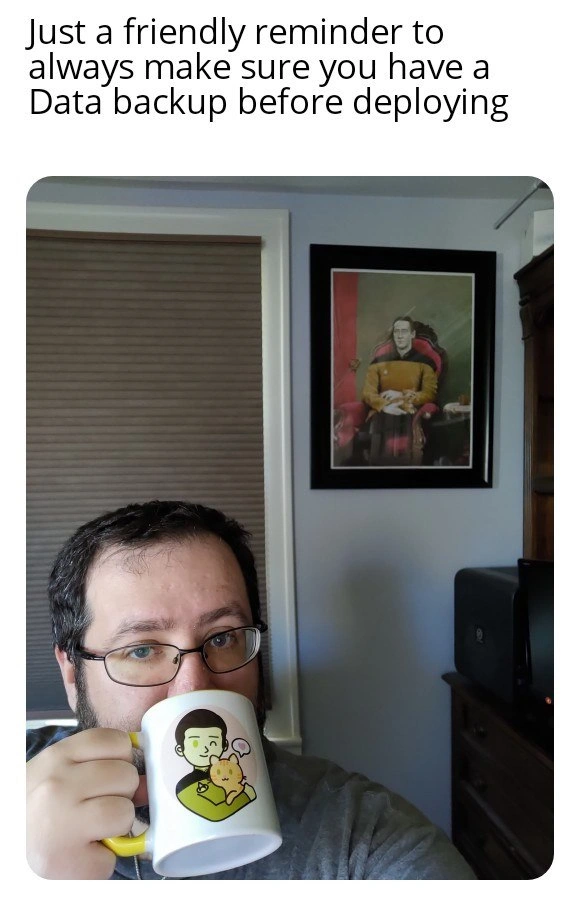
The meme itself is done in a PSA meme format – the top text delivers the message, and the image reinforces it with a bit of humor. Here the image is a selfie_dev_life moment: a real developer at home, looking relaxed with his coffee. The funny thing is imagining him saying: “No worries, I got my coffee... and yes, I did my backups!” The coffee_mug_message (that cartoon on his mug) creates a casual, friendly tone. It’s as if he’s saying, “I may be chill now, but only because I took the proper precautions.” For a junior developer, the takeaway is: before you do something risky in production, like deploying a major update or running a script on the live database, take a few minutes to backup your data. It’s a simple step that can save you from huge headaches. Think of it like saving your progress in a game or making a copy of an important document – you hope you won’t need that copy, but you’ll be extremely glad to have it if something unexpected happens. In the world of IT, an ounce of prevention (a quick backup) is worth a pound of cure (trying to undo a big mistake without one). And if your senior teammates keep reminding you about backups with a grin, it’s because they learned the hard way how painful it is when you don’t have one. 😅 In short: Better safe than sorry is the mantra here, and a backup is what keeps you safe.
Level 3: Production Service Announcement
At first glance, this meme looks like a casual public service announcement – a developer calmly sipping coffee under a stern warning: “Always make sure you have a data backup before deploying.” Seasoned engineers recognize this as a tongue-in-cheek DevOps gospel. The juxtaposition of a relaxed home-office selfie with that urgent reminder is no accident: it reflects the hard-won wisdom that Deployment time is only calm if you’ve done your homework. In the world of DevOps/SRE, a coffee break during a prod deploy is a luxury you earn by having a solid backup and recovery plan. The meme’s humor comes from this contrast – the developer appears nonchalant, mug in hand, precisely because they’ve guarded against the worst-case scenario. It’s a “keep calm and carry on” moment for tech: keep calm because you took a backup.
Underneath the friendly phrasing lies a serious DeploymentPainPoint that veterans know too well. Pushing new code to production can be a nail-biting affair – data migrations can misfire, bugs can corrupt customer information, or a script might accidentally DROP DATABASE production;. 😱 Without a current DatabaseBackup, any of these mistakes can lead to irreversible DataLoss. That’s the horror story this meme winks at. Deployment anxiety is real – even the most confident senior dev gets a twinge of dread before hitting Deploy. But if you’ve got a fresh backup in your pocket, that anxiety turns into cautious optimism. It’s the difference between a rollout and a resumé-generating event. Seasoned DevOps engineers have lived through or heard war stories: perhaps a colleague skipped the backup “just this once” and Murphy’s Law struck, causing a late-night scramble to recover lost data (or the realization it’s gone forever 😬). As the saying goes, “There are those who back up, and those who haven’t lost important data yet.” This meme’s friendly reminder is a gentle echo of countless post-mortems that concluded, “we should’ve had a backup.”
From a technical perspective, backups are all about resilience and durability – core principles in database design and operations. In database theory, the “D” in ACID stands for Durability, meaning once a transaction is committed, it will persist even if the system crashes. In practice, that durability often relies on writing to disk logs or replicas, but a true safety net is an external backup copy. In distributed systems, we talk about Recovery Point Objective (RPO) – how much data you could afford to lose – and Recovery Time Objective (RTO) – how quickly you can bounce back. A backup taken right before deployment gives you an RPO of near zero (you won’t lose any new orders or user changes if you need to revert) and a fast RTO (just restore the backup and you’re back in business). Even with modern high-availability setups and replication across servers, a bad deployment can execute a destructive command that gets faithfully copied to every node. A separate backup is your parachute when all replicas dutifully replicate the same mistake. This is why many deployment runbooks include a step like “verify latest backup exists and is viable” or automatically trigger a backup snapshot just before rolling out changes. For example, a pipeline might run a command like pg_dump or mysqldump to export the production database to a safe storage location. If the new release introduces a bug that scrambles customer data or a migration script accidentally drops a table, you can restore that SQL dump and recover quickly. Without it, you might be staring at a blank database, trying to explain to your users (and your boss) why their data is gone.
The meme’s image also carries subtle clues that resonate with the DevOps humor community. The developer’s setting – a typical work-from-home desk with a closed window shade, a little printer, and fun decor on the wall – says “this is just another day in the life.” The white coffee mug with a cute cartoon character on it adds a splash of whimsy. It’s disarming: here’s a friendly fellow developer on a coffee break, casually dropping one of the most critical rules of operations. It’s practically the IT equivalent of those infomercial scenes where someone smiles into the camera and reminds you to change your smoke alarm batteries. By casting this backup_before_deploy advice as a light-hearted PSA meme format, it avoids being preachy and instead earns a knowing chuckle. Experienced engineers see the calm face and think, “Either they backed up their data or they’re about to learn a hard lesson.” In other words, the meme brilliantly captures that zen state of a deploy going right – a state only achieved by preparing for when it goes wrong.
Description
A photo of a man with glasses and a beard looking at the camera while drinking from a white and yellow mug. The mug features a cartoon illustration of the android character Data from Star Trek: The Next Generation, holding his cat, Spot. In the background, hanging on a light blue wall, is a framed, classical-style portrait of the same character, Data, sitting in a chair. Above the entire scene, white text on a transparent background reads, 'Just a friendly reminder to always make sure you have a Data backup before deploying.' The meme is a clever, multi-layered pun that plays on the term 'Data backup.' For software engineers, a data backup is a critical step before deploying code to production to prevent data loss. The image humorously literalizes this by showing two 'backups' of the character Data, appealing to the nerd culture prevalent in the tech industry
Comments
7Comment deleted
Your RPO/RTO goals are meaningless if your disaster recovery plan just involves printing another photo of your favorite Soong-type android
Sure I’ve got a backup - eight hours old, stored on the same volume I’m about to terraform destroy… so basically Schrödinger’s disaster recovery
The real question is whether your backup strategy follows the Picard Principle: 'Make it so... that you can actually restore from those backups you've been meaning to test for the last three quarters.'
The only time 'backing up Data' means both saving your database snapshots AND making sure your favorite android officer has a contingency plan. Because whether you're deploying to production or beaming down to an away mission, you really don't want to explain to the captain why everything's gone - and unlike Commander Data, your database won't just reassemble itself from a positronic backup
Picard knows: Never 'make it so' without a pg_dump - lest your prod data gets assimilated by a bad migration
Replicas aren’t backups - they’re just how a bad migration achieves low-latency, multi-region failure
CI can be green, but without a fresh snapshot your actual SLA is “restore p99,” and Friday deploys tend to run that benchmark in production