The SSH Key Gaffe That Leads to the Dark Side
Why is this Security meme funny?
Level 1: Giving Away the Keys
Imagine you have a house with a special lock, and you have two things: a key that opens the lock (which you keep to yourself), and a spare lock that you can give to friends so they can let you into their house. In our story, the developer essentially gave away the key to his house by accident, not just the spare lock. It’s like he pinned his actual house key on the town notice board for anyone to take. His friend (like Padme in the meme) at first smiles and says, “You gave them the copy of the lock, right? You didn’t actually give out your real key… right?” When the developer stays quiet, the friend’s smile drops: “...right??!” Now the friend is horrified, because giving away your secret key means strangers could enter your house! In simpler terms, the developer did something silly without realizing it: he shared something secret that absolutely should have stayed secret. The teammate’s reaction — a mix of disbelief and panic — is the same way you’d react if your friend announced they posted their phone password or house key for the world to see. It’s funny in that oh-no-I-can’t-believe-you-did-that way. We laugh because we all understand you’re never supposed to give away the keys that let random people into your stuff. The meme just shows that mistake happening in a dramatic, meme-worthy fashion, with one person innocently unaware and the other person freaking out once they realize the gravity of the goof-up.
Level 2: id_rsa vs id_rsa.pub
Let’s break down the basics behind this meme’s joke. The humor revolves around a mix-up between two files: id_rsa and id_rsa.pub. These are standard names for a pair of files that come from creating an SSH key pair. SSH (Secure Shell) is a protocol developers use to log in to servers or authenticate with services (like GitHub) without typing a password each time. When you generate SSH keys (for example by running ssh-keygen on your computer), you get two files: a private key (often named id_rsa) and a public key (often named id_rsa.pub). They work as a pair. The public key is meant to be shared – you give it to servers or colleagues to let them grant you access. The private key, on the other hand, must be kept secret – it’s like a password or a proof of identity. In simple terms, the public key is like a lock you can hand out to people, and the private key is the key that opens that lock, which you keep to yourself.
To make it crystal clear, here’s the difference between these two files:
| File | What it is | Should you share it? |
|---|---|---|
id_rsa |
Your private key – the secret half of your SSH key pair. It proves your identity. | NO! Never share this. If someone else gets this file, they can pretend to be you. |
id_rsa.pub |
Your public key – the open half of the pair. It’s meant to be given out to others (servers, services). | Yes. You can share this freely. Others need this to let you in, and it’s useless to attackers by itself. |
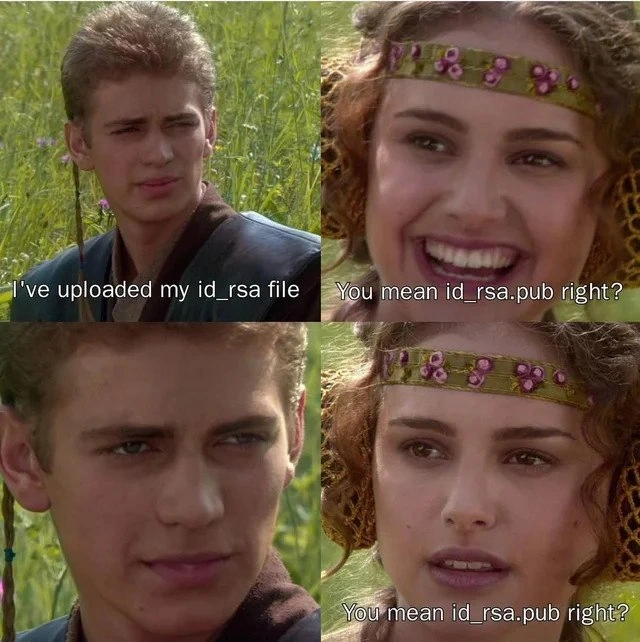
In the meme, Anakin proudly says he uploaded his id_rsa. Padme expects that he should have only uploaded the .pub file, since that’s the one that’s safe to share. When she asks “You mean id_rsa.pub, right?” she’s basically saying, “Wait, you shared the public key… right? You didn’t actually expose the secret?” Her growing concern comes from knowing that if he really uploaded id_rsa (the private key), it’s a serious mistake. That would be like accidentally publishing your password online. The silence from Anakin tells her that, yes, he did the unthinkable. Hence her alarmed repeat of the question – she’s hoping this is just a misunderstanding.
Now, why is uploading id_rsa such a big deal? Think of the private key as the literal key to your developer identity. For example, developers often use their id_rsa key to authenticate with GitHub. Instead of typing a username/password to push code, they configure GitHub to trust whatever computer has the matching private key. So if someone else gets ahold of your id_rsa, they could potentially push code to your repositories or access servers that trust that key, as if they were you. It’s essentially the digital equivalent of giving away your login credentials. In security terms, this is an exposed credential or secret leak.
When we talk about committing something, we’re in the realm of version control (specifically Git). A commit is like saving a snapshot of your project’s files. When you push that commit to a platform like GitHub, you’re publishing those files to a repository on the internet. A public repository means anyone can see its content. So if you accidentally include sensitive files in a commit, you’ve just shared them with the whole world. In a well-run project, teams use a file called .gitignore to prevent certain files from ever being committed. A .gitignore might contain entries like id_rsa specifically to stop someone from accidentally adding their key. In our scenario, it sounds like either there was no .gitignore, or the developer ignored it or didn’t realize what they were doing. It’s a rookie mistake in Git usage: perhaps running git add . (which stages every file in the current folder) without checking exactly what’s being added. If a new developer had their whole home directory or dotfiles in a Git repo to sync configurations, they might unknowingly scoop up their SSH keys in the process. A more experienced dev would know to exclude or ignore those secret files.
This situation touches on the broader concept of Secrets Management in software development. Secrets management just means handling things like keys, passwords, API tokens, etc., in a safe way. A common rule is “Never hard-code or commit secrets to your repository.” Instead, you use secure storage or configuration (like environment variables, vault services, or at least private config files not tracked by Git). The reason is exactly as shown in the meme: once a secret is in your repo, especially a public one, you’ve lost control over it. Even deleting it later won’t fully remove it from the history without special intervention. That’s why Padme is basically panicking – she knows that even if Anakin deletes the file in the next commit, the secret has already been exposed. The proper response is not just “oops, remove it” but “assume it’s compromised and take action.”
For a newcomer, it might be surprising that a single file like id_rsa can cause such a stir. But as you learn in DevOps and security, some files are extremely sensitive. An SSH private key is one of them. Another common example is an AWS access key (AWS_SECRET_ACCESS_KEY) which, if posted publicly, can lead to big problems (like huge cloud bills or data breaches). That’s why you’ll hear experienced developers joke (with a hint of seriousness), “Never commit on Fridays, and never ever commit secrets.” It’s part of the culture of being careful with what you share. The meme’s joke, spelled out plainly, is: the developer shared something that should never be shared, and his colleague is experiencing immediate dread. Padme’s line could be translated to, “You gave them the public info, not the secret, right?” – which is something any mentor might urgently ask upon seeing a suspicious commit. It’s a gentle way of correcting someone, hoping it’s just a minor misunderstanding. When it turns out to be a major security goof, that’s when the real lesson is learned.
Level 3: Push, Panic, Post-Mortem
For seasoned engineers, this meme elicits a knowing groan because it lampoons a classic DevOps horror story. In the first panel, Anakin casually says “I’ve uploaded my id_rsa file.” Instantly, any experienced developer or SRE feels their stomach drop. By the next panel, Padme (smiling nervously) asks, “You mean id_rsa.pub, right?” — clinging to the hope that it was just the harmless public key. Then comes that silent stare from Anakin, and Padme’s face turns to shock as she repeats “...right?!”. This four-panel scene perfectly captures the progression from blissful ignorance to dawning horror. It’s funny on the surface, but every senior dev knows there’s a real-life version of this story, and it usually ends with an urgent company-wide email and a very late night.
What exactly happens when someone commits their SSH private key to a public repo? It’s a cascade of Security and DevOps pain points set into motion:
Immediate Exposure: The moment
id_rsais pushed to GitHub, it’s essentially like posting the keys to the kingdom on a public bulletin board. If that key was used for anything – say, access to production servers or as credentials for a Git account – that access is now up for grabs by anyone. Even if it’s your personal key, attackers could attempt to use it wherever they can, potentially logging in to systems or impersonating you in other services. As far as GitHub commit fails go, accidentally pushing your private key is among the worst.Automated Alerts: Many developers don’t realize it, but if you push a known secret, GitHub might flag it. GitHub’s security systems and third-party services monitor public repos for leaked credentials. You might get an email or alert within minutes saying, “We detected a private key in your repo.” In many organizations, internal security tools (like TruffleHog or GitGuardian) will also create an alert in the security team’s channel. In our meme scenario, Padme’s concerned question is essentially that automated alert in human form: a immediate warning sign that something is very wrong.
Key Revocation and Rotation: The top priority becomes revoking that key. If
id_rsawas an SSH key used for server logins, the team must rush to remove its matching public key from every server’sauthorized_keysfile. If it was used for Git or other services, they’ll remove it from those accounts. The developer needs to generate a new key pair (ssh-keygento the rescue) and distribute the new public key to replace the old one. This process is called key rotation – essentially changing the locks. It’s frantic but crucial: you have to assume the leaked key has been compromised and act as if an intruder now has a copy of it.Incident Response: This kind of mistake often triggers a full-on incident response. The security team or the on-call SRE (Site Reliability Engineer) jumps in. They’ll treat it like a breach until proven otherwise. That means checking logs for any suspicious access using the key, monitoring systems for strange behavior, and sometimes even taking systems offline to be safe. It’s not just “remove the key and move on” – you have to verify that the leak didn’t already lead to unauthorized access. It’s a tense time for everyone involved.
Post-Mortem & Lessons: After the immediate panic comes the inevitable post-mortem. This is where the team meets (virtually or in person) to dissect how the heck this happened and how to prevent it in the future. There will be tough questions: “Why wasn’t
id_rsain the.gitignore? Do we need better onboarding training about secrets? Should we enforce commit hooks to block this pattern?” The incident becomes a case study. The unfortunate developer will have to explain the timeline of events, and the team, rather than just blame, will try to extract actionable lessons. In a way, this meme itself is part of that cultural lesson-sharing – it’s the kind of story folks tell new hires: “Don’t be the one who uploads their private key to GitHub.” You can bet that moving forward, there’ll be new safeguards: maybe automated scans on commit, maybe stricter code reviews, or at least a few prominent warnings in the README about secrets. And of course, this fiasco will enter office lore (and likely a few Slack emoji reactions) for months or years to come.
The humor here is both painful and relatable. It’s the kind of mistake that makes your heart race when you realize what you’ve done. The meme captures that universal IT moment of “Tell me you didn’t just do that...”. Padme’s hopeful expression turning to horror is every senior engineer’s face when a junior says, “I pushed something to the repo” and that something is a secret. There’s an almost cinematic drama in those panels for anyone who’s been through a similar incident. In real life, you might hear a colleague ask in a shaky voice, “Please tell me you didn’t commit the actual key...” and then comes the painful silence. It’s a bit like a disturbance in the Force for the tech team – a collective oh no moment you can practically feel in the air.
Beyond the individual goof, this meme spotlights why secrets management is such a big deal in modern DevOps. Seasoned devs have a sort of PTSD from all the times credentials were leaked accidentally. That’s why we have conventions and tools: putting sensitive files in .gitignore, using environment variables or vault services for passwords, code reviews specifically sniffing for API keys in diffs, etc. The joke lands hard because it’s born from reality – rookie mistakes like these happen often enough that entire systems and best practices exist to prevent them. It’s both a facepalm and a teaching moment. As seniors, we laugh (maybe a tad bitterly) because we’ve either made a similar mistake early in our careers or spent a night cleaning up after someone who did. The Padme-Anakin format from Star Wars is the perfect vehicle here: Anakin is the over-eager junior developer who unknowingly did something catastrophic, and Padme is the senior dev or security lead trying to remain calm while verifying the damage. “You used the public key… right?” is asked with the same energy as “You did follow the one fundamental rule… right?!” We all know the answer, and that’s why it’s funny — in that stomach-dropping, gallows-humor kind of way. This meme basically says: anyone who’s been around the block in version control and security has lived through (or narrowly avoided) this nightmare. And now we can smirk at it in retrospect, even as we double-check that our own keys are safely out of any repo.
Level 4: Publicizing the Private
At the deepest level, this meme highlights a failure in public-key cryptography practice and the unforgiving nature of secrets in a distributed system. The file id_rsa is the user's RSA private key – part of an asymmetric key pair used for SSH authentication. In the RSA algorithm (named for Rivest, Shamir, and Adleman), your security is based on a mathematical one-way trapdoor: it’s practically impossible to derive the private key from the public key. Even a supercomputer would spend eons factoring the enormous prime numbers inside an RSA key. But all of that elegant math becomes irrelevant the instant you publish the private key itself. This is a textbook illustration of Kerckhoffs's principle in cryptography: a system is secure even if everything about it is public except the key. By accidentally committing id_rsa to a public repo, our hapless developer has essentially shouted out their secret on a megaphone, nullifying the entire security of the cryptosystem. The private key is no longer private, meaning anyone can now authenticate as that user – the cryptographic equivalent of handing out the master key to your house.
Modern platforms and attackers react blindingly fast to such leaks. There are automated key-scanning bots constantly trolling public GitHub commits for secrets. A block of text that looks like an SSH key – for example, the telltale header -----BEGIN RSA PRIVATE KEY----- – is like blood in the water for these bots. By the time Padme asks “You mean id_rsa.pub, right?”, an opportunistic script could have already found that commit, scraped the private key, and possibly begun using it. This isn’t theoretical paranoia; it’s exactly what happens in real incidents. For example, developers who accidentally push AWS credentials often discover that malicious bots spin up hundreds of cloud servers within minutes of the leak. An SSH private key might not immediately rack up a cloud bill, but it could silently grant attackers access to servers or code repositories until the key is revoked. Because of this threat, platforms like GitHub now integrate secret scanning on public repos and can notify you (or even automatically disable certain secrets). Leaking id_rsa triggers the highest level of alarm – it’s essentially a security fire drill in progress.
There’s also a fascinating Git angle to this fiasco. Git is a distributed version control system, which means once you commit and push something publicly, that data spreads and persists. Even if you realize the mistake seconds later and delete the file in a new commit, the sensitive data still exists in the repo’s history. Every clone of the repository has that commit. The only way to truly purge a leaked secret from a Git history is to rewrite the history (using tools like BFG or git filter-branch to remove the file from all past commits) and force-push – a procedure that is complex, disruptive, and not guaranteed to reach everyone who already pulled the original. In short, once id_rsa is exposed, you have to assume it’s cached or archived somewhere forever. No amount of version control wizardry can confidently un-leak a secret once it’s been made public.
So in this single meme panel, we’re seeing a catastrophic collapse of several layers of safeguards. The strength of asymmetric encryption doesn’t matter if you publish the secret key. The distributed resilience of Git becomes a liability when trying to clean up a sensitive commit. And the speed of modern DevOps (quick commits, continuous integration, instant sharing) turns against you when a mistake is broadcast worldwide in seconds. It’s a potent reminder that even the most robust technical systems hinge on a basic premise: keep your secrets secret. No algorithm can save you if you hand out the keys. This humorous scene is, in essence, a cryptography and DevOps cautionary tale – the kind that makes security researchers shake their heads and say, “The math was perfect… until the human got involved.”
Description
This meme uses the four-panel format from the Star Wars prequel movie 'Attack of the Clones' featuring Anakin Skywalker and Padmé Amidala to illustrate a common but critical security mistake. In the first panel, a confident Anakin says, 'I've uploaded my id_rsa file'. In the second, a smiling Padmé replies, 'You mean id_rsa.pub right?'. The third panel shows Anakin with a blank, emotionless stare, not answering. The final panel shows Padmé's smile gone, replaced with a look of dawning horror as she repeats, 'You mean id_rsa.pub right?'. The humor is rooted in a fundamental concept of SSH and public-key cryptography. 'id_rsa' is the filename of a user's private key, a secret that should never be exposed. 'id_rsa.pub' is the public key, which is safe to share. By uploading his private key, the character has made a catastrophic security blunder, and the meme perfectly captures the panic and dread an experienced engineer feels upon witnessing such a mistake

Comments
13Comment deleted
Uploading your id_rsa is the technical equivalent of giving a Sith Lord the keys to the Jedi Temple. The resulting 'Order 66' will be on your entire production infrastructure
Somewhere between the first and second panel, GitHub’s secret-scanning bots have already spun up a bitcoin miner with your key
The moment when you realize your private key has been public longer than your last performance review, and rotating keys across 47 production servers suddenly becomes your weekend plan - right after explaining to security why your commit message 'fixed typo' actually means 'exposed infrastructure credentials to the entire internet'
The moment when you realize you've just given the entire internet root access to production. Time to rotate every key, revoke every certificate, and update your résumé - in that order. At least you'll never make the 'which RSA key goes where' mistake again, assuming you survive the post-mortem
Nothing wakes a senior SRE at 3AM like 'accidentally committed id_rsa' - cue the galaxy-wide key rotation frenzy
Seeing id_rsa in a commit is the fastest path to incident response - revoke everything, rebuild AMIs, rotate hosts, and finally add the pre‑receive hook we promised in 2017
Committing id_rsa is the fastest way to force org-wide SSH certs, gitleaks, and a crash course in filter-repo - before lunch
Please explain Comment deleted
id_rsa = ssh private key id_rsa.pub = ssh public key Comment deleted
Hehe Comment deleted
Do you store your private keys in plain text, unencrypted? Comment deleted
Yes Comment deleted
passphrase Comment deleted