Skip to content
DevMeme
3209 of 7435
The Developer's Compulsive Save Reflex
DeveloperProductivity Post #3530, on Aug 12, 2021 in TG

The Developer's Compulsive Save Reflex

Why is this DeveloperProductivity meme funny?

Level 1: Better Save Than Sorry

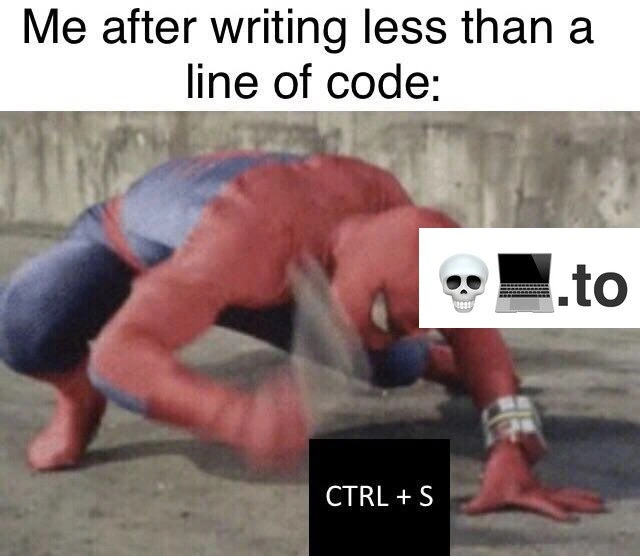
Imagine you’re drawing a picture, and after coloring just a tiny part of it, you immediately stop and make a copy of your drawing to keep it safe. You haven’t even finished one full line of the drawing, yet you’re already acting like it might disappear any second. Sounds funny, right? That’s basically what’s happening in this meme. The person in the picture is dressed as Spider-Man and is slapping the ground really fast. In the meme world, we pretend he’s slapping a “Save” button on a computer. The words “CTRL + S” are on the image because that’s the key combination for saving your work on a computer. So the picture is showing someone saving their work super fast, over and over, even though they’ve barely started doing the work.

Why would they do that? Because they’re being extra careful. It’s like if you’re playing with LEGO blocks and after placing each single block on your tower, you yell “Done!” and take a photo of it so you won’t lose that progress. You’re worried that if you don’t save (or take that photo) right now, something bad might happen — maybe the tower falls or someone knocks it over — and you’d have to start all over. In real life, when you’re typing on a computer, you save your file so that your writing or code is stored safely. If the computer suddenly turned off or the program closed by accident, anything not saved could disappear. That’s why people say, “Better safe than sorry.” In this context, it becomes “Better save than sorry.” It means it’s wiser to be very cautious (by saving all the time) than to risk losing your work and regretting it.

So the meme is funny because the person is overreacting in a cute way: they wrote just half a line of code and already they’re smashing that save button like a panic button. It exaggerates how some of us behave when we’re afraid of losing even a little bit of progress. Even though computers usually don’t lose things that quickly, the feeling of “Oh no, what if I lose this!” is so strong that the person saves their work every few seconds. It’s a silly image that makes people who write code laugh and nod, thinking, “Haha, I do that too sometimes.” Essentially, it’s saying the coder is super careful with their work, saving it constantly — just to be extra safe, so they’ll never be sorry about losing anything!

Level 2: Save Early, Save Often

Let’s break down what’s happening for those newer to coding. The meme shows a person in a Spider-Man suit slapping the ground really fast, with the text “CTRL + S” over it. In computing, pressing Ctrl+S (the Control key and the S key together) is the universal keyboard shortcut to save your work. In almost every code editor or word processor, Ctrl+S instantly writes your changes to a file on the hard drive. (On a Mac, you’d use ⌘+S, the Command key, but it does the same thing.) The top caption says, “Me after writing less than a line of code:” meaning the person has barely started typing some code — not even a full line — and already they are hitting the save keys. The image of Spider-Man slamming his hand down over and over is a funny exaggeration of how fast and furiously developers will hit that save command. There’s even motion blur on the hand to show it’s moving super quickly. In other words, the meme humorously claims: “As soon as I type literally a few characters of code, I smash Ctrl+S like a maniac!”

Why would someone do this? It comes from the strong advice: “save your work frequently.” In programming (and any computer work), if you don’t save your changes and something bad happens – say the application crashes or the power goes out – you could lose everything since the last save. When you write code, unsaved changes live only in your computer’s memory (RAM). If the program closes unexpectedly, those changes vanish because memory is temporary. Saving writes those changes to permanent storage (like your disk or SSD), making sure they’ll still be there when you reopen the file. Developers, even early on, learn this the hard way at least once: maybe you wrote a whole function or did a homework project and forgot to save, and then the computer froze, wiping out an hour of work. That really hurts! To avoid feeling that pain again, coders develop a habit of saving very often — sometimes ridiculously often, as this meme jokes. The muscle memory becomes so strong that pressing Ctrl+S turns into a reflex, almost like blinking. You might not even think “I should save now”; your fingers just hit the keys automatically after every minor edit.

It’s also about Developer Productivity and peace of mind. Continuously saving means if something goes wrong, at most you lose a few seconds of work, not hours. It’s like hitting the checkpoint in a video game frequently so you never have to replay too much. Some modern coding tools and IDEs (Integrated Development Environments, which are powerful programs for writing and debugging code, like Visual Studio Code, IntelliJ, or Eclipse) have an auto-save feature that saves the file for you every time you pause typing or every few minutes. However, not everyone enables or trusts auto-save. A lot of developers still prefer the feeling of control from manually pressing the save shortcut. They might even turn auto-save off because they want to decide when a file is saved (for example, some like to save only when the code is in a runnable state to avoid triggering build errors on half-written code). The term “autosave anxiety” fittingly describes the worry that if you rely on the computer to save by itself, maybe it won’t save at the exact right moment – so people double down and hit Ctrl+S anyway, just to be sure. It’s a belt-and-suspenders approach to protecting one’s work.

The Spider-Man imagery adds a layer of fun. Spider-Man is a superhero known for his extremely fast reflexes (thanks to his “spider-sense” that alerts him to danger). In the meme, the “danger” is unsaved code! The moment our developer-self writes a few characters, an inner alarm bell rings – something could happen, better save now! – and our hand moves blindingly fast to press the keys, like Spider-Man reflexively reacting to a threat. The blurred slap in the picture perfectly represents that urgent, repetitive motion: Ctrl+S, Ctrl+S, Ctrl+S! The black box with "CTRL + S" written in white is basically labeling Spider-Man’s action as the save command. It’s common in memes to put the text of an action or item onto the image to show what’s being portrayed. Here it tells us “he is slapping the Save keys.”

This habit is very relatable in DeveloperHumor circles because nearly every programmer will smile and admit, “Yeah, I do that.” It’s part of daily coding life. You write a tiny bit of code, and boom – save it immediately. It might seem silly (computers today are pretty stable, and many tools auto-save your work), but it just feels safer to manually save. It gives a sense of assurance, like clicking seatbelt twice. Plus, using the keyboard shortcut is quick and satisfying – you don’t even interrupt your flow to go up to the File menu; it’s just tap-tap and you know your changes are tucked away on disk. In short, save early, save often is ingrained advice, and this meme humorously exaggerates it to “save constantly, even after 5 seconds of coding”. The little watermark in the corner with a skull emoji and laptop and “.to” likely indicates the source of the meme (possibly a website or user who created it), but it’s not really part of the joke – it’s just there to mark who made or shared the image. The core joke is simply about the reflexive Ctrl+S habit that developers can’t shake.

Level 3: Spidey Save Reflex

At the highest level, this meme captures a developer’s ultra-instinct to hit CTRL+S with absurd speed and frequency. The top caption sets the scene: “Me after writing less than a line of code:” — a scenario so trivial, yet the reaction is comically overblown. Enter Spider-Man, frantically slapping the ground in a blurred fury. In the meme, his hand is Spider-speed fast, and the text CTRL + S is emblazoned near it. Why Spider-Man? Because Spidey is known for lightning reflexes and a danger sense; here it’s as if his spider-sense is screaming “Save that file now!” even when only half a line of code has been typed. The humor lies in this habitual file save reflex being exaggerated to superhero proportions.

For seasoned developers, this image hits home (and the Save key) hard. We’ve all developed a muscle-memory for the Save shortcut in our favorite IDEs and text editors. It’s an almost pavlovian response: type a few characters and slam CTRL+S like Spider-Man pummeling a villain. Even if you’ve added nothing but a semicolon or a half-finished variable name, that little finger instinctively goes for the Ctrl key. Why? Because experience has taught us a primal lesson: unsaved code is vulnerable code. Many of us have been burned by an IDE crash, a sudden reboot, or a power outage that vaporized hours of work not saved to disk. The trauma of losing code just once triggers a lifelong reflex — much like Spidey’s trauma (Uncle Ben, anyone?) honed his vigilant reflexes. With every tiny edit, an inner voice whispers, “Better hit save, just in case.” It’s a mix of productivity paranoia and survival instinct in the coding world.

The meme brilliantly hyperbolizes this everyday developer quirk. The text “less than a line of code” underscores how excessive this habit can feel — we know logically that typing two words then saving is overkill, yet we still do it. It’s a shared secret in DeveloperHumor circles: you might catch yourself pressing CTRL+S twice in a row even when nothing changed, purely out of reflex. The motion blur on Spidey’s hand perfectly captures that frenzied “spam Save” action many of us do unconsciously. It elicits a knowing groan and laugh from veteran programmers because it satirizes our collective coding life: from newbies to seniors, nearly everyone in software development has mashed that save shortcut like an emergency button. In a world of auto-saving software, continuous integration, and cloud backups, it’s ironically antiquated, yet we just can’t let go of the old ways. Some of us have even pressed CTRL+S in web forms or Google Docs (which auto-save everything) — a reflex so ingrained that the finger moves before the brain realizes “hey, this app is always saving!”

There’s also an element of Developer Experience (DX) history embedded here. In older development environments, saving your file was a manual, critical step. IDEs didn’t always auto-save; a stray crash or a mis-click could mean hours of code lost in RAM. Teams and mentors drilled the mantra “Save early, save often” into young developers to safeguard their productivity. Over time, this good practice evolves into a near-compulsive tic. Modern editors like VS Code or IntelliJ might auto-recover unsaved files or have plugins for continuous save, but muscle memory is stronger than rationale. The result? Even today, with autosave options available, many of us toggle them off or ignore them, preferring the reassuring tactile confirmation of pressing CTRL+S ourselves. It’s a bit of “trust issues” with technology — we’ve been stood up by faulty save mechanisms before, so now we manually ensure our work is written to disk, no matter how trivial the change. In fact, hitting save becomes part of our flow: it might trigger linters, formatters, or build processes on file save (a common setup in modern development). We’ve ritualized the save shortcut to the point that it’s like a punctuation mark at the end of every thought.

So this meme is funny-not-funny to developers. It lampoons our autosave anxiety in a way only insiders fully appreciate. The costume Spider-Man slamming the ground is us — the over-caffeinated coder — smashing CTRL+S after typing “int x”. It’s a lighthearted jab at how our quest for Developer Productivity sometimes results in comically exaggerated habits. We laugh because it’s true: our fingers behave as if every keystroke might be the one to crash the program. The meme’s relatability factor is off the charts, and that’s its magic. With great code power comes great responsibility… to save your work every second!

Description

A meme featuring the superhero Spider-Man in a dramatic, low-crouching pose with one hand slamming the ground. The image is captioned at the top with the text, 'Me after writing less than a line of code:'. A black box with 'CTRL + S' is positioned near Spider-Man's blurred, fast-moving hand, indicating he is rapidly hitting the save keyboard shortcut. A small watermark with a skull emoji, a laptop emoji, and the text '.to' is visible. The meme humorously exaggerates the deeply ingrained muscle memory of developers who compulsively save their work after making the tiniest change. This habit is often a learned trauma response from past experiences of losing work due to crashing editors, system failures, or power outages, even though modern IDEs often have robust autosave features
Comments

11
Anonymous ★ Top Pick My editor has autosave, my OS has snapshots, and Git tracks every change. I still hit Ctrl+S after typing a semicolon. It's not a habit, it's a trauma response baked into the firmware
  1. Anonymous ★ Top Pick

    My editor has autosave, my OS has snapshots, and Git tracks every change. I still hit Ctrl+S after typing a semicolon. It's not a habit, it's a trauma response baked into the firmware

  2. Anonymous

    I still smash Ctrl+S after every semicolon - once you’ve watched a day’s hand-merged XML vanish over a flaky NFS mount in 2004, no IDE’s “autosave” will ever earn your trust

  3. Anonymous

    That's the exhaustion from mentally debugging the three dependency conflicts, two breaking API changes, and one expired SSL cert you'll discover when you try to run that single line

  4. Anonymous

    After two decades in the industry, you develop a Pavlovian CTRL+S response - not because your IDE is unreliable, but because you've been burned by enough kernel panics, OOM killers, and 'git stash' mishaps that your muscle memory treats every keystroke like it might be your last. The real senior move is the triple-save: CTRL+S, verify the file watcher triggered, then manually check git status. Trust nothing, save everything, and yes, that single-line change absolutely warrants a backup branch

  5. Anonymous

    Years of Eclipse crashes hardwired me to Ctrl+S after a single brace; now that reflex triggers a monorepo DDoS as Prettier, ESLint, and Bazel spin up like I fixed prod

  6. Anonymous

    Ctrl+S: the one microservice that never needs a circuit breaker, deployed reflexively since the Vim dark ages

  7. Anonymous

    Years of editor crashes trained me to Ctrl+S after every character; now on-save Prettier/ESLint/typecheck turns a comma into a full monorepo rebuild

  8. @LastStranger 4y

    What (scull laptop).to means?

    1. @RiedleroD 4y

      It's an ad for the domain name I believe. It might also be the name of a meme site, but I don't know. Either way, it's very annoying imo

  9. @merik 4y

    💀💻.to

  10. @ZgGPuo8dZef58K6hxxGVj3Z2 4y

    F5

Use J and K for navigation