
Skip to content
DevMeme
6467 of 7435
Hyprland Rice Config Showcase With Animated Neofetch and Nord Theme
CLI Post #7092, on Sep 2, 2025 in TG

Hyprland Rice Config Showcase With Animated Neofetch and Nord Theme

Why is this CLI meme funny?

Level 1: Fancy Lights, No Work

Imagine you have a homework assignment to do on your computer, but you decide to pretend your room is a spaceship control center first. You spend all afternoon putting up neon lights, cool panels, and even a big sign that says "Welcome, Captain" when you turn on your screen. Now your room looks like the bridge of a rocket ship – it's super awesome and you feel like a space commander at your desk! But here's the catch: after doing all that decorating, you haven't started your homework at all. This joke is just like that. The programmer made their computer look incredibly cool (with flashy colors, animated text, and a sci-fi style welcome message) to feel like a commander in charge of a futuristic control panel. It's fun and impressive to look at, but in the end, they spent more time playing with how things look than actually doing the work (writing the code). The humor comes from recognizing that sometimes we all do the fun, fancy stuff instead of the boring homework – even grown-up programmers!

Level 2: Tricked-Out Terminal

Let's break down what this meme is showing in simpler terms. Essentially, a developer has heavily customized their Linux PC’s desktop look-and-feel (the practice is jokingly called "ricing" in Linux circles, which means styling your interface like you'd soup up a car). Here are the key parts and what they mean:

  • Arch Linux – This is the Linux operating system they're using. Arch is known for being very minimal at the start; you have to install and set up everything yourself via the command line. People who choose Arch usually enjoy learning how every piece fits together. It's popular among power-users because you can tailor the system exactly to your liking. (It's also a bit of a bragging right to say "I run Arch" since it's considered advanced.)
  • Hyprland (Wayland compositor) – Hyprland is the program that manages the windows and visuals. It's a type of window manager that works with Wayland, which is a modern system for displaying graphics on Linux (replacing the old X11 system). In simple terms, Hyprland decides how windows are arranged (tiled, floating, etc.) and adds cool effects. Using Hyprland means the person is not using a typical desktop environment like Ubuntu's GNOME; instead, they're building their own environment piece by piece for maximum tweakability.
  • Waybar – Since Hyprland is just a window manager, you add extras like panels yourself. Waybar is a customizable bar (like a taskbar or status bar). It can show the time, battery level, volume, Wi-Fi status, CPU usage — whatever you configure it to show. You can script it to update dynamically. So instead of a fixed toolbar, this one is programmed by the user to maybe change color or icons based on events (for example, flash red when the battery is low, or display a music track when playing a song).
  • Neofetch – This is a command-line tool that displays system information along with an ASCII art logo in the terminal. For instance, on an Arch Linux system, running neofetch will print the Arch logo made of characters and details like the OS version, kernel, uptime, CPU, GPU, and memory. People often post screenshots of Neofetch to show "Here's my system specs". When they say Animated Neofetch, they likely set it up so that this info refreshes continuously or animates in some way. That means instead of a one-time snapshot, the system info (like CPU percentage, memory usage) might update every few seconds in the terminal, looking like a little dashboard.
  • Cava (ASCII visualizer) – Cava is a program that creates a visual representation of audio (sound) in your terminal. Imagine the bars that bounce up and down with music on a stereo – Cava does that with simple character blocks in a terminal window. It's called an ASCII visualizer because it uses text characters to draw the bars. Including this means whenever music is playing on the computer, the user can see a live animation of the sound. It doesn't serve a practical purpose for work; it's mostly for the cool factor, making the setup feel like a high-tech audio reactor.
  • Nord theme – This refers to a specific color palette/theme. Nord is a set of colors (inspired by the Arctic, with lots of cool blues, gray, and some purples) that many people use to theme their editors, terminals, and UIs. When someone says they're using a Nord theme, it means the background, text, and highlight colors you see are from that set, giving everything a consistent look. Here they said "neon-radioactive" Nord theme, which implies they took those normally subdued blues and made them glow or added neon green accents – basically making the colors look like they're lit up, to match the cyberpunk aesthetic.
  • "Добро пожаловать, командир." – This line is in Russian, translating to "Welcome, commander." The developer has set this as a custom greeting, likely displayed either in the terminal or on the desktop when they start up. It's purely for style – making it feel like the computer is a secret facility acknowledging the user's presence. They chose Russian text to fit the cold war/post-apocalyptic vibe of that background with the nuclear reactors. It's like the computer is saying, "You're in charge, let's do this."
  • Rice / dotfiles – Just to clarify the slang: to "rice" a desktop means to customize it heavily (it's a nerdy term that came from the custom car scene, meaning to add a lot of visual flair). Dotfiles are the configuration files (usually starting with a dot .) where all these settings are stored, like .bashrc or config files in ~/.config/hypr/. This person likely has a collection of these config files saved, so they can reproduce this look and share it. In fact, the screenshot looks like it’s from a README on a code hosting site, which suggests they uploaded their config (dotfiles) for others to see or use.

In short, this developer transformed their desktop into a themed experience. Instead of a normal plain background and a basic taskbar, everything has been tailored: the colors are coordinated, there are animated stats and even music visualization, and a thematic wallpaper + greeting to set the mood. It's like turning a regular car into a glowing show-car with custom paint and neon lights everywhere. The Configuration effort is pretty extreme, but it results in a one-of-a-kind look.

The funny part of this, especially for other programmers, is the prioritization. This person spent a lot of time making their environment look amazing – time that wasn't spent actually coding. It's a bit of an open secret: lots of developers love to tweak their setup (the IDE, the terminal, the desktop) and can get carried away. It's both a hobby and a form of procrastination. If you're a new developer, it's good to know that making your environment comfortable and "yours" can be rewarding and teach you a lot, but it’s easy to fall down a rabbit hole. Here, the joke is that instead of, say, building a software feature, the dev was perfecting an "animated radioactive Nord theme with ASCII equalizer" — super cool, but not really necessary for getting work done. In the end, though, you can bet when they do sit down to code, they'll smile because their whole setup looks straight out of a game or movie. And sometimes, that bit of joy is worth it (just maybe do a little coding too!).

Level 3: Neon Reactor Ricing

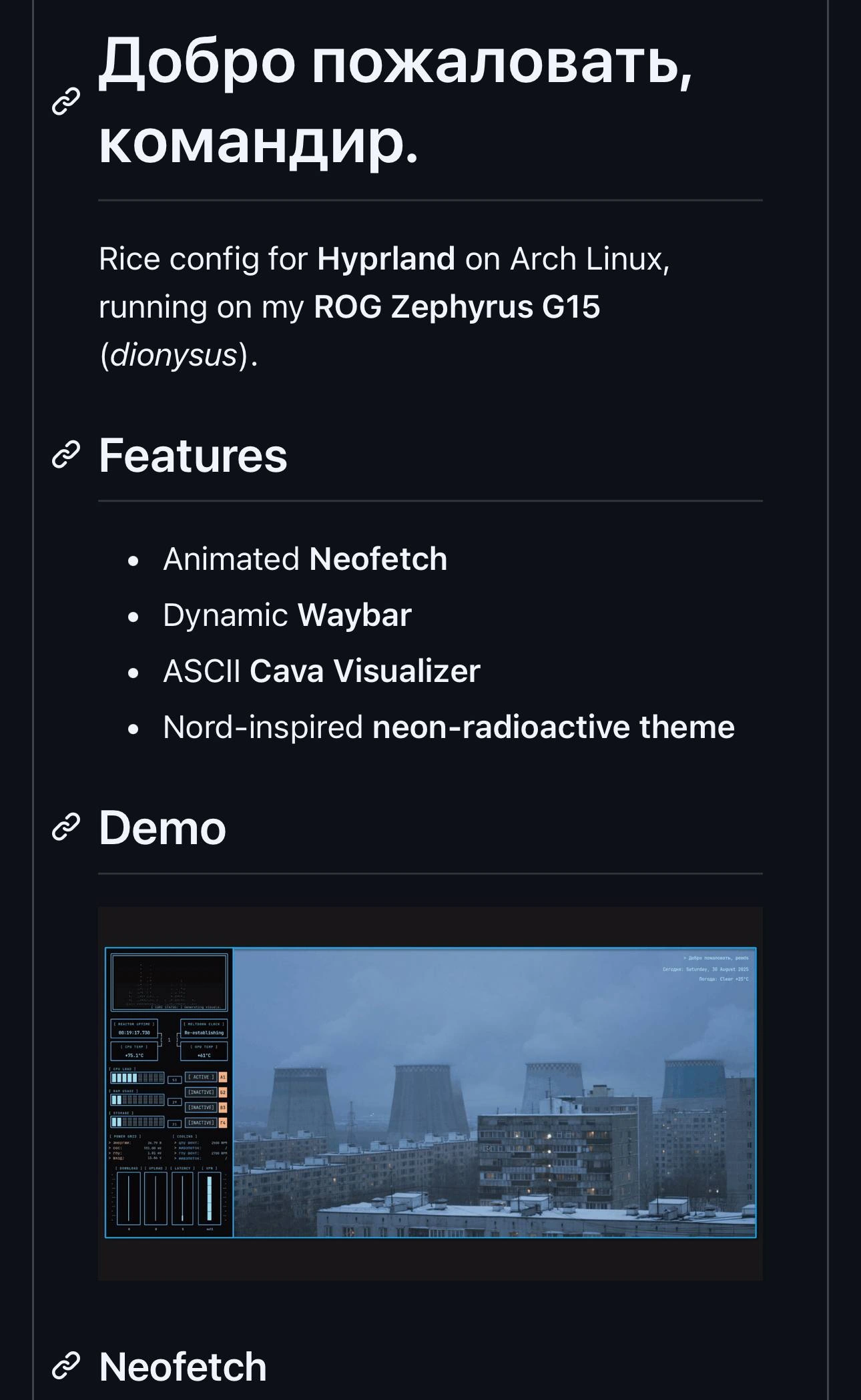
This isn't your typical developer's desktop; it looks like a cyberpunk control panel right out of a dystopian sci-fi. The screenshot greets us with bold Cyrillic text “Добро пожаловать, командир.” (“Welcome, commander.”), as if logging into a secret Soviet mainframe. On one side, neon-blue graphs and system stats glow like a heads-up display, while the other side shows a bleak snowy city skyline dominated by nuclear cooling towers. The whole vibe screams nuclear reactor monitoring station meets coder's lair. It's dark, sleek, and dripping with style – clearly the work of a Linux power-user who has spent countless hours turning their desktop into a personalized sci-fi command center.

If you notice the line "Hyprland on Arch Linux (ROG Zephyrus G15)", you can already hear veteran Linux folks nodding knowingly (perhaps muttering "I use Arch, btw" under their breath). Arch Linux is the poster child of Linux minimalism and customization: you only get what you install and configure yourself. That attracts tinkerers who treat their OS like a customizable puzzle. And Hyprland is a modern Wayland compositor (think of it as a window manager for Wayland, akin to i3 or Sway) known for slick visuals and endless tweakability. In plain terms, this user runs a bleeding-edge operating system setup that they likely pieced together via the ArchLinuxUserRepository (AUR) and manual configs. Wayland (the next-gen graphical server replacing X11) can be finicky with fancy effects, but it allows smoother graphics once you get it right. So our friend here didn't go the easy route of GNOME or KDE – they built a custom environment from the ground up, like a chef growing their own ingredients and cooking everything from scratch rather than using any pre-packaged meal.

The README's Features section reads like a gadget list from a hacker's toolkit:

  • Animated Neofetch – normally neofetch prints a static ASCII logo and system info when you open a terminal. They've likely set it to refresh continuously (using a --loop flag or a script) so the ASCII art and stats update in real-time. Essentially, they turned a fun one-off command into a live status monitor purely for eye-candy.
  • Dynamic WaybarWaybar is a custom status bar for Wayland (similar to Polybar on X11). Making it dynamic means they've scripted it to change on the fly: e.g. show a special module when music is playing, flash the CPU usage in red if it’s too high, or animate the workspace indicators. It's not just a static bar with time and battery; it's more like a mini control panel that responds to the system state.
  • ASCII Cava VisualizerCava is an audio visualizer that displays pulsing bars in the terminal. Completely unnecessary for coding, but undeniably cool. If music is playing, those bars bounce to the beat in a terminal window or overlay, making the whole desktop feel alive. It's pure terminal eye-candy – the kind of thing you run just to channel some hacker movie vibes.
  • Nord-inspired neon themeNord is a popular color palette (lots of cool blues, teals, and grays). By calling it "neon-radioactive", they've likely cranked up a bright electric blue or green for highlights. The result is a cohesive color scheme across the board: the Waybar, terminal text, and even the wallpaper accents all share that frosty Nord base with glowing cyan/green highlights. It ties everything together with a futuristic, slightly eerie consistency (very DevEnvironmentSetup chic).

All these pieces are meticulously configured to work in harmony. Under the hood, there's probably a master config or startup script launching these components at login. For example, an Arch user might put something like this in their Hyprland autostart script:

# Continuously update Neofetch (ASCII system info) every 5 seconds
neofetch --loop 5 &    # refresh system info ASCII art in terminal
# Launch the Cava audio visualizer for live music bars
cava -p ~/.config/cava/config &    # uses a custom config file for visuals
# Start Waybar (the custom status bar with Nord theme and dynamic modules)
waybar & 

Each command here kicks off one part of the showcase: updating the Neofetch ASCII dashboard, running the music visualizer, and starting the custom status bar. In true dotfiles_culture fashion, every detail (the config files, theme colors, scripts) has been tuned and documented. This is the kind of setup you might find on someone's GitHub as their “rice config” repository, complete with screenshots and installation instructions for fellow enthusiasts.

Now, the humor in all this – especially for seasoned devs – comes from the massive effort for a mostly aesthetic payoff. It's undeniably cool, but let's be honest: configuring your interface to look like a Cold War control room doesn't get your app built any faster. Experienced developers smile at this because we've either done it ourselves or know someone who has. It’s the classic joke: why code for an hour when you can spend 10 hours automating and beautifying your setup instead? Here, the punchline writes itself – they've built a nuclear-reactor-themed coding environment, presumably to write code that has nothing to do with nuclear reactors. It's a form of productive procrastination: sure, you're working on your computer... but you're working on the computer (customizing it) rather than on the code. The description even jokes about it: "seasoned Linux users tweak for hours instead of shipping code." We all recognize that tendency. Why fix a bug when you can redecorate your workstation fine-tune your Waybar animations, right?

In fairness, setting up a fancy environment like this is not entirely pointless – it's a geeky hobby that teaches you a lot along the way. There's an inside term “yak shaving” for when you get sidetracked solving ancillary problems; here the yak shaving involves writing scripts to colorize your RAM usage bars instead of finishing the feature you were on. But you do end up learning scripting, theming, how a wayland_compositor works, and so on. It's like a self-guided crash course in system configuration (with a dopamine reward when everything looks just right). And at the end of it, you have a desktop that gives you joy when you use it.

This kind of ultra-customized setup is celebrated in certain communities. For example, the subreddit r/unixporn (despite the name) is all about sharing screenshots of beautiful *nix desktops. A setup like this – with its unified Nord theme, animated widgets, and that immersive “Welcome, commander” vibe – would be a top-tier post there. In those circles, showing off your TerminalLife aesthetic earns you serious street cred among fellow geeks. It's basically the developer equivalent of modding a car: half the fun is in the tinkering and the other half is in showing it off. And let's admit it, coding on a machine that greets you as "Commander" and glows like a reactor core feels awesome, even if it's just your to-do list app open in the end. This meme gets a laugh (and a nod) because it captures that paradox perfectly: developers will put in absurd effort to customize and automate something that isn’t strictly necessary, simply because it's fun and gives a sense of personal satisfaction. Hey, at least our commander here gets to write code in style – that's worth a few hours of config tweaking, если вы спросите меня (if you ask me)!

Description

A GitHub README-style page showcasing a Hyprland rice configuration for Arch Linux running on an ROG Zephyrus G15 laptop nicknamed 'dionysus'. The page is in Russian with the greeting 'Dobro pozhalovat, komandir' (Welcome, commander). Features listed include Animated Neofetch, Dynamic Waybar, ASCII Cava Visualizer, and a Nord-inspired neon-radioactive theme. A demo screenshot shows a tiled window manager setup with system monitoring widgets, CPU/GPU temperatures, and a moody cityscape wallpaper featuring industrial cooling towers in winter
Comments

7
Anonymous ★ Top Pick Spending 200 hours ricing your Arch Linux desktop to achieve the perfect neofetch screenshot that you'll show to exactly 3 people on r/unixporn -- and all 3 will ask why you didn't use Catppuccin instead
  1. Anonymous ★ Top Pick

    Spending 200 hours ricing your Arch Linux desktop to achieve the perfect neofetch screenshot that you'll show to exactly 3 people on r/unixporn -- and all 3 will ask why you didn't use Catppuccin instead

  2. Anonymous

    Proof that infrastructure as code is overrated - real engineers terraform their desktop until even Neofetch thinks it’s running inside a nuclear reactor

  3. Anonymous

    Nothing says 'I've achieved peak productivity' quite like spending 47 hours configuring your desktop to look like a Chernobyl control room interface, complete with Russian greetings and enough system monitors to make you feel like you're preventing a meltdown every time you check your CPU usage

  4. Anonymous

    When your Arch Linux rice is so elaborate that configuring Hyprland takes longer than the Soviet Union took to build those cooling towers in the background - but at least your dotfiles are version controlled and your neofetch animation doesn't require a five-year plan

  5. Anonymous

    Arch users call it rice; SREs call it a single-node observability platform - I’ve seen production clusters with less telemetry than this Waybar

  6. Anonymous

    Built a dynamic Waybar, ASCII CAVA, and animated Neofetch before the feature - my Arch laptop now has better observability than prod

  7. Anonymous

    Ricing Hyprland configs denser than legacy Spring XML, but with zero merge hell

Use J and K for navigation


