
Skip to content
DevMeme
3057 of 7435
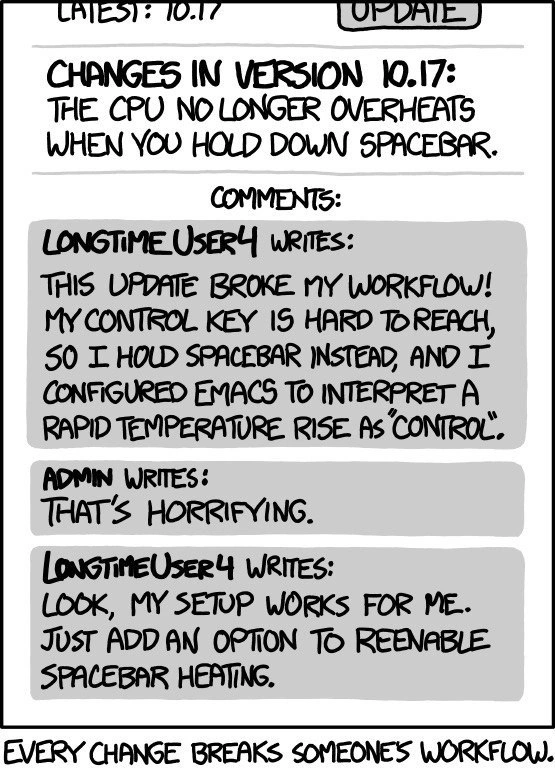
Patch stopping spacebar overheating enrages Emacs user relying on thermal control shortcut
DeveloperExperience DX Post #3372, on Jul 4, 2021 in TG

Patch stopping spacebar overheating enrages Emacs user relying on thermal control shortcut

Why is this DeveloperExperience DX meme funny?

Level 1: Can’t Please Everyone

Imagine you have a door in your house that makes a loud creaking sound whenever it opens. Most people think, “Ugh, that squeak is annoying,” and they’d gladly oil the hinges to fix it so the door swings quietly. So one day, your parent oils the door and tada – no more creak. Good fix, right? But now think of your brother who had a special use for that creaky sound: he used the squeak as an alarm to tell when someone (like you or your parents) was coming into his room. He actually liked the noise because it warned him ahead of time. When the door got fixed and stopped creaking, your brother was upset because he lost his little “early warning system.” In this story, fixing the door made the house nicer for everyone, but it accidentally messed up one person’s unique trick.

This meme’s joke is just like that. The computer had a problem (the CPU getting too hot when holding the spacebar key) and the developers fixed it so it wouldn’t happen anymore. That’s like oiling the door – it’s supposed to be a good thing. But one quirky user had found a clever way to use that very problem as a tool (just like using the creak as an alarm). When the problem was fixed, his special trick stopped working, and he got mad and asked to bring the problem back! It’s funny because it shows how sometimes you just can’t please everyone. Fixing something that’s bad for most people might upset someone who had gotten used to the bad thing. The overall message is that even a positive change can feel negative to someone who relied on the old way – and that idea is both true in life and kind of humorous when you see it in such an extreme example.

Level 2: Spacebar Overheat Hack

Let’s break down what’s happening in simpler terms. We have an application that issued new release notes for version 10.17, and one line says: “The CPU no longer overheats when you hold down spacebar.” This implies that in the previous version, there was a bug causing high CPU usage (and thus a lot of heat) whenever you kept the spacebar key pressed. Most users would see that and think, “Great, they fixed a performance bug.” But one particular user had a very custom setup depending on that bug!

The user in question is an Emacs user. Emacs is a highly extensible text editor that programmers use – it’s been around forever (since the 1970s) and is famous for being super customizable. In Emacs, almost every key can be reprogrammed or configured, and it has its own scripting language (Emacs Lisp) to automate tasks. Emacs users often like to tailor their environment to their personal workflow. For example, Emacs uses the Control key a lot for keyboard shortcuts (like Ctrl+X or Ctrl+C combinations to perform commands). On modern keyboards, the Control key can be a bit awkward to reach (usually at the bottom left of the keyboard). Many Emacs enthusiasts remap their keyboard so that the Caps Lock key acts as Control, or they use other tricks to avoid straining their pinky finger – this repetitive strain from hitting Control so much even has a nickname: “Emacs pinky.”

Now, the LongtimeUser4 in the comic found a very unconventional trick. Instead of using a normal key remapping or an ergonomic keyboard, he relied on that spacebar overheating bug as a signal. He set up Emacs so that when the computer’s CPU temperature suddenly went up, Emacs would interpret that as a press of the Control key. In other words, holding down the spacebar (which in the old version would heavily tax the CPU and make it hot) became a way for him to trigger “Control” in Emacs without actually pressing the Control key. This is what we mean by a thermal shortcut – using heat (thermal) as a trigger for a keyboard shortcut. It’s a totally bizarre use of a bug: basically treating the bug (overheating CPU) as a feature to support a personalized workflow.

When the developers released the patch to stop the CPU from overheating on a long spacebar press, they unknowingly broke this user’s workflow. His Emacs no longer detects a temperature spike (since the CPU stays cool now), so it never thinks “Control” is being pressed. From his perspective, something important in his setup just stopped working. This is a classic case of a software update accidentally disrupting someone’s environment. In software development, ensuring backwards compatibility means making sure updates don’t break things people were already doing. However, developers usually can’t imagine someone would use a glitch as a legitimate tool! That’s why this situation is so comedic and exaggerated.

In the “comments” section of the comic, the user complains: “This update broke my workflow! … I configured Emacs to interpret a rapid temperature rise as ‘Control’.” You can almost hear the indignation. He basically says, “Look, my setup may be weird but it works for me.” This is a relatable sentiment among programmers – we often have unique configurations or scripts that we grow reliant on. Then the project’s admin replies, “That’s horrifying.” That one got a laugh from a lot of readers, because it’s exactly what a maintainer or any sane developer would think upon hearing about such a hack. It’s a mix of shock and dark humor – horrifying yet also impressive that someone went that far. The user then insists, “Just add an option to reenable spacebar heating.” This is poking fun at how users sometimes ask developers to add configuration options for everything, even to undo a fix. In reality, adding an option means more complexity and maintenance burden, especially if the option is to bring back a bug that causes tooling frustration (excess CPU use is generally bad!). But from the user’s angle, he doesn’t care about the bigger picture – he just wants his custom workflow back. This mirrors real life in tech where power users might have niche needs and they beg for a setting or flag to keep old behavior. It’s a tug-of-war between progress (fixing bugs, improving performance) and stability for the user (don’t change my environment!).

Finally, the caption at the bottom, “Every change breaks someone’s workflow.” drives home the point. This is the meme’s message: no matter how positive a change is, there’s a chance it inconveniences somebody out there. It’s a tongue-in-cheek reminder for developers to be mindful of obscure use cases, and for users to expect that sometimes updates require adjusting your setup. The whole scenario is exaggerated for comedic effect (no real Emacs user is likely detecting CPU heat as a control key… we hope!), but it highlights real frustrations in the DeveloperExperience_DX of software updates and tooling changes. It’s funny and relatable to developers because we’ve all experienced a moment where an update or patch note made us go “Wait, no! I was using that!” – though probably not in such a crazy way as shown here.

Level 3: Literally a Hot Key

In this update log style comic, a seemingly minor bug fix sets off a chain reaction of comic horror for power-users. The release notes announce: “The CPU no longer overheats when you hold down spacebar.” For most of us, that’s an obvious improvement – who wants their CPU acting like a space heater just because you’re holding the space key? But then along comes LongtimeUser4 in the comments, furious that this patch broke his workflow. Why? Because this inventive Emacs user rigged up a thermal shortcut: he literally configured Emacs to treat a sudden CPU temperature spike as the Control key being pressed. Yes, you read that right – this person was leveraging a hardware side-effect (CPU overheating) as a software input. It’s an absurdly convoluted workflow_breakage that perfectly satirizes the nightmare of supporting extreme user customization. The humor here is in the sheer audacity of the hack and the truth it exposes: in software, one person’s bug is another person’s feature.

From a seasoned developer’s perspective, this scenario is both hilarious and horrifying. Emacs is a legendary text editor/IDE known for its endless configuration possibilities – you can remap keys, automate tasks, even run arbitrary Lisp code to control your environment. Emacs users famously customize their setup in wild ways (there’s a reason we joke that “Emacs is an OS, and Text Editor is just its hello world”). But using CPU heat as a key press? That’s a new level of extreme. It means LongtimeUser4 wrote code to monitor the CPU’s temperature from inside Emacs. Perhaps his Emacs Lisp checks a system sensor file or runs a script, and if it detects a rapid rise in degrees Celsius, it triggers a Ctrl input in Emacs. The reason behind this madness is somewhat relatable: Emacs relies heavily on the Control key for commands (e.g. Ctrl+x Ctrl+c to exit), and long-time users often complain about “Emacs pinky” – the strain from stretching their pinky to hit Control constantly. This user’s Control key was “hard to reach,” so in a twisted stroke of genius (or desperation), he turned the spacebar into a dual-purpose key: tap for a space character, but hold it down and it becomes a pseudo-Control via the spacebar_overheating_bug. It’s a terribly cursed configuration – essentially turning a hot key into a literally hot key. No surprise the admin responds with, “That’s horrifying.” Even in the anything-goes world of Emacs, piggybacking on a CPU thermal sensor to register a keypress crosses a line.

Let’s appreciate the backward-compatibility quagmire this raises. The developers fixed a genuine problem – unnecessary CPU load from a stuck key causing overheating. Any sane person would call that a good DeveloperExperience_DX improvement: your laptop won’t start throttling or sounding like a jet engine just because you held a key for a second. But in doing so, they unknowingly yanked the rug out from under one highly eccentric user. This is the essence of ReleaseNotes humor: even the most well-intentioned software_updates can have side effects on somebody’s weird setup. There’s an unwritten law among senior engineers that “if it exists, someone relies on it.” Remove a seemingly useless quirk, and that might be the exact quirk some veteran user MacGyver’d into their tooling. We’ve seen real-life parallels: update a programming language and someone’s legacy code stops working; deprecate an old API and some mission-critical script in a dusty corner of the enterprise breaks. In large systems, teams go to great lengths to preserve odd behaviors because users build workflows around them. In fact, operating systems like Windows or Linux often carry around decades-old backward compatibility shims to avoid breaking long-time users’ workflows (somewhere out there, a business still runs a piece of software written in 1995 depending on a now-“bug”). This comic exaggerates it to the extreme: a user depending on overheating hardware! The maintainer’s deadpan reply “Just add an option to reenable spacebar heating” is comedic gold because it’s a line we’ve all heard in issue trackers – “Can you add a setting to bring back the old behavior?” It’s the classic user request when an update changes something: please include a checkbox, flag, or obscure config (enable_spacebar_heater=true) so my specific setup keeps working. From the developer’s side, that suggestion is hair-raising. Imagine deliberately reintroducing a CPU-overheating mode as a feature! That’s why the admin/dev’s reaction is a blunt “No, that’s horrifying.” Maintaining such a flag would mean carrying a bug forward on purpose. ToolingFrustration indeed – it’s a lose-lose: either you frustrate a power-user or you bloat the software with insane legacy options. The meme nails this tension in a way that’s painfully relatable to anyone who’s maintained software: every fix has the potential to anger someone relying on the old behavior.

The deeper joke is an indictment of how far customization_options can go and the burden on those who maintain tools (Tooling category vibes). Emacs, being as powerful as it is, empowers users to bend it to their will – even if that will includes bending the laws of thermodynamics! The xkcd_reference style of the comic (monochrome, simple panels, sarcastic commentary) underscores the nerdy in-joke here. Seasoned devs chuckle because they’ve been on one side or the other of this story: either the exasperated maintainer thinking “I can’t believe someone did THAT,” or the stubborn user thinking “They don’t understand how important my weird workaround is!” As outlandish as using heat as a key signal sounds, it’s an exaggerated metaphor for real “hacks” we do to make our environment just right. And it highlights the thankless job of developers trying not to break anything with updates. In summary, the humor lands because it exposes a truth of tech life: Every change breaks someone’s workflow, no matter how positive the change seems. It’s a wink to all the battle-scarred devs who have learned that even a bug fix can spawn a support ticket from the one person who treated that bug as a feature.

;; Hypothetical Emacs Lisp: using CPU temperature as a "Control" key signal
(defun get-cpu-temperature ()
  "Read system sensor for CPU temp (just pretend this returns an integer °C)."
  ;; ... imagine code that reads /sys/class/thermal or uses an OS command ...
  )

(defun on-thermal-check ()
  (when (> (get-cpu-temperature) 80)        ;; if CPU hotter than 80°C...
    (simulate-control-key-press)))         ;; ...trigger a "Control" key event in Emacs

(run-at-time 0 0.5 'on-thermal-check)      ;; run every 0.5s to monitor temperature

// The code above is a tongue-in-cheek illustration. In reality, doing this in your .emacs config would be, well... as the admin said, horrifying.

Description

Black-and-white single-panel comic styled like an update changelog. At the top, a small label reads "LATEST: 10.17 UPDATE." Below that, a bold heading states "CHANGES IN VERSION 10.17: THE CPU NO LONGER OVERHEATS WHEN YOU HOLD DOWN SPACEBAR." A "COMMENTS:" section follows, rendered as grey speech bubbles. 1) "LONGTIMEUSER4 writes: This update broke my workflow! My control key is hard to reach, so I hold spacebar instead, and I configured Emacs to interpret a rapid temperature rise as 'Control'." 2) "ADMIN writes: That's horrifying." 3) "LONGTIMEUSER4 writes: Look, my setup works for me. Just add an option to reenable spacebar heating." The footer text says, "EVERY CHANGE BREAKS SOMEONE'S WORKFLOW." Technically, the joke highlights backward-compatibility headaches, bizarre user customizations, and how release notes that seemingly fix bugs can disrupt niche automation workflows, especially for power-users of editors like Emacs


Comments

12
Anonymous ★ Top Pick We closed the “spacebar heats CPU” ticket, and five minutes later an Emacs guru opened a blocker: “Regression - my 95 °C core temp was bound to Ctrl. Please add `--legacy-thermal-modifiers`.”
  1. Anonymous ★ Top Pick

    We closed the “spacebar heats CPU” ticket, and five minutes later an Emacs guru opened a blocker: “Regression - my 95 °C core temp was bound to Ctrl. Please add `--legacy-thermal-modifiers`.”

  2. Anonymous

    Somewhere there's a senior engineer who just realized their thermal throttling monitoring dashboard was actually tracking Dave from accounting's typing speed

  3. Anonymous

    This perfectly captures the Hyrum's Law nightmare: when you fix a CPU overheating bug, somewhere a power user has built their entire Emacs workflow around thermal-based Control key emulation. The real horror isn't the workaround itself - it's that after 20 years of muscle memory, 'just use the actual Control key' is genuinely the more disruptive solution. Every production hotfix is someone's critical dependency

  4. Anonymous

    Admins fix the CPU meltdown; Emacs diehards demand a config flag to reenable their spacebar sauna

  5. Anonymous

    Release notes: “Spacebar no longer overheats the CPU.” SREs cheer; the Emacs crowd files a P0 for a hot path regression - Ctrl was mapped to thermal spikes - so now product wants a feature flag: legacy.spacebar_heating=true

  6. Anonymous

    We spent a quarter removing undefined behavior from the CPU, only to learn a power user had been treating it as an API and bound it to Ctrl - now they want --enable-spacebar-heat

  7. @pyproman 5y

    Just use Android Studio as the spacebar

  8. @esraghu 5y

    Someone just used a bug as a feature here 😎

  9. @p4vook 5y

    "If people rely on your bug, it's not a bug, it's a feature"

  10. @ipaal 5y

    And it's broke my eyes because of reading this unreadable font

    1. @p4vook 5y

      It is readable

  11. @clockware 5y

    This is gold)

Use J and K for navigation
