Skip to content
DevMeme
6627 of 7435
IoT Smart Lightbulbs Require Authentication Just to Turn On
IoT Post #7261, on Oct 12, 2025 in TG

IoT Smart Lightbulbs Require Authentication Just to Turn On

Why is this IoT meme funny?

Level 1: Just Flip the Switch

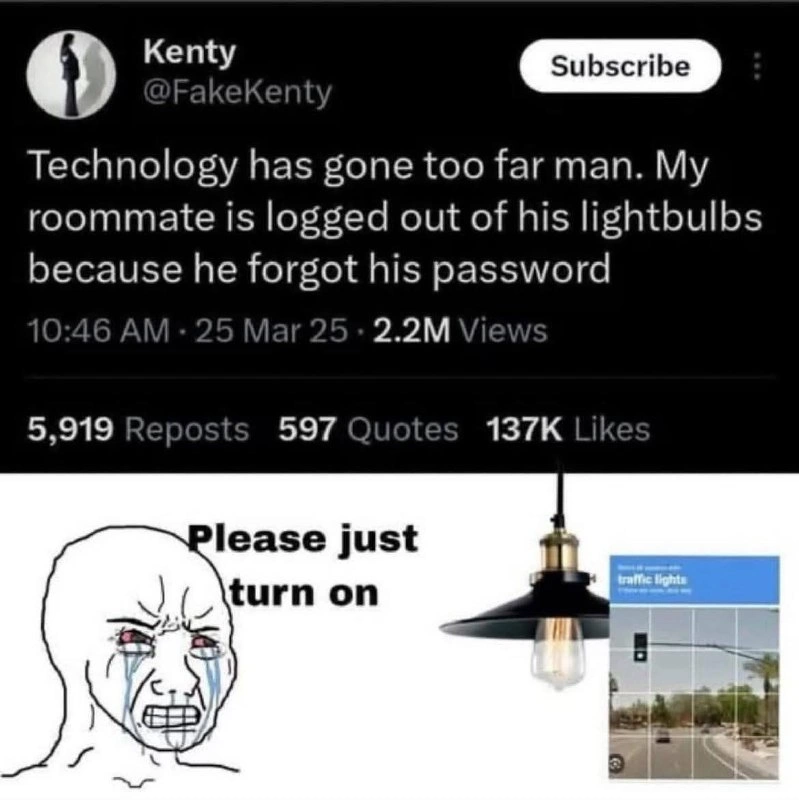
Imagine you go to turn on your bedroom light, but instead of the light turning on, a voice says: “Please say the secret password!” You’ve forgotten the password, so the light just won’t turn on. You’re standing there in the dark going, “Please, I just want my light on!” This meme is joking about exactly that kind of silly situation. It’s funny because normally turning on a lamp is the easiest thing – you just flip a switch or push a button. But here technology made it complicated: the lamp acts like a locked phone or a guarded treasure chest. It’s as if your lamp doesn’t trust you until you prove who you are! In the picture, the crying character just wants the light to work, and the lightbulb is effectively saying “Not until you answer this riddle about traffic lights.” That little grid of pictures (the CAPTCHA) is like a quiz: “Show me where the traffic lights are in these photos, and maybe then I’ll shine.”

For a simple everyday task, this is over-the-top and that’s why it’s humorous. It’s poking fun at how modern gadgets sometimes add too many safety checks. Think of it like if you tried to open your fridge but it demanded a fingerprint or if your faucet required you to solve a puzzle before water comes out. You’d be like, “Ugh, come on!” We expect things like lights to be straightforward. The meme makes us laugh by showing a really frustrated person begging their smart light, which has essentially locked them out because of a forgotten password. In plain terms: technology made a simple thing overly complicated, and that absurdity is both relatable and comedic. It reminds us that sometimes the old simple ways (like a regular light switch) can be a lot less hassle than all these high-tech “smart” versions, especially when they decide not to cooperate.

Level 2: Smart Bulb Blues

Let’s break down what’s happening in simpler terms. This meme is about a smart lightbulb – a lightbulb that’s connected to the internet as part of the Internet of Things (IoT). IoT devices include things like smart bulbs, thermostats, fridges, and locks that you can control with an app or voice commands. In theory, that’s super convenient. In practice, as we see here, it can introduce some silly problems.

In the old days (or with regular lightbulbs), to turn on a light you simply flip a switch on the wall. No passwords, no fuss. With a smart bulb, the bulb is often always powered and waiting for a wireless command. You usually control it through a smartphone app or a smart home hub. To make sure the commands come only from authorized users (like you, not a random hacker or nosy neighbor), the system requires you to log in with a username and password on that app. That’s the authentication step – proving “it’s me, I’m allowed to do this.” In many systems, once you log in, you stay logged in. But if you get logged out (say you changed your phone or the session expired), the app will ask for that password again.

In the meme’s story, the roommate forgot his password, so he’s effectively locked out of the app that controls his Wi-Fi lightbulbs. He can’t turn on the lights through the app because it keeps asking for the password he can’t recall. Picture standing in a dark room, opening the lamp’s app, and it says “Please log in.” You go, “uh oh, what’s my password again?” Usually, you’d hit “Forgot password,” go check your email, reset it… Meanwhile, you’re still in the dark! This is already frustrating and kind of funny if you think about it – needing an account recovery to turn on a lamp.

The meme takes it a step further: sometimes, when you try logging in and the system thinks it might not actually be you (maybe you entered the wrong password a couple times, or you’re on a new device), it will show a CAPTCHA. A CAPTCHA is that little test with the grid of images where it says “select all squares with traffic lights” or “click all the pictures that have a crosswalk.” Websites use CAPTCHAs to confirm you’re a real person and not a malicious computer program (a bot) trying to break in. They are quite common if you’re doing a password reset or logging in from an unusual location. In our scenario, after the roommate fumbles the password, the smart-home app (or whatever interface he’s using) might throw a CAPTCHA challenge. It’s essentially saying: “We’re not sure you are a human or the rightful user, prove it by doing this puzzle.”

Now the absurd image: The meme artist drew a crying, frustrated character (a simplified meme representation of the roommate) begging the actual physical bulb, “Please just turn on.” Next to the bulb is the CAPTCHA panel labeled “traffic lights.” Of course, real lightbulbs don’t have a screen to show you a CAPTCHA. This is a visual way to represent what the app is doing. It’s as if the lightbulb itself is saying, “I won’t light up until you log in and prove you’re not a robot.” It’s a funny exaggeration of the feeling the user has. Usability-wise, this is a failure: a very basic task (getting light) has become complicated by layers of digital security.

Let’s clarify a couple of terms and why the designers thought this was a good idea (and where it went wrong):

  • IoT (Internet of Things): everyday devices connected to the internet. The smart bulb is an IoT device. It can be controlled over the internet, which is cool because you could turn your lights on/off even when you’re not home, set schedules, or use voice commands with Alexa/Siri. But it also means the device often relies on remote servers and accounts.
  • Authentication: the process of verifying who you are. In plain terms, it’s logging in. Username/password is one factor (something you know).
  • MFA (Multi-Factor Authentication): when a system requires more than just your password – e.g., a second step like a text message code, a phone app approval, or solving a CAPTCHA. It’s like double-checking your identity using a second method. It greatly improves security because even if someone guesses your password, they’d also need your phone or to pass these extra tests.
  • CAPTCHA: A specific kind of test usually consisting of identifying objects in images or typing a distorted word. It’s there to block automated attacks (bots). The one shown says “traffic lights” – a common type where you click all the images that contain a traffic light. It’s a bit ironic here because the user is trying to turn on a light and is being asked to identify pictures of lights.
  • Smart Bulb Login: Smart home devices often require you to log into an account. The first part of the meme (the tweet) explicitly says the roommate is “logged out of his lightbulbs.” That indicates the bulbs are tied to an account system. No account access = no control.
  • Security vs. Usability: This is a common tug-of-war in tech. More security (passwords, MFA, strict checks) usually means more inconvenience for the user. More convenience (like no login needed) can mean less security. In the case of a lightbulb, leaning too far into “security” led to a pretty ridiculous outcome. It’s overkill to treat a lamp like Fort Knox, but that’s what happened.

To visualize the difference, consider how a normal old-fashioned light compares to a smart IoT light in everyday use:

Traditional Lightbulb 🕯️ Smart IoT Lightbulb 💡
Turn it on by flipping a wall switch – instant on/off. Turn it on via a smartphone app or voice command, which sends a request through the internet.
No login or password needed, ever. Must log in to an app or service that controls the bulb. Password (and sometimes MFA) required.
Works offline (it’s a circuit, no internet involved at all). Needs a working internet connection and cloud service. If Wi-Fi or the service is down, the app might not control the bulb.
If you can physically press the switch, you can use the light – that’s the only “authentication” (physical access). Only authorized users can control it. Others can’t turn it on remotely, which is good for security, but it means even the owner has to prove their identity digitally.
Very simple user experience – anyone in the room knows how to use it intuitively. Learning curve: you have to install the app, pair the bulb, remember the password, and navigate the interface. Non-tech-savvy folks might struggle.
Virtually no risk of being “hacked” (someone would have to break into your house to mess with it). Has cyber risk: if you use a weak password or the company has a breach, someone on the internet could control your light. Hence all the security layers.

As you can see, the smart bulb adds a lot of complexity for features and security. In everyday life, that can lead to amusingly frustrating situations. The meme captures one: needing to go through a whole login/CAPTCHA procedure (like a mini exam or a security screening) to do something as simple as turning on a lamp. For a junior developer or tech enthusiast, it’s a lesson in design balance. We implement logins, CAPTCHAs, and MFA to secure things, but we also must consider the context. Not every device or function needs the highest security if it ruins the user experience. Here, requiring a password (and more) for a lightbulb without any fallback (like a manual switch) is arguably a design flaw — it made the system robust against hackers, but too brittle for the actual user. The poor roommate in the meme is living that design flaw: he’s in the dark, literally, because of a forgotten digital key. It’s both a funny story and a thought-provoking example of user experience failure in IoT.

Level 3: Locked Out of Light

From a senior developer’s perspective, this meme is painfully on point. It’s poking fun at an overengineering fiasco that we’ve seen creeping into daily life: simple devices requiring complex authentication. The top half is a viral tweet complaining that “Technology has gone too far” — and any experienced engineer might chuckle and nod, recalling their own encounters with overengineered IoT products. The roommate “logged out of his lightbulbs” is a hilarious exaggeration, but it rings true. We’ve all witnessed a home_automation fail where a smart home gadget becomes unusable due to a forgotten password, a server outage, or some app glitch. It’s a classic case of security vs. usability: the product team was so focused on security and data integration that they created a usability nightmare. Sure, now nobody can hack the lightbulb, but apparently the owner can’t use it either without jumping through hoops. It’s security_overkill embodied in a device whose entire job used to be accomplished by a $0.50 wall switch.

The humor here comes from relatability and absurdity. Seasoned devs have often warned about user experience failure in IoT: “Don’t make a thermostat that needs a 2FA code just to heat the house!” Yet here we are. The image of a crying NPC-faced person pleading “Please just turn on” to an uncooperative smart bulb hits home for anyone who’s fought with “smart” gadgets. Maybe you’ve wrestled with a Wi-Fi enabled toaster that demanded a firmware update before making breakfast, or a door lock that wanted a server connection to let you in. The meme’s lightbulb scenario sounds outrageous, but similar things have genuinely happened – for instance, people getting locked out of their own smart locks or unable to turn on Wi-Fi bulbs when the Internet was down. It’s funny because it’s true enough in the era of cloud-dependent everything.

In a real-world scenario, how does one get “logged out” of a lightbulb? Likely via the bulb’s companion app. Smart bulbs often require you to use a mobile app linked to a cloud account (say a Philips Hue or Xiaomi account). That app controls the bulb via the cloud. If your session expires or you reinstall the app, you might need to log in again. Forget your password? Congratulations, you’ve got a digital lockout – you literally can’t turn on the light until you recover or reset the credentials. The bottom half of the meme illustrates the frustrating workflow that ensues: you try to log in, maybe you fumble the password, and bam, the system throws a CAPTCHA at you (select all squares with “traffic lights” – the irony!). It’s a dramatization, but many of us have cursed at those image-picking CAPTCHAs in far less urgent situations. Put yourself in that poor roommate’s shoes: it’s dark, you just want your lamp to work, and now you’re squinting at your phone verifying other lights in street photos. This is user experience hell.

The senior engineers also recognize the broader satire of industry trends. Everything is becoming a subscription or a service. The tweet screenshot even shows a “Subscribe” button next to the username (likely a Twitter UI artifact, but oh-so fitting). It hints that even our appliances might demand subscriptions or logins to function. There’s a half-joke among weary devs that in the future you’ll need to watch a 30-second ad or pay a microtransaction to turn on your faucet. Here, it’s an MFA prompt to turn on your bulb. We laugh, but it hurts because it feels like a sneak peek at a dystopian UX. Experienced developers rally against this kind of overengineering_iot because it’s a textbook example of forgetting the core purpose: a lightbulb’s primary function is to provide light conveniently. If a design requires an account sign-in or puzzles to do that, something’s gone off the rails in the requirements meetings.

Importantly, seniors will point out why this keeps happening. Companies love tying devices to cloud accounts – it lets them collect data, improve security centrally, and even lock customers into their ecosystem. On paper, it also outsources “smarts” to the cloud so the device can be cheaper. But the trade-off is reliability and simplicity. No internet or no account access often means no device function, as the roommate found out. A veteran developer might sarcastically quip: “We solved the problem of someone stealing your lightbulb’s Wi-Fi, at the cost of occasionally bricking the bulb for the actual owner.” The meme is a cultural pushback on this trend, a comic reminder that just because we can add cloud authentication to everything doesn’t mean we should.

In the end, the scenario is undeniably funny but also educational. It’s a caution to engineers: don’t let “smart” tech become too smart for its users. When designing IoT, always ask, what happens if the fancy parts fail? Can the user still flip a switch? Here, evidently, the answer was no, and that’s why millions found this tweet meme-worthy. After all, nobody wants to file an IT ticket for their bedroom lamp or pass an exam to turn on the lights. It’s a perfect example of modern_inconvenience through technology.

// Pseudo-code for an over-secured smart bulb:
function turnOnLight(request) {
  if (!request.user.isAuthenticated) {
    showCaptcha("traffic lights");  // Ask user to prove they're human
    throw new Error("AccessDenied: Please log in to use the lightbulb.");
  }
  if (!request.user.hasValidMFA) {
    promptSecondFactor();  // e.g., send a push notification to phone
    return "Waiting for MFA confirmation...";
  }
  light.powerOn();  // finally, turn on the physical light
}

// The above snippet is exaggerated, but not far from reality – this is what it feels like just to get a lamp to light up in IoT-land.

Level 4: Zero-Trust Nightlight

At the deepest technical layer, this meme highlights how IoT devices turn a simple act (flipping on a light) into a miniature distributed security workflow. Modern smart bulbs are not just bulbs – they're IoT nodes in a cloud ecosystem. When you tap your phone to turn on an IoT light, your request often travels through the internet to the manufacturer's servers and back to your lamp. Under the hood, the light is essentially saying: "I won't obey until I know who you are and that you’re allowed." This involves cryptographic handshakes and authentication tokens, not unlike logging into a secure web service. The phrase “logged out of his lightbulbs” hints that the bulb’s cloud account session expired or credentials failed. In a strict zero-trust design, every action must be authenticated — even a request to shine. It’s as if the lamp follows a corporate-grade multi-factor authentication (MFA) policy. No token, no light.

Why would anyone design it this way? Historically, IoT security has been a nightmare. Weak default passwords on early smart devices led to massive botnets (like the infamous Mirai in 2016) hijacking cameras and thermostats. To prevent unauthorized access (imagine a prankster turning your lights on/off remotely at 3 AM), vendors started enforcing strong logins and cloud controls. Your smart bulb doesn’t really trust your local network; it trusts the cloud’s say-so. So from a security standpoint, the bulb’s software treats a user command as it would any API request: verify identity via authentication, maybe even run a quick check (entering a CAPTCHA or MFA code) if the situation looks suspicious. It’s the security vs. usability trade-off taken to an absurd extreme. The foundational principle of “never trust, always verify” gets literal here: a CAPTCHA about “traffic lights” becomes a Turing test for your lamp, making you prove you’re human to an actual light bulb.

This almost comical rigor links back to real computer science concepts. CAPTCHA stands for “Completely Automated Public Turing test to tell Computers and Humans Apart,” originally a way to block bots. Here it’s guarding, of all things, actual lights. On a theoretical level, it’s a clash between the implicit trust of physical interfaces (a light switch doesn’t ask who you are) and the explicit trust model of networked systems (each request must be vetted). The IoT bulb is designed as a node on the internet first and a lamp second. In doing so, it inherits the full stack of security protocols — encryption, tokenization, challenge-response tests — that were meant for high-stakes online accounts. The result? You get a supremely over-secured piece of hardware. It’s as if someone applied Kerberos authentication and OAuth tokens to a nightlight. The engineering rationale might be sound (protect user devices, unify login for all smart home functions), but it creates the absurd scenario we see in this meme: a security_overkill where the pathway to illumination is gated by login prompts and CAPTCHA puzzles. It’s a modern inconvenience born from layering enterprise-level security onto a tiny appliance that just needs to glow when you want it. In essence, the meme exposes how elegant theoretical security can backfire in practice — turning a light bulb into a strict gatekeeper that won’t deliver a lumen until you’ve proven your identity and maybe your sanity.

Description

A tweet from Kenty (@FakeKenty) reading 'Technology has gone too far man. My roommate is logged out of his lightbulbs because he forgot his password' posted 25 Mar 25 with 2.2M views, 5,919 reposts, 597 quotes, and 137K likes. Below the tweet is a meme showing a crying Wojak face next to a pendant lightbulb with the text 'Please just turn on' and a small inset image of a book about traffic lights. The meme captures the absurdity of IoT devices requiring cloud authentication for basic functions

Comments

8
Anonymous ★ Top Pick In 2025, 'let there be light' requires a valid OAuth token and your smart home hub not having an expired SSL certificate
  1. Anonymous ★ Top Pick

    In 2025, 'let there be light' requires a valid OAuth token and your smart home hub not having an expired SSL certificate

  2. Anonymous

    Great - now the sprint review includes a P0 bug where the living-room light can’t pass CAPTCHA because the lamp shade keeps blocking the traffic signal

  3. Anonymous

    Remember when the hardest part of changing a lightbulb was reaching it? Now it's implementing OAuth2 with refresh tokens, setting up 2FA, and explaining to your PM why the bulb needs a microservice architecture with a Redis session store just to achieve 60 watts of illumination

  4. Anonymous

    This is the inevitable endpoint of 'move fast and break things' culture - we've successfully broken the light switch, a technology that's worked flawlessly for 140 years without requiring OAuth2 flows, password resets, or a stable internet connection. Now we're one firmware update away from needing 2FA to use the bathroom at 3 AM. The real kicker? The bulb probably has better uptime than most microservices, but worse availability due to authentication dependencies. At least when your Kubernetes cluster goes down, you can still see it happening

  5. Anonymous

    Nothing says enterprise-grade home automation like needing OAuth, SSO, and a reCAPTCHA to toggle a GPIO - CAP theorem for lighting: consistent and secure, but not available

  6. Anonymous

    IoT: Because nothing says 'simple relay flip' like a 2048-bit RSA handshake over MQTT just to banish the dark

  7. Anonymous

    We shipped zero-trust for the living room light: OAuth, reCAPTCHA, and 2FA - trading a 50-cent switch’s five-nines for a password reset ticket

  8. @RiedleroD 9mo

    "too far" no, just in the wrong direction. I like my smart lights, they have a hardware fallback in case the HOAS is down or whatever

Use J and K for navigation