
Skip to content
DevMeme
756 of 7435
Ancient Developer Tools: The Turbo C++ Era
TechHistory Post #855, on Nov 26, 2019 in TG

Ancient Developer Tools: The Turbo C++ Era

Why is this TechHistory meme funny?

Level 1: Back in My Day

Imagine you show your grandparent a high-tech smartphone, and then you show them an old rotary phone from the 1940s. They might smile and say, “Oh, I used to use one of those when I was your age!” That’s basically what’s happening in this meme, but with computer programming. The top picture is like an old tool from many years ago that was used to write computer programs. It’s all blue and old-looking because that’s how computer screens looked back then – kind of like how old TVs were black-and-white. The bottom picture shows someone looking amazed and saying, “I was there, 3,000 years ago...,” which is a funny way to say, “I remember this from a long, long time ago!” (They’re pretending to be as old as a mythical figure who’s thousands of years old, just for dramatic effect.)

Why is this funny? Because in the world of technology, things change really fast. A tool or program from 30 years ago (long before most kids or even teenagers today were born) feels super old, almost like it’s from ancient history. When an experienced programmer sees that blue old-fashioned programming screen, they feel a warm wave of nostalgia – that means a mix of happiness and bittersweet longing for the past, kind of like when you remember your favorite childhood toy. They might chuckle and say, “Wow, I started coding on that! Feels like ages ago.”

It’s like if you played video games on a Nintendo from the 1980s and suddenly you see one now – you’d get excited and say, “Whoa, I remember this, it’s so old-school!” Younger folks who never used it might not fully get why it’s special, but for those who were there, it brings back memories. In simple terms, this meme shows an old coding program that makes older programmers feel like they’re revisiting their childhood or early career days. And the joke is that in the tech world, feeling 30 years older is like feeling 3000 years older – things evolve that quickly! It’s a little loving laugh at how far things have come, and how those who do remember feel like wise old wizards saying, “Back in my day, this is how we wrote code…”

Level 2: Turbo C++ 101

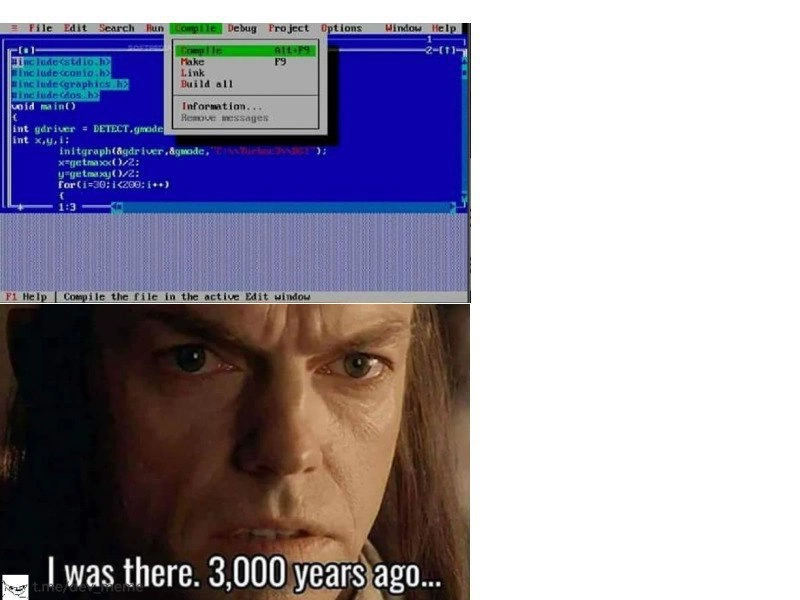
Let’s break down what’s going on in this meme for those who might not have experienced it first-hand. Turbo C++ was an Integrated Development Environment (IDE) and compiler for C and C++ programs, very popular in the late 1980s and early-to-mid 1990s. It was made by a company called Borland, and it ran on an operating system called MS-DOS (Microsoft Disk Operating System). DOS was a text-based OS that predated Windows – imagine using your computer entirely through a black (or blue) screen with text and simple menus, no mouse-driven interface with icons. Turbo C++ itself had a characteristic look: a bright blue background filling the whole screen, a menu bar at the top with entries like File, Edit, Compile, etc., and an editor area where you write your code. This blue-screen IDE is instantly recognizable to anyone who coded on DOS; it’s almost iconic, sort of like the “blueprints” for many programmers’ early experiences.

The menu shown in the meme is specifically the Compile menu open with options. In modern terms, “compile” means to take your human-readable source code (in C or C++ here) and translate it into machine code that the computer can execute. Turbo C++ being an IDE means it has that compiler built-in. The menu options listed:

  • Compile (shortcut Alt+F9) – compile the current file you’re editing.
  • Make – compile any files in your project that have changed and then link them (basically an incremental build).
  • Link – take the already-compiled pieces of your program (and any libraries) and link them into the final executable program (.EXE file).
  • Build All – recompile everything from scratch and link it (a full rebuild of the project).
  • Information... – show info about the last compilation (like how many errors, memory used, etc.).
  • Remove Messages – clear the compilation messages/output window (for example, remove the list of error messages once you’ve fixed them).

Today, an IDE like Visual Studio or a build tool like npm or gcc kind of does all these steps under one “Run” or “Build” command, so you might not see them separated so explicitly. But in Turbo C++, you had manual control. For instance, you could compile a file without linking, which was useful if you just wanted to check for errors in one file quickly. The presence of these options in the meme instantly tells you “this is an old-school build process.”

Now, let’s talk about the code visible in that top panel. It’s written in C (or C++ in C-style). The first lines are #include<stdio.h> and #include<conio.h> and others – these are header files that you include to use certain functions. <stdio.h> is the standard I/O library (for things like printf). <conio.h> stands for "console I/O" – it was a non-standard header provided by Borland (and some other compilers) that let you do things like clear the screen or read a character from input without waiting for Enter (like getch() which reads a key press). <dos.h> was another Borland-specific header with DOS system calls (like delay() to pause for a number of milliseconds, or functions to manipulate hardware interrupts). These are considered legacy headers; they only worked in DOS-based compilers and aren’t part of the standard C/C++ library you’d use today.

The most interesting is #include<graphics.h>. This is the header for Borland’s BGI (Borland Graphics Interface) library. In the days of DOS, doing graphics (drawing shapes, lines, pixels) wasn’t straightforward because DOS itself had no built-in graphics support – it was all text by default. Borland provided BGI as a simple way for programmers, especially learners, to use the graphics capabilities of their video card without having to write assembly code or direct VGA programming. By including graphics.h, you got access to functions to initialize a graphics mode and draw things like circles, lines, rectangles, etc.

Looking at the code:

void main() {
    int gd = DETECT, gmode;
    int x, y;
    initgraph(&gd, &gmode, "C:\\turboc3\\bgi");
    x = getmaxx() / 2;
    y = getmaxy() / 2;
    for(i = 30; i < 200; i++) {
        … 
    }
}

Let’s decode this: void main() is how a lot of simple DOS programs start – typically, modern C++ would use int main(), but in Turbo C++ it was common (though technically not standard) to use void main for a program that doesn’t return an exit status to the OS. Inside, they declare gd and gmode of type int. gd is set to DETECT, which is a constant in graphics.h that basically says “auto-detect the graphics driver.” initgraph(&gd, &gmode, "C:\\turboc3\\bgi"); is the key call. It tries to initialize the graphics system. It takes pointers to gd and gmode (which will be set to the detected graphics driver and mode, like say VGA and 640x480 resolution), and the third argument is a path to where the BGI driver files are. In this code, they explicitly provided "C:\\turboc3\\bgi" which suggests that on that computer, the BGI drivers are located in C:\turboc3\bgi. (Turbo C++ often came with a BGI folder containing files like EGAVGA.BGI). If you didn’t specify the path, initgraph would look in the current directory or a default path, but many sample programs hard-coded it like this because otherwise initgraph might fail if it can’t find the driver. After initgraph, if it succeeds, the screen would switch from text mode to a graphics mode (the screen might flicker and then you’re in a graphics screen which might be blank initially).

Then getmaxx() and getmaxy() are functions that return the maximum x and y coordinates on the screen in the current graphics mode. So, x = getmaxx() / 2; y = getmaxy() / 2; is calculating the center point of the screen (dividing by 2). Next, there’s a for loop: for(i = 30; i < 200; i++) { ... }. We don’t see the inside, but given the pattern, maybe they’re drawing something with varying size, perhaps circles with radius i or a line moving outward. It’s likely a small demo of drawing shapes or an animation – typical for a beginner trying out graphics.

All these pieces – graphics.h, initgraph, those specific include files – firmly place this code in the context of DOS programming with Turbo C++. This is not code you’d see in modern C++ textbooks; it’s very tied to that era and that particular toolset. That’s why the meme evokes “retro dev nostalgia”: it’s showcasing a classic setup that older developers remember using when they started programming.

Now, the bottom half of the meme (the reaction image) shows a person impressed and the caption "I was there. 3,000 years ago...". This is basically a joke. It implies that the person (the senior developer) is dramatically stating how long ago it feels since they used that old technology. Obviously, no one was literally coding 3000 years ago – we barely had the abacus back then! – but in tech terms, something from ~30 years ago can feel that ancient. The humor is that a young developer might look at Turbo C++ and say, “Wow, that’s old, when did people even use this?!” and an older dev, puffing out their chest, goes, “Kid, I was using that 3000 years ago,” as if they’re an ageless being from a bygone era.

One more tidbit: why the blue background? Back in the days of DOS text-mode applications, it was common to have bright colors to make the UI more readable on CRT monitors. Borland IDEs (and also Microsoft’s similar tools) often used a blue background with white or yellow text. It was just the style, and many remember it fondly. Today, many IDEs default to a light or dark theme with modern color schemes, but you can often find a “Borland” theme or somebody’s custom theme that mimics that blue look for nostalgia.

To put it all in perspective, here’s a quick comparison between Turbo C++ in its time and the tools we use now:

Turbo C++ (DOS Era) Modern Development (Now)
Runs on single-tasking MS-DOS (16-bit) environment, no multitasking. The IDE is the whole environment. Runs on multitasking OS (Windows/Linux/macOS). You can have an editor, compiler, browser, etc., all open at once.
Text-mode blue interface, keyboard-driven menus. Graphical GUI IDEs or editors (like VS Code, Visual Studio) with windows, panels, mouse support, and customizable themes.
Limited by 640KB memory for program and environment. Programs are 16-bit. Programs and tools can use gigabytes of RAM. We build 64-bit applications, and memory is seldom a worry for simple programs.
Uses Borland-specific libraries like BGI for graphics, tied to DOS. Uses cross-platform or OS-specific frameworks (SDL, OpenGL, DirectX, etc.) for graphics, or high-level engines.
Distribution via floppy disks or CDs; no internet required (or available). Tools and libraries are downloaded from the internet (Stack Overflow for help, frequent updates, etc.).

What remains the same? The C/C++ language syntax is still recognizable. A loop is a loop, printf works similarly (if you include <stdio.h> in a modern program, it’s still there), and concepts like compiling and linking are still how we build software under the hood. But the environment and ecosystem around the language have transformed dramatically.

So, this meme is basically a nostalgia trip. For younger devs, it’s a peek into what coding looked like for their “developer ancestors.” For older devs, it’s a proud and humorous reminder: “Yep, that’s where I started – and look how far we’ve come!” If you ever hear a senior engineer say something like “I remember writing code on a 386 in Turbo C++,” now you’ll know exactly what kind of scene they’re picturing: a blue screen, an Alt+F9 compile command, and probably some ASCII art or BGI graphics dancing on a CRT monitor.

Level 3: Alt+F9 Flashbacks

If you’ve been coding since the *90s (or earlier), this image hits you right in the feels. The moment a seasoned developer sees that blue-screen Turbo C++ IDE with its grey menu bar and the "Compile" menu open, a flood of memories comes rushing in. It’s the software equivalent of hearing a familiar old song – one that you may not have heard in decades but still know by heart. In fact, many of us can practically hear the clicky sound of navigating those menus and the faint computer speaker beep that played when compilation finished successfully. The meme pairs it with a reaction image captioned, “I was there. 3,000 years ago...” — a humorous exaggeration of how ancient this all feels in the fast-paced timeline of tech. And honestly, in computing terms, the early 1990s are practically ancient history.

So why is this combination of elements (a Turbo C++ screenshot and that caption) so potent? It’s because it taps into a shared experience among older programmers, especially those who learned C or C++ in the age of DOS. Back then, Borland’s Turbo C++ was the tool for many students and professionals alike. Entire generations cut their teeth on it, writing simple programs and experimenting with graphics using the BGI library. The code snippet shown – including #include <graphics.h>, initgraph(), and calculations of x = getmaxx()/2 – is immediately recognizable. It’s not just any C code; it’s the boilerplate for drawing shapes on a DOS screen. Countless beginner projects started exactly like this: set up graphics mode, compute the center of the screen, draw something (maybe a circle expanding in a loop, as implied by that for(i=30; i<200; i++) { … }). The mere sight of #include <conio.h> and #include <dos.h> invokes muscle memory for veteran devs: we recall using clrscr(); to clear the screen or getch(); at the end of main to prevent the program from closing instantly (a common trick so you could see your graphics output until you pressed a key).

The menu snippet in the meme – with options for Compile, Make, Link, Build all – is basically a UI snapshot of the entire build process. Seeing Alt+F9 highlighted next to “Compile” is the kicker. Any Borland IDE user from those days remembers that keyboard shortcut viscerally. We didn’t have fancy mice (or often, we preferred keys), so Alt+F9 to compile, and then Ctrl+F9 to run, were burned into our brains. It’s like a secret handshake for elder developers: if your fingers instinctively know what Alt+F9 does, you’ve been around long enough to call yourself a grizzled coder. This meme gently teases that collective nostalgia — “Hey, remember when compiling meant a blue screen and you hit Alt+F9?” Absolutely we do, and some of us get a little misty-eyed thinking about it.

What’s particularly humorous is how this old IDE’s appearance starkly contrasts with modern development environments. Today we have slick, themeable editors, VS Code with hundreds of extensions, IntelliSense autocompletion, real-time error squiggles, and Git integration at our fingertips. By contrast, Turbo C++ offered a simple text interface with drop-down menus and an editor that didn’t even understand our code beyond color-coding keywords. Yet, it felt complete and powerful at the time. The meme plays on the idea that senior devs might actually be impressed or emotional (like the woman in the reaction image, eyes lit up) upon seeing something so primitive by today’s standards. It’s the juxtaposition of how far things have come versus how fondly we remember the old ways. The caption “I was there, 3,000 years ago” nails this sentiment: it humorously implies the senior dev is basically an immortal elder, witnessing the dawn of modern computing tools.

This also touches on a bit of tech culture history: TechNostalgia is real. Just as people get nostalgic for old video games or typewriters, programmers often wax poetic about the first languages and tools they used — no matter how clunky they were. Turbo C++ is often a subject of such reminiscence. Many learned programming in a classroom or at home with this IDE, perhaps off a set of floppy disks or a CD, long before the internet had Stack Overflow or GitHub. The BGI graphics library in particular is almost a rite of passage story: “Oh, you think making a webpage animation is hard? Back in my day, we had to initialize graphics mode with a file path to driver files, and we drew circles with code on a 320x200 screen!” It’s the truth: drawing a simple circle or line in that environment felt like an accomplishment (and in many school programs, it was literally the assignment).

There’s also an underlying commentary about legacy systems and education. Turbo C++ lingered around in curriculums and older codebases far longer than it should have. By November 2019 (when this meme was posted), Turbo C++ was decades out of date, yet you’d still find senior engineers joking about how some universities (especially in certain countries) inexplicably still taught C programming using Turbo C++ well into the 2010s. Talk about legacy! Imagine teaching auto mechanics by having students rebuild a Ford Model T — that’s the equivalent in software education. So for those in the know, the meme might also elicit an eye-roll and a chuckle: “Yup, and some of us not only were there 3000 years ago, but our old school professors trapped us there by insisting we keep using this fossil of an IDE!” It’s funny because it’s true: plenty of seasoned devs had to deal with moving from this archaic tool to modern compilers and unlearn some outdated practices (like using gets() or void main or assuming 16-bit ints, etc.).

To sum it up, the meme’s humor comes from a place of affectionate recognition. It pokes fun at how quickly technology moves by presenting something once cutting-edge that now looks like a museum piece. Compilers and IDEs have evolved, but seeing Turbo C++’s interface instantly bonds those who shared that chapter of tech history. It’s the kind of post where the comment section would be filled with things like “OMG Alt+F5 to run with debugger, I remember this!” or “This is how I wrote my first program in 1995 😃.” In a world where new JavaScript frameworks emerge every month, being able to say “I was coding before Stack Overflow even existed” is a badge of honor. And this meme lets the veterans wear that badge with a proud, slightly smug grin.

Level 4: When 640K Was Enough

In the DOS-era of computing, an IDE like Turbo C++ had to thrive under constraints that modern systems would consider prehistoric. Running on 16-bit real mode architecture, it was limited to a mere 640 KB of conventional memory – yes, just kilobytes, not gigabytes. This meant the entire editor, compiler, linker, and your program all juggled space within that tiny memory sandbox. The Borland compiler produced 16-bit x86 executables that ran in real mode, where addresses were segmented (a combination of a 16-bit segment and offset). If you needed more memory, you’d have to orchestrate elaborate bank-switching with EMS/XMS or use overlays. This is the world where the phrase “640K ought to be enough for anyone” (often attributed to Bill Gates, perhaps apocryphally) was a relatable idea. In practice, every byte was precious, and tools like Turbo C++ were engineered in assembly and C to be incredibly lean and efficient within these limits, truly earning the "Turbo" moniker for compilation speed.

Under the hood, Turbo C++’s compile->link cycle was exposed through those menu options: Compile, Make, Link, Build all. In modern IDEs, hitting “Build” might orchestrate dozens of tasks behind the scenes, but here each step was explicit and controllable. Compile (Alt+F9) would translate a single source file into an .OBJ object file. Make would compile only the files that changed (Borland’s built-in make system analogous to a basic makefile), and Link would then take all those .OBJ files plus the necessary libraries and stitch them into a single .EXE. The separation was not just a formality – it was a practical necessity. Linking could be a memory-intensive step (relative to the 640K limit), so doing it separately allowed the compiler to unload some context to free up memory. If you invoked Build all, it meant “recompile everything from scratch and link,” essentially a clean slate – useful if incremental compile had gotten confused (which, in those days of flaky dependency management, was not unheard of).

The BGI graphics library (graphics.h) in this meme is a perfect specimen of legacy engineering. Modern graphics APIs like OpenGL or DirectX interface with GPU hardware, but back then, consumer GPUs were primitive and no hardware acceleration existed for drawing lines or circles in 2D. Instead, BGI acted as a layer over video memory or BIOS interrupts. When you call initgraph(&gd, &gmode, "C:\\turboc3\\bgi"), the library attempts to DETECT the graphics adapter (CGA, EGA, VGA, etc.) and then load the appropriate driver from the bgi directory (for example, loading a file like EGAVGA.BGI for standard VGA graphics). These drivers know how to switch the display into a graphics mode (say 640x480 with 16 colors) and then manipulate pixels. Behind the scenes, drawing a line or a circle meant calculating pixel coordinates in system memory and then writing those values into the mapped video memory address (often starting at segment 0xA000 for VGA). This was done largely in software, pixel by pixel – a far cry from today’s GPU shaders running billions of operations a second. The fact that the code snippet includes for(i=30; i<200; i++) { … } hints at drawing an expanding shape or pattern, which on BGI would have been visibly slow if the loop did a lot of pixel work. Yet, it felt magical at the time: you were commanding the screen directly, without any Windows or fancy drivers in between.

Even the function signatures and headers in this old code illuminate how the language and system evolved. The use of void main() was common (Borland compilers tolerated it to mean a DOS program with no exit code), whereas modern C++ would insist on a proper int main(). Headers like <conio.h> (console I/O, for functions like clrscr() to clear screen or getch() to pause until a key press) and <dos.h> (DOS-specific calls like delay() or interrupt handling) were part of the compiler’s extensions to interface with DOS. These aren’t standard C headers – they tied your code to the DOS platform. A program using them could not be compiled on, say, Linux or even on modern Windows compilers without considerable changes, because they directly interacted with DOS interrupts and memory. This illustrates a key aspect of legacy code: it tended to be platform-specific and non-portable. Turbo C++ code often assumed a single-tasking environment (no threads to worry about, but also no OS services to rely on beyond BIOS), and computation was done on a single CPU core that ran at maybe 16-33 MHz. By contrast, today we write C++ targeting 64-bit multicore processors with gigabytes of RAM, and we rely on standard libraries and OS APIs for graphics or I/O.

From a tech historian’s perspective, the Turbo C++ blue-screen IDE is a living fossil from a time when integration was a necessity, not just a convenience. Modern IDEs (Visual Studio, CLion, VS Code, etc.) run on operating systems that handle windows, multitasking, and memory protection for them. But Turbo C++ was an all-in-one cathedral: a text editor, compiler, linker, and debugger living inside a single process, on a machine that could only run one thing at a time. When you pressed Ctrl+F9 (the hotkey to run the program, after compiling with Alt+F9), the IDE would actually suspend itself, invoke the .EXE you just built, and then somehow regain control after the program ended. Achieving that without modern OS support involved some low-level wizardry – effectively the IDE acted like a mini operating system for your program. It might save its state, execute your program, then catch the termination (perhaps via a DOS interrupt or a parent-child process return) to bring you back to the editor. This is akin to a parent process forking a child in today’s terms, but on DOS it was more like the IDE doing a execvp() to run the child and relying on the fact that when the child exits, DOS returns control to the next instruction in the parent (which the IDE had arranged to be its resume point). It’s bare-metal multitasking, in a sense. The integrated debugger similarly had to manipulate the CPU’s interrupt vectors to allow breakpoints and stepping through code, since DOS had no concept of protected debugging APIs. These technical feats were cutting-edge in their day, enabling a surprisingly slick development experience on hardware with the computing power dwarfed by today’s average wristwatch.

In summary, this meme’s Turbo C++ panel is more than just nostalgia; it’s a gateway to the architecture of early PC software development. It reminds us how compilers and IDEs were built tightly coupled to the operating environment. The humor carries an appreciation for how far we’ve come: from manually managing memory and graphics with libraries like BGI, to today’s world of high-level frameworks and virtually limitless computing resources. It’s a playful nod that even though the tools have changed drastically, the foundations of compiling, linking, and basic algorithms remain – and some senior devs remember implementing them under conditions that feel nearly mythological now.

Description

A two-panel meme. The top panel displays a screenshot of the classic Borland Turbo C++ IDE, instantly recognizable by its vibrant blue background and pixelated font. The code window shows a simple C program with `#include <graphics.h>` and `#include <dos.h>`, indicating its MS-DOS origins. The 'Compile' menu is open, with the 'Compile' option highlighted and its shortcut 'Alt+F9' visible. The bottom panel features a close-up of Elrond from 'The Lord of the Rings' with a serious expression, captioned with the iconic line, 'I was there. 3,000 years ago...'. The meme humorously equates the experience of using this archaic development environment to witnessing an event in ancient history. It's a deeply nostalgic joke for senior developers who began their careers in the DOS era, reminding them of how fundamentally different and primitive software development used to be compared to modern IDEs and tooling


Comments

7
Anonymous ★ Top Pick Modern developers talk about container orchestration. We used to orchestrate memory segments and DMA channels just to get a pixel on the screen. And our 'hot reload' was rebooting the entire PC
  1. Anonymous ★ Top Pick

    Modern developers talk about container orchestration. We used to orchestrate memory segments and DMA channels just to get a pixel on the screen. And our 'hot reload' was rebooting the entire PC

  2. Anonymous

    Alt+F9 in Turbo C was our original CI/CD - compile, link, and ship a 32 KB EXE on a floppy; today “Build All” spins up 300 Kubernetes pods just to draw the same BGI circle

  3. Anonymous

    Kids these days complain about VS Code being slow while I remember when 'real-time syntax highlighting' meant waiting 30 seconds for the compiler to tell you that you forgot a semicolon on line 47 of your 50-line program

  4. Anonymous

    When the tech lead asks you to maintain the payment processing module and you discover it's still running on Turbo C++ 3.0 with hardcoded paths to floppy drives, you don't just inherit technical debt - you inherit geological strata of architectural decisions that predate Git, Stack Overflow, and the concept of memory safety. At that point, you're not refactoring; you're conducting digital paleontology, carefully excavating each `far` pointer and `interrupt` handler while praying the business logic isn't encoded in BGI graphics coordinates

  5. Anonymous

    Back when scaling meant flipping Turbo C to huge memory model, hitting Build All, and praying initgraph(DETECT,...) found EGAVGA.BGI next to the exe

  6. Anonymous

    Fixed-form Fortran: where column 7 betrayal hits harder than a merge conflict in a monolith

  7. Anonymous

    Alt+F9 here doesn’t just compile; it links my memory model back to 16‑bit real mode where void main and BGI were the UI framework

Use J and K for navigation
