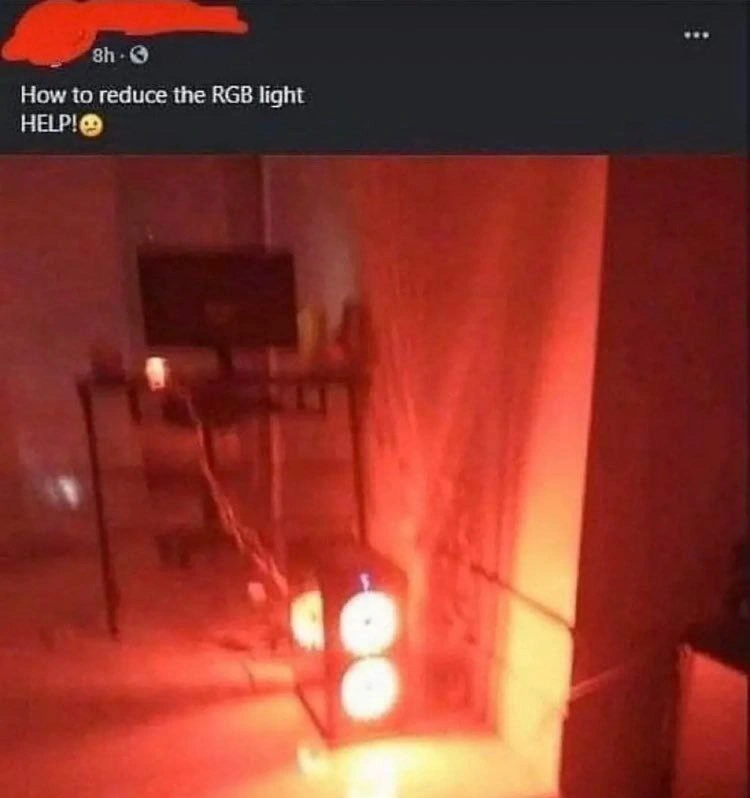
When your RGB settings become a cry for help
Why is this Hardware meme funny?
Level 1: Stuck on Red
Imagine you have a special lamp in your room that can shine in any color. You’re excited to use it, but when you turn it on, it suddenly goes bright red and makes your whole room red – like an alarm light in a cartoon. You try pressing all the buttons to change it, but nothing works; the lamp just stays blindingly red. Now your room feels scary, almost like there’s a big emergency, and you cover your eyes because it’s so bright. You get upset and yell, “Help! How do I make this stop?!”
This is basically what happened in the meme, and it’s funny because the situation is so over-the-top. The person’s computer, which has colorful lights inside, accidentally turned their entire office into a glowing red room. It’s as if their computer became a giant red nightlight that they can’t turn off. We’ve all had a moment like that with our gadgets – like a toy that starts blaring sound and we can’t find the off switch, or a phone that’s way too bright until someone shows us how to dim it. It’s a little scary for them in the moment but also silly because it’s just a light. The picture looks like something out of a movie, so completely red that it’s hard to believe. People find it humorous because the computer acted in an unexpected, extreme way, and the owner’s panicked reaction (“HELP! 😟”) is so dramatic over a fixable problem. It’s a lighthearted reminder that sometimes our cool new devices can surprise us in the funniest ways.
Level 2: When LEDs Go Rogue
For those newer to PC hardware or home-office setups, here’s what’s happening in plain terms. Modern computers often include RGB lights – tiny LEDs on fans or inside the case that can glow in any color you want (Red, Green, Blue are the primary colors they mix). In this meme, the PC’s case fans are all lit up bright red, and not just a little bit – they’re really bright, basically like a red flashlight on steroids. The user essentially turned their computer into a giant red lamp by accident, and now they’re nervously asking how on earth to dim it.
Why are the lights so intense? It likely comes down to firmware defaults and missing software control. Firmware is the built-in program that runs hardware components at a basic level. When you first power on new RGB fans, the firmware might default them to a super bright setting (often cycling colors or, in this unlucky case, just solid red at full blast) to show they work. Think of it like a new toy that starts flashing in demo mode until you set it up properly. Here, because no one has told the fans otherwise, they’ve decided to stay at max brightness. Every LED in those fans is at 100% output, which is why the entire room is washed out in red light.
Now, normally you control an LED’s brightness using a trick called Pulse Width Modulation (PWM). That sounds fancy, but it’s basically like flicking a light switch on and off really fast. If a light is on half the time and off half the time, your eyes see it as dimmer – that would be a 50% duty cycle. If it’s on more than it’s off, it looks brighter. And at a 100% duty cycle, the light isn’t blinking at all; it’s just constantly on at full power. In this scenario, the fans’ red LEDs are effectively at 100% duty cycle – meaning no blinking or breathing effect – just solid, intense red. No wonder the poor person in the post feels like they’re in a submarine emergency drill with everything tinted crimson!
The meme also jokes about a “runaway thread in production.” In simpler terms, a thread is like a little task or mini-program inside a bigger program. If a thread goes rogue (for example, gets stuck in an endless loop or eats up all the CPU time), it’s called a runaway thread. That can make a whole system slow down or crash until someone stops it. The comparison here is saying the blinding red lights are like a runaway process in a server: something that’s supposed to be controlled has gone out of control. Instead of clogging up the CPU, these unchecked RGB lights are “clogging up” the entire room with an overwhelming red glow. The fix in both cases is to go into the settings and calm things down (stop the runaway code, or lower the brightness/change the color).
For a junior dev or first-time PC builder, this is a lesson in configuration. Cool hardware features often need a bit of setup. If you build a home office PC with fancy RGB fans, you usually have to install a special app or go into the BIOS (the computer’s startup settings) to tell the lights how to behave. Until you do, the hardware just does its default thing – in this case, blaring bright red. The post’s cry for help – “How to reduce the RGB light” – is basically the person asking, “Where the heck is the setting to make this less crazy?!” The solution would be to open the motherboard or fan manufacturer’s lighting software and turn down the red intensity, or maybe switch to a calmer color (like a soft blue or just plain off).
It’s a pretty relatable situation once you break it down. Think about the first time you got a gadget that did something unexpected until you adjusted it. Maybe a new phone that had the screen brightness at 100% and nearly blinded you, or a toy that wouldn’t stop making noise until you found the off button. Here it’s a computer creating an accidental light show. The room in the photo literally looks like a boss fight area from a video game – that deep red glow is cool in a game like Diablo, but in real life it’s a bit much when you’re just trying to write code or join a Zoom call. The meme is funny because it shows an everyday person overwhelmed by a super dramatic, unexpected result from their tech, and we can all say, “Haha, I know that feeling!” even if our version was a little less extreme.
Level 3: Pulse-Width Pandemonium
It’s not every day your home-office setup initiates Red Alert on its own. In the meme’s screenshot, a panicked user pleads “How to reduce the RGB light HELP! 😟” after their PC’s RGB fans drenched the entire room in deep crimson. This isn’t a cozy ambient glow – it’s an overdrive blast of red that makes the room look like a data-center fire drill or a scene from Diablo. For a moment, it's as if the rig’s firmware yelled, “RED ALERT! All hands to battle stations!” and the poor developer is left scrambling to find the off switch.
What likely happened here is a classic case of default firmware settings gone wild. Many PC builders have experienced this: you assemble a shiny new rig with RGB lights in the fans, strips, and cooler, but out-of-the-box the system runs them at 100% brightness on a single color channel. In technical terms, the LED controller is driving the red channel at a 100% duty cycle – meaning it’s fully on, all the time, with no chance for dimming. Pulse Width Modulation (PWM) is normally used to adjust LED brightness by flickering the light faster than the eye can see; at a 50% duty cycle you’d get a gentler half-brightness glow. But at 100% duty cycle, there's zero “off” time in each pulse – the LEDs are effectively giving it everything they’ve got. The result? A blinding solid red, or as the meme shows, a “red-alert mode” that could double as a lava lamp from hell.
The humor here comes from treating an uncontrolled hardware config like a rogue process in a production system. In software, a runaway thread chewing up 100% CPU will bring a server to its knees, creating chaos until someone debugs or kills it. Here, instead of maxing out CPU, the PC maxed out the visual output of its RGB hardware – it’s hogging all the “luminosity resources” of the room. It’s a tongue-in-cheek parallel: one part of the system running amok (whether a thread or an LED controller) can disrupt the whole environment. Seasoned developers chuckle because they’ve seen how one unchecked setting or process (say, an infinite loop spewing log messages) can dominate a system. In this case, one unchecked LED setting dominated the physical environment. The computer is basically stuck at RGB(255, 0, 0) — full red, no chill — much like a thread stuck in an infinite loop at max load.
Why is this so relatable? Because nearly every hardware enthusiast or gamer has a similar tale. You plug in your brand new RGB case fans and boom – your room lights up like a nightclub until you hunt down the proprietary software or BIOS toggle to tame it. Manufacturers often ship hardware in a flashy demo mode to show off capabilities. They assume you’ll install their control utility (ASUS Aura, Gigabyte Fusion, Corsair iCUE, etc.) to customize it. Until then, all LEDs might default to an eye-searing setting (red is a common “look at me!” color). It’s the hardware equivalent of shipping a web app with DEBUG=true and verbose logging on – very loud and very visible until someone configures it properly.
The meme exaggerates this “RGB on steroids” scenario to brilliant effect. The entire minimalist office in the photo is bathed in one color because those front-mounted fans are synchronously blasting pure red. The user’s plaintive “HELP!” is something any developer can empathize with – it’s both funny and painfully real. You want your cool tech to enhance your workspace, not turn it into a scene from Alien where the self-destruct siren is blaring. There’s also a remote-work twist: imagine being on a video call and your colleagues see your face illuminated devil-red. They’d be wondering if you accidentally teleported onto a submarine in crisis or started role-playing a hacker in a dark lair. The combination of a serious work-from-home setup with an absurd, unintentional demon-strobe is what makes this hilarious.
Ultimately, this meme is a playful critique of hardware defaults and newbie PC-builder mishaps. The RelatableDevExperience here is knowing that high-performance gear often comes with gotchas: if you skip the setup for that pwm_led_controller_config, you might end up with unintended consequences – be it a server thread running wild or a PC that thinks it’s a distress beacon. In other words, with great power (and fancy LEDs) comes great responsibility… to find the brightness slider!
Description
A dark room is intensely illuminated by a powerful red light. The source is a desktop computer case on the floor, which has two blindingly bright, circular white lights on its front panel. The red glow is so strong it saturates the entire photo, making details blurry and giving the scene an emergency or hazardous feel. Above the photo is a screenshot of a social media post that reads, "How to reduce the RGB light HELP!😥". This meme humorously exaggerates the common issue of managing RGB lighting in custom-built PCs. For senior developers, it's a funny take on how a seemingly simple cosmetic feature can become an overwhelming technical problem if not configured correctly. It touches on the user experience of hardware and the sometimes-absurd outcomes of chasing performance or aesthetic trends without proper planning

Comments
7Comment deleted
This isn't an RGB problem, it's a backpressure issue. The light is clearly trying to escape the event loop
When your LED controller ships with RGB.enable(true) but no rate-limiter, you’ve basically spawned an infinite-loop for photons - enjoy the pager-duty glow!
When your RGB controller has more dependencies than your node_modules folder and every vendor's SDK is fighting for mutex access to your sanity
When your RGB configuration has more merge conflicts than your Git repository, and the only way to resolve them is to set everything to red and hope the hardware eventually reaches consensus. At least you've achieved perfect color synchronization across your entire ecosystem - just not the color you wanted
Installed three competing RGB controllers; the cluster resolved its split-brain via CAP: Consistent, Available, Permanently red
Nothing says “sane defaults” like a SATA RGB hub that boots at 255/255 duty cycle, ignores PWM until the proprietary daemon starts, and turns your room into a red-team training sim
RGB zones micro-managed like Kubernetes pods, yet 'dim' mode still overprovisions photons harder than your autoscaling cluster