
Git Desperation: Adding Fuel to the Fire
Why is this VersionControl meme funny?
Level 1: Adding Fuel to the Fire
Imagine you have a small campfire that’s starting to go out of control, and you accidentally grab a gasoline can instead of water – and pour it on the fire. WHOOSH! 🔥 Now the fire is ten times bigger. This meme is joking that a programmer did something similar with their code. They had a little problem in their code project (a tiny fire), and they tried to fix it with the wrong solution (pouring fuel). Instead of the problem getting better, it burst into a much bigger problem (a big bonfire!). It’s a funny way to say, “I tried to help, but I actually made it worse.” Everyone can relate to that feeling of oops – like when you try to wipe a small ink smudge on a drawing and end up smearing it everywhere. The picture just uses a big, bright example: fire and gasoline. The developer is the person with the can, the bad Git commands are the gasoline, and the poor code branch is the fire. The lesson? Sometimes trying random fixes without knowing what you’re doing is like adding fuel to a fire – you should be careful or ask for help, or you might turn a small problem into a blazing big one!
Level 2: Git Gone Wrong
Let’s break down what’s happening here in simpler terms. Git is a popular tool for version control, which means it helps developers keep track of changes in code by saving snapshots (commits) and letting them branch off to try new ideas without messing up the main project. A branch in Git is like a separate workspace or timeline where you can work on something independently. In the meme, "My branch" refers to one of those timelines of code that this person (the developer) is working on. Now, this branch is described as "already fucked" – which, in polite terms, means it’s in a pretty bad state. Maybe the developer tried to update their branch with the latest code from coworkers and ended up with a merge conflict (when two people changed the same part of the code and Git doesn’t know how to combine those changes). A branch in such a broken state is like a small campfire that’s smoking and sputtering – not good, but not a huge disaster yet.
What does our intrepid developer do? Instead of carefully figuring out the problem, they start throwing "random git commands" at it – basically trying a bunch of different GitCommands without a clear plan. It’s like randomly hitting buttons in a complex machine hoping one will fix the jam. For example, they might try git rebase (which is a way to take your changes and replay them on top of someone else’s work – useful for cleaning up history, but tricky if you’re not careful). If that rebase_gone_wrong makes things weirder (which can happen if there were conflicts or if the branch was shared with others), they might then try git cherry-pick (picking specific changes from one branch and applying them to another). Or maybe they use git reset to move the branch pointer back in history, or git commit --amend to rewrite the last commit. Each of these commands has a purpose, but using them without understanding is risky. It’s a bit like mixing random medicines together when you’re sick – you might cure the illness, or you might create a new problem that’s even worse.
The fuel_on_fire_analogy in the picture – pouring gasoline on a fire – is exactly what happens with a lot of these random Git fixes. One especially dangerous move is the force push: git push --force basically tells Git, “I don’t care if my version of the branch is completely different from what others have – just overwrite the remote branch with mine.” This is almost always a last-resort move, because it can cause anyone else working on that branch to suddenly get errors or lose the work they did that wasn’t in your copy. It’s like saying “my way or the highway” to the shared code – you replace the common history with your version. If the branch was already messy, a history_rewrite_panic (like a rushed force push after frantic rebasing) can make it so no one else knows what’s going on anymore. They’ll pull the branch and see a bunch of conflicts or find that their own code changes are now gone (since your force push removed them). This is why we call it a branch_damage_control_fail – the attempt to control damage actually caused more damage. Instead of putting out the small fire (resolving the conflict or issue carefully), the branch is now a roaring blaze of confusion.
In day-to-day development, this scenario is unfortunately common enough to be a running joke (DeveloperHumor and horror story). Newer developers (and yes, even experienced ones under pressure) might not be fully comfortable with Git’s complicated commands. When something goes wrong – say a MergeConflict they don’t know how to fix – it’s tempting to Google around and try the first fix suggestion you find. You might see advice like “just do git reset HEAD~1” or “try git pull origin main --rebase”. These can be the right commands in some situations, but used in the wrong context they make a bigger mess. Every Git command is like a tool: git merge combines work, git rebase reshuffles commit order, git reset moves the pointer of your branch (and can throw away changes if used with --hard!), git cherry-pick plucks a change from another branch, and git push --force as mentioned just shoves your branch onto the server regardless of conflicts. If you don’t fully grasp what each does, running them randomly is dangerous.
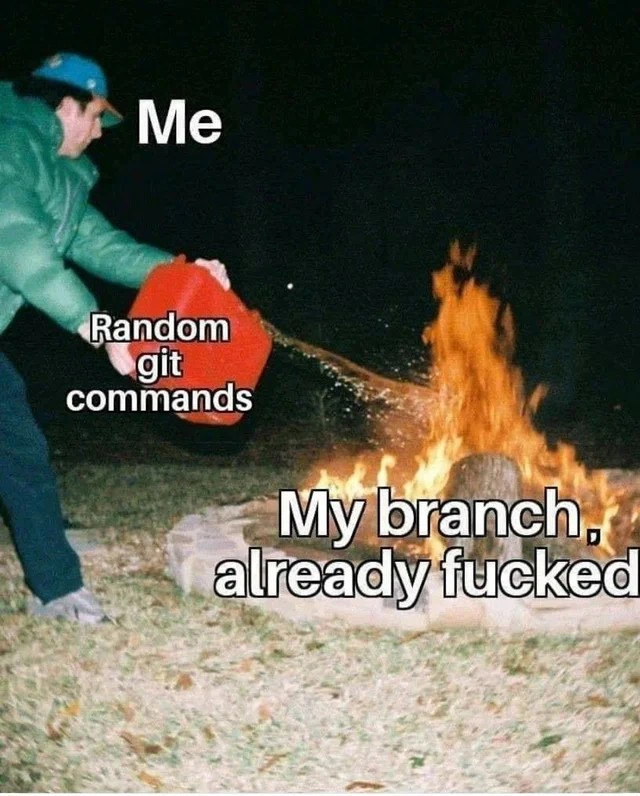
So, the meme shows Me (the developer) pouring Random git commands (from a red fuel can) onto My branch, already [in trouble] (the fire). It’s a funny and painful metaphor. Anyone who’s struggled with Git branching issues finds it relatable – we’ve tried a quick fix that backfired. It also carries a lesson: slow down and learn what the commands do, or you might set your project on fire (figuratively!). In a real debugging/troubleshooting session with Git, a better approach is to stop and assess: for example, check git status to see where you stand, maybe use git log --oneline --graph to visualize your branch’s commits, or ask a teammate for help. Sometimes the safest route when a branch is truly messed up is to save whatever new changes you made (using git stash or copying files), then checkout a fresh branch from a known good commit and apply your changes there, rather than trying five different complex commands in a panic. The meme exaggerates it with flames, but that feeling is real: a small problem can escalate into a day-long headache if you use Git incorrectly. It’s VersionControlHumor with a lesson behind the laughter.
Level 3: Force Push Fiasco
From a senior developer’s perspective, this meme nails a classic version control blunder: trying ad-hoc Git fixes on a problematic branch and only making things worse. The person in the image labeled "Me" is every developer who’s ever panicked during a bad Git day. The branch was already smoldering with issues (perhaps a nasty merge conflict or a botched rebase), and instead of calmly resolving it, we panicked and threw random git commands at the problem. Those "random git commands" – maybe a desperate git cherry-pick here, an ill-advised git reset --hard there – are the fuel in the red container. Each command is basically an attempt at branch damage control that fails spectacularly. Ever tried a quick fix like git pull --rebase to sync up, only to end up in an even worse state? That’s a rebase gone wrong scenario many of us recognize. Or perhaps you’ve done a git merge to grab upstream changes, hit conflicts, freaked out, then ran git merge --abort followed by something like git pull origin master --allow-unrelated-histories (the Git equivalent of mixing random chemicals). These unvetted commands are the textbook definition of cargo cult programming in version control: copying and pasting Stack Overflow suggestions or half-remembered tutorials as if they were magical spells, hoping one incantation will cure the problem. Instead, each misstep just fans the flames.
One of the biggest accelerants in this scenario is the infamous force push. Imagine you’re in the middle of a complicated history rewrite and nothing is working, so you finally do git push --force out of sheer frustration. This is the git_force_push_misfire that turns a local mess into a team-wide firestorm. A force-push, when used without caution, is like firing a cannon to kill a fly: sure, it moves things – but it can obliterate whatever was there before. Colleagues who pulled the original branch are now staring at Git errors about "histories diverged" or missing commits. Senior engineers cringe at this because they’ve either made this mistake themselves or had to clean up after someone who did. We set up branch protections (like denying force pushes on main) explicitly to prevent this kind of fiasco.
The humor and horror in the meme come from the fuel_on_fire_analogy being so true to life. What was a small controlled burn – say a minor merge conflict – becomes an uncontrolled inferno when the wrong approach is taken. Instead of resolving the root cause or carefully debugging/troubleshooting the conflict, the developer’s actions introduce more problems: new merge commits piling up, commit history becoming inconsistent, perhaps code changes getting accidentally lost or duplicated. It’s a relatable developer experience that mixes panic and regret. We’ve all had that “Oh no… what did I just do?” moment after a hasty Git command. The overlay text “My branch, already fucked” says in blunt terms what every engineer feels when they realize their branch’s history is now a tangled mess of conflicts and weird commit logs. The meme is essentially a cautionary tale wrapped in humor: Git is an incredibly powerful tool in our workflow, but with great power comes great responsibility (and potential for screw-ups). Instead of true bug fixing, these random commands became the bug introducers. It’s developer self-deprecation at its finest – we laugh because we’ve been “Me”, dumping gasoline on the fire and then watching our version control carefully crafted branch go up in flames. As seasoned devs will tell you, the proper fix is often to step back, understand what went wrong (maybe use git log or git diff to inspect the damage), or even ask a teammate for help, rather than feverishly trying one command after another. The meme resonates strongly because it’s a shared lesson: slow down with the Git voodoo, or risk a bonfire of your code history.
Level 4: Temporal Git Paradox
At the most technical level, this meme hints at the deep mechanics of Git’s version control model – essentially a content-addressable Directed Acyclic Graph (DAG) of commits. Each commit in Git is like a snapshot of your project with a pointer to its parent snapshot. Normally, this history is immutable – once a commit exists and is shared, it shouldn’t change. However, "random git commands" often include history-rewriting operations (like git rebase or git reset) which literally create an alternate timeline of commits. Think of it as time travel in your code’s history: you’re altering past commits or their order. In theory, if only you know about this new history, it’s fine – but the moment you share it (push it to a remote), anyone who had the old history is in for a shock. You’ve introduced a kind of temporal paradox in the repository: collaborators now have divergent realities of the project’s timeline. This is why a force-push is dangerous – Git normally protects the integrity of the shared history (it rejects non-fast-forward updates), but git push --force overrides that safety, allowing you to replace the remote history with your new one. It’s akin to violating causality in a distributed system: you’ve invalidated everyone else’s known good past. The result? Chaos and conflicts, since their local clones still reference commits that the remote branch no longer recognizes. In formal terms, the team’s repositories have lost consistency until they manually reconcile this discrepancy. Under the hood, those old commits become dangling objects – still present in the object database (Git doesn’t immediately delete them) but orphaned from any branch reference, much like ghost data waiting for garbage collection. Advanced Git wizards know to consult the reflog (a log of recent HEAD positions) to recover from such misadventures – essentially Git’s own little time machine for undoing a bad rewrite. But if you’re resorting to random incantations without understanding, you’re playing with the fundamental arrow of time in your version control history. The meme’s fiery imagery perfectly captures the theoretical lesson: in a system built on the idea of append-only, shared history, recklessly rewriting that history is like dumping energy (in this case, raw fuel) into a closed system – an explosion of conflicts and a bonfire of regret is the almost inevitable outcome.
Description
A meme depicting a person at night in a green jacket pouring gasoline from a red can onto an already large fire in a stone fire pit. The image has text overlays identifying the elements of the scene. The person is labeled 'Me'. The red gasoline can is labeled 'Random git commands'. The raging fire is labeled 'My branch, already fucked'. This meme uses the 'Pouring Gasoline on Fire' template to humorously illustrate a common and painful developer experience. It visualizes the panic that sets in when a Git branch is in a broken state, leading a developer to try random, poorly understood commands from the internet. Instead of fixing the issue, these actions often make the situation catastrophically worse, turning a small problem into a major disaster that requires significant effort to untangle

Comments
7Comment deleted
The branch was fine until I tried that Stack Overflow snippet with 3 upvotes from 2012. Now my git tree looks like a Jackson Pollock painting and my only option is `git reset --hard origin/main` and a long walk of shame
Pro-tip: if your recovery plan starts with “git reflog | tail -n1 | xargs git reset --hard”, you’re basically carrying the jerrycan
The only thing more dangerous than a junior with sudo access is a senior developer with a corrupted git branch and a deadline - we've all been there at 3am, frantically googling 'git undo' variations while our commit history looks like a Jackson Pollock painting
When your feature branch is already in a detached HEAD state with 47 merge conflicts, but you decide 'git reset --hard' followed by 'git push --force' will definitely improve the situation. Spoiler: it won't, and now you're explaining to the team why three days of commits vanished into the reflog void
Senior tip: branch protection is the sprinkler system - without it, ‘git push --force’ turns every RCA into archaeology
If your fix involves 'git reset --hard' then 'git push -f', you’ve moved from incident response to arson - open the reflog, branch off, and let Friday cool down
Classic Git: one random command turns 'detached HEAD' into 'git fsck --full' apocalypse

