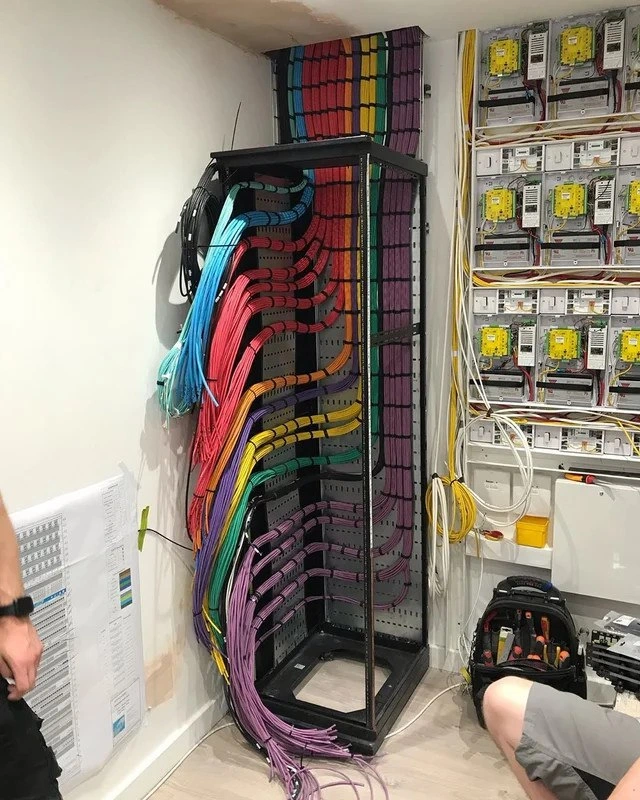
The Art of Color-Coded Cabling
Why is this Infrastructure meme funny?
Level 1: Rainbow Order in the Wires
Imagine you have a giant box of colored thread that’s usually all tangled up into a big knot. One day, someone takes the time to unknot everything and wind each thread neatly, then line them up in the order of the colors of the rainbow. Suddenly, that messy sewing box looks like a beautiful rainbow display! This picture is funny and happy for tech folks because it’s just like that – usually the wires in a computer closet are a jumbled mess, but here they’ve been sorted so perfectly by color that it looks like a rainbow hanging on the rack. It’s really pretty to look at, and it also makes people who have to work with the wires feel relieved. Why? Because if you ever needed to find one specific cable, it would be super easy, like finding a red crayon in a box where all the crayons are sorted by color. The joke is kind of that it’s so organized it became art. It makes us smile because it’s both useful and joyful – the person who did this must really care about doing a good job, and any kid (or grown-up) can see it and think, “Wow, that’s neat and colorful!” It’s the same happiness you get from seeing your toys all sorted nicely on a shelf instead of scattered on the floor. In the tech world, that feeling is golden, and that’s why this rainbow rack of wires is such a delight.
Level 2: Ethernet Feng Shui
Let’s break down what’s going on here for those newer to Networking or SystemsAdministration. We’re looking at a network rack – basically a tall metal frame (often 42U tall, which means it holds 42 units of equipment, each unit being 1.75 inches high). Think of it as a bookshelf for network gear like switches, servers, and patch panels. In this picture, the rack’s door is open or removed, and we see the cables and cable management inside. Those cables are almost certainly Ethernet cables (the kind that connect computers, servers, and other devices to a network, usually with RJ45 connectors at the ends). Ethernet cables often come in many colors, but usually you’ll see maybe a couple of colors in one rack. Here we have an entire rainbow of them, carefully arranged from purple/violet at the bottom up through blue, green, yellow, orange, red, and even magenta at the top. It’s so orderly that it immediately reminds us of a rainbow or the Pride flag. That’s why the meme title jokes about the rack doubling as a “pride-flag-level cable masterpiece.” It’s both a nod to the rainbow look and a way of saying “this cabling is masterfully done.”
Now, cable management is a big deal in infrastructure. Good cable management means routing and securing cables so they’re tidy, easy to follow, and don’t interfere with equipment operation. In the photo, you can see vertical and horizontal channels (like black ladder-like frames at the sides of the rack) – these are cable managers or cable trays. They guide the bulk of cables in straight lines. The cables are all bundled and lined up within those, almost like how you comb hair so it’s not tangled. In fact, network techs even use a tool colloquially called a “cable comb” to straighten and organize many cables at once (imagine a rigid comb that you pull through a cluster of cables to align them). Each color group of cables is neatly held together with Velcro straps (the little black strips you see around the bundles) at regular intervals. It’s important those are Velcro and not plastic zip-ties because Velcro can be easily undone and redone when you need to add or remove a cable, and it doesn’t pinch the cables too tightly. Zip ties are more permanent (you have to cut them off, which risks cutting cables) and can damage cables if overtightened. So, seeing Velcro tells us this person knew what they were doing – it’s the preferred method among pros for large cable bundles.
All these cables typically connect to a patch panel. A patch panel is like a set of sockets that all these long cables terminate into. You can think of it like a phone switchboard or a big panel of jacks. On one side of the patch panel, each cable from somewhere in the building (maybe an office cubicle, a server, or a device) is punched down or connected into the back of a jack. On the front side of the patch panel (likely what we see as rows of holes or colored blocks), you can use short cables (called patch cords or jumpers) to connect those jacks to your network switches or routers. The idea is that the permanent cabling in the walls or building goes to patch panels, and then you just patch from those into equipment as needed. It makes things modular and easy to reconfigure without running new long cables every time. In the image, the colored bundles probably correspond to different patch panels or sections thereof. For example, all the purple cables might be going to one patch panel that handles one floor of a building, the blue to another panel, etc. Or maybe they simply decided to arrange the colors in a gradient for aesthetics – which, honestly, might be the case because it looks cool!
Notice how the cables make clean 90-degree turns into the sides of the rack and into the panels. This isn’t just visually pleasing; it also avoids excessive bending of the cables. Ethernet cables have a recommended bend radius (you shouldn’t kink them too sharply, or it can impair performance by messing with the twists inside). The nice gentle curves you see are deliberate – they maintain the signal integrity and also look like tidy right angles. It’s all very satisfying to the eye, almost like a geometrically perfect layout. Those loose white and yellow wires you see hanging on the right side are likely temporary patch cords or maybe power cables that haven’t been dressed yet. They actually stand out as messy compared to the main bundles – perhaps the work isn’t finished, or those are awaiting final routing. It’s common when doing a big cabling project that some jumpers are left hanging until everything is tested and ready, then they get tidied up last.
When we mention structured cabling, we’re talking about a standardized approach to designing and installing cabling systems in buildings. There are international standards (like ANSI/TIA-568 in the US) that outline how to do this neatly and reliably. For example, these standards dictate things like keeping data cables a certain distance away from power cables to avoid electrical interference, using proper cable pathways and supports (so you’re not just draping cables over ceiling tiles, which unfortunately does happen in lazy setups), and labeling everything. Structured cabling also involves documentation – see those printed wiring schedules or diagrams on the left wall in the photo? Those are part of it. They likely list each cable by an ID or number and tell you where it goes (e.g., Cable #27: goes from Patch Panel A port 5 to Conference Room 2 jack). This paperwork (or nowadays often a spreadsheet or database) is super valuable when troubleshooting or when you need to add changes years later. A newbie joining the team can look at the map and immediately understand the layout, instead of playing detective.
For a junior developer or new IT person, walking into a server room like this would be surprisingly delightful. You might have heard horror stories of messy server rooms (we sometimes call them “spaghetti wiring” because a chaotic tangle of cables looks like a bowl of spaghetti). In those messy rooms, if you’re asked to, say, “move server A from switch 1 to switch 2,” you first have to find server A’s network cable among dozens of identical-looking gray snakes. It can be frustrating and intimidating, and mistakes like unplugging the wrong thing are common. But in a room like the one in this meme, everything is labeled and separated by color and path. It’s like having a cheat-sheet or the world’s easiest puzzle: you need to find a cable, you just follow the neatly separated color bundle and trace it in an orderly fashion. Even the process of moving equipment or replacing something becomes easier because you’re not wrestling with a tangled mass – each cable can be pulled or replaced cleanly. This level of order also indicates that the person maintaining this system took pride and care in their work, which is something to admire and emulate. Good practices in infrastructure (just like good coding practices) might take a bit more effort upfront, but they pay off over time by preventing headaches.
There’s also an element of humor and joy in this post – it’s tagged as SysadminHumor for a reason. People in IT (especially system administrators and network engineers) often share pictures like this with a kind of giddy awe. They jokingly call it “cable porn” because it’s oddly satisfying to look at if you deal with the chaos of cables daily. It’s the same feeling you get from seeing a perfectly organized desk when your own desk is a mess. Part of the humor is knowing how rare this level of perfection is. It’s like seeing a unicorn. Most of the time, server racks don’t look this pretty unless someone has a lot of experience and dedicates time specifically to tidy everything. There are even online communities (like a subreddit called r/cablemanagement) where techs share their proud cable setups or swap horror stories of bad ones. So this image would be right at home there, garnering comments like “I’m in love” or “this sparks so much joy.”
In summary, for a junior tech or someone new: this meme is highlighting best practices in cabling with a fun, colorful twist. It’s saying, “Look, someone actually made their network rack not only super organized but also gorgeous like a rainbow!” It teaches the value of good cable management (organization, labeling, color-coding, using Velcro, proper routing) in a cheeky way. And it resonates with IT folks because it’s both educational and a little tongue-in-cheek – we rarely get to see things this perfect, so we half-joke about it like it’s a mythical accomplishment. But deep down, we all know this is how it should be done for a cleaner, safer, more maintainable server room. And that’s the networking equivalent of writing clean, well-documented code instead of spaghetti code. The difference is literally visible here: neat cables versus a chaotic tangle. Which one would you rather work with? (Rhetorical question – of course, the neat rainbow!).
Level 3: Structured Cabling Zen
Behold a 42U rack in full technicolor glory – this is the pinnacle of CableManagement and NetworkInfrastructureDesign. Seasoned sysadmins are drooling over this image because it’s essentially a unicorn: a server rack so immaculately organized it resembles a pride flag. The rainbow layout isn’t just for show, either – it hints at a meticulous color-coded scheme. Each hue likely represents a specific network function or location (red for critical systems, green for internal network, blue for management, etc.), or maybe it’s purely aesthetic OCD satisfaction. Either way, the result is both functional and rack_cable_art. In an industry where we often joke that a data center’s aesthetic ranges from “wire spaghetti” to “rat’s nest nightmare,” seeing such rainbow cabling perfection is hilariously refreshing. It’s like stumbling upon a Zen garden in the middle of a construction site – completely unexpected and utterly calming.
What makes this funny to infrastructure veterans is the contrast between this ideal and the usual reality. Normally, network closets evolve under tight deadlines and constant changes: you run a new cable in a hurry, you promise to tidy later, and a year on you have the Kraken’s lair of tangled Ethernet. Here, someone clearly said “not on my watch” and spent serious time on structured cabling discipline. The cables are combed into perfect parallel runs, making satisfying 90° bends into neatly labeled patch panel ports. Every bundle is cinched with Velcro straps (not zip ties – praise be, because Velcro can be easily adjusted without cutting or strangling the cables). The vertical and horizontal cable managers on the rack are filled but not overstuffed, meaning there’s room for airflow and future expansion. This person followed the best practices chapter to the letter (probably even laminated it and hung it on the wall next to those wiring schedules we see on the left). The joke’s subtext is: “How often do you see a network rack this beautiful? Almost never.” It’s simultaneously aspirational and comedic – aspirational because we all want this level of order, and comedic because we know how far from this our own setups usually are.
Industry old-timers recognize in this photo a kind of holy grail of Networking ops. Done right, structured cabling saves countless hours in the long run. When a server is down at 3 AM and you’re on-call, a messy cabinet can turn a 5-minute fix into an all-nighter of pulling random cables and praying. Ever had that horror where you disconnect one cable and five critical systems mysteriously blink out because nothing was labeled and you yanked the wrong wire? 😱 This rainbow rack is the antidote to that nightmare. Each cable here can be traced end-to-end by color and label in seconds. The printed wiring schedule on the wall likely maps each port number to a room or device. A quick glance at the documentation and you know exactly which cable is which. Traceability is through the roof – it’s so good it probably meets the TIA/EIA standards and then adds its own artistic flair. The humor is that whoever did this turned drudgery (cable routing and labeling) into something approaching art, and every battle-scarred sysadmin who’s fought the spaghetti monster is cheering (and maybe wiping away a single tear of joy).
And let’s not forget the practical engineering win here: airflow. Those perfectly combed bundles mean air can flow freely through the rack, cooling the switches and servers. In poorly managed racks, bundles of tangled cables act like felt blankets over ventilation – equipment overheats, dust collects, and you’ve basically knitted an electric sweater for your router (not good). In this setup, equipment can “breathe.” This is not just visual OCD; it’s real NetworkInfrastructureDesign excellence. Even the power distribution on the right wall is tidy: those DIN-rail mounted devices and terminal blocks are arranged methodically, separating power from data to avoid interference. The entire room says “professional” – it’s the kind of setup that passes an audit with flying colors (literally!).
The meme hits home because it celebrates the unsung art of cabling with a dash of pride (pun intended). It riffs on the idea of a “pride flag” because the cables literally form a rainbow, but also because any sysadmin would be proud to have a rack like this. It’s sysadmin humor at its finest: taking something as mundane as Ethernet cables and elevating it to a showpiece. In the same way developers joke about beautifully formatted code vs. copy-pasted chaos, network folks joke about immaculate ethernet_bundle vs. the cable apocalypse. This image is the cable world’s equivalent of “clean code” – a ServerRoomStories legend where someone actually had the time, budget, and dedication to do it “right.” It’s funny because we all know the gap between textbook best practices and real life is usually huge. Yet here it is, a glorious exception. Cue the jokes that this was done by a sysadmin with one too many free weekends, or that this closet belongs in an art gallery. As one Reddit comment famously quipped on a similar photo: “I can almost hear the cables singing in harmony.” 🎶 In short, this meme nails a very particular tech joy: finding beauty and sanity in the infrastructure chaos, and having a good chuckle at how rarely that happens.
Description
A photograph of a network infrastructure installation in progress. In the center is a black server rack with meticulously organized bundles of multi-colored cables creating a rainbow effect. The cables (red, orange, yellow, green, blue, purple) are neatly combed and secured with zip ties, flowing from a ceiling entry point down through the rack's vertical management channels. To the right is a wall with several electrical or data panels, showing complex wiring. On the floor, a technician in grey shorts is working, with a professional tool bag open beside them. On the left wall, a large technical diagram or blueprint is taped up for reference. This image is a prime example of 'cable porn,' celebrating the skill and discipline required for clean, maintainable structured cabling. The use of color-coding is not just aesthetic but a critical practice for identifying and tracing lines in complex network environments, a principle highly valued by experienced engineers
Comments
7Comment deleted
I see the frontend team is handling the cabling for this project. The backend is just a single beige wire with a sticky note that says 'RESTART IF BROKEN'
Layer 1: pristine rainbow cabling; Layer 7: a monolith held together by “TODO: refactor” comments - turns out Velcro scales better than our architecture reviews
The new hire spent three days color-coding the cables by VLAN, and now we're migrating everything to SDN next quarter
When your network engineer has more OCD than your linter has rules - this is what happens when someone applies 'clean code' principles to physical infrastructure. Each cable follows SOLID principles: Single responsibility (one connection), Open/closed (sealed terminations), Liskov substitution (any cable can replace another of same color), Interface segregation (separate VLANs by color), and Dependency inversion (high-level switches don't depend on low-level endpoints). The rainbow gradient isn't just aesthetic - it's a visual representation of the OSI model layers, where each color represents a different subnet or VLAN. Meanwhile, the rest of us are still dealing with cable spaghetti that looks like it was deployed during a 3am production incident by someone who thought 'documentation' was a type of Docker container
Physical layer technical debt: untangling this rack would take longer than migrating a COBOL monolith to Kubernetes
Manual Terraform for networks: idempotent curves, declarative color mapping - until someone yells ‘quick hotfix’ and hands you a zip tie
Distributed tracing without Jaeger: follow the purple span end-to-end - our service mesh is zip‑tied at layer 1, and STP now stands for Stop Touching Prod