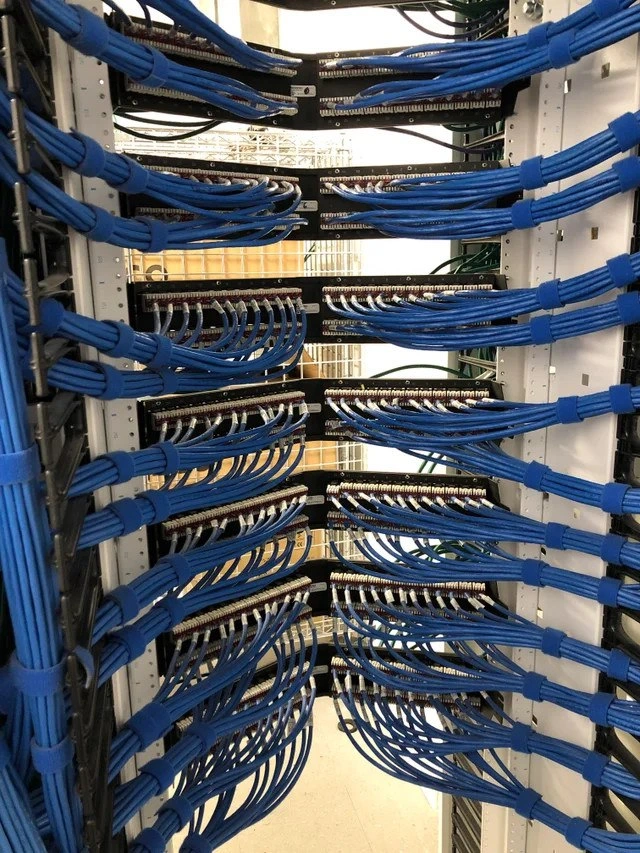
Impeccable Network Cable Management in Server Rack
Why is this Infrastructure meme funny?
Level 1: Everything in Its Place
Imagine you walk into a playroom where yesterday all the toys were dumped in a big pile on the floor. It was almost impossible to find your favorite toy car because it was tangled up with action figures and building blocks – a total mess! But today, you open the door and wow – all the toys are neatly put away on shelves and in bins. 🧸🚗 Every toy car is parked in a little garage, every crayon is sorted by color in the box, and every LEGO piece is in the right drawer. You can see everything and get to anything you want without tripping or digging. Feels pretty great, right? You might even get a little happy tear in your eye because it’s so nice and tidy.
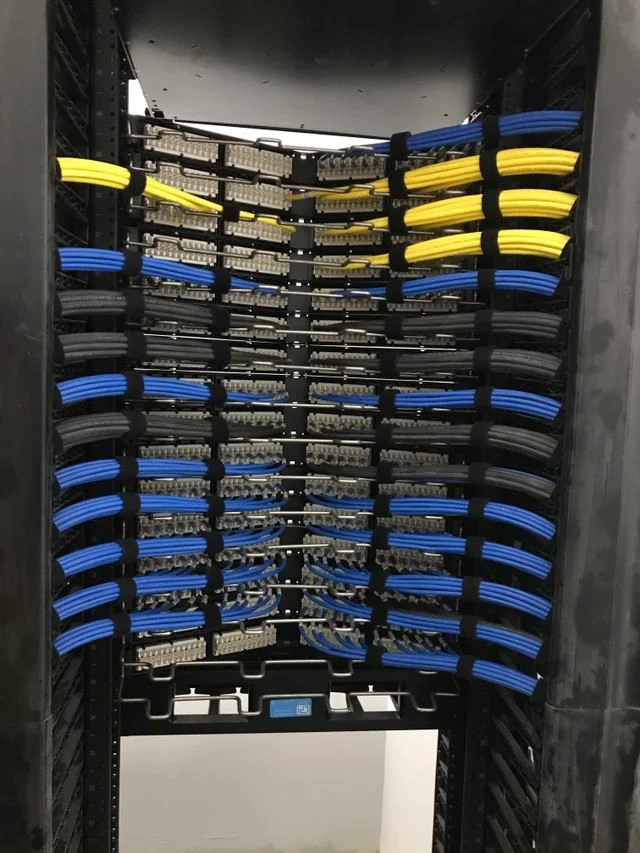
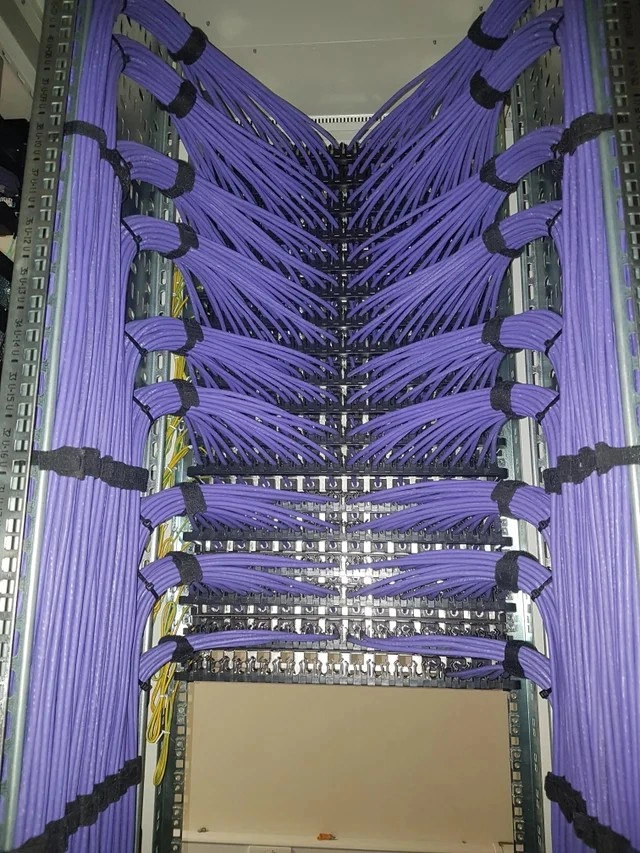
That’s exactly how computer helpers (like the people who keep the internet and servers running) feel when they see a rack of wires like this. In the picture, all the blue wires are organized perfectly – not a single one is tangled or out of place. It’s like someone took a big bowl of spaghetti and straightened out every noodle side by side! Each wire has its own path, just like each toy has its own spot on the shelf. This makes the computer helpers very happy because they can easily find and fix things. Nothing is hiding or mixed up. It’s all everything in its place.
So, the funny part of the meme is that grown-up tech experts are so pleased by this super neat wiring that it makes them jokingly say, “It’s so beautiful, I could cry.” Just like you feel good in a clean playroom, they feel good seeing a clean rack of cables. It’s a happy kind of joke – we’re laughing because we totally understand that warm, fuzzy feeling of seeing something really well organized.
Level 2: No Spaghetti Allowed
If you’re newer to IT, you might wonder why a bunch of blue wires in a rack is causing such a stir. In the world of Networking and SystemsAdministration, this is basically a work of art. It’s often jokingly referred to as “cable management porn” because seeing everything organized so perfectly gives tech folks the same kind of satisfaction as seeing a super tidy room or a perfectly color-arranged bookshelf. The joke in the meme’s title about “weeping tears of pure joy” isn’t much of an exaggeration – network engineers and sysadmins actually get emotional (at least a happy little sigh) when they see cables managed this well. Why? Because they’ve seen the opposite, and it’s ugly. Let’s break it down in simpler terms:
- Patch Panels: Those black horizontal bars with rows of ports (sockets) are patch panels. Think of them as the central hub or switchboard of network cables. Each port on a patch panel usually leads to a wall jack or another location in the building. Instead of running a long cable directly from a server or switch to an office desk (which would be messy and permanent), cables are neatly terminated at a patch panel. Then short patch cables connect the patch panel to the network switches (the devices that direct network traffic). In this photo, the patch panels are fully populated with cables, meaning every port is in use and connected to something important.
- Ethernet Cables (Cat5e/Cat6): These are the blue cables you see. They’re like the highways for data in an office or data center. Cat5e and Cat6 are categories of Ethernet cabling commonly used for Gigabit networks and beyond. All the cables here are the same type and color, which not only looks nice but also means whoever set this up likely had a standard – for example, “blue cables for network connections.” Consistency helps when you or someone else comes in later: you immediately know those blue cables are network patch leads. (Sometimes different colors are used for different purposes – e.g., red for critical connections, yellow for management networks, etc. – but here the uniform look was chosen for symmetry.)
- Cable Management: This term basically means “keeping cables neat, tidy, and functional.” Good CableManagement uses things like Velcro straps, cable trays, and lacing bars (those horizontal bars guiding the cables) to bundle and route cables cleanly. In the photo, cables are bundled in groups, then secured to the rack at intervals using blue hook-and-loop (Velcro-like) straps. They all curve gently to the sides in a uniform way. This isn’t just pretty; it serves a purpose. The gentle curves respect the recommended bend radius – meaning none of the cables are bent sharper than they should be. If you bend a network cable too much (imagine pinching a hose), the signal inside can degrade. Here, all cables have smooth, 180-degree arcs, avoiding any data flow problems and looking like a synchronized dance.
- No Spaghetti Wiring: A common term you’ll hear is “cable spaghetti” – and it’s exactly what it sounds like. That’s when cables are all over the place, tangled and crossing in a messy heap, like a pile of cooked spaghetti on a plate. It happens a lot in rushed IT setups or old server closets: one cable gets added on top of another, and before you know it, you have a knotted mess where you can’t tell which end goes where. Troubleshooting in that scenario is a nightmare (“Which cable goes to the database server? Oh no, not that one… maybe it’s this other one under five others…”). In this rack, there’s no spaghetti allowed – every cable is parallel, grouped, and clearly traceable. If you need to follow a cable, your eyes (and fingers) can glide along one of those blue bundles without losing track.
For someone early in their career, the main takeaway is: organized cables save time and headaches. When a senior admin says “make sure to do proper cable management,” they mean use labels, Velcro straps, and plan the paths of your cords so that everything stays accessible. It’s a bit like routing traffic in a city – you don’t want random roads (cables) crisscrossing everywhere with no order. Instead, you have main roads (bundles) and clear signs (labels/port numbers) so people can get from point A to B without getting lost.
Consider an example: imagine you have to replace a network switch (the device connecting all these cables) because it failed. In a well-managed rack like this, you can easily undo the Velcro, move each cable aside in its bundle (knowing exactly which group goes to that switch), swap the hardware, and then place everything back neatly. In a messy rack, you might spend hours just figuring out which cables belong to the switch, accidentally disconnect other devices while pulling out tangled wires, and basically play a high-stakes game of pick-up sticks with live network connections. Not fun.
SysAdminHumor often highlights these scenarios – the veteran admin who finds a closet of chaos versus the one who leaves behind a pristine setup. Newcomers quickly learn why it matters. It’s not merely about looks (though, admit it, this rack looks cool in that “tech beauty” way); it’s about practicality and professionalism. A tidy rack is easier to work on, less prone to mistakes, and earns the respect (and gratitude) of your teammates and future maintainers. Plus, it’s kind of a rite of passage to achieve a super neat rack at least once in your career – some even take a picture when they finish cabling a rack nicely (just like this meme) to show off their DataCenter craftsmanship on forums or to their boss.
In short, this meme is celebrating the gold standard of cable organization. It’s showing something every junior IT person can aspire to: keep those cables under control, and you’ll make everyone’s jobs easier (and maybe even get a round of applause from the senior admins 😉).
Level 3: Network Feng Shui
Behold the rare sight of cable management nirvana – an open-frame rack where every bright blue Ethernet patch cord flows in perfect harmony. This is more than just tidy cables; it’s network feng shui. Each bundle of Cat6 (likely Cat6 UTP) cables is meticulously measured and routed with almost musical symmetry, arcing left and right from the patch panels like graceful notes on a staff. The result? Symmetrical serenity that’s as functional as it is beautiful. Seasoned SystemsAdministrators and NetworkEngineering pros see this and feel a wave of relief: no chaotic “spaghetti wiring” here, just pure structured bliss.
In Infrastructure and data center design, such attention to detail has very practical benefits:
- Traceability: With cables grouped and curved uniformly, you can actually follow a cable from one end to the other without diving into a knot. Need to find which port connects to Conference Room B? A quick glance at the neatly labeled patch panel and bundled cord, and you’re there. No more tug-of-war with a snake pit of wires.
- Reduced Errors: When everything is in its right place, there’s less risk of unplugging the wrong port or accidentally yanking out a neighboring cable. The uniform routing means each patch cord has a designated path – you won’t find cables strangling each other or hiding behind random devices. It’s the opposite of those horror-movie server closets where one wrong move can take down a mysterious legacy server.
- Airflow & Cooling: Notice how the cables sweep to the sides? This keeps the center area clear for airflow. In a dense rack full of switches and servers, proper cable management prevents bundles from blocking fans or air vents. Cooler devices are happier devices (and happy devices mean happy on-call engineers).
- Strain Relief: The use of horizontal lacing bars and those matching blue hook-and-loop (Velcro) straps isn’t just for show. They support the cables’ weight and maintain gentle curves, protecting the terminations. That consistent cable_bend_radius_best_practice – no sharp kinks, only smooth bends – preserves signal integrity. Twisted pair cables can suffer from crosstalk or even broken conductors if bent too tightly. Here, every bend looks to respect that golden rule of thumb (about 1-inch radius for Cat6). The cables are effectively saying “no stress, we’re chill,” and the network performance will thank them.
This kind of perfection doesn’t happen by accident. It’s the result of planning and OCD-level dedication (in the best way). The installer likely measured cable lengths to fit exactly, used one color for consistency, and labeled everything. Notice the tiny port numbers on each jack – they hint that every connection is documented. The bright blue bundles are all uniform, secured at equal intervals by those Velcro straps. Even the choice of Velcro over zip ties is deliberate: Velcro straps can be undone and redone easily for re-cabling, and they won’t pinch the cables. (Ever had to cut 50 plastic zip ties with a knife just to add one new cable? Shudders – that’s how you accidentally slice into a live cable at 3 AM. Velcro avoids that drama.)
Overjoyed SysAdmin: “Excuse me, I need a moment. This is so beautiful, I’m literally crying.”
For veteran techs, an immaculate rack like this is almost emotional. There’s even a slang term for it: “rack pr0n.” Yes, it’s affectionately compared to eye-candy of the extreme kind, because for those who spend days wading through dusty server rooms, seeing such a clean DataCenter setup is oddly exhilarating. It’s the data-center equivalent of a perfectly executed piece of code – elegant, efficient, and bug (tangle) free. Every SysAdminHumor meme about “cable nightmares” finds its foil in a photo like this. We’ve all seen the nightmare fuel: random cables hanging like jungle vines, unlabeled ends, maybe a rogue power cord strangling a network cable for good measure. By contrast, this rack is a sanctuary of order.
From an architectural standpoint, this is how you design for scale and maintainability. Need to replace a switch or re-arrange network segments? The consistent routing means you can remove a bundle and lay it back exactly as it was, without disturbing neighboring connections. Future scalability was clearly on the mind of whoever built this – they left just enough room and used standard lengths so that adding one more server or re-patching a port won’t unravel the whole scheme. It’s modular and predictable. In essence, this rack is speaking the language of professional discipline: “I’m ready for whatever changes you throw at me, and I’ll still look this good afterwards.”
Every experienced systems administrator or network engineer looking at this is nodding in appreciation. 😌 It’s funny because it’s true: such neatness is rare. Achieving this is often a battle against tight budgets, tighter timelines, and the infamous “we’ll clean it up later” procrastination. Many of us have inherited racks that look like a bowl of multicolored spaghetti because someone in the past said, “I’ll fix the cabling after this quick fix,” and that day never came. This picture is the antidote to that collective trauma. It shows that with enough care (and perhaps a label maker and some zen-like patience), the dream of a perfectly organized server rack can come true. And when it does, sysadmins really do get a little misty-eyed with joy.
Description
This image displays a server rack viewed from the side, showcasing exemplary cable management. Dozens of identical bright blue network cables are neatly organized and routed. They are bundled together at regular intervals with blue velcro straps, forming clean, sweeping curves as they connect to multiple patch panels within the black server rack. The precision and orderliness create a visually satisfying pattern, often referred to as 'cable porn' by IT professionals. This level of organization is crucial for maintainability, airflow, and troubleshooting in a data center environment, reflecting a high degree of professionalism and attention to detail from the network administrator or data center technician
Comments
7Comment deleted
I showed this to our lead engineer, and he shed a single tear. He said it's been years since he's seen a production environment that wasn't one urgent ticket away from becoming a Lovecraftian horror of tangled patch cords
Cable management so clean it’s basically domain-driven design in Cat6; shame our microservices still think “bounded context” means whichever switch port was free at 2 a.m
This is the rack where they keep all the technical debt payments on schedule - everything looks perfect until you need to trace that one failing connection at 3 AM
This is what happens when the network engineer has unlimited time, budget, and zero production pressure - a mythical state that exists only in vendor marketing materials and retirement fantasies. In reality, this pristine cable management will last exactly until the first emergency midnight deployment when someone needs 'just one more port' and discovers all the pre-measured cables are 6 inches too short
The physical incarnation of tech debt: untangling this costs more in downtime than the entire refactor budget
Infra as code is cute; at Layer 1 the rollback plan is “un‑Velcro and pray” - you can’t git revert a punch‑down
We preach loose coupling, then applaud the network team for the tightest Cat6 braiding imaginable - right up until 2 a.m. when distributed tracing is literally O(n) with a flashlight and a label maker