Skip to content
DevMeme
6557 of 7435
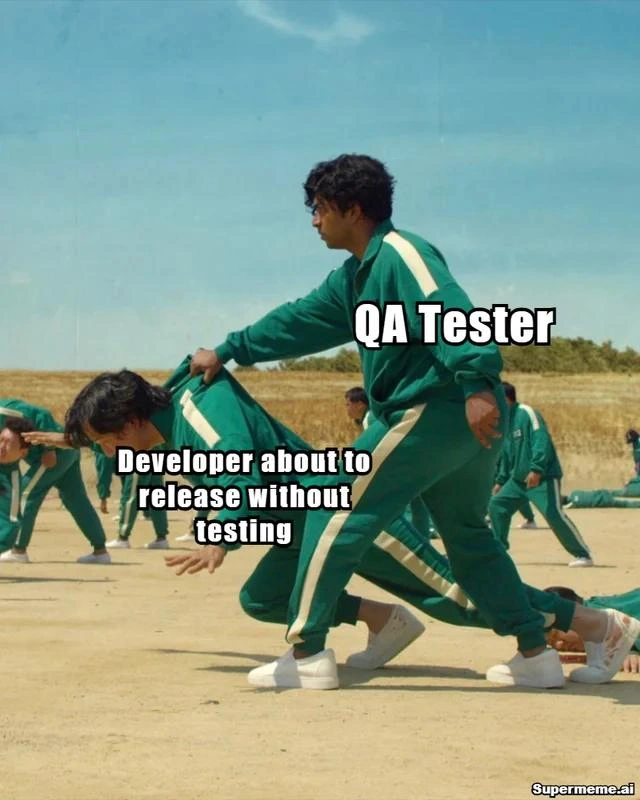
QA Tester Catches Developer Trying to Release Without Testing
QA Post #7185, on Sep 30, 2025 in TG

QA Tester Catches Developer Trying to Release Without Testing

Why is this QA meme funny?

Level 1: Look Before You Leap

Releasing code without testing it first is just like doing something risky without checking if it’s safe – it’s a recipe for trouble. Imagine you’re about to run across a busy street without looking both ways. You’re excited and in a hurry to get to the other side, kind of like a developer rushing to launch a new feature. But then your friend sees a car coming that you didn’t notice. They grab you by the collar and yell, “Wait, stop!” You halt just in time as a car zooms past. Phew! It might have felt annoying for a second to be yanked back, but actually your friend just protected you from getting hurt.

In this meme, the QA tester is that friend. The developer was about to “run” his code straight into the real world traffic without checking, and the QA person pulled him back to look before he leaps. In simpler terms: the QA wants to make sure everything is safe and working (all tests done) before letting that code cross into the live site where users are. It’s funny in the picture because the developer is being literally tackled to the ground to stop him, but the idea behind it is easy to understand. Sometimes, someone stopping you for a moment — to double-check safety — can save you from a really bad outcome. It’s a lighthearted reminder that being careful first is always better than fixing a big mess later.

Level 2: But Did You Test It?

In this meme, the person labeled “QA Tester” is grabbing the “Developer about to release without testing.” Basically, the QA tester is stopping the developer from deploying new code to the live app before it’s been properly tested. This funny scene exaggerates a real software workflow: making sure code is safe and bug-free before it reaches actual users. It’s a core part of the QA process in development teams – kind of like a safety inspection for new code.

Let’s break down the roles. QA stands for Quality Assurance. A QA tester’s job is to double-check and verify that the software works correctly and that new changes don’t introduce new problems. They actively look for bugs by following test plans, clicking through the application, trying unusual inputs, and generally using the software like a picky user. If they find something wrong, the issue must be fixed and tested again before release. On the other side, the developer is the person who writes the code for new features or fixes. Developers might test their code a bit on their own machine, but it’s the QA tester who approaches it with fresh eyes and thorough methods to catch things the developer might have missed. When a developer tries to release code to production (which means pushing the code to the real environment that all users use) without QA’s green light, that’s a major red flag. “Untested” code means no one apart from the dev has given it a proper look in a realistic environment. Sure, maybe the feature seemed to work on the dev’s laptop (the classic “It works on my machine!” scenario), but that doesn’t guarantee it will work on the production servers or for all users. Relying on “it worked for me once, so it must be fine” is often a dangerous assumption.

Usually, teams follow a sequence to prevent mishaps:

  1. Development & Unit Testing: The developer writes the new code and often runs some basic checks or writes unit tests (small, automated tests for individual pieces of code) to make sure each function does what it’s supposed to in isolation.
  2. QA Testing on Staging: The new code is deployed to a staging environment (a test server that’s like a mini-production site) where QA testers thoroughly test it. They use the new feature like a real user would, and also ensure existing features still work (this is sometimes called regression testing, meaning checking old stuff still behaves). The QA folks are trying to break the feature in every way they can think of: entering weird data, clicking buttons in odd sequences, combining the new feature with other parts of the app. If anything unexpected or wrong happens, they document a bug and send it back to the developer to fix.
  3. Release Approval: Only after the new code passes all these tests (and any reported bugs are fixed) does QA give approval – often called QA sign-off. With that approval, the team can confidently deploy to production, meaning the new code goes live for real users. This deployment step might be pressing a button or running a script, but it shouldn’t happen until testing is complete.

The meme shows a developer trying to skip from step 1 straight to step 3 — basically releasing to users without the important step 2. The “QA Tester” grabbing him is a humorous way of saying, “Hold on! Did you test it? We need to make sure this is actually working correctly before it goes live!” In real life, a QA engineer would stop the deployment by refusing to approve it or by raising concerns in the release meeting, rather than a literal physical tackle 😄. But the tackling visual makes the message crystal clear: no testing, no release!

Why is this so important? Because if you release code without testing, a lot can go wrong:

  • The new feature might crash the application or cause errors (for example, a missing null check could make the whole page blow up when a certain condition happens).
  • It might break other parts of the system that the developer didn’t realize were connected. Maybe that “small change” in the login code accidentally stops new user sign-ups from working – a classic unintended side effect.
  • There could be security holes or data issues. Perhaps skipping testing means nobody noticed that an update would inadvertently delete some user data or expose something it shouldn’t.

Any of these bugs going out to real users would be a big problem. It could cause downtime (the site or app not working), upset customers, bad reviews, and emergency repair work late at night. In short, it’s a recipe for stress. That fear of deploying something broken is what we call release anxiety (or deployment anxiety): everyone’s a bit nervous until they know the new code is stable in production. QA’s job is to reduce that anxiety by catching issues beforehand. The QA tester in the meme is essentially doing exactly that – preventing a potentially shaky update from hitting the real world unchecked.

Even as a junior developer, it’s easy to relate. Maybe you’ve had a school project or a personal coding project where you were excited to show it off, but a friend or teacher said, “Have you tried running it with different inputs?” or “Did you check if it works on another computer?” That’s the same instinct. No matter how confident we are, we all need that careful second look. The humor in this meme resonates because developers can get a bit over-confident (“It’s fine, let’s ship it!”) and testers often have to be the cautious ones (“Let’s test it first, just in case…”).

The use of the Squid Game scene (the folks in green tracksuits on a dusty field) is a pop-culture nod to high stakes and strict rules. In Squid Game, players had to freeze when the game doll said “Red Light,” or they faced dire consequences. Similarly, the QA in the meme is effectively calling a “Red Light!” on the deployment: Stop right now, or something bad will happen! It’s a fun way to visualize the idea that rushing ahead in software without testing is as foolish as running ahead in that deadly game. In both cases, listening to the warning (and stopping in time) can save your life — or in this case, save your app from crashing.

Level 3: The Friday Deploy Defense

In this Squid Game-themed meme, the QA tester is literally tackling a developer to prevent an untested release from sprinting into production. It's a hyperbolic depiction of QA as the final release gatekeeper. Any battle-scarred engineer recognizes this scenario: it’s the end of the week (quite possibly a Friday afternoon), and a developer is about to push code that hasn’t been through proper QA testing. The QA leaps in like a panicked goalie making a last-second save, yanking the dev back from slamming that big red “Deploy” button.

Why the dramatic tackle? Because releasing untested code to production is basically inviting a disaster. It’s the stuff of deployment anxiety nightmares. There’s often intense release pressure from product or management to ship new features quickly (especially by end of week), and that pressure can tempt devs to skip steps. But every battle-hardened dev knows that untested code is a ticking time bomb – deploy it on Friday at 5 PM and you’re playing a high-stakes game of “Red Light, Green Light” with your live system. QA in this meme is slamming the “Red Light!” button before the dev’s gung-ho green light causes an outage. In many companies, the QA process is literally a gate in the deployment pipeline: without QA sign-off, code can’t go live. This meme turns that formal gate into a literal physical take-down.

The humor lands because it caricatures the real QA vs Dev battle that happens in software teams. QA folks often serve as the last line of defense, with the authority to say “Stop the release, it’s not ready!” Developers sometimes see this as an obstacle (when you’re proud of your code, you just want it out there), while QA sees it as saving everyone’s bacon. The green tracksuits in the image reference Squid Game contestants, implying this deploy is as dangerous as a deadly children’s game. In the show, if you move on a “Red Light,” you get eliminated. Here, pushing untested code is that fatal move. Move fast and break things? Sure… until you break production and get eliminated yelled at by the on-call team.

If QA didn’t intervene here, we all know how the story goes:

  • Hotfix scramble: The team scrambling to rollback or patch the release late Friday night to undo a bug that slipped out.
  • Customer complaints: Support tickets and angry tweets flood in because a critical feature broke for all users.
  • Post-mortem blame game: Come Monday, everyone’s in a meeting asking “How on earth did this deploy without testing?” and trading sighs and blame.

By tackling the dev (literally), QA is saving everyone from that nightmare script. It’s darkly funny because it’s true DeveloperHumor and TestingHumor rolled into one. Many of us have lived this: a developer tries to push a last-minute “quick fix” and a vigilant QA stops them, preventing a fiasco. Every veteran has learned the hard way: better to bruise a developer’s ego now than to bruise the whole team’s weekend with a Sev-1 outage. I’d take a bruised ego from QA over a 3 AM on-call fire any day.

Interestingly, this meme echoes the ethos of shift-left testing. Ideally, testing (automated and manual) happens early and throughout development so that QA isn’t just a final tackle at the end. Modern CI/CD pipelines run suites of unit and integration tests to catch issues before the code even reaches QA. But even in 2025, let’s be real: human QA testers remain the safety net catching what automation misses. And when that safety net spots a show-stopper bug at the finish line, you get scenes like this — a last-second stop_the_release body-check that spares everyone a world of hurt. It’s a comical reminder that no matter how much ReleasePressure you’re under, skipping QA is like sprinting through a red light. You might get away with it once or twice, but eventually there’s going to be a truck (or in this case, a furious production outage) flying through that intersection.

Description

A Squid Game meme showing two players in green tracksuits. One player labeled 'QA Tester' is grabbing and restraining another player labeled 'Developer about to release without testing' who is trying to move forward. Other players are visible in the background on sandy ground. The scene is from the 'Red Light, Green Light' game. The meme captures the classic tension between developers rushing to ship and QA testers preventing untested code from reaching production. Watermark: Supermeme.ai

Comments

11
Anonymous ★ Top Pick QA isn't blocking your release -- they're saving you from explaining to the VP why checkout is processing orders in negative dollars
  1. Anonymous ★ Top Pick

    QA isn't blocking your release -- they're saving you from explaining to the VP why checkout is processing orders in negative dollars

  2. Anonymous

    A developer's definition of 'done' is when the code works on their machine. A QA tester's definition of 'done' is when the developer can't find any more excuses for why it *only* works on their machine

  3. Anonymous

    True velocity isn’t story points per sprint, it’s how fast QA can drag you away from kubectl apply

  4. Anonymous

    After 20 years in the industry, you realize the real game isn't Red Light, Green Light - it's watching junior devs discover their 'hotfix' that bypassed CI/CD just took down production during Black Friday, while the QA lead who warned them three times is already updating their LinkedIn

  5. Anonymous

    The eternal struggle: developers optimizing for velocity while QA engineers optimize for not getting paged at 3 AM. In this high-stakes game, the QA tester is the last line of defense before 'works on my machine' becomes 'why is production down?' The irony is that both players are on the same team, but the developer's sprint velocity metrics don't account for the post-deployment incident retrospectives

  6. Anonymous

    QA's grip: the only thing stronger than a dev's 'it works on my machine' conviction before prod kaboom

  7. Anonymous

    Nothing says mature CI/CD like QA acting as the manual circuit breaker that turns 'continuous delivery' into Red Light, Green Light the moment someone says, 'tests are flaky - ship anyway.'

  8. Anonymous

    QA is the only team that turns a “green” pipeline into Red Light, Green Light - because “works on my laptop” isn’t a deployment strategy

  9. Mario 9mo

    qa testers don't exist

    1. Deleted Account 9mo

      😕

    2. @Johnny_bit 9mo

      they do! But depending on how bad your env is those could be called "users" :P

Use J and K for navigation