
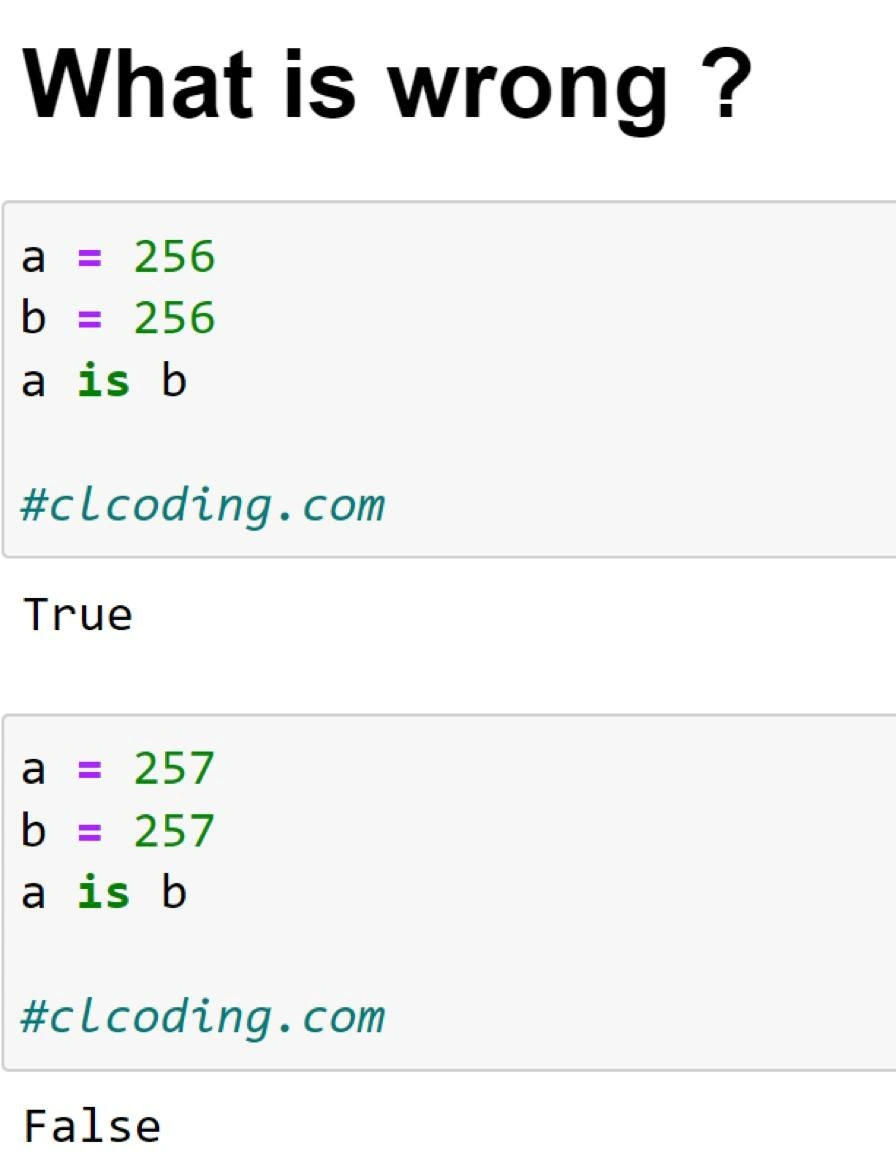
Python's Identity Crisis: The Peculiar Case of Integer Caching
Description
The image presents a programming quiz-style meme titled 'What is wrong?'. It shows two blocks of Python code with their respective outputs. The first block assigns the integer 256 to variables 'a' and 'b', and the expression 'a is b' evaluates to 'True'. The second block assigns 257 to 'a' and 'b', but this time 'a is b' evaluates to 'False'. Both blocks contain the watermark '#clcoding.com'. The technical context behind this is a CPython optimization where a range of small integers (from -5 to 256) are pre-allocated and cached. The 'is' operator checks for object identity (whether two variables point to the same memory location), not just value equality. For 256, both 'a' and 'b' point to the same cached object, so 'a is b' is True. For 257, which is outside this range, Python creates two separate objects in memory, making 'a is b' False. This behavior is a classic 'gotcha' that contradicts Python's reputation for being straightforward, as noted by the post's caption


Comments
113Comment deleted
The Zen of Python says 'There should be one-- and preferably only one --obvious way to do it.' CPython's integer cache then whispers, '...unless the number is bigger than 256.'
256 gets the VIP singleton pass in CPython’s small-int pool; 257 shows up and your ‘is’ test fails harder than your promised five-nines SLA
After 15 years of Python, you still explain to juniors that 'is' checks if two variables are the same person at a party, while '==' checks if they're wearing the same outfit. Then CPython's integer caching from -5 to 256 shows up like that one friend who insists on being a singleton at every gathering
Ah yes, the classic 'is' vs '==' interview trap that separates those who've read CPython source from those who just write Python. Nothing says 'senior engineer' quite like knowing that -5 to 256 live in a special VIP lounge while 257 has to wait outside like a peasant. It's Python's way of teaching us that identity is just a social construct... until you hit production and wonder why your cache key comparison works in dev but fails with real data. Pro tip: if your code's correctness depends on whether integers are the same object in memory, you're not writing Python - you're writing a very expensive philosophy dissertation on the nature of sameness
If your dedup logic uses 'a is b', congratulations - your correctness now depends on CPython’s small-int cache; your SLA is fine until a customer orders item 257
Python's small int cache: the singleton pattern 256 lives for, but 257 has to rent its own object - talk about class discrimination
Relying on CPython’s small‑int cache for correctness is how ‘is’ becomes a portability bug - works on your laptop, detonates on PyPy
wtf? Comment deleted
maybe 256 is byte and integer size of a byte is stored as value? Comment deleted
No, byte max value is 255 Comment deleted
then i have no clue Comment deleted
numbers from some negative number to 256 are singletons, for performance reasons. This is literally UB too, since this is only an implementation peculiarity in CPython. Comment deleted
i think it has to do with the id of values Comment deleted
Caching, I guess. Numbers up to 256 are cached and returned as a single data type. 257 is not cached, so it is two data types in memory. At least that's how it works in Java Comment deleted
yes Comment deleted
can you gives us the whole story pls ? Comment deleted
https://www.codementor.io/@arpitbhayani/python-caches-integers-16jih595jk I guess this one should help Comment deleted
thanks Comment deleted
This is true Comment deleted
This is on the same level as JavaScript fuckery Comment deleted
Not even slightly, JS is another level Comment deleted
I'd say this one is more obscure than JS magicks. All the crazy stuff happening in JS is well documented at least. Comment deleted
JavaScript's pretty simple, until you mix numbers, objects and arrays with ToString(). Who even thought that was a good idea? Comment deleted
and valueOf Comment deleted
who even thought using JavaScript is a good idea? Comment deleted
i -= -1...) Comment deleted
What? -=-1 is equal to +=1 Comment deleted
what about types Comment deleted
There is TS to fix it. Comment deleted
Also: char * s = "12"; s-=-1; printf("%s", s); Comment deleted
2?? Comment deleted
> checks for reference equality rather than value equality in a built-in datatype that isn't meant to be used like an object > wonders why UB is happening no, this isn't js-like fuckery Comment deleted
This is not UB though Comment deleted
from 0 to i guess 256 each number has it's own id Comment deleted
also not from 0 Comment deleted
but from -5 Comment deleted
thanks for the correction Comment deleted
it also sounds so funny Comment deleted
is is used in comparisons to check whether the variables refer to the same address in memory. As the numbers up to 256 are cached in memory, it produces this counterintuitive result. Comment deleted
"We cache -4" Comment deleted
the only reason you want to use is operator is when you want to check variable for nullability (if x is None:) I dunno is there any other scenario when you really need to test variables by their memory references Comment deleted
type(X) is Y Comment deleted
if isinstance(X, Y): is better in most cases, because it works for subclasses too Comment deleted
And multiple types at once (second argument can be tuple of types). Comment deleted
I also used x is False to avoid coercion of 0 and "" to False Comment deleted
https://ideone.com/EgC18t Comment deleted
maybe that's not CPython. It is UB after all Comment deleted
My opinion may be biased due to me working with that thing on a daily basis and having gotten used to the black magic. Comment deleted
Just don't use "is", You will almost never face this behavior in the code, in contrary to JS weirds Comment deleted
What exactly does "is" do then? Apparently it's more than comparison by value? Comment deleted
It's comparison of address in memory. 'id(a) == id(b)' Though objects may be equal, but if in memory they are different you get false. If you want to compare objects you use "==" Comment deleted
Thanks for letting me know Comment deleted
Similar thing happens for other objects as well, for example for the string. Take the quiz: https://github.com/zshimanchik/python_core_tutorial/blob/master/02_int_caching.ipynb Comment deleted
bro: literally doesn't understand what "is" does also bro: wtf i don't understand what "is" does 🤯 omg so unintuitive Comment deleted
Um? Comment deleted
Wouldn't be surprised if this were both configuration and implementation specific. Essentially the "meme" is a nice example for why you should know operators and types and such and pick the right ones ... (I guess in all languages) Comment deleted
print python version. reproduced on 3.11.2 Comment deleted
I checked, it depends on how you call it. https://t.me/devs_chat/98827 Comment deleted
i.e. in a file a is b → True and inside the interactive shell, a is b → False Comment deleted
if repl than yes, otherwise it's done bugless i assume, yes Comment deleted
wdym bugless, all of this is intended behaviour Comment deleted
*me sitting here for two straight minutes, trying to figure out wheres REPL part came from* Comment deleted
you have three options - 1. write to a file and exec it, 2. run REPL and put them there or 3. pass some code as argument to the interpreter Comment deleted
ik, just had a lil brain melt Comment deleted
"caching numbers" makes me vomit Comment deleted
Ok, I see Comment deleted
Honestly, you're pretty damn lucky if you've only encountered this symptom in Python, not due to pointer provenance Comment deleted
"is" checking if it is the same object... Up to 256 ints are just a pointer, so it is literally points at the same memory cell... Comment deleted
all ints are objects in python, but they're only singletons up until 256 (plus some negative numbers) Comment deleted
Like writing to a log file with rotation without losing the output? Comment deleted
Mine is too a bit. Since JS itself wasn't meant to be working with filesystems, NodeJS and other runtimes followed that by not supporting syscalls which track FS nodes. Comment deleted
don't compare numbers with is >:I Comment deleted
maybe because usually such code is written only by some software engineering babies or fools Comment deleted
Wait till you realize that JavaScript uses 64 bit integers for everything, pointers, consts (like null, true, false, NaN, etc) and that objects are sometimes stored like vectors, sometimes as a fucking "butterfly" which is custom type that is a 32 bit pointer stored in a 64 bit integer and points in the middle of the array. The left side of the array stores values/pointers to the properties, and the right side stores array items if the object is also an array (which it is sometimes) Comment deleted
stop it you are scaring me Comment deleted
That was not all Comment deleted
oki imma leave now :) Comment deleted
The problem is that you mixed tabs with spaces Comment deleted
floating point numbers range from 0001 0000 0000 0000x to FFFE FFFF FFFF FFFFx Comment deleted
what Comment deleted
Wait wait isn't every bit sequence a valid fp number? Comment deleted
I'm not sure about the trick described above, but there are many different NaN values which can be abused to store extra data for NaN Comment deleted
where is it from Comment deleted
hmm Comment deleted
still UB, it's not the job of python to make sure you don't do cursed shit with it Comment deleted
Python exists because it babysits programmers. It's slow, hungry, and lacks power. And now you claim that it fails even in its sole purpose? Comment deleted
python exists to be quick to code, not to babysit programmers. Comment deleted
Do you think Python is quick? To me, it feels like it took the worst of both worlds: the clumsiness of compiled languages and the sluggishness of interpreted ones. Just compare it to Perl, for example, and you'll see how to achieve the same results with half the code. But sure, if by "quick" you mean "pull it from a library and pray," then you're correct... however from this perspective Bash even more "quick". Comment deleted
it's not clumsy at all though bash is cursed Comment deleted
bash is the OG python Comment deleted
and no, I barely ever use external libs for my python scripts Comment deleted
Bash isn't as universal though Comment deleted
in this case, it's because the parser somtimes likes to make two equivalent literals the same object, to save on instanciating overhead Comment deleted
so it actually compiles to bytecode that looks something like _hidden = 257 a = _hidden b = _hidden Comment deleted
256 is still part of the numeric range where python uses singletons Comment deleted
all I know is that baba is you Comment deleted
change your python Comment deleted
What python is that? I tried it on python 3.10 and got the described result Comment deleted
i tried on 3.5 3.6 3.8 and 3.9 Comment deleted
and 3.11 Comment deleted
try writing it to a file and executing it then, the precompile stage sometimes does a bit of optimization the interactive interpreter can't Comment deleted
lol > This is guaranteed to be unique among simultaneously existing objects. such a scam Comment deleted
ints aren't meant to be used like regular objects Comment deleted
but that makes me wonder why its only 256 values Comment deleted
because ints up to 256 are singletons (in CPython at least) Comment deleted
i mean why not regular int but only char sized? everything bigger than byte eventually degrades to PyNumber? Comment deleted
all python ints are objects. The interpreter just saves some time on creating lower ones, because they get used a lot in e.g. iterators and such Comment deleted
I thought they start to become one after int32 boundaries passed. But I guess its only int16 Comment deleted
no, all of em are objects in python. They become slightly different objects at some point though, when values get too large (or small) they keep track of the value via a BigInt-ish structure internally. Comment deleted
(iirc, afaik) Comment deleted
I know that they become big int at some point (with enormous base as representation) Comment deleted
it's an arbitrary decision. They could've made it 100 or 123. They still probably chose 256 because 2**8 is a nice number in computing Comment deleted
ok I hate js as much as the next guy (or gal or nb pal) but if you modify your object inside its valueOf, that's your fault. Comment deleted