Skip to content
DevMeme
1104 of 7435
The Escalating Genius of 'Press Any Key'
CLI Post #1232, on Apr 3, 2020 in TG

The Escalating Genius of 'Press Any Key'

Why is this CLI meme funny?

Level 1: Silly Misunderstanding

Imagine your teacher says, “You can start reading any book on the shelf.” Most people would just pick a book they like and start reading. But one very confused kid asks, “Which one is the ‘Any’ book?” They start looking for a book actually titled “Any”! That’s exactly the kind of mix-up this meme is joking about. The computer said “press any key,” meaning press whichever button you want on the keyboard. But someone got confused and tried to press a key that literally says “Any” – or even a key from their keychain! It’s funny because the instruction was meant to be general, but the person took it way too literally, causing a silly misunderstanding. In simple terms: the computer just wanted you to hit one of the regular keys to continue, and our hapless user totally over-thought it, making us all laugh at how crazy literal they got.

Level 2: Ambiguous Prompt

The meme highlights how a seemingly simple computer instruction can confuse people. In a Command Line Interface (CLI) — a text-based terminal where programs often run — it's common for a program to say "Press any key to continue..." when it’s paused and waiting. That means you can press any key on the keyboard (like Enter, space, or any letter) and the program will proceed. The computer isn’t looking for a specific key named "Any"; it literally doesn’t care which key you press. For example, a program’s code might look like:

printf("Press any key to continue...\n");
// Program waits here for a single key press:
_getch();  // This function returns as soon as *any* key is pressed

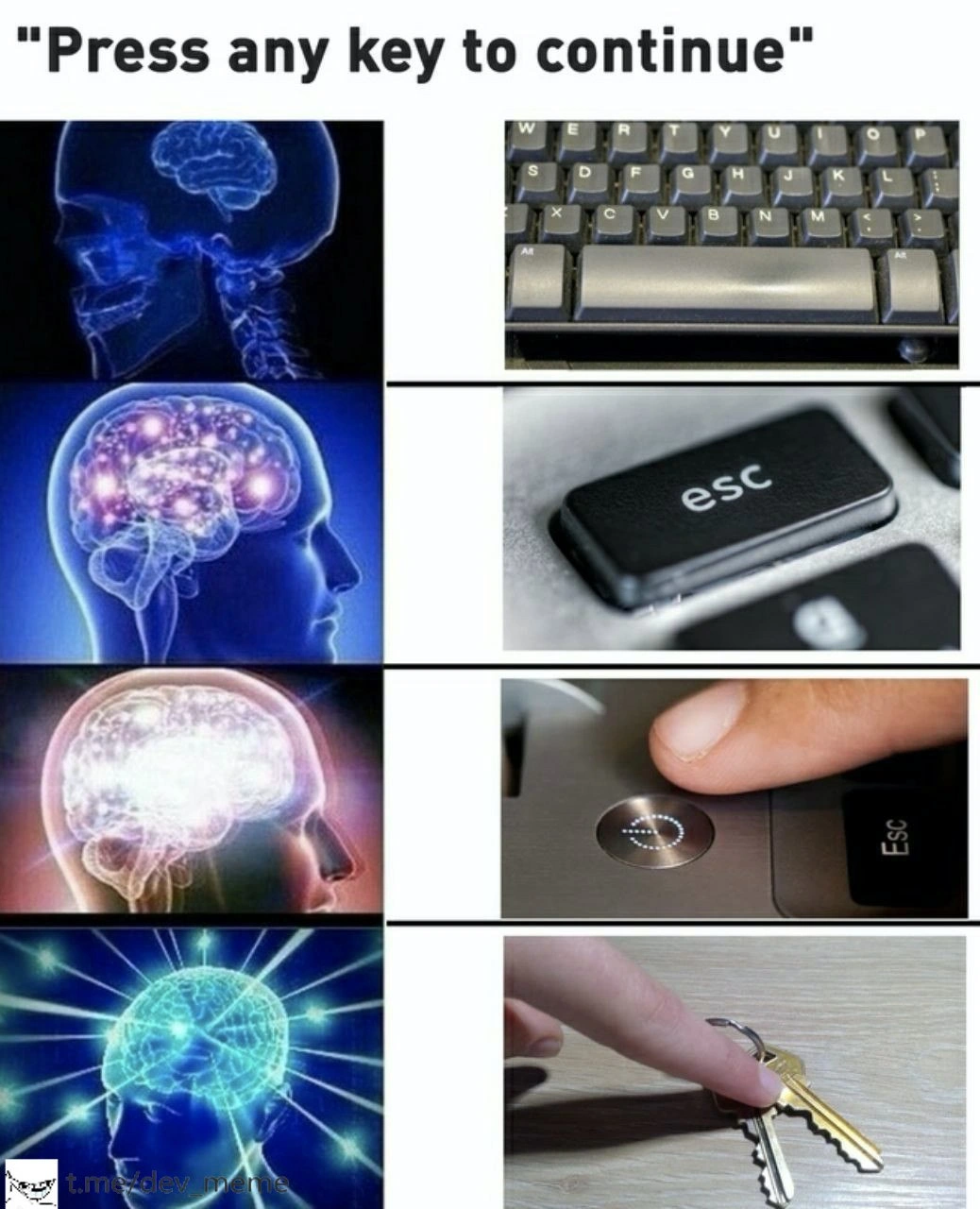
Here, _getch() will unblock no matter which key you hit — A, 5, the space bar, or even Esc. The problem (and the joke) is that the phrase "any key" can be misunderstood if someone takes it literally. The meme shows four panels of a brain getting brighter to illustrate four interpretations of that prompt, each more literal (and absurd) than the last:

  • First panel: A normal keyboard with the space bar highlighted – this is a reasonable action. Hitting the space bar is indeed pressing an "any" key to continue. Most people would do something like this intuitively (often folks press Enter or space by habit).
  • Second panel: A close-up of the Esc key. This is cheeky because Esc (Escape) usually means cancel or stop. If you press Escape at a "Press any key..." prompt, technically the program will still continue (since it said any key). But it's a mischievous, ironic choice – pressing the one key that typically means “get me out of here,” even though the program just treats it like any other input.
  • Third panel: A finger reaching for the computer’s power button (next to the Esc key on a laptop). Now the user is going off-script! The power button is not a keyboard key at all – it turns the whole machine off. It’s a funny literal misinterpretation: "Well, the power button is a button on the computer, so maybe that counts as a key?" In reality, pressing this will likely shut down or suspend the system, definitely not what the program wanted. This image emphasizes how the instruction could be taken in a way that ends the program rather than continuing it.
  • Fourth panel: A finger about to press a set of house keys on the desk. This one blows past all logical boundaries. The person isn’t even interacting with the computer now – they’re pressing actual keys you use to open doors. It’s the meme’s ultimate literal interpretation. Of course, no one would seriously do this, but it exaggerates the confusion: "You said any key, so I grabbed my keys!" It’s a visual pun – computer keys vs. physical keys – highlighting the absurdity of misunderstanding the prompt so badly.

This progression is a great example of an UX/UI misunderstanding. UX (User Experience) refers to how well the design of an interface helps users accomplish their goals. Here we have a UX failure in wording: "Press any key" is short and common, but not totally foolproof. New or literal-minded users might think “any key” is a specific thing they need to find. This is a relatable humor among tech folks because many have seen or heard of such UserErrors. In fact, helpdesk technicians have jokingly suggested, "Oh, the 'Any' key is the one next to the Shift key," when dealing with these calls. The meme uses the galaxy brain format (in which each panel’s brain is more illuminated) to poke fun at how increasingly “galactic” brainpower might interpret "press any key" ever more literally. It’s basically saying: the more you galaxy-brain this prompt, the more ridiculously you overthink what "any key" could mean. For a junior developer or someone new to the command line, the takeaway is clear: be precise in instructions. If you’re coding a prompt for users, you might write "Press Enter to continue" instead, to avoid this kind of mix-up. And if you see "Press any key…", just remember it’s computer shorthand for “press literally any key on the keyboard — it doesn’t matter which one!” (No, your house keys don’t count 😉.)

Level 3: Pressing Boundaries

At the highest level, this meme satirizes a classic ambiguity in CLI UX that every seasoned developer has chuckled (or winced) about. The familiar prompt "Press any key to continue" is meant to be harmless and straightforward, yet here it spawns a cascade of increasingly outlandish user responses. The meme uses the galaxy brain format to ironically portray the dumbest interpretations as the most "enlightened." In the first panel, a dimly lit brain corresponds to a user doing the sensible thing: pressing the space bar (an obvious "any key"). By the final panel, an explosively radiant brain equates to a user about to press a pair of house keys against their keyboard – an absurdly literal twist on "any key." Each stage escalates the literalism: from a normal key, to the Esc key (cheekily picking the one labeled escape), to the power button on the PC (which definitely does not continue the program!), and ultimately to an actual metal key. This progression is a tongue-in-cheek commentary on instruction ambiguity: as the brain images expand, the interpretation of "any key" becomes broader and more misguided.

For veteran developers, the humor cuts close to real life. It's developer humor born of countless support calls and user tests where someone inevitably asks, "Where’s the ‘Any’ key?" 😅. We recognize the UX failure here: the prompt assumes a certain basic understanding that not all users have. In tech lore, there are even jokes and anecdotes (and a famous Simpsons scene) about users literally searching their keyboard for a key labeled "Any". The meme’s final panel – pressing physical keys – is an exaggeration, but it highlights a real DeveloperExperience (DX) lesson: users can interpret things literally in ways we never expected. Seasoned devs have learned (often the hard way) that what seems obvious ("just hit any key, it doesn't matter which") can be misconstrued if phrased poorly. This meme brilliantly captures that facepalm moment of realization: "Oh no... my simple instruction wasn’t so simple after all!" It’s both a laugh at how relatable this scenario is and a wink reminding us to be clearer in our interface designs. In a world of command-line tools and old-school prompts, Terminal humor like this resonates because it’s “so true.” The next time you write a console program, you might think twice about using that decades-old prompt without a hint – lest someone get too creative and press the one key you never expected (like the power off).

Description

A four-panel 'Expanding Brain' meme satirizing the classic computer prompt 'Press any key to continue'. The meme progresses through four levels of enlightenment. The first panel shows a standard brain next to a keyboard's spacebar, the most common and expected action. The second panel displays a more active brain next to an 'esc' key, a slightly more rebellious choice. The third panel features a brightly glowing brain next to a finger pressing a laptop's power button, representing a drastic, system-level solution. The final, 'galaxy brain' panel, shows a fully illuminated, god-like brain next to a hand holding a pair of physical house keys, the ultimate literal and absurd interpretation of 'any key'. The meme's humor lies in its escalating, literal interpretation of a vague user prompt, a scenario familiar to any developer who has dealt with ambiguous requirements. A watermark for 't.me/dev_meme' is visible in the bottom left corner
Comments

7
Anonymous ★ Top Pick The junior dev presses spacebar. The mid-level hits Esc. The senior just powers it off, knowing it's probably a symptom of a larger, unstated problem. The architect is already filing a patent for a USB-to-Schlage-key adapter
  1. Anonymous ★ Top Pick

    The junior dev presses spacebar. The mid-level hits Esc. The senior just powers it off, knowing it's probably a symptom of a larger, unstated problem. The architect is already filing a patent for a USB-to-Schlage-key adapter

  2. Anonymous

    Seniority scale of “Press any key”: junior hits space, senior taps Esc, principal mashes the power button, and the architect hands ops the office keys and files a ticket to delete every interactive prompt from CI

  3. Anonymous

    The same developer who presses a physical house key is now architecting your distributed system's eventual consistency model

  4. Anonymous

    The evolution of a senior engineer's interpretation of 'press any key': from using the spacebar like a normal person, to ESC because we're always trying to exit something, to the power button because sometimes a hard reboot is the only solution, to finally using a physical key because after 20 years in this industry, we've learned that specifications are merely suggestions and 'any' truly means ANY

  5. Anonymous

    “Press any key to continue” is the SRE escalation ladder: Space → Esc → Power → car keys to the data center when SSH is down and OOB is dead

  6. Anonymous

    Escalation perfected: from Ctrl+C to yanking the ATX connector - no strace required

  7. Anonymous

    “Press any key” is why UX needs type systems - leave the domain unconstrained and someone will unit‑test with the power button and call it chaos engineering

Use J and K for navigation