The Perils of Performance Optimization
Why is this Performance meme funny?
Level 1: The Slow Shortcut
Imagine you have a big toy box and it takes a while to find your favorite toy each time. One day, you decide to rearrange all your toys in a “better” way to try to find things faster. You spend a couple of hours sorting and organizing the box in a new order that you think is super clever. But the next time you go to grab that favorite toy, it’s even harder to find than before! In fact, it takes you eight times longer to dig it out. All that work you did to save time actually made things worse. You sit there surrounded by a mess, scratching your head and thinking, “How did my great idea make this so bad? Was my plan just... dumb?”
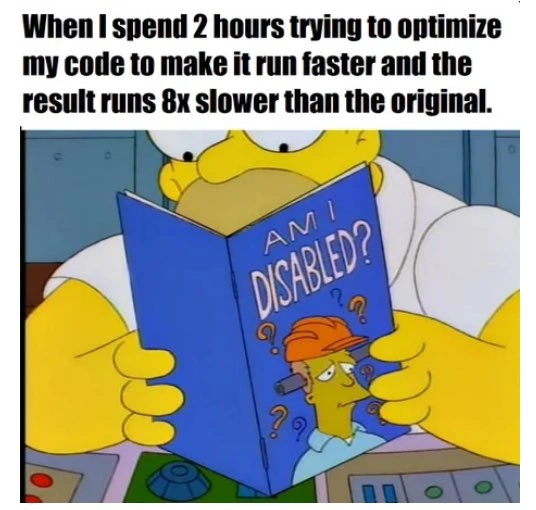
This is exactly what’s happening in the meme, but with computer code. The person tried to make their program run faster (like you trying to speed up finding your toy) and instead made it much slower (like your toy hunt taking way more time). It’s funny in a very relatable way: we’ve all tried to take a shortcut or improve something quickly, only to end up with a result that backfires. It’s like trying to take a shortcut home and accidentally going on a much longer route – you end up laughing at how badly your plan failed. In the picture, Homer Simpson is looking at a booklet titled "Am I Disabled?" which is a jokey way of him feeling really silly and wondering if something must be wrong with him for messing up so badly.
So, the simple idea is: the harder they tried to go fast, the slower things got. We find that funny because we understand the irony. It’s a bit like a cartoon scenario where someone hits the gas pedal to go faster but accidentally left the parking brake on – the car slows to a crawl and they feel foolish. The meme makes people laugh and cringe at the same time because it captures that "oops" moment perfectly. You don’t need to be a programmer to get it: it’s the classic tale of a backfired improvement. The lesson? Sometimes trying too hard to speed things up without thinking it through can make you go backwards, and all you can do is shake your head and chuckle at the mistake.
Level 2: When Faster Is Slower
This meme is highlighting a common developer frustration: trying to make code run faster (an act of performance optimization) but accidentally making it run much slower instead. The text in the image says the person spent 2 hours tweaking their code to be faster, and the end result runs eight times slower than before. That outcome is the opposite of what they wanted! It’s a very relatable scenario for programmers, because it happens more often than you’d think. The image of Homer Simpson holding a booklet titled "Am I Disabled?" is basically a cartoon way of saying the developer is asking themselves, "Did I just do something really dumb here?" They feel so defeated that they joke about questioning their own abilities. The humor comes from that extreme self-own: you set out to be a hotshot and improve performance, and now you’re left with a slower program and a bruised ego.
So, what actually went wrong under the hood? In many cases, this kind of slowdown happens when a coder changes the algorithm or method in a way that increases the amount of work the computer has to do. We use Big O notation to talk about how an algorithm’s work scales with the size of the input. For example, if you have to do something for each item in a list of n items, that’s an $O(n)$ (pronounced "O of n") algorithm – time grows linearly with n. If you have a double loop, where for every item you do something with every other item, that’s $O(n^2)$ – time grows with the square of n (quadratic). Let’s say the original code was doing a single loop through data (linear), and the optimized code unintentionally ended up doing something like a double loop (quadratic) or otherwise doing more per item. If the input had, for example, 1000 elements, the original might do about 1000 steps, whereas the new code could be doing 1,000 × 1,000 = 1,000,000 steps! Even if each step was a bit faster, a million of them will take far longer than a thousand of them. This is what we mean by an accidental big-O upgrade – "upgrade" humorously implies it got worse, not better. The algorithm’s complexity class jumped to a heavier one. That’s a sure way to ruin performance. No matter how much you micro-tune a quadratic algorithm, it will always lose to a linear one on sufficiently large input.
Another likely issue involves how computers handle memory and data access. Computers have caches, which are small but super-fast memory storage areas. When your code accesses data that’s laid out nicely (like going through an array in order), the CPU cache can load chunks of data and feed the processor very efficiently. But if your code starts accessing memory in a scattered or unpredictable way (maybe the "optimized" code uses a different data structure or pattern that jumps around), it causes a lot of cache misses. A cache miss is when the data the CPU needs isn’t found in the fast cache (because you jumped to something not nearby in memory), so the CPU has to reach out to the much slower main memory (RAM) to fetch it. This is kind of like if you had your tools laid out in front of you versus having to run to the other room to get each tool one at a time. Lots of cache misses can make a program dramatically slower even if, at a high level, you aren’t doing more calculations. So if our developer’s changes messed with how data is accessed (for example, maybe turning a tight loop into a bunch of scattered look-ups), it could absolutely make the code eight times slower just from the memory wait times. They wasted CPU cycles not because of doing more math, but by waiting around for data to move back and forth. Modern processors are incredibly fast, but also incredibly reliant on feeding data efficiently; a poor memory access pattern starves the CPU of data and it ends up twiddling its silicon thumbs.
Now, why did the developer even try this optimization? Possibly they thought the code was slow and had a hunch about how to fix it. The mistake here is not using a profiler or measuring to confirm what part of the code was actually slow. Profiling means running your program with special tools or instrumentation to see where it spends most of its time. It will tell you, for example, “80% of the time is spent in this function or that loop.” If you don’t do this and just guess, you might end up fixing something that wasn’t a problem and inadvertently hurting the part that was fine. We have a term for tweaking code for speed without evidence it’s needed: premature optimization. It’s called "premature" because you’re doing it too early – before you really know what part of the code needs optimizing. It’s like deciding to soup up a car engine without checking if the real issue slowing the car is flat tires. Here, profiling was not done, so the developer may have optimistically said, "I bet this code will run faster if I change X," spent two hours on X, and skipped over the fact that maybe Y was the real slowdown or that their change X has side effects. When they finally ran the full program with their new code, reality smacked them in the face: it ran much slower. Essentially, no profiling = high risk. They optimized blindly and paid for it.
There’s also an element of what we call microbenchmark deception at play. A microbenchmark is when you test a small piece of code on its own to measure performance. Perhaps in isolation, the new code seemed a bit faster for a tiny test case or under ideal conditions. For example, they might have run the function they optimized with 100 items and saw a slight improvement in speed, thinking "Great, my change works!" But this can be deceiving. Real-world programs have larger inputs, or the optimized part interacts with other parts of the system. The improvement seen in a microbenchmark can vanish or reverse when scale or integration is considered. It’s like testing a new ingredient in a dish by tasting a drop of it and thinking it’s better, but when you mix it into the whole pot, the flavor is actually worse. If our developer did a quick test on their machine with a small dataset, they might not have noticed the big O blow-up or the cache issues. Only when deploying or testing with a full workload did it become clear that their "faster" code is actually slower. Oops!
And we can’t ignore the human factor: refactoring code (changing the code’s structure without changing its external behavior) is often done to improve things, but it carries risk. Code is a bit like a finely tuned machine – the original version might have been crafted or evolved in a way that was actually pretty optimal for the task. When you refactor for performance without fully understanding why the code was the way it was, you might remove some crucial efficient behavior. For example, maybe the original code used a simple list and processed it straightforwardly. The dev thinks, "I’ll use a fancy data structure or do something clever to reduce operations," but that fancy structure could introduce overhead like extra memory allocations or complexity that outweighs the saved operations. So the refactoring pain here is that the new code is not only slower, but possibly more complex. The developer now has a double whammy: they wasted time writing the new code and now might have to spend additional time debugging or reverting it. It’s painful because refactors are supposed to make code better – cleaner, faster, easier to maintain – not worse in every way!
In simpler terms, this meme is a cautionary tale for any coder: don’t assume your change will make things better just because it sounds smart. Always test and measure, or you might end up with a nasty surprise. The story is funny to fellow developers because we’ve all had that stealthy bug or performance problem that was our own doing. Seeing Homer’s confused face with the "Am I disabled?" booklet is an exaggerated reflection of how we feel in that moment: utterly baffled that our clever idea tanked the performance. It’s both funny and educational — reminding us that sometimes doing nothing (leaving the code as-is) was the smarter move, and that chasing performance without data can trip you up badly.
Level 3: The Root of All Evil
Seasoned developers will grin (and maybe cringe) at this meme because it screams a timeless truth: "Premature optimization is the root of all evil." In practice, the engineer poured a couple of hours into tweaking code for speed, only to create a performance regression – the new version runs dramatically slower than the original. That’s the software equivalent of trying to tune up a car and ending up with it barely able to drive. The top caption spells it out in plain pain: “I spent 2 hours making my code ‘faster’ and it runs 8× slower.” Oof. The punchline is reinforced by the image of Homer Simpson reading a booklet titled “Am I Disabled?”. It’s a not-so-subtle way of saying the developer is left questioning their own competence: “How on earth did my ‘improvement’ make things worse? Am I... dumb or something?!” It’s darkly funny because every engineer, no matter how senior, has tasted this humble pie at least once. We’ve all had that ego-bruising moment of implementing a clever tweak and then watching our program slow to a crawl, prompting a facepalm and a bout of imposter syndrome.
Why does this happen so often? One big reason is optimizing without evidence – aka profiling not done. In an ideal world, you run a profiler to pinpoint exactly which part of your code is the slowpoke (the bottleneck). Then you focus your efforts there. But it's tempting to skip straight to coding because you think you know what needs speeding up. This meme’s hapless developer likely fell for that trap: they guessed at a performance issue and charged ahead with a fancy refactor, without real data to back it up. Maybe they assumed a certain function was too slow or a particular loop needed unrolling. In reality, that part might not have been the true bottleneck at all, or their change introduced more work than it saved. Optimizing the wrong thing is a recipe for disappointment — you spend effort on part "B" while part "A" was the real culprit all along, and sometimes you even end up slowing down both A and B. It’s a prime engineering pain point: debugging a mysterious slowdown that you introduced yourself is both embarrassing and time-consuming.
Another common culprit is trading one cost for another without fully understanding the performance trade-offs. Perhaps the developer tried to save some CPU time by using a more complex caching strategy or compressing data, but the overhead of that strategy outweighed the gains. Or they replaced a straightforward algorithm with a more intricate one that, in theory, does fewer operations on paper, but in practice those operations are more expensive. For example, imagine thinking, "Hey, I can make this faster by doing more work upfront to avoid work later." Sometimes that can work – other times you just front-loaded a bunch of computations that no one asked for, making everything slower. It’s like deciding to alphabetize all the records in a system to speed up one search operation, but if most of the time the records were accessed in random order, you just wasted effort sorting for little benefit. Developers might also ignore how well-optimized existing library functions or language features are. Rewriting a built-in function in pure Python or Java, thinking you can beat it, often leads to slower code because those built-ins are written in highly optimized C/C++ or assembly. In short, the refactoring intended to speed things up can introduce new costs (extra loops, more memory shuffling, complex conditionals) that end up slowing things down overall.
To paint a clearer picture, consider a concrete (if exaggerated) example of a refactor gone wrong. Suppose the original code wanted to find the maximum number in a list of values. A sane implementation might use something like Python’s max() function, which is optimized in C and runs in linear time. Our over-eager optimizer, however, decides to rewrite it "from scratch" to squeeze out more performance, perhaps to avoid a second pass or to be more “algorithmically pure.” Unfortunately, they choose a naive approach that turns out to be much less efficient:
# Original approach: simple and efficient (Python's built-in max is highly optimized in C, O(n) time)
max_val = max(data)
# "Optimized" approach: a naive attempt that ironically makes it O(n^2) time
max_val = None
for x in data:
is_max = True
for y in data: # Inner loop: compares x with every other element
if y > x:
is_max = False # Found an element larger than x
break
if is_max: # If no larger element was found, x is the max
max_val = x
print(max_val)
In this snippet, the new code does a nested loop to find the max: for each number x it checks against every other number y. That’s a classic $O(n^2)$ approach. The original single call to max() would scan the list just once (O(n)). The refactor here quadruples the work if you double the list size. It’s a comical illustration of an optimization backfire. The developer proudly introduced a bunch of extra checks and loops (perhaps thinking they’d eliminate some other minor cost), but all they did was massively slow down the overall operation. This kind of refactoring pain is all too real: the code is now longer, more complex, harder to maintain, and slower.
The humor (tinged with pain) for senior engineers is in that recognition. It's the "oh no, I've done exactly that" feeling. The meme exaggerates with an 8× slowdown, but honestly, such regressions happen in the real world — maybe not always that extreme, but enough to make you groan. It highlights why experienced devs treat performance tuning with respect. They know a targeted fix after proper analysis can work wonders, but a blind "I bet this will be faster" tweak often bites back. This scenario is a relatable developer experience precisely because many of us have created our own slowdowns at one point or another, all while trying to do the opposite. It’s practically a rite of passage in software engineering to screw up performance in the name of improvement at least once!
The meme is also a nod to humility. Even engineering veterans can get this wrong. Maybe you remember that famous quote from Tony Hoare: “Premature optimization is the root of all evil.” This is exactly what he was warning about. If you jump into micro-optimizations without understanding the problem, you often introduce bugs or slowdowns – you evil up your code rather than evil-proofing it. The safe approach (which this scenario ignored) is: measure first, then optimize. Use a profiler or timing logs to find the real hotspots. Often, you’ll discover that the part you were about to tweak isn’t even where the program spends most of its time! So if our friend in the meme had profiled, they might have saved those 2 hours or applied them to a part of the code that actually mattered. The fact that they ended up slower strongly suggests they optimized something that didn't need optimizing, or they optimized in the wrong way, turning a small problem into a bigger one.
In the end, this meme resonates with developers because it combines comedy with a cautionary tale. It’s funny to see Homer (our inner code-monkey) asking “Am I dumb?” after a self-inflicted performance wound. But it’s also a gentle reminder from the coding gods: don’t celebrate your "faster code" until you’ve proven it’s actually faster! Otherwise you might be pouring one out for your CPU as it struggles under your so-called enhancement, and searching for that "Am I incompetent?" pamphlet yourself. We laugh because we’ve been Homer in that control room, dumbfounded at the benchmark results, learning the hard way to respect the mantra: optimize later, and only with evidence.
Level 4: Complexity Catastrophe
At the deepest technical level, this meme spotlights how a misguided performance "improvement" can violate fundamental computer science principles and wreak havoc. The developer likely altered the algorithm in a way that secretly upgraded the Big O complexity (in the worst way possible). For instance, an operation that used to run in linear time $O(n)$ might have been replaced with one that runs in quadratic time $O(n^2)$ by accident. This is an accidental Big O upgrade: perhaps a simple single-pass loop was refactored into a nested loop or repeated work. The math is brutal – if you double the input size under an $O(n^2)$ approach, the work potentially quadruples. No wonder the "optimized" version crawls 8× slower! It’s doing a combinatorially larger amount of work as the problem scales. In algorithmic terms, the developer traded a sleek one-pass solution for a bloated two-pass (or more) solution, blowing past any constant-factor speedups and landing firmly in performance oblivion.
Beyond algorithmic theory, there’s a good chance the change also sabotaged the delicate dance between software and hardware. Modern CPUs are incredibly fast in part because of caching and predictive execution. An originally simple approach might have been cache-friendly: iterating through an array in order, which keeps data in the speedy L1/L2 CPU cache where the processor can chug through it with minimal delays. The "optimized" code might access memory in a more scattered pattern or use a data structure that doesn’t fit neatly in caches, resulting in frequent cache misses. Each cache miss forces the CPU to fetch data from the far slower main memory, stalling the processor and wasting CPU cycles on waiting rather than doing useful work. In essence, a change intended to shave off microseconds can inadvertently add milliseconds if it disrupts these low-level efficiencies. The memory hierarchy has cruel rules: if you stray from contiguous access patterns or thrash a cache by accessing too much data at once, you pay a hefty time penalty.
There’s also the sneaky issue of CPU instruction-level optimizations. Compilers and CPUs often perform automatic optimizations (like vectorization or branch prediction) on straightforward code. A hand-tuned micro-optimization can backfire by being too clever, preventing those automatic optimizations from kicking in. For example, unrolling a loop or adding complex logic might disable the compiler’s ability to auto-vectorize operations, or introduce unpredictable branches that confuse the CPU’s branch predictor. The result? The CPU’s deep execution pipeline stalls more often, and all the theoretical gains vanish in a puff of pipeline flushes and cache evictions. The 8× slower outcome hints that the refactor collided with one or several of these factors: the code is doing more work algorithmically and doing it less efficiently at the processor level.
This is a classic case of microbenchmark deception too. Perhaps the developer tested their changes on a small input or an isolated function and saw it run faster in that narrow context. But microbenchmarks can mislead: they don't capture the real-world mix of operations, data sizes, and system effects. What looked like a win in a tiny lab experiment can turn into a loss in the full program. The improvement might have been within measurement noise or only beneficial under unrealistic conditions. In a real application run, the supposed optimization crumbles — the overhead dominates and previously negligible factors (like memory access patterns or algorithmic growth) take over, making everything slower.
In summary, from a theoretical and low-level standpoint, the meme’s scenario is a perfect storm of performance pitfalls. The code’s underlying math got worse, the hardware’s performance tricks were foiled, and the result is a net loss in speed by a factor of eight. It's the universe’s way of saying: you can’t cheat computational complexity and hardware physics with a few hours of hacking. The humor here is that the developer’s attempt to be a hero violated these bedrock principles, yielding a result that’s comically (and educationally) tragic.
Description
A meme featuring a still from the animated TV show 'The Simpsons.' The top text reads, 'When I spend 2 hours trying to optimize my code to make it run faster and the result runs 8x slower than the original.' The image below shows Homer Simpson in a lab coat, looking confused as he reads a book with a blue cover titled 'AM I DISABLED?'. The cover features a cartoon construction worker looking perplexed. This meme captures the deeply frustrating and humbling experience of attempting to improve code performance, only to make it significantly worse. It speaks to the non-intuitive nature of optimization, where changes that seem logical can have unforeseen negative consequences on execution time, often due to complex interactions with compilers, caches, or underlying hardware. It's a classic example of premature or misguided optimization, a pain point every experienced developer has faced
Comments
7Comment deleted
My code is like a quantum superposition: it's both highly optimized and catastrophically slow until a benchmark collapses the waveform into a state of pure disappointment
Nothing like trading O(n log n) for O(n²) just to save three lines - congratulations, you invented the ‘slow-fast path.’
Spent two hours replacing a HashMap with a custom bit-packed struct to save memory, only to discover I'd just reinvented cache misses as a service
The classic tale of spending two hours hand-optimizing a tight loop only to discover you've inadvertently defeated the compiler's vectorization, introduced cache thrashing, and turned O(n) into O(n²). Remember: the first rule of optimization is don't optimize; the second rule is don't optimize yet; and the third rule is profile first, because your intuition about bottlenecks is probably wrong - and even when it's right, your 'optimization' might just be teaching the CPU how to context-switch more efficiently
If your ‘optimization’ doesn’t involve a profiler, it probably involves a mutex - and a guided tour of L3 cache misses
Knuth warned us: premature optimization is the root of all evil - turns out it also multiplies runtime by eight
Classic: optimized the cold path, wrecked cache locality, added a mutex, and Amdahl’s Law approved the PR - now it’s 8x slower