Skip to content
DevMeme
6676 of 7435
Never Touch a Running System: Charger Cable Held by Coat Hanger Setup
Hardware Post #7317, on Oct 21, 2025 in TG

Never Touch a Running System: Charger Cable Held by Coat Hanger Setup

Why is this Hardware meme funny?

Level 1: If It Works, Don’t Move It

Imagine you have an old toy or gadget that only works if you leave it exactly the way it is. For example, think of a wobbly table that you’ve fixed by shoving a book under one leg. As long as the book stays put, the table doesn’t wobble. So everyone in the house knows not to touch that book or move the table at all. This meme is joking about the same idea, but with a computer. The laptop is so fragile that someone literally used a screwdriver and wires to prop it in place so it wouldn’t break. It looks super silly, but the people using it are probably saying, “Hey, it’s working now – just don’t touch it!” The humor comes from seeing such a ridiculous setup and realizing they’re basically treating the computer like a house of cards: stable only as long as no one makes a sudden move. It’s funny because we all get the feeling – sometimes you’re just happy something old is still working, and you’ll do anything, even weird stuff, to avoid messing it up.

Level 2: Technical Debt, Physical Edition

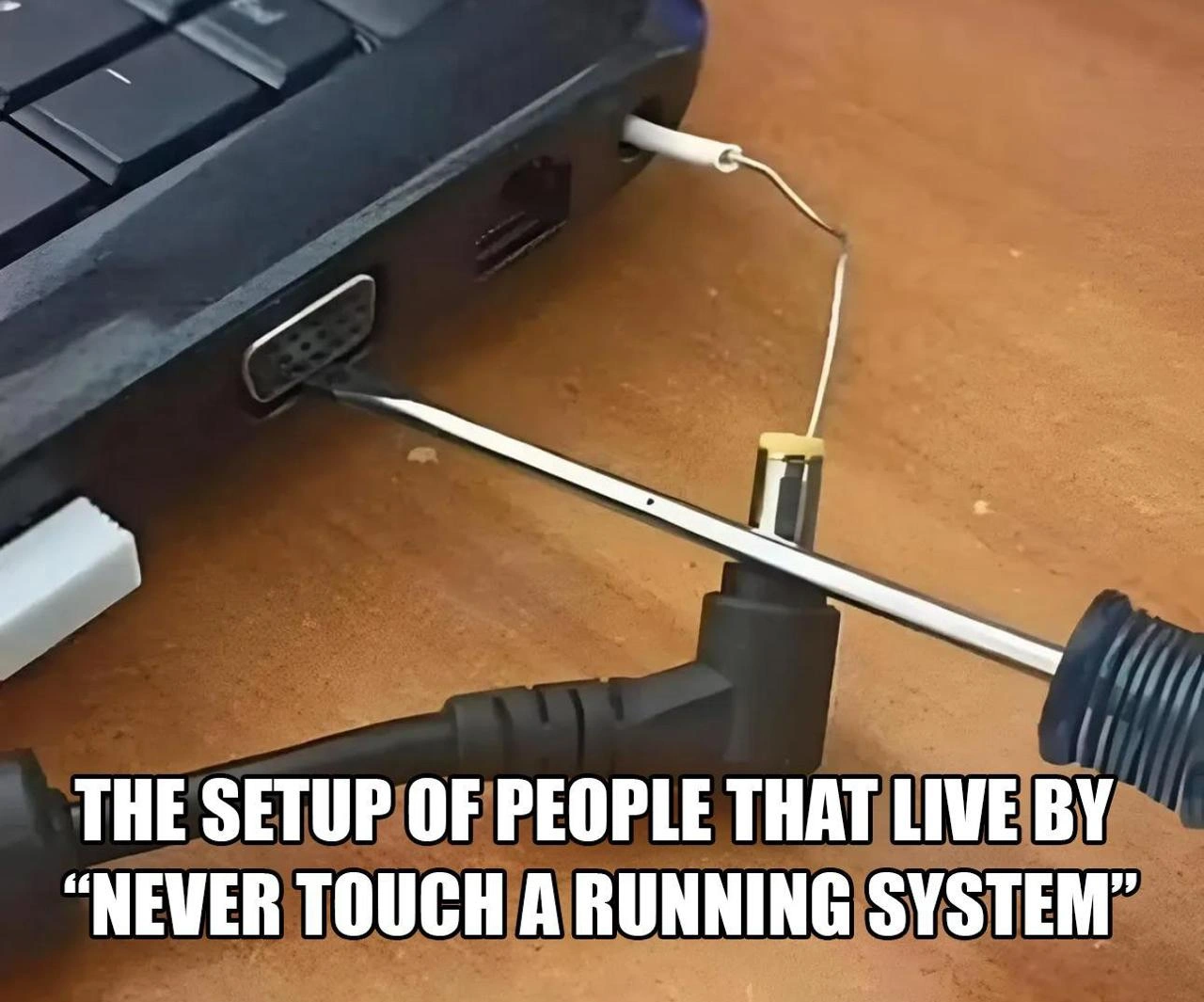
Why is there a screwdriver sticking out of a laptop?! To understand, let’s unpack the joke. The phrase "never touch a running system" is an old proverb in IT. It basically means if something is working, don’t change it. Think of it as the tech equivalent of “if it ain’t broke, don’t fix it.” In practice, this motto is meant to prevent unnecessary downtime – for example, don’t apply a risky update or reboot a server during business hours when everything is humming along. But here, the meme takes that idea to an extreme literal level: they aren’t touching the running system… literally holding it in place so it keeps running!

Look at the laptop in the photo: it’s old (we can tell from that VGA video port – that rectangular connector with 15 pin-holes that was common on 90s/00s PCs). This thing is probably a Legacy System running some important task. Over time, hardware wears out: maybe the screen hinge broke or the power jack inside got loose from years of yanking the cable. In a normal situation, you’d repair or replace the laptop. But if this machine is a critical production box (e.g. controlling a piece of factory equipment or running a legacy app), taking it offline is risky. They might fear that if it shuts down or is disassembled, it may never come back up properly. Enter the janky fix: prop it up as-is and forbid anyone from disturbing it.

Here’s what’s happening with that improvised setup:

  • Screwdriver in the VGA port: The VGA port isn’t being used for a monitor here – it’s used as an anchor point. By jamming a flat-head screwdriver in, they’ve effectively wedged the laptop’s chassis or an internal component to prevent movement. It’s like sticking a doorstop under a door to keep it from closing.
  • L-shaped power plug as brace: The black L-shaped thing is the laptop’s power connector. It’s plugged in, supplying electricity. But notice how it’s shoved against the screwdriver. This is very likely intentional: if the laptop’s power jack is loose inside, the plug needs to sit just right for continuous power. By bracing it with the screwdriver, they maintain the perfect angle and pressure so the connection doesn’t cut out. It’s a crude clamp to avoid any wiggle that could unplug or short the power.
  • Frayed white wire through another port: That white wire looks like it’s tied from one side of the laptop to the screwdriver or plug on the other side. It’s probably adding tension, sort of tying the whole thing together so the screwdriver can’t slip out. Imagine looping a string around a cabinet to keep the door shut – same idea. The wire might also serve as a ground or just happened to be the nearest piece of scrap that could be used to secure things. Either way, it’s extra support to keep this makeshift_support_structure stable.

All these pieces turn the laptop into a delicate Frankenstein’s monster of hardware hacks. It’s held in a very precise position where everything continues to work. Move any piece, and who knows – the power might cut off or the laptop could literally fall apart. This is why the meme talks about “people that live by ‘never touch a running system’.” The folks maintaining this machine have decided that doing a proper fix or update is too risky; instead, they’ve frozen the situation in place with tools and said “Alright, it’s running now, so DON’T TOUCH IT.” It’s an extreme example of a Workaround over a real solution.

For a junior developer or someone new to sysadmin humor, this is a lesson in TechnicalDebt and LegacyInfrastructure. Technical debt isn’t only in code; it can be in hardware too. Here, instead of paying off the “debt” (i.e. fixing/replacing the faulty hardware), they’re paying interest on that debt by babysitting this creaky laptop with creative hacks. Every time someone sees this setup, they’re reminded that one day this could fail spectacularly. It’s a MaintenanceNightmares waiting to happen. Yet, it’s also darkly comedic — the kind of story IT people share over beers: “We had this server once that we kept running with a paperclip and a prayer.” This meme hits on that same joke.

In simpler terms: imagine a very important computer that must not turn off. It’s old, it’s falling apart, but it’s doing a job no other machine is ready to do right now. Nobody wants to risk fixing it properly because it might die for good. So what do they do? They prop it up (literally) and lock it down so it keeps working. They schedule no updates, avoid any movement, and often have a sign like “Do NOT power off or even look at it funny.” This is sometimes half-jokingly called “production by luck.” It’s the kind of kludge that makes outsiders say, “Are you serious?!” but insiders nod and say, “Welcome to legacy IT.” The humor here comes from the sheer audacity of the fix – it’s so bad it’s good, a physical embodiment of “it works… for now.”

Level 3: Legacy Life Support

In the trenches of LegacySystems and SystemsAdministration, you eventually witness contraptions exactly like this. The photo shows an ancient laptop literally propped up with a screwdriver and wires—a frankenstein_laptop kept alive by sheer will (and some metal). The meme caption reads "THE SETUP OF PEOPLE THAT LIVE BY 'NEVER TOUCH A RUNNING SYSTEM'", and it couldn’t be more perfect. This machine has likely been running some critical service for years, and everyone is terrified to even nudge it. Why? Because the unspoken rule in many IT departments is that if a production box is still running, you do not mess with it. Ever. Not for updates, not for cleaning, and apparently not even for proper hardware repairs.

This absurd hardware hack is basically TechnicalDebt in physical form. Instead of fixing the underlying issue (a broken port, a loose power jack, a cracked chassis—take your pick), someone high on sysadmin ingenuity said, “Alright, nobody breathe, we’re going to brace it just like this… and done. Don’t touch it!” It’s funny because it’s true: in many enterprises, “never_touch_a_running_system” is practically a mantra. Here, that mantra has been taken so literally that they’ve created a makeshift support structure to ensure nothing moves a millimeter. It’s the ultimate enterprise_change_freeze—not only freezing software changes, but physically freezing the hardware in a fragile status quo.

Let’s break down this janky_hardware_fix masterpiece: the laptop’s VGA port (meant for an external monitor) has a flat-head screwdriver jammed in at an angle, acting as a stabilizing rod. The right-angle barrel plug of the power adapter is pressed up against that screwdriver, like a brace holding a wobbly bookshelf. And that frayed white wire threaded through another port? That’s the extra insurance, tied off to tension everything together – a final touch of "just don’t ask". This laptop is basically one loose screw away from a total shutdown, and the screwdriver is literally preventing that loose screw from living up to its name. It’s a hardware Workaround so crude and crazy that it crosses into genius territory. As a senior engineer, you laugh, then shudder, recognizing the scene: this is what keeping a Production system running at all costs can look like.

LegacyInfrastructure like this often arises from years of ignoring problems. Maybe the laptop’s power jack broke, and there was no budget (or no courage) to replace the motherboard. Perhaps the machine runs some irreplaceable 15-year-old software that nobody fully understands, so they refuse to even power it down. The result? A makeshift_support_structure straight out of a MacGyver episode, immortalized in a meme. Seasoned folks have war stories of “that one server under Jim’s desk” that’s been running since 2008 on an old OS, covered in dust, with a hand-written sign saying “DO NOT POWER OFF.” This image is that nightmare turned up to 11, with actual hardware held together by fear and a flat-head.

From a senior perspective, the humor comes with a side of PTSD. 😅 We’ve seen how these house-of-cards setups end. One day, a well-meaning new hire might say “Hey, let’s clean up this mess,” and boom – mission-critical downtime because someone dared to touch the untouchable. It’s the classic “temporary fix that became permanent” problem. Everyone knows this rig is ridiculous, but as long as it works, no one wants to be the hero who breaks it. The meme perfectly captures that paradox: we joke about the ridiculousness (a screwdriver as part of your production hardware — really?!) even as we nod knowingly. In the real world, TechnicalDebt and fear of downtime often lead to exactly this kind of outcome, where stability is achieved not through sound engineering, but through ProductionHacks and prayers that the last hack keeps holding. It’s equal parts hilarious and horrifying to any veteran engineer: a true MaintenanceNightmares monument to “if it ain’t broke (enough), don’t fix it.”

Description

A photo showing a laptop with a charging cable precariously balanced and held in place by a wire coat hanger wedged against the laptop port. The cable appears to have a broken or loose connection that only works at a specific angle, maintained by the hanger's tension. The bottom text reads 'THE SETUP OF PEOPLE THAT LIVE BY "NEVER TOUCH A RUNNING SYSTEM"'. This perfectly captures the sysadmin and developer philosophy of refusing to fix or update something that technically works, no matter how fragile the setup, because any change risks breaking it entirely

Comments

23
Anonymous ★ Top Pick This is the physical manifestation of a try-catch block wrapped around your entire main() function -- it works, nobody knows why, and that coat hanger is now load-bearing infrastructure with zero documentation
  1. Anonymous ★ Top Pick

    This is the physical manifestation of a try-catch block wrapped around your entire main() function -- it works, nobody knows why, and that coat hanger is now load-bearing infrastructure with zero documentation

  2. Anonymous

    That's not just technical debt; it's a load-bearing screwdriver. The JIRA ticket to fix it has been in the backlog since the VGA port was considered modern

  3. Anonymous

    Sure, CI/CD is great, but nothing beats a 6-inch screwdriver for guaranteeing zero deployments

  4. Anonymous

    This is the physical manifestation of that production microservice held together by a setTimeout() that nobody remembers why it needs to be exactly 1337ms, but changing it causes the entire payment gateway to fail during lunar eclipses

  5. Anonymous

    When your production infrastructure has the same structural integrity as your cable management - one sneeze away from a P0 incident and a 3 AM PagerDuty alert

  6. Anonymous

    Immutable infra? Just screw it in place - no rollbacks needed

  7. Anonymous

    Our CAB calls it a change risk; I call it the stateful load balancer keeping five‑nines from becoming 0x0

  8. Ølеґsîū 🪬🕍🪬 8mo

    Literally my old laptop 🗿

  9. ᗰᗩᔕOᑌᗪ 8mo

    😂😂

  10. @deadgnom32 8mo

    but does this work though? it has only 1 pin on the power connection.

    1. @sadok_spb 8mo

      the other one on the screwdriver

      1. @deadgnom32 8mo

        but it goes into vga

        1. @sadok_spb 8mo

          That's right. That's where the zero is

          1. @deadgnom32 8mo

            that's probably one of those laptops — which starts to add electrical noise to headphones, after a charging cable is plugged in.

            1. @sadok_spb 8mo

              Exactly

            2. @deadgnom32 8mo

              my professor for digital tech had one like this, and he loooved to show some meme videos while his assistant was cleaning the blackboard. he plugged huge speakers into his laptop and we all were instantly being hit by BZZZZZZZZZZZZZZ

              1. @azizhakberdiev 8mo

                one of my old speakers for some reason had both aux out and aux in, I became curious and plugged it into itself. The moment I turned it on, it became a siren

                1. _ 8mo

                  Nice introduction to Larsen effect

            3. losiwo 8mo

              Do you know how to fix this? I plugged a bare usb cable to my heater to ground it

  11. @adm877 8mo

    VGA grounding?

  12. @azizhakberdiev 8mo

    later I realized aux out is for chaining speakers

  13. @tuguzT 8mo

    > see screwdriver > instant "Demon Core mentioned"

  14. losiwo 8mo

    I need something better 😂

Use J and K for navigation